1
|
1
Anti-Executable Standard User Guide
2
|
Last modified: October, 2012
© 1999 - 2012 Faronics Corporation. All rights reserved. Faronics, Deep Freeze, Faronics Core Console,
Faronics Anti-Executable, Faronics Device Filter, Faronics Power Save, Faronics Insight, Faronics System
Profiler, and WINSelect are trademarks and/or registered trademarks of Faronics Corporation. All other
company and product names are trademarks of their respective owners.
Anti-Executable Standard User Guide
|
Contents
Preface . . . . . . . . . . . . . . . . . . . . . . . . . . . . . . . . . . . . . . . . . . . . . . . . . . . . . . . 5
Important Information. . . . . . . . . . . . . . . . . . . . . . . . . . . . . . . . . . . . . . . . . . . . . . . . . . . . . 6
About Faronics . . . . . . . . . . . . . . . . . . . . . . . . . . . . . . . . . . . . . . . . . . . . . . . . . . . . . . . 6
Product Documentation . . . . . . . . . . . . . . . . . . . . . . . . . . . . . . . . . . . . . . . . . . . . . . . . . 6
Technical Support . . . . . . . . . . . . . . . . . . . . . . . . . . . . . . . . . . . . . . . . . . . . . . . . . . . . . . . . 7
Contact Information. . . . . . . . . . . . . . . . . . . . . . . . . . . . . . . . . . . . . . . . . . . . . . . . . . . . 7
Definition of Terms . . . . . . . . . . . . . . . . . . . . . . . . . . . . . . . . . . . . . . . . . . . . . . . . . . . . . . . 8
Introduction . . . . . . . . . . . . . . . . . . . . . . . . . . . . . . . . . . . . . . . . . . . . . . . . . . 10
Anti-Executable Overview . . . . . . . . . . . . . . . . . . . . . . . . . . . . . . . . . . . . . . . . . . . . . . . . . 11
About Anti-Executable . . . . . . . . . . . . . . . . . . . . . . . . . . . . . . . . . . . . . . . . . . . . . . . . . 11
Anti-Executable Editions. . . . . . . . . . . . . . . . . . . . . . . . . . . . . . . . . . . . . . . . . . . . . . . . 11
System Requirements . . . . . . . . . . . . . . . . . . . . . . . . . . . . . . . . . . . . . . . . . . . . . . . . . . . . 12
Anti-Executable Licensing . . . . . . . . . . . . . . . . . . . . . . . . . . . . . . . . . . . . . . . . . . . . . . . . . 13
Installing Anti-Executable . . . . . . . . . . . . . . . . . . . . . . . . . . . . . . . . . . . . . . . . 15
Installation Overview. . . . . . . . . . . . . . . . . . . . . . . . . . . . . . . . . . . . . . . . . . . . . . . . . . . . . 16
Installing Anti-Executable Standard. . . . . . . . . . . . . . . . . . . . . . . . . . . . . . . . . . . . . . . . . . . 17
Accessing Anti-Executable Standard . . . . . . . . . . . . . . . . . . . . . . . . . . . . . . . . . . . . . . . . . . 20
Using Anti-Executable . . . . . . . . . . . . . . . . . . . . . . . . . . . . . . . . . . . . . . . . . . . 21
Overview . . . . . . . . . . . . . . . . . . . . . . . . . . . . . . . . . . . . . . . . . . . . . . . . . . . . . . . . . . . . . 22
Configuring Anti-Executable . . . . . . . . . . . . . . . . . . . . . . . . . . . . . . . . . . . . . . . . . . . . . . . . 23
Status Tab . . . . . . . . . . . . . . . . . . . . .
Verifying Product Information . . . . .
Enabling Anti-Executable Protection.
Anti-Executable Maintenance Mode .
.
.
.
.
.
.
.
.
.
.
.
.
.
.
.
.
.
.
.
.
.
.
.
.
.
.
.
.
.
.
.
.
.
.
.
.
.
.
.
.
.
.
.
.
.
.
.
.
.
.
.
.
.
.
.
.
.
.
.
.
.
.
.
.
.
.
.
.
.
.
.
.
.
.
.
.
.
.
.
.
.
.
.
.
.
.
.
.
.
.
.
.
.
.
.
.
.
.
.
.
.
.
.
.
.
.
.
.
.
.
.
.
.
.
.
.
.
.
.
.
.
.
.
.
.
.
.
.
.
.
.
.
.
.
.
.
.
.
.
.
.
.
.
.
.
.
.
.
.
.
.
.
.
.
.
.
24
24
24
25
Execution Control List Tab . . . . . . . . . . . . . . . . . . . . . . . . . . . . . . . . . . . . . . . . . . . . . . . . . 26
Users Tab. . . . . . . . . . . . . . . . . . . . . . . . . . . . . . . . . . . . . . . . . .
Adding an Anti-Executable Administrator or Trusted User . . . . . .
Removing an Anti-Executable Administrator or Trusted User . . . .
Enabling Anti-Executable Passwords . . . . . . . . . . . . . . . . . . . .
..
..
..
..
.
.
.
.
.
.
.
.
.
.
.
.
.
.
.
.
.
.
.
.
.
.
.
.
.
.
.
.
.
.
.
.
.
.
.
.
.
.
.
.
.
.
.
.
.
.
.
.
.
.
.
.
.
.
.
.
.
.
.
.
.
.
.
.
.
.
.
.
27
27
28
29
Temporary Execution Mode Tab. . . . . . . . . . . . . . . . . . . . . . . . . . . . . . . . . . . . . . . . . . . . . . 30
Activating or Deactivating Temporary Execution Mode . . . . . . . . . . . . . . . . . . . . . . . . . . . 30
Setup Tab . . . . . . . . . . . . . . . . . . . . . . . . .
Setting Event Logging in Anti-Executable .
Monitor DLL Execution . . . . . . . . . . . . . .
Monitor JAR Execution . . . . . . . . . . . . . .
Anti-Executable Stealth Functionality . . . .
Compatibility Options. . . . . . . . . . . . . . .
Customizing Alerts. . . . . . . . . . . . . . . . .
.
.
.
.
.
.
.
.
.
.
.
.
.
.
.
.
.
.
.
.
.
.
.
.
.
.
.
.
.
.
.
.
.
.
.
.
.
.
.
.
.
.
.
.
.
.
.
.
.
.
.
.
.
.
.
.
.
.
.
.
.
.
.
.
.
.
.
.
.
.
.
.
.
.
.
.
.
.
.
.
.
.
.
.
.
.
.
.
.
.
.
.
.
.
.
.
.
.
.
.
.
.
.
.
.
.
.
.
.
.
.
.
.
.
.
.
.
.
.
.
.
.
.
.
.
.
.
.
.
.
.
.
.
.
.
.
.
.
.
.
.
.
.
.
.
.
.
.
.
.
.
.
.
.
.
.
.
.
.
.
.
.
.
.
.
.
.
.
.
.
.
.
.
.
.
.
.
.
.
.
.
.
.
.
.
.
.
.
.
.
.
.
.
.
.
.
.
.
.
.
.
.
.
.
.
.
.
.
.
.
.
.
.
.
.
.
.
.
.
.
.
.
.
.
.
.
.
.
.
.
.
..
..
..
..
..
..
..
32
32
32
32
33
33
34
Report Tab . . . . . . . . . . . . . . . . . . . . . . . . . . . . . . . . . . . . . . . . . . . . . . . . . . . . . . . . . . . . 35
Uninstalling Anti-Executable . . . . . . . . . . . . . . . . . . . . . . . . . . . . . . . . . . . . . . 37
Uninstalling Anti-Executable Standard . . . . . . . . . . . . . . . . . . . . . . . . . . . . . . . . . . . . . . . . . 38
Anti-Executable Standard User Guide
3
4
|
Contents
Anti-Executable Standard User Guide
|
5
Preface
Faronics Anti-Executable is a solution that ensures endpoint security by only permitting approved
executables to run on a workstation or server.
Topics
Important Information
Technical Support
Definition of Terms
Anti-Executable Standard User Guide
6
|
Preface
Important Information
This section contains important information about Anti-Executable.
About Faronics
Faronics delivers software that helps manage, simplify, and secure multi-user computing
environments. Our products ensure 100% workstation availability, and have freed IT personnel
from tedious technical support and software issues. Fueled by a customer-centric focus, Faronics’
technology innovations benefit educational institutions, healthcare facilities, libraries,
government organizations and corporations.
Product Documentation
The following documents form the Faronics Anti-Executable technical documentation set:
Anti-Executable Standard User Guide
•
Faronics Anti-Executable User Guide — This document guides you how to use the product.
•
Faronics Anti-Executable Release Notes — This document lists the new features, known
issues and closed issues.
•
Faronics Anti-Executable Feature History — This document lists the new features.
•
Faronics Anti-Executable readme.txt — This document guides you through the installation
process.
Technical Support
|
Technical Support
Every effort has been made to design this software for ease of use and to be problem free. If
problems are encountered, contact Technical Support
Web: support.faronics.com
Email: [email protected]
Call Toll Free (North America): 1-800-943-6422
Call Local: 1-604-637-3333
Hours: Monday to Friday 7:00am to 5:00pm (Pacific Time)
Contact Information
Headquarters:
Faronics Corporation
609 Granville Street, Suite 620
Vancouver, BC V7Y 1G5
Canada
Web: www.faronics.com
Email: [email protected]
Phone: 800-943-6422 or 604-637-3333
Fax: 800-943-6488 or 604-637-8188
Hours: Monday to Friday 7:00am to 5:00pm (Pacific Time)
Faronics Technologies USA Inc.
2411 Old Crow Canyon Road, Suite 170
San Ramon, CA 94583
USA
Faronics Corporation (Europe)
Siena Court
The Broadway Maidenhead
Berkshire, SL6 1NJ UK
Anti-Executable Standard User Guide
7
8
|
Preface
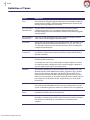
Definition of Terms
Term
Definition
Alert
The notification dialog that appears when there is an attempt to launch an
unauthorized executable. Anti-Executable Administrators can specify the
message and image displayed in the alerts.
Anti-Executable
Administrator
Anti-Executable Administrators have access to all Anti-Executable
configuration options. They can manage Anti-Executable users, set
Anti-Executable protection to Enabled or Disabled, and uninstall/upgrade
Anti-Executable.
Anti-Executable
Trusted User
They can set Anti-Executable protection to Enable or Disable. Trusted
Users cannot uninstall/upgrade Anti-Executable.
Executable
Any file that can be launched by the operating system. The executable files
managed by Anti-Executable have the extension .scr, .jar, .bat, .com, or
.exe. Dynamic Link Library files with the extension .dll can be managed if
configured in the Setup tab.
Execution
Control List
An Execution Control list defines how Anti-Executable must manage a file
or Publisher. The Execution Control List defines whether the file must be
Allowed or Blocked.
External User
Any user that is neither an Anti-Executable Administrator nor an
Anti-Executable Trusted user.
An external user can run only authorized executables and has no control
over Anti-Executable configuration. This restriction applies regardless of
any user rights assigned by the operating system.
Anti-Executable Standard User Guide
Identifile
The Identifile Database provides information about executable files. The
Identifile details include Manufacturer Name, Application Type, Product
Name, Product Version, File Name and Special Code. Special Code is a
single character field that identifies special file signature entries, such as
malicious code signatures or other types of special entries. Special Code can
have values such as M (malicious file), S (special file) or it can be blank
(normal file).
JAR file
A JAR (Java ARchive) is an archive file format contains many Java class
files and associated metadata and resources (text, images and so on) into
one file to distribute application software or libraries on the Java platform.
Maintenance
Mode
When in Maintenance Mode, new executable files added or modified are
automatically added to the Local Control List.
Protection
When set to Enabled, this setting indicates that Anti-Executable is
protecting a computer based on the Central Control List and Local Control
List. When set to Disabled, any executable can be launched on the
computer.
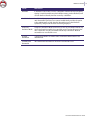
Definition of Terms
Term
Definition
Publisher
A Publisher is the creator of a file. A Publisher validates the file by digitally
signing it. Anti-Executable uses the Publisher name, product filename, and
version details to identify the files created by a Publisher.
Stealth Mode
Stealth Mode is a group of options that control visual indication of
Anti-Executable's presence on a system. Stealth Mode provides the option
to the Administrator to hide the Anti-Executable icon in the Windows
system tray, and prevent the Alert from being displayed.
Temporary
Execution Mode
Temporary Execution Mode allows users to run any executable without any
action from Anti-Executable for a specified period. During this period, the
user is allowed to run any executable without any restrictions. Blocked
executables are not allowed to run.
Trusted
Executable
A Trusted executable can launch other executables that themselves are
unauthorized.
Unauthorized
Executable
An Unauthorized executable is one that is not allowed to run.
|
Anti-Executable Standard User Guide
9
10
|
Introduction
Introduction
Anti-Executable ensures total endpoint productivity by only allowing approved applications to
run on a computer or server. Any other program - whether they are unwanted, unlicensed, or
simply unnecessary - are blocked from ever executing.
Topics
Anti-Executable Overview
System Requirements
Anti-Executable Licensing
Anti-Executable Standard User Guide
Anti-Executable Overview
|
Anti-Executable Overview
About Anti-Executable
Faronics delivers software that helps manage, simplify, and secure multi-user computing
environments. Our products ensure 100% workstation availability, and have freed IT personnel
from tedious technical support and software issues. Fueled by a customer-centric focus, Faronics’
technology innovations benefit educational institutions, healthcare facilities, libraries,
government organizations and corporations.
Anti-Executable Editions
Faronics Anti-Executable has four different editions available. Whether you have servers or
workstations, working standalone or as part of a network, Anti-Executable will provide you with
the protection that you need. Choose the Anti-Executable edition that bests suits your needs:
Edition
Use Anti-Executable to protect
Standard
A single standalone computer loaded with non-server operating system.
Server Standard
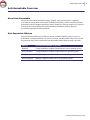
A single standalone computer loaded with server operating system.
Enterprise
Multiple computers loaded with non-server operating system.
Server Enterprise
Multiple computers loaded with server operating systems.
Anti-Executable Standard User Guide
11
12
|
Introduction
System Requirements
Anti-Executable can be installed on the following operating systems:
— 32-bit edition of Windows XP SP3 and 64-bit edition of Windows XP SP2.
— 32- and 64-bit editions of Windows Server 2003, Windows Server 2008, Windows Server
2008 R2 (64-bit only), Windows Server 2012, Windows Vista, Windows 7, and Windows 8.
Anti-Executable Standard User Guide
Anti-Executable Licensing
|
Anti-Executable Licensing
Anti-Executable is available in both Full and Evaluation versions. An Evaluation version can be
downloaded for free from Faronics' web site (www.faronics.com) and it will be fully operational for
30 days after installation. An expired Evaluation version will not protect the machine and must be
uninstalled or upgraded to a Full Version. A Full version requires a valid License Key in order to
protect the machine.
Server editions of Anti-Executable cannot be installed on a non-Server Operating
System. License Keys for Server editions of Anti-Executable cannot be used on
non-Server editions.
Non-Server editions of Anti-Executable cannot be installed on a Server Operating
System. License Keys for Non-Server editions of Anti-Executable cannot be used
on Server editions.
Anti-Executable Standard User Guide
13
14
|
Introduction
Anti-Executable Standard User Guide
|
Installing Anti-Executable
This chapter describes the installation process of Anti-Executable.
Topics
Installation Overview
Installing Anti-Executable Standard
Accessing Anti-Executable Standard
Anti-Executable Standard User Guide
15
16
|
Installing Anti-Executable
Installation Overview
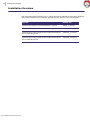
Anti-Executable features installers for 32- and 64-bit versions of Windows Server 2003, Windows
Server 2008, Windows Server 2008 R2, Windows XP SP3, Windows Vista, and Windows 7.
Anti-Executable Standard User Guide
System
Install File
Windows XP, Windows Vista and Windows 7 (32-bit)
AEStd_32-bit.msi
Windows XP, Windows Vista and Windows 7 (64-bit)
AEStd_64-bit.msi
Windows Server 2003, Windows Server 2008 and Windows
Server 2008 R2 (32-bit)
AESrvStd_32-bit.msi
Windows Server 2003, Windows Server 2008 and Windows
Server 2008 R2 (64-bit)
AESrvStd_64-bit.msi
Installing Anti-Executable Standard
|
Installing Anti-Executable Standard
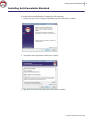
To install Anti-Executable Standard, complete the following steps:
1. Double-click the .msi file to begin the installation process. Click Next to continue.
2. Accept the License Agreement. Click Next to continue.
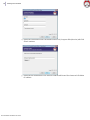
3. Specify the User Name and Organization. Click Next to continue.
Anti-Executable Standard User Guide
17
18
|
Installing Anti-Executable
4. Specify the Destination Folder. The default location is C:\Program Files\Faronics\AE. Click
Next to continue.
5. Specify the AE Administrator User Password and the AE Trusted User Password. Click Next
to continue.
Anti-Executable Standard User Guide
Installing Anti-Executable Standard
|
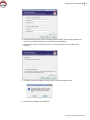
6. Select the following options and Click Install. Anti-Executable will scan the computer and
create a Control List containing a list of all the files and Publishers.
•
Include DLLs while creating the control list - select this option if you want DLLs to be
included.
7. Click OK to restart the computer. Click Cancel to restart the computer later.
8. Click Finish to complete the installation.
Anti-Executable Standard User Guide
19
20
|
Installing Anti-Executable
Accessing Anti-Executable Standard
Anti-Executable is accessed directly on a workstation by double-clicking on the Anti-Executable
icon in the Windows System Tray. The Ctrl + Alt + Shift + F10 hotkey sequence can be used as
well.
If you are an Administrator, you will have access to the Status, Execution Control List, and User
tabs. If you are a Trusted User, you will have access only to the Status, and Execution Control List
tabs.
External users are not permitted to access Anti-Executable. Anti-Executable Administrator and
Trusted Users must enter the appropriate passwords to access Anti-Executable if those passwords
have been set.
Anti-Executable Standard User Guide
|
Using Anti-Executable
This chapter describes the procedure to configure and use Anti-Executable.
Topics
Overview
Status Tab
Execution Control List Tab
Users Tab
Temporary Execution Mode Tab
Setup Tab
Report Tab
Anti-Executable Standard User Guide
21
22
|
Using Anti-Executable
Overview
Anti-Executable provides multiple Control Lists for enhanced protection. The following
components are available:
Anti-Executable Standard User Guide
•
Execution Control List - An Execution Control list defines how Anti-Executable must manage
a file or Publisher. The Execution Control List defines whether the file or Publisher must be
Allowed or Blocked.
•
Local List of Files and Publishers (Control List) - When Anti-Executable is installed for the
first time on the workstation, Anti-Executable scans the computer and creates a list of all files
and Publishers that are Allowed.
Configuring Anti-Executable
|
Configuring Anti-Executable
The following tabs are available in Anti-Executable:
•
Status
•
Execution Control List
•
Users
•
Temporary Execution Mode
•
Setup
•
Report
Anti-Executable Standard User Guide
23
24
|
Using Anti-Executable
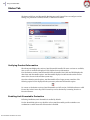
Status Tab
The Status tab allows Anti-Executable Administrators and Trusted Users to configure various
settings, set protection to Enable, Disable, or Maintenance Mode.
Verifying Product Information
The About pane displays the version of Anti-Executable installed. If newer versions are available,
New version is available is displayed. Click Update for more information.
If an Evaluation version of Anti-Executable has been installed, the Valid until field displays the
date when Anti-Executable expires. Anti-Executable displays a notification about the current
status of the License in the windows system tray.
Once the evaluation period expires, Anti-Executable will no longer protect a machine. The
following expired icon is displayed in the system tray when Anti-Executable expires.
To convert an Evaluation version of Anti-Executable to a Full version, click Edit and enter a valid
License Key in the License Key field. License Keys can be obtained by contacting Faronics or
Faronics Partners.
Enabling Anti-Executable Protection
Following installation, Anti-Executable is enabled by default.
Use the Remind Me after every check box to have Anti-Executable provide reminders on a
workstation to enable Protection if Protection is disabled.
Anti-Executable Standard User Guide
Status Tab
|
Anti-Executable Maintenance Mode
Select Maintenance Mode and click Apply to run Anti-Executable in Maintenance Mode. When in
Maintenance Mode, new executable files added or modified are automatically added to the
Execution Control List. To exit Maintenance Mode, select Enable or Disable.
If Enable is selected, the changes are recorded by Anti-Executable. If Disable is selected, the
changes are not recorded by Anti-Executable.
Adequate time required for Windows Updates must be provided while running in
Maintenance Mode.
If the computer is running in Maintenance Mode, and the Protection is disabled,
the changes made to the workstation during Maintenance Mode are not added to
the Execution Control List.
Anti-Executable Standard User Guide
25
26
|
Using Anti-Executable
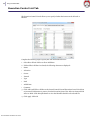
Execution Control List Tab
The Execution Control List tab allows you to specify whether the items must be Allowed or
Blocked.
Complete the following steps to specify the Anti-Executable behavior:
1. Select Show Files & Folders or Show Publishers.
2. If Show Files & Folders is selected, the following columns are displayed:
•
Name
•
AE Action
•
Source
•
Trusted
•
Type
•
Path
•
Added Date
•
Comment
3. Click Add to add Files or Folders to the Central Control List and Execution Control List. Select
an item and click Remove to remove from the Execution Control List. Select an item and click
Allow or Block. Click Identifile Details to view the Identifile details for the selected file.
4. Click Apply. Click OK.
Anti-Executable Standard User Guide
Users Tab
|
Users Tab
Anti-Executable uses Windows user accounts to determine the features available to users. There
are two types of Anti-Executable users:
•
Administrator User — Can manage Execution Control List, Users, and Setup and can uninstall
Anti-Executable.
•
Trusted User — Can configure Anti-Executable, and set the Execution Control List. They are
prohibited from uninstalling Anti-Executable and cannot manage Users or Setup.
By default, the Windows user account which performs the Anti-Executable installation becomes
the first Anti-Executable Administrator User. This Administrator User can then add existing
Windows users to Anti-Executable.
If an Anti-Executable Administrator or Trusted User attempts to open an unauthorized
application while Anti-Executable is enabled, the Alert dialog will be displayed.
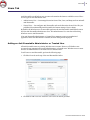
Adding an Anti-Executable Administrator or Trusted User
All Anti-Executable users are existing Windows user accounts. However, all Windows user
accounts do not automatically become Administrators or Trusted users. Windows user accounts
that are not Administrators or Trusted Users are External users.
To add a user to Anti-Executable, perform the following steps:
1. Click the Users tab at the top of the Anti-Executable window.
2. Click Add to add a new user. Select the User icon from the list provided.
Anti-Executable Standard User Guide
27
28
|
Using Anti-Executable
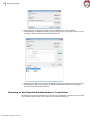
3. Click Advanced > Find Now to display a list of available users. Anti-Executable
administrators can add domain users (or groups) and local users (or groups). Click on a user
or group to add it to Anti-Executable’s list and click OK.
4. By default, each added user is an Anti-Executable Trusted User. If the new user is to be given
administrative rights, specify them as an Anti-Executable Administrator by checking the
Anti-Executable Admin Role check box.
Removing an Anti-Executable Administrator or Trusted User
Click on the Users tab and select the user to be removed. Click Remove. This does not remove the
user’s Windows user account. The user has now become an external user.
Anti-Executable Standard User Guide
Users Tab
|
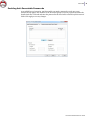
Enabling Anti-Executable Passwords
As an added layer of protection, Anti-Executable can attach a password to each user group.
Passwords only apply to the members of the associated groups. To specify a password, ensure the
Enable check box is selected and enter the password in the New Password and Confirm Password
fields. Click Apply to save any changes.
Anti-Executable Standard User Guide
29
30
|
Using Anti-Executable
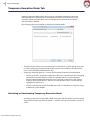
Temporary Execution Mode Tab
Temporary Execution Mode allows users to run any executable without any action from
Anti-Executable for a specified period. During this period, the user is allowed to run any
executable without any restrictions. Once the Temporary Execution Mode period ends,
Anti-Executable is Enabled.
The following options are available for Temporary Execution Mode:
•
The following users have access to Temporary Execution Mode - to allow specific set of users
to activate Temporary Execution Mode on their systems. Select All Users, Anti-Executable
users or Anti-Executable Administrators only.
•
Temporary Execution Mode log - to create log files during Temporary Execution Mode.
— Number of log files - specify the number of log files (up to a maximum of 10). The logging
information is stored in the files serially. For example, if there are 3 files A,B and C,
Faronics Anti-Executable first writes the error logs to file A. Once file A is full, it starts
writing to file B and finally file C. Once file C is full, the data in file A is erased and new
logging data is written to it.
— File size - Select the size of each file in MB. There can be a maximum of 10 log files of up to
10 MB each i.e total 100 MB.
Activating or Deactivating Temporary Execution Mode
•
Anti-Executable Standard User Guide
Activating Temporary Execution Mode: Right-click on the Anti-Executable icon in the System
Tray and select Temporary Execution Mode > x minutes (select up to 60 minutes, 24 hours or
7 days)
Temporary Execution Mode Tab
•
|
Deactivating Temporary Execution Mode: Right-click on the Anti-Executable icon in the
System Tray and select Temporary Execution Mode > Disable
The following icon is displayed in the System Tray at the workstation when Temporary Execution
Mode is activated:
A message appears at the workstation 3 minutes before the Temporary Execution
Mode ends.
Automatic Windows Updates will be disabled during Temporary Execution Mode.
Anti-Executable Standard User Guide
31
32
|
Using Anti-Executable
Setup Tab
The Anti-Executable Administrator can setup Logging to log various user actions, apply various
settings for Stealth Mode, set up Alerts and enable Compatibility Options.
Setting Event Logging in Anti-Executable
Select Log to File to log events to the log file.
Monitor DLL Execution
Select the Monitor DLL Execution check box to monitor DLLs. If this check box is not selected,
the DLLs will not be monitored even if they have been added to the Execution Control List.
If a selected Monitor DLL Execution check box is cleared, it displays a message Do
you want to delete all the DLL entries in the Execution Control List?. Click Yes to
delete all the DLL entries and No to retain the entries.
Monitor JAR Execution
Select the Monitor JAR Execution check box to monitor JAR files. If this check box is not selected,
the JAR files will not be monitored even if they have been added to the Execution Control List.
Anti-Executable Standard User Guide
Setup Tab
|
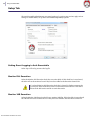
Anti-Executable Stealth Functionality
Stealth Mode is a group of options that control visual indication of Anti-Executable's presence on a
system. Stealth Mode gives the option to the Administrator to hide the Anti-Executable icon in the
Windows system tray and prevent the Alert from being displayed.
When Anti-Executable is not visible in the system tray, Administrators and Trusted users can
launch Anti-Executable through the Ctrl + Alt + Shift + F10 hotkey.
Stealth functionality has the following options:
•
Hide Notification — prevents the Alert from being displayed.
•
Hide icon on system tray — hides the Anti-Executable icon in the system tray.
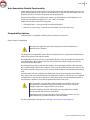
Compatibility Options
Anti-Executable is compatible with Deep Freeze and Faronics Anti-Virus.
Deep Freeze Compatibility
This feature is applicable only when Deep Freeze and Anti-Executable are
installed on the computer.
The Deep Freeze Compatibility feature allows the Administrator to synchronize the Maintenance
Modes of Deep Freeze and Anti-Executable.
By enabling the Enable Deep Freeze Compatibility check box, Anti-Executable will automatically
enter Maintenance Mode when Deep Freeze enters Maintenance Mode (Deep Freeze reboots
Thawed in Maintenance Mode).
By setting both Deep-Freeze and Anti-Executable to be in Maintenance Mode at the same time,
any executable that is added to the computer, will not only be added to the Execution Control List,
but will be retained by Deep Freeze once it freezes back the computer after the Maintenance Mode
ends.
Anti-Executable will stay in Maintenance Mode until shortly before the Maintenance Mode of
Deep Freeze ends. Once Anti-Executable exits Maintenance Mode, it will add any new or updated
executable files to the Execution Control List. When Deep Freeze exits its Maintenance Mode, it
will reboot the computer Frozen with the updated Execution Control List.
It is not possible to set Anti-Executable to Maintenance Mode if Deep Freeze
Compatibility is enabled and Deep Freeze status is Frozen. This is because,
changes made to the computer will be lost on reboot.
If Anti-Executable is disabled, and Deep Freeze enters Maintenance Mode,
Anti-Executable will continue to be disabled.
Maintenance periods triggered by Deep Freeze will take precedence over any
other Maintenance periods scheduled on Anti-Executable.
For more information on Deep Freeze, visit http://www.faronics.com/deepfreeze.
Anti-Executable Standard User Guide
33
34
|
Using Anti-Executable
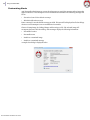
Customizing Alerts
Anti-Executable Administrators can use the Alerts pane to specify the message and an image that
appears whenever a user attempts to run an unauthorized executable. The following messages can
be set:
•
Execution Control List violation message
•
Blocked notification message
Enter a message or use the default message provided. This text will be displayed in all alert dialogs
whenever a user attempts to run an unauthorized executable.
Choose a bitmap image by clicking Change and browsing to a file. The selected image will
accompany the text in the alert dialog. Alert messages display the following information:
•
Executable location
•
Executable name
•
Default or customized image
•
Default or customized message
A sample alert dialog is displayed below:
Anti-Executable Standard User Guide
Report Tab
|
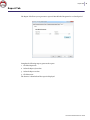
Report Tab
The Report Tab allows you to generate a report of Most Blocked Programs for a selected period.
Complete the following steps to generate the report:
1. Click the Report tab.
2. Select the Report from date.
3. Select the Report to date.
4. Click Generate.
The browser is launched and the report is displayed.
Anti-Executable Standard User Guide
35
36
|
Using Anti-Executable
Anti-Executable Standard User Guide
|
Uninstalling Anti-Executable
Topics
Uninstalling Anti-Executable Standard
Anti-Executable Standard User Guide
37
38
|
Uninstalling Anti-Executable
Uninstalling Anti-Executable Standard
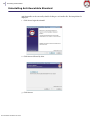
Anti-Executable can be removed by double-clicking on .msi installer file. The Setup Wizard is
displayed:
1. Click Next to begin the uninstall.
2. Click Remove followed by Next.
3. Click Remove.
Anti-Executable Standard User Guide
Uninstalling Anti-Executable Standard
|
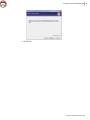
4. Click Finish.
Anti-Executable Standard User Guide
39
40
|
Uninstalling Anti-Executable
Anti-Executable Standard User Guide