1
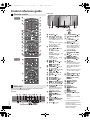
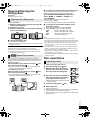
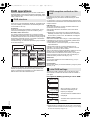
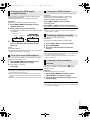
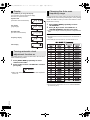
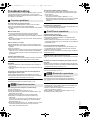
SC-HC55_35-RQTX1262.book 10 ページ 2011年4月1日 金曜日 午前11時34分 Control reference guide Front view Remote control [HC55] [HC35] Main unit Buttons such as 2 function the same as the remote control. They can be used interchangeably. Top view ヰヱユワバヤロヰヴユ ヰヱユワバヤロヰヴユ RQTX1262 ンモュリヰ 10 ヷヰロヶヮユ [HC35] 30º 1 [SLEEP] (> 13) 2 Standby/on switch [Í], [Í/I] (> 11, 12, 13, 20) Press to switch the unit from on to standby mode or vice versa. In standby mode, the unit is still consuming a small amount of power. 3 Numeric buttons [1-9, 0, S10] (> 12, 13, 15, 20) To select a 2-digit number e.g. 16: [S10] # [1] # [6] To select a 3-digit number e.g. 226: [S10] # [S10] # [2] #[2] # [6] 4 [DEL] (> 12) 5 [HC55] [ , iPod] (> 17, 18) [HC35] [iPod] (> 17) 6 [CD] (> 12) 7 [:], [9] (> 12, 13, 15, 17, 18, 20) 8 [1/;] (> 12, 17, 18, 20) [HC55] [ ] (> 19) 9 [6], [5] (> 12, 13, 15, 17) : [SOUND] (> 6, 11, 13, 19) ; [D.BASS] (> 13) < [PLAY MENU] (> 12) = [iPod MENU] (> 17) [HC55] [ MENU] (> 19) > [3, 4, 2, 1], [OK] (> 6, 12, 13, 15, 17, 19, 20) ? [DISPLAY] (> 12, 16, 19) [jDIMMER] Press and hold to dim the display panel. Press and hold again to cancel. @ [HC55] [OPEN/CLOSE SENSOR] (> 11) [HC35] [INPUT LEVEL] (> 6) A [iPod <] (> 11) [iPod <, OPEN/CLOSE] [HC55] Sensor activity indicator* B [PLAY, F] (> 13) 30º C [CLOCK/TIMER] (> 13) D [PROGRAM] (> 12, 13, 15) E [+, VOL ,–] [– VOLUME +] (> 19) Adjusts sound volume. F [MUTE] (> 19) Mutes the sound. Press again to cancel. “MUTE” is also cancelled when the volume is adjusted or the unit is turned off. G [EXT-IN, RADIO] [RADIO/EXT-IN] (> 13, 15, 20) H [∫] (> 12, 17, 18, 20) [HC55] [ ] (> 19) I [PRESET EQ] (> 13) J [RADIO MENU] (> 13, 15, 16) K [AUTO OFF] This function allows you to turn the unit off (except in radio mode) after the unit is left unused for about 30 minutes. When the function is turned on, the “A.OFF” indicator light. L [AUTO PRESET] (> 13) M [CD <] (> 11) [CD <, OPEN/CLOSE] [HC55] Sensor activity indicator* N Standby indicator O [HC55] Open/Close sensor (> 11) P Speaker Q Display R Sliding door S [HC55] Microphone (> 19) T [HC55] Bluetooth® indicator (> 18) U Remote control signal sensor Distance: Within approx. 7 m directly in front. * The sensor activity indicator will light when the Open/Close sensor is turned on. One of the indicators will flash while the sliding door is opening or closing.