1
Revised September 26, 2012
Sony Creative Software Inc.
8215 Greenway Blvd.
Suite 400
Middleton, WI 53562
USA
The information contained in this manual is subject to change without notice and does not represent a
guarantee or commitment on behalf of Sony Creative Software Inc. in any way. All updates or additional
information relating to the contents of this manual will be posted on the Sony Creative Software Inc. web
site, located at http://www.sonycreativesoftware.com. The software is provided to you under the terms of
the End User License Agreement and Software Privacy Policy, and must be used and/or copied in
accordance therewith. Copying or distributing the software except as expressly described in the End User
License Agreement is strictly prohibited. No part of this manual may be reproduced or transmitted in any
form or for any purpose without the express written consent of Sony Creative Software Inc.
Copyright 2012. Sony Creative Software Inc.
Program Copyright 2012. Sony Creative Software Inc. All rights reserved.
ACID, ACIDized, ACIDplanet.com, ACIDplanet, the ACIDplanet logo, ACID XMC, Artist Integrated, the
Artist Integrated logo, Beatmapper, Cinescore, CD Architect, DoStudio, DVD Architect, Jam Trax, Perfect
Clarity Audio, Photo Go, Sound Forge, Super Duper Music Looper, Transparent Technology, Vegas, Vision
Series, and Visual Creation Studio are the trademarks or registered trademarks of Sony Creative Software
Inc. in the United States and other countries.
PlayStation is a registered trademark and PSP is a trademark of Sony Computer Entertainment Inc.
All other trademarks or registered trademarks are the property of their respective owners in the United States
and other countries.
Sony Creative Software Inc. may have patents, patent applications, trademarks, copyrights, or other
intellectual property rights covering subject matter in this document. Except as expressly provided in any
written license agreement from Sony Creative Software Inc., the furnishing of this document does not give
you any license to these patents, trademarks, copyrights, or other intellectual property.
Table of Contents
The Sound Forge Pro interface
7
An overview of Sound Forge Pro
7
Viewing and arranging tools
8
Preferences
Working with files in Sound Forge Pro
10
11
Creating a new sound file
11
Opening a file
11
Opening multiple files in the editor
13
Saving a file
15
Saving a file with a new name or format
15
Close
16
Quitting and closing files
16
Working with projects
16
Viewing and editing file properties
17
Viewing summary information
18
Statistics
19
Working with markers and regions
21
Using markers
21
Using regions
22
The Regions List
23
Exporting regions
24
Selecting sound data
25
Selecting data using the mouse
25
Enable snapping
26
Marking the beginning or end of a selection
27
Choosing a status format
27
The selection status bar
29
The overview bar
30
Editing sound data
33
Editing modes
33
TABLE OF CONTENTS 3
Undoing and redoing edits
33
Cutting sound data
34
Copying sound data
34
Pasting sound data
35
Mixing sound data
36
Paste to New
38
Deleting sound data
39
Inserting silence
40
Simple Synthesis
40
Pencil Mode
41
Envelope Mode
41
Event-based editing
45
Creating events
45
Moving events
46
Splitting events
46
Cutting, copying, pasting, and deleting events
46
Selecting events
47
Crossfading events
48
Event envelopes
49
Slipping and trimming events
50
Processing audio
53
Channel Converter
53
Stretching audio
53
Fade in/out
55
Inverting data
56
iZotope 64-Bit SRC
56
iZotope MBIT+ Dither
57
Muting sound data
59
Normalizing audio
59
Reversing data
62
Applying effects
63
Adding a single effect to an audio file
4 TABLE OF CONTENTS 63
Adding effects to a plug-in chain
65
Volume
68
Automating effect parameters
68
Recording audio
71
Recording a new file
71
Recording into an existing sound file
72
Recording audio automatically
73
The Record tool
74
Previewing files
77
Magnification and zooming
77
Using transport controls
78
Preview cut
79
Monitoring peak levels
79
Monitoring with VU and peak program meters
81
Keyboard shortcuts
83
Index
87
TABLE OF CONTENTS 5 6 TABLE OF CONTENTS Chapter 1
The Sound Forge Pro interface
The Sound Forge Pro interface is easy to use and can be customized for your workflow.
An overview of Sound Forge Pro
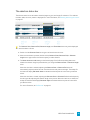
The Sound Forge Pro window is divided into five main areas that allow you to edit multiple sound files at
once while providing easy access to the tools you need.
The main toolbar
n Click the Record button to record a new sound file. For more information, see "Recording a new file"
on page 71.
n Use the File controls to create a new file, open a file, or save a file. For more information, see
"Working with files in Sound Forge Pro" on page 11.
n Use the Transport controls to start, pause, or stop playback in the active editor. For more
information, see "Using transport controls" on page 78.
n The activity view in the center of the toolbar displays the current cursor position and displays status
information when you perform a task.
n The Editor controls allow you to display multiple files at once in a single tabbed view, a horizontal
tabbed view, or a vertical tabbed view. For more information, see "Opening multiple files in the
editor" on page 13.
n The View controls allow you to show or hide the side and bottom tool areas to optimize the
workspace. For more information, see "Viewing and arranging tools" on page 8.
n The Tools control allows you to show and hide tools and choose where each tool will be displayed.
If you want to hide the toolbar, choose View > Hide Toolbar. If you want to restore the toolbar, choose
View > Show Toolbar.
The left pane
By default, the left pane displays the Media Browser tool. You can use the Media Browser to find files on
your computer. For more information, see "Opening a file" on page 11.
Click the Show or hide the left pane button
to toggle the pane's display.
THE SOUND FORGE PRO INTERFACE 7
The editor
The center of the Sound Forge Pro window is dedicated to editing your sound files.
When you open a file, its waveform is displayed here.
When you open multiple files in tabs, the editor controls allow you to display multiple files at once in a
single tabbed view, a horizontal tabbed view, or a vertical tabbed view. For more information, see "Opening
multiple files in the editor" on page 13.
The right pane
By default, the right pane displays the Meters, Plug-In Chain, and Plug-In Chooser tools.
For more information, see "Monitoring peak levels" on page 79, "Adding effects to a plug-in chain" on page
65, or "Processing audio" on page 53.
Click the Show or hide the right pane button
to toggle the pane's display.
You can rearrange tools within a pane by dragging the heading to a new position, or you can change a
tool's placement by dragging it between the right and left panes.
The bottom pane
The bottom pane displays the File Properties, Regions List, Summary Information, Record, and Statistics
tools.
For more information, see "Viewing and editing file properties" on page 17, "The Regions List" on page 23,
"Viewing summary information" on page 18, "Statistics" on page 19, or "The Record tool" on page 74.
Click the Show or hide the bottom pane button
to toggle the pane's display.
Viewing and arranging tools
Sound Forge Pro displays panes at the sides and bottom of the window that you can use to arrange your
editing tools.
Showing or hiding panes
Click the Show or hide the left pane button , Show or hide the right pane button
the bottom pane button
to quickly show or hide the panes.
, and Show or hide
Showing or hiding tools
Choose View > Tools, and then choose a command from the submenu to show or hide a tool.
8 CHAPTER 1 Adding or removing tools from a pane
You can drag tools among panes to move them quickly: if you want to display the Meters tool on the left
side of the waveform, for example, you can drag the Meters heading from the right pane to the left pane.
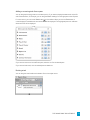
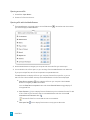
For more control, you can use the Tools button
in the toolbar. When you click the Tools button, a
control displays all available tools and where each will be displayed. The highlighted pane icon indicates
where each tool will be displayed:
If you want to move a tool to a different pane, select the icon for the desired pane.
If you want to hide a tool, click the selected pane to deselect it.
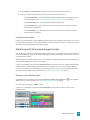
Resizing a tool
You can drag the resize handle at the bottom of a tool to adjust its size:
THE SOUND FORGE PRO INTERFACE 9 Preferences
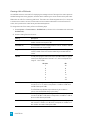
Choose Sound Forge Pro > Preferences to choose various settings for editing in Sound Forge Pro.
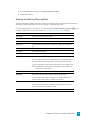
General preferences
Item
Description
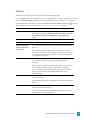
Keep new peak files
Select this check box if you want to preserve peak (.spk) files in your
library folder. When the check box is cleared, peak files are deleted
when you close the application.
Move selection on edit
Select this check box if you want to move the loop bar when
changing the Selection Start, Selection End, or Selection Length
boxes below the waveform. When the check box is selected, the
tooltips for the boxes will display Edit Mode: Move to indicate that
the loop bar will move when you edit the values.
When the check box is cleared, the loop bar's length is adjusted when
you change the Selection Start, Selection End, or Selection Length
boxes below the waveform. When the check box is cleared, the
tooltips for the boxes will display Edit Mode: Adjust to indicate that
the loop bar will be adjusted when you edit the values.
Scroll playback
Select this check box to enable automatic waveform scrolling during
playback.
Update loop bar on
Mark In/Out
Select this check box if you want to update the selection when setting
the mark in and mark out point. When the check box is cleared, the
selection isn't updated until you set a mark in and mark out point.
For more information, see "Marking the beginning or end of a
selection" on page 27.
Use default settings for Select this check box if you want to use the default parameters when
new files
creating a new file. Use the Sample rate, Bit depth, and Channels
controls at the bottom of the dialog to specify default parameters.
When the check box is cleared, you'll be prompted to specify
parameters when creating a new file.
10 CHAPTER 1 Chapter 2
Working with files in Sound Forge Pro
Sound Forge Pro can open and save a wide range of file formats.
Creating a new sound file
Each sound file is opened in a separate tab in the editor. You can have multiple files open at once; click
anywhere in a tab to make it active.
If you want to create a new sound file using a section of another file, you can use the Paste to New
command. For more information, see "Paste to New" on page 38.
1. Choose File > New.
2. Use the New Sound File dialog to specify the parameters for the new file:
a. Choose a sample rate from the Sample rate drop-down list.
b. Choose a setting from the Bit depth drop-down list to specify the number of bits that should
be used to store each sample.
c. Choose a setting from the Channels drop-down list to specify the number of channels that
will be used in the window.
If you want to use the same settings when you create new files, you can select the Use
these settings for all new files check box or use the Use default settings for new files
check box in the Preferences dialog.
3. A new, untitled sound file is created.
Opening a file
Use the Open command to open a media file in a new Sound Forge Pro editor tab.
You can also drag a file from the Finder to the Sound Forge Pro window or Dock icon.
Opening a file
1. Choose File > Open. The Open dialog is displayed.
2. Choose the folder where the file you want to open is stored.
3. Select a file in the browse window. Detailed information about the selected file is displayed.
4. Click the Open button.
If you want to edit multiple files in an editing session, use the Open command to open additional
files. Each opened file will be displayed in a separate editor tab.
WORKING WITH FILES IN SOUND FORGE PRO 11
Opening a recent file
1. Choose File > Open Recent.
2. Choose a file from the submenu.
Opening a file with the Media Browser
1. If the Media Browser isn't already visible, click the Tools button
you want to display the Media Browser:
in the toolbar and choose where
2. Use the Media Browser to navigate your computer and choose the files you want to open.
3. You can double-click a file to open it, or you can drag it from the Media Browser to an editor tab.
If you open multiple files, each file will be opened in a separate editor tab.
The Media Browser can display all files on your computer, favorite files, open files, or you can
search for files. Use the toolbar at the top of the Media Browser to choose what is displayed:
n Show files on computer : Click to display all files on your computer. Use the Media
Browser to navigate your drives and folders.
Click the Show files on computer button and choose Show All Items to toggle display of
all/supported files.
n Show Favorites : Click to display files and folders that you've marked as favorites. To add
a file or folder to your favorites, select it in the Media Browser and then click the Add
selected item to Favorites button .
Favorites for files from unmounted volumes are unavailable.
n Show open files : Click to display files that are currently open in editor tabs.
12 CHAPTER 2 n Search for files : Click to search your computer for a specific file. You can type a file
name (or a partial file name) in the Search box to search for matching files.
Press Shift+Command+D to navigate to the desktop, or press Shift+Command+H to
navigate to your Home folder.
To preview a file in the Media Browser, Control-click the file and choose Preview. To toggle
automatic preview of selected files, click the Show files on computer button
and choose Auto
Play.
Opening multiple files in the editor
If you need to work with multiple files in an editing session, you can divide the Sound Forge Pro interface
horizontally or vertically to view multiple editors at once.
When you open a file, it is added as a new tab in the active editor.
When multiple editors are visible, click a portion of the editor to make it active. A border is drawn around
the active editor so you can find it easily.
Arranging editors vertically
Click the Show two vertical editors button (or choose View > Show Two Vertical Editors) to display two
vertical editors side by side. You can open multiple tabs in each editor.
WORKING WITH FILES IN SOUND FORGE PRO 13 Arranging editors horizontally
Click the Show two horizontal editors button
(or choose View > Show Two Horizontal Editors) to
display two stacked horizontal editors. You can open multiple tabs in each editor.
Moving tabs
Drag a tab to move it within the editor. You can rearrange tabs or move them across sections of the editor.
When viewing a single editor, you can drag a tab to the right edge of the editor to split the editor vertically
and move the tab to the new editor.
When viewing a single editor, you can drag a tab to the bottom edge of the editor to split the editor
horizontally and move the tab to the new editor.
14 CHAPTER 2 Reverting to a single editor
Click the Show single editor button
editor.
(or choose View > Show Single Editor) to return to a single, tabbed
Saving a file
1. Click anywhere in the tab to select it.
2. Choose File > Save.
If the active tab contains new data that was not retrieved from a previous file or was loaded from a
format that is not supported for saving, you will be prompted with the Save As dialog. For more
information, see "Saving a file with a new name or format" on page 15.
If you have multiple tabs open, hold Option and choose File > Save All to save all open files.
Saving a file with a new name or format
1. Click anywhere in the tab to select it.
2. Choose File > Save As.
3. Type a name in the Save As box to identify your file.
4. Choose a location from the Where drop-down list to choose where you want to save your file.
5. Choose a file format from the Format drop-down list to choose the kind of file you want to save.
6. Choose a setting from the Preset drop-down list to choose the attributes that will be used to save
your file.
7. Click the Save button.
WORKING WITH FILES IN SOUND FORGE PRO 15 Close
Choose File > Close to close the active file.
If you have multiple tabs open, hold Option and choose File > Close All to close all open files.
Quitting and closing files
Choose Sound Forge Pro > Quit Sound Forge Pro to exit the application.
The command's behavior depends on the System Preferences > General > Close windows when quitting
an application (Mountain Lion) or Restore windows when quitting and re-opening apps (Lion) setting.
If Close windows when quitting an application (Mountain Lion) is selected or Restore windows when
quitting and re-opening apps (Lion) is not selected. . .
n Choose Sound Forge Pro > Quit Sound Forge Pro to close all open files and exit the application.
You'll be prompted to save any changes, and no files will be opened the next time you start Sound
Forge Pro.
n Hold Option and choose Sound Forge Pro > Quit and Keep Windows to exit the application. The
next time you start Sound Forge Pro, any files that were open in the editor will be restored.
If Close windows when quitting an application (Mountain Lion) is not selected or Restore windows when
quitting and re-opening apps (Lion) is selected. . .
n Choose Sound Forge Pro > Quit Sound Forge Pro to close all open files and exit the application. The
next time you start Sound Forge Pro, any files that were open in the editor will be restored.
n Hold Option and choose Sound Forge Pro > Quit and Close All Windows to exit the
application.You'll be prompted to save any changes, and no files will be opened the next time you
start Sound Forge Pro.
Working with projects
When you save a project file, Sound Forge Pro creates a .forgeproj archive containing your editing history,
all associated media, and temporary files created by your editing operations.
A project file is not a multimedia file, but a portable snapshot of the entire editing history of a file — you
can edit your project at any time without worrying about corrupting your source files. Project files are also
easy to transfer between computers for editing on the go.
You can render a project file to a new multimedia file at any time by choosing Save As from the File menu.
For more information, see "Saving a file with a new name or format" on page 15.
1. Click anywhere in the tab to select it.
2. Choose File > Save As.
3. Type a name in the Save As box to identify your file.
4. Choose a location from the Where drop-down list to choose where you want to save your file.
16 CHAPTER 2 5. From the Format drop-down list, choose Sound Forge Pro Project.
6. Click the Save button.
Viewing and editing file properties
The File Properties tool displays information saved in the active file that is saved with the file and can be
displayed by media players when you save your project in a different file format.
If the File Properties tool is not visible, you can select the Show or hide the bottom pane button
the View > Tools menu. For more information, see "Viewing and arranging tools" on page 8.
Option
Description
File Name
The name of the file saved on disk.
Location
The folder where the file is saved.
Size
The size of the file on disk.
Attributes
Indicates whether file attributes (read-only, hidden, etc.) have been
set.
Last Saved
The date and time the file was saved.
File Type
The file type for the file.
Format
The format used to save the audio stream.
Sample Rate
Displays the number of samples used to store each second of audio.
or use
Click the setting and choose a sample rate from the drop-down list to
set the number of samples per second used to represent the audio.
This setting will not resample the sound file. If the playback rate
is different from the originally recorded rate, the pitch will vary
unless the file is resampled.
Bit Rate
Displays the bit rate of the audio file.
Bit Depth
Displays the number of bits used to represent each sample.
Click the setting and choose a bit depth from the drop-down list to
set the number of bits used to represent each sample.
Channels
Displays the number of audio channels stored in the file.
Click the setting and choose a setting from the drop-down list to set
the number of channels stored in the file.
Length
The duration (in time and samples) of the audio file.
WORKING WITH FILES IN SOUND FORGE PRO 17 Viewing summary information
The Summary Information tool in the bottom pane displays information saved in the active file.
To edit summary information, double-click the Value column and type a new value in the box.
If the Summary Information tool is not visible, you can select the Show or hide the bottom pane button
or use the View > Tools menu. For more information, see "Viewing and arranging tools" on page 8.
Name
Description
Title
The title of the subject of the file, such as Madison From Above.
Artist
The artist of the original subject of the file.
AlbumName
The name of the album that contains the file.
Copyrights
Copyright information for the file. For example, © Copyright 2012
Sony Creative Software Inc. If there are multiple copyrights,
separate them with a semicolon followed by a space.
Author
The name of the person or organization that created the file.
Publisher
The name of the person or organization that published the file.
Type
The type or genre of media contained in the file.
Description
General comments about the file or the subject of the file. If the
comment is several sentences long, end each sentence with a period.
Do not include new-line characters.
Subject
Describes the contents of the file, such as Aerial view of Madison.
CreationDate
The date the subject of the file was created. List dates in year-monthday format, padding one-digit months and days with a zero on the
left. For example, 1964-03-02 for March 2, 1964.
Software
The name of the software package used to create the file.
Language
The language used in the file.
Location
Identifies the location where the file was recorded.
18 CHAPTER 2 Statistics
The Statistics tool displays information about the selected sound file region.
Click the Update button after moving the cursor or creating a selection to refresh the display, or you can
select the Automatic updates check box to refresh the display when you move the cursor or selection.
If the Statistics tool is not visible, you can select the Show or hide the bottom pane button
View > Tools menu. For more information, see "Viewing and arranging tools" on page 8.
or use the
Option
Description
Level Format
Choose a setting from the drop-down list to choose the format that
will be used to display the Sample value at cursor, Minimum sample
value, Maximum sample value, RMS level, and Average value
values.
Cursor position
The cursor position from the start of the sound file.
Sample value at cursor
The number stored by a single sample at the cursor position.
Minimum/Maximum
sample position and
sample value
The maximum and minimum sample values and the locations where
they occur.
RMS level
The Root Mean Square of the sample values relative to the RMS value
of a maximum-amplitude square wave (the loudest possible
recording).
These values can help you determine if any clipping occurs in the
sound file. It can also be used to determine the noise level of a signal.
For example, to find the noise amplitude, run the Statistics function
on a region of noisy silence.
When used on short intervals, this value relates to the volume level of
the sound file. However, if used on a large selection with large
volume variation, this value becomes less meaningful. For another
way to measure loudness, use the Scan Levels button in the
Normalize dialog.
Average value
The sum of all sample values in the selected region divided by the
number of samples.
An average value that does not equal zero (-inf dB) can indicate a DC
offset.
Zero crossings
The number of times per second that the waveform changes from a
negative value to a positive value.
This value can be used as a rough estimate of the frequency of the
sound data for very simple waveforms.
WORKING WITH FILES IN SOUND FORGE PRO 19 20 CHAPTER 2 Chapter 3
Working with markers and regions
Markers and regions serve as reference points along the timeline.
Using markers
Choose Insert > Marker (or press M) to add a marker at the current cursor position. Markers are reference
points you can place throughout a file to identify positions for editing.
Inserting a marker
1. Position the cursor where you want to add a marker.
2. Choose Insert > Marker (or press M). A marker
will be added at the cursor position.
Naming or renaming a marker
Control-click the marker tag and choose Rename from the shortcut menu. Type the name of the marker
in the edit box and press Enter when you're finished.
—or—
Double-click to the right of the marker and type a name in the edit box.
Deleting a marker
Control-click the marker tag
and choose Delete from the shortcut menu.
Deleting all markers and regions
Control-click the marker bar and choose Markers/Regions > Delete All. All markers
removed.
and regions
are
Deleting all markers and regions within a selection
Control-click the marker bar and choose Markers/Regions > Delete All in Selection. All markers
regions
and
in the selected area are removed.
Moving a marker
Drag the marker tag
to a new location.
WORKING WITH MARKERS AND REGIONS 21
Tags will snap to other markers and regions if snapping is enabled. Hold Shift while dragging to override
snapping. For more information, see "Enable snapping" on page 26.
Moving a marker to the cursor position
1. Position the cursor in the waveform.
2. Control-click a marker
and choose Move to Cursor from the shortcut menu.
The marker moves to the cursor position.
If you have a range of data selected, the cursor will blink at one end of the selection; press Home to
move the cursor to the beginning of the selection or press End to move to the end of the selection.
You can also press , (comma) to move the cursor to the beginning or end of the selection.
Using regions
Choose Insert > Region (or press R) to add region markers at each end of the current selection. Regions can
be used to indicate sections of projects such as choruses or verses, or they can be used to make notes in the
project.
Inserting a region
1. Drag the cursor in the waveform or marker bar to make a time selection. For more information, see
"Selecting data using the mouse" on page 25.
2. Choose Insert > Region (or press R). Numbered region markers
the selected area.
are placed at the start and end of
Naming or renaming a region
Control-click the starting region tag and choose Rename from the shortcut menu. Type the name of the
region in the edit box and press Enter when you're finished.
—or—
Double-click to the right of the region marker and type a name in the edit box.
Deleting a region
Control-click the starting region tag
and choose Delete from the shortcut menu.
Deleting all markers and regions
Control-click the marker bar and choose Markers/Regions > Delete All. All markers
removed.
22 CHAPTER 3 and regions
are
Splitting a region
1. Click to position the cursor where you want to split the region.
2. Control-click the beginning or ending region tag and choose Split Region at Cursor from the
shortcut menu. Two regions are created from the original region based on the cursor position.
Deleting all markers and regions within a selection
Control-click the marker bar and choose Markers/Regions > Delete All in Selection. All markers
regions
and
in the selected area are removed.
Moving a region
Drag the region tag
to a new location.
Tags will snap to other markers and regions if snapping is enabled. Hold Shift while dragging to override
snapping. For more information, see "Enable snapping" on page 26.
Moving a region to match the current selection
1. Create a time selection. For more information, see "Selecting data using the mouse" on page 25.
2. Control-click a region tag
and choose Move to Selection from the shortcut menu.
The beginning and ending points of the region are moved to match the current selection, and the
length of the region is modified if necessary.
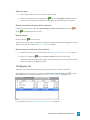
The Regions List
The Regions List in the bottom pane displays all regions and markers in the active sound file.
If the Regions List is not visible, you can select the Show or hide the bottom pane button
View > Tools menu. For more information, see "Viewing and arranging tools" on page 8.
or use the
For more information, see "Working with markers and regions" on page 21.
WORKING WITH MARKERS AND REGIONS 23 Sorting columns
Click a column heading to sort the results in ascending or descending order based on the column's contents.
Selecting a marker or region
Select a marker or region (by clicking in the marker or region's row) to move the cursor or selection in the
waveform display.
Renaming a marker or region
Double-click the Name column and type a new name to name or rename a marker or region. The name is
displayed in the Regions List and with the marker
or region
tag in the waveform display.
Editing the start, end, or length
You can edit a region by double-clicking and typing new values in the Start, End, or Length boxes.
You can edit a marker by double-clicking and typing a new value in the Start box.
Exporting regions
Choose File > Export Regions to create new files from regions in your file.
1. Choose File > Export Regions. The Export Regions dialog is displayed.
2. Type a name in the Prefix box if you want add a prefix to extracted regions. For example, type Test
to extract Test_1.wav, Test_2.wav, Test_3.wav, and so on.
3. Choose a location from the Where drop-down list to choose where you want to export your files.
4. Choose a file format from the Format drop-down list to choose the kind of files you want to export.
5. Choose a setting from the Preset drop-down list to choose the attributes that will be used to export
your files.
6. A list of regions is displayed at the bottom of the dialog. Select the Export check box for each region
you want to export, or click Select All to export all regions.
7. Click the Export button.
24 CHAPTER 3 Chapter 4
Selecting sound data
Selecting data and positioning the cursor are the first steps in most editing processes. After you have
selected data, you can cut, copy, paste, mix, add effects, and more.
Choose Edit > Mode > Time (or click the Time Mode button in an editor's playbar) to create time
selections.
Selecting data using the mouse
Choose Edit > Mode > Time (or click the Time Mode button in an editor's playbar) to create time
selections by clicking and dragging in a waveform.
Making a selection
Perform any of the following actions to select data:
n Click to position the cursor, hold the mouse button, and drag over an area of the waveform to select
data.
If snapping is enabled, the selection edge will snap to marker/region tags and major divisions of the
time ruler as you drag past them.
For more information, see "Working with markers and regions" on page 21 and "Enable snapping"
on page 26.
n Double-click the waveform to select sound data between boundaries: if the sound file has no
markers or regions, double-clicking will select the entire waveform. If markers and regions are
present, double-clicking between marker or region tags will select the waveform between the tags.
n Double-click the loop bar to select the entire waveform.
n When markers and regions are present in the sound file, you can triple-click to select all data. Hold
Shift while double-clicking to the right or left of a selection to extend the selection to the next region
or marker.
Selecting channels
When you are working with stereo or multichannel files, you can select data from the individual channels or
all channels:
n Drag within a channel to select that channel only.
n Drag across channels to select multiple channels.
n Drag along the divider between channels (or the loop bar above the ruler) to select all channels.
n Hold Command and click a channel to add or remove it from the current selection.
SELECTING SOUND DATA 25
n Hold Command and Shift while clicking the first and last channel you want to select to select a
range of channels.
Adjusting the length of a selection
1. Move the mouse over the edge of a selection. The resize pointer
will be displayed.
2. Drag to change the length of the selection.
You can also drag the ends of the loop region to adjust the selection length.
Hold Shift while clicking the waveform to extend a selection to the point you click.
Hold Shift while double-clicking to select the entire waveform. If markers or regions exist,
Shift+double click extends the selection to the previous and next marker/region.
Shifting a selection left or right
Drag the center of the loop region to move a selection without resizing it:
Hold Option while dragging either end of a selection to move it.
Enable snapping
Choose Options > Snapping > Enable to turn automatic snapping on or off.
Snapping helps you position the cursor, make selections, and align items along the grid when you paste,
mix, trim, or work with markers and regions. As you drag items in the editor, snap points are highlighted.
Hold the Shift key to temporarily suspend snapping.
Turning snapping on or off
Choose Options > Snapping > Enable to turn automatic snapping on or off. When snapping is enabled,
objects will snap to the following points:
n The cursor
n Time selection edges
You can also choose to snap events to grid divisions, markers, or events.
26 CHAPTER 4 Snapping to the grid
When snapping is enabled, you can also choose to have objects snap to whole time divisions as designated
by the marks on the time ruler above the data window.
Choose Options > Snapping > Grid to toggle snapping to grid lines.
To change the time format of the grid, choose Options > Status Format and then choose a setting from
the submenu (or Control-click the time ruler and choose a format from the shortcut menu).
Snapping to markers
When snapping is enabled, you can also choose to have elements in the data windows snap to markers.
Choose Options > Snapping > Markers to toggle snapping to markers and regions.
For more information, see "Working with markers and regions" on page 21.
Snapping to events
When snapping is enabled, you can also choose to have elements in the data windows snap to event
boundaries.
Choose Options > Snapping > Events to toggle snapping to event boundaries.
For more information, see "Event-based editing" on page 45.
Marking the beginning or end of a selection
Choose Edit > Selection > Mark In to set the cursor position as the beginning of a time selection.
Choose Edit > Selection > Mark Out to set the cursor position as the end of a time selection.
Choosing a status format
Choose Options > Status Format and choose a setting from the submenu to specify the format that will be
used to display the time ruler, cursor position, and selection. A check mark is displayed next to the selected
format.
You can also Control-click the time ruler and choose a format from the shortcut menu.
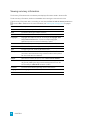
Format
Description
Samples
Displays the ruler in samples.
Time
Displays the ruler in hours:minutes:seconds.milliseconds.
Seconds
Displays the ruler in seconds.
Time & Frames
Displays the ruler in hours:minutes:seconds.frames.
Absolute Frames
Displays the ruler with all frames numbered sequentially from the
beginning of your project.
SELECTING SOUND DATA 27 Format
Description
SMPTE Film Sync (24
fps)
Displays the ruler in hours:minutes:seconds:frames with a frame rate
of 24 frames per second. This frame rate matches the standard
crystal-sync 16/33 mm film rate of 24 fps.
SMPTE EBU (24 fps,
Video)
Displays the ruler in hours:minutes:seconds:frames with a frame rate
of 25 frames per second. This is known as SMPTE EBU (European
Broadcasting Union) because European television systems run at 25
fps. Use SMPTE 25 EBU format for PAL DV/D1 projects.
SMPTE Non-Drop
(29.97 fps, Video)
Displays the ruler in hours:minutes:seconds:frames with a frame rate
of 29.97 frames per second, which leads to a discrepancy between
real ("wall clock") time and the SMPTE time, because there is no
compensation in the counting system as there is in Drop Frame.
Use SMPTE Non-Drop format for NTSC D1 projects that will be
recorded on master tapes striped with Non-Drop timecode.
SMPTE Drop (29.97 fps,
Video)
Displays the ruler in hours:minutes:seconds;frames with a frame rate
of 29.97 fps to match the frame rate used by NTSC television
systems (North America, Japan).
Use SMPTE Drop format for NTSC DV/D1 projects. Both SMPTE Drop
and SMPTE Non-Drop run at 29.97 fps. In both formats, the actual
frames are not discarded, but they are numbered differently. SMPTE
Drop removes certain frame numbers from the counting system to
keep the SMPTE clock from drifting from real ("wall clock") time. The
time is adjusted forward by two frames on every minute boundary
except 0, 10, 20, 30, 40, and 50. For example, when SMPTE Drop
time increments from 00:00:59.29, the next value will be
00:01:00.02.
SMPTE 30 (30 fps,
Audio)
Displays the ruler in hours:minutes:seconds:frames with a frame rate
of 30 frames per second. This rate is exactly 30 fps and is commonly
used when synchronizing audio applications such as multitrack
recorders or MIDI sequencers. This format should not be used when
working with video.
Audio CD Time
Displays the ruler in hours:minutes:seconds:frames with a frame rate
of 75 frames per second for creating disc-at-once CDs.
28 CHAPTER 4 The selection status bar
The selection status bar in each editor shows the beginning, end, and length of a selection. If no selection
has been made, the cursor position is displayed. For more information, see "Selecting data using the mouse"
on page 25.
The Selection Start, Selection End, Selection Length, and Zoom Ratio boxes may not be displayed
when the editor is narrow.
n Double-click the Selection Start box to type a value and move the cursor.
n When a time selection is present, double-click the Selection Start, Selection End, or Selection
Length box to type values in the boxes to specify or edit a selection.
n The Move selection on edit setting on the General page of the Preferences dialog determines
whether the selection length is preserved when you change the Selection Start or Selection Length
value.
When the check box is selected, adjusting the Selection Start or Selection End value will
automatically adjust the other value to move the selection and preserve its length. The tooltips for
the boxes will display Edit Mode: Move to indicate that the loop bar will move when you edit the
values.
When the check box is cleared, adjusting the Selection Start or Selection End value will adjust only
the value you edit, adjusting the selection length in the process. When the check box is cleared, the
tooltips for the boxes will display Edit Mode: Adjust to indicate that the loop bar will move when
you edit the values.
For more information, see "Preferences" on page 10.
SELECTING SOUND DATA 29 n To change values quickly, you can use mathematical operations.
Type + to add to the current value: "+1" in the Selection Start box would move the beginning of the
selection one status-format unit to the right.
Type - to subtract from the current value: "-1" in the Selection Start box would move the beginning
of the selection one status-format unit to the left.
Type / to divide the current value: "/2" in the Selection Start box would move the beginning of the
selection to half of its current value.
Type * to multiply the current value: "*2" in the Selection Start box would move the beginning of the
selection to two time its current value.
Type % to multiply the current value by a percentage: "%50" in the Selection Start box would move
the beginning of the selection to half of its current value.
n Control-click to display a shortcut menu that allows you to choose a time format. For more
information, see "Choosing a status format" on page 27.
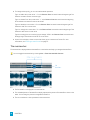
The overview bar
The overview bar is displayed above the waveform in each editor and helps you navigate the waveform.
You can toggle the overview bar by choosing View > Show Overview/Hide Overview.
n The full waveform is displayed in the overview bar.
n The unshaded portion of the waveform display represents the portion of the waveform shown in the
editor. You can drag this portion to navigate the waveform.
n The current selection is also represented in the overview bar.
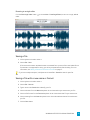
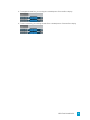
30 CHAPTER 4 n To navigate the waveform, you can drag the unshaded portion of the waveform display:
n To zoom horizontally, you can drag the ends of the unshaded portion of the waveform display:
SELECTING SOUND DATA 31 32 CHAPTER 4 Chapter 5
Editing sound data
The edit operations used most often include cut, copy, paste, mix, and delete. Most of these functions use
the clipboard, which is a temporary storage area. The clipboard can also be used to move data across
sound files.
Editing modes
Sound Forge Pro provides several editing methods. To set the editing mode for the active editor, choose Edit
> Mode, and choose a command from the submenu or click a mode button in the playbar below the
waveform.
n Time Mode : in this general-purpose editing mode, you can create time selections in the waveform
to manipulate audio. For more information, see "Selecting data using the mouse" on page 25.
n Event Mode : in this mode, you can edit nondestructively, using multiple audio files in a single
editor. For more information, see "Event-based editing" on page 45.
n Pencil Mode : in this mode, you can perform precision edits by drawing directly in the waveform.
For more information, see "Pencil Mode" on page 41.
n Envelope Mode : in this mode, you can use envelopes to adjust effect parameters over time. For
more information, see "Automating effect parameters" on page 68.
Undoing and redoing edits
Choose Edit > Undo or Redo to reverse or restore edit operations.
Undoing a single edit
Choose Edit > Undo to reverse the last action performed. For example, if you deleted a section of data
accidentally, use the Undo command to restore the data.
Redoing a single edit
Choose Edit > Redo to reverse an undo operation.
EDITING SOUND DATA 33
Cutting sound data
Choose Edit > Cut to remove the selected sound data and copy it to the clipboard. Cutting sound data
replaces the previous contents of the clipboard.
For information about cutting events, please see "Cutting, copying, pasting, and deleting events" on page
46.
1. Choose Edit > Mode > Time (or click the Time Mode button in an editor's playbar).
2. Select the data you want to cut. For more information, see "Selecting data using the mouse" on page
25.
3. Choose Edit > Cut.
If you cut data from individual channels of multichannel files, the waveform will contain silence at
the end of the cut channel. The channels in a multichannel file must always be equal in length.
Before cut
After cut
Copying sound data
Choose Edit > Copy to copy the selected sound data to the clipboard. Copying sound data replaces the
previous contents of the clipboard.
For information about copying events, please see "Cutting, copying, pasting, and deleting events" on page
46.
1. Choose Edit > Mode > Time (or click the Time Mode button in an editor's playbar).
2. Select the data you want to copy. For more information, see "Selecting data using the mouse" on
page 25.
3. choose Edit > Copy. The data is copied to the clipboard.
34 CHAPTER 5 Pasting sound data
Choose Edit > Paste to insert a copy of the clipboard contents at the cursor position. If there is a selection,
the Paste command deletes the selected data before inserting.
For information about pasting events, please see "Cutting, copying, pasting, and deleting events" on page
46.
Pasting by dragging and dropping a selection
1. Choose Edit > Mode > Time (or click the Time Mode button in an editor's playbar).
2. Select the sound data you want to paste.
For more information, see "Selecting data using the mouse" on page 25.
3. Hold Command and drag the selection to the location where you want to paste the data. The paste
cursor is displayed, and a vertical line is displayed to show you where the paste will occur.
When dragging a selection, drag up or down before dragging left or right. Dragging left or
right before dragging vertically adjusts the selection length.
You can drag a selection to a new location in the current editor, to a different editor, or to a
blank spot in an editor (to create a new tab).
If you're dragging nonadjacent channels in a multichannel file — channels 1 and 3 in a 5.1channel file, for example — hold Option during the drag to force the dragged data to adjacent
channels.
4. When you drop the selection, the selection is pasted.
EDITING SOUND DATA 35 Pasting audio from the clipboard
1. Choose Edit > Mode > Time (or click the Time Mode button in an editor's playbar).
2. Click to place the cursor where you want to paste the clipboard contents, or select the data you want
to replace. For more information, see "Selecting data using the mouse" on page 25.
3. Choose Edit > Paste.
Pasting into a multichannel file will insert data to all channels — the channels in a multichannel file
must always be equal in length.
Before paste
After paste
Mixing sound data
Choose Edit > Mix to mix a copy of the clipboard contents at the current cursor position.
Mixing by dragging and dropping a selection
1. Choose Edit > Mode > Time (or click the Time Mode button in an editor's playbar).
2. Select the sound data you want to mix or crossfade.
For more information, see "Selecting data using the mouse" on page 25.
36 CHAPTER 5 3. Drag the selection to the location where you want to mix the data. The mix cursor is displayed, and
a shaded selection box is displayed to show you where the mix will occur.
When dragging a selection, drag up or down before dragging left or right. Dragging left or
right before dragging vertically adjusts the selection length.
You can drag a selection to a new location in the current editor, to a different editor, or to a
blank spot in an editor (to create a new tab).
If you're dragging nonadjacent channels in a multichannel file — channels 1 and 3 in a 5.1channel file, for example — hold Option during the drag to force the dragged data to adjacent
channels.
4. When you drop the selection,the Mix dialog is displayed.
5. Choose a setting from the Preset drop-down list, or adjust the controls as desired:
a. Drag the source Volume fader to adjust the volume of the selection you want to mix.
b. Drag the destination Volume fader to adjust the volume of the selection you want to mix
over.
Select the Invert phase check boxes to invert the source or destination audio at the
baseline (reverse the phase). Inverting data can help match transitions and compare
the phase relationship of the two sound files.
c. Type a value in the Fade in box (or use the spinner) to set the length of the fade in between
the source and destination audio.
d. Type a value in the Fade out box (or use the spinner) to set the length of the fade out
between the source and destination audio.
Click the Fade curves button
the speed of the in and out fades.
and choose a curve type from the menu to set
e. Select the Proportional fade lengths check box if you want to specify fade lengths as a
percentage of the selection.
6. Click the Process button to apply the mix.
EDITING SOUND DATA 37 Mixing audio from the clipboard
The the Mix command is not available in event-editing mode.
1. Choose Edit > Mode > Time (or click the Time Mode button in an editor's playbar).
2. Select the sound data you want to mix or crossfade, and then cut or copy the sound data to the
clipboard.
For more information, see "Selecting data using the mouse" on page 25, "Cutting sound data" on
page 34, or "Copying sound data" on page 34.
3. Click to place the cursor where you want to mix the clipboard contents or select the data you want
to replace.
4. Choose Edit > Mix. The Mix dialog is displayed.
5. Choose a setting from the Preset drop-down list, or adjust the controls as desired:
a. Drag the source Volume fader to adjust the volume of the selection you want to mix.
b. Drag the destination Volume fader to adjust the volume of the selection you want to mix
over.
Select the Invert phase check boxes to invert the source or destination audio at the
baseline (reverse the phase). Inverting data can help match transitions and compare
the phase relationship of the two sound files.
c. Type a value in the Fade in box (or use the spinner) to set the length of the fade in between
the source and destination audio.
d. Type a value in the Fade out box (or use the spinner) to set the length of the fade out
between the source and destination audio.
Click the Fade curves button
the speed of the in and out fades.
and choose a curve type from the menu to set
e. Select the Proportional fade lengths check box if you want to specify fade lengths as a
percentage of the selection.
6. Click the Process button. The contents of the clipboard are mixed starting at the cursor position.
If the clipboard has fewer channels than your mix target, only the selected channels will be mixed.
If the clipboard has more channels than your mix target, only the selected channels in your
destination will be mixed.
Paste to New
Choose Edit > Paste to New to create a new file that contains the contents of the clipboard.
38 CHAPTER 5 Deleting sound data
Choose Edit > Delete to remove the selected sound data without copying it to the clipboard.
1. Choose Edit > Mode > Time (or click the Time Mode button in an editor's playbar).
2. Select the data you want to delete. For more information, see "Selecting data using the mouse" on
page 25.
3. Choose Edit > Delete.
If you delete data from individual channels of multichannel files, the waveform will contain silence
at the end of the deleted channel. The channels in a multichannel file must always be equal in
length.
Before delete
After delete
EDITING SOUND DATA 39 Inserting silence
Choose Insert > Silence to insert a section of silence in a sound file.
1. Choose Edit > Mode > Time (or click the Time Mode button in an editor's playbar).
2. Choose Insert > Silence. The Insert Silence dialog is displayed.
3. In the Insert box, specify the length of silence that you want to add.
4. Choose a setting from the at drop-down list to specify where the silence should be inserted:
n Cursor: inserts silence at the current cursor position.
n Start of file: inserts silence at the beginning of the file.
n End of file: inserts silence at the end of the file.
5. Click the Insert button.
Any markers or regions that exist after the insertion point will be rippled to preserve their
position.
Simple Synthesis
You can use the Simple Synthesis plug-in to generate a simple waveform of a given shape, pitch, and
length.
1. Select the sound data you want to replace with a synthesized waveform. If no data is selected, the
synthesis will be inserted at the cursor position. For more information, see "Selecting data using the
mouse" on page 25.
2. Choose Insert > Simple Synthesis. The Simple Synthesis dialog is displayed.
The Insert > Simple Synthesis command is not available in event-editing mode.
3. Choose a setting from the Preset drop-down list, or adjust the controls as desired:
a. Choose a shape from the Type drop-down list to specify the shape of a single period of the
waveform.
b. In the Length box, specify the length (in seconds) of the generated waveform.
c. Drag the Amplitude fader to set the peak level of the waveform.
d. In the Start Frequency box, specify the frequency of the waveform you want to generate or
the starting frequency of the range you want to sweep.
Aliasing can occur with many of these waveforms when using high frequencies
because they are not band-limited.
40 CHAPTER 5 e. If you want to sweep a range of frequencies, select the Use Sweep check box and use the
End Frequency box to specify an ending frequency.
Select the Log Sweep check box if you want to sweep the range logarithmically; when the
check box is cleared, the sweep is linear. The available frequency range is limited by your
current sampling rate. The highest frequency available will be the Nyquist frequency.
4. Click the Process button
Pencil Mode
Choose Edit > Mode > Pencil (or click the Pencil Mode button in an editor's playbar) to edit the
waveform by drawing on it. For example, if you have a glitch in the sound data, zoom in to the glitch and
smoothly redraw the waveform.
Pencil mode is available only at magnification levels of 1:32 or greater.
Envelope Mode
Choose Edit > Mode > Envelope (or click the Envelope Mode button
on effect automation envelopes.
in an editor's playbar) to edit points
For more information, see "Automating effect parameters" on page 68.
Adjusting an envelope
By default, A new envelope will contain a single envelope point. If you want to adjust the overall level of an
envelope, drag the envelope up or down. A floating tooltip will show you the envelope's current setting:
If an envelope has multiple points, you can drag each point, or you can drag envelope segments up or
down.
EDITING SOUND DATA 41 If snapping is enabled, envelope points will snap to enabled snap points (grid marks, markers, or
events) as you drag them. For more information, see "Enable snapping" on page 26.
Hold Command while dragging an envelope point or segment to adjust the point's value without
changing its horizontal position.
Hold Command+Option while dragging an envelope point to move the point's horizontal position
without changing its value.
Click and drag in an editor to create a selection box and select multiple envelope points.
Double-click an envelope point to restore it to its default value.
Adding or deleting envelope points
To create more complex envelopes, you will need to add points. To add an envelope point, double-click the
envelope. You can then drag and position the point as necessary.
To delete a point, right-click it and choose Delete from the shortcut menu.
Flipping an envelope
You can flip an envelope to invert the envelope around its center.
Flipping all points
1. Right-click an envelope segment. A shortcut menu is displayed.
2. Choose Flip all from the shortcut menu.
Flipping selected points
1. Choose Edit > Mode > Envelope (or click the Envelope Mode button
in an editor's playbar).
2. Create a time selection to select the points you want to flip.
3. Right-click an envelope point in the time selection and choose Flip from the shortcut menu.
42 CHAPTER 5 Setting fade properties
You can adjust the fade curve for each envelope segment individually. To change the fade curve, right-click
an envelope segment and choose a command from the shortcut menu:
n Hold:
n Linear:
n Fast:
n Slow:
n Smooth:
n Sharp:
Cutting, copying, and pasting envelope points
1. Choose Edit > Mode > Envelope (or click the Envelope Mode button
in an editor's playbar).
2. Create a time selection to select the points you want to cut or copy.
3. Choose Edit > Cut or Copy.
4. Click to position the cursor where you want to paste the envelope points.
5. Choose Edit > Paste.
Envelope points can be pasted only within the same envelope.
EDITING SOUND DATA 43 44 CHAPTER 5 Chapter 6
Event-based editing
Choose Edit > Mode > Event (or click the Event Mode button
based editing.
in an editor's playbar) to perform event-
Event-based editing allows you to divide a sound file into any number of independent sections that can be
arranged and rearranged on the timeline.
Creating events
Events are created when you cut/copy/paste sound data, split events, drag sound data to an editor, or
process selections.
Creating events by cutting, copying, pasting, or mixing sound data
Cutting, copying, pasting, or mixing sound data will create events in a data window.
After performing one of these edits, choose Edit > Mode > Event (or click the Event Mode button
editor's playbar) to work with the new event.
in an
For more information, see "Cutting sound data" on page 34, "Copying sound data" on page 34, "Pasting
sound data" on page 35, or "Mixing sound data" on page 36.
Creating events by processing a selection
When you apply processes or effects to a portion of a sound file, Sound Forge Pro creates an event from
the selection.
1. Create a time selection in an editor.
For more information, see "Selecting data using the mouse" on page 25.
2. Apply a process or effect to your time selection. Sound Forge Pro creates an event from the
selection.
For more information, see "Processing audio" on page 53 or "Applying effects" on page 63.
3. Choose Edit > Mode > Event (or click the Event Mode button
the new event.
in an editor's playbar) to work with
EVENT-BASED EDITING 45
Moving events
You can move events horizontally along the timeline by dragging them when in event-editing mode.
Choose Edit > Mode > Event (or click the Event Mode button
editing mode.
in an editor's playbar) to enable event-
Moving an event past the end of the current file inserts time into the editor. You must remove any
unwanted silence when you are finished editing the file.
When dragging events vertically across channels, you are limited to the number of channels in the current
file. You cannot drag an event past the top or bottom channel in a data window to create more channels in
the file.
Events can cross channel boundaries, but overlapping events must lie on the same channels. Sound Forge
Pro automatically splits or merges channels as you move events.
Splitting events
Splitting an event allows you to adjust a small part of an event or break a single event into multiple sections
that you can edit independently.
1. Choose Edit > Mode > Event (or click the Event Mode button
event-editing mode.
in an editor's playbar) to enable
2. Click above the time ruler to position the cursor where you want to split the events.
3. Select the events you want to split.
4. Choose Edit > Event > Split (or press S).
If no events are selected, the events located at the current cursor position will be split throughout all
of the channels.
If events are selected, only the selected events will be split at the current cursor position.
Cutting, copying, pasting, and deleting events
When working with the Event tool, you can easily cut, copy, paste, and delete events in an editor or across
multiple editors. For more information, see "Opening multiple files in the editor" on page 13.
Cutting events
1. Choose Edit > Mode > Event (or click the Event Mode button
event-editing mode.
in an editor's playbar) to enable
2. Select the events you want to cut. For more information, see "Selecting events" on page 47.
3. Choose Edit > Cut.
The selected events are removed from the editor and placed on the clipboard.
46 CHAPTER 6 Copying events
1. Choose Edit > Mode > Event (or click the Event Mode button
event-editing mode.
in an editor's playbar) to enable
2. Select the events you want to copy. For more information, see "Selecting events" on page 47.
3. Choose Edit > Copy.
The selected events are copied to the clipboard and the waveform is unchanged.
Pasting events
1. Choose Edit > Mode > Event (or click the Event Mode button
event-editing mode.
in an editor's playbar) to enable
2. Move the cursor to the desired location on the timeline.
3. Choose Edit > Paste.
The clipboard events are inserted into the editor, and existing events on the selected channels are
moved by the total length of the pasted events.
If no channels are selected, the clipboard events are pasted to all channels.
Deleting events
1. Choose Edit > Mode > Event (or click the Event Mode button
event-editing mode.
in an editor's playbar) to enable
2. Select the events you want to delete. For more information, see "Selecting events" on page 47.
3. Choose Edit > Delete.
The selected events are removed from the editor, but they are not placed on the clipboard.
Selecting events
Select one or more events by clicking in the waveform display when in event-editing mode.
Choose Edit > Mode > Event (or click the Event Mode button
editing mode.
in an editor's playbar) to enable event-
Selecting events
n To select an event, click it. To deselect an event, click it again.
n To select multiple adjacent events, hold the Shift key and click the first and last event you want to
select. All events between the first and last selected events are also selected.
n To select multiple nonadjacent events, hold the Command key and click each event you want to
select.
EVENT-BASED EDITING 47 n To select the next or previous event, choose Edit > Event > Select Next/Previous Event (or press
Shift+Right/Left Arrow).
n To extend a selection to the next or previous event, choose Edit > Event > Extend Selection to
Next/Previous Event (or press Command+Shift+Right/Left Arrow).
Choose View > Zoom Time > Event to maximize the selected event to fit the width of the
editor.
Creating a time selection from an event
Double-click an event to select it and set the loop bar to match the event's length.
Selecting channels in an event
You can drag the top and bottom edges of events if you want to use only a subset of the channels in a
multichannel file. This method is also useful for duplicating or rearranging channels without performing
channel conversion, which always processes the entire file:
You can quickly restore contiguous channels by dragging the event edge back.
Crossfading events
Crossfades are automatically applied when you overlap two events on the same channel.
Creating an automatic crossfade
An automatic crossfade is inserted if you move an event to overlap the beginning or end of another event.
1. Choose Edit > Mode > Event (or click the Event Mode button
event-editing mode.
in an editor's playbar) to enable
2. Drag an event so it overlaps another event on the same channel.
A crossfade is automatically added to transition between the two events.
48 CHAPTER 6 Creating a manual crossfade
An automatic crossfade is not inserted if a shorter event is placed on top of a longer event (as in a punchin). You can manually create a crossfade to fade in to or out of the shorter event.
This is a fast and effective method of punching in to replace a bad section of audio.
1. Choose Edit > Mode > Event (or click the Event Mode button
event-editing mode.
in an editor's playbar) to enable
2. Drag a shorter event so it overlaps a longer event.
3. Hover over the upper-left or upper-right corner of an audio event until the fade offset cursor
displayed.
is
4. Click the corner of the event and drag to create a fade.
5. Repeat step 4 for the other end of the event.
Changing the fade type
You can change a crossfade to use one of many combinations of fast, slow, linear, smooth, and sharp fade
curves.
1. Right-click the crossfade region to display a shortcut menu.
2. Choose Fade Type from the shortcut menu and choose a fade curve from the submenu:
Event envelopes
You can apply envelopes to individual events. Envelopes, known as ASRs (attack sustain, and release) give
you the ability to control an event's fade-in, fade-out, and overall level.
When you create an event, handles are added that are used to set the envelope. As you drag these handles,
a volume envelope appears.
Adjusting an event's volume
1. Choose Edit > Mode > Event (or click the Event Mode button
event-editing mode.
in an editor's playbar) to enable
2. Hover over the top of an audio event.
EVENT-BASED EDITING 49 3. When you see the envelope cursor ( ), drag the volume line to the desired level. As you drag the
envelope, the event’s gain is displayed in dB.
Fading an event in or out
1. Hover over the upper-left or upper-right corner of an audio event until the fade offset cursor is
displayed
.
2. Click the corner of the event and drag to create a fade.
3. To remove a fade, drag the end of the fade curve back to the edge of the event.
Changing the fade type
1. Right-click the fade-in or fade-out area to display a shortcut menu.
2. Choose Fade Type from the shortcut menu and choose a fade curve from the submenu:
Slipping and trimming events
You can use any of the following methods to adjust events.
Trimming an event
1. Choose Edit > Mode > Event (or click the Event Mode button
event-editing mode.
in an editor's playbar) to enable
2. Hover over the edge of an event. The trim cursor is displayed:
.
3. Drag the edge of the event to trim it, exposing more or less of the underlying media.
Events do not loop and cannot exceed the start, end, or channels of the underlying media. For
example, you cannot trim an event past its right edge to insert silence.
50 CHAPTER 6 Slipping (shifting the contents of) an event
Hold Option while dragging an event. The slip cursor is displayed:
.
As you drag the event, the contents of the event shift, but the event will not move. You can use this
technique when you want to maintain an event's length and position, but have the event play a different
section of the source media file.
Slip-trimming an event
Hold Option while dragging the right or left edge of an event. The slip-trim cursor is displayed:
.
As you drag the event edge, the opposite edge of the event will remain fixed, trimming the media from the
edge you drag.
Hold Option+Shift while dragging any portion of an event to slip-trim the right edge. The left edge of
the event will remain fixed, and the media is slipped past the left edge of the event. This slip mode is
useful when you want to slip an event without changing its last frame.
Holding the Shift key temporarily overrides snapping if it is enabled. Release the Shift key while
dragging to snap the event to available snap points.
For more information, see "Enable snapping" on page 26.
EVENT-BASED EDITING 51 52 CHAPTER 6 Chapter 7
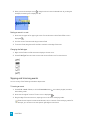
Processing audio
The Process menu is reserved for sound-altering processes that are included with Sound Forge Pro and
cannot be added to the Plug-In Chain.
The commands in the Process and Effects menus are not available in event-editing mode.
Channel Converter
Choose Process > Channel Converter to change the number of channels in an audio file. The Channel
Converter dialog can also be used to reverse the channels of a stereo file or intermix the channels of a
multichannel file to create interesting panning effects.
To perform quick channel conversion without specifying the mix, use the Channels box in the File Properties
tool. For more information, see "Viewing and editing file properties" on page 17.
1. Choose Process > Channel Converter.
2. Choose a setting from the Preset drop-down list, or adjust the controls as needed:
a. Choose a setting from the Output Channels drop-down list to indicate the number of
channels in the converted file.
b. Click in the In box for each output channel and type a gain value (or drag the fader) to
adjust the amount of the original channel that will be mixed to the new channel.
3. Click the Process button
Stretching audio
Choose Process > élastique Timestretch to time-stretch and pitch-shift audio while maintaining control
over all stretching parameters.
After you open the élastique Timestretch dialog, you can choose a preset from the Preset drop-down list, or
adjust the controls as desired.
n Use the Time stretch controls to change the duration of your audio.
n Use the Pitch shift controls to raise or lower the pitch of your audio.
n Use the Formant shift controls to adjust the audio's fundamental harmonic frequency range. These
controls are typically used to prevent the "chipmunk effect" in vocal performances.
PROCESSING AUDIO 53
n To reset time and pitch stretching, double-click the point in the Pitch/Time graph:
n If you want to move the point in the graph horizontally or vertically only, you can drag the
horizontal or vertical grab bars.
n Select the Synchronize Pitch check box if you want the plug-in to transition smoothly as you adjust
time and pitch stretching. This setting is useful if you want to adjust settings while previewing. If the
check box is not selected, stretching will change abruptly if you adjust settings while previewing.
Choosing a stretching mode
Choose a setting from the Mode drop-down list to choose the stretching method that is best suited to your
source media:
Mode
Description
Pro
This mode provides the highest quality stretching for most
applications but requires more RAM usage and CPU power.
Formant shift controls are available only when using Pro mode.
Efficient
This mode provides good-quality stretching but uses fewer CPU
resources.
Soloist (Monophonic)
This mode provides the highest quality stretching for monophonic
audio sources.
Soloist (Speech)
This mode provides the highest quality stretching for monophonic
speech signals.
Adjusting time stretch controls
In the Time stretch group, the Original Time and Original Tempo boxes display the original length and
tempo of your audio.
Drag the Ratio slider to the right to make your audio slower, or drag to the left to make the audio faster.
You can stretch the audio from 1/10 to 10 times its original duration.
n As you drag the Ratio slider, the New Time and New Tempo boxes are updated.
n You can double-click the New Time and New Tempo boxes and type a new value.
54 CHAPTER 7 n If the original tempo of the clip is displayed incorrectly, you can double-click the Original Tempo
box and type a new value.
Editing the Original Tempo value does not affect the original file data or attributes, but you can use
the Original Time and Original Tempo values to autocalculate the desired time stretch ratio.
n As you adjust the tempo, the gold point in the Pitch/Time graph is updated to reflect the modified
clip length. You can also drag this point to adjust time and pitch shifting.
Adjusting pitch shift controls
In the Pitch shift group, the Semitones and Cents sliders allow you to raise or lower the pitch of your audio
up to two octaves.
Drag the Semitones slider for coarse control.
Drag the Cents slider for fine control.
n You can also double-click the Semitones and Cents boxes and type a new value.
n As you adjust the pitch, the gold point in the Pitch/Time graph is updated to reflect the modified clip
pitch. You can also drag this point to adjust time and pitch shifting.
Adjusting Formant shift controls
You can use the Formant shift controls to control whether the audio's fundamental harmonic frequency
range is shifted along with the Pitch Shift value.
The Formant shift controls are available when Pro is selected from the Mode drop-down list.
As you adjust the pitch, the silver point in the Pitch/Time graph is updated to reflect the modified formant
shift. You can also drag this point to adjust formant shifting.
The fundamental harmonic frequency range is specific to the instrument's or vocalist's resonating body (as
opposed to the notes that are produced by that resonating body).
Drag the Formant shift slider to 0 (Preserve) if you do not want to pitch shift formants. When set to 100
(Match Pitch), formants are shifted by the same amount as the Pitch Shift setting.
Drag the Optimize for audio content max pitch slider to indicate which frequencies will be used as the
format range. This slider is unavailable when the Formant shift slider is set to 100 (Match Pitch).
Fade in/out
Choose Process > Fade In or Fade Out, and then choose a fade type from the submenu to vary the volume
of a sound file over time.
1. Select the data you want to fade. If no data is selected, the fade will be applied to the entire file.
For more information, see "Selecting data using the mouse" on page 25.
2. Choose Process > Fade In or Fade Out, and then choose a fade type from the submenu.
PROCESSING AUDIO 55 Inverting data
Choose Process > Invert/Flip to reverse the phase of the sound data. Although inverting data does not
make an audible difference in a single file, it can be useful for matching a sample transition when
executing certain pastes, mixes, or loops.
If no data is selected, the entire file will be inverted.
In the following example, the red line represents the baseline, and the lower waveform is the inverted image
of the upper waveform.
iZotope 64-Bit SRC
Choose Process > iZotope 64-Bit SRC to change the sample rate of an existing sound file.
1. Choose Process > iZotope 64-Bit SRC.
2. Choose a setting from the Preset drop-down list, or adjust the controls as needed.
Item
Description
New Sample Rate
Specify the sample rate to which the sound file will be converted.
Increasing a file's sample rate cannot improve the quality of the
existing audio, but does allow higher resolution for processing.
Quality
When the Use Simplified Quality Setting check box is selected, you
can drag the Quality slider to adjust the plug-in's controls
automatically.
Dragging the slider sets the balance of audio quality vs. processing
speed. A setting of 50% works well for most applications. Increasing
the setting improves the quality of the plug-in but requires more
processing power.
When the Use Simplified Quality Setting check box is cleared, you
can adjust the plug-in's controls manually.
56 CHAPTER 7 Item
Description
Steepness
The plug in uses a low-pass filter to discard frequencies that cannot
be represented or are undesirable in your audio output.
This setting establishes the steepness of the transition band of the
low-pass filter. Higher settings will reject unwanted frequencies, but
can cause more ringing in the time domain and a higher CPU load.
Max Filter Length
Sets the maximum length of the filters used for resampling.
The default setting will work well for most applications, but you can
increase the setting if very high-quality output is desired for
uncommon source or destination sampling rates.
Cutoff Scaling
Allows you to scale the cutoff frequency of the plug-in's low-pass
filter from the Nyquist frequency.
Typical values are near 1. Higher values will offer a flatter pass-band,
and lower values will offer better aliasing suppression.
Alias Suppression
Sets the amount of suppression in the low-pass filter's stop-band.
Frequencies in the stop-band that are not fully attenuated will result
in aliasing. Higher settings will result in better quality, and lower
settings can minimize CPU load.
Prering
Low-pass filters are characterized by the amount of ringing they
introduce into their output. Higher Steepness settings produce
increased ringing.
A setting of 100% produces a linear phase filter with equal pre and
post ringing. A setting of 0% produces a minimum phase filter that
offers no preringing but has nonlinear phase distortion. Intermediate
settings allow a tradeoff between preringing and postringing and
allows you to linearize phase in the pass-band.
3. Click the Process button.
iZotope MBIT+ Dither
Choose Process > iZotope MBIT+ Dither to convert sound files to different bit depths and apply dithering.
Because the signal-to-noise ratio decreases when you decrease the bit depth of a file, you should
maximize the volume of the sound file using the Volume or Normalize functions before performing
the conversion.
1. Choose Process > iZotope MBIT+ Dither.
2. Choose a setting from the Preset drop-down list, or adjust the controls as needed.
PROCESSING AUDIO 57 Item
Description
Bit Depth
Specify the sample rate to which the sound file will be converted.
Increasing a file's sample rate cannot improve the quality of the
existing audio, but does allow higher resolution for processing.
Dither Mode
Choose a setting from the drop-down to choose the type of dithering
that will be applied to mask quantization noise.
n Type 1: Uses a traditional rectangular probability distribution
function.
n Type 2: Uses a traditional rectangular probability distribution
function.
n MBIT+: Uses a proprietary algorithm to offer superior results
for all types of source material.
Noise Shaping
Choose a setting from the drop-down list to control the amount of
noise shaping that will be applied.
When Type 1 or Type 2 is selected in the Dither Mode drop-down list,
the following settings are available:
n None: No noise shaping is applied.
n Simple: A high-pass filter is applied to the dither noise.
n Clear: Aggressively moves dither noise toward the Nyquist
frequency.
n Psych5: Uses a fifth-order filter to move dither noise away
from audible frequency bands.
n Psych9: Uses a ninth-order filter to move dither noise away
from audible frequency bands.
When MBIT+ is selected in the Dither Mode drop-down list, you can
choose a setting from the Noise Shaping drop-down list to control
the amount of noise shaping applied. Increased settings will provide
more audible noise suppression at the expense of a higher noise
floor.
58 CHAPTER 7 Item
Description
Dither Bits/Amount
When Type 1 or Type 2 is selected in the Dither Mode drop-down list,
you can choose a setting from the Dither Bits drop-down list to
choose whether you want to use 1 or 2 dither bits. 1 works well for
most applications.
When MBIT+ is selected in the Dither Mode drop-down list, you can
choose a setting from the Dither Amount drop-down list to control
the amount of dithering applied. Normal works well for most
applications. The None and Low settings can leave some nonlinear
quantization distortion or dither noise modulation behind. The High
setting can eliminate nonlinear quantization distortion at the expense
of a higher noise floor.
Auto Blank
Allows you to scale the cutoff frequency of the plug-in's low-pass
filter from the Nyquist frequency.
Typical values are near 1. Higher values will offer a flatter pass-band,
and lower values will offer better aliasing suppression.
Minimize Peaks
Select this check box if you want to suppress peaks in the dither noise
signal.
Silence Harmonics
Select this check box if dithering distorts the timbre of your audio.
When the check box is selected, harmonic quantization distortion is
moved away from the overtones of audible frequencies.
3. Click the Process button.
Muting sound data
Choose Process > Mute to set the volume of a selection to -Inf dB (silence).
If no data is selected, the entire file will be muted.
Normalizing audio
Choose Process > Normalize to raise the volume of a selection so that the highest sample level reaches a
user-defined level. Use normalization to ensure you are using all of the dynamic range available to you
without clipping.
When normalizing multichannel data, normalization is computed on the loudest sample value found
in any selected channel and the same gain is applied to all selected channels. If a single channel is
selected, normalization will affect only that channel.
When you convert files to a compressed format such as MP3, peaks that are at or near 0 dB may be
clipped by the compression process. Consider normalizing first to reduce the possibility of clipped
peaks (normalizing to a peak level of -0.9 dB is a good starting point).
PROCESSING AUDIO 59 Normalizing using a peak value
When you normalize to a peak value, you can specify the level to which the maximum detected sample
value will be set. A constant gain is applied to the selection to raise the peak to this level.
1. Choose Process > Normalize.
2. Click the Peak level radio button.
3. Choose how you want to scan the file:
n When the Autoscan levels when changing selection or settings radio button is selected,
Sound Forge Pro will scan each time you change the selection in the waveform or the
settings in the Normalize dialog. If no selection exists, the entire file is scanned.
n When the Use current scan levels radio button is selected, you can click the Scan Levels
button to start a scan.
4. Drag the Normalize to fader to specify the level to which the highest peak should be set.
5. Click the Process button.
Normalizing using average RMS level
When you normalize using average RMS level, the average RMS value of the sound file is raised to a value
you specify. This is helpful for matching the apparent loudness of different recordings.
1. Choose Process > Normalize.
2. Click the Average RMS level radio button.
3. Choose how you want to scan the file:
n When the Autoscan levels when changing selection or settings radio button is selected,
Sound Forge Pro will scan each time you change the selection in the waveform or the
settings in the Normalize dialog. If no selection exists, the entire file is scanned.
n When the Use current scan levels radio button is selected, you can click the Scan Levels
button to start a scan.
4. Drag the Normalize to fader to specify the new average RMS level for the selection.
When using RMS levels, set the Normalize to fader to -6 dB or less. Normalizing to 0 dB boosts
the signal so that it has the same apparent loudness as a 0 dB square wave (which is incredibly
loud). If you were to do so, all of the dynamic range of the signal would be squashed and all
the peaks would either be clipped or seriously compressed. Normalizing a peak to 0 dB is OK,
but normalizing RMS to anything above -6 dB can compromise sound quality.
60 CHAPTER 7 5. Adjust scan settings:
Item
Description
Ignore below
Drag the fader to determine the level of material you want to include
in the RMS calculation. Any sound material below the threshold will
be ignored in the calculation. This is useful to eliminate any silent
sections from the RMS calculation. You should set this parameter a
few dB above what you consider to be silence.
If you set this value to minus infinity, all sound data will be used. If
the value is set too high (above -10 dB), there is a good chance that
the RMS value is always below the threshold. In this case, no
normalization will occur. Therefore, it is good to test the threshold by
using the Scan Levels button.
Attack time
Specify how quickly the scan should respond to transient peaks in the
sound file. A slower attack time will tend to ignore fast-peaking
material.
Release time
Specify how quickly the scan should stop using transient peak
material after it has begun to drop in level. A slower release time will
increase the amount of material included in the RMS calculation.
Use equal loudness
contour
Select this check box if you want the RMS calculation to compensate
for high- and low-frequency audio. Very low and high frequencies
are less audible than mid-range frequencies.
6. Select an option from the If clipping occurs drop-down list:
Item
Description
Apply dynamic
compression
Any peaks that would clip are limited to below 0 dB using nonzero
attack and release times to minimize distortion. In other words, a
time-varying gain is used to ensure that no hard clipping occurs.
This option is useful for getting very loud, yet clear sound during the
mastering process.
Normalize peak value
to 0 dB
The selection’s peak amplitude level is normalized to 0 dB. This
applies the maximum possible constant gain that doesn’t clip to the
selection. Less gain is applied than would be necessary to achieve the
Normalize to RMS level.
Ignore (saturate)
Sound data is allowed to clip. Use this option only if the clipping
samples are very short and infrequent.
7. Click the Process button.
PROCESSING AUDIO 61 Normalize using levels from another selection
1. Select the data you want to use to normalize your data.
2. Choose Process > Normalize.
3. Select the Use current scan levels radio button.
4. Click the Scan Levels button.
5. Select the data you want to normalize.
6. Click the Process button. The selection is normalized to the level displayed in the Peak or RMS fields
without rescanning.
Reversing data
Choose Process > Reverse to reverse the current selection, creating a backward-tape effect.
If no data is selected, the entire file will be reversed.
62 CHAPTER 7 Chapter 8
Applying effects
Sound Forge Pro software includes many processes and effects that you can use to improve the quality of
your audio or create unique sounds.
Sound Forge Pro supports 64-bit Audio Units (AU) and 64-bit VST 2.x plug-ins.
Adding a single effect to an audio file
The Plug-In Chooser displays the plug-ins that are available on your computer. You can use the Plug-In
Chooser to browse plug-ins and presets that you can use to process your audio. Processing is an offline
operation: you need to apply the effect to commit it to your file.
If the Plug-In Chooser is not visible, you can select the Show or hide the right pane button
View > Tools menu. For more information, see "Viewing and arranging tools" on page 8.
or use the
The commands in the Process and Effects menus are not available in event-editing mode.
Processing audio with a single plug-in
1. Select the sound data you want to process. If no data is selected, processing will be applied to the
entire file.
When you're working with multichannel files, only the selected region in the selected channel is
processed. Most functions can be applied to the individual or all channels. However, because the
channels in a multichannel file must be equal in length, functions that affect the length of the data
cannot be performed on individual channels.
For more information, see "Selecting data using the mouse" on page 25.
2. Expand the Plug-In Chooser to display your plug-ins. You can click the heading to expand or
collapse the plug-in list.
Choose a setting from the Filter drop-down list if you want to filter the list of plug-ins, or
choose All to display all your plug-ins in the Plug-in Chooser.
If you want to search for a plug-in by keyword, type in the search box at the bottom of the
Plug-In Chooser.
3. Click the Expand button
next to a plug-in name to see the plug-in's presets.
APPLYING EFFECTS 63
4. Drag a preset to the waveform or Control-click a preset name and choose Process Selection from
the shortcut menu.
You can drag a plug-in or preset from the Plug-In Chooser to an editor's tab to bring it to the
foreground. For more information, see "Opening multiple files in the editor" on page 13.
You can also choose a plug-in from the Process or Effects menu to add it to the current editor.
A new window opens where you can adjust the plug-in's controls.
If a plug-in does not support the current channel selection, the plug-in UI will display Not
Connected. You can click in the editor to update your channel selection.
5. Choose a preset from the Preset drop-down list or adjust the dialog controls as needed.
6. Click the Preview button to hear the effects of your processing settings.
If you want to hear the unprocessed signal, click the Plug-In Enable button
at the top of the
dialog to deselect it. Select the button again before clicking the Process button.
7. Click the Process button to start processing.
During processing, a progress meter is displayed in the activity view at the top of the window. You
can cancel the operation at any time by clicking the Cancel button.
Saving a single plug-in's settings as a preset
The controls at the top of the plug-in window allow you to load and save presets.
When you edit a plug-in's settings, an asterisk (*) is appended to the preset name to let you know that the
settings have been altered.
To save a new preset, click the Save As button
and type a name in the Preset name box.
To replace an existing user preset, click the Save button
.
Processing audio with a chain of plug-ins
If you want to process audio with multiple plug-ins, use the Plug-In Chain. Effects from the Plug-In Chain
are previewed in real time when you play back a file and are applied when you save the file.
For more information, see "Adding effects to a plug-in chain" on page 65.
64 CHAPTER 8 Adding effects to a plug-in chain
The Plug-In Chain tool allows you to add multiple plug-ins to process your audio.
Insert effects are previewed in real time when you play back a file and are applied when you save the file.
If the Plug-In Chain is not visible, you can select the Show or hide the right pane button
View > Tools menu. For more information, see "Viewing and arranging tools" on page 8.
or use the
If a plug-in does not support the current channel count, it will be bypassed and displayed in red in the
Plug-In Chain, and the plug-in UI will display Not Connected:
Adding an effect to the plug-in chain
Perform any of the following steps to add a plug-in to the active editor's chain:
n Click the Add Plug-In button at the top of the Plug-In Chain tool to quickly add a plug-in to the
bottom of the chain.
n Drag a preset from the Plug-In Chooser to the Plug-In Chain in the right pane.The plug-in is added
to the chain where you drop it.
n Control-click a preset in the Plug-In Chooser and choose Add to Plug-In Chain from the shortcut
menu.
Choose a setting from the Filter drop-down list if you want to filter the list of plug-ins, or
choose All to display all your plug-ins in the Plug-in Chooser.
If you want to search for a plug-in by keyword, type in the search box at the bottom of the
Plug-In Chooser.
n Hold Option while choosing an effect from the Effects menu.
n Hold Option while double-clicking an effect or preset in the Plug-In Chooser.
APPLYING EFFECTS 65 Adjusting an effect's settings
The Plug-In Chain tool allows you to choose new presets or display a plug-in's controls.
Each plug-in displays a drop-down list that shows the current preset. Click the drop-down to choose a new
preset from the list.
To adjust a plug-in's controls, click the Show Plug-In button. A new window opens where you can adjust the
plug-in's controls:
Saving a single plug-in's settings as a preset
The controls at the top of the plug-in window allow you to load and save presets.
When you edit a plug-in's settings, an asterisk (*) is appended to the preset name to let you know that the
settings have been altered.
To save a new preset, click the Save As button
and type a name in the Preset name box.
To replace an existing user preset, click the Save button
.
Removing or bypassing plug-ins
The Plug-In Chain tool displays the active editor's effects chain.
If you want to bypass the plug-in chain, click the Enable plug-in chain button to turn it off. Click again to
re-enable the chain:
If you want to bypass a plug-in without removing it from the chain, click the Enable plug-in button to turn
it off:
66 CHAPTER 8 If you want to remove a plug-in from the chain, click the Remove from chain button:
Managing plug-in chain presets
The Plug-In Chain tool allows you to save effects chains as presets that you can use later.
To save a new preset, click the Save As button
and type a name in the Preset name box.
To replace an existing user preset, click the Save button
.
To load a preset, choose it from the Preset drop-down list at the top of the Plug-In Chain tool or choose it
from the Effects > Plug-In Chains submenu.
Changing the order of plug-ins in the Plug-In Chain
You can drag plug-ins within the Plug-In Chain tool to change the order in which they will be processed.
The following image shows the AUDelay plug-in being dragged between the AUDynamicsProcessor and
AUPeakLimiter plug-ins:
APPLYING EFFECTS 67 Volume
Choose Effects > Sony Creative Software > Volume to change the volume of a selection.
You can also use the Normalize dialog to maximize the volume of a sound file. For more information,
see "Normalizing audio" on page 59.
1. Select the data you want to modify. For more information, see "Selecting data using the mouse" on
page 25.
2. If no data is selected, the volume of the entire file will be modified.
3. Choose Process > Volume.
4. Drag the Master fader to adjust the volume of the selection, or you can drag a channel fader to
adjust channel levels independently:
5. Click the Process button.
Automating effect parameters
When you add an effect that supports automation to the Plug-In Chain, a list of the effect's automatable
parameters is displayed in the Plug-In Chain tool. You can use these controls to add, show/hide, and
enable/bypass automation envelopes.
Plug-in parameters can be edited using the automation envelope in the editor.
If the Plug-In Chain tool is not visible, you can select the Show or hide the right pane button
View > Tools menu. For more information, see "Viewing and arranging tools" on page 8.
or use the
Choosing a new effect chain preset will clear the current effect automation settings.
Adding an effect automation envelope
1. In the Plug-In Chain, click the down arrow for an effect that includes automatable parameters. The
plug-in's automatable parameters are displayed.
2. Select the Enable Envelope button
signal.
68 CHAPTER 8 to apply a parameter's automation envelope to your audio
3. Click the Show Envelope button
to the waveform.
for the parameter you want to automate. An envelope is added
Envelope points represent plug-in parameter settings at a specific point in time. A new envelope will
have a single point.
You can add points, adjust their positions, and change the fade curves between points to modify
effect parameters and the transitions between them.
Choose Edit > Mode > Envelope or click the Envelope Mode button in the playbar to add points
and adjust fades. For more information, see "Envelope Mode" on page 41,
Showing or hiding effect automation envelopes
Select the Show Envelope button
to display a parameter's envelope in the editor.
When the button is not selected, an effect automation envelope is ignored and the effect's initial state is
used.
Enabling or bypassing effect automation envelopes
Select the Enable Envelope button
to apply a parameter's automation envelope to your audio signal.
Bypassed envelopes are drawn in gray in the editor.
When the button is not selected, the envelope is hidden in the editor, but its playback properties are
retained.
Plug-in controls reflect the automated state during playback and when you position the cursor.
APPLYING EFFECTS 69 70 CHAPTER 8 Chapter 9
Recording audio
You can record into existing audio files or to new audio files with Sound Forge Pro.
Recording a new file
Choose Transport > New Recording to open the Record dialog and create a new recording.
If you want to record into an existing sound file, please see "Recording into an existing sound file" on page
72.
Creating a recording
1. Choose Transport > New Recording (or click the New Recording button
on the toolbar).
2. Use the New Sound File dialog to specify the parameters for the new file:
a. Choose a sample rate from the Sample rate drop-down list.
b. Choose a setting from the Bit depth drop-down list to specify the number of bits that should
be used to store each sample.
c. Choose a setting from the Channels drop-down list to specify the number of channels that
will be used in the window.
3. Click OK. A new, untitled sound file is created, and recording begins.
If you want to use the same settings when you create new files, you can select the Use these
settings for all new files check box or use the Use default settings for new files check box in
the Preferences dialog.
If you want to check your input levels during recording, you can use the meters in the Record tool.
For more information, see "The Record tool" on page 74.
The peak meters represent the volume of the recording input. For best results, the peak level should
be somewhere in the yellow range with an occasional red segment: you want your input to be as
loud as possible without clipping.
4. Click the Record
or Stop
button to end recording.
RECORDING AUDIO 71
Reviewing recorded takes
Click the Play button
to review your recording. Click the Stop button
to end playback.
Recording into an existing sound file
Click the Record button
punch-in recording).
(or choose Transport > Record) to record into an existing sound file (also called
If you want to record to a new file, please see "Recording a new file" on page 71.
Recording at the cursor position or into a selection
1. Select the sound data you want to replace, or click to position the cursor where you want to begin
recording. For more information, see "Selecting data using the mouse" on page 25.
2. Click the Arm button
button .
if you want to begin recording as soon as possible after clicking the Record
The Arm button is optional, but can allow for more accurate takes. When you click Arm, the
wave device is opened and all recording buffers are loaded in order to minimize the amount of
time between clicking the Record button and when recording starts.
3. Click the Record button (or choose Transport > Record). Recording begins, and the recording
position is displayed in the activity view at the top of the Sound Forge Pro window.
If you want to check your input levels before or during recording, you can use the meters in the
Record tool. For more information, see "The Record tool" on page 74.
The peak meters represent the volume of the recording input. For best results, the peak level should
be somewhere in the yellow range with an occasional red segment: you want your input to be as
loud as possible without clipping.
4. Recording will stop automatically at the end of the selection.
If you're recording without a selection, existing data is overwritten during recording, and you can
click the Record or Stop button to end recording.
Recording multiple takes into a selection
1. Select the sound data you want to replace.
2. Select the Loop Playback button
3. Click the Arm button
button .
.
if you want to begin recording as soon as possible after clicking the Record
The Arm button is optional, but can allow for more accurate takes. When you click Arm, the
wave device is opened and all recording buffers are loaded in order to minimize the amount of
time between clicking the Record button and when recording starts.
72 CHAPTER 9 4. Click the Record button (or choose Transport > Record). Recording begins, and the recording
position is displayed in the activity view at the top of the Sound Forge Pro window.
If you want to check your input levels before or during recording, you can use the meters in the
Record tool. For more information, see "The Record tool" on page 74.
The peak meters represent the volume of the recording input. For best results, the peak level should
be somewhere in the yellow range with an occasional red segment: you want your input to be as
loud as possible without clipping.
5. When recording reaches the end of the time selection, the cursor returns to the beginning of the
selection, and a new take is recorded.
6. Click the Record
or Stop
button to end recording.
7. You can use the Undo and Redo commands to cycle through your recorded takes while previewing.
Recording audio automatically
You can use the Record tool in the bottom pane to set up recording to begin automatically from the
selected input device by detecting when audio exceeds a set threshold.
When you're using threshold-triggered recording, you can choose to record continuously: set a buffer size,
and the recorded audio will fill the buffer, discarding the oldest data as new data is recorded. If you want
to save data from the buffer, you can save it to disk.
If the Record tool is not visible, you can select the Show or hide the bottom pane button
View > Tools menu. For more information, see "Viewing and arranging tools" on page 8.
or use the
Recording audio over a set threshold
1. Click the General tab in the Record tool.
2. Choose a recording device from the Device drop-down list.
If your device has multiple inputs, choose Sound Forge > Preferences, and use the Audio tab to
map channels to input ports.
3. Choose Automatic: Threshold from the Method drop-down list.
4. Click the Advanced tab.
5. If you want to set a prerecord buffer, select the Prerecord buffer check box and type a value in the
edit box to maintain a set amount of time in a buffer when Sound Forge Pro is armed for recording.
A prerecording buffer helps to ensure you won't miss a perfect take if you've set the threshold a bit
too high.
When the prerecording buffer is enabled, recording begins when the audio input reaches the
threshold level and the sound data in the buffer is committed to disk. For example, if you set a 15second buffer, recording effectively begins 15 seconds before the input reaches the set threshold
level.
6. Use the Threshold control to set the audio level at which recording will begin.
RECORDING AUDIO 73 7. Use the Release control to set the amount of time the audio level should be below the Threshold
setting before recording will stop.
8. Select the Automatically rearm after record check box if you want to continue monitoring audio
levels and recording until you click the Stop button .
9. Click the Arm button . Recording will begin at the cursor position when the audio signal meets the
threshold level and will stop after the level falls below the threshold for the specified release time.
10. Click the Record
or Stop
button to end recording.
If you've created a time selection in the editor and Loop Playback is not enabled, the
Release setting is ignored and Sound Forge Pro will record the full selection length.
If you've created a time selection (or loop region) in the editor and Loop Playback is
enabled, a new take is recorded each time the cursor returns to the beginning of the selection.
Recording will stop after the level falls below the threshold for the specified release time.
The Record tool
You can use the Record tool in the bottom pane to configure your recording device, choose a recording
mode, and set recording options.
If the Record tool is not visible, you can select the Show or hide the bottom pane button
View > Tools menu. For more information, see "Viewing and arranging tools" on page 8.
or use the
Choosing a recording device
1. Click the General tab in the Record tool.
2. Choose a recording device from the Device drop-down list.
If your device has multiple inputs, choose Sound Forge > Preferences, and use the Audio tab to
map channels to input ports.
Choosing a recording method
1. Click the General tab in the Record tool.
2. Choose a setting from the Method drop-down list.
n Normal: recording begins at the cursor position when you click the Record button ,
overwriting any sound data that exists after that position. When recording is stopped, the
cursor returns to the original cursor position, allowing you to review and replace the last take
if necessary.
For more information, see "Recording a new file" on page 71 or "Recording into an existing
sound file" on page 72.
n Automatic: Threshold: recording begins automatically when the audio input reaches the
level specified by the Threshold control on the Advanced tab.
For more information, see "Recording audio automatically" on page 73.
74 CHAPTER 9 Monitoring the audio input
Recording meters are displayed in the Record tool so you can check your input before and during recording.
The peak meters represent the volume of the recording input. For best results, the peak level should be
somewhere in the yellow range with an occasional red: you want your input to be as loud as possible
without clipping.
Select the Monitor Inputs check box if you want to send your audio input to your output device during
recording (and when the Arm button is active).
RECORDING AUDIO 75 76 CHAPTER 9 Chapter 10
Previewing files
Previewing a file allows you to witness the results of your meticulous editing.
Magnification and zooming
Depending on the editing operations you want to perform, you may want to view the entire file or only a
small section. You can change the magnification of each file independently.
Zoom horizontally
Zooming incrementally
To zoom in and out in time by small increments, press the Up Arrow/Down Arrow keys.
Zooming in fully
Choose View > Zoom Time > In Full to maximize the horizontal magnification to 24:1 (24 pixels per
sample).
Zooming out fully
Choose View > Zoom Time > Out Full (or press Ctrl+Down Arrow) to zoom out to the lowest magnification
so that the entire sound file will fit on the screen.
If you're using a trackpad, you can use gestures to zoom:
n Hold Shift and pinch to zoom.
n Hold Option+Shift and pinch to zoom incrementally.
n Swipe up or down with two fingers to zoom.
n Hold Option and swipe up or down with two fingers to zoom incrementally.
Zooming to a selection
Choose View > Zoom Time > Selection to maximize the time selection to fit the width of the editor.
Zooming to an event
When the Event Mode button is selected, choose View > Zoom Time > Event to maximize the selected
event to fit the width of the editor.
PREVIEWING FILES 77
Zooming vertically
Zooming incrementally
To zoom in and out vertically by small increments, press Shift+Up Arrow/Down Arrow.
Zooming out fully
Choose View > Zoom Level > Entire Waveform to allow viewing of the entire amplitude range.
Zooming to fit the waveform to the editor height
Choose View > Zoom Level > Visible Waveform to allow viewing of the amplitude range in the visible
portion of the editor.
Zooming to fit the selection to the editor height
Choose View > Zoom Level > Selected Waveform to allow viewing of the current selection's amplitude
range.
If you're using a trackpad, you can pinch to zoom vertically.
Using transport controls
Transport controls are available in the main toolbar, in the playbar below the waveform, and in the
Transport menu.
Use the transport controls to perform playback and recording functions.
Option Description
Record New: click to create a new recording. For more information, see "Recording a new file"
on page 71.
Arm: click if you want to begin recording as soon as possible after clicking the Record button
The Arm button is optional, but can allow for more accurate takes when recording to an
existing file.
When you click Arm, the wave device is opened and all recording buffers are loaded in order to
minimize the amount of time between clicking the Record button and when recording starts.
Record: click to start recording at the cursor position in the active editor. For more information,
see "Recording into an existing sound file" on page 72.
Loop Playback: click to play the selected data in a continuous mode.
If there is no selection, the entire sound file is played in an endless loop.
Go to Start: click to move the cursor to the beginning of the current file.
Rewind: click to move the cursor backward through the current file.
Forward: click to move the cursor forward through the current file.
78 CHAPTER 10 .
Option Description
Go to End: click to move the cursor to the end of the current file.
Stop: click to stop playback and return the cursor to its position prior to playback.
Play: click to play back the file from the current cursor position.
If a selection exists, only the selected channels will be included in playback.
During playback, you can use the peak meters to monitor sound levels.
When Options > Seek Playback to Cursor is selected, playback will restart when you position the
cursor. If you do not want to interrupt playback when positioning the cursor, clear this
command.
Preview cut
Choose Transport > Preview Cut (or press Command+K) to play 1.5 seconds of data before and after the
current selection or cursor position.
This command lets you preview the result of a cut or delete operation without altering the file.
If you want to play to the cursor with no post roll, choose Transport > Preroll to Cursor.
Monitoring peak levels
The Meters tool displays peak meters that you can use to monitor your audio levels.
If the Meters tool is not visible, you can select the Show or hide the right pane button
Tools menu. For more information, see "Viewing and arranging tools" on page 8.
or use the View >
The peak meters display instantaneous levels during playback to help you determine the loudest level in
your audio signal and whether the signal is clipping.
To prevent clipping, keep an eye on your peak meters. Peak levels should never exceed 0 dB.
PREVIEWING FILES 79 Display peak meters in the right pane
Use the transport controls to start playback. During playback, peak and VU/PPM meters are displayed in
the Meters tool. For more information, see "Using transport controls" on page 78.
Click the arrow to show
or hide
the meters.
Resetting clip indicators
When clipping is detected, the peak meters display a red clipping indicator.
Perform any of the following actions to reset the indicator:
n Control-click the meter and choose Reset Clip from the shortcut menu.
n Click the red clip indicator.
n Choose Options > Channel Meters > Reset Clip.
Changing the meters' display resolution
The peak meters display levels in dB FS. To change the resolution of the meters, do either of the following:
n Choose Options > Channel Meters > Peak Range.
n Control-click the channel meter, choose Peak Range from the shortcut menu, and then choose a
display range.
Choosing a wide range allows you to see low-level signals at the expense of precision display at high levels.
Change the meters' display options
You can choose whether labels, peaks, and valleys are displayed in the meters and whether the meters are
displayed on top of other windows when they are not docked.
Do either of the following to change the meters' display options:
80 CHAPTER 10 n Choose Options > Channel Meters, and then choose a command from the submenu.
n Control-click the channel meter and choose a command from the submenu:
o Select Show VU/PPM if you want to display VU/peak program meters in the Meters tool. For
more information, see "Monitoring with VU and peak program meters" on page 81.
o Select Show Labels if you want to display level labels on the meters.
o Select Hold Peaks if you want to display a thin line in the meters to maintain the highest
peak levels during playback.
o Select Hold Valleys if you want to display a thin line in the meters to maintain the lowest
peak levels during playback.
Change the meters' layout
Control-click the peak meters, choose Layout, and then choose a command from the submenu if you want
to change the orientation of the peak meters. Meters can be presented horizontally or vertically, or they can
switch automatically depending on the window layout.
Monitoring with VU and peak program meters
You can display volume unit (VU) and peak program (PPM) meters in the Meters tool to help you determine
the perceived loudness of your audio signal (peak program meters provide faster response times to volume
increases than VU meters).
VU/PPM meters are especially helpful when you're mastering: comparing two audio files' VU/PPM readings
will help take the guesswork out of matching levels.
Control-click the Meters tool and choose Show VU/PPM from the shortcut menu to toggle the display of the
VU/PPM meters. VU/PPM readings should fall near the 0 (or reference) mark. 0 VU is merely a reference
level, and your signal may exceed 0 VU. To prevent clipping, keep an eye on your peak meters. Peak levels
should never exceed 0 dB. For more information, see "Monitoring peak levels" on page 79.
Showing or hiding VU/PPM meters
If the Meters tool is not visible, you can select the Show or hide the right pane button
Tools menu. For more information, see "Viewing and arranging tools" on page 8.
Click the arrow to show
or hide
or use the View >
the meters.
Control-click in the Meters tool and choose Show VU/PPM from the shortcut menu to show or hide
VU/PPM meters.
PREVIEWING FILES 81 Choosing a VU or PPM scale
VU and PPM scales are most useful for displaying the average volume of the signal: the meter represents
the RMS average level during playback, and their attack and decay are not as sensitive as the peak meter.
PPM scales are useful for monitoring peak levels. The meters use a fixed integration time (5 or 10 ms) that
is sensitive to increases in volume, but the meters are less sensitive to decreases in volume than the VU
scales, which produces less meter activity and decreased eyestrain.
To change the scale of the meter, perform the following steps:
1. Choose Options > Channel Meters > VU/PPM Scale (or Control-click in the Meters tool and choose
VU/PPM Scale).
2. Choose a setting from the submenu:
Setting
Description
Traditional VU
The traditional VU meter is displayed with a scale of -10 dB to +2 dB.
0 dB on the VU meter equals 4 dBu.
Extended VU
The extended VU meter is displayed with a scale of -30 dB to +8 dB. 0
dB on the VU meter equals 4 dBu.
Logarithmic VU
Displays the meters in a logarithmic scale (like the Sound Forge peak
meters) instead of the linear scales traditionally associated with VU
meters.
UK PPM
The UK peak program meter (also known as a BBC meter) is a Type II
meter and is displayed with a scale of 1 to 7, which corresponds to a
range of -12 to 12 dBu:
EBU PPM
UK Marks
dBu
7
12
6
8
5
4
4
0
3
-4
2
-8
1
-12
The EBU peak program meter is a Type II meter and is displayed with
a scale of -12 to +12, which corresponds to -12 dBu to 12 dBu. 0 on
the EBU PPM equals 0 dBu.
The EBU PPM and UK PPM respond identically to increases in
volume, but the EBU PPM decays more slowly.
DIN PPM
The DIN peak program meter is a Type I meter and is displayed with
a scale of -50 dB to +5 dB, which corresponds to -44 dBu to 11 dBu. 0
dB on the DIN PPM equals 6 dBu.
Nordic PPM
The Nordic peak program meter is a Type I meter and is displayed
with a scale of -42 dB to +12 dB, which corresponds to -42 dBu to 12
dBu. 0 dB on the Nordic PPM equals 0 dBu.
82 CHAPTER 10 Chapter 11
Keyboard shortcuts
The following shortcut keys that can help streamline your work with Sound Forge Pro software. The
available shortcut keys are arranged in tables according to function.
File shortcuts Command
Keyboard Shortcut
Create a new sound file
Command+N
Open a sound file
Command+O
Save the active file
Command+S
Save all files
Option+Command+S
Save a file with a new name or type Shift+Command+S
Close the active file
Command+W
Close all files
Option+Command+W
Magnification and view Command
Keyboard Shortcut
Zoom time in/out
Up/Down Arrow
Zoom to selection
Command+Up Arrow
Zoom time in full (if no time selection exists)
Zoom to selected event
Zoom level in/out
Shift+Up/Down Arrow
Show/hide left pane.
Command+P
Show/hide right pane
Shift+Command+P
Show/hide bottom pane
Option+Command+P
Show/hide Plug-In Chooser tool
Command+0
Show/hide Media Browser tool
Command+1
Show/hide File Properties tool
Command+2
Show/hide Plug-In Chain tool
Command+3
Show/hide Meters tool
Command+4
Show/hide Regions List tool
Command+5
Show/hide Summary Information tool
Command+6
Show/hide Record tool
Command+7
Show/hide Statistics tool
Command+8
KEYBOARD SHORTCUTS 83
General editing Most of the cursor placement commands, when combined with the Shift key, also perform selection.
Command
Keyboard Shortcut
Undo the last operation
Command+Z
Reverse the last Undo operation.
Command+Shift+Z
Move (cut) the selected data onto the clipboard
Command+X
Copy the selected data onto the clipboard
Command+C
Paste data from the clipboard into the active editor Command+V
Mix data from the clipboard with the active editor
Option+Command+V
Paste the clipboard contents into a new editor
Command+E
Select all data
Command+A
Cursor movement Most of the cursor placement commands, when combined with the Shift key, also perform selection.
Command
Keyboard Shortcut
Move 1 pixel
Left/Right Arrow
Move 1 sample
Option+Command+Left/Right Arrow
Move to next boundary
Command+Right/Left Arrow
Move 10% of screen
Page Up/Down (Command+Fn+Up/Down
Arrow)
Move 100% of screen
Command+Page Up/Down (Fn+Left/Right
Arrow)
Move to beginning/end of screen
Home/End (Fn+Left/Right Arrow)
Move to beginning/end of file
Command+Home/End
(Command+Fn+Left/Right Arrow)
Move the cursor to the beginning or end of the current Comma
selection
84 CHAPTER 11 Selecting data Most of the cursor placement commands, when combined with the Shift key, also perform selection.
Command
Keyboard Shortcut
Set the cursor position as the beginning of a time selection. I
Set the cursor position as the end of a time selection.
O
Event editing Command
Keyboard Shortcut
Split event at cursor
S
Select previous/next event
Shift+Left/Right Arrow
Extend a selection to the next or previous event Command+Shift+Left/Right Arrow
Navigation and playback Most of the cursor placement commands, when combined with the Shift key, also perform selection.
Command
Keyboard Shortcut
Play All
Shift+Spacebar
Play/Pause
Spacebar
Preview Cut
Command+K
Preroll to Cursor Command+Shift+K
Pause
Return
Go to Start
Command+Home
Rewind
Control+Page Up
Forward
Control+Page Down
Go to End
Command+End
KEYBOARD SHORTCUTS 85 86 CHAPTER 11 Index
A
absolute frames 27
add silence 40
adding automation envelopes 68
adding effects
chained effects 65
single effects 63
adding envelope points 42
adding or removing editors 9
adjusting a selection 26
adjusting an envelope 41
adjusting effect settings 66
advanced recording 74
applying processes and effects 63
arranging editors 13
ASR envelopes 49
attributes 17
audio CD time 28
Audio Units plug-ins 63
automatic recording 73
automatic updates 19
automatically rearm after record 74
automating effects parameters 68
average value 19
B
bit depth 17, 57
bit rate 17
bottom pane 8
bypassing automation envelopes 69
bypassing effects 66
C
changing channels 17, 19
changing meter layout 81
changing meter resolution 80
Channel Converter 53
channels 17
copying events 47
copying sound data 34
creating a new sound file 11
creating events 45
crossfading events 48
crossfading sound data 36
cursor position 19
cutting
envelope points 43
events 46
sound data 34
D
default settings for new files 10
deleting
envelope points 42
events 47
markers 21
regions 22
sound data 39
DIN PPM 82
display peak meters 80
dither 57
drawing waveform data 41
E
EBU PPM 82
edit mode in status selection boxes 10, 29
editing 33, 53
editing modes 33
editor 8
effect automation 68
enable snap to grid 26
enable snap to markers 26
enabling automation envelopes 69
envelopes
editing 41
effects 68
events 49
fades 43
flip envelope 41
events
copying 47
creating 45
crossfades 48
cutting 46
deleting 47
editing 45
envelopes 49
moving 46
pasting 47
punch-in 49
INDEX 87
selection 47
slip-trimming 51
slipping 51
trimming 50
exit 16
export regions 24
extended VU 82
extending a selection 26
left pane 7
Length 17
level format 19
Location 17
logarithmic VU 82
looped playback 78
looped recording 72
M
F
fade properties 41, 43
file name 17
file type 17
files 11
flip envelope 41
flipping an envelope 42
.forgeproj files 16
formants 55
format 17
Forward 78
G
Go to end 79
Go to start 78
magnification and zooming 77
Mark In 27
Mark Out 27
markers 21
markers and regions 21
Media Browser 12
minimum sample position 19
mixing sound data 36
modes 33
monitor inputs 75
monitoring peak levels 79
move selection 26
move selection on edit 10
Move to Selection 23
moving a marker 21
moving a region 23
moving events 46
muting sound 59
H
hiding automation envelopes 69
holding peaks and valleys when metering 80
horizontal zooming 77
I
inserting
markers 21
regions 22
inserting silence 40
inverting sound data 56
iZotope 64-Bit SRC 56
iZotope MBIT+Dither 57
K
keep new peak files 10
L
Last saved 17
88 INDEX N
naming a marker 21
naming a region 22
New 11
new recording 71
nonadjacent channel selection 25
Nordic PPM 82
Normalize peaks 60
Normalize RMS 60
normalizing audio 59
Not Connected message 64-65
O
opening a file 11
opening multiple files 13
copying envelope points 43
Overview Bar 30
P
Paste to New 38
pasting envelope points 43
pasting events 47
pasting sound data 35
peak files 10
peak levels 79
peak program meters (PPM) 81
pencil editing 41
pitch shift 55
Play 79
plug-ins
ading to Plug-In Chain 65
AU,VST 63
presets 64, 66
using presets in the Plug-In Chain 67
prerecord buffer 73
presets 67
preview cut/cursor 79
previewing files 77
processes and effects 63
processing sound files 63
project files 16
Properties 17
punch-in event 49
punch-in recording 72
Q
quit Sound Forge Pro 16
R
recent files 11
recording audio
monitoring levels 75
new files 71
overview 71
punch-in recording 72
Record button 78
record device 74
record method 74
takes 72
the Record Tool 74
Redo 33
regions
exporting 24
overview 22
the Regions List Tool 23
removing effects 66
resample 56
resetting clip indicators 80
resizing tools 9
restoring files 16
Reverse 62
Rewind 78
right pane 8
RMS level 19
S
Sample rate 17
sample value at cursor 19
Samples 27
Save As 15
saving a file 15
scroll playback 10
Seconds 27
selecting events 47
selecting nonadjacent channels 25
selecting sound data 25
selections
adjusting 26
selecting channels 25
selecting sound data 25
selection status bar 29
shifting 26
shift selection 26
shortcuts 83
show or hide the left pane 8
show or hide the right pane 8
show overview bar 30
show peak meters 80
show single editor 15
show two horizontal editors 14
show two vertical editors 13
show VU/PPM 81
showing automation envelopes 69
showing or hiding tools 8
silence, inserting 40
simple synthesis 40
Size 17
slip-trimming events 51
slipping events 51
SMPTE 30 (30 fps, audio) 28
SMPTE drop (29.97 fps, video) 28
SMPTE EBU (24 fps, video) 28
SMPTE film sync (24 fps) 28
SMPTE non-drop (29.97 fps, video) 28
snapping 26
split event 46
INDEX 89
splitting a region 23
statistics 19
status format 27
Stop 79
stretching audio 53
stretching mode 54
synthesis
simple 40
T
takes, recording 72
threshold recording 73
Time 27
Time & frames 27
Time Display 7
time stretch 54
toolbar 7
traditional VU 82
transport controls 78
trimming an event 50
U
UK PPM 82
Undo 33
update loop bar on Mark In/Out 10
updating marker position 22
use default settings for new sound files 10
using regions 22
V
vertical zooming 78
viewing and arranging tools 8
VST plug-ins 63
VU meters 81
VU/PPM scale 82
W
working with files 11
working with projects 16
Z
zero crossings 19
zooming horizontally 77
zooming vertically 78
90 INDEX