1
Installation Manual
600TV Lines Super
High Resolution Color Camera
1
WARNING
TO REDUCE THE RISK OF FIRE OR ELECTRIC SHOCK, DO NOT EXPOSE THIS PRODUCT TO
RAIN OR MOISTURE. DO NOT INSERT ANY METALLIC OBJECTS THROUGH THE
VENTILATION GRILLS OR OTHER OPENINGS ON THE EQUIPMENT.
CAUTION
EXPLANATION OF GRAPHICAL SYMBOL
The lightning flash with arrowhead symbol, within an equilateral triangle, is intended to
alert the user to the presence of un-insulated "dangerous voltage" within the product's
enclosure that may be of sufficient magnitude to constitute a risk of electric shock to
persons.
The exclamation point within an equilateral triangle is intended to alert the user to the
presence of important operating and maintenance (servicing) instructions in the
literature accompanying the product.
PRECAUTIONS
Installation
Do not install the unit in an extremely hot or humid
place or in a place subject to excessive dust,
mechanical vibration.
Cleaning
Clean the unit with a slightly damp soft cloth.
Use a mild household detergent. Never use strong
solvents such as thinner or Benzene as they might
damage the finish of the unit.
Retain the original carton and packing materials for
safe transport of this unit in the future.
Safety
Should any liquid or solid object fall into the cabinet, unplug
the unit and have it checked by
qualified personnel before operating it any further.
Unplug the unit from the wall outlet if it is not going to be used
for several days or more.
To disconnect the cord, pull it out by the plug. Never pull the
cord itself.
Allow adequate air circulation to prevent internal heat build-up.
Do not place the unit on soft surfaces (rugs, carpets, sofas,
etc.) or near materials (curtains, draperies) that may block the
ventilation holes.
Height and vertical linearity controls located on the rear panel
are for special adjustments by qualified personnel only.
2
3
4
INTRODUCTION
The camera provides high-quality images using SONY CCD technology especially
designed for closed-circuit television (CCTV) and security surveillance
applications.
Features:
High resolution and high performance 1/3" SONY Super HAD CCD Technology
Excellent picture quality
600 lines(Color) of resolution
0.14 Lux(Color), 0.03 Lux(B/W) @ F1.2, 30IRE Sensitivity
Auto electronic shutter [1/60(1/50) ~ 1/100,000] and manual electronic
shutter modes
OSD (On Screen Display)
Auto and manual white balance modes
BLC (Back Light Compensation)
Day & Night (Auto / DAY / NIGHT / EXT)
Privacy Zone 8 Point, Polygonal Mosaic
AGC (Auto Gain Control)
Sense-up (x2 ~ x256)
MIRROR (NORMAL / MIRROR / VERTICAL / ROTATE)
VIDEO OUT BNC
Motion Detection(240 cells can be selected or deselected)
SLC (Side Light Compensation)
HDR (WDR)
DIS (Digital Image Stabilization)
DPC (Dead Pixel Cancellation)
Operates in AC24V ± 10% / DC12V ± 10%
Use Certified / Listed Class 2 power supply only
Camera Mount : camera mount directily to the wall or ceiling
IMPORTANT: The user of this camera is responsible for
checking and complying with local, state, and federal laws
and statutes concerning the recording and monitoring of
audio signals.
5
CAMERA OVERVIEW
6
CAMERA OPERATION WITH O.S.D
<MAIN MENU>
EXPOSURE SET
COLOR SET
DAY & NIGHT SET
SPECIAL SET
MOTION DET.
PRIVACY SET
SETUP
EXIT
<DAY/NIGHT>
D/N MODE
C-SUP
A-SUP
RETURN
<PRIVACY>
MASK1
MASK2
MASK3
MASK4
MASK5
MASK6
RETURN
<EXPOSURE>
LENS
E. SHUTTER
BLC
HDR
AGC
SENSE UP
RETURN
< COLOR >
WB MODE
R-Y GAIN
B-Y GAIN
RETURN
<SPECIAL>
MIRROR
SHARPNESS
GAMMA
FREEZE
NEGA
3D DNR
D_ZOOM
SLC
ECLIPSE
DIS
RETURN
< MOTION DET.>
MOTION
SET WINDOW
ALL SET
ALL CLEAR
SENSITI
SHOW INDI
DELAY OUT
RETURN
<SETUP>
SYNC
CAMERA ID
TITLE
DPC
MONITOR
LANGUAGE
BAUDRATE
7
<EXIT>
EXIT
SAVE & EXIT
FACTORY SET
RETURN
OSD MAIN SCREEN
ALL operation is via the tact switch
[CENTER]
Turn OSD menu ON or to go into Sub Menu
[UP] / [DOWN]
UP or DOWN of Cursor
[LEFT] / [RIGHT] Change setting
<EXPOSURE SET>
Press the [ENTER] button to access the “EXPOSURE SET” mode.
1) LENS : Select the type of lens.
MANUAL : Select when fixed lens is used
Sub Menu - MANUAL Level adjustment
(Adjust brightness of fixed lens)
DC : Select when DC Varifocal lens is used
Sub Menu -DC Level adjustment
(Adjust brightness of varifocal lens)
2) E. SHUTTER : Shutter setting
Able to set from 256 to 1/100000 (Shutter speed adjustment)
Change FLK MODE(Select when using flicker mode)
3) BLC : BLC Setting
Select BLC ON/OFF(Backlight compensation function)
Sub Menu -Set BLC activity area
4) HDR : HDR Setting
Select HDR ON/OFF (Similar function as WDR)
Sub Menu - Adjust HDR level
5) AGC : AGC Setting
Select AGC OFF / LOW / MIDDLE / HIGH
6) SENSE UP : Sense up Setting
Shutter Scale function( OFF, x2 ~ x256 )
7) RETURN : Return to Main menu.
8
<COLOR SET>
Press the [ENTER] button to access the “COLOR SET” mode
1) WB MODE : WB Setting (White Balance)
Select AWC/ATW/MANUAL/PUSH LOCK (adjust white balance)
Select MANUAL WB (Manual white balance mode)
Sub Menu -Select M.WB R (Adjust Red level when using manual WH)
Sub Menu -Select M.WB B (Adjust Blue level when using manual WH)
2) R-Y GAIN : Adjust RED gain
3) B-Y GAIN : Adjust BLUE gain
4) RETURN : Return to Main menu.
<DAY & NIGHT SET>
Press the [ENTER] button to access the “DAY & NIGHT SET” mode
1) D&N MODE : DAY & NIGHT Setting
2)
3)
4)
Select AUTO/COLOR/BW/EXT
(TDN FUNCTION/COLOR/BLACK AND WHITE)
AUTO : The camera automatically switches between day and night
BURST : Burst ON / OFF Setting(Only removing burst signal)
COLOR ► BW : Switching time setting
BW ► COLOR : Switching time setting
READ TIME : Read Time setting(Adjust filter switching time)
RETURN
COLOR : The camera stays in day mode.
B/W
: The camera stays in night mode.
EXT
: The camera stays in external mode.
C-SUP : Color Suppress Setting
A-SUP : Aperture suppress setting
RETURN : Return to Main menu.
9
<SPECIAL SET>
Press the [ENTER] button to access the “SPECIAL SET” mode
1) MIRROR : OFF/MIRROR/V_FLIP/ROTATE Selectable
(left&right / up&down / rotate)
2) SHARPNESS : Adjust Sharpness (Image sharpness can be adjusted)
3) GAMMA : GAMMA Setting
Select 0.45/0.6/1.0(Adjust gamma level)
4) FREEZE : Image freeze function
5) NEGA. : Y Signal,Color Reverse function
6) 3D DNR : 3D DNR OFF/LOW/MIDDLE/HIGH Setting
(Adjust NOISE when low light condition)
7) D_ZOOM : D_ZOOM ON/OFF Setting
Adjustable from X1.0 to X3.0
Change left/right, up/down
Show ZOOM,PAN,TILT amount (shows on the right side of the bottom)
8) SLC : Side Light Compensation (Make brighter image of corner of screen)
SLC Level Setting(corner of screen can be adjusted)
9) ECLIPSE : Eclipse ON/OFF Selectable
Eclipse Level Setting (Brightness of Eclipse is adjustable)
10) DIS : DIS ON/OFF Setting (Digital Image Stabilization)
11) RETURN : Return to Main menu.
<MOTION DET.>
Press the [ENTER] button to access the “MOTION DET.” Mode
1) MOTION : Motion ON/OFF Setting
2) SET WINDOW : Set the range when using motion detection function.
Set the screen range for motion detection.
(240 cells can be selected or deselected)
This feature allows you to detect the movement of an object in 240 different areas of the
screen and display an alarm on the screen.
3) ALL SET : Set entire screen as a range for motion.
4) ALL CLEAR : Cancel entire screen range setting for motion.
5) SENSITI. : Adjust sensitivity when using motion detection.
As the sensitivity level increases, smaller movements are detected
6) SHOW INDI. : Motion defected indicator can be selected as OFF / ICON / TRACE
7) DELAY OUT : Alarm signal display on the screen is delayed from 1sec to 15sec
8) RETURN : Return to Main menu.
10
<PRIVACY SET>
Press the [ENTER] button to access the “PRIVACY SET” Mode
1) MASK1 : MASK1 Screen setting
2) MASK2 : MASK2 Screen setting
3) MASK3 : MASK3 Screen setting
4) MASK4 : MASK4 Screen setting
5) MASK5 : MASK5 Screen setting
6) MASK6 : MASK6 Screen setting
7) RETURN : Return to Main menu.
Select MASK1~6 (Set from 1 to 6 where wish to be hidden )
Mask Range can be adjusted, Able to set in different shapes
Mask color setting(Can change the color of hidden part)
This function sets a certain areas of the screen to be hidden.
The image is divided into 6 zones.
<SETUP>
Press the [ENTER] button to access the “SETUP” Mode
1) SYNC : Sync Setting
2)
3)
4)
5)
6)
7)
Line Lock Mode Setting(Select when using line lock)
RANGE SETTING(Set line lock range)
CAMERA ID : Camera ID Setting (Set a camera ID no. as a unique identifier)
TITLE : Title ON/OFF Setting
Title EDIT(Select desired characters using joystick)
Title Reset (Clears the title)
Title Position Select
DPC : DPC Auto Setting (Dead pixels are automatically removed)
WHITE THR.(Cancelling White defective pixels)
BLACK THR. (Cancelling Black defective pixels)
DPC Level gain setting (Overall level can be adjusted)
MONITOR : Monitor Setting Mode (CRT/LCD Selectable)
LANGUAGE : Select Language
BAUDRATE : Set Data communication speed
<EXIT>
Press the [ENTER] button to access the “EXIT” Mode
1) EXIT
2) SAVE & EXIT : OSD menu after saving current setting.
3) FACTORY SET : Go back to factory default.
4) RETURN : Return to Main menu
11
12
13
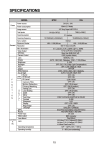
SPECIFICATIONS
Power
Power source
Power consumption
Image sensor
Total number of pixels
Scanning system
Scanning frequency
Sync. system
Electronic shutter
Resolution
Min. illumination
Video output
S/N ratio
Camera Control
Exposure Shutter
Lens (Auto Iris Control)
General
F
U
N
C
T
I
O
N
Lens Level(Brightness)
BLC
AGC
HDR(WDR)
Sense-up
Eclipse
3D-DNR
DIS
White Balance
Day & Night
Privacy zone
Display Title
Gamma
Freeze
SLC
Motion Detection
DPC
LANGUAGE
BAUDRATE
Video Picture
Sharpness
Mirror
AC24V ± 10% / DC12V ± 10%
Max 4.0 Watts
1/3” SONY Super-HAD CCD
NTSC : 811(H) x 508(V), PAL : 795(H) x 596(V)
2:1 interlace
NTSC : 15.734KHz(H) x 59.94Hz(V)
PAL : 15.625KHz(H) x 50Hz(V)
Internal / Line Lock
1/60(1/50) ~ 1/100,000sec
600 TVL (colour)
0.14 Lux(Color), 0.03 Lux(B/W) @ F1.2, 30IRE
1.0Vp-p (75ohm, composite)
More than 50dB (AGC OFF, Sense up OFF)
OSD(TACT Switch), RS-485
1/60(1/50), Flickeless, 1/250 ~ 1/100,000sec
DC / ELC
0 ~ 99
OFF/ON
OFF / LOW / MIDDLE / HIGH
OFF / ON (0~20)
OFF, x2~x256
OFF / ON
OFF / LOW / MIDDLE / HIGH
OFF / ON (Digital Image Stabilization)
AWC / ATW / MANUAL / PUSH
AUTO / COLOR / B&W / EXT
OFF / ON (8 Point, Polygonal Mosaic)
OFF / ON ( EDIT, RESET, POSITION)
USER, 0.45, 0.6, 1.0
OFF / ON
OFF / ON (0~50) / Side Light Compensation
OFF / ON, (SET WINDOW, ALL SET, ALL CLEAR,
SENSITIVITY, SHOW INDICATOR, DELAY OUT)
OFF / AUTO (WHITE, BALCK, DPC LEVEL)
(Dead Pixel Cancellation)
ENGLISH / CHINESE
2400 / 4800 / 9600 / 14400 / 19200 / 38400
POSI / NEGA
0~49
OFF / MIRROR / V-FLIP / ROTATE
14
Sync
Zoom & Pan/Tilt
V - Phase (LineLock)
Camera ID
EXIT
Power input
Video output
Day & Night Input
INTER / AUTO
ZOOM (X1~X3), PAN(-128~+127), TILT(-82~+81)
0 ~ 199
0 ~ 254
EXIT / SAVE & EXIT / FACTORY SET
2-Pin Terminal Block
BNC connector
Terminal Block
Lens mount
Connector
Etc
C/CS mount (Selected through back focus)
Auo Iris Output
Alarm Output
RS-485
Mounting Hole
Operating Temperature
4-pin mini din jack (Standard connection)
Terminal Block
Terminal Block
1/4"-20 UNC (top or bottom)
-10°C~+55°C [14°F~131°F]
Operating humidity
0~96% (non-condensing)
Weight
270g
External Dimension (mm)
66(W) x 56(H) x 120(D)
15
50302883A
16