1
Assembly Instructions
1
P35
2
P36
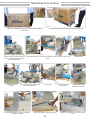
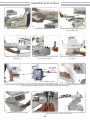
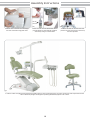
35-Install the seat lower covering watching the holder on the chair frame. Tighten the handle screw.
36-Fix the rear pantograph cover tightening the four
screws, watching sizes and right places to insert
them (detail).
2
1
3
P37
P38
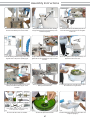
37Replace the seat upholstery on the chair, watching the specific fit (1) and watching the screw (2) to avoid
damaging the chair’s PC Board. Tighten the handle screw (3).
38-Raise up the backrest frame and remove the
finishing cover.
P40
P39
39-Remove the screws from the backrest using a 5mm Hex Wrench, place backrest on its frame and handtighten the
center screw. Tighten screws carefully to avoid upholstery damages.Replace finishing cover.
P41
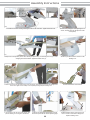
41-Fix armrests on the chair using 13mm wrench, and
place the finishing covers using 3mm Hex Wrench.
P42
40-Place the headrest on the backrest.
P43
42-Plug in the Operating Light electrical connector
and move it up into the arm. Fix the Operating Light.
08
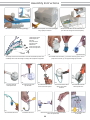
43-After install the anchors on the ground, use
11mm L wrench to fix the chair to the ground.
Replace finishing covers.