1
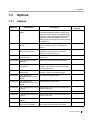
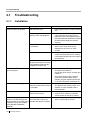
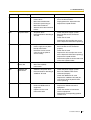
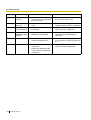
4.1 Troubleshooting
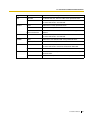
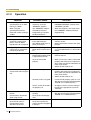
Error Code
Error Message
PROBABLE CAUSE
031*
System data file
not found
•
032*
System
initialization file
not found
•
033*
•
Card initialization •
file not found
034*
LCD file not found
035
System data file
access error
036*
System
initialization file
access error
037*
Card initialization
file access error
038*
LCD file access
error
039*
SD file access
error
041*
Expansion
Memory Card
Failure
•
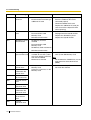
SOLUTION
SD Memory Card not
installed
Bad connection of SD
Memory Card
SD Memory Card malfunction
Main Board malfunction
•
•
•
•
Press the Reset Button
Reprogramme the Hybrid IP-PBX
Replace the SD Memory Card
Replace the Hybrid IP-PBX
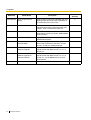
MEC card is not properly
connected
•
See if the corresponding optional
service card is installed properly
Pull out and re-insert the
corresponding optional service card
Replace the corresponding optional
service card
•
•
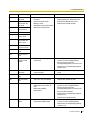
090
Over Card
Limitation
•
Too many optional service
cards installed
•
Reduce the number of optional service
cards
091*
PT connection
over
•
Too many PTs connected
•
Reduce the number of PTs
092*
CS connection
over
•
Too many CSs connected
•
Reduce the number of CSs
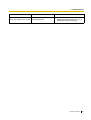
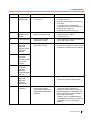
234
DPLL clock failure •
Optional service card
malfunction: DLC, BRI, IPGW
Main Board (MPR)
malfunction
•
See if the corresponding optional
service card is installed properly
Pull out and re-insert the
corresponding optional service card
Press the Reset Button
Replace the corresponding optional
service card
Replace the Hybrid IP-PBX
•
•
•
•
•
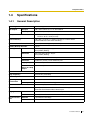
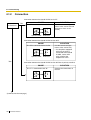
251
MSG/SVM DSP
failure
•
Optional service card
malfunction: MSG, SVM
•
•
See if the corresponding optional
service card is installed properly
Replace the corresponding optional
service card
Installation Manual
195