1
CDS3 McAfee Desktop Firewall "Learn Mode" End-User Guide
Managing the Desktop Firewall Rules
Each time you click on Allow or Deny for a McAfee pop-up, a new rule gets
created. If you need to go back and modify the rule or delete it then do the
following:
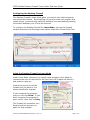
Double-click on the McAfee Desktop Firewall icon on the bottom right corner
of the Desktop.
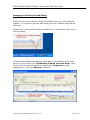
In the McAfee window that appears, scroll down to the bottom of the rules
where you will find all your “Dynamically Created Via Learn Mode” rules.
Click on the rule you are looking for and click on Properties to make
changes to it, or click on Remove to delete it.
Firewall_LearnModeEndUserGuide.doc (Ver 1.0)
Page 2 of 2