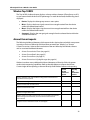
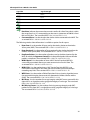
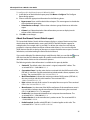
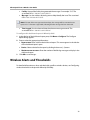
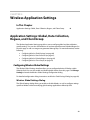
1
WhatsUp Gold v16.2 Wireless User Guide Contents Welcome to WhatsUp Gold Wireless Wireless Overview ........................................................................................................................................................ 1 Supported wireless devices .......................................................................................................................... 1 Wireless accessibility ................................................................................................................................................... 3 Using WhatsUp Gold Wireless Discovering wireless devices .................................................................................................................................... 4 Modifying wireless device role settings ............................................................................................................... 6 Adding existing devices to Wireless ...................................................................................................................... 7 Managing Devices in Wireless.................................................................................................................................. 7 Map........................................................................................................................................................................ 8 Performance ..................................................................................................................................................... 11 Clients ................................................................................................................................................................. 18 Rogues................................................................................................................................................................ 21 Log ....................................................................................................................................................................... 25 Wireless Reporting Using Wireless Dashboard Reports ...................................................................................................................... 27 About the Wireless: Bandwidth report ................................................................................................... 29 About the Wireless: Bandwidth Summary report ............................................................................... 29 About the Wireless: Client Count report ................................................................................................ 29 About the Wireless: Rogue Count report............................................................................................... 30 About the Wireless: RSSI report................................................................................................................. 30 About the Wireless: System Summary report ...................................................................................... 30 Wireless Top 10 Bandwidth ........................................................................................................................ 31 Wireless Top 10 Client Count ..................................................................................................................... 31 Wireless Top 10 Rogue Count .................................................................................................................... 31 Wireless Top 10 RSSI ...................................................................................................................................... 32 Aironet Current reports ................................................................................................................................ 32 Wireless Alerts and Thresholds .............................................................................................................................. 39 i Wireless Application Settings Application Settings: Global, Data Collection, Rogues, and Client Group ............................................. 40 Configuring Wireless Global Settings ..................................................................................................... 40 Configuring Wireless Data Collection ..................................................................................................... 41 Configuring Wireless Excluded Rogues List.......................................................................................... 42 Configuring Wireless Client Groups ........................................................................................................ 42 More information Finding more information and updates ............................................................................................................. 44 Copyright notice ......................................................................................................................................................... 45 ii CHAPTER 1 Welcome to WhatsUp Gold Wireless In This Chapter Wireless Overview.............................................................................................1 Wireless accessibility........................................................................................3 Wireless Overview Wireless is a feature within WhatsUp Gold that allows you to track and manage wireless devices as well as identify rogue devices and access points connected to your network. To access Wireless, click the Wireless tab from the WhatsUp Gold web interface main menu. WhatsUp Gold Wireless manages the following device types: § LWAP. A Lightweight Access Point provides the signal for Wi-Fi network device connections. It stores no data and receives monitoring and configuration information from a Wireless LAN Controller. § Wireless LAN Controller. A Wireless LAN Controller (WLC) serves as the "brain" of the Wi-Fi network. It is used to configure and manage lightweight access points. WAP. A Wireless Autonomous Access Point provides both a signal and Wi-Fi network monitoring and configuration functions. It combines the functionality of a WLC and LAP device. § Important: If you are monitoring Cisco Aironet Autonomous access points we recommend that you run IOS 12.3 or newer. WhatsUp Gold may report inaccurate data if you are using an older IOS version. For additional information, see the WhatsUp Gold Release Notes (http://www.whatsupgold.com/WUG162releasenotes). § Rogue. A Rogue is a device detected due to geographic proximity to an access point but that is unknown to the network and should be investigated to determine potential risk. Supported wireless devices Cisco and Aruba wireless LAN controllers Cisco Small Business wireless devices (Cisco WAP 321) Meru Networks wireless devices Ruckus wireless devices 1 WhatsUp Gold v16.2 Wireless User Guide The five main views within WhatsUp Gold Wireless are: Map. Displays a graphical representation of wireless device connections on your network including Wireless LAN Controllers, Access Points, and Clients. Color-coded SSIDs display between Access Points and Clients. Note: While other Wireless pages make historical data available, the Map page only displays devices currently connected to (or detected by) the network. Performance. Displays Bandwidth, Client Count, Rogue Count, Received Signal Strength Indicator, CPU Utilization, Signal to Noise Ratio, and Memory utilization data for wireless infrastructure devices discovered on your network. Data may be viewed in graphical or tabular format. Clients. Displays a list of known wireless devices connected to your network as well as connection information for each device. Rogues. Displays a list of wireless devices that have been identified as rogues by the Wireless Infrastructure to help you identify rogue devices and mitigate risk. From the Wireless Rogue interface, devices can be sorted by Time, SSID, or MAC Address. Additionally, one or more devices displayed may be selected and subsequently excluded from the list, if desired. Log. Displays a time line of informational events concerning the wireless service. Each page, except the Log, contains a searchable navigation tree on the left side of the page. Data for the wireless devices, network group, or specific scan selected in the tree is displayed on the page along with any devices beneath it in the hierarchy. Note: By default, the navigation tree displays a maximum of 25 devices inside any one group. If you select a group with more than 25 devices, Wireless displays data for all devices in that group in the pane to the right of the navigation tree. To filter the navigation tree using search, enter your full or partial search term and click . The navigation tree updates to reflect only items matching your search parameters. To remove the filter you applied, click the Clear Filter hyperlink below the search box. Note: WhatsUp Gold Wireless is only accessible on the web interface; however, configuring device role settings, including wireless device roles, must be performed on the WhatsUp Gold console. Important: Because of the volume of data collected and stored for Wireless, we recommended that you use Microsoft SQL Server 2005, Microsoft SQL Server 2008 or 2008 R2, Microsoft SQL Server 2012, or Microsoft SQL Server Cluster 2005, 2008, 2008 R2, or 2012 to store the data collected by WhatsUp Gold. See Installing WhatsUp Gold using advanced options for more information. 2 WhatsUp Gold v16.2 Wireless User Guide Note: Device cloning is not available for wireless devices. Note: The date/time format in WhatsUp Gold Wireless and WhatsUp Gold Virtual as well as the Discovery console, are not affected by the settings in the Regional settings dialog in the WhatsUp Gold console. Instead, the date/time format for these areas of the WhatsUp Gold interface are automatically adjusted based on the browser regional language selection. Wireless accessibility Your ability to manage wireless infrastructure devices is determined by your user rights. To view data in WhatsUp Gold Wireless, the Access Wireless option must be selected under your WhatsUp Gold user profile. However, having only Access Wireless user rights prevents you from seeing controls or options applicable to including, excluding, or managing rogues. To actively manage wireless infrastructure devices, the Configure Wireless option must be selected as well. For detailed information on user rights, see Adding and editing user accounts and About user rights in the Ipswitch WhatsUp Gold help. 3 CHAPTER 2 Using WhatsUp Gold Wireless In This Chapter Discovering wireless devices .............................................................................4 Modifying wireless device role settings ........................................................5 Adding existing devices to Wireless ...............................................................7 Managing Devices in Wireless ..........................................................................7 Discovering wireless devices Wireless infrastructure devices are discovered along with non-wireless devices connected to the network during the WhatsUp Gold discovery process. Network discovery is the process WhatsUp Gold uses to identify devices on your network that you may want to monitor. Network discovery scans each device to determine its manufacturer, model, and running software and services. Discovering wireless devices on your network is a three-stage process that includes: 1 2 3 Configuring discovery settings Running discovery Adding discovered devices to WhatsUp Gold Important: Do not use single device discovery (Device > New Device) to add wireless devices to WhatsUp Gold, as devices discovered using this discovery method are not recognized as wireless devices. To discover wireless devices: 1 Access the WhatsUp Gold web interface, then click Devices > Discovery Console. The Discovery Console appears. 2 At the bottom left of the screen, click Start a new discovery session. 3 Configure the following discovery scan settings. a) Scan type b) Credentials 4 WhatsUp Gold v16.2 Wireless User Guide Important: The addresses and credentials of wireless devices you want to monitor/manage with WhatsUp Gold Wireless must be included in the discovery scan settings. Prior to running the discovery process, we recommend assigning SNMPv2 or higher credentials to wireless devices, controllers, and access points. SNMPv2 or higher credentials allow for network information to be polled and passed in data batch groups, whereas SNMP v1 credentials limit device information to be polled and passed in single data operations. c) Scan method d) Advanced settings Important: To ensure wireless devices are found during discovery, confirm that the Gather information for wireless topology and performance option is selected under Settings > Advanced Settings in the WhatsUp Gold Discovery Console. 4 5 6 7 8 9 Click Start a new scan session. When the discovery scan is complete, click Add completed devices to WhatsUp. The Add Devices to WhatsUp Gold dialog appears. Identify wireless devices you want to monitor using Wireless and select the check boxes to the left of the applicable devices. Click Add devices to WhatsUp Gold. After devices have been Saved/Updated, click Close to close the Add Devices to WhatsUp Gold dialog. Click Wireless > Clients to view wireless infrastructure devices now monitored by Wireless. If desired, you can also specify the default configuration behaviors of wireless devices found during the WhatsUp Gold discovery by using the Device Role Settings dialog, which is accessed through the WhatsUp Gold console. For more information, see Modifying wireless device role settings (on page 5). 5 WhatsUp Gold v16.2 Wireless User Guide Modifying wireless device role settings The Device Role Settings determine which monitors, context menu items, and custom web links are assigned to the wireless device, as well as defining which wireless device attributes are collected during polling. To modify Device Role Settings: 1 In the WhatsUp Gold console, select Tools > Discover Devices. The WhatsUp Gold Discover Devices dialog appears. 2 From the Discover Devices dialog menu, select Advanced > Device role settings. The Device Role Settings dialog appears. 3 For wireless devices, configure the following device roles: Lightweight Access Point (Lightweight AP) Wireless Access Point (WAP) Wireless LAN Controller (WLC Controller) 6 WhatsUp Gold v16.2 Wireless User Guide Tip: Ensure controllers are included in the discovery so the wireless devices with which they communicate are seen. Discovering a controller also discovers the wireless devices the controller is communicating with even if they are outside of scan parameters. If you do not want some or all of the devices associated with the controller to be added, deselect them prior to saving discovered devices to WhatsUp Gold. Caution: You cannot save an access point without its associated controller. If an access point is discovered and saved without its controller, it is not recognized as a wireless device. Adding existing devices to Wireless After you upgrade to a new version of WhatsUp Gold that includes Wireless, you need to rediscover any wireless devices you want to manage and/or monitor within Wireless. To add existing devices to Wireless, begin a new discovery session in WhatsUp Gold and make sure to include in the settings the addresses and credentials of wireless devices. For more information on the WhatsUp Gold Discovery Console and instructions for discovering network devices, see Discovering Network Devices and Configuring and Running Discovery in the Ipswitch WhatsUp Gold help. Note: If you are rediscovering one or more lightweight access points, you must also include any associated controllers in your discovery for them to be discovered. Managing Devices in Wireless Wireless allows you to monitor a number of aspects of each wireless device discovered on your network in a variety of ways. Wireless devices and their associated network connections can be viewed as a graphical representation on the Map page. Viewing the Performance page, you can monitor Bandwidth, CPU utilization, memory utilization, RSSI data, and Signal to Noise ratio data for wireless devices on the network in either tabular or graphical representations across a user-defined date range. The Clients page displays a list of known wireless clients connected to your network. The Rogues page displays a list of all unknown wireless devices seen by the wireless infrastructure for the purpose of identifying rogues. The Rogues page can be also be configured to show devices polled during a user-defined date range as well as to sort devices by time, SSID, or MAC address and to exclude selected devices. Finally, the Log page displays a time line of informational events concerning the Wireless service. For each page in Wireless other than the Map, you can select a preset reporting interval or customize one of your own. 7 WhatsUp Gold v16.2 Wireless User Guide To specify a preset reporting interval: 1 At the top of the page, click the button showing the current date. A Date Range dialog appears. 2 Select a preset date/time range from the list. The preset options are: 3 Current Today Yesterday Last 4 Hours Last 8 Hours Last 3 Days Last 7 Days This Month Last Month Click OK. The page updates to reflect wireless infrastructure data within the selected interval. To specify a custom time interval: 1 At the top of the page, click the button showing the current date. A Date Range dialog appears. 2 Select Custom from the list. Start date and end date boxes appear within the dialog along with lists for start time and end time. 3 Click within the start date box and select the desired start date from the calendar that appears. 4 Click the start time list and select the desired start time. Start of day is 12:00 a.m. and End of day is 11:59:59. 5 Repeat steps 3 and 4 to select desired end date and time. 6 Click OK. The page updates to reflect wireless infrastructure data within the selected interval. Map The Wireless Map page displays a graphical representation of current wireless device connections on your network including wireless LAN controllers, access points, and clients. Initially, only controllers and access points may be visible. As you zoom in, associated clients appear in proximity to their access points. Color-coded SSIDs (wireless network names) are displayed between access points and clients. A legend is available at the bottom right of the page to show the wireless network names and associated colors. At the upper right corner of each controller and access point icon is a color coded indicator representing device status. Device status indicators are customizable. For additional information, see Changing the device state colors or icons. Important: To ensure the Wireless map page displays properly, limit your map to less than 1800 devices (APs + WLCs + Clients). 8 WhatsUp Gold v16.2 Wireless User Guide You can click on any icon on the map page to launch a dialog containing detailed information about that device. Clicking on a Controller icon following active information: displays the MAC. The MAC address specific to the controller. IP. The IP address assigned to the controller. Manufacturer. The brand name of the controller. Model. The specific name and/or number assigned to this type of controller by the manufacturer. Location. The physical location of the controller hardware. Serial Number. The unique identification number assigned to this specific controller by the manufacturer. CPU Utilization. The current percentage of CPU usage by the controller. Memory Utilization. The current percentage of memory usage by the controller. # managed APs. The total number of access points managed by the controller. # managed SSIDs. The total number of SSIDs managed by the controller. # associated clients. The total number of clients currently connected to access points managed by the controller. # rogues detected. The total number of rogue devices currently detected by access points managed by the controller. Clicking on an autonomous access point icon information: displays the following active MAC. The MAC address specific to the access point. IP. The IP address assigned to the access point. # rogues detected. The number of rogue devices currently detected by the access point. Manufacturer. The brand name of the access point. Model. The specific name and/or number assigned to this type of access point by the manufacturer. Location. The physical location of the access point hardware. Serial Number. The unique identification number assigned to this specific access point by the manufacturer. Software Version. The number indicating the software release running on the access point. CPU Utilization. The current percentage of CPU usage by the access point. Memory Utilization. The current percentage of memory usage by the access point. Tx. The current transmission speed of data sent in bytes per second. Rx. The current transmission speed of data received in bytes per second. 9 WhatsUp Gold v16.2 Wireless User Guide Average RSSI. The average received signal strength of all clients on the access point expressed as a percentage. Average SNR. The average signal to noise ratio of all clients on the access point expressed as a percentage. SSIDs. The number of Service Set Identifiers on the access point/The number of clients seen on the access point. Note: Below the SSIDs listing, the name of each individual SSID is displayed with the number of clients connected to that SSID. Clicking on a lightweight access point icon information: displays the following active Managing WLC. The name of the Wireless LAN Controller managing the access point. MAC. The MAC address specific to the access point. IP. The IP address assigned to the access point. # rogues detected. The number of rogue devices currently detected by the access point. Manufacturer. The brand name of the access point. Model. The specific name and/or number assigned to this type of access point by the manufacturer. Location. The physical location of the access point hardware. Serial Number. The unique identification number assigned to this specific access point by the manufacturer. Tx. The current transmission speed of data sent in bytes per second. Rx. The current transmission speed of data received in bytes per second. Average RSSI. The average received signal strength of all clients on the access point expressed as a percentage. Average SNR. The average signal to noise ratio of all clients on the access point expressed as a percentage. SSIDs. The number of Service Set Identifiers on the access point/The number of clients seen on the access point. Note: Below the SSIDs listing, the name of each individual SSID is displayed with the number of clients connected to that SSID. Note: The Wireless Map utilizes the same iconography for both lightweight and autonomous access points. 10 WhatsUp Gold v16.2 Wireless User Guide Clicking on a client icon displays the following active information: MAC. The MAC address specific to the access point. IP. The IP address assigned to the access point. AP. The name of the access point to which the client is connected. SSID. The Service Set Identifier the client is using. Connection. The start time and duration of the client's current session (up to 6 hours). Average RSSI. The average received signal strength of all clients on the access point expressed as a percentage. Average SNR. The average signal to noise ratio of all clients on the access point expressed as a percentage. Current Tx. The current transmission speed of data sent in bytes per second. Current Rx. The current transmission speed of data received in bytes per second. Bytes Sent. The amount of data sent by the client during the current session (up to 6 hours). Bytes Received. The amount of data received by the client during the current session (up to 6 hours). Important: Wireless automatically hides unavailable or not applicable data. For example, Aruba devices do not report RSSI or SNR statistics. If you click on a lightweight access point manufactured by Aruba, Average RSSI and Average SNR do not appear in the detailed information dialog for the device. Note: If a device is reported with an IP address of 0.0.0.0, this indicates its controller is unable to obtain an IP address from the device or the access point cannot determine it. Performance The Wireless Performance page displays Bandwidth, Client Count, Rogue Count, Received Signal Strength Indicator, CPU Utilization, Signal to Noise Ratio, and Memory Utilization data for wireless infrastructure devices connected to your network. By default, data for all devices is shown. You can filter the performance data that is displayed by selecting specific wireless devices or network groups from the navigation tree on the left side of the page. For additional information on each report, see the following: Bandwidth Report (on page 13) Client Count Report (on page 14) Rogue Count Report (on page 15) Received Signal Strength Indicator Report (on page 15) CPU Utilization Report (on page 16) 11 WhatsUp Gold v16.2 Wireless User Guide Signal to Noise Ratio Report (on page 17) Memory Utilization Report (on page 17) To select the number of devices displayed on a graph or in the table: Select a number from the Max items list at the top of the report. To configure tabular and graphical display options: Click the applicable icon to display device information in the desired format. Click tabular, for stacked area graph, or for for line graph. Note: Bandwidth, Client Count, and Rogue Count data support stacked area graphing. If Current is selected as the reporting interval, stacked area graphs cannot be generated for any performance data. Additionally, if Current is selected, clicking the line graph button generates a pie chart with each client, SSID, or access point (depending on your specified grouping) depicted as a different color wedge. The arrangement of graphs and tables on the Performance page is configurable. You can specify which reports appear on the Performance page as well as in what position. To configure the layout of the Performance page: 1 Click Configure Layout. The Configure Layout dialog appears. 2 Click to select the check box to the left of any reports you no longer want to display on the Performance page. As items are deselected, they automatically move down the list within the dialog leaving selected items at the top. 3 Of the reports that remain selected, if desired, click and drag report titles within the dialog to reorder the list. The position map shown within the dialog represents how your configured reports listing appears on the Performance Page. 4 Click OK to save configuration changes. Note: Following initial device discovery, as initial polling occurs and data returns, it may take a few moments for information to display. Clicking an icon to the left of a device displayed in any tabular report launches a dialog containing detailed device information. represents a lightweight access point. represents an autonomous access point. represents a WLC. Specific dialog content is dependant upon device type and identical to detailed device information displayed when you click on an icon on the Wireless Map page. For descriptions of each device type-specific dialog, see Map (on page 8). 12 WhatsUp Gold v16.2 Wireless User Guide Note: To see icons in the Bandwidth report, select grouping by AP. Clicking the icon at the upper right corner or clicking anywhere on a report displayed on the Performance page causes that report to open in a full page view. When a report is viewed in this manner, you still have the ability to switch between tabular and graphical displays, modify the reporting interval, change the grouping, select other scans and devices to display, and increase or decrease the maximum number of items displayed on the report. Additionally, from any full page view, clicking Axis Scaling launches a dialog you may use to select Auto Scale or a Fixed Scale you customize by setting the minimum and maximum for the axis as well as the unit of measurement. Any configuration changes made in full page view are persistent and will remain when you return to the main Wireless Performance page. Bandwidth The Wireless Bandwidth report displays wireless elements (Client Groups, Clients, SSIDs, or APs) with the highest bandwidth discovered by your network during the selected reporting interval. Report data is grouped by Traffic In and Traffic Out. Use the navigation tree at the left side of the page to select specific groups or wireless infrastructure devices from which to display data. Bandwidth data for five, ten, fifteen or twenty devices can be displayed in both tabular and graphical format. You can define a range to only display devices polled during a specific time period using the date button. When you view the bandwidth report in tabular format, the following information is displayed: Client Group/Client/SSID/AP. Displays the group name, client name, SSID type, or access point depending on how the table is viewed. Select from the View by list at the top of the dashboard report to graph bandwidth data by Client Group, Client, SSID, or AP. Min. Displays the minimum speed of data traffic during the selected time interval in bytes per second. Min. is only displayed when the Bandwidth Report is viewed in tabular format. Max. Displays the maximum speed of data traffic during the selected time interval in bytes per second. Max. is only displayed when the Bandwidth Report is viewed in tabular format. Average Bytes Received/Sent. Displays the amount of data received (under Traffic In) or sent (under Traffic Out) during the selected time interval in bytes per second. When selecting View by Client Group, Client, SSID, or AP, remember your selection changes the perspective of Traffic In versus Traffic Out: When View by Client Group is selected, Traffic In represents cumulative data received by the client group from the access point and Traffic Out represents cumulative data sent from the client group to the access point. When View by Client is selected, Traffic In represents data received by the client from the access point and Traffic Out represents data sent from the client to the access point. 13 WhatsUp Gold v16.2 Wireless User Guide When View by AP is selected, Traffic In represents data received by the access point from the client and Traffic Out represents data sent from the access point to the client. When View by SSID is selected, Traffic In represents data received by an access point associated with a particular SSID. Traffic Out represents data sent from an access point associated with a particular SSID. Note: If Current is selected as the reporting interval, Average Bytes Received and Average Bytes Sent become Bytes Received and Bytes Sent since there is no time span over which to average data. When you view the bandwidth report in graphical format, the the x axis represents the selected date range and the y axis represents aggregate average traffic for the selected client, SSID, or access point within the specified time interval. Each item on the graph is color-coded. Click the Show Legend check box below the graph to display the legend listing the device names and corresponding colors. Note: Reported bandwidth data, though displayed split between traffic in and traffic out, is aggregated. As a result, the Client Group/Client/SSID/AP Traffic In and Traffic Out line items are always identical and at first glance the report may not appear to be sorted properly. The first item in each Client Group/Client/SSID/AP list has the highest TOTAL bandwidth (Traffic In + Traffic Out), the second item has the second highest, etc. Client Count The Wireless Client Count report displays access points with the highest number of clients discovered on your network during the selected reporting interval. Use the navigation tree at the left side of the page to select specific groups or clients from which to display data. Client count data for five, ten, fifteen or twenty access points can be displayed in both tabular and graphical format. Additionally, you can define a range to only display access points polled during a specific time period using the date button. When you view the client count report in tabular format, the following information is displayed: Device. Displays the device name or IP address. Select from the View by list at the top of the dashboard report to graph client count data by Client Group, SSID, or AP. Min. Displays the lowest number of clients the device connected to at one time within the specified time interval. Max. Displays the highest number of clients the device connected to at one time within the specified time interval. Average. Displays the aggregate average number of clients the device connected to within the specified time interval. 14 WhatsUp Gold v16.2 Wireless User Guide Note: If Current is selected as the reporting interval, Average becomes Client Count since there is no time span over which to average data. When you view the client count report in graphical format, the x axis represents the selected date range and the y axis represents aggregate average client count for the selected devices within the specified time interval. Each device on the graph is color-coded. Click the Show Legend check box below the graph to display the legend listing the device names and corresponding colors. Rogue Count The Wireless Rogue Count report displays access points with the highest number of unique unknown wireless infrastructure devices detected by your network during the selected reporting interval. Important: Because rogue counts represent distinct devices, rolled up data values usually appear larger than the raw values. For example: If you have five rogues seen for the first half of the hour and five different rogues for the last half, you would see a constant value of five in the raw data. However, when rolled up into hourly data, you have seen ten distinct rogues for the hour, so the graph would reflect a value of ten. Use the navigation tree at the left side of the page to select specific groups or wireless infrastructure devices from which to display data. Rogue count data for five, ten, fifteen or twenty devices can be displayed in both tabular and graphical format. Additionally, you can define a range to only display access points polled during a specific time period using the date button. When you view the rogue count report in tabular format, the following information is displayed: Device. Displays the device name or IP address of the access point. Rogue Count. Displays the number of rogues the access point detected within the selected time interval. When you view the rogue count report in graphical format, the x axis represents the selected date range and the y axis represents aggregate average rogue count for the selected devices within the specified time interval. Each device on the graph is color-coded. Click the Show Legend check box below the graph to display the legend listing the device names and corresponding colors. 15 WhatsUp Gold v16.2 Wireless User Guide Received Signal Strength Indicator The Wireless Received Signal Strength Indicator report displays wireless infrastructure devices with the lowest overall RSSI percentages discovered by your network during the selected reporting interval. Use the navigation tree at the left side of the page to select specific groups or wireless infrastructure devices from which to display data. RSSI data for five, ten, fifteen or twenty devices can be displayed in both tabular and graphical format. Additionally, you can define a range to only display access points polled during a specific time period using the date button. When you view the Received Signal Strength Indicator report in tabular format, the following information is displayed: Device. Displays the device name. Select from the View by list at the top of the report to graph RSSI data by Client Group or AP. Min%. Displays the lowest signal transmission strength received from the device in relation to all available power within the selected time interval. Max%. Displays the highest signal transmission strength received from the device in relation to all available power within the selected time interval. Average%. Displays the average signal strength from the selected device within the selected time interval. When you view the Received Signal Strength Indicator report in graphical format, the x axis represents the selected date range and the y axis represents aggregate average signal strength for the selected devices within the specified time interval. Each device on the graph is color-coded. Click the Show Legend check box below the graph to display the legend listing the device names and corresponding colors. CPU Utilization The Wireless CPU Utilization report displays wireless infrastructure devices with the highest percentage of CPU usage discovered by your network during the selected reporting interval. Use the navigation tree at the left side of the page to select specific groups from which to display data. Utilization data for five, ten, fifteen or twenty devices can be displayed in both tabular and graphical format. Additionally, you can define a range to only display access points polled during a specific time period using the date button. When you view the CPU Utilization report in tabular format, the following information is displayed: Device. Displays the device name or IP address. Min%. Displays the lowest percentage used by the device within the selected time interval. Max%. Displays the highest percentage used by the device within the selected time interval. Percent Used. Displays the average percentage used by the device within the selected time interval. 16 WhatsUp Gold v16.2 Wireless User Guide When you view the CPU Utilization report in graphical format, the x axis represents the selected date range and the y axis represents the average percentage of CPU utilization for the selected devices within the specified time interval. Each device on the graph is colorcoded. Click the Show Legend check box below the graph to display the legend listing the device names and corresponding colors. Note: If you are displaying devices or a group with devices that have multiple CPUs, CPU utilization values seen will be an average for each device. To see utilization of individual processors on a device, use the navigation tree to "select" fewer items. Signal to Noise Ratio The Wireless Signal to Noise Ratio report displays wireless infrastructure devices with the lowest overall SNR percentages discovered by your network during the selected reporting interval. Use the navigation tree at the left side of the page to select specific groups from which to display data. Signal to Noise Ratio data for five, ten, fifteen or twenty devices can be displayed in both tabular and graphical format. Additionally, you can define a range to only display access points polled during a specific time period using the date button. When you view the Signal to Noise Ratio report in tabular format, the following information is displayed: Device. Displays the device name or IP address. Select from the View by list at the top of the report to graph SNR data by Client Group or AP. Min%. Displays the lowest signal to noise percentage transmitted by the device in relation to all available power within the selected time interval. Max%. Displays the highest signal to noise percentage transmitted by the device in relation to all available power within the selected time interval. Average%. Displays the average percentage used by the device within the selected time interval. Note: Percentages reported likely will never reach 0 or 100. Generally, A Signal to Noise ratio of 40% is considered good. Anything less than 20% is considered poor. When you view the Signal to Noise Ratio report in graphical format, the x axis represents the selected date range and the y axis represents the percentage of average signal to noise ratio for the selected devices within the specified time interval. Each device on the graph is colorcoded. Click the Show Legend check box below the graph to display the legend listing the device names and corresponding colors. 17 WhatsUp Gold v16.2 Wireless User Guide Memory Utilization The Wireless Memory Utilization report displays wireless infrastructure devices with the highest percentage of memory usage discovered by your network during the selected reporting interval. Use the navigation tree at the left side of the page to select specific groups from which to display data. Utilization data for five, ten, fifteen or twenty devices can be displayed in both tabular and graphical format. Additionally, you can define a range to only display access points polled during a specific time period using the date button. When you view the Memory Utilization report in tabular format, the following information is displayed: Device. Displays the device name or IP address. Min%. Displays the lowest percentage used by the device within the selected time interval. Max%. Displays the highest percentage used by the device within the selected time interval. Percent Used. Displays the average percentage used by the device within the selected time interval. When you view the Memory Utilization report in graphical format, the x axis represents the selected date range and the y axis represents the percentage of average memory utilization for the selected devices within the specified time interval. Each device on the graph is colorcoded. Click the Show Legend check box below the graph to display the legend listing the device names and corresponding colors. Clients The Wireless Clients page displays a table of wireless clients connected to your network and all available data on each connection. The client name is determined by Wi-Fi authentication and may not be present under all authentication schemes. If the client name is not available or cannot be determined, the client's MAC address is displayed. If a client is displayed as 0.0.0.0, this indicates the device's controller is unable to obtain its IP address or the access point cannot determine it. For each client connected during the selected time interval, the following information is displayed: Client. The name assigned to the wireless client connected to the access point. MAC. The MAC address specific to the client connected to the access point. SSID. The SSID broadcast by the access point to which the client is connected. Device. The access point to which the client is connected. First Seen. The date and time the client first connected during the defined date/time interval. Last Seen. The date and time the client disconnected during the defined date/time interval. Bytes Sent. The amount of data sent by the client during the session. 18 WhatsUp Gold v16.2 Wireless User Guide Bytes Received. The amount of data received by the client during the session. Percent Connected. The percent of time the client was connected in relation to the First Seen and Last Seen times displayed. Note: If Current is selected as the reporting interval, the Clients page only displays data for clients currently connected. Clicking the icon to the right of any client name causes details for that client to open in a full page view. For additional information, see Individual Client Detail (on page 20). To create a custom filter for a column: 1 2 Click the icon for the column you want to filter. Use the lists and entry fields within the dialog that appears to define the filter. 3 Click Filter to apply the filter to the column. Note: Multiple columns can have filters applied simultaneously. To search for a specific client: 1 Enter an SSID, a client’s name, a client’s MAC address, or a client’s IP address in the search box. 2 Click Search. The list is filtered to display only devices matching your search criteria. Note: The search box supports partial search terms but not 'wildcard' characters. 19 WhatsUp Gold v16.2 Wireless User Guide Note: When comparing a client's MAC or IP address against the entered search term, the results returned reflect clients' IP or MAC addresses that begin with the search term entered. When comparing a client's name or SSID against the entered search term, results returned reflect SSIDs and names containing the search term entered. To assign clients to a new or existing client group: 1 Click the check box next to the MAC address for each client to be added to the group. 2 Click Assign Group. 3 Select a group from the list within the dialog that appears or enter a new group name if you are creating a new client group. 4 Select the radio button for either MAC Address or MAC Prefix to set the group Entry Type. 5 Click Assign. For information on creating client groups, see Configuring Wireless Client Groups (on page 42). Client Details The client details interface displays the following data for the selected time interval: Client name and MAC address Bandwidth data Individual session details Note: A client's overall Percent Connected is not an average of each Percent Connected displayed below it in the expanded client's polling detail. Each instance of Percent Connected is in direct relation to the associated times under First Seen and Last Seen. Caution: Polling interval and data retention settings affect session time and detailed polling information reported displayed for a client. When determining settings for data retention schedules, make modifications based on your network size. Consider that specificity is lost as data is rolled up from raw to hourly data and from hourly to daily data. Keeping raw data for less time may improve performance. Example: A client is connected to a specific access point from 10:05 to 10:20 and again from 10:35 to 10:55 on February 1st, 2012. When the raw data is rolled up to hourly, you will know a device was connected for 50 minutes between 10:05 and 10:55 but will no longer be able to determine when the gap occurred within the hour. The Clients page will display a Start Time of 2/1/2012 10:05 AM, an End Time of 2/1/2012 10:55 AM, and a Percent Connected of 70.0%. Contiguous data is not lost in the roll up. Data is displayed as follows: First Time Seen Last Time Seen - Total Minutes; so, if the device was constantly connected from 10:10 to 10:40, the connection would start 10:10, end at 10:40 and have a connected percentage of 100%. Contiguous data is not lost in the roll up. Data is displayed as follows: First Time Seen - Last Time Seen - Total Minutes; so, if the device was connected from 10:00 to 10:30, you would know the connection was active between 10:00 and 10:30. 20 WhatsUp Gold v16.2 Wireless User Guide Associations by AP Associations by SSID SNR and RSSI data Note: When Current is selected as the reporting time interval, graphical data is replaced with gauges showing Bandwidth, SNR, and RSSI data and Associations by AP and Associations by SSID are no longer displayed. The minimum and maximum values shown on the each gauge are determined by the data reported on that gauge. Each element of the client details page is collapsible so you can customize which client to the left of the details are displayed and which are hidden. To hide an item, click the element you no longer want displayed. Click the to the left of any hidden item to display it. Specifically, for individual client session details, each client name, MAC address, and IP address displayed is hyperlinked. Clicking a hyperlink automatically uses that text as a search term and launches a search page listing matching Wireless information. You can perform additional searches for information on other wireless infrastructure devices from this page by using the search box at the top of the table where the hyperlinked content you clicked to launch the initial search is pre-populated. Additionally, session details can be sorted in the same manner as tabular data on the main Clients (on page 18) page. You can return to the Clients (on page 18) page by clicking the Back To Clients Page hyperlink at the top of the client detail full page view. Rogues The Wireless Rogues page displays a list of wireless devices that have been identified as rogues by the Wireless Infrastructure. The Rogues page is intended to help you identify foreign wireless devices that emulate access point devices (rogues) in order to mitigate risk. Using this interface, you can sort displayed devices by Time, SSID, or MAC Address, search for a specific wireless device, exclude devices of which you are already aware and/or known devices in close geographic proximity to your wireless network and are certain to pose no threat to your network, and limit the display to show devices polled during a specific date range. For each rogue detected, the following information is displayed: SSID. The SSID broadcast by the rogue access point. If a rogue has been configured not to broadcast an SSID, the SSID box is blank. MAC Address. The MAC address specific to the rogue detected by the network. Duration. The amount of time the SSID/MAC Address combination has been seen on the specific access point since the listed poll time. First Seen. The date and time the rogue was first seen during the defined date/time interval. 21 WhatsUp Gold v16.2 Wireless User Guide Last Seen. The date and time the rogue was last seen during the defined date/time interval. Percent Seen. The percent of time the rogue was connected in relation to the defined date/time interval. Note: If Current is selected as the reporting interval, the Rogues page only displays the SSID and MAC Address of rogues currently visible. The devices displayed on the Rogue page are grouped by the access points on which they are/were connected. An SSID/MAC Address combination may appear under more than one access point indicating it is a roaming device hopping from one access point to another. Clicking the icon to the left of any access point displayed launches a dialog containing detailed AP information. Specific dialog content is identical to detailed device information displayed when you click on an access point icon on the Wireless Map page. For a description, see Map (on page 8). To sort rogues: 1 Click Sort By Last Seen. 2 Select a sort method from the list that appears. The sort button changes and displayed devices are reordered based on your selection. The available options are: Sort by last seen Sort by duration Sort by ssid Sort by mac Sort by Percent seen (asc) Sort by Percent seen (desc) Note: If Current is selected as the reporting interval, the Rogues page can only be sorted by SSID or MAC address. Rogues can be excluded from the display if they are known devices or if you are certain they pose no threat to your network. When a rogue is excluded from the list, existing data for that rogue is now hidden from both the rogues page and the rogue count performance and dashboard reports. Additionally, any applicable thresholds in Alert Center will no longer report trigger alerts for the rogue and Wireless no longer collects data for that rogue when wireless devices are polled. If you remove the rogue from the excluded rogues list, there will be a gap in data for that rogue between time of initial rogue exclusion and inclusion back into the rogues page. To exclude devices: 1 Click the check box to the left of each of the devices you want to exclude from the list. 2 Click Exclude Rogue. Selected devices are removed from the list. For more information on managing excluded rogues, see Add to Excluded Rogues (on page 24) and Manage Excluded Rogues (on page 23). 22 WhatsUp Gold v16.2 Wireless User Guide To search for a specific device: 1 Enter an SSID or MAC Address in the search ssid or mac box. 2 Click Enter. The rogues list is filtered to display only devices matching your search criteria. 3 4 5 6 or Click the icon to the right of the search ssid or mac box. Enter an SSID and/or a MAC Address in the applicable boxes in the search dialog that appears. If desired, select the Include Blank SSID check box to include devices in the search that have been configured to not broadcast an SSID. Click Search. The rogues list is filtered to display only devices matching your search criteria. Note: When comparing a rogue's MAC or IP address against the entered search term, the results returned reflect rogue IP or MAC addresses that begin with the search term entered. When comparing a rogue's name or SSID against the entered search term, results returned reflect SSIDs and names containing the search term entered. In addition to excluding individual devices one at a time from the rogues list, you can also search the database for devices to bulk add to the excluded list in one step from the Wireless Application Settings page using a list of SSIDs and/or MAC addresses you know you want to exclude. Caution: The Add to Excluded Rogues feature can only be used to search the existing WhatsUp Gold database for previously seen wireless infrastructure devices you want to add to the excluded list. You cannot add SSIDs and/or MAC addresses to be excluded if and when they are detected in the future. To access the Add to Excluded Rogues List: 1 in the upper-right corner of the page and select Click the Application Settings icon Application Settings. The Application Settings interface appears. 2 Click Wireless under Application Settings. 3 Click Add to Excluded Rogues List. The Add to Excluded Rogues dialog appears. Managing Excluded Rogues You can manage devices previously excluded from the Rogues page using the Application Settings configuration page. To access the Manage Excluded Rogues List: 1 in the upper-right corner of the page and click Click the Application Settings icon Application Settings. The Application Settings interface appears. 2 Click Wireless under Application Settings. 3 In the Excluded Rogues List section, click Manage. The Manage Excluded Rogues List page appears. 23 WhatsUp Gold v16.2 Wireless User Guide To add previously excluded rogues to the rogues list: 1 Click the check box to the left of each of the devices you want to add back to the rogues list. 2 Click Include Rogue. Selected devices are removed from the excluded rogues list and reintroduced into the rogues list. To search for an excluded device: 1 Enter an SSID or MAC Address in the search ssid or mac box. 2 Click Search. Only devices matching your search criteria are displayed. To sort excluded rogues: 1 Click Sort By Last Seen. Note: Excluded devices are sorted by the date and time they were last seen by default. 2 Select Sort By Last Seen, Sort By SSID, or Sort By MAC. The sort button changes and displayed devices are reordered based on your selection. Adding to Excluded Rogues To search for devices to add to the Excluded Rogues List: 1 Enter or copy and paste a delimited list of SSIDs and/or MAC addresses in the applicable data entry boxes in the Add To Excluded Rogues dialog. 2 Click Submit. The Select Rogues to Add to Excluded List page appears with all devices matching your SSID and/or MAC address criteria preselected. Note: List items must be delimited using a comma (,) or a semicolon (;). You can enter a MAC address in any of the following formats: 01:23:45:67:89:0A, 01-23-45-67-89-0A, or 01.23.45.67.89.0A. Partial search terms are supported. For additional instructions on adding devices to the Excluded Rogues list, see Select Rogues to Add to Excluded List (on page 24). Selecting Rogues to Add to Excluded List To add devices to the Excluded Rogues List: 1 Click to select the check box to the left of each of the devices you do not want to exclude from the list. 2 Click Exclude Selected. Selected devices are added to the Excluded Rogues list. To sort rogues: 1 Click Sort By Last Seen. Note: Devices are sorted by the date and time they were last seen by default. 2 Select Sort By SSID or Sort By MAC. The sort button changes and displayed devices are reordered based on your selection. 24 WhatsUp Gold v16.2 Wireless User Guide Log The Wireless Log page displays a time line of informational events concerning the Wireless service. The following information is displayed: Date. The calendar date and time of the event displayed in month/day/year hour:minute:second format Severity. The type of the event based on the predefined classifications of Error, Warning, Information, or Verbose. Message. A detailed description of the event logged. icon to the left of each event message launches a dialog containing complete Clicking the status message content. To filter Log page data: 1 Click Show All. 2 Select a filter from the list that appears. The button label changes to display your selection and only messages matching that criteria are shown. The available options are: Show All Filter By Critical Filter By Error Filter By Warning Filter By Information Filter By Verbose Filter By Start Filter By Stop Filter By Suspend Filter By Resume Filter By Transfer To create a custom filter for a column: 1 Click the 2 Use the lists and entry fields within the dialog that appears to define the filter. icon for the column you want to filter. 25 WhatsUp Gold v16.2 Wireless User Guide 3 Click Filter to apply the filter to the column. Note: Multiple columns can have filters applied simultaneously. 26 CHAPTER 3 Wireless Reporting In This Chapter Using Wireless Dashboard Reports .............................................................. 27 Wireless Alerts and Thresholds ...................................................................... 39 Using Wireless Dashboard Reports In addition to the reports available under Wireless, the WhatsUp Gold Home dashboard includes a dashboard view containing a number of Wireless dashboard reports by default. You can also add Wireless dashboard reports to the WhatsUp Gold home page, providing custom report views you want to make available on your WhatsUp Gold dashboard. The following Wireless dashboard reports can be added to the WhatsUp Gold home page: Bandwidth (on page 28) Bandwidth Summary Client Count Rogue Count (on page 29) RSSI Wireless System Summary Wireless Active Clients (on page 33) Wireless Details (on page 35) Wireless Errors (on page 37) Wireless Last 10 Syslog Messages (on page 38) When configuring Wireless dashboard reports, device groups must be selected. A single device version of each of these reports except for the system summary can also be added to the WhatsUp Gold dashboard. When configuring single device Wireless dashboard reports, a single device must be selected. Top 10 versions of Bandwidth, Client Count, Rogue Count (on page 31), and RSSI are also available in WhatsUp Gold. For details on Top 10 dashboard reports, see Top 10 reports in the Ipswitch WhatsUp Gold help. To access WhatsUp Gold Dashboard Reports: For detailed instructions, see Adding Dashboard Reports to a Dashboard View in the Ipswitch WhatsUp Gold help. 27 WhatsUp Gold v16.2 Wireless User Guide To add Wireless dashboard reports: 1 In the title bar of the dashboard pane, click Add Content. The Add Content pane appears. 2 Select the Wireless folder icon from the grid. Note: If you are adding one of the Wireless Top 10 dashboard reports, select the Top 10 folder instead of the Wireless folder. 3 4 Select the Wireless report you want to add. A dialog that previews the report appears. Click + Add. The selected report appears on the WhatsUp Gold home page. Repeat this step until you have added all the Wireless dashboard reports you want to include on the WhatsUp Gold home page. 5 Click Close. 6 Click I'm Done at the bottom of the home page. Tip: You can view other Wireless dashboard reports in the preview dialog without returning to the WhatsUp Gold home page by using the PREV and NEXT buttons at the left and right of the dialog. Each Wireless dashboard report can be customized to fit your specific needs. From any Wireless dashboard report menu, select Configure to open the configuration dialog. To configure the dashboard report settings: 1 In the upper-right corner of the dashboard report, click Menu > Configure. A Configure Report dialog appears. 2 From this dialog, you can: Modify the Report name. Specify the devices for which the report displays data. Select a predefined date range. Set the height and width of the report. Choose between a graphical or tabular display. Choose how report data is grouped (by device, access point, or SSID). Choose whether or not the report in graphical form contains a legend. Note: For some Wireless dashboard reports, configuration options are limited. Configuration dialogs only display options applicable to the selected report. 3 Make configuration changes as needed and click OK to save. The dashboard report updates to reflect configuration changes. 28 WhatsUp Gold v16.2 Wireless User Guide About the Wireless: Bandwidth report The Bandwidth dashboard report displays information on the speed and quantity of data sent and received by wireless infrastructure devices. The following data is displayed: Client Group/Client/SSID/AP. Displays the group name, device name, SSID, or access point depending on how the table is grouped. Min. Displays the minimum speed of data traffic during the selected time interval in kilobytes per second. Min. is only displayed when the Top 10 Bandwidth Report is viewed in tabular format. Max. Displays the maximum speed of data traffic during the selected time interval in kilobytes per second. Max. is only displayed when the Top 10 Bandwidth Report is viewed in tabular format. Average Bytes Received/Sent. Displays the aggregate average amount of data received (under Traffic In) or sent (under Traffic Out) by the client, SSID, or access point during the selected time interval in kilobytes per second. About the Wireless: Bandwidth Summary report The Bandwidth Summary dashboard report displays basic information on bandwidth usage by wireless infrastructure devices monitored by WhatsUp Gold. The following data is displayed: The current aggregated data rate of data sent and data received in bytes per second. The domain/username of the client using the most bandwidth. The domain/username of the client with the highest total traffic over the past twelve hours. About the Wireless: Client Count report The Client Count dashboard report displays information on the quantity of wireless infrastructure devices connected to your network. The following counts are displayed: Client Group/SSID/AP. Displays the group name, SSID, or access point depending on how the table is grouped. Min. Displays the lowest number of clients the device connected to at one time within the specified time interval. Max. Displays the highest number of clients the device connected to at one time within the specified time interval. Average Count. Displays the aggregate average number of clients the device connected to within the specified time interval. 29 WhatsUp Gold v16.2 Wireless User Guide About the Wireless: Rogue Count report The Rogue Count dashboard report displays a listing of unknown wireless infrastructure devices seen by access points on your network. For each rogue listed, the following data is displayed: Device. Displays the device name or IP address of the access point. Rogue Count. Displays the number of times the device was polled and returned data within the selected time interval. About the Wireless: RSSI report The RSSI dashboard report displays information on signal strength for wireless elements (Client Groups or APs) when data is sent and received by wireless infrastructure devices on your network. For each device listed, the following data is displayed: Device. Displays the device name or IP address. Min%. Displays the lowest signal transmission strength received from the device within the selected time interval. Max%. Displays the highest signal transmission strength received from the device within the selected time interval. Average%. Displays the average signal strength from the selected device within the selected time interval. About the Wireless: System Summary report The System Summary dashboard report displays high-level information on the quantity of each wireless infrastructure device type and average RSSI and SNR data for all wireless infrastructure devices monitored by WhatsUp Gold Wireless. The following data is displayed: WLCs. The current number of Wireless LAN Controllers connected to the network. Lightweight APs. The current number of lightweight access points connected to the network. Autonomous APs. The current number of autonomous access points connected to the network. SSIDs. The current number of SSIDs used by the network. Clients. The current number of clients connected to the network. Rogues. The current number of rogues detected by the network. RSSI Avg. The average RSSI percentage of all wireless infrastructure devices connected to the network. SNR. The average SNR percentage of all wireless infrastructure devices connected to the network. 30 WhatsUp Gold v16.2 Wireless User Guide Wireless Top 10 Bandwidth The Top 10 Bandwidth dashboard report displays the ten wireless elements (Client Groups, Clients, SSIDs, or APs) on your network with the highest aggregate bandwidth. For each device displayed, the following data is displayed: Client Group/Client/SSID/AP. Displays the Client Group, Client, SSID, or access point depending on how the table is grouped. Min. Displays the minimum speed of data traffic during the selected time interval in kilobytes per second. Min. is only displayed when the Top 10 Bandwidth Report is viewed in tabular format. Max. Displays the maximum speed of data traffic during the selected time interval in kilobytes per second. Max. is only displayed when the Top 10 Bandwidth Report is viewed in tabular format. Average Bytes Received/Sent. Displays the aggregate average amount of data received (under Traffic In) or sent (under Traffic Out) by the client, SSID, or access point during the selected time interval in kilobytes per second. Important: For important information regarding traffic in, traffic out, and how bandwidth data is reported by Wireless, see Bandwidth. Wireless Top 10 Client Count The Top 10 Client Count dashboard report displays the ten wireless elements (Client Groups, Clients, SSIDs, or APs) on your network with the highest number of clients connected. For each device listed, the following data is displayed: Client Group/SSID/AP. Displays the Client Group, SSID, or access point depending on how the table is grouped. Min. Displays the lowest number of clients the device connected to at one time within the specified time interval. Min. is only displayed when the Top 10 Client Count Report is viewed in tabular format. Max. Displays the highest number of clients the device connected to at one time within the specified time interval. Max. is only displayed when the Top 10 Client Count Report is viewed in tabular format. Average Count. Displays the aggregate average number of clients the device connected to within the specified time interval. Wireless Top 10 Rogue Count The Top 10 Rogue Count dashboard report displays a listing of the ten access points on your network with the highest number of rogues detected. For each device listed, the following data is displayed: Device. Displays the device name or IP address of the access point. Rogue Count. Displays the number of times the device was polled and returned data within the selected time interval. 31 WhatsUp Gold v16.2 Wireless User Guide Wireless Top 10 RSSI The Top 10 RSSI dashboard report displays a the ten wireless elements (Client Groups or APs) on your network with the lowest RSSI percentage. For each device listed, the following data is displayed: Device. Displays the client group name or access point. Min%. Displays the lowest signal transmission strength received from the device within the selected time interval. Max%. Displays the highest signal transmission strength received from the device within the selected time interval. Average%. Displays the average signal strength from the selected device within the selected time interval. Aironet Current reports The following dashboard elements which report wireless device data and which were present in previous versions of WhatsUp Gold have been renamed from "Wireless" to "Aironet Current" for version 16 due to the introduction of the new WhatsUp Gold Wireless feature and its associated dashboard elements. Aironet Current Active Clients (on page 33) Aironet Current Details (on page 35) Aironet Current Errors (on page 37) Aironet Current Last 10 Syslog Messages (on page 38) Wireless introduces many additional dashboard elements to WhatsUp Gold with greater wireless device reporting capabilities. Refer to the table below to compare the Aironet Current single device reporting to the new WhatsUp Gold Wireless features and reporting. Aironet Current Dashboard Reports Displays detailed radio and hardware configuration information for Cisco Aironet access points X Requests current log entries from Cisco Aironet access points X Reports current totals for radio errors X Reports current wireless data WhatsUp Gold v16 Wireless Features X X Reports on single device data X X Displays clients currently connected to Cisco-managed environments, Aruba-managed environments, and Cisco Aironet autonomous environments X X Subject to access restrictions based on User Rights X 32 WhatsUp Gold v16.2 Wireless User Guide Displays devices currently connected to Cisco-managed environments, Aruba-managed environments, and Cisco Aironet autonomous environments Records, tracks, and reports wireless data over time Reports aggregate device/group data X X X About the Aironet Current Active Clients report This home-level dashboard report lists the clients currently connected to the wireless access point (WAP) and displays important statistical information for each wireless device connected to the WAP. You can also click the (WAP) device name link, at the top of the report, to access the device status report. For more information, see Understanding the Device Status dashboard. If you use the WhatsUp Flow Monitor plug-in with WhatsUp Gold, you can click the icon to drill down into the Flow Monitor reports for specific source and destination information about the wireless device and its conversation partners. The first two columns are fixed attributes (Name and IP Address) and the remaining columns are user configurable. You can configure the dashboard report to display the following parameters in addition to the default attributes: MAC Address, Signal Strength, Data Rate, Connected Since, SSID, Bytes Sent, Bytes Received, Duplicate Packets, MSDU Retries, MSDU Fails, WEP Errors for each wireless device, MIC Errors, and MIC Missing Frames. The following wireless client information is available in this report by default: Name. Lists the wireless device name. This is the Cisco IOS device hostname if the other end of the association is a bridge, access point, or repeater. If it is a wireless client, this is the configured client name. If this value is not available, then a lookup of the client's manufacturer is done based on client's MAC address. The associated OID is 1.3.6.1.4.1.9.9.273.1.2.1.1.13. IP Address. Lists the wireless device IP address. The associated OID is 1.3.6.1.4.1.9.9.273.1.2.1.1.16. SSID. Lists the Service Set Identifier (SSID), or assigned device name, associated with the radio interface to broadcast its identity. The associated OID is 1.3.6.1.4.1.9.9.272.1.1.1.6.1.2. Note: There can be multiple SSIDs for each radio. MAC Address. Lists the wireless device Media Access Control (MAC) address (physical address). Signal Strength. Indicates the connection strength of the wireless device to the WAP. Each bar indicates 20% signal strength. The associated OID is 1.3.6.1.4.1.9.9.273.1.3.1.1.3. 33 WhatsUp Gold v16.2 Wireless User Guide Signal bar Signal Strength None Poor Fair Good Very Good Excellent Data Rate. Indicates the current data transmit rate for this client. Rate value is within the range from 2 to 127, corresponding to data rates in increments of 500 kb/s from 1 Mb/s to 63.5 Mb/s. The associated OID is 1.3.6.1.4.1.9.9.273.1.3.1.1.1. Connected Since. Lists the time that the wireless device connected to the WAP. The associated OID is 1.3.6.1.4.1.9.9.273.1.3.1.1.2. The following wireless client information is available as options for this report: Bytes Sent. Lists the number of bytes sent by the wireless device to the wireless access point (WAP). The associated OID is 1.3.6.1.4.1.9.9.273.1.3.1.1.9. Bytes Received. Lists the number of bytes received by the wireless device from the wireless access point (WAP). The associated OID is 1.3.6.1.4.1.9.9.273.1.3.1.1.7. Duplicate Packets. Lists the number of packets sent by the client (received by the WAP) for which the Sequence Control box in the packet header indicates that the packet is a duplicate. The associated OID is 1.3.6.1.4.1.9.9.273.1.3.1.1.10. MSDU Retries. Lists the number of times a MAC Service Data Unit (MSDU) is successfully transmitted after one or more retransmissions for this client. The associated OID is 1.3.6.1.4.1.9.9.273.1.3.1.1.11. MSDU Fails. Lists the number times a MAC Service Data Unit (MDSU) is not transmitted successfully for this client due to the number of transmit attempts exceeding retry limit. The associated OID is 1.3.6.1.4.1.9.9.273.1.3.1.1.12. WEP Errors. Lists the number of Wired Equivalent Privacy (security algorithm) errors that occurred during the data transmission between the wireless device and the (WAP). The associated OID is 1.3.6.1.4.1.9.9.273.1.3.1.1.13. MIC Errors. Lists the number of message integrity code (MIC) errors occurred for this client. MIC is an algorithm used to gauge the integrity of a message. The associated OID is 1.3.6.1.4.1.9.9.273.1.3.1.1.14. MIC Missing Frames. Lists the number of missing message integrity code (MIC) packets for this client. MIC is an algorithm used to gauge the integrity of a message. The associated OID is 1.3.6.1.4.1.9.9.273.1.3.1.1.15. 34 WhatsUp Gold v16.2 Wireless User Guide To configure this dashboard report in WhatsUp Gold: 1 In the title bar of the dashboard report pane, click Menu > Configure. The Configure Report dialog appears. 2 Enter or select the appropriate information for the following boxes. Report name. Enter a title for the dashboard report. This name appears in the title bar of the dashboard report pane. Select Devices or Groups. Click to select a device or group of devices to add to the report. 3 Column 3 - 6. Select the wireless client information you want to display in each column of this dashboard report. Click OK to save changes. About the Aironet Current Details report This home-level Wireless Details dashboard report displays a variety of hardware and data details about the selected wireless access point (WAP). If the WAP includes support for multiple radios, for example, 802.11g and 802.11n devices, the values for each radio are provided in a separate column (maximum of three radio columns). You can also click the (WAP) device name link, at the top of the report, to access the device status report. For more information, see Understanding the Device Status dashboard. If you use the WhatsUp Flow Monitor plug-in with WhatsUp Gold, you can click the icon to drill down into the Flow Monitor reports for specific source and destination information about the wireless device and its conversation partners. The following wireless client information is available in this report by default: Station ID. The default value is the station's assigned, unique MAC address. The associated OID is 1.2.840.10036.1.1.1.1. Connection Count. Lists the active devices associated with the WAP on each of the IEEE 802.11 interfaces. Possible active devices include wireless clients, repeaters, and bridges. The associated OID is 1.3.6.1.4.1.9.9.273.1.1.2. Max Client Stations. Indicates the maximum number of WAP stations (IEEE 802.11) that may associate with this radio interface. The associated OID is 1.3.6.1.4.1.9.9.272.1.1.1.1.1.7. Role. Indicates the role of this station. For example, Root access point. The associated OID is 1.3.6.1.4.1.9.9.272.1.1.1.1.1.1. Manufacturer. Lists the name of the WAP manufacturer. If the manufacturer name is not available, a lookup using the manufacturer OUI obtained using the associated OID (1.2.840.10036.3.1.2.1.1) is attempted. Product ID. Lists the product identifier that is unique to the manufacturer. The associated OID is 1.2.840.10036.2.1.1.9. Product Version. Lists the manufacturer's product version. The associated OID is 1.2.840.10036.3.1.2.1.4. Radio Standard. Specifies which IEEE 802.11 Standard applies to this radio. The associated OID is 1.3.6.1.4.1.9.9.272.1.1.2.1.1.6. 35 WhatsUp Gold v16.2 Wireless User Guide SSIDs. Lists the Service Set Identifier (SSID), or assigned device name, associated with the radio interface to broadcast its identity. The associated OID is 1.3.6.1.4.1.9.9.272.1.1.1.6.1.2. Note: There can be multiple SSIDs for each radio. Data Rates. Lists the set of data rates at which the station may transmit data. Each octet contains a value representing a rate. Each rate is within the range from 2 to 127, corresponding to data rates in increments of 500 kb/s from 1 Mb/s to 63.5 Mb/s, and is for receiving data. This value is reported in transmitted Beacon, Probe Request, Probe Response, Association Request, Association Response, Reassociation Request, and Reassociation Response frames. The associated OID is 1.2.840.10036.1.1.1.11. Regulatory Domain. Lists the current regulatory domain. The associated OID is 1.2.840.10036.4.1.1.2. Carrier Set. Lists the WAP radio frequencies that are in operation. The associated OID is 1.3.6.1.4.1.9.9.272.1.1.2.1.1.1. Current Channel. Lists the number of the current operating frequency channel. The associated OID is 1.2.840.10036.4.11.1.1. Beacon Period. Lists the number of time units (TUs) that a station uses for scheduling Beacon transmissions. This value is transmitted in Beacon and Probe Response frames. The associated OID is 1.2.840.10036.1.1.1.12. Antenna Diversity. Indicates the type(s) of wireless antennas used in the WAP. Support for diversity, encoded as: X'01'-diversity is available and is performed over the fixed list of antennas defined in dot11DiversitySelectionRx. X'02'-diversity is not supported. X'03'-diversity is supported, and control of diversity is also available. The associated OID is 1.2.840.10036.4.2.1.2. WEP Enabled. When listed as true, indicates that the IEEE 802.11 Wired Equivalent Privacy (WEP) option is implemented. The associated OID is 1.2.840.10036.1.1.1.7. Max WEP Data Rate. Lists the maximum transmit bit rate supported by the radio when using WEP encryption. The associated OID is 1.3.6.1.4.1.9.9.272.1.1.1.1.1.4. Cisco Ext Enabled. When listed as yes, indicates that the Cisco Aironet extensions to the basic IEEE 802.11 protocols are enabled. The associated OID is 1.3.6.1.4.1.9.9.272.1.1.1.1.1.2. VoIP Ext Enabled. When listed as true, indicates that support for Voice-over-IP (VoIP) phones is enabled. The associated OID is 1.3.6.1.4.1.9.9.272.1.1.1.1.1.9. To configure this dashboard report in WhatsUp Gold: 1 In the title bar of the dashboard report pane, click Menu > Configure. The Configure Report dialog appears. 2 Enter or select the appropriate information: Report name. Enter a title for the dashboard report. This name appears in the title bar of the dashboard report pane. Device. Select a device for the report by clicking the browse (...) button. 3 Click OK to save changes. 36 WhatsUp Gold v16.2 Wireless User Guide About the Aironet Current Errors report This home-level Wireless Errors dashboard report displays information about all wireless access point (WAP) transmit and receive errors. If the WAP includes support for multiple radios, for example, 802.11g and 802.11n devices, the error values for each radio are provided in a separate column. You can also click the (WAP) device name link, at the top of the report, to access the Device Status Dashboard. For more information, see Understanding the Device Status dashboard. If you use the WhatsUp Flow Monitor plug-in with WhatsUp Gold, you can click the icon to drill down into the Flow Monitor reports for specific source and destination information about the wireless device and its conversation partners. The following wireless client information is available in this report by default: Station ID. The default value is the station's assigned, unique MAC address. The associated OID is 1.2.840.10036.1.1.1.1. Carrier Set. Lists the WAP radio frequencies that are in operation. The associated OID is 1.3.6.1.4.1.9.9.272.1.1.2.1.1.1. Receive Errors ACK Failures. Lists the number of times the Transmission Control Protocol acknowledgement (ACK) is not received when expected. The associated OID is 1.2.840.10036.2.2.1.9. FCS Errors. Lists the number of times a Frame Check Sequence (FCS) error is detected in a received MAC Protocol data unit (MPDU). The associated OID is 1.2.840.10036.2.2.1.12. WEP Undecryptable. Lists the number of times a frame is received with the Wired Equivalent Privacy (WEP) subbox of the Frame Control box set to one and with the WEPOn value for the key mapped to the Transmitter's (TA's) MAC address. This indicates that the frame should not have been encrypted or that frame is discarded due to the receiving station (STA) not implementing the privacy option. The associated OID is 1.2.840.10036.2.2.1.14. Frame MAC CRC Errors. Lists the number of times a frame received has any Message Authentication Code cyclic redundancy check (MAC CRC) errors. The associated OID is 1.3.6.1.4.1.9.9.272.1.2.1.1.1.2. SSID Mismatches. Lists the number of times a beacon or probe response frame is received for which the Service Set Identifier (SSIDs) in the frame do not match any of the supported SSIDs. The associated OID is 1.3.6.1.4.1.9.9.272.1.2.1.1.1.3. Transmit Errors Transmit Failed. Lists the number of times a MAC Service Data Unit (MSDU) is not transmitted successfully due to the number of transmit attempts exceeding either the dot11ShortRetryLimit or dot11LongRetryLimit. The associated OID is 1.2.840.10036.2.2.1.3. Single Retries. Lists the number of times a MAC Service Data Unit (MSDU) is successfully transmitted after one retransmission. The associated OID is 1.2.840.10036.2.2.1.4. 37 WhatsUp Gold v16.2 Wireless User Guide Multiple Retries. Lists the number of times a MAC Service Data Unit (MSDU) is successfully transmitted after one or more retransmissions. The associated OID is 1.2.840.10036.2.2.1.5. Deferred Energy Detect Errors. Lists the number of times a frame transmission is deferred due to energy detection errors. The associated OID is 1.3.6.1.4.1.9.9.272.1.2.1.1.1.1. To configure this dashboard report in WhatsUp Gold: 1 In the title bar of the dashboard report pane, click Menu > Configure. The Configure Report dialog appears. 2 Enter or select the appropriate information: Report name. Enter a title for the dashboard report. This name appears in the title bar of the dashboard report's pane. Device. Select a device for the report by clicking the browse (...) button. 3 Click OK to save changes. About the Aironet Current Last 10 Syslog Messages report This home-level Wireless Log Messages dashboard report displays a history of syslog messages generated by the selected wireless access point (WAP). Tip: By default, this dashboard report displays the last ten log messages only. You can click Menu > Configure to change the number of default log messages to display in the dashboard report. You can also click the (WAP) device name link, at the top of the report, to access the device status report. For more information, see Understanding the Device Status dashboard. If you use the WhatsUp Flow Monitor plug-in with WhatsUp Gold, you can click the icon to drill down into the Flow Monitor reports for specific source and destination information about the wireless device and its conversation partners. The following wireless client information is available in this report: Severity. Lists the severity of the wireless device error. The associated OID is 1.3.6.1.4.1.9.9.41.1.2.3.1.3. Severity icon Severity Description Emergency, alert, or critical Error Warning Notice or info Debug 38 WhatsUp Gold v16.2 Wireless User Guide Facility. Name of the facility that generated the message. For example: 'SYS'. The associated OID is 1.3.6.1.4.1.9.9.41.1.2.3.1.2. Message. Lists the wireless device log error to help identify the issue. The associated OID is 1.3.6.1.4.1.9.9.41.1.2.3.1.5. Note: If the text of the message exceeds 255 bytes, the message will be truncated to 254 bytes and a '*' character is appended, indicating that the message has been truncated. Time Logged. Lists the date and time that the error message occurred. The associated OID is 1.3.6.1.4.1.9.9.41.1.2.3.1.6. To configure this dashboard report in WhatsUp Gold: 1 In the title bar of the dashboard report pane, click Menu > Configure. The Configure Report dialog appears. 2 Enter or select the appropriate information: Report name. Enter a title for the dashboard report. This name appears in the title bar of the dashboard report's pane. Device. Select a device for the report by clicking the browse (...) button. 3 Maximum rows to return. Enter the number of default log messages to display in the dashboard report. Click OK to save changes. Wireless Alerts and Thresholds For detailed information on alerts and thresholds specific to wireless devices, see Configuring wireless thresholds in the Ipswitch WhatsUp Gold help. 39 CHAPTER 4 Wireless Application Settings In This Chapter Application Settings: Global, Data Collection, Rogues, and Client Group 40 Application Settings: Global, Data Collection, Rogues, and Client Group The Wireless Application Settings page allows you to configure global and data collectionspecific settings. You can also add exclusions to and manage the current Excluded Rogues list from this page as well as manage user-generated client groups. For more information, see the following: Configuring Wireless Global Settings (on page 40) Configuring Wireless Data Collection (on page 41) Configuring Wireless Excluded Rogues (on page 42) Configuring Wireless Client Groups (on page 42) Configuring Wireless Global Settings The Wireless Global Settings interface allows you to configure behavior of Wireless within WhatsUp Gold. You can also enable and disable global wireless from this page. Click Change Settings to launch the Wireless Global Settings configuration dialog. For detailed configuration dialog instructions see Wireless Global Settings Dialog (on page 40). Wireless Global Settings Dialog The Global Settings dialog allows you enable or disable Wireless as well as configure settings specific to Wireless without modifying global settings applicable to WhatsUp Gold. 40 WhatsUp Gold v16.2 Wireless User Guide To configure Wireless settings: 1 Click the Global Wireless enabled check box to enable/disable wireless device data collection. 2 In the Polling interval data entry box, enter the desired interval, in minutes, for polling wireless infrastructure devices. The default is 5 minutes. Caution: Setting the Wireless polling interval to less than 5 minutes has a direct impact on the quantity of data collected. Because more data is collected, a polling interval less than 5 minutes could affect performance. 3 4 5 6 7 8 In the SNMP timeout data entry box, enter the desired time, in seconds, for the poller to wait for an SNMP response from a wireless infrastructure device. The default is 2 seconds. In the SNMP retries data entry box, enter the desired number of times to retry polling wireless infrastructure devices for SNMP data. The default is 1. In the Log expiration data entry box, enter the desired interval for log information to be retained in Wireless. The default is 365 days. In the Session timeout data entry box, enter the desired time of inactivity to be reached by a client before statistics for that client are associated with a new session. The default is 10 minutes. In the Max devices in tree data entry box, enter the maximum number of devices you want the tree to display. To display no limit to the number of devices displayed, enter a value of -1 Click Save. Note: Increasing the Wireless polling interval does not change wireless threshold configurations in WhatsUp Gold. WhatsUp Gold will return identical results for applicable wireless infrastructure devices until the next global polling interval. Configuring Wireless Data Collection +The Wireless Data Collection application settings interface allows you to enable data collection from wireless infrastructure devices and configure data retention schedules. Data collection settings can be configured for the following: Rogues AP Statistics Client Statistics CPU/Memory Data 41 WhatsUp Gold v16.2 Wireless User Guide Note: In order to collect client statistics, you must enable data collection for AP statistics. Click any Data collection enabled hyperlink under Data collection to access the Wireless Data Collection configuration dialog. For more detailed configuration dialog instructions see Wireless Data Collection Configuration Dialog (on page 42). Caution: When determining settings for data retention schedules, make modifications based on your network size. Consider that specificity is lost as data is rolled up from raw to hourly data and from hourly to daily data. Keeping raw data for less time may improve performance. Wireless Data Collection Configuration Dialog 1 2 3 4 5 6 Click the Enable data collection check box to enable Rogue data collection. In the Raw Data entry box, enter the desired amount of time to keep raw data and use the adjoining list to select the desired unit of time. The default is 12 hours for all device types. In the Hourly Data entry box, enter the desired amount of time to keep hourly data. The default is 3 days for all device types except for Clients which is 15 days. In the Daily Data entry box, enter the desired amount of time to keep daily data. The default is 90 days for all device types except for Clients which is 60 days. Click the check box to the left of any device type to which you would like to apply these settings. Click Save. Configuring Wireless Excluded Rogues List The Wireless Excluded rogues list application setting interface allows you to access the Excluded Rogues list in order to manage existing and add new devices to the list. To view and make changes to previously excluded rogues, click Manage. For more detailed information, see Manage Excluded Rogues (on page 23). To bulk add devices to the Excluded Rogues list using the Add To Excluded Rogues dialog, click Add exclusions. For more detailed information, see Add to Excluded Rogues (on page 24). Configuring Wireless Client Groups WhatsUp Gold Wireless allows you to create customized client groups based on MAC addresses or MAC prefixes. These groups can be beneficial for hardware comparison and tracking purposes. Client groups can be configured to represent device owners by name, company department (Development, IT, Quality Assurance), vendors or manufacturers (Dell, HP, Apple), device types (tablets, smartphones, laptops), or any other categorization you find beneficial. Additionally, a single device can reside in multiple groups to provide more comprehensive organizational options for wireless clients monitored by WhatsUp Gold. 42 WhatsUp Gold v16.2 Wireless User Guide Wireless Client Group Usage Examples Create two client groups; one representing tablet devices and the other representing laptops. Access the Performance page and view the Client Count report by Client Group. From here, you can see at a glance which device type had the most connected clients within a specific time frame. Create three client groups; one each representing devices used by Sales employees, by IT employees, and by Research and Development employees. Access the Performance page and view the Bandwidth report by Client Group. From here, you can see at a glance which department used the most bandwidth within a specific time frame. The Wireless Client Groups application setting interface allows you to manage user-created client groups consisting of wireless infrastructure devices on your network. Entries in a Client Group can be the specific/individual MAC address of one client device, or the MAC prefix shared by multiple devices. To view, create, modify, or delete client groups, click Manage to launch an interface displaying a table of existing client groups appears. For detailed client group configuration instructions see Wireless Client Groups Interface (on page 43). Wireless Client Groups Interface To view the clients associated with a specific group, click the icon to the left of the group name. The main line item expands to show a list of each client's MAC address. To add a new client group:w 1 Click Add new group to launch the Add new group dialog. 2 Enter a name for the new client group. 3 Enter or copy and paste a delimited list of MAC addresses and/or MAC prefixes in the applicable data entry box. 4 Click Update. The client group appears in the Manage Client Groups table. To edit a group name: 1 Click Edit to the right of the group you want to modify. 2 Enter the updated group name in the data entry box. 3 Click Update to save changes. To delete a group: 1 Click Delete to the right of the group you want to remove. 2 Click OK. 43 WhatsUp Gold v16.2 Wireless User Guide More information Finding more information and updates The following are information resources for WhatsConfigured. This information may be periodically updated and available on the WhatsUp Gold web site (http://www.whatsupgold.com/support/index.aspx). Release Notes. The release notes provide an overview of changes, known issues, and bug fixes for the current release. The release notes are available on the WhatsUp Gold web site (http://www.whatsupgold.com/WUG162releasenotes). Application Help for the console and web interface. The console and web help contain dialog assistance, general configuration information, and how-to's that explain how to use the features. The Table of Contents is organized by functional area, and can be accessed from the main menu or by clicking Help in the console, or the ? icon in the web interface. Additional WhatsUp Gold resources. For a listing of current and previous guides and help available for WhatsUp Gold products, see the WhatsUp Gold web site (http://www.whatsupgold.com/support/guides.aspx). Licensing Information. Licensing and support information is available on the WhatsUp Customer Portal (http://www.whatsupgold.com/wugCustPortal). The web portal provides enhanced web-based capabilities to view and manage Ipswitch product licenses. Technical Support. Use the WhatsUp Gold Support Site for a variety of WhatsUp Gold product help resources. From here you can view product documentation, search Knowledge Base articles, access the community site for help from other users, and get other Technical Support information. The Support Site is available on the WhatsUp Gold web site (http://www.whatsupgold.com/support/index.aspx). 44 WhatsUp Gold v16.2 Wireless User Guide Copyright notice ©1991-2013 Ipswitch, Inc. All rights reserved. This document, as well as the software described in it, is furnished under license and may be used or copied only in accordance with the terms of such license. Except as permitted by such license, no part of this publication may be reproduced, photocopied, stored on a retrieval system, or transmitted, in any form or by any means, electronic, mechanical, recording, or otherwise, without the expressed prior written consent of Ipswitch, Inc. The content of this document is furnished for informational use only, is subject to change without notice, and should not be construed as a commitment by Ipswitch, Inc. While every effort has been made to assure the accuracy of the information contained herein, Ipswitch, Inc. assumes no responsibility for errors or omissions. Ipswitch, Inc., also assumes no liability for damages resulting from the use of the information contained in this document. IMail, the IMail logo, WhatsUp, the WhatsUp Gold logo, WS_FTP, the WS_FTP logos, Ipswitch, and the Ipswitch logo are trademarks of Ipswitch, Inc. Portions of Telerik Extensions for ASP.NET MVC ©2002-2012 by Telerik Corporation. All rights reserved. Other products and their brands or company names, are or may be trademarks or registered trademarks, and are the property of their respective companies. This document was published on Thursday, August 08, 2013 at 13:06. 45