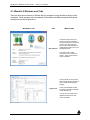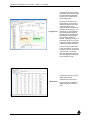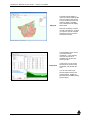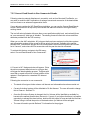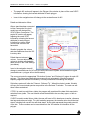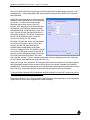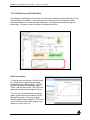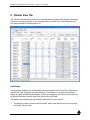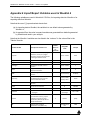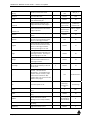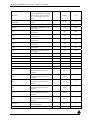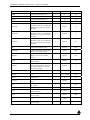
1
Woodlot for Windows 4 User Guide Ministry of Forests, Lands and Natural Resource Operations And The Federation of British Columbia Woodlot Associations Version 4.1 Update July 25, 2014 Prepared by: Enfor Consultants Ltd. #118-3721 Delbrook Avenue North Vancouver, BC Canada V7N 3Z4 www.enfor.com Enfor Consultants Ltd. Woodlot for Windows 4 User Guide – version 4.1 update User Guide Revision History Date User Guide Version September 5, 2013 4.0.0 July 25, 2014 4.1.0 July 25, 2014 Description Author Initial version of the user guide Updated for Woodlot 4.1 software updates M. Greig, Enfor Consultants Ltd. i M. Greig, T. Bradley Enfor Consultants Ltd. Woodlot for Windows 4 User Guide – version 4.1 update Table of Contents User Guide Revision History ...................................................................................................... i Table of Contents ........................................................................................................................ ii Acknowledgements .................................................................................................................... v What’s New in Woodlot 4 (and Woodlot 4.1) ........................................................................... vi 1. Introduction .......................................................................................................................... 1 1.1 User Support ....................................................................................................................... 1 2. Installation of Woodlot for Windows Software ................................................................. 2 2.1 BC Government Users ........................................................................................................ 2 2.2 Industry and Non-government Users .................................................................................. 2 2.3 Computer System Requirements ........................................................................................ 4 2.4 Software Requirements ....................................................................................................... 4 2.5 Forward Compatible Files ................................................................................................... 4 3. Software Components ......................................................................................................... 5 3.1 Updating Woodlot 4 ............................................................................................................. 5 4. Woodlot Overview ............................................................................................................... 6 4.05 Caution - Woodlot 4 and Legacy Data .............................................................................. 6 4.1 Woodlot 4 Windows and Tabs ............................................................................................. 7 4.2 Sequence of Work in Woodlot 4 ........................................................................................ 10 4.3 Basic Functionality and Workspace .................................................................................. 11 4.4 Menu Items ........................................................................................................................ 11 4.4.1 File .............................................................................................................................. 12 4.4.2 Edit.............................................................................................................................. 13 4.4.3 View ............................................................................................................................ 14 4.4.4 Reports and Graphs ................................................................................................... 14 4.4.5 Help ............................................................................................................................ 14 4.5 Toolbars ............................................................................................................................ 15 4.6 Importing Shapefiles – Import (shp) .................................................................................. 16 4.7 Growth and Yield Models Used in Woodlot ....................................................................... 19 4.8 Silviculture Systems and Yields used – Clearcut & Partial Cut ......................................... 20 4.9 File Types used in Woodlot 4 ............................................................................................ 20 5. The About Screen .............................................................................................................. 22 6. Project Tab ......................................................................................................................... 23 6.1 Project Information (Defaults) ............................................................................................ 24 6.2 Description ........................................................................................................................ 25 6.3 Harvest Parameter Defaults .............................................................................................. 25 6.4 Partial Cut Defaults ........................................................................................................... 25 6.5 TIPSY Defaults .................................................................................................................. 26 6.7 Utilization Levels ............................................................................................................... 30 6.8 Linkage – to existing Resultant (polygons) ........................................................................ 31 7. Polygon View Tab ................................................................................................................. 32 7.1 Conventions Used in Polygon View .................................................................................. 33 7.2 Polygon View Toolbar and Displays .................................................................................. 33 July 25, 2014 ii Enfor Consultants Ltd. Woodlot for Windows 4 User Guide – version 4.1 update 7.2.1 Information Displays – Small Map, Comments, VRI, Yield Graphs ............................ 34 7.3 Navigation Tree ................................................................................................................. 36 7.4 Summary ........................................................................................................................... 37 7.5 Area ................................................................................................................................... 38 7.6 Classifiers .......................................................................................................................... 39 7.7 BEC Zone .......................................................................................................................... 40 7.8 Small Map ......................................................................................................................... 40 7.9 Existing Forest................................................................................................................... 41 7.9.1 Silviculture System ..................................................................................................... 41 7.9.2 Forest Polygon Information ......................................................................................... 42 7.9.3 Calculate Site Index .................................................................................................... 43 7.9.4 Yield Type and Yield Settings ..................................................................................... 44 VDYP Yields ........................................................................................................................ 45 TIPSY Yields........................................................................................................................ 47 NC – Non Commercial Cover .............................................................................................. 48 NSR – Not Satisfactorily Restocked .................................................................................... 48 Custom Yield ....................................................................................................................... 49 7.9.5 Convert Dead Stands to Non-Commercial Stands ..................................................... 51 7.9.6 Yield Curves and Yield Tables .................................................................................... 54 7.10 Reforest ........................................................................................................................... 55 7.11 Imported Lot File Yields ................................................................................................... 57 7.12 Calculating Yields ............................................................................................................ 58 7.12.1 Recalculating Yields ................................................................................................. 58 7.12.2 Recalculating Imported Lot File Yields ..................................................................... 59 8. Tabular View Tab ............................................................................................................... 60 8.1 Column Filter ..................................................................................................................... 62 8.2 Row Filter .......................................................................................................................... 64 9. Map View Tab ..................................................................................................................... 66 10. Calculations Tab ................................................................................................................. 68 10.1 Harvest Priority ................................................................................................................ 69 10.2 Harvest Order .................................................................................................................. 70 10.3 Constraints ...................................................................................................................... 71 10.3.1 Adding and Editing Constraints ................................................................................ 72 10.3.2 Types of Constraints ................................................................................................. 73 10.4 Calculate AAC ................................................................................................................. 75 10.4.1 Automatic Calculations ............................................................................................. 76 10.4.2 Manual Calculations, Testing Harvest Rates (and Implications) .............................. 76 10.5 Harvest Schedule ............................................................................................................ 79 10.6 Standing Volume/Time Graph ......................................................................................... 81 11. Reports and Graphs .......................................................................................................... 84 12. For More Information ......................................................................................................... 86 Appendix 1 Accessing Woodlot 4 on Citrix ............................................................................ 87 Appendix 2 Silviculture Systems in Woodlot ......................................................................... 88 Clearcut ................................................................................................................................... 88 Partial Cut (Average Age Method) .......................................................................................... 89 Appendix 3 Managed or Natural Stands ................................................................................. 92 Appendix 4 VDYP vs TIPSY ..................................................................................................... 97 July 25, 2014 iii Enfor Consultants Ltd. Woodlot for Windows 4 User Guide – version 4.1 update Appendix 5 Tree species used in Woodlot 4 .......................................................................... 98 Appendix 6 Import/Export Variables used in Woodlot 4 ..................................................... 101 Appendix 7 Some Basic Steps to Use Woodlot 4 ................................................................ 106 Getting Acquainted ................................................................................................................ 106 Key Features of Woodlot ....................................................................................................... 108 How Woodlot Calculates the Harvest Rate ........................................................................... 110 Summary of Basic Steps to Use Woodlot ............................................................................. 111 Some Woodlot for Windows Tips and Tricks ......................................................................... 112 Appendix 8 Sample Woodlot report ...................................................................................... 113 Appendix 9 VRI Variables Used in Woodlot 4.0 ................................................................... 116 Appendix 10 Woodlot for Windows 4.1 What’s New ? ........................................................ 121 July 25, 2014 iv Enfor Consultants Ltd. Woodlot for Windows 4 User Guide – version 4.1 update Acknowledgements The assistance, ideas and cooperation of the following are gratefully acknowledged: Dave Haley, RPF, Forest Tenures Branch, FLNRO Peter Graff, RPF, Forest Tenures Branch, FLNRO Brian McNaughton RPF, Federation Tom Bradley, RFT, Federation Jerry Benner, RPF, Federation Bruce Bell, Information Management Branch, FLNRO Ricky Yee, Information Management Branch, FLNRO Sam Otukol, PhD, RPF, Forest Analysis and Inventory Branch, FLNRO Mario Di Lucca, RPF, Forest Analysis and Inventory Branch, FLNRO Barry Snowden, RPF, Forest Analysis and Inventory Branch, FLNRO Dave Waddell, RPF, Forest Analysis and Inventory Branch, FLNRO Woodlot Licence and timber supply staff in Forest Regions and Districts Wolfram Woolenheit, RPF, Econ Consulting. Richard Kyle, Enfor Consultants Ltd. Mike Greig RPF, P.Eng, Enfor Consultants Ltd. The following contributed further assistance and ideas for Woodlot 4.1: John Illes, RPF, Donna Brochez, RFT, Neal Marincak, RFT, Cya Solecki, RPF, Nadina Resource District Geoffrey Klassen, RPF, Forest Tenures Branch, FLNRO Peter Lewis, RPF, FLNRO, Nelson Ted Traer, RPF, FLNRO Steve Henderson, RPF, FLNRO Alison Patch, RPF, woodlot owner and consultant Mike Bandstra, RPF, consultant July 25, 2014 v Enfor Consultants Ltd. Woodlot for Windows 4 User Guide – version 4.1 update What’s New in Woodlot 4 (and Woodlot 4.1) Woodlot for Windows (Woodlot) is timber supply analysis software used for woodlots and small woodlands in BC. Woodlot 4 was developed in 2013 as a reprogramming project utilizing the best features of Woodlot 3.2. It provides an updated interface and programming language, adds important timber supply modeling upgrades and provides for future expansion. Woodlot 4 was updated to Woodlot 4.1 in March 2014. Powerful new analysis features were added in the Polygon View, Tabular View, Map View, as well as general enhancements and the User Guide update in response to needs identified by Ministry staff and woodlot owners. Refer to Appendix 9 “Woodlot for Windows 4.1 What’s New”, April 22, 2014, for a synopsis of updates. The objectives in developing Woodlot 4 were to: Update the software platform to run on current Windows based operating systems and to take advantage of current technology used in timber supply. Incorporate VDYP7 and TIPSY 4.3, the latest timber growth and yield functions. Provide usability upgrades identified in a 2012 study (e.g. remove area and polygon limits, import custom yield tables, partial cutting methods, etc.) Maintain the general workflow, concepts and interface as much as possible; not a “re-think”. Allow for upgrades to meet future needs (e.g. mapping). Some new or improved features of Woodlot 4 include: Runs on Windows 7 & 8 operating systems; compatible with Windows XP. Woodlot 4 is programmed in VB.Net and compatible with framework 4.0. Removed upper limits for number of polygons and maximum area. Incorporates VDYP7 and TIPSY 4.3. Updated interface, navigating with tabs. Import Woodlot 3.2 .lot files. Import VRI data and shp files directly. Project tab, which is now used to adjust default values. Polygon View tab, which is an updated version of Polygon Data. Users can sort polygons. New Map View (partially interactive) tab to display a map if the user imports a shp file. Uses VRI data or FIP data. Partial cutting: scoped out new method (multi-age) + current method (lowered even age). Import custom yield tables. Improved harvest sort order. Improved constraints. Improved harvest flow calculations. Graphing upgraded to use FLNRO’s “Plotsy”, which provides expanded features. Updated Woodlot Harvest Report. New User Guide. July 25, 2014 vi Enfor Consultants Ltd. Woodlot for Windows 4 User Guide – version 4.1 update 1. Introduction Woodlot for Windows (Woodlot) is timber supply software used to calculate harvest rates on Woodlot Licences in BC’s Woodlot Licence Program. For industry users, the software and user guide are available at no charge from the Ministry of Forests, Lands and Natural Resource Operations (FLNRO) website. For Ministry staff, the software is available on a Citrix server. Woodlot was originally developed in 1996 and has undergone a number of updates since then. The previous update of Woodlot, Version 3.2, was created in 2007, and the user manual was last updated in April 2003. Woodlot 4 was developed and released in August 2013. FLNRO and Federation of BC Woodlot Associations (Federation) undertook the project jointly. The objectives in developing Woodlot 4 were to ensure it would meet current and anticipated timber supply needs on woodlots, to run on current operating systems, and to take advantage of the latest inventory and timber supply technology. The project included reprogramming Woodlot using a newer programming language (VB.Net) to avoid software redundancy issues. In March 2014, Woodlot 4 was updated to Woodlot version 4.1, adding powerful new analysis features in the Polygon View, Tabular View, Map View, as well as general enhancements and the User Guide update in response to needs identified by Ministry staff and woodlot owners. All information, timber growth and yields, mapping conventions and formats are applicable to forests in British Columbia, Canada. This user guide is organized as follows: What’s New in Woodlot 4 Installation of Woodlot software Software components Description of key features in Woodlot 4 Appendices with information for users For more information, please contact: Ministry of Forests, Lands and Natural Resource Operations Forest Tenures Branch Victoria, BC, V8W 9C2 Federation of BC Woodlot Associations Brian McNaughton, General Manager 381 Pheasant Road Williams Lake, BC, V2G 5A9 Tel: (250) 387-8634 Website: www.for.gov.bc.ca/hth Tel: 1- 866-345-8733 Email: [email protected] Website: www.woodlot.bc.ca 1.1 User Support Woodlot licensees may contact Mike Bandstra, RPF at [email protected] or Tel: (250) 847-4822. July 25, 2014 1 Enfor Consultants Ltd. Woodlot for Windows 4 User Guide – version 4.1 update 2. Installation of Woodlot for Windows Software This chapter describes the installation of Woodlot 4. It applies to all later versions of Woodlot for Windows software (e.g. Woodlot 4.1) as well. Woodlot for Windows 4 software is available at no charge as follows. 2.1 BC Government Users BC Government users can access Woodlot software using the Ministry of Forests, Lands and Natural Resource Operations’ Citrix server. This will have the latest version of Woodlot and related documents ready for use. You will need to be a registered user with an IDIR account. Government users who require access to Woodlot through Citrix should contact Forest Tenures Branch - [email protected] Please refer to Appendix 1 for directions on accessing Citrix. If any questions, please contact the Information Management Branch. 2.2 Industry and Non-government Users Industry and non-government users can download and install Woodlot software from the following Ministry of Forests, Lands and Natural Resource Operations website: http://www.for.gov.bc.ca/hth/timber-tenures/woodlots/woodlot-for-windows.htm July 25, 2014 2 Enfor Consultants Ltd. Woodlot for Windows 4 User Guide – version 4.1 update Please select the version and applications you wish to download from the menu items provided. Follow the prompts to have Woodlot self-install in your computer. Woodlot licensees and Industry users are advised to check the FLNRO Woodlot website regularly for updates and the latest version of Woodlot for Windows. Note: The Woodlot 4 install will check that your computer has the correct version of Microsoft .Net framework. Woodlot requires the .Net framework version 4; most systems have this already. If you do not have the latest version, a free upgrade is available as follows: If you have the correct version of the .Net framework, Woodlot will continue to install on your computer. If you require an upgrade to .Net framework version 4, you will be prompted. An updating feature will activate for your convenience, connecting you to the Microsoft website for the update. Please follow the self-updating steps provided. You will be able to continue installing Woodlot after updating the .Net framework. If you require an upgrade to .Net framework version 4 but do not have a fast internet connection for an update, a copy of the .Net update is available from the FLNRO Woodlot website as a .Net framework redistributable file. The file name is dotNetFx40_Full_x86_x64.exe. Woodlot licensees can contact the Federation User Support (see above) for a CD copy and assistance. July 25, 2014 3 Enfor Consultants Ltd. Woodlot for Windows 4 User Guide – version 4.1 update 2.3 Computer System Requirements Any computer capable of running Windows should run Woodlot 4. You will require: Hard Drive space: 150MB free storage space Operating Systems: Windows XP, Windows Vista, Windows 7, Windows 8+ Microsoft .Net Framework: version 4.0 (Note: if the Microsoft .Net framework version 4.0 is not available on your system, you can upgrade at no cost by navigating to http://www.microsoft.com/enca/download/details.aspx?id=17851 to install the upgrade, or see your system administrator.) Woodlot operates on 32-bit operating systems and therefore will not run on Windows 3.1 or older operating systems (16-bit). (For this same reason, Woodlot 4 does not use older versions of VDYP, such as VDYP6 used in Woodlot 3.) 2.4 Software Requirements Woodlot comes with most of the software required to run timber supply calculations and create reports. This includes the parent Woodlot 4 application, and its dependent applications VDYP7, TIPSY4.3, and Plotsy (refer to Section 3). Other software packages that are not provided with Woodlot but are recommended for preparing data, formatting reports and printing include: Word Processing: Word for Windows for final formatting of your woodlot timber supply reports. Spreadsheet: Excel for creating and/or editing CSV data files, which can be imported into Woodlot. GIS: ArcMap or similar mapping software for assembling and preparing VRI inventory data and .shp graphics files and/or CSV files, which can be imported into Woodlot. Note: Woodlot for Windows Version 3 and Version 4x can be installed on the same computer. This can be useful during transition work to move old data files to Version 4. 2.5 Forward Compatible Files Files created in Woodlot 4 are forward compatible only, meaning they can only be used in Woodlot 4.0 or later versions, but will not run in Woodlot 3.1. The Woodlot 4.1 update in 2014 resulted in several changes to the file formats, and so files created in Woodlot 4.1 may only be used in Woodlot 4.1 or later versions. If you have any questions about compatibility, check with your Woodlot support contact. July 25, 2014 4 Enfor Consultants Ltd. Woodlot for Windows 4 User Guide – version 4.1 update 3. Software Components This chapter describes the main software components in Woodlot 4. Woodlot 4 incorporates the following suite of timber supply software components, each being the most recent version available in 2013. Please refer to the About screen for the latest version numbers in use. Software Functionality in Woodlot 4 Application used in Woodlot 4 Woodlot 4 The parent application used for timber supply analysis. VDYP7 Console Used to predict timber yields for natural (unmanaged) stands and for partially cut stands. bTIPSY 4.3 Used to predict timber yields for managed stands. Sindex 3.3 Used to generate reference heights for a given reference age and site index. Plotsy 1.09 Used to graph results. All software is owned and managed by the Ministry of Forests, Lands and Natural Resource Operations. The Woodlot 4 Help feature includes information on both VDYP7 and TIPSY 4.3. For more information on VDYP, TIPSY, Sindex and Plotsy please contact the Forest Analysis and Inventory Branch. 3.1 Updating Woodlot 4 From time to time, it may be necessary for FLNRO to update Woodlot 4 or its dependent software VDYP7, TIPSY4.3, Sindex and Plotsy. The FLNRO is responsible for the updating process. For internal Ministry users, the latest version should always be available on Citrix. For Woodlot Licensees, industry and external users, please check the Ministry website to ensure you are working with the latest version of Woodlot. Searching for "Woodlot for Windows" will find an appropriate web link to the software. July 25, 2014 5 Enfor Consultants Ltd. Woodlot for Windows 4 User Guide – version 4.1 update 4. Woodlot Overview This chapter provides an overview of main features in Woodlot 4. Woodlot 4 is a timber supply analysis program for use on woodlots and small woodlands in BC. In addition, Woodlot 4 now includes the ability to determine harvest rates on larger forest tenures such as Community Forest Agreements and First Nations Woodland Licences. It uses the timber inventory and timber management information you provide, estimates the growth and yield on your woodlot, and calculates the best possible sustainable harvest rate for the planning period. Woodlot calculates a non-declining even flow (flat-line) harvest rate over a 250 year planning horizon. Woodlot 4 retains the same general workflow as Woodlot 3.2, while taking advantage of the latest technologies, data sources and timber yield functions. User-friendly features have been provided to assist you with your analysis. Like any software program, the results are as good as the information that you provide. You will be rewarded if you are diligent in preparing complete and accurate data. Experienced users may wish to skip to Appendix 7, which provides a summary of the steps to using Woodlot 4, Getting Acquainted with Woodlot 4, Key Features, How Woodlot Calculates the Harvest Rate and Tips and Tricks. 4.05 Caution - Woodlot 4 and Legacy Data If you are using data imported from an earlier version of Woodlot in Woodlot 4, (i.e. older lot files or csv files), please be advised that you will need to review and likely adjust the crown closure values in the imported data prior to recalculating the yields in Woodlot 4. Earlier versions of Woodlot used VDYP 6, which uses estimated crown closure at rotation age to predict stand volumes. The crown closure data required in the old lot or csv file was intended to be measured or estimated crown closure at rotation age. Woodlot 4 uses the VDYP 7 FIPSTART method to predict stand volumes when using old format data. This method requires crown closure at stand reference age, which is generally crown closure at current stand age. (See Section 7.9.3 for more details.) The difference in crown closure values and in resulting predicted VDYP 7 yield will be small for older stands near rotation age, but can be very significant for younger stands. The user should be prepared to document and support any required changes to crown closure values on a polygon by polygon basis, and expect to provide a rationale supporting the revised values in their Management Plan. Note: Woodlot 4 will import the VDYP 6 yield predictions when you import an old version lot file, and will use the VDYP 6 yield predictions to calculate an AAC. Woodlot 4 does not import the VDYP 6 yield predictions when you import an old version csv file. July 25, 2014 6 Enfor Consultants Ltd. Woodlot for Windows 4 User Guide – version 4.1 update 4.1 Woodlot 4 Windows and Tabs There are six main work areas in Woodlot that you navigate to using the tabs at the top of the workspace. Each operates with sub-windows of information and data summarized below and discussed in the following Sections. Window or Tab Title About Screen What it does The About screen shows the version and date of Woodlot 4. Use this information to verify that you are using the most up to data version of Woodlot before completing the final runs for your Management Plan. The screen also includes information on the versions of VDYP7, TIPSY 4.3 and Plotsy used in Woodlot 4 The Project tab is used to enter basic woodlot project information and to adjust default analysis settings. Project Tab These include default Harvest Parameters, Partial Cut defaults, TIPSY defaults, etc. You can view the species and utilization levels used in VRI, VDYP and TIPSY. July 25, 2014 7 Enfor Consultants Ltd. Woodlot for Windows 4 User Guide – version 4.1 update The Polygon View tab is used to manage the forest inventory data and management assumptions specific to each forest polygon and calculate yields. Polygon View The polygon view tab can be used to directly enter inventory information about a forest type, or the information can be prepared outside of Woodlot and imported into the program. As a general rule, it is more efficient to prepare the data outside of Woodlot in a GIS system and/or spreadsheet or data manager and import the results into woodlot. Preparing the data in a GIS system allows you to import a SHP file set which enables the mapping tools within Woodlot 4. This is the most important data screen in Woodlot 4 as your final calculations are only as good as your input data. You should spend an appropriate amount of time collecting and ensuring this screen is filled correctly. The Tabular View tab is used to display basic polygon information for a quick check. Tabular View July 25, 2014 8 Polygon data can be filtered to display the data in a variety of ways. Enfor Consultants Ltd. Woodlot for Windows 4 User Guide – version 4.1 update Map View The Map View tab displays a map of your forest inventory data when you import a SHP format. You are required to load a map shp file to display in the Map View; otherwise this tab display will be blank. Map view can display a map for use with a Woodlot 3.2 *.lot file if you import a *.shp file of spatial information that you can link to the Woodlot 3.2 data. The Calculations tab is used to conduct harvest rate calculations. A non-declining even flow harvest rate is calculated over the 250 year planning horizon. Calculations In this screen you can set the harvest priority, harvest order, constraints, and calculate the AAC. You can view results in the harvest schedule section and produce graphs. Graphs are generated in the FLNRO plotting program Plotsy. July 25, 2014 9 Enfor Consultants Ltd. Woodlot for Windows 4 User Guide – version 4.1 update 4.2 Sequence of Work in Woodlot 4 The general sequence of timber supply work in Woodlot 4 is suggested as follows: For a new woodlot calculation, or to use new inventory data on an existing woodlot, you will need to identify your woodlot area and assemble the forest inventory for your woodlot. Most woodlots will have VRI data available from FLNRO. If you are not familiar with GIS applications or access to on-line spatial data, you should contact a GIS forester to arrange for the data file. You will need to identify sustainable forest management assumptions including any constraints on timber supply. For updating an existing woodlot calculation, you will need your Woodlot 3.2 lot file, the updates if any to your forest inventory, and updates if any to your forest management assumptions. Most users will want to import their data into Woodlot, although you can also manually enter your data. To import, prepare a CSV file or SHP file based on the parameters described in the following sections of this guide. Alternatively, import your old .lot file and update it manually once in Woodlot 4. Carefully review the data you have imported, looking for missing data items or mistakes. Data from Woodlot 3.2, regardless of import format used, will be missing some key information: basal area, stems per hectare, and Biogeoclimatic zone. You can edit flawed or incomplete data in the Project View tab and Polygon View tab in Woodlot, or edit the source data and import it again. Growth and Yield. For new woodlot projects, Woodlot 4 will generate yields from VDYP7 or TIPSY 4.3 based on growth and yield assumptions for each of your forest polygons. Click the Calculate Yields menu item to generate new or updated yields. Alternatively, you can import and use a custom yield curve using the features in Existing Forest or Reforest, under the “Yield Settings” window, which is activated by clicking on the yield type section. When you import data created in Woodlot 3.2, Woodlot 4 will load the existing yield information in your old lot file and will use this yield information to run your harvest calculations. To update the old yields using the new VDYP7 and TIPSY 4.3, you can either open the “Yield Settings” window for a specific polygon and uncheck the “Imported from Lot File” checkbox, or use the "Edit", "Remove all "Imported .LOT Yields" tool. Timber supply constraints. You can reflect constraints on your timber supply for non-timber management uses of your woodlot. Typically, these might include area reductions for future roads or timber reserves, forest cover age or height requirements for wildlife, environmental or social concerns (e.g. Visual Quality). Use the Constraints section on the Calculation screen to select these. You can also add an area netdown and a road netdown for each polygon on the Polygon View tab if required. Calculate non-declining even flow harvest rate over a 250 planning horizon. From the Calculations tab, select your harvest priority, harvest order and constraints. Click on “Calculate” to generate your harvest rate. This will create a harvest schedule with details of the calculation, and the green Standing Volume/Time graph. You can test your harvest rate by adjusting the priority and order, or by forcing a higher or lower harvest rate. July 25, 2014 10 Enfor Consultants Ltd. Woodlot for Windows 4 User Guide – version 4.1 update Produce woodlot harvest planning report. From the main menu, select Reports, “Woodlot Report” and one of the graphs. This will provide you key details on your calculated harvest rate. 4.3 Basic Functionality and Workspace Woodlot 4 is a Windows based application with standard conventions and functionality. This includes: Menu (e.g. File, Edit, View, Reports, Help). Toolbar (New, Open, Save, Calculate Yields, etc.). On some Tabs such as the Polygon View Tab, additional toolbar items are provided. Tabs located under the menus to navigate around Woodlot 4 (Project, Polygon View, Tabular View, Map View, Calculations). Workspace with: standard text boxes for manual data entry, drop down list boxes, check boxes and radio buttons for selecting options. Status and Information bar at the bottom of the screen. The Information bar provides a log of recent actions and can be used to help troubleshoot if you are having any issues. Menu Toolbar Tabs Workspace Status and Information Bar July 25, 2014 11 Enfor Consultants Ltd. Woodlot for Windows 4 User Guide – version 4.1 update 4.4 Menu Items Woodlot 4 has five main menu items listed along the top of your window, including File, Edit, View, Reports and Help, which are displayed at all times. 4.4.1File New – to begin creating a new Woodlot project, and to clear out old data if you have an active project in Woodlot 4. Open – used to open a Woodlot 4 .wlt file. Note that the .wlt file is the new Woodlot 4 file format, replacing the previous Woodlot 3.2 .lot file. Refer also to the “Save” and “Save As” commands below. Import (shp) – used to import a standard ESRI Shapefile so that you can display a map in Woodlot. This feature replaces the “Import VRI (shp)” feature in Woodlot 4.0. See section 4.6 below for more on importing Shapefiles. Import (csv, txt) – used if you want to import data from a Comma Separate Values (csv) file, text (txt) file. Only fields with names recognized by Woodlot 4 will be imported. Other data will be ignored. Refer to Section 4.8 and Appendix 6 for more on the required file formats. Export (csv, txt) - used if you want to export your Woodlot data to a Comma Separate Values (csv) file, text (txt) file. The files created will have the required Woodlot 4 file format and column headers, and will be populated with results from your analysis. Import Woodlot 3 (lot) – used if you want to import an old Woodlot 3.2 .lot file. This will import all the data, yield information, harvest priorities and previous calculated AAC. Refer to section 7.11 for more information on importing old Woodlot 3.2 .lot files. July 25, 2014 12 Enfor Consultants Ltd. Woodlot for Windows 4 User Guide – version 4.1 update Woodlot 4 will convert and use as much of the old data as is available. Woodlot 4 requires some additional fields of data (for example to run VDYP7) which will be evident when you view polygons in the Polygon View tab or try to recalculate yields. You will need to update the data, recalculate yields and re-run your harvest calculations if you wish to take advantage of the advances in Woodlot 4. Import Woodlot 3 (csv) – used if you want to import a Woodlot 3.2 .csv file. This will import all the data, yield information, harvest priorities and previous calculated AAC. Woodlot 4 will convert and use as much of the old data as is available. Woodlot 4 requires some additional fields of data (for example basal area, stems per hectare, and Biogeoclimatic zone, which are required to run VDYP7). The missing fields will be evident when you view polygons in the Polygon View tab or try to recalculate yields. You will need to add the missing information, recalculate yields and re-run your harvest calculations if you wish to take advantage of the advances in Woodlot 4. Save – used to re-save your .wlt file. Save As – used to save your .wlt file as a new file. Recent – used to access recent files that you saved for importing or opening a woodlot file. Recent will track the last 10 files used. Exit – to close Woodlot. You will be prompted to save your changes before Woodlot shuts down. Default directory location: When you save or open a file for the first time, Woodlot will attempt to use your “My Documents” directory. If you use another directory, Woodlot will remember this and will save or open a file from the last directory location you use. 4.4.2Edit The Edit menu provides access to the following features: Copy (Summary) – click this to copy and paste a key table of data displayed in each tab. On the Polygon View tab, this will be the Summary table. Select None – click this to batch clear the polygons selected in the Polygon View tab, Tabular View tab, and Map View tab. Remove all “Imported .LOT Yields” – click this to batch clear the volume and batch un-check the imported yields for polygons imported from an old lot file. See 7.11.2 on using this feature. This allows you to recalculate yields with the current version of TIPSY and VDYP. Delete Selected Polygons – used to delete the polygons you have selected in the Polygon View tab or on the map. Convert Dead Stands to Non-Commercial – a new utility used to change groups of forest polygons from VDYP modeled stands with a high component of dead timber to NonCommercial stands that will be regenerated per user specifications following a stand conversion. Works with VRI data sets only. For details on the use of this feature, see Section 7.9.5 Yield Type and Yield Settings. July 25, 2014 13 Enfor Consultants Ltd. Woodlot for Windows 4 User Guide – version 4.1 update 4.4.3View The View menu is used to turn on or turn off the display of detailed items in the Polygon View tab. Most viewable items now have their own display buttons on each window. Hide non-FMLB – by default, Woodlot will hide the non-FMLB polygons in the navigation tree. These can be displayed by simply navigating to the tree and clicking on the + button, or by unchecking this feature in the View menu. This is simply a shortcut feature. See also Section 7.2 for view items in the Polygon View tab, including the Small Map, Comments, VRI and Yield Graphs buttons. 4.4.4ReportsandGraphs Reports and graphics can be produced in Woodlot 4 from the Reports menu. You will be required to run a calculation to produce or update a report or graph. Items include: Woodlot Report – to generate the standard Woodlot Licence Harvest Planning Report. Age Distribution Graph – to generate a standard age class distribution graph, using Plotsy. Standing Volume/Time Graph – to generate the green graph that displays on the Calculations tab using Plotsy. Refer also to Section 11 Reports and Graphs for more details on creating reports and graphs in Woodlot 4. 4.4.5Help The Help menu item provides access to key documentation, the Woodlot User Guide and various other Help items. About – used to access the “About” screen, which has program details. User Guide – used to open a pdf copy of the Woodlot User Guide (i.e. this document). Download Latest User Guide from MOF – to seek and download the latest version of the Woodlot 4 User Guide from the MFLNRO website. TIPSY Help – used to access the Help file from TIPSY. VDYP Help – used to access the Help file from VDYP7 Console. July 25, 2014 14 Enfor Consultants Ltd. Woodlot for Windows 4 User Guide – version 4.1 update 4.5 Toolbars The toolbar provides common commands used in Woodlot 4. It is split into two sections. The first half is used on all tabs and includes general functions that can be accessed anywhere in Woodlot 4. The second half is used only in the Polygon View tab to activate features there. Polygon Toolbar The first half of the toolbar includes the following features, shown as icons: New – used to create a new Woodlot project file. Open – used to open an existing .wlt file from Woodlot 4. Save – saves your project to the existing Woodlot 4 .wlt file you are working on. Calculate Yields – used to calculate new yields from any Tab. Shows the number of polygons that have not been calculated yet (you can check which ones are not calculated in the Polygon View tree.) A second half of the toolbar is displayed only when you navigate to the Polygon View tab. For information on this toolbar, please refer to Section 7. July 25, 2014 15 Enfor Consultants Ltd. Woodlot for Windows 4 User Guide – version 4.1 update 4.6 Importing Shapefiles – Import (shp) The Import (shp) file menu item is a new feature in Woodlot 4.1, which allows you to import an ESRI Shapefile, so that you can display a map of the inventory polygons in the woodlot. The two files read by Woodlot are the .shp and .dbf. The shape type must be a polygon, (including polygon, polygon M, and Polygon Z). For more information on ESRI Shapefiles, refer also to http://en.wikipedia.org/wiki/Shapefile. The Import (shp) feature is also used to import a standard Vegetation Resource Inventory (VRI) shp file of forest inventory data. VRI data is available at no charge from the FLNRO from http://www.for.gov.bc.ca/hts/vridata/ or https://apps.gov.bc.ca/pub/dwds/home.so. Woodlot will import all fields of data but will only use and allow edits to the fields required to run Woodlot. Each shp file is georeferenced in a mapping coordinate system. We recommend you use BC Albers, as this is that standard Ministry georeferencing format and there are not multiple zones within BC, as with UTM. However, UTM data will also work properly. To import a Shapefile, click on File, “Import (shp)”. Woodlot will open a standard Windows "browse for a file" window. Navigate to where your Shapefile is located. Select on the file you wish to work with and click “Open”. This will activate a new “Import” dialogue window with two tabs, Basic and Advanced, as described below. July 25, 2014 16 Enfor Consultants Ltd. Woodlot for Windows 4 User Guide – version 4.1 update Basic Tab The Basic tab provides a summary of results of your import. Cells in green shading indicate a successful import. Cells in red shading indicate potential issues, with a suggestion to overcome the issue. Shape – indicates you have successfully imported a shp file. Only a shp file may be imported this way at this time (This feature has been developed with future importing functionality in mind.) VRI Columns – indicates if you have imported a complete VRI dataset or not. Woodlot Columns – indicates if any old Woodlot format columns have been imported. If you are importing a VRI shp file, there will be no Woodlot old columns to import. Classifier Columns – indicates if you have imported any Woodlot Classifiers, and the classifier field names. Rows (polygons) – indicates the number of polygons and how they are being processed. If you have any red shaded sections, click on the “Advanced Tab” to adjust your import. Advanced Tab The advanced tab is a tool which provides details on and control over how your data has imported. This is an advanced feature intended for error checking if you are having trouble importing data. You might also wish to consult a GIS technician if you are having trouble importing your files. July 25, 2014 17 Enfor Consultants Ltd. Woodlot for Windows 4 User Guide – version 4.1 update The Advanced tab is split into the following sections: Linkage to existing Resultants (polygons) via – indicates the main linkage to the row of data you imported. Woodlot will default to Mapsheet/Polygon/Subpolygon since this is used in Woodlot 3.1. If you have duplicated polygons that may be in pieces, you can import them by row number as the unique identifier. Shape File – indicates if you have imported Shapefile graphics. VRI Columns – indicates if you have imported VRI columns. Woodlot Columns – indicates if you have imported woodlot columns of data. Classifiers – indicates if you have imported classifier columns of data. Columns / Fields – provides a cross reference of the data imported to fields used in Woodlot. File Headers to Columns – shows the database field name on the left and how they are linked to the Woodlot variable friendly name on the right. Green text indicates fields that have been imported. Red text indicates fields that were not imported. File Headers not Imported – lists the database fields that were not imported. VRI Columns to File Headers – lists the VRI data Woodlot variable names on the left and how they are linked to the database field name you imported. Woodlot Columns to File Headers – lists the Woodlot only variable names and how they are linked to the database field name you imported. This does not include the VRI variables of classifiers. Classifiers to File Headers – lists the Woodlot Classifiers and how they are linked to the Database field names. Rows / Resultants (Polygons) – describes the polygons by row depending on how you are importing them as indicated in the “Linkage to existing Resultants (polygons) via: “ section: Mapsheet/Polygon/Sub Polygon – shows the polygons that have tried to import. Duplicated polygons are shown in green text. Row Number – shows each polygon by row number from your database. This is useful if you wish to import pieces of polygons with the same name. July 25, 2014 18 Enfor Consultants Ltd. Woodlot for Windows 4 User Guide – version 4.1 update 4.7 Growth and Yield Models Used in Woodlot Timber volume estimates and related statistics are generated in Woodlot 4 using the Ministry growth and yield models VDYP7 and TIPSY4.3, or from custom yield tables you provide. Yield model input parameters are based on the polygon data you supply. VDYP and TIPSY are the yield models generally accepted for timber supply analysis in BC. The choice of yield model is left to the user, and is usually based on the type of forest management for the stand as discussed below. The yield model is chosen in the Polygon View tab for each polygon. If you are not sure which management type you have, it is likely that the stand is naturally occurring and therefore you should use VDYP in the absence of better information. You may wish to discuss the matter with your Woodlot Forester. Refer to Section 7 for more on using VDYP and TIPSY in Woodlot, and for importing custom yields in the Polygon View tab. The yield options include: Variable Density Yield Projection (VDYP). VDYP7 has replaced VDYP 6. VDYP7 is more sensitive to changes in stand density such as basal area and trees per hectare. VDYP7 Console is used in Woodlot 4, and is developed and owned by FLNRO. VDYP is an empirical yield prediction system intended for use in unmanaged, natural stands of pure or mixed species composition. It is also used in Woodlot to model yields in partially cut stands. For more information on VDYP, refer to http://www.for.gov.bc.ca/hts/vdyp/ Table Interpolation Program of Stand Yields (TIPSY). BatchTIPSY 4.3 is used in Woodlot 4. TIPSY is used typically for planted stands with managed stand density. It is also used for naturally regenerated stands that are managed to full stocking. TIPSY is a growth and yield program that provides access to the managed stand yield tables generated by the models Tree and Stand Simulator (TASS) and the Silviculture on Yield, Lumber Value, and Economic Return (SYLVER). TIPSY retrieves and interpolates yield tables from its database, customizes the information and displays summaries for a specific site, species and management regime. Yield tables are available for various even-aged coniferous species, as well as trembling aspen and red alder, growing on the coast and in the interior of British Columbia. TIPSY is developed and owned by FLNRO. TIPSY also provides a growth benefit through genetic worth for planting, includes features for pre-commercial thinning (also known as spacing) and fertilization. These features can be toggled on and adjusted in Woodlot 4 in the Yield Settings window in the Polygon View tab. For more information on TIPSY, refer to http://www.for.gov.bc.ca/hre/gymodels/tipsy/ or to http://www.for.gov.bc.ca/hts/growth/tipsy/tipsy_news.html Custom Yields. Woodlot 4 allows users to import their own yield tables generated elsewhere, such as from TASS. A rationale should be provided to support the use of custom yield tables in a woodlot licence AAC determination. For information on choosing VDYP versus TIPSY, refer to growth and yield modeling information within Appendices 3 and 4, or contact the FLNRO Forest Analysis and Inventory Branch, Growth and Yield Section (contact information within section 12). Refer to Appendix 5 July 25, 2014 19 Enfor Consultants Ltd. Woodlot for Windows 4 User Guide – version 4.1 update for information on species supported by VDYP and TIPSY. Refer also to the complete species listing on the bottom of the Project View tab. 4.8 Silviculture Systems and Yields used – Clearcut & Partial Cut Two silviculture systems are available in Woodlot 4, clearcut or partial cut. TIPSY yields are generally recommended for use on even aged stands with managed stocking densities that have been regenerated following clearcutting or clearcutting with reserves, and naturally regenerated stands that are managed to full stocking. Generally, TIPSY stands are typical even aged, managed second growth stands. Partially cut stands are considered uneven aged management. Typically, harvests in these stands have used group selection, single-tree selection, variable retention, or another system in which the residual stand that remains following harvest presents the next harvest opportunity. Yield curves are not widely available for partially cut stands in BC. Therefore, an approximation has been used in BC timber supply modeling and in Woodlot 4 to estimate yields from partially cut stands. This is the same general method used in Woodlot 3.2, referred to as the “average age” partial cut method. The method has been updated in Woodlot 4 to start the harvest at the older of the current age or your target harvest age. It will then harvest down to the % removal from that age. A partial cut stand is assumed to be growing initially as a natural stand using a VDYP yield curve for the stand attributes. The stand is harvested down to a residual volume (set by the user) and the corresponding stand age for a natural stand with the post harvest volume is determined from on the VDYP yield curve. Since VDYP is based on natural stands that are fully stocked and not partially harvested, the partial cut adjustment factor (PCAF) was introduced to simulate re-growth at a lesser density and to reflect any rebound delay effects. The default PCAF used in Woodlot 4 is a 20% reduction in VDYP predicted stand yield. The use of the “average age” method is a reasonable first approximation of partial cut yields. Another partial cutting simulation technique also considered for Woodlot 4 was the “multi-age” method. This method would simulate partial cutting as a series of smaller patch cuts, resulting in groups of patches with multiple ages across the polygon. This feature will be considered for inclusion in a future version of Woodlot. Refer to Section 6.3 and Appendix 2 for more on silviculture systems and partial cutting in Woodlot 4. 4.9 File Types used in Woodlot 4 Woodlot 4 is designed to work with any of the following file types. Files are imported and exported from Woodlot from the File menu item. Refer to section 4.41 and Appendix 6 for more detailed information including the required field names used in the csv import file. The order of fields does not matter. wlt – A .wlt file is the new file type you create when saving your file from Woodlot 4. This is the replacement for the previous versions’ .lot file. To load a .wlt file in Woodlot 4, use the File, Open menu item. July 25, 2014 20 Enfor Consultants Ltd. Woodlot for Windows 4 User Guide – version 4.1 update lot – Woodlot 4 can import a Woodlot 3.2 lot file. This will bring in data, yield information, harvest priorities and the calculated AAC from previous versions of Woodlot. If you plan to update or refresh your AAC, some fields will need to be filled in or updated in Woodlot 4, particularly the data in Polygon View. A .lot file is loaded into Woodlot using the File, Import Woodlot 3 (lot) menu item. Refer to section 7.11 for more detailed information on imported lot files. shp – Woodlot 4 will accept any standard ESRI Shapefile so that you can display a map in Woodlot. This includes standard FLNRO VRI Shapefiles. Refer to Section 4.6 above on importing Shapefiles. CSV (Woodlot 3) – Woodlot 4 can import a Woodlot 3 Comma Separate Values (CSV) file. If you import a csv file, only fields with names recognized by Woodlot 4 will be accepted. A csv file is imported into Woodlot using the File, Import Woodlot 3 (CSV) menu item. CSV (Woodlot 4) – Woodlot 4 can import a new CSV file, and export to a new CSV file. Only fields with names recognized by Woodlot 4 will be imported. This file type is loaded into Woodlot using the File, Import (csv, txt) menu item. txt - Woodlot 4 can import a new .txt file, and export to a new txt file. Only fields with names recognized by Woodlot 4 will be imported. This file type is loaded into Woodlot using the File, Import (csv, txt) menu item. Hint: If you are not using standard VRI data, a good way to ensure you have the correct data and field formats for use in Woodlot 4 is to export a sample project file from Woodlot 4 in the file type you plan to use to import your data. Use this as a template. Either modify your data to match the template format, or populate the template with your data based on the column header field names. For example, if you plan to use a CSV file, export a sample project in CSV format, keep the column headers, delete the sample data, fill the template with your woodlot data and import the result into Woodlot 4. July 25, 2014 21 Enfor Consultants Ltd. Woodlot for Windows 4 User Guide – version 4.1 update 5. The About Screen The About screen shows important information on Woodlot 4 including: Woodlot software name. Woodlot version number and version date. Ownership and copyright – Forest Tenures Branch, Ministry of Forests, Lands and Natural Resource Operations. The software developer. The About screen also includes important versioning information on the dependent software used in Woodlot 4, including: VDYP7 Console. Batch TIPSY (bTIPSY). Sindex. Plotsy. When you start Woodlot, the About screen will appear for a few seconds and then close. You can always access the About screen through the Help menu. July 25, 2014 22 Enfor Consultants Ltd. Woodlot for Windows 4 User Guide – version 4.1 update 6. Project Tab The Project tab is used: to enter project information for your woodlot, to adjust default settings that will apply globally to the entire woodlot, and to view basic information inventory and yield assumptions. You can edit the default values as required. You can also change or override these default values on a polygon specific basis in the Polygon View tab. It is important to check that the default settings reflect conditions on and assumptions applicable to your woodlot, as the defaults will be used in the absence any polygon specific information that you may provide. This is a substantially updated version of the old Project screen in Woodlot 3.2, which only included basic information on the woodlot. The main sections in the Project Tab include: Project Information. Harvest Parameter Defaults. Partial Cut Defaults. TIPSY Defaults. Species - information used in VRI, VDYP and TIPSY and utilization levels. Linkage – to existing Resultants (polygons) July 25, 2014 23 Enfor Consultants Ltd. Woodlot for Windows 4 User Guide – version 4.1 update Note: Important new global defaults are present in Woodlot 4.1. These will affect your woodlot calculations, and include: Coast/Interior for your woodlot. BEC zone for your woodlot. Base Year for your timber inventory. VDYP Utilization level options. 6.1 Project Information (Defaults) The Project Information section is used to enter basic information about your woodlot, as well as some important new default values required in Woodlot 4. The basic information is optional, for your reference and use in the report. It can be text or numbers, and includes: Tenure – enter your woodlot licence number. Company Name – enter your company name. User name – enter your name. Scenario number – enter the scenario name or number. Forest District – enter the forest district your woodlot is in. Created on – will be populated by Woodlot 4, which is the date you first started your work. Last Modified – the date you last saved the file, + the number of changes made since you last saved the wlt file. Four new global default values are required in Woodlot 4.1 for your woodlot. These include: Coast/Interior - Indicate if your woodlot is on the Coast or Interior. This will affect results in TIPSY and VDYP. It cannot be changed by polygon. BEC – indicate the default Biogeoclimatic Ecological Classification (BEC) Zone your woodlot is in. BEC can be changed for each polygon in the Polygon View tab. BEC is now required for VDYP7. Base Year – this is the year that your timber inventory was prepared. It is used to define the establishment year for each polygon, which is in turn used to define the current age of the polygon. Establishment year is derived by subtracting the measured age of your stand from the base year when it was measured. If your woodlot inventory has different base years, you can address this in two ways in Woodlot. a) Multiple Import – For each base year, you can import that group of polygons separately. Import the first group, set that base year. Then import the next group into the same wlt file and set that base year. Etc. for as many base years that you have. July 25, 2014 24 Enfor Consultants Ltd. Woodlot for Windows 4 User Guide – version 4.1 update b) Adjust Current Age – Alternately, you can import all polygons and set one base year then go to each polygon and adjust the current age. For example, if your inventory was conducted in two passes five years apart, import the entire woodlot dataset and set the earliest base year; then decrease the current age by five years on the polygons with a later base year. You are essentially just adjusting the inventory measured current age, to the actual current age on your woodlot. You are required in Woodlot 4 to set the base year if you import data with an “Age”. Woodlot 4 does not store the age directly, it stores the established year and shows the calculated age. When importing old data, set the base year to the projected year of the data, then after importing adjust the base year back to the current year. All ages will automatically be updated. VDYP Utilization level – the VDYP utilization level needs to be set for your woodlot. TIPSY utilization is always set to 12.5 cm diameter at breast height (dbh). See below. 6.2 Description The large workspace on the top right of the window is provided to allow you to help you keep notes and provide documentation as you do work. Click on the description to start typing. Text will wrap and the box will scroll, allowing for many rows of text. Right click in the Description box to bring up a standard Windows menu for editing items. 6.3 Harvest Parameter Defaults The harvest parameters used in Woodlot 4 are the same as in Woodlot 3.2. They are used to establish economic rotation parameters for the woodlot. These include: Minimum Age (yrs) – the youngest age needed to harvest a forest polygon. Minimum DBH (cm) – the minimum stand diameter at breast height needed to harvest a forest polygon. Minimum volume (m³/ha) – the minimum merchantable volume per hectare needed to harvest a forest polygon. Regen Delay (yrs) – include your expected default regeneration delay. Typically, this is the number of years after harvest until you have a fully stocked planted or naturally regenerated stand. A regen delay of 0 yrs assumes you will have a fully stocked, growing, new stand in the same year that you harvest. 6.4 Partial Cut Defaults The Partial Cut defaults in this section are used in the “average age” partial cut method only, and are the same partial cut defaults used in Woodlot 3.2. For more on partial cut methodology in Woodlot 4, please refer to Section 4.7 and Appendix 2. July 25, 2014 25 Enfor Consultants Ltd. Woodlot for Windows 4 User Guide – version 4.1 update The partial cut defaults include: Partial Cut Percent (%) – the targeted percent volume to be harvested on the first entry. For example, a 25% Partial Cut Percent removal when a stand reaches 400 m³/ha will result in a harvest of 100 m³/ha. It will assume that the new stand is 300 m³/ha and begin the yield curve for the next entry as if the residual stand is at the age when a normal natural stand reaches this volume. On the harvest entry, Woodlot will again harvest the stand down to this volume level, and re-grow up from there. Acceptable values 1-50%. Min. Re-entry period (yrs) – this is the number of years you wish to allow the forest in the polygon to grow until you harvest again. Woodlot will grow the forest for that number of years, and then at the re-entry, will harvest the in-growth down to the same residual level as was set on the first entry. In the example above, this would harvest ingrowth down to 300 m³/ha. Acceptable values 10-999 years. Adjustment Factor (PCAF) – the Partial Cut Adjustment Factor (PCAF) is normally defaulted to 80% and should not be adjusted unless you have information to support a change. Partial cut yield curves are not widely available in BC, and so Woodlot uses VDYP with a PCAF to offset any overestimate of growth response from the base fully stocked stand. It is assumed that a stand that is partially cut results in a lower stand density and will respond at a slower growth rate than the natural average density stands that VDYP uses to calibrate growth. Since VDYP assumes a fully stocked stand of the full range of diameter classes is growing, on partial cut stands, the default PCAF of 80% is used to model the stand growth at the lower stand density to avoid overestimating growth rate. 6.5 TIPSY Defaults TIPSY Operational Adjustment Factor (OAF) defaults can be adjusted in the Project Tab. (In Woodlot 3.2, this setting was on the Polygon Data screen.) OAFs are used by TIPSY to mimic operational conditions, to adjust ideal research forest conditions to operational forest situations. The default and recommended OAF settings are: OAF 1 accounts for the reduction of physical growing space due to holes created by nonmapped rock outcrops, swamps and non-commercial tree cover. OAF1: 0.85. This is the same as a 15% OAF1 in previous versions of TIPSY. OAF 2 is used to account for decay, waste, and breakage, and some pest damage that increases towards maturity. OAF2: 0.95. This is the same as a 5% OAF2 in previous versions of TIPSY. (Alternately, for OAF2 in TIPSY 4.3 you can use the DWB feature based on your BEC zone. However, Forest Analysis and Inventory Branch have advised that the DWB setting is not recommended for use because it is partially based on old growth loss factors used in VDYP7 that may not be appropriate for second growth stands. This feature is under review by FAIB). July 25, 2014 26 Enfor Consultants Ltd. Woodlot for Windows 4 User Guide – version 4.1 update TIPSY 4.3 Help defines decay, waste and breakage as: Decay “is caused by wood-rotting fungi, which produce soundwood losses due to physical and chemical processes”. Waste is the “soundwood portion of a tree or log which has more than 50% decay, considered non-recoverable under current utilization standards”. Breakage “represents all soundwood losses due to felling and yarding. The broken pieces are considered too small to be merchantable”. For more information on OAFs and what is appropriate for use, see TIPSY Help or TIPSY websites at http://www.for.gov.bc.ca/hfp/silviculture/OAF1/default.htm and http://www.for.gov.bc.ca/hre/gymodels/TIPSY/features.htm#Overview July 25, 2014 27 Enfor Consultants Ltd. Woodlot for Windows 4 User Guide – version 4.1 update 6.6 Species The Species section provides you with two important new capabilities: View tree species and related inventory and modeling information used in Woodlot 4. Select default utilization levels for your woodlot. The species information used in Woodlot 4, including cross references and utilization levels, is derived from VRI standards, VDYP documentation and TIPSY documentation. The Forest Analysis and Inventory Branch of FLNRO have reviewed it; please contact FAIB if any questions. All tree species supported by the FLNRO Vegetation Resources Inventory (VRI), VDYP7 and TIPSY 4.3 are available for use in Woodlot 4, and have been cross-linked. This is a complex and important information source in timber supply modeling, important for users to be aware of so they understand modeling limitations. Hence, the listing has been provided in the Project Tab with defaults. Selecting on the radio buttons will display the listing for each data source and model, as follows. 6.6.1VRISpecies For Vegetation Resources Inventory (VRI) data, this list describes the species code, common names, species code used in VDYP, species code used in TIPSY and whether it is considered deciduous or non-commercial. Only the species that show under the VDYP and TIPSY headers will have yield information calculated for them. Unlisted species can be imported for completeness but will not have yields calculated in Woodlot. July 25, 2014 28 Enfor Consultants Ltd. Woodlot for Windows 4 User Guide – version 4.1 update 6.6.2VDYPSpecies For VDYP, this list describes the species code, common name, default utilization level (which is set above), species grouping, site index species used and the yield curve reference. 6.6.3TIPSYSpecies For TIPSY, this list describes the species code, common name, default utilization level (which is set above), default Genetic Worth (%), volume curve used, site index species used and the yield curve reference. Genetic Worth defaults cannot be set in this version of Woodlot. Instead, Genetic Worth values are entered for each polygon in the Polygon View tab, Yield Settings, or via an export to CSV and edit in Excel. July 25, 2014 29 Enfor Consultants Ltd. Woodlot for Windows 4 User Guide – version 4.1 update 6.7 Utilization Levels The timber utilization levels available in Woodlot 4 are based on utilization levels used by FLNRO in timber supply analyses in BC. Utilization generally depends on whether the stand is an existing natural stand, existing managed stand, a future managed stand, second growth or old growth, on the coast or interior. The following default options were developed for Woodlot 4. You can change the utilization level for any polygon in the Polygon View tab. TIPSY yields are generally calculated to a default 12.5 cm dbh utilization, while VDYP yields are calculated to 12.5 or 17.5 cm depending on location and species. Yield Type Utilization Default Option Species Typical Application Min. dbh (cm) Max. Stump Height (cm) Min. Top Diameter (cm) Existing managed stands TIPSY All cases All species Future managed stands 12.5 30 10 VDYP 2G-Second Growth All species Existing natural second growth stands 12.5 30 10 VDYP HG-Haida Gwaii All species Applies only to Haida Gwaii, all ages, all species 12.5 30 10 VDYP OG-Old Growth Varies by species Existing natural old growth stands 17.5 or 12.5 30 10 VDYP 12.5 - All Species 12.5 All species Existing natural second growth stands 12.5 30 10 VDYP 17.5 - All Species 17.5 All species Existing natural old growth stands 17.5 30 10 If you wish to use other than the default 12.5 cm dbh utilization in TIPSY: 1) Make a backup copy of C:\Program Files\Woodlot for Windows 4\Woodlot\Species.dat (One editing mistake could render Woodlot inoperable until you get a clean copy of this file. A backup copy ensures this will not be an issue.) 2) Open C:\Program Files\Woodlot for Windows 4\Woodlot\Species.dat in Notepad. 3) Scroll down to the TIPSY section at Line 146. July 25, 2014 30 Enfor Consultants Ltd. Woodlot for Windows 4 User Guide – version 4.1 update 4) Replace the 12.5 values for the species of concern (e.g. with 17.5 values). Do not alter the file formatting or spacing, just change the numbers. 5) Save, exit. TIPSY yields will now use the changed utilization standards. Important Note: If you make the utilization level change after you have run Calculate Yields once, Woodlot will not understand that the TIPSY yield parameters have changed and that yields should be recalculated. If you start again with freshly imported data, your TIPSY yields will calculate with the new utilization standards. This is not an attractive option if you have invested time in editing your data set. In that case: 1) Export your data to CSV. 2) Load the CSV into Excel.. 3) Go to the bottom of the data set where you will find a set of rows with no polygon number, BEC, area, or age information, but which do have a "YieldMeth" entry of "TIPSY"(in Excel Column AG). These are the TIPSY "Reforest To" scenario definitions. Note which row numbers these scenarios occupy. Or change the font or color to clearly identify the rows. 4) Navigate many columns to the right to Excel Column BV which contains the "Density" entry. This is the plantation establishment density. Add 1 to the value shown. For example, 1600 becomes 1601. Do this for all the TIPSY "Reforest To" scenarios. 5) Save the CSV, unload it from Excel 6) Go back to Woodlot, import the CSV. Be sure to choose 'Yes - Update' when prompted! 7) Woodlot will now identify that the TIPSY scenario information has changed, as the initial establishment density is higher, and will re-calculate yields for the polygons using the modified utilization standards. The increase of 1 seedling per hectare has no measurable effect on yields. 6.8 Linkage – to existing Resultant (polygons) A new advanced addition to Woodlot 4.1 was to add an identifier for users that import data files. Previous versions of Woodlot identified rows of data by the “Name”. Now users can select if they would prefer to use “Name”, “Unique ID” or “Row Number” from their data file. This feature is helpful for users that wish to import files over existing files. If you are unsure, leave the setting in its default position, which will apply to most users. The setting should change to “Row Number” if you import a shp file. See also the Import section for more information. July 25, 2014 31 Enfor Consultants Ltd. Woodlot for Windows 4 User Guide – version 4.1 update 7. Polygon View Tab The Polygon View tab is used view, edit, add and delete forest polygon information, set yield calculation parameters, and define the conversion of existing forest stands to a reforested forest type. Features of this tab are similar to the Polygon Data screen in Woodlot 3.2, with streamlined and new features added. Polygon number This tab has the following functional sections: Polygon View Toolbar Map Navigation tree Comments/VRI (when activated) Summary (when activated) Existing Forest Area Reforest to Classifiers Yields July 25, 2014 32 Enfor Consultants Ltd. Woodlot for Windows 4 User Guide – version 4.1 update 7.1 Conventions Used in Polygon View There are a few helpful conventions used on the Polygon View tab to keep in mind as you work in Woodlot 4: Forest Polygon - The forest polygon you are working on is the displayed screen of data. The polygon number is highlighted in the navigation tree, and listed at the top of your workspace highlighted in yellow. Your polygon number includes the Mapsheet number, polygon number and can include a subpolygon number, similar to Woodlot 3.2. Defaults [ ] Square Brackets – As in Woodlot 3.2, square brackets represent a default or imported numerical value. To override and replace a default or imported value, click on the cell and type over with your better information. Click to another place on the screen to register the change. To reset the default values, type over the value with a [ ] square bracket or any text character (e.g. a, b, c, xx, etc.), then click to another polygon on the screen to register the change. Adding Data – add data by typing into a cell. Use the Add Polygon menu item to manually add polygons. See below for information on manually adding polygons. Imported Lot files – when you import an old lot file, Woodlot imports the base data, timber yields and analysis results. If you wish to recalculate your yields, you will need to uncheck the check box in VDYP and TIPSY Yield Settings and enter the missing data.1 Viewing Yield Information – you can view yield information for the polygon by clicking anywhere in the yield screen. Display Yield Curves – you can view your yield curve by clicking on the Plotsy icon on the inset graph at the bottom of the screen. Display Yield Table – you can view your yield table by clicking the inset graph at the bottom of the screen. Selecting polygons to view in Map view – you can select multiple polygons to be displayed on the map. In the navigation tree, simply double click them on (hatched) or off (solid). 7.2 Polygon View Toolbar and Displays The toolbar expands when you are on the Polygon View Tab but not on other tabs. This toolbar includes the following features: Add Polygon – used to add a new forest polygon. Split Polygon – used to split an existing forest polygon. Add Classification – used to add a new classifier for the forest polygon. Rename Polygon – used to rename an existing polygon name. 1 This task can also be accomplished for an entire project through the Edit menu Remove all "Imported .LOT Yields" function July 25, 2014 33 Enfor Consultants Ltd. Woodlot for Windows 4 User Guide – version 4.1 update 7.2.1InformationDisplays–SmallMap,Comments,VRI,YieldGraphs A new feature in Woodlot 4.1 was the addition of information displays to the Polygon View tab. The following information display buttons are listed along the top right side of the Polygon View tab window: Small map - The “Small Map” button is used to turn on or off the individual polygon map displayed at the upper right, if you loaded a shp file for forest polygons into Woodlot. This map includes the polygon shape and map label for the forest polygon selected in the navigation tree at left. The grid used is 100m x 100m (= 1ha). Refer also to section 7.8 Map. Comments - Comments may be added to each polygon in Woodlot. Click on the “Comments” button to display a comments box section, ready for you to type in. Comments will be saved with the polygon. Unclick the button to hide comments. VRI - Key VRI inventory attributes may be displayed or hidden by clicking the “VRI” button on or off. VRI data is base forest inventory data provided by the MFLNRO, used as a starting point for your timber supply analysis, a reference for updating your polygons, and for other complex analysis such as accounting for MPB dead volume. Small Map Comments section VRI data section July 25, 2014 34 Enfor Consultants Ltd. Woodlot for Windows 4 User Guide – version 4.1 update Yield Graphs - The “Yield Graphs” button will display and hide the small yield graph under your yield type for that polygon below the “Existing Stand” and “Reforest” stand. Yield Graph buttons and summary yield graph results. Click on the mini graph to display the yield table. Click on the yield graph button to display the yield July 25, 2014 35 Enfor Consultants Ltd. Woodlot for Windows 4 User Guide – version 4.1 update 7.3 Navigation Tree The navigation tree is located along the left side of the Polygon View tab. As you toggle on the list of polygons, the polygon information will display at the right. With the navigation tree, you can: Quickly move between polygons. The selected polygon number will display at the top of the workspace. Display your data by Group. The groups are listed above in the “Group by” list box. Generally, this includes the summary by FMLB, Mapsheet, Ownership, and any classifications you have added. Select on the Group to organize your display list. Sort your data. Select on the “Sort by” list box to sort polygons by Mapsheet/Polygon number, Age, or Area, from greatest to least. To help your work in the Polygon tab, a colour scheme has been added to the polygon icons to describe at a glance the status of yields and polygons in the project. The following legend applies July 25, 2014 36 Enfor Consultants Ltd. Woodlot for Windows 4 User Guide – version 4.1 update to the icons in the navigation tree. The same general scheme is carried forward to the Tabular View and the Map View tabs. Icon Yield Status Legend Green ‐ the polygon is forested and available for harvest (harvest parameters have been met). It is part of the FMLB and can contribute to the AAC. Yellow ‐ the polygon is not satisfactorily restocked (NSR), will contribute to the AAC if a forest stand is assigned to it. ? with red background ‐ the polygon is forested but yields need to be calculated or there is an issue with the yield information. Mustard brown ‐ the polygon is forested but will not be harvested and will not contribute to the AAC. It either does not meet minimum harvest parameters or has been set to do not harvest. It will contribute to meeting forest cover constraints. This will include NC polygons (or any forest polygons) that have the silviculture system set to “Do Not Harvest”. Note: You will need to change the silviculture system to harvest and provide a “Reforest to” regime for the polygon before it will be available for harvest, changing to green or yellow. Grey ‐ the polygon is not forested and does not contribute to the AAC or forest cover constraints. It is not FMLB. In the FMLB group of polygons, these polygons are denoted with a “No (reason)”, meaning it is not FMLB, followed by the reason. 092G094 Red hatch – the polygon is selected for viewing in the Tabular View and Map View (if a map is available). To select and de‐select polygons, double click on their icon in the navigation tree, or on the small map, or right click on the Map view polygon. Bold text polygon number – represents the selected polygon you are working on in the workspace. It will also display at the top of the workspace in bold and yellow highlight. 7.4 Summary You can generate a quick area/volume summary for your woodlot. In the navigation tree, click on a Folder icon to produce a summary table. A more detailed summary is produced in the Woodlot report. To copy the Summary table to another application such as Excel or Word, navigate to the Edit menu and select “Copy Summary”. Paste the table of data in the other application. July 25, 2014 37 Enfor Consultants Ltd. Woodlot for Windows 4 User Guide – version 4.1 update 7.5 Area The Area section displays the area attributes for the polygon, including: Gross Area (ha) - shown in square brackets if it has been imported. You can override the area by typing over it. (Four decimals are used if data is derived from a GIS to avoid addition errors.) FMLB – the classifier of Forest Management Landbase (FMLB) has been included in Woodlot 4, based on VRI terminology. If the polygon is considered forestland it will contribute to the woodlot timber supply, and the FMLB code used is “Yes”. The polygon icon will be displayed as green if harvest parameters can be met, yellow if it is NSR, or mustard brown if it is forestland but the harvest parameters will not be met. Polygons with forest cover below minimum harvest parameters will not be harvested but will contribute to forest cover constraints. If the polygon is non-forest it will not contribute to the woodlot timber supply and the FMLB code will be “No” with the reason why it is excluded. The excluded polygon icon will show as grey. These polygons will not contribute to forest cover constraints. You can override the contribution by selecting on the drop down list box to reclassify it from Yes to No, or from No to Yes. You can edit the classifiers and use your own terms. Click on the underlined FMLB text to bring up the editing dialogue. Reduction – to show an area reduction on your polygon, check the box on . You can make an area reduction (ha) or use a % reduction. If you use a % reduction, the % value will display and be reduced in the Net Area. Remember to add your reason. No volume will be harvested from the area removed from the polygon. Future Roads (ha or %) reduction - You can make a reduction for future roads as an area reduction (ha) or use a % reduction. If you use a % reduction, the % value will display and be reduced in the Net Area. Timber will be harvested from the future road area on the next harvest pass, but after that the road area will not grow trees for future harvests. Net Area (ha) – the Net Area will be the reduced area after exclusions or reductions. This is the area that will be used in long-term timber supply calculations for this polygon. July 25, 2014 38 Enfor Consultants Ltd. Woodlot for Windows 4 User Guide – version 4.1 update 7.6 Classifiers Classifiers are used in Woodlot 4 to organize data for later reporting and analysis. They can help in summarizing your data, help in analyzing polygons of similar classification, and help to delineate forest cover constraints by polygon. Classifiers are a new addition to Woodlot for Windows software. Classifiers are now used to delineate ownership. In addition to ownership, you may want to distinguish forest management constraints on polygons classified as VQO or Deer Winter Range. The list and constraints are added in the Polygon View tab and activated in the Calculations tab. Your polygons can be sorted by classification in the navigation tree. The Classifier section includes: Ownership – by default, Woodlot includes a classifier for ownership. You can distinguish whether the polygon is Crown, Private, Top-up, Other or none by selecting one from the drop down list box. Classifications – to add another classification for your polygon, on the toolbar, click the Add Classification toolbar item and follow the prompts. To delete the classifier, click on the underlined classifier name to bring up the edit dialogue window; check on the Delete Classifier checkbox. The Ownership classification cannot be deleted, as it is used to distinguish ownership. Classifiers – to add, edit or delete a sub classifier for your classification, click on the underlined classifier name to open an editing window. For example, if you have a VQO classification, you may want to have sub classifiers for Retention or Partial Retention, which you can apply different cover constraints to later in the Calculations Tab. July 25, 2014 39 Enfor Consultants Ltd. Woodlot for Windows 4 User Guide – version 4.1 update Once a classifier has been created in any polygon, it can be activated in other polygons in the woodlot by selecting the classifier from the drop down list box. Leave them listed as “none” if they are not to be used. Classifiers can be automatically imported by creating fields that start with either c_ or class_ in the inventory data set prior to importing it into Woodlot. A common approach is to use the overlay capabilities of a GIS system to add mapped classifiers such as UWR or visual constraints to inventory data. As long as the class ID fields in the new resultant layer are prefixed with c_ or class_, the classification scheme will be imported into Woodlot 4 with the inventory data in .shp format. 7.7 BEC Zone Another important new addition to Woodlot software is the addition of the BEC Zone. BEC is now required in VDYP7 . The BEC Zone is displayed in this section. The default BEC Zone set on the Project parameters tab will be displayed in the list with [ ] square brackets. The default can be manually over-ridden here by selecting on the drop down list box. The correct BEC for each polygon will be included in a VRI data set, and can be included in a CSV file if you are importing data. If the woodlot has multiple BEC zones, and you did not use VRI as source data, you will be need to check and possibly update the BEC zone for each polygon. 7.8 Small Map A small map of your forest polygon will display at the far right if you have imported a shp file with graphics. The polygon will be colour coded the same as in the navigation tree. It will include the polygon label. The map can be displayed or hidden by clicking the “Small Map” button. The map will not be displayed if you have not loaded a shp file, or have not yet linked a shp file with a non-spatial data set such as a Woodlot 3.2 lot file. July 25, 2014 40 Enfor Consultants Ltd. Woodlot for Windows 4 User Guide – version 4.1 update The grid is 100 m x 100 m (1 ha). Double click the polygon in the map to select it on the Tabular view and the Map view. The polygon and navigation tree icon will show shaded. Double click to unselect the polygon in the views. 7.9 Existing Forest The Existing Forest section provides attributes for the existing state of your polygon. This is where you: select the intended silviculture system, enter basic timber yield information, select the growth and yield model/type for your polygon, and view results of the yield curve for the current forest. This is a merging of forest management information previously included on the Polygon Data screen of Woodlot 3.2. July 25, 2014 41 Enfor Consultants Ltd. Woodlot for Windows 4 User Guide – version 4.1 update 7.9.1SilvicultureSystem Select the Silviculture System for your forest polygon from the drop down list box. The choices are as follows: Do Not Harvest. For use if you do not intend to harvest the polygon. For example, if it is intended to be a wildlife habitat, long-term retention area or simply not available for harvest. Selecting this will activate the Reforest screen; a “Do Not Harvest” window will display with a description box to add your reason if any. Polygons tagged as Do Not Harvest will still be used to offset forest cover requirements/constraints. (This is a new feature in Woodlot 4; Woodlot 3.2 required the user to set the harvest age to 999 yrs if the harvest was deferred). Clearcut (No Change). For use if you intend to clearcut and manage the polygon as the same yield type in subsequent rotations. Selecting this will activate the Reforest screen. In the Reforest screen, a “Regen Delay (yrs)” window will display. Enter the number of years for regeneration. This value will auto-populate from the project defaults, but can be changed on a polygon by polygon basis. Year 1 of future stand growth will start at the end of the regeneration period. Clearcut (Reforest To). For use if you intend to clearcut and manage the polygon in another forest type or yield type. Selecting this will activate the Reforest screen. See “Reforest” section 7.10 on how to enter your reforestation data. Click the + plus button to display the Reforest to details screen and yield types available, which includes VDYP, TIPSY, NC, NSR, TASS and custom. Partial Cut. For use if you intend to do multiple partial removal entries over time to your polygon. Selecting this will activate the Partial Cut window. Enter the partial cut methodology, Removal (%), and Re-entry Period (yrs). These values will auto-populate from the project defaults, but can be changed on a polygon by polygon basis. The “Average Age” method is the method used in Woodlot 3.2 whereby a partial cut harvest is modeled by reducing average stand age. For more on partial cutting in Woodlot 4 and the variables used, refer to Section 6.3 and Appendix 2. 7.9.2ForestPolygonInformation In the upper portion of this section, you enter the following forest information for the current polygon: Site Index –enter the site index in m (breast height age 50 years) for the leading species. Age (yrs) – current age of the leading species of the stand. This will be affected by the entered base year of your forest inventory. For example, if the inventory was completed in 2013 and the stand age was 80 years old at that time, enter 80. Enter a base year of 2013. The stand age is current, and the stand will be modeled as an 80-year-old stand in 2013. As another example, if the inventory was completed in 2003 and at the time the stand age was 52, enter age 52 but be sure to change the base year to 2003. Woodlot will increase the July 25, 2014 42 Enfor Consultants Ltd. Woodlot for Windows 4 User Guide – version 4.1 update stand age by 10 years to 62 yrs old in 2013 to reflect the current time that has passed between when the age was measured and the current year. Harvest Age (yrs) – The harvest age will be calculated for you by default as the age at which all your harvest parameters are met or culmination age, whichever is greater. You can over ride the harvest age by typing over this cell. An age displayed in [ ] square brackets is the default harvest age, which will be used unless you manually override it. Note: The harvest age is used to set the earliest age the polygon can be harvested in the AAC calculations. If the polygon harvest is delayed in the calculation past the harvest age, the calculation will use the volume from the actual, older age at harvest. 7.9.3CalculateSiteIndex You can calculate the site index for your forest polygon if you do not know it or wish to calculate it for another reason. Woodlot uses Sindex to derive site index. Sindex is the site index estimating tool used by TIPSY and VDYP7. Note that once you change the site index the forest polygon will need to have the yield recalculated. In the Existing Forest screen, click on the “Calculate SI” button to activate the Calculate Site Index dialogue screen. Enter data for your polygon starting with the Leading Species, then either Breast Height Age (yrs) or Total Age (yrs), and the height (m) of the leading species. Site index BH50 will be calculated for the polygon (shown in green), and will replace the site index in the existing forest. The polygon will be marked in the navigation tree with a “?” signifying that the yield needs to be recalculated for that polygon. July 25, 2014 43 Enfor Consultants Ltd. Woodlot for Windows 4 User Guide – version 4.1 update 7.9.4YieldTypeandYieldSettings To open the Yield Settings window single-click on the coloured Yield Type section in the Polygon View tab. Likewise, to open the Yield Table, click the yield curve graph. To open the Yield Settings window, click on one of the coloured Yield Type sections. To open the Yield Table window, click on one of the yield curve graphs. The Yield Setting window and the summary is colour coded by yield. To edit and update yields, you will first need to update the yield settings. In the Yield Settings window, select a yield type and enter or update the yield data. The stand age, site index and BEC are displayed at the bottom of the window for easy reference. Click Save Changes when you have entered your data and are ready to calculate your yields. The Yield Types include VDYP, TIPSY, NC, NSR, TASS, and Custom as follows. July 25, 2014 44 Enfor Consultants Ltd. Woodlot for Windows 4 User Guide – version 4.1 update VDYPYields VDYP7 is used in Woodlot 4. VDYP polygons will display as a light brown (see above example). Data required includes: Species - selected from the pick list. Species % composition must add to 100%. Double click on the last species % to auto update to 100%. Cells will display in red if they do not add to 100%. Utilization level - selected at the bottom and displayed next to the Include check box by species. Utilization levels include 12.5 cm dbh and 17.5 cm dbh, based on FLNRO standard utilization levels used in TSRs. Utilization levels can be selected also in the Project tab. (Note: If a custom utilization level or profile is required, you can create one by copying, renaming and editing one of the utilization *.dat files found in C:\Program Files\Woodlot for Windows 4\Woodlot) Include species - checked on to harvest them; uncheck if you wish to harvest but not utilize their volume in the harvest calculation. Stand Reference Age (yrs) – age of the stand at the reference year. You will also supply either Basal Area and Trees per Hectare, or Crown Closure at this reference year to VDYP 7. Reference Height (m) - Reference height is calculated in Woodlot by default (shown by [ ] square brackets) using Sindex. Sindex is a model, built into Woodlot 4 which is used to generate reference heights for a given reference age and site index. You can override the default by typing over the cell if you have better site information. Volume Adjustment Factor (VAF) - Assumed to be 1.00 unless you have better information. The VAF scales the volume for all species up or down by that amount. For example, a VAF of 1.10 would scale the volumes by 110%. Note: VAF has no impact on volume prediction for some young stands. If you wish to adjust the predicted volume of a currently young stand to align with observed values, you may have to change Reference Age and Crown Closure to achieve the desired adjustment. “Estimate Yield Using” – in this section, select the radio button to determine how VDYP should calculate your yields. Two methods are available in VDYP7, either using Basal Area & TPH, or using Crown Closure. Both require data at your stand reference age. Basal Area & TPH method – Select and use Basal Area (BA) and Trees per Hectare (TPH) at the stand reference age if this data is available. This is the recommended method in VDYP7, as BA and TPH are measures of stand density, which are used to estimate July 25, 2014 45 Enfor Consultants Ltd. Woodlot for Windows 4 User Guide – version 4.1 update yields, and is considered the more accurate method. Be sure to use the BA and TPH at the stand reference age. Alternately, if BA and TPH are not available, you can use Crown Closure as follows. Crown Closure method – If BA & TPH are not available, select and use Crown Closure at the stand reference age. This will trigger the “FIPSTART” function in VDYP7 to estimate yields. Crown closure is used in VDYP7 as a proxy to estimate basal area, which is then used to project yields. If you select this method and have not entered a Crown Closure, Woodlot will use a Ministry default Crown Closure for you, and will display [ ] square brackets; you can override the default value by typing over the cell if you have better information. Default Crown Closure is usually based on a mature stand, so if you have a young stand, typically < 50 yrs old, you will need to enter the correct Crown Closure or the yield estimate will be wrong. In any case, it is not recommended to use the Ministry default Crown Closure unless it is reflective of the stand reference age, such as old growth types. Note I: If you are using the Crown Closure method be sure to use the Crown Closure at the stand reference age, as VDYP 7 uses the inventory attributes at the reference age. This differs from earlier versions of Woodlot and VDYP 6 wherein the Crown Closure used was estimated CC at harvest age.) Note II: The user may wish to review the VDYP 7 predicted volumes at harvest for stands currently < 50 years old. Crown closure of young stands is difficult to estimate or measure, and a small change in estimated crown closure for a young stand may have a significant impact on predicted harvest age volume. The user may wish to compare VDYP predicted volume at harvest age with known volume at harvest age from cruise or scale records. The crown closure at stand reference age can be adjusted to align VDYP predicted volumes with known harvest volumes. In some cases, adjustment of both stand reference age and crown closure to the values of the pre-harvest stand may be required to generate a predicted volume that aligns with known harvest volume. The user should be document and support any such changes from the VRI data set on a polygon by polygon basis, and expect to provide a rationale for the changes in their Management Plan. For more information on VDYP7 and the yield estimating options, please refer to Section 4.6, to the VDYP7 Help, or contact the Forest Analysis and Inventory Branch, Stand Development Modeling section. July 25, 2014 46 Enfor Consultants Ltd. Woodlot for Windows 4 User Guide – version 4.1 update TIPSYYields TIPSY 4.3 is used in Woodlot 4 to estimate yields of managed stands. Managed stands are typically planted, spaced or fertilized stands. They also include naturally regenerated stands that have been managed to a free growing state or with stocking control. Typically, these stands are less than 50 years age, and generally, they include all recently reforested sites. TIPSY polygons will display as a light green. Data required includes: Species - selected from the pick list. Species % composition must add to 100%. Double click on the last species % to auto update to 100%. Cells will display in red if they do not add to 100%. Utilization level - selected in the Project View tab and displayed next to the Include check box by species. TIPSY utilization is assumed to be 12.5 cm dbh for all species. If you wish to use a different utilization level, review the discussion in Section 6.7 Included species - checked to include volume in harvest volume calculation. Uncheck if you do not wish to utilize in harvest volume calculation. Regen Method – Natural, Planted or Clumped. Initial Density (#/ha) –Initial stocking level following reforestation. Reference Height (m). Reference height is calculated by default (shown by [ ] square brackets) using Sindex (internal to Woodlot). You can override the default by typing over if you have better site information. OAF1 and OAF2 – Operational Adjustment Factors, provided as defaults in [ ] square brackets. Can be overridden by typing over the cells. (Note: You should be prepared to provide a rationale is you chose to use something other than the defaults, which are usually OAF1 = 0.85 and OAF2 = 0.95. Refer also to Section 6.3 or TIPSY Help for more on TIPSY OAFs. Pre-commercial thin (Optional) – Activate by selecting the checkbox, and enter your thinned to density (# stems/ha). Check the TIPSY Help if any questions on pre-commercial thinning in TIPSY. Commercial Thin (Optional) - Activate by selecting the checkbox and entering the data. Note: Commercial Thin is only available for Fd on the Coast and Pl in the Interior. Check the TIPSY Help to determine applicability before you use this feature. Fertilize (Optional) - Activate by selecting the checkbox and entering the data. Check the TIPSY Help if you propose to use this feature. July 25, 2014 47 Enfor Consultants Ltd. Woodlot for Windows 4 User Guide – version 4.1 update Genetic Worth % (Optional) - Activate by selecting the checkbox, and enter data for each species next to the composition %. Check the TIPSY Help if you propose to use this feature. NC–NonCommercialCover The NC polygons will display as a light blue. This feature is included for use for stand conversions, and non-commercial or damaged site conversions back into productive forest. For conversions back to productive forest, ensure you activate the Reforest screen by selecting the "Clearcut (Reforest To) silviculture system. You can use either TIPSY or VDYP yield predictions for the future forest. Data required includes: Harvest in (yr.) – the number of years from present that you intend to harvest the volume on the current stand as part of the stand conversion. Net Harvest Volume (m³) – your estimate of the net merchantable volume you expect to recover on the conversion harvest. Deciduous Percent (%) – the proportion of merchantable deciduous on the stand at the conversion harvest. Heights (m) – average stand height, for use in meeting forest cover constraints of the stand. Description – enter a description if any of the stand. NSR–NotSatisfactorilyRestocked NSR polygons can be added, and will display as a light yellow. Some stands may be currently considered NSR, in which case you can use this feature to track them in the beginning of your analysis. Restock in (yrs) - enter the number of years when you intend to fully restock the stand. This will be akin to setting a regen delay, and the start of the new forest cycle. It is recommended that you activate the Reforest screen using the TIPSY yield type for these polygons if the new stand will be/was established by planting or natural regeneration and is considered managed. If you will manage the stand using partial cutting, then you will need to use the VDYP yield type. July 25, 2014 48 Enfor Consultants Ltd. Woodlot for Windows 4 User Guide – version 4.1 update TASS–TreeandStandSimulatorYields this is a future feature and currently not active in Woodlot 4. This will display as a light blue window. CustomYield You can import a custom yield table for your polygons. This is a new feature in Woodlot 4. It does not require the yield to be produced in Woodlot. From the Yield Type drop down, click on Custom. This will display a blank light magenta window, ready for importing your data or displaying the imported data. Import txt file You will need a tab delimited text file with the following column headers and data to import into Woodlot 4. Note: [ ] square brackets denote fields where header names are required but for which data is optional, as Woodlot will calculate this number from the rest of the data. July 25, 2014 49 Enfor Consultants Ltd. Woodlot for Windows 4 User Guide – version 4.1 update Only data in the required format will be imported, including: Age – age increment in years (Required data). Volume – total net volume m3/ha. Data for this field is optional as Woodlot will calculate the total volume from your species volumes and use this as the total net Volume m3/ha. (Optional data). Height – in meters. (Required data) DBH – diameter at breast height in cm. (Required data). MAI – mean annual increment, m3/ha/yr. Data in this table field is optional as Woodlot will calculate the MAI from the total volume, by age. This field must be included in table structure even. area in m2/ha. (Required data). TPH – trees per hectare. (Required data). Species 1 net volume m3/ha – the header name will be the VRI species code (for example, CW = western redcedar) and the data will be the net volume m3/ha for that species. (Required data). Species 2 to Species 6 - similar data to Species 1 as above. (Required data). The following is an example of a tab delimited text file used for importing a custom yield table to Woodlot 4: July 25, 2014 50 Enfor Consultants Ltd. Woodlot for Windows 4 User Guide – version 4.1 update 7.9.5ConvertDeadStandstoNon‐CommercialStands Following extensive natural disturbance in a woodlot, such as from Mountain Pine Beetle, you may wish to model the AAC implications of salvage harvest and conversion of the dead stands to a new forest or an advanced regeneration forest. If your data set contains the VRI Dead Percent attribute, you can use the Convert Dead Stands to Non-Commercial tool to help set up the harvest and stand conversion of the high mortality existing stands. The tool will select all stands with more than a user specified mortality level, and reclassify them as “non-commercial” yield type in Woodlot. The existing forest will retain the volume and other attributes provided from the VRI inventory. When you run the AAC calculation, NC polygons that have been assigned a silviculture system and reforestation regime will be moved to the top priority for harvest, available at the earliest possible time. Note that the polygon will not be harvested if the silviculture system has not been set to "harvest", and volume will not accumulate until the year the stand is reforested. To activate this feature, navigate to the Edit menu, select “Convert Dead Stands to Non-Commercial”. A “Convert to NC” dialogue window will appear. Enter the minimum percent dead volume in a polygon that will trigger the batch updating process. Polygons with more than or equal to this level of dead volume will be updated. Dead percent is a standard VRI data set attribute. Following the conversion to non-commercial: The stand will not grow further volume until harvest and reforestation have been carried out. Current silvicultural system will be defaulted to Do Not Harvest. The user will need to change this to Clearcut - Reforest To. Once the Silviculture System is changed, the Live Volume will be identified as available for harvest at the earliest possible time (Harvest In: 0 years). If you believe that there is a feasible opportunity to salvage the dead volume, double click the purple NC area and edit the Net Harv Volume listing to include the portion of the dead volume you believe will be salvaged. The user will need to provide Reforest To information for the polygon. July 25, 2014 51 Enfor Consultants Ltd. Woodlot for Windows 4 User Guide – version 4.1 update The purple NC section will appear in the Polygon View window in place of the usual VDYP information, showing the harvest attributes for each polygon. Icons in the navigation tree will change to the mustard brown for NC. Details and discussion follow. After a stand has been converted to Non-Commercial, the yield model type will change from VDYP to Non-Commercial. The purple NC section will appear, replacing the usual VDYP information, showing the harvest attributes for each polygon, including live volume, dead volume, and volume to be harvested. Woodlot populate the volume and stand attributes from the VRI inventory data. Default harvest volume is live volume. You can adjust harvest volume to include merchantable dead volume in the Yield Settings (see below). Icons in the navigation tree will change to mustard brown for NC until you set the silviculture system and reforestation regime (mustard brown = polygon will not be harvested). The user must enter the appropriate "Silviculture System” and “Reforest to” regime for each NC polygon. This future stand description process was not automated in Woodlot because it requires judgments that are best made by a forest professional undertaking the analysis. Silviculture system will often be "Clearcut - Reforest To". When this choice is made, Woodlot will copy the current stand species composition to the Reforest To window. The user can edit these values as desired. If TIPSY is used to model future yields, the program will populate all the data fields required to calculate future yields. The user should review the defaults to be sure they agree, or edit as required. If VDYP is used to model future yields, the user will have to fill in basal area, trees/ha, reference total age and reference height. For yield modeling purposes, the trees/ha value should be total stems, including both current live and dead stems, as this total represents the growth potential of the site. These numbers can be transcribed from the VRI window of information for the polygon. July 25, 2014 52 Enfor Consultants Ltd. Woodlot for Windows 4 User Guide – version 4.1 update Once you set the silviculture system, the icon will change from mustard brown to yellow in the navigation tree. Yellow represents NSR, as the stand is assumed to be NSR until it is cleared and reforested. Adding a silviculture system to the polygon will make the current standing live volume available for harvest. To adjust the current harvest attributes and harvest volume of any NC polygon, click the purple NC screen to activate the polygon “Yield Settings” dialogue window. Harvest attributes include Harvest in (yrs), Net Harv. Volume (m3/ha), Deciduous Percent %, and target Height (m). By default, Woodlot will set the net harvestable volume to the live volume only, which you can change. By default, Woodlot will set the net harvestable volume m3/ha to the live volume only in the polygon (per the VRI data) because the inclusion and merchantability of the dead volume is a judgment call. If you believe that all or a portion of the dead volume will be sold at harvest, add the appropriate dead m3/ha to the live volume and enter this total m3/ha in Net Harv. Volume (m3/ha). For your reference, the dead volume is displayed on the NC yield type on the Polygon View tab and also under the VRI view. When you run the AAC calculation, NC polygons that have been assigned a silviculture system and reforestation regime will be moved to the top priority for harvest, available at the earliest possible time. Note that the polygon will not be harvested if the silviculture system has not been set to "harvest", and volume will not accumulate until the year the stand is reforested. To ensure that the polygon will be harvested and will contribute to your AAC, ensure you set up the harvest assumptions in the NC yield type. Refer also to Section 7.9.4 Yield Type and Yield Settings for more information on the silviculture system and the future forest regeneration scenario settings. July 25, 2014 53 Enfor Consultants Ltd. Woodlot for Windows 4 User Guide – version 4.1 update 7.9.6YieldCurvesandYieldTables At the bottom of the Polygon View screen is a yield curve summary for both the Existing Forest and the Reforest To sections. It will display as a set of mini curves if the yields have been calculated and blank if no yield has been calculated. It will display the culmination age and harvest age. Complete curves and tables are available as follows. Yield Curve Graphs To view the yield curve graph, click the Plotsy icon (at the bottom right of the small graph located below the yield data table). This will activate and display the graphing program “Plotsy” with the yield curves. The yield curve graph can be saved and managed in Plotsy. If you have any questions about using these graphs, please refer to the toolbars in Plotsy and the Plotsy Help. Plotsy is a powerful FLNRO graphing utility available in TIPSY and can be used to overlay multiple graphs, copy graphs for reports, print, etc. July 25, 2014 54 Enfor Consultants Ltd. Woodlot for Windows 4 User Guide – version 4.1 update Yield Tables To view tabulated yield data, click anywhere on the coloured yield data table section. This will bring up the Yield Table window, which has a small toolbar, an upper header section and a lower table section. The upper header section is used to display issues in the data or results. The lower table section is used to display output results. The culmination age will be highlighted. You can view and toggle between output and input data. Click the toolbar item from “Output Data” to “Input Data” to display data that was used in creating the yield curves. To copy the table to memory for pasting to another application such as Excel, click “Copy Table” from the Toolbar. Click the Plotsy icon if you would like to display the Yield Curve graph. VDYP and TIPSY Information and Error Messages A red message is displayed below the Existing Forest and Reforest section if the yield curve has not been calculated or if there are errors in creating the yield curve. Follow the prompts provided. (Note that VDYP7 and TIPSY each have their own set of error messages generated if there are issues unrelated to Woodlot. Additional information on the message may be available in the Help for VDYP and TIPSY.) July 25, 2014 55 Enfor Consultants Ltd. Woodlot for Windows 4 User Guide – version 4.1 update 7.10 Reforest The Reforest section is used to select attributes for the new forest you plan to establish after harvesting. To activate the Reforest section, select Clearcut (Reforest to) in the Existing Forest section under Silviculture System. To activate the Yield Settings for the new forest, click either the + plus button or click the Yield type screen. The will bring up the Yield Settings window. Yield Settings - Refer to Section 7.9.3. Yield settings work similarly in the Existing Forest and Reforest sections. You can rename the Yield Name in Reforest as described below. Reforest to Yield Name - you can create one or many custom sets of reforestation parameters that can be used on similar polygons. Type your yield name in the box and Save Changes. The Yield Name will display in the Reforest to list box and this set of reforestation parameters can be selected for use in other polygons. Site Index –enter the site index in m (breast height age 50 years) for the leading species. Age (yrs) – current age of the leading species of the stand. This will be affected by the entered base year of your forest inventory. For example, if the inventory was completed in 2013 and the stand age was 80 years old at that time, enter 80. Enter a base year of 2013. The stand age is current, and the stand will be modeled as an 80-year-old stand in 2013. As another example, if the inventory was completed in 2003 and at the time the stand age was 52, enter age 52 but be sure to change the base year to 2003. Woodlot will increase the July 25, 2014 56 Enfor Consultants Ltd. Woodlot for Windows 4 User Guide – version 4.1 update stand age by 10 years to 62 yrs old in 2013 to reflect the current time that has passed between when the age was measured and the current year. Harvest Age (yrs) – The harvest age will be calculated for you by default as the age at which all your harvest parameters are met or culmination age, whichever is greater. You can over ride the harvest age by typing over this cell. An age displayed in [ ] square brackets is the default harvest age, which will be used unless you manually override it. Note: The harvest age is used to set the earliest age the polygon can be harvested in the AAC calculations. If the polygon harvest is delayed in the calculation past the harvest age, the calculation will use the volume from the actual, older age at harvest. Yield Curves and Yield Tables – refer to section 7.9.4. Yield curves and Yield Tables work the same in both Existing Forest and Reforest settings. 7.11 Imported Lot File Yields When you import a Woodlot 3.2 lot file, the yield settings and yield results will be imported as well. The yields will be those you generated last in Woodlot 3.2. The Yield Settings window will be grayed out, and at the bottom will display a checkbox “Imported from LOT file”. The polygon yield data and yields will be locked until you uncheck the box. This checkbox will be displayed for each yield type that you import. At this point you can update the yield settings and prepare to recalculate your yields if you desire. You can either use your own information, or use the Woodlot 4 defaults. Woodlot will automatically apply the default values after you uncheck the box, which you can choose to use or override. Woodlot 4 defaults are based on general provincial default values. For example, TIPSY OAFs will be set to 0.85 and 0.95; VDYP7 will use default Crown closure based on provincial species default values. July 25, 2014 57 Enfor Consultants Ltd. Woodlot for Windows 4 User Guide – version 4.1 update 7.12 Calculating Yields You can calculate your yields by clicking the Calculate Yields toolbar item, once you have set up your existing forest and reforest parameters. You can calculate yields from any tab in Woodlot. The toolbar item will display the number of polygons that require yields to be calculated (which should be the number of polygons represented with a ? question symbol in the navigation tree.) Clicking Calculate Yields will bring up a black VDYP Console operation screen and then a TIPSY operation screen similar to earlier versions of Woodlot. A progress bar will display at the bottom of the Polygon View tab window. Once calculated, the black screens will close and yields will be complete. The mini-yield curves will be displayed at the bottom of the screen. Calculate Yields Where you have similar or identical vegetation cover types with duplicate yield types, Woodlot will only calculate the yield once and apply results of that yield data to similar polygons. If after Calculating Yields there are still some polygons with no timber yield estimates, navigate back to the polygons to view the data. The “Calculate Yields” button will display the number of polygons with no estimates, for example (4 to do), and these polygons should still show the ? in the navigation tree. Failure to calculate yields is generally caused by missing data items. Fill in the missing data and click Calculate Yields again, this should now complete your yields. If you have an error, it will be displayed both on the mini yield curve in red text and in the yield table. Click on the mini yield curve to bring up the yield table for a report of errors. 7.12.1RecalculatingYields Yields do not need to be updated once calculated if no stand parameters or management parameters change. If parameters do change, you will wish to recalculate your yields. The number of polygons that require updating will be displayed on the Calculate Yields menu item. The number of polygons that require updating will be displayed on the Calculate Yields menu item. July 25, 2014 58 Enfor Consultants Ltd. Woodlot for Windows 4 User Guide – version 4.1 update Click the Calculate Yields menu item to calculate those updated polygon yields. Only those with new data will be recalculated. 7.12.2RecalculatingImportedLotFileYields If you import an old lot file, the yields generated by the earlier version of Woodlot will be imported with the lot file You can continue to use these in Woodlot 4, or you may wish to refresh them based on the newer yield models in Woodlot and any vegetation cover updates you may have. To do this for a single polygon, uncheck the “Imported from LOT file” checkbox and update the Yield settings. This will clear out the imported yield estimates; will indicate “no volume” in red on the Polygon View window next to harvest age, and will assign the harvest age of “not” for this polygon. The icon next to your polygon number in the navigation tree will show as a ? . You can batch uncheck imported lot file yields from the Edit menu, to save time from manually un-checking each one. Select on “Remove all “Imported .LOT Yields”. This will clear all your polygons and will apply the default Woodlot 4 yield settings. You can choose to manually edit the yield settings for each polygon or proceed to calculate yields. The number of polygons that require updating will be displayed on the Calculate Yields menu item. Click the Calculate Yields menu item to calculate those updated polygon yields. Only those with new data will be recalculated. July 25, 2014 59 Enfor Consultants Ltd. Woodlot for Windows 4 User Guide – version 4.1 update 8. Tabular View Tab The Tabular View tab can be used to view, edit and report summary forest polygon information. Features of this tab are similar to the Summary screen in Woodlot 3.2, with streamlined and new features added to Woodlot version 4.1. Data Display The workspace displays your woodlot data summary based on the Column Filter (field names) and the Row Filter (polygons) you have selected. For example, if you want the summary to display all typical woodlot report attributes for all of your polygons, the Column Filter will be set to {Woodlot Summary} and the Row Filter will be set to {All Rows}. The tabular view listing displays the following information for your woodlot: The polygon number is listed in the left column, with a small pointer on the row you have selected in Tabular View. July 25, 2014 60 Enfor Consultants Ltd. Woodlot for Windows 4 User Guide – version 4.1 update Grey columns of data are Read-only cells. These numbers have been calculated in the Polygon View tab. They can be edited by editing the calculation in that window. White columns of data are editable cells. To edit, simply highlight the cell you wish to change and enter the new data. The highlighted row(s) are polygon(s) you have selected in the Polygon View or Map View. Icon colours are the same as used as in the Polygon View tab. Refer to Section 7.3. Square brackets [ ] represent values derived from defaults in Woodlot. Column headers represent fields of data in the Woodlot wlt file. Columns can be sorted from low to high by clicking on the column header. Reorder Columns Columns can be re-ordered by clicking and dragging the column header to a new location. Copying Data Data in the Tabular View screen can be copied. Open the table view you are interested in from the Column Filter. From the Edit menu, click on Copy Table to place data from that table view into memory, ready for you to paste into another application such as Excel or Word. The last arrangement of table views will be saved when you save your file. Menu Buttons Menu buttons are provided along the right side of the header for the following features: Selected Only – click this button to display only those polygons you have selected in the Polygon View tab and Map View tab. Useful if you only wish to view certain polygons. Friendly Headers – click this button to switch column header names from variable names to user friendly names. Useful if you are checking variables and data in a file. Expand Codes – click this button to expand the columns of data on some of the tables. July 25, 2014 61 Enfor Consultants Ltd. Woodlot for Windows 4 User Guide – version 4.1 update 8.1 Column Filter The Column Filter includes two default summary tables and allows you to create your own custom table from your data set. Click on the list box to display tables you have available, and to create your own custom tables. The two default tables include a {Woodlot Summary} and {VRI}, distinguished by the { } brackets. Each has basic information on your woodlot. Your custom tables will be displayed in plain text. In the example adjacent, the project has an “Ownership Only” summary table. -New Filter- Select this when you wish to create a new table view. Create a New Column Filter To create a new table view, navigate to the Column Filter drop down list box and click on New Filter. This will bring up the “Column Filters” dialogue, which you use to create your table view: Under Column Filter, select on the New Filter list box and click “Create” to enter a name for the new filter and start configuring the filter July 25, 2014 62 Enfor Consultants Ltd. Woodlot for Windows 4 User Guide – version 4.1 update Add columns of data by: Selecting from Column Type drop down list box. If you don’t know which type of data to select from, leave it on All. Selecting from the Columns list box of data you wish to display. Click on Add to add the column of data, or Remove to remove the column of data. Selected columns of data will be greyed out once added. The columns will be listed in right side Columns list box. Columns can be re-ordered once in the Tabular View by clicking and dragging the column header to a new location. Click “Done” when you are ready to view your new table format in the Tabular View tab. The Column Filter menu buttons include: Create – for creating a new column filter. Rename – rename the Column filter name selected. Remove – to delete the Column filter selected. Export – you can also export the wcf (woodlot column filter) format for use by another person. The file will be exported for saving as a .wcf file. Import – you can import a .wcf format from another user with the import feature. Your new Column filter will be saved with your woodlot project file when you save the project. Edit a Table View To edit a table view, in the Tabular View screen, select the view from the Column Filter list box and click the “Edit” button. This will bring up the Column Filters dialogue box, where you can make your changes. July 25, 2014 63 Enfor Consultants Ltd. Woodlot for Windows 4 User Guide – version 4.1 update 8.2 Row Filter You can filter out polygons that have specific data you are interested in with the Row Filter feature. Click on the Row Filter drop-down list box and select the attributes you wish to display polygons for. Woodlot provides a preliminary list of some filters you may wish to choose. Otherwise, click “Edit” to create a new Row Filter and follow the instructions below. Note: Creating a Row Filter is an advanced feature, which may require you to consult with your GIS mapping consultant to set up your attributes. Creating a New Row Filter To create your own custom Row Filter, click “Edit” next to the list of Row Filters. This will display a Row Filters” dialogue box. Click “Create” to create your new Tow Filter and enter the new filter name. Your new filter name will appear in the list box, and the Row Filter dialogue will appear ready for you to select the attributes to add. July 25, 2014 64 Enfor Consultants Ltd. Woodlot for Windows 4 User Guide – version 4.1 update Click “Add” on the right side of the Row Filters dialogue box to display the attributes you can add to your filter. Click on the attribute you are interested in to select it. This will bring up an Edit Row Filter dialogue box, which you can enter the parameters for the attributes for the polygons you wish to filter out. Click “Save Filter”. This will take you back to the Row Filters dialogue box and will display the filter(s) you have created. Add more filters in the same way as above by clicking “Add” and following the same sequence as above. Click “Done” when you are finished. You can export and save your Row filter for use by another person in their file, or import a Row Filter using the Export and Import buttons. Rename or remove filter attributes by selecting the filter, and using the Rename and Remove buttons. When you are done, you will see your Row Filter listed in the drop down list box. Select on this to filter the polygons in your woodlot for the attributes in your Row Filter. Your Row Filter will save with your woodlot project file when you save the file. July 25, 2014 65 Enfor Consultants Ltd. Woodlot for Windows 4 User Guide – version 4.1 update 9. Map View Tab The Map View tab is used for viewing a map of your woodlot. This is a new feature in Woodlot 4. This feature can be expanded in future to meet other mapping needs and colour theming applications. If you are not familiar with digital maps or GIS, you may want to seek assistance from a mapping consultant or inventory forester when preparing files for use in Map View. The Map View displays the map of your woodlot if you have imported a VRI shp file to Woodlot 4. Currently Woodlot 4 will only accept VRI shp files. Refer to Section 3.2 for more on map file formats that may be imported. If you are working with a Woodlot 3.2 lot file, no map will be displayed unless you have imported a corresponding shp file, which will be a future feature in Woodlot 4. Map View includes the following basic features: Themed map of your woodlot with forest polygons and forest cover labels, with a legend. Adjusting label displays, using the label check boxes. “FC Labels” provides the standard FLNRO map label format. “Use VRI Label Position” provides the positioning of map labels based on standard VRI format. July 25, 2014 66 Enfor Consultants Ltd. Woodlot for Windows 4 User Guide – version 4.1 update The map is colour coded using colours in the Polygon View navigation tree. Green represents forested polygons, yellow for NSR polygons, grey for excluded polygons (such as lakes and rock), red hatched for selected polygons. To select and highlight polygons, right click on the map polygon (hatch on). To un-select a highlighted polygon, right click again (hatch off). Hatched polygons will display in the Polygon View and Tabular View as hatched icons. Navigating the Map To navigate around the map: Click “Zoom All” to return the map to the starting position. Use this if you lose the map. To zoom in, left click, hold and draw a box on your area of interest. Use the scroll wheel to zoom in and out. Be careful where you position the mouse as this will affect how the map will zoom in and out. The information bar at the bottom of the screen lists the polygon number that your mouse cursor hovers over. (It includes positioning coordinates internal to Woodlot for future use if the mapping feature is developed further.) Draw an area of interest box July 25, 2014 67 Enfor Consultants Ltd. Woodlot for Windows 4 User Guide – version 4.1 update 10. Calculations Tab The Calculations tab is used to undertake harvest rate calculations for your woodlot, and to create harvest planning reports and graphs. Features of the Calculations tab are similar to the Calculations screen in Woodlot 3.2, with streamlined and new features added. The calculations and reports are used to support an AAC determination by the District Manager. In Woodlot 4, like Woodlot 3.2, a non-declining even flow (flat line) sustainable harvest rate is calculated over a 250 year planning horizon, which is FLNRO policy for woodlot licences in BC. An iterative harvest rate calculation is performed on polygons identified in the Harvest Order. Calculations use the forest polygon yield and management information shown in the Polygon View tab. Forest cover constraints can be applied to simulate the impact on timber supply of non-timber values that do not preclude harvesting. The sustainable annual harvest rate (m³/year) is shown next to the Calculate button and in the information bar at the bottom. The resulting harvest schedule is displayed in the table at the top right and can be viewed in several helpful ways by selecting on one of the radio buttons. The resulting volume over time graph is displayed at the bottom right. Reports and graphs can be generated from the Reports menu item. July 25, 2014 68 Enfor Consultants Ltd. Woodlot for Windows 4 User Guide – version 4.1 update The Calculations tab is split into the following functional sections, described below: Harvest Priority Harvest Order Constraints Calculate AAC Harvest Schedule Standing Volume/Time graph Click the Calculate button to calculate the sustainable harvest rate once you have identified the harvest priority and harvest order. The Calculate button will show red if any data or assumptions have changed since the last time a harvest rate was calculated. A new harvest schedule and Standing Volume/Time graph will display for your review. You can also produce a Woodlot Harvest Planning Report and graphs. 10.1 Harvest Priority The harvest priority section is used to identify the order in which polygons will be scheduled for harvest first. The priority can be based on up to six (6) prioritizing options starting with the highest priority at the top. You add these by selecting on the checkboxes. The order will be displayed in the Harvest Order section below, starting with the highest priority first. The harvest schedule is then run in this sequence. If a polygon has not met its harvest parameters by the time it is scheduled for harvest, it will be put in a queue and harvested once they are met. The harvest priority for the first few polygons can be forced by manually scheduling their priority in the Harvest Order section (see below). Those polygons must first meet their harvest parameters as well before harvest. July 25, 2014 69 Enfor Consultants Ltd. Woodlot for Windows 4 User Guide – version 4.1 update The harvest priority options include: Partial Cut – partial cuts take priority in the harvest sequence since they usually have timing constraints once they reach a harvestable age. Closest to Harvest – schedules the harvest based on when polygons have met or will meet in the future all their harvest parameters. Polygons that have met their harvest parameters for a long time will have a high availability (which will be displayed as a high “Av” number in the Harvest Order); conversely, polygons that require a long time before meeting their harvest parameters will show with a low availability or negative availability “Av” number of years. “Av” refers to number of years that a polygon has met its harvest parameters for, and has been ready for harvest. Oldest First – the classic timber supply priority that schedules harvesting based on the oldest polygons first, assuming they first meet their harvest parameters. Site Index – schedules harvesting based on the highest site index polygons first, assuming they first meet their harvest parameters. MAI – schedules harvesting based on polygons that have the highest mean annual increment first, assuming they first meet their harvest parameters. Woodlot 3 Sort Order – for use with old Woodlot 3.2 lot files only. Woodlot 4 will carry over and display your original AAC calculation result, and will structure the order for harvest based on the sort order from the lot file. This will help you assess changes in calculation methodology between Woodlot 3.2 and Woodlot 4. The Woodlot 3 Sort Order option will only be displayed when a lot file is imported. New projects will not display this option. Internally in Woodlot 4, a weighting is applied to each polygon based on the priority chosen. The higher up the displayed list, the higher the priority weighting. The weighting is displayed in the Harvest Schedule. Partial cut polygons are given a high priority for harvest because they are time sensitive. As a reminder, Woodlot 4 will default the stand harvest age to the older of a) culmination age and b) the age at which all the harvest parameters are met. The default can be overridden by manually entering a custom harvest age in the Polygon View tab, overriding the default [ ] square bracketed harvest age. 10.2 Harvest Order The harvest order section lists the order in which polygons will be harvested based on the harvest priorities set above, and any manual harvest order you apply in this section. Users have the flexibility to schedule in blocks that they wish to harvest first. If you manually sequence a polygon, it will move to the top of the priority for harvest. To manually sequence polygons, select the polygon from the list and use the navigation buttons at left to move them up or down: First – sends the selected polygon to the top, first position for harvest. Up and Down – sends the selected polygon up or down a position(s). Next – adds the polygon you select to the next position for harvest. July 25, 2014 70 Enfor Consultants Ltd. Woodlot for Windows 4 User Guide – version 4.1 update None – removes the manually sequenced priority from the selected polygon. The column headers include “Pri” = priority. “Name” = polygon number. “Av.” = number of years the polygon has been available for harvest and met the harvest parameters. “Age” = current age of the polygon leading species. “Area” = polygon area in hectares (ha). 10.3 Constraints Timber harvesting constraints that model the impact of stewardship and non-timber resource management on timber supply can be applied using the Constraints feature. This works similar to Constraints in Woodlot 3.2, although the feature now has expanded capability. Constraints can be applied universally to your entire woodlot, and/or to specific classifications of polygons created/selected in the Polygon View tab. Constraints can be applied for % area netdowns, stand height constraints, stand age constraints or any combination of these. Polygons will be harvested once the current inventory meets the prescribed constraint parameters, on a going forward basis. Several or all constraints can be met at the same time, constraints are not cumulative. Timber required to meet one constraint can also be used to meet other constraints. To activate constraints in your harvest calculation, select the check boxes for the constraints you have set up, and you wish to activate. They will not activate if they are not checked. July 25, 2014 71 Enfor Consultants Ltd. Woodlot for Windows 4 User Guide – version 4.1 update 10.3.1AddingandEditingConstraints To add a constraint, in the Constraints section click the Add button. This will bring up the Add Constraint window as follows: Woodlot-wide Constraints Classification Specific Constraints Constraints can be applied to the entire woodlot (global) or to an individual classification only (classification specific) as follows: Global constraints - to apply constraints globally across all polygons in your woodlot, from the “Where” list box, select All. Select the type of constraint from the list box. Classification specific constraints - to apply constraints to one of your classifications, from the “Where” list box, select the classification you wish to apply constraints to. In the example above, four classifications are identified (Ownership, VQO, DWR, OGMAs) in addition to All (the whole woodlot). To edit a constraint, select the constraint in the Constraints section checklist, click the Edit button to bring up the Edit Constraint dialogue window and make your changes. To delete a constraint, select it in the Constraints section checklist, and click Delete. July 25, 2014 72 Enfor Consultants Ltd. Woodlot for Windows 4 User Guide – version 4.1 update 10.3.2TypesofConstraints There are four general types of forest cover constraints that can be applied to the timber supply in Woodlot 4. These can be added, edited and deleted from the Constraints section of the Calculations tab. After you have selected to Add a constraint, choose the one you wish to use and select the “Apply this Constraint” checkbox to apply it to the chosen polygons listed under the “Where” drop down list box. Un-check if you wish to turn them off. You can also turn constraints on or off in the Calculations tab by selecting the check-boxes there. Constraints will stay listed even if they are not applying. Choose one or all of the following cover constraints: EXCLUDE from Woodlot – this constraint is available in the event you wish to completely remove a classification group of polygons from the timber harvest rate. Use this only on a classification, not globally. EXCLUDE polygons will not be harvested and will not contribute to the forest cover constraints, and will not display in the Standing Volume/Time graph. This constraint could be used to test the impact of excluding private land from the timber supply. AREA Netdown – this constraint is used to apply a broad % netdown across polygons contributing to the timber harvest rate. An area netdown will reduce the timber management area on the woodlot by the indicated amount. The standing and future volume from that area will not be available for harvest, but the forest will contribute towards forest cover constraints on the woodlot. It will display as a tan section in the Standing Volume/Time graph. For example, a 2% area netdown on a 100 ha woodlot will reduce the area by 2 ha of land and timber from the harvest, although the area and timber will contribute to meeting forest cover constraints, such as ungulate winter range or visual quality objectives. Must be TALLER than – a height constraint requiring that x % of the forest cover in the classification the constraint applies to must be TALLER than y m. This constraint is used typically to model visual quality objectives or hydrology management. July 25, 2014 73 Enfor Consultants Ltd. Woodlot for Windows 4 User Guide – version 4.1 update Must be OLDER than – an age constraint requiring that w % of the forest cover in the classification the constraint applies to must be OLDER than z yrs. This constraint is used typically to model ungulate winter range or old growth management needs. The order for constraints in the calculations is to EXCLUDE, then AREA Netdown, then TALLER than, and finally OLDER than. You can name the descriptor for classification specific constraints by completing the “Name (optional)” box. The descriptor name will display in the Constraints section of the Calculations tab for classification specific constraints, but not for global constraints. July 25, 2014 74 Enfor Consultants Ltd. Woodlot for Windows 4 User Guide – version 4.1 update 10.4 Calculate AAC To calculate the harvest rate, click the Calculate button at the bottom of the Calculation tab. This will generate the estimated sustainable, non-declining even flow harvest rate in cubic meters of timber per year over a 250-year planning horizon. The harvest rate will be displayed next to the Calculate button; it will also display at the bottom of the screen in the information bar. The Harvest Schedule will update, as will the Standing Volume/Time graph. In the graph: dark green and dark brown represents volume that is available for harvest at each year, light green and light brown represents volume scheduled for harvest and will become available once the parameters have been met, and mustard brown indicates volume not scheduled for harvest over the 250-year horizon. For a more detailed description of the shaded areas refer to the Standing Volume/ Time Graph within section 10.6. The calculation is based on meeting the harvest priorities, the harvest order (if any specified), the harvest parameters and harvest ages for existing and future forests, and the harvest constraints you set. July 25, 2014 75 Enfor Consultants Ltd. Woodlot for Windows 4 User Guide – version 4.1 update If the harvest rate is a sustainable non-declining even flow harvest rate over the 250-year planning horizon, having met the harvest parameters and constraints, the annual volume should display the same for each year in the Harvest Schedule at the right; no issues should appear. The Calculate button will display red if the harvest rate needs to be calculated or recalculated, indicating that there has been a change in data or settings since the last calculation. You can choose to calculate the harvest rate either automatically or manually, as follows. 10.4.1AutomaticCalculations Three automatic setting options are available for running harvest calculations. Utilize Conifer Only – this will harvest all conifer and deciduous timber, but will utilize the conifer volume only and will not include the deciduous component in the AAC. This feature is commonly used to test the contribution of deciduous volume in the harvest rate, or to test excluding deciduous harvest because of limited or no current merchantability. Disable Partial Cut – this will convert partial cut polygons to clearcut. This feature is commonly used as a test of the implications of partial cutting on the AAC. Auto – Harvest Rate (m3/yr.) – this will harvest the woodlot in the manner you have prescribed above. If you have activated the Utilize Conifer Only or Disable Partial Cut, the Auto Harvest will simply harvest the woodlot based on meeting those options in addition to the normal harvest priorities, parameters and constraints you have set for the woodlot. The resulting harvest schedule will be displayed at the top right. The Standing Volume/Time graph will display at the right, showing the available timber supply over the 250-year planning horizon. 10.4.2ManualCalculations,TestingHarvestRates(andImplications) You may also want to undertake a manual harvest rate calculation. This feature is a very good way to test the sensitivity of your woodlot timber supply to harvest parameters, constraints or to simply check the implications of a higher or lower harvest rate on your timber supply. To do this, un-check the automatic calculation checkboxes, enter your own harvest rate in the Calculate box and click Calculate. You will be presented with an updated Harvest Schedule and Standing Volume/Time graph, with comments or denotations depicting whether the harvest rate is higher or lower than the sustainable level. Where the harvest rate is higher than a non-declining even flow harvest rate (i.e. above the auto-calculated rate), vertical red bars or blue bars will be displayed in the graph for the times when there is not enough eligible volume to harvest. An “Issue” will be denoted in the Harvest Schedule Annual View Issues column describing what has not been met. Testing Higher Harvest Rates The Standing Volume/Time graph depicts the sum total of timber volume on the woodlot at any point in time over the 250 year planning horizon. When a harvest calculation occurs, the July 25, 2014 76 Enfor Consultants Ltd. Woodlot for Windows 4 User Guide – version 4.1 update sustainable harvest rate will be reported. No vertical red or blue bars indicates that constraints will be met. Un-check the “Auto-Harvest Rate (m3/yr)” checkbox and enter a higher harvest level than the one calculated. For example, if the sustainable rate is 1,335 m3/yr, enter 2,000 m3/yr and click the “Calculate” button. If you see red or blue bars, the harvest rate is partially achievable; but not sustainable over the 250 year planning horizon. Red bars indicate that there is sufficient volume but it is constrained, and the harvest will result in not achieving those cover constraints. In the Harvest Schedule, under Issues, Woodlot will indicate “Constraints”. Not enough merch volume available to harvest. Constraints will not be met. Blue bars indicate that there is simply not enough merchantable volume to make the desired harvest rate. Woodlot will harvest the portion of merchantable volume that is available or, if none is available, will defer the harvest until there is some volume available. In this case, Woodlot will indicate “Nothing to Harvest” as the issue. It is quite likely that there is volume on the woodlot at these times, however this has not met merchantability limits (as denoted by the lighter green colour). In the example above, the sustainable harvest rate was 1,335 m³/yr. The forced manual harvest for testing purposes is 2,000 m³/yr. Issues are denoted by vertical red bars and vertical blue bars in the graph, and in the Issues column in the Harvest Schedule. The forced cut has enough timber of merchantable size available to harvest through some of the constraints, but it will violate constraints. Blue vertical bars appear when there is insufficient merchantable July 25, 2014 77 Enfor Consultants Ltd. Woodlot for Windows 4 User Guide – version 4.1 update volume of any kind available to harvest, with or without constraints. In these situations, Woodlot will harvest all available volume but the annual harvest volume will be lower than the target. In automatic mode, Woodlot would normally defer harvesting until there is sufficient volume to meet the constraints, resulting in a harvest of 1,335 m3/yr. Testing Lower Harvest Rates To test a lower harvest rate, uncheck the “Auto - Harvest Rate (m3/yr) checkbox, enter your harvest rate in the Calculate cell and click “Calculate”. The resulting Harvest Schedule and graph will typically show a building inventory of merchantable timber. No constraints will be broken, you will simply be harvesting below the sustainable harvest rate. This may be useful to test the implications of not harvesting at the sustainable harvest rate. Merchantable volume builds Total volume builds The example above demonstrates how a lower harvest will be displayed. A sustainable harvest rate was calculated at 1,335 m³/yr. A lower forced harvest of 1,000 m³/yr. is proposed. There are no issues denoted in the Harvest Schedule or vertical lines on the graph, indicating that there is more than enough merchantable timber available to meet that harvest level. The merchantable volume (dark green and dark brown) and total available volume (top of light green) builds over time. See below for more information on the Harvest Schedule and the Standing Volume/Time graph. July 25, 2014 78 Enfor Consultants Ltd. Woodlot for Windows 4 User Guide – version 4.1 update 10.5 Harvest Schedule The harvest schedule will display the calculated results of your harvest calculation. The results displayed are useful for you to assess your AAC analysis. If your harvest rate is sustainable, meeting all the harvest parameters and constraints, the annual volume should display the same for each year in the Harvest Schedule, and no issues should appear. This denotes a non-declining even flow harvest rate over the 250 year planning horizon. (Refer also to Manual Calculations above if you have vertical red or blue bars appearing in the graph, or Issues identified.) View the results of your harvest schedule by selecting on one of the two radio buttons, either Polygon or Annual view. View more details by selecting the Advanced checkbox for either view. The columns include the following items: Polygon view – displays your harvest calculation results on a polygon specific basis and includes: o Polygon name. o Ownership. o Priority for harvest – this is a calculated number in Woodlot used to establish harvest sequence. o Rotation harvested. July 25, 2014 79 Enfor Consultants Ltd. Woodlot for Windows 4 User Guide – version 4.1 update o o o o o Advanced Polygon columns include: o o o o o o Conifer – volume of coniferous harvested (m³). Deciduous – volume of deciduous harvested (m³). % volume harvested – percent of volume harvested as deciduous. Age - age of the stand at harvest (yrs). DBH - dbh of the stand at harvest (cm). Vol/ha – volume of the stand at harvest (m³/ha). Annual view – displays your harvest calculation results on an annual basis. For each year: o o o o o o o o o o Method – clearcut versus partial cut, including the occurrence. Start – starting year for harvest. End – final year for harvest. Volume – total volume harvested (m³). Area – total area harvested (ha). Year – harvest year. Block list – list of polygons harvested in that year. Area harvested (ha). Issues – either: blank, meaning there was sufficient merchantable timber available to harvest and no issues; “Nothing to Harvest”, meaning there is no merchantable timber available to harvest; or, “Constraints”, meaning that at least one of your harvest constraints has not been met. Volume – total volume harvested (m³). Conifer – coniferous volume harvested (m³). Deciduous – deciduous volume harvested (m³). Deciduous % - % of deciduous in the harvest. Number of Polygons – number of polygons harvested in that year. Classifier Constraints – a column for each classifier constraint will display the % of the forest that meets the constraint, for example: Height Constraint – if there is a height constraint, this will display the % of the forest that meets the constraint. Age Constraint – if there is an age constraint, this will display the % of the forest that meets the constraint. Advanced Annual columns include: o o o o Total Vol – total available volume meeting harvest parameters (m³). Conifer Vol – total available conifer volume meeting harvest parameters (m³). Deciduous Vol – total available deciduous volume meeting harvest parameters (m³). Deciduous % - the deciduous % of the total available merchantable volume. Note: Columns can be moved by clicking and dragging them to a new position. July 25, 2014 80 Enfor Consultants Ltd. Woodlot for Windows 4 User Guide – version 4.1 update 10.6 Standing Volume/Time Graph After a calculation is run, the colour Standing Volume/Time graph will be displayed. This is a graph showing the total volume of timber on the woodlot at any point in time over the 250-year planning horizon. For best results, the graph should be read in conjunction with the Harvest Schedule. The vertical axis displays total net merchantable timber volume in (m3) after allowances for decay waste and breakage. The horizontal axis shows time over a 250-year planning horizon, from the current year (year 0) to 250 years in the future. The graph is a stacked graph, showing the following volumes at any point in time. They add cumulatively from the bottom to the top for each of the following segments: Mustard Brown – timber of all ages that will not be harvested within the 250-year planning period. This results from either the area netdowns or polygons classified as not harvestable. It will contribute to meeting the forest cover constraints, but will never be harvested. This is shown as the lowest layer on the graph. Dark Brown – mature deciduous timber that meets the harvest parameters set for the woodlot (age, diameter, vol/ha) and the minimum harvest age of each polygon. This timber is available for harvest and is considered mature deciduous. July 25, 2014 81 Enfor Consultants Ltd. Woodlot for Windows 4 User Guide – version 4.1 update Dark green – conifer timber that meets the harvest parameters set for the woodlot (age, diameter, vol/ha) and the minimum harvest age of each polygon. This timber is available for harvest and is considered mature conifer. Light brown – deciduous timber that has not yet met harvest parameters or not of harvestable age, and will at some point become available for harvest. Considered immature deciduous. Light green – conifer timber that has not yet met harvest parameters or not of harvestable age, and will at some point become available for harvest. Considered immature conifer. The total volume standing on the woodlot, mature and immature, at any point in time is shown along the top edge of the light green. Total Volume Conifer immature Conifer mature Deciduous mature Deciduous immature Un-harvestable volume You can select a polygon or group of polygons in the Harvest Schedule, these will be highlighted on the graph for the periods selected. July 25, 2014 82 Enfor Consultants Ltd. Woodlot for Windows 4 User Guide – version 4.1 update If you have forced a cut higher than the sustainable rate, vertical red bars or blue bars will be displayed in the graph for the times when there is not enough eligible volume to harvest. An “Issue” will be denoted in the Harvest Schedule Annual View Issues column describing what has not been met. This situation will normally occur if the manually forced harvest rate is higher than the auto-calculated harvest rate. Red bars represent where a constraint will not be met, but there is sufficient volume. In this case, Woodlot will force the cut and indicate “Constraints” as the issue. Blue bars represent where there is not sufficient merchantable volume to make the desired cut. In this case, Woodlot will harvest the little volume that is available or, if none is available, will defer the harvest until there is some volume available. In this case, Woodlot will indicate “Nothing to Harvest” as the issue. Refer also to Manual Calculations above. July 25, 2014 83 Enfor Consultants Ltd. Woodlot for Windows 4 User Guide – version 4.1 update 11. Reports and Graphs Reports and graphics can be produced in Woodlot 4 to summarize the results of your analysis. Important data used in your analysis and generated in the harvest calculation is summarized in the woodlot report for your use and editing in MS Word. The report-writing feature works much the same way as in Woodlot 3.2, although it is now activated from the Report menu. Graphing has been updated to utilize the FLNRO graphing program Plotsy. To generate reports and graphs, from the Report menu select one of the following options, described below. You will need to run a calculation or have a previous calculation run in order to generate a report. Woodlot Report – select this if you would like to generate a Woodlot Licence Harvest Planning report for the woodlot project you are working on. This will launch MS Word and display the report as a rich text file (rtf); a copy will be saved to your working directory as “report.rtf”. You can make edits and add graphics as you normally would in MS Word. When you are finished editing, save the file as a .doc file. July 25, 2014 84 Enfor Consultants Ltd. Woodlot for Windows 4 User Guide – version 4.1 update Age Distribution Graph – select this to generate an age distribution graph over time for the woodlot project you are currently working on. Graphs are generated in Plotsy and can be exported from Plotsy in several graphics file formats, which you can later import into a report. It is best to maximize the Plotsy window before export to improve the resolution of the exported graphic. Standing Volume/Time Graph – select this to generate the volume/time graph for your woodlot project. Graphs are generated in Plotsy and can be exported from Plotsy in several graphics file formats, which you can later import into a report. It is best to maximize the Plotsy window before export to improve the resolution of the exported graphic. Note: Plotsy is a powerful plotting program that will give you added flexibility for comparing scenarios and creating custom graphs for your woodlot. For more information on the use of Plotsy, please refer to the Plotsy Help menu or contact the FLNRO Forest Analysis and Inventory Branch. July 25, 2014 85 Enfor Consultants Ltd. Woodlot for Windows 4 User Guide – version 4.1 update 12. For More Information We hope that you find Woodlot 4 useful. Should you have any questions please contact one of the following: Ministry of Forests, Lands and Natural Resource Operations Forest Tenures Branch Victoria, BC V8W 9C2 Canada Tel: (250) 387-8355 Website: www.for.gov.bc.ca/hth Or: https://www.for.gov.bc.ca/hth/timber-tenures/woodlots/woodlot-for-windows.htm Ministry of Forests, Lands and Natural Resource Operations Forest Analysis and Inventory Branch Victoria, BC V8W 9C2 Canada Tel: (250) 356-5947 Website: http://www.for.gov.bc.ca/hts/ Federation of BC Woodlot Associations Brian McNaughton, General Manager 381 Pheasant Road Williams Lake, BC V2G 5A9 Canada Tel: 1.866.345.TREE (8733) Email: [email protected] Website: www.woodlot.bc.ca User Support Woodlot licensees may contact the following for user support questions: Mike Bandstra, RPF Email: [email protected] Tel: (250) 847-4822. July 25, 2014 86 Enfor Consultants Ltd. Woodlot for Windows 4 User Guide – version 4.1 update Appendix 1 Accessing Woodlot 4 on Citrix Please refer to the following steps to access Woodlot 4 from the Ministry of Forests, Lands and Natural Resource Operations Citrix server, or contact the Information Management Branch (Source: Information Management Branch, June 5, 2013). 1) Open a browser. Type in this URL: HTTPS://DTS.BCGOV 2) Select the Forests folder: (FLNR) by clicking it once 4) Select Woodlot(4) test by clicking it once 3) Select ‘Woodlot Applications’ by clicking it once. 6) Agree to let Citrix use your local drives. Tick the box if you don’t want to do this each time. 5) Enter your IDIR logon credentials Watch the Woodlot4 Splash screen July 25, 2014 Use Woodlot 87 Enfor Consultants Ltd. Woodlot for Windows 4 User Guide – version 4.1 update Appendix 2 Silviculture Systems in Woodlot Woodlot 4 offers two silviculture systems for timber supply analysis, clearcut and partial cut. Silviculture systems can be selected by forest polygon. In the Polygon View tab, select the silviculture system in the Existing Forest section. Refer also to Section 7.9.1 of this user guide. The clearcut method also provides for commercial thinning of certain species in managed stands by way of using TIPSY when you select your yield settings. Clearcut The first harvest entry will occur at or later than the harvest age selected in Polygon View. The actual harvest age will depend on the order selected in the Calculations tab and actual position in the queue of polygons being harvested. Graphically, the clearcut methodology is as follows: July 25, 2014 88 Enfor Consultants Ltd. Woodlot for Windows 4 User Guide – version 4.1 update Partial Cut (Average Age Method) The following appendix describes the functionality of the “average age” partial cut feature, used in Woodlot 3.2 and carried over to Woodlot 4. How the Average-Age Partial Cut Method Works (and PCAF) Woodlot 4 uses, as one method, a simple approximation “average age” technique to predict future yields and measure in-growth from partially cut stands, using VDYP natural yields and a Partial Cut Adjustment Factor (PCAF). This approximation technique is considered to be most accurate when a stand is harvested close to its culmination age. It may be appropriate to use a different PCAF with adequate justification. This method is used in the absence of yield models for partially cut stands in BC, and has been accepted by MOF staff for use in Woodlot. (PrognosisBC was considered for use in Woodlot, but has not been included due to the small number of ecosystems that it supports and the lack of ground cruise plots to run it.) In Woodlot, partial cutting works in the following manner: 1. In the Polygon View tab, navigate to Existing Forest. At Silviculture System, select Partial Cut. In the Reforest window, a Partial Cut feature will display. Select Average Age, the % removal and re-entry period. 2. Click the Calculate Yields toolbar. Yield curves are derived, as they would be for all polygons. Partial cutting uses only VDYP natural yields in Woodlot. 3. The first harvest entry will occur at or later than the harvest age selected in the Polygon View tab. The actual harvest age will depend on the order selected in the Calculations screen and actual queue in the line of polygons being harvested. A volume of timber is removed which effectively reduces the stand to the same condition it would be in at an earlier age with the same residual volume; the stocking and growth characteristics will be assumed to be the same as the fully stocked younger stand unless a Partial Cut Adjustment Factor is used to simulate the short term retarding effect of partial cutting (see below). Woodlot moves the stand growth down the yield curve to this reduced volume/ha point on the volume-age curve where it restarts growing from. 4. To measure volume removed on the first entry, Woodlot will first determine the residual volume to be reduced to base on the % removal. The residual volume is the difference in volume at the specified harvest age, less the % removal. 5. To model the in-growth and volume to be removed on subsequent entries, the residual volume is compared to the VDYP yield curve, and assumed to grow like a similar stand in stocking at the younger age that matches this residual volume. The stand is assumed to grow at the same rate and stocking as the naturally occurring well-stocked stand did (adjusted as noted below for a PCAF), and is re-harvested at the specified re-entry period. 6. To adjust for any upward or downward bias in this methodology due to regeneration lags, crown expansion, and other factors that may affect the recovery of a stand, a Partial Cut Adjustment Factor July 25, 2014 89 Enfor Consultants Ltd. Woodlot for Windows 4 User Guide – version 4.1 update (PCAF) was introduced. The yield generated is reduced (or can be increased) by this amount. Woodlot defaults the PCAF to 0.8, which assumes a conservative 20% reduction on ingrowth to account for the methodology bias. A PCAF of 1 assumes that the ingrowth will not be affected by a partial cut and will produce yields at exactly the same rate (and shape of the yield curve) for the ingrowth period as it would if the stand had not been harvested at all. The PCAF can be reset in the Harvest Parameters screen. The PCAF is applied to the in-growth, and the net amount is used for harvest calculations (i.e. volume used for partial cut polygon in harvest calculations = in-growth * PCAF). 7. At re-entry age, the in-growth is removed, and the stand is reduced to the younger age again. The stand re grows again, until it is harvested at the next re-entry period, and the cycle continues. A graphical and tabular example is provided below for the average-age method for partial cutting in Woodlot 4. (Note: numbers in the graph may not agree with table due to changes in the way Woodlot 4 now handles partial cutting. Tabulated numbers are correct; the graph is correct in concept.) July 25, 2014 90 Enfor Consultants Ltd. Woodlot for Windows 4 User Guide – version 4.1 update Example Item Numerical values Comment Current Age of stand (years) 110 years Does not affect calculations. If the current age is > the harvest age, then the current age and volume at this age will be used for the first harvest age. Target Harvest Age (years) (existing Management = 1st harvest age) 100 years User selected. Example actual harvest age (years) 120 years Typical example actual harvest age used by Woodlot due to delayed sequence in Calculations or queue Total Volume at actual harvest age (m³/ha) 420 m³/ha VDYP generated. % volume to be removed Minimum Re-entry period (years) Residual Volume (Volume to be harvested down to) in all partial cuts (m³/ha) Volume removed at first harvest (m³/ha) Assumed stand age which ingrowth is assumed to occur from (years) Regen Delay Assumed stand age at next and subsequent harvests (years) Volume for a normal stand at 115 years (m³/ha) In-Growth (m³/ha) PCAF In-growth volume used for subsequent harvest calculation July 25, 2014 15% User selected. This will reduce the volume available to 85% of the volume at the actual harvest age. 30 years User selected. This is the in-growth period. Volume grown over this period will be harvested on the next entry. 420-(15%*420) = 357m³/ha Woodlot calculated as the residual volume to measure from. 420-357 = 63 m³/ha Volume that Woodlot will include in the harvest rate calculations for the first entry. Volume of 357 m³/ha occurs at 85 years age on a normal VDYP stand VDYP generated. N/A This feature was removed in version 3.1 85 + 30 years = 115 years Woodlot will use the volume at this age. 410 m³/ha 410-357 =53 m³/ha Unadjusted in-growth, which will vary depending on the actual subsequent harvest age. 0.8 (Default Value) Partial Cut Adjustment Factor is user selected. The default value assumes a 20% reduction in volume to account for a possible overestimation from fully stocked and full density clearcut based yield curves at the corresponding age. 0.8*53 m³/ha = 42.4 m³/ha 91 Volume that Woodlot will include in the subsequent harvest rate calculation. Enfor Consultants Ltd. Woodlot for Windows 4 User Guide – version 4.1 update Appendix 3 Managed or Natural Stands (Source: Ministry of Forests, Lands and Natural Resource Operations website http://www.for.gov.bc.ca/hre/gymodels/GYModel/compare.htm#ComparingandSelectingModels, July, 2013) Comparing and Selecting Models Table 1 (see following page) lists and compares a number of model characteristics and features that may be helpful in selecting an appropriate model for a given situation. Even though there are several models available, it is entirely possible that there may be situations where none of them are appropriate or where even the "best" one should be used with caution. There are a few simple, intuitive steps or questions that can help us select growth and yield models. Keep in mind your intended application; for example, is it silviculture, inventory or planning? What type of stand do you have and what kind of information do you currently have about it? You can set aside models that are not calibrated for your species and stand types. You can also determine if you currently have sufficient data to run a particular model, as some require more detailed data than others (e.g., permanent sample plot data versus inventory data). What type of density management treatment(s) you are interested in and how much treatment flexibility do you require? Although all the models in the table have some capability for stand density management, most only support a limited number of options. Finally, you will no doubt be exposed to conflicting results regarding these and other growth and yield models. Some differences are due to the models themselves but others stemming from an emphasis on biology versus economics, or different interpretations of the historic theory versus science. Data from reproducible experiments should always be the ultimate arbitrator for both scientific theories and models. "In God we trust; all others bring data" (K. Iles, personal communication) July 25, 2014 92 Enfor Consultants Ltd. Woodlot for Windows 4 User Guide – version 4.1 update Table 1. Model Comparison Table (Stearns-Smith, 1999) Prognosis BC Mixedwood Growth Model (MGM) Variable Density Yield Prediction (VDYP) Tree and Stand Simulator (TASS) Table Interpolation Program for Stand Yields (TIPSY) USFS Intermtn variant adapted to BC by BCFS BC MOF (free) Steve Titus, U of Alberta BCFS Ken Mitchell, BCFS BCFS U of Alberta free (web) BC MOF (free, web) BC MOF (free, web) Individual tree, distance independent Tree list Individual tree, distance independent Tree list or stand description whole stand not distrib. BC MOF does free runs Individual tree, distance dependent Not SI, uses BC BEC and physiography Pw, Lw, Fd, Bg, Hw, Cw, Pl, Se, Py, Hm Site Index (SI) Establishment density & spatial dist. SI Establishment density Site Productivity Input Species Species composition, crown closure SI Sw, At, Pl, (Sb) 32 commercial BC species Fdc, Fdi, Hwc, Hwi, Ss, Bg, Cw, Pl, Sw Stand Types single and mixed-spp, even and uneven aged PCT, partial cutting mixedwood, even and uneven aged single and mixedspp, even aged single-spp, even aged Fdc, Fdi, Hwc, Hwi, Ss, Bg, Cw, Pl, Sw (see notes below) single-spp, even aged (multi-spp area prorated) PCT Developer Distributor and Cost Model Type Tree Input Data Post-estab. activities supported Other growth modifiers PCT, partial cutting PCT, partial cutting, fertilization, pruning Output besides yield tables projected tree lists, diameter distributions projected tree lists, crop plans Decay, waste and breakage and VAF’s ave diameter and culmination MAI Development Data Sources USFS CFI and EP plus PSP from BC S. Interior partial cutting in complex stands; pest and habitat models available Alberta PSP TSP PSP & EP. BC, AB, WA, OR boreal mixedwood natural stands CFI updating and timber supply analysis spatially explicit; crown based, timber supply analysis, custom runs on request Unique Features & Applications root disease Requires EXCEL 97 see TASS SI OAF’s, some pests and diseases OAFs, Lodgepole repression stand and tree visualization, wood characteristics, projected tree lists, etc diameter distribution, lumber and logs, mortality and snags, economic analysis see TASS yields from TASS, timber supply analysis and economic analysis Abbreviations: BC MOF=BC Min of Forest; USFS=US Forest Service; OMNR=Ontario Min of Nat Res; CFS=Canadian Forest Service; PCT=pre-commercial thinning; EP=experimental plots; PSP=permanent sample plots; TSP=temporary sample plots; CFI=continuous forest inventory; OAF’s=operational adjustment factors, VAF’s=volume adjustment factors; MAI=mean annual increment; BEC=Biogeoclimatic Ecological Classification Notes: TIPSY has been updated since the date of this publication to now include species At and Dr. Bg is derived from HWC. July 25, 2014 93 Enfor Consultants Ltd. Woodlot for Windows 4 User Guide – version 4.1 update Managed vs. Unmanaged Stands What Model Might be used? (Source: Ministry of Forests, Lands and Natural Resource Operations website http://www.for.gov.bc.ca/hre/gymodels/GYModel/compare.htm#Managedvs.UnmanagedStandsWhatModelMightbeused? , July, 2013) The following information will help planners identify managed vs. unmanaged stands (polygons), for the application of appropriate yield models (curves). The distinction is important because managed stands tend to be more productive. A decision tree is provided to help make the distinction between managed and unmanaged stands and suggest yield models for various stand types (Nussbaum, 1998). Managed stands Managed stands are even-aged stands that have benefited from management activities to encourage their growth potential. They have known establishment conditions including species, density, and distribution of stems. Managed stands can be: planted or natural origin but have not experienced repression or overstory competition. harvested stands regenerated after 1986 that have achieved "free growing" status, as specified in the regional free growing guidebooks. For stands regenerated before 1987, silviculture records, management plans, and local knowledge are needed to determine if stands are managed. young spaced and fertilized stands if the establishment conditions can be approximated partially harvested stands, such as commercially thinned stands if they were unsuppressed or unrepressed during establishment, establishment conditions can be approximated, and removals are documented. Unmanaged Stands Even-aged stands have not had the benefits of management and their establishment conditions are unknown. Although some stands may achieve their potential, others may have inadequate stocking, experience overstory competition, or repression. Uneven-aged stands are considered unmanaged for this exercise, as the concept of establishment conditions holds little meaning, and a large number of stems could be suppressed by an overstory. These stands generally contribute to non-timber objectives where maximizing growth is not the primary concern. They have historically been handled as "naturals". July 25, 2014 94 Enfor Consultants Ltd. Woodlot for Windows 4 User Guide – version 4.1 update Models Decision Tree (Source: Ministry of Forests, Lands and Natural Resource Operations website http://www.for.gov.bc.ca/hre/gymodels/GYModel/flochart.htm , July, 2013) Forest growth and yield models have been developed for many different purposes. It is important to choose the proper model and understand its assumptions and limitations. Models can be sophisticated computer models or simple yield tables derived from appropriate data. The above distinction between managed and unmanaged stands should A word of caution about models! (Source: Ministry of Forests, Lands and Natural Resource Operations website http://www.for.gov.bc.ca/hre/gymodels/GYModel/compare.htm#ModelsDecisionTree , July, 2013) Forestry and statistically based biological experimentation are both relatively new sciences whose joint development is governed largely by the (slow) rate of tree growth. Seeming contradictions among the limited existing experiments serve to highlight our imperfect understanding of complex biological systems and discourage risk-laden investment decisions based on limited (or select) information. Decision making given imperfect information requires risk analyses that take into account the uncertainties regarding future biological and economic consequences. Models can be important tools, but we should not rely solely on them for making decisions. Use your professional judgment to examine your own data and assumptions before making the final management decision. July 25, 2014 95 Enfor Consultants Ltd. Woodlot for Windows 4 User Guide – version 4.1 update Model Application and Use (Source: Ministry of Forests, Lands and Natural Resource Operations website http://www.for.gov.bc.ca/hre/gymodels/GYModel/compare.htm#ModelsDecisionTree , July, 2013) Selecting a model is only half the battle. Proper use of a model also depends on proper selection and preparation of the input data and proper interpretation of the model output. This is why most regulatory agencies avoid any open or implied sanctioning of specific models in favour of yield table approvals. The main uses of growth and yield predictions are to: increment and update forest inventories compare silviculture treatments by simulating treatments and predicting outcomes influence stand and forest level decision making provide input for forest management planning including timber supply analysis, Allowable Annual Cut (AAC) determinations and policy making assess the impact of timber losses due to pests and fire allow extrapolations for missing or inadequate data explore and teach tree and stand dynamics The application of any model in silviculture decision support also requires a clear statement of management objectives translated into appropriate quantitative values that can be identified in model output. Care must be taken to understand the implications and limitations of using various quantitative measures as surrogates for management objectives. July 25, 2014 96 Enfor Consultants Ltd. Woodlot for Windows 4 User Guide – version 4.1 update Appendix 4 VDYP vs TIPSY (Source: adapted from TIPSY 4.3.0 Help File, Ministry of Forests, Lands and Natural Resource Operations, May 6, 2013 and the VDYP7 website http://www.for.gov.bc.ca/hts/vdyp/ July, 2013 ) VDYP 7 The Variable Density Yield Prediction (VDYP 7) Model is an empirical yield prediction system that replaces VDYP6. The new model is more sensitive to changes in stand density such as basal area and trees per hectare. It is intended for use in unmanaged, natural stands of pure or mixed species composition. VDYP 7.0 was released on 2nd April 2007. The VDYP system was developed by Resources Inventory Branch (now the Forest Analysis and Inventory Branch of the Ministry of Forests and Range) using randomly located plots that cover the full range of conditions found in our forestland base. Consequently, VDYP projects the average yield of naturally regenerated stands that have not been treated. The empirical yields from VDYP will invariably be lower than the potential yields given by TASS and TIPSY, although TIPSY yields can be adjusted for operational conditions. Density traditionally refers to any quantitative measure of crowding in stands. In TIPSY we use Number of Trees/ha (see Number of trees). "Residual Density" refers to the number of trees alive after thinning. For more information on VDYP, please refer to: http://www.for.gov.bc.ca/hts/vdyp/ TIPSY (TASS) TASS generates the yield tables in TIPSY’s database. TASS is a computer model that simulates the growth of individual trees and stands in three dimensions. The crowns of individual trees expand and contract asymmetrically as branch extension responds to internal growth processes, physical restrictions imposed by the crowns of competitors, environmental factors and silvicultural practices. The crowns add a shell of foliage each year that benefits the trees in diminishing amounts for several years. The volume increment produced by the foliage is distributed over the bole annually and accumulated to provide tree and stand statistics. TASS is based on growth trends observed in fully stocked research plots growing in a relatively pest free environment. The yields will be very close to the potential of a specific site, species and management regime. Research Branch maintains the system. For more information on TIPSY (TASS), please refer to: http://www.for.gov.bc.ca/hre/gymodels/index.htm The latest version of TIPSY is available from: http://www.for.gov.bc.ca/hts/growth/download/download.html July 25, 2014 97 Enfor Consultants Ltd. Woodlot for Windows 4 User Guide – version 4.1 update Appendix 5 Tree species used in Woodlot 4 Table 5-1 below provides a list of VRI tree species codes used in Woodlot 4, with the crossreference to VDYP tree species codes and TIPSY tree species codes. For more information, refer to Section 6.5 and refer to the Project tab. This list may be updated from time to time; therefore, please refer to the Species section of the Project tab for the latest listing of species. Table 5-1 VRI Tree Species Codes Code Name VDYP TIPSY Deciduous NonCommercial A AC ACB ACT AT AX B BA BB BG BL C CW D DR E EA EE EP ES EW EXP EY F Aspen, Cottonwood or Poplar poplar balsam poplar black cottonwood trembling aspen hybrid poplars Fir (Balsam) amabilis fir balsam fir grand fir subalpine fir Cedar western redcedar Alder red alder Birch Alaska paper birch European Birch paper birch silver birch water birch Alaska x paper birch hybrid Yellow Birch Douglas-fir A AC ACB ACT AT AX B BA BB BG BL C CW D DR E EA EE EP ES EW EXP -F AT ---AT -B BA B -BL CW CW DR DR --------FD Decid Decid Decid Decid Decid Decid -------Decid Decid Decid Decid Decid Decid Decid Decid Decid Decid -- -----------------NC --NC NC NC -- July 25, 2014 98 Enfor Consultants Ltd. Woodlot for Windows 4 User Guide – version 4.1 update FD FDC FDI G GP H HM HW HXM J JR JS K KC L LA LD LS LT LW M MB MV P PA PF PJ PL PLC PLI PR PW PXJ PY Q QG S SB SE SS SW SX SXL SXS SXW T TW UP V VB VP W WA WB WD WS WT Y YC Douglas-fir coastal Douglas-fir interior Douglas-fir Dogwood Pacific dogwood Hemlock mountain hemlock western hemlock mountain x western hemlock hybrid Juniper Rocky Mtn. juniper Seaside Juniper Cascara cascara Larch alpine larch Dahurian larch Siberian larch tamarack western larch Maple bigleaf maple vine maple Pine whitebark pine limber pine jack pine lodgepole pine shore pine lodgepole pine red pine western white pine lodgepole x jack pine hybrid ponderosa pine Oak Garry oak Spruce black spruce Engelmann spruce Sitka spruce white spruce spruce hybrid Sitka x white Sitka x unknown hybrid Engelmann x white Yew western yew Pacific crab apple Cherry bitter cherry pin cherry Willow peachleaf willow Bebb's willow pussy willow Scouler's willow Sitka willow Cypress yellow-cedar July 25, 2014 FD FDC FDI G GP H HM HW HXM J JR -K KC L LA --LT LW M MB MV P PA PF PJ PL PLC PLI PR PW PXJ PY Q QG S SB SE SS SW SX SXL SXS SXW T TW UP V VB VP W WA WB WD WS WT Y YC 99 FD FDC FDI --H HM HW HM -----L ---L LW ---PL PL PL PL PL PL PL -PW -PY --S -SE SS SW S S S S ------------YC YC ---Decid Decid ----Decid Decid Decid Decid Decid ------Decid Decid Decid -----------Decid Decid ---------Decid Decid Decid Decid Decid Decid Decid Decid Decid Decid Decid Decid --- ---NC NC ----NC NC NC NC NC --NC NC ----NC -----NC -----NC NC ---------NC NC NC NC NC NC NC NC NC NC NC NC --- Enfor Consultants Ltd. Woodlot for Windows 4 User Guide – version 4.1 update X XC XH Z ZC ZH RA AD BC BM BP ME MN MS QE QW UA VS YP OA OB OC OD OE OF OG OH OI OJ OK PM PS SN R U VV WP unknown unknown conifer unknown hardwood other tree, not on list other conifer other hardwood Arbutus menziesii southern cottonwood white fir Shasta red fir noble fir box elder Norway maple Sycamore maple English oak white oak apple sweet cherry Port Orford-cedar incense-cedar giant sequoia coast redwood European mountain-ash Siberian elm common pear Oregon ash white ash shagbark hickory Tree-of-heaven Japanese Walnut Monterey pine sugar pine Norway spruce Arbutus Apple choke cherry Pacific willow X XC XH Z ZC ZH RA AD BC BM BP ME MN MS QE -UA VS YP OA OB OC OD OE OF OG ----PM PS SN R U VV WP --------BA ----------------------------- --Decid --Decid Decid Decid ---Decid Decid Decid Decid Decid Decid Decid ----Decid Decid Decid Decid Decid Decid Decid Decid Decid Decid Decid Decid Decid Decid Decid ---NC -NC NC NC -NC -NC NC NC NC NC NC NC NC NC --NC NC NC NC NC NC NC NC NC NC NC NC NC NC NC Table 5-1 References: VDYP species and utilization levels were assembled in consultation with Dave Waddell, Modeling Forester, Strategic Initiatives Section, Forest Analysis and Inventory Branch, FLNRO and Sam Otukol, Team Lead Statistical & Biometrics Support, Forest Analysis and Inventory Branch, FLNRO, February to July, 2013 TIPSY species were assembled based on the latest version of batch TIPSY, July 2013. VRI Relational Data Dictionary version 4.0 (draft), pp 73-75, Ministry of Forests, Lands and Natural Resource Operations, December 12, 2012. A Users Guide to the Vegetation Resources Inventory VRI Attribute Codes, Appendix 4, Timberline Forest Inventory Consultants Ltd. (Michael Sandvoss, Bruce McClymont, Craig Farnden) March 31, 2005. July 25, 2014 100 Enfor Consultants Ltd. Woodlot for Windows 4 User Guide – version 4.1 update Appendix 6 Import/Export Variables used in Woodlot 4 The following variables are used in Woodlot 4 CSV files, for importing data into Woodlot or for exporting data from Woodlot. Note that the use of [ ] square brackets denote that: (a) for importing data to Woodlot, the variable is to use default values generated by Woodlot, or, (b) for exported files, the value in square brackets was generated from defaults generated by Woodlot and used in your analysis. Note that the Woodlot 4 variables are also listed in the “columns” in the column filter in the Tabular View tab. Woodlot Default Value can be generated Acceptable codes Example Woodlot Variable Description of variable to use UniqueID An optional field of unique polygon identifiers, used if your polygon mapsheet numbers have duplicates to distinguish between them. Text or number MG1 Mapsheet Mapsheet number. Text or number 092C095 Polygon Polygon number. Text or number 111 SubPolygon Split polygon identifier name or number. Text or number a Delete Polygon will be imported but not displayed in Woodlot. 0=yes, 1=no 0 FMLB Forest Management Land Base classifier. Yes, No (reason) No (Rock) Ownership Land ownership classifier. You can use Woodlot terms or your own custom classification terms. Crown, Private, Top‐Up, Other Crown AreaGross Gross area in hectares. Accepts 0‐4 decimals. Number 20 AreaEx Percent of area excluded. % 100.00% AreaExDesc Description of area excluded. Text Rock AreaRoads Area of road to be reduced, in ha or % of polygon. Number or percentage 0.4 or 2.0% AreaNet Calculated net area after exclusions and reductions. Enter [ ] square brackets to have the net area calculated by Woodlot by default. Accepts 0‐4 decimals. Y Number [20.0] BEC Biogeoclimatic Ecological Classification Zone (BEC Zone). Valid BEC Zone text CWH July 25, 2014 101 Enfor Consultants Ltd. Woodlot for Windows 4 User Guide – version 4.1 update BEC Zone, subzone and variant Valid BEC Zone text CWH_vh_1 YearEstab Year of establishment. Number 1951 CurAge Current age of the polygon, years from establishment year. Number 62 Used to provide comments in the Polygon View tab for each polygon. Text (with rows delimited by the |pipe symbol) This polygon was updated with new Site Index. Used to provide text to override the polygon map label. Text (with rows delimited by the |pipe symbol) Blk 15 | Logged 2010 SiteIndex Site index at breast height age 50, meters. Number 20 SISpecies Site index species used to calculate site index in the Calculate Site Index feature on the Polygon View tab. Text Fd SIAgeBH Breast height age used to calculate site index in the Calculate Site Index feature on the Polygon View tab. Used only if total age is not used. Number 15 SIAgeT Total age used to calculate site index in the Calculate Site Index feature on the Polygon View tab. Used only if a breast height age is not used. Number 65 SIHeight Height used to calculate site index in the Calculate Site Index feature on the Polygon View tab. Number 22 HarvestAge Age at which harvest parameters are met or the age at which you want to harvest, years. Y Number 61 c_... Classifier. The field header is described by c_ and followed by the classifier name; for example c_VQO would create a classifier for VQO. Populate data in this column with the VQOs for each polygon. Text Partial Retention CC‐NoChange BEClong Comments LabelOverride Silvi Silviculture System to use. "none", "CC‐ NoChange", "CC‐Reforest", "PC" PCPerc Partial Cut % removal on the first entry. % 20% PCNext Partial Cut number of years until re‐ entry. Number 25 PCMeth Choice of partial cut method. (Multiage is not currently available.) A=average age (M=multiage for a future feature) A NoHarvReas User defined reason for not harvesting. Text or number Crappy stand RegenDelay Regeneration delay in years. Number 2 July 25, 2014 102 Enfor Consultants Ltd. Woodlot for Windows 4 User Guide – version 4.1 update Future forest site index in m (at breast height age 50), for the second rotation. Type in your site index, or use ‐1 or 0 to bring in original site index. Number 21.4 HarvestAg2 Harvest age in years for the second rotation. Number 95 YieldName2 "Reforest to" yield name. Text HighsiteFD YieldMeth Yield method ‐ VDYP, TIPSY, NC, NSR, TASS, Custom. Text VDYP SpCd1 Species code ‐ 1st species. Use VRI species codes. Text HW SpCd2 Species code ‐ 2nd species. Use VRI species codes. Text CW SpCd3 Species code ‐ 3rd species. Use VRI species codes. Text SS SpCd4 Species code ‐ 4th species. Use VRI species codes. Text FD SpCd5 Species code ‐ 5th species. Use VRI species codes. Text YC SpCd6 Species code ‐ 6th species. Use VRI species codes. Text DR SpPt1 Species percent ‐ 1st species. % 40 SpPt2 Species percent ‐ 2nd species. % 20 SpPt3 Species percent ‐ 3rd species. % 15 SpPt4 Species percent ‐ 4th species. % 10 SpPt5 Species percent ‐ 5th species. % 10 SpPt6 Species percent ‐ 6th species. % 5 SpIn1 Whether species1 will be included and available for harvest (ie, not excluded). Y or N Y SpIn2 Whether species2 will be included and available for harvest (ie, not excluded). Y or N Y SpIn3 Whether species3 will be included and available for harvest (ie, not excluded). Y or N Y SpIn4 Whether species4 will be included and available for harvest (ie, not excluded). Y or N Y SpIn5 Whether species5 will be included and available for harvest (ie, not excluded). Y or N Y SpIn6 Whether species6 will be included and available for harvest (i.e., not excluded). Y or N Y GenWorth Genetic worth, yes to activate it or no to not activate it. Y or N N SpWG1 Genetic worth by species in %. % 5.8 SiteIndex2 July 25, 2014 103 Enfor Consultants Ltd. Woodlot for Windows 4 User Guide – version 4.1 update SpWG2 Genetic worth by species in %. % 5.8 SpWG3 Genetic worth by species in %. % 5.8 SpWG4 Genetic worth by species in %. % 5.8 SpWG5 Genetic worth by species in %. % 5.8 SpWG6 Genetic worth by species in %. % 5.8 MinCutAge Minimum harvest age for harvest parameters. Enter [ ] to use Woodlot defaults or enter your own minimum parameter. Y Number [ ] MinCutDBH Minimum dbh for harvest parameters. Enter [ ] to use Woodlot defaults or enter your own minimum parameter. Y Number [ ] MinCutVol Minimum volume/ha for harvest parameters. Enter [ ] to use Woodlot defaults or enter your own minimum parameter. Y Number [ ] VAF Volume adjustment factor for VDYP yields, from 0‐1.0 (95% = 0.95) 0.0 to 1.0 0.95 RefStemsHa Number of stems per ha at reference year, for use in VDYP7 Console. Number 1235 RefBasalA Basal area m2 per hectare at reference year, for use in VDYP7 Console. Number 52.6 RefAge Age at reference year, for use in VDYP7 Console. Number 34 RefHeight Height in meters at reference year, for use in VDYP7 Console. Enter [ ] to use Woodlot defaults or enter your own reference height. Y Number [ ] RefDate Reference date, in day/month/year. Date 21/07/1987 UtilizFile Utilization level ‐ OG, 2G, HG, 12.5, 17.5. Text or number OG Closure Crown Closure. % 60 StockClass Stocking Class ‐ 0, 1, 2, etc per VRI specs. Number 1 OAF1 Operational Adjustment Factor 1. 15% = 0.85 Y % 0.85 OAF2 Operational Adjustment Factor 2. Y Text or % 0.95 Regen Regeneration method ‐ Natural, Planted, Clumped. Text ‐ N, P or C N Density Stems per hectare at establishment, for use in TIPSY. Number 1600 Thin Whether to pre‐commercial thin or not. Y or N Y Thinned Thin to density in stems per hectare, for use in TIPSY. Number 1200 July 25, 2014 104 Enfor Consultants Ltd. Woodlot for Windows 4 User Guide – version 4.1 update ComThin Whether to Commercial thin or not. Can only be used with Fd on the coast and Pl in the Interior. Refer to TIPSY Help for more info. Y or N Y CTStemha Commercial thin‐to density in stems per hectare, for use in TIPSY. Number 600 CTHeight Commercial thin‐to height in metres, for use in TIPSY. Number 25.3 Fert Whether to fertilize or not. Y or N Y FertAge Age of fertilization in years. Number 55 NSRRestock Number of years when to restock a NSR polygon. Number 4 NCHarvIn Number of years when to harvest a NC polygon. Number 12 NCVolHa Merchantable Volume m³/ha of the NC stand. Number 120 NCDecid % of the NC stand that is deciduous. % 60 NCHeight Height in meters of the NC stand. Number 15.6 NCDesc Descriptor of the NC stand. Text N FIPstart Whether to activate FIPstart if data is available. Generally leave this as "Y". Y or N Y [ ] Square brackets Indicates that the value has been generated from the defaults used in Woodlot. Woodlot will generate default numbers and use these unless you over‐ride them. To over‐ride default values being generated and used, enter your own data in the cell. [ ] use [ ] to activate default values Default parameters Some default parameters on the Project tab can be entered in your CSV file. Region Region is manually entered into the Project Tab. Region Coast or Interior Yes or No convention If the first character is Y, 1, or T then the result is true, otherwise it is false. Alternately, use N, 0, or F to enter No Y, 1, T or N, 0, F Classifiers ‐ C_name Any column with a "C_" followed by a name, will become a classifier. Usually these are added to the end of the CSV file. C_ (text descriptor) C_VQO Notes for Woodlot 4 variables: July 25, 2014 105 Enfor Consultants Ltd. Woodlot for Windows 4 User Guide – version 4.1 update Appendix 7 Some Basic Steps to Use Woodlot 4 Users are encouraged to refer to the Woodlot for Windows 3.1 User Manual, April 2003 for more background on completing timber supply analysis on woodlots (copy available at http://www.for.gov.bc.ca/hth/timber-tenures/woodlots/woodlot-for-windows.htm ). While dated and for use with previous Woodlot software, most concepts remain the same in Woodlot 4, and are repeated below with reference to the new version of Woodlot 4. Getting Acquainted We suggest you acquaint yourself with the features of Woodlot 4 before running your first harvest rate calculation. Refer to Section 4.1 and 4.2 for a description of the main functional areas in Woodlot 4. Use the following steps to guide you through a test application. Woodlot 4 uses most features common to Windows based applications. All functions are activated by “pointing and clicking” on screen buttons with a mouse. Polygon data (forest inventory information for each forest polygon) is entered either manually on the screens or by loading in polygon data input files. Parameters and constraints are changed on screen as you work. Sample steps: 1. Load up Woodlot 4 by double clicking on the Woodlot icon, or activate it by navigating to Start, then Programs, then Woodlot 4. The About screen will appear, and then will leave within a few seconds automatically. The Project screen with the five main tabs will appear. 2. Load up a sample woodlot file. Click on <File> then <Import Woodlot 3 (lot)>. Click on your sample woodlot file. The filename will appear at the top of the screen once it is loaded in. 3. Click through the five main tabs to view the data that has been entered, and the results of the last calculation. 4. Click on the Project tab and ensure the default information is correct for your woodlot. Make sure you have entered whether you are Coast or Interior and your BEC zone, these are new defaults you will need. 5. To check forest polygon data and yield information, click open the Polygon View tab. You will see all the data for each individual polygon in the list box required to determine the yields. Click through several polygons to see information pertaining to each polygon. 6. To update your yields, click on <Edit><Remove all imported .LOT Yields>. Then on the menu bar, click on <Calculate Yields>. 7. The VDYP and TIPSY calculations will start and a black DOS screen will appear. Allow several seconds for it to compile the VDYP and TIPSY yields. The resulting yield information will be loaded into Woodlot automatically, and you will be returned to the Polygon View tab. July 25, 2014 106 Enfor Consultants Ltd. Woodlot for Windows 4 User Guide – version 4.1 update 8. To view timber yield information for any polygon, in the Polygon View tab, click on the polygon number in the navigation tree, then click on the yield type screen, usually for VDYP or for TIPSY. This will open a Yield Settings window with the polygon data for that yield type. Click on the <Cancel> button at the bottom right to close this screen. Click on the mini-graph to display the yield table. Click on the Plot Yield icon at the top to view the yield curves. Close out the windows by clicking the red X. 9. To view a summary of basic yield information for all your forest polygons, open the Tabular View tab. This will display a listing of polygons and harvest information. 10. To run a calculation, open the Calculations tab. 11. Forest polygons are listed in a small display box called Harvest Order. That order is set based on the Harvest Priority displayed above. By default Woodlot 4 will set the Harvest Order to the same as in your last *.lot file. The calculation will assume that the order for harvest is the order listed here. 12. If you want to reset the harvest order, you will need to unselect the Woodlot 3 Sort Order check box. Clicking on a polygon and using the buttons titled <First>, <Up>, <Down>, <Next> and <None> can change this order. 13. Or, the order can be automatically sorted by clicking on the Harvest Priority menu items above. 14. To run a calculation, click on the <Calculate> button in the lower portion of the screen and allow a few seconds. The model will calculate a non-declining even flow harvest rate for the polygons in the order selected, using yield information derived in Polygon Data. 15. The Standing Time/Volume Graph and summary harvest schedule will update. The graph displays the available timber volume over a 250-year horizon. In the graph, dark green colours indicate volume that has reached harvest age; light green colours indicate volume younger than harvest age. A tan coloured line on the bottom denotes volume that is not contributing to the harvest rate but which is used to meet forest cover constraints along with merchantable timber. The top green line denotes the total volume at every year. A line that increases over time indicates that volume is being grown faster than it is being harvested. 16. Try a few revisions to test the impact of increasing the harvest rate. Click off the check box in the lower left corner titled <Auto-Harvest Rate>, enter a higher harvest rate than calculated, say 50% higher in the next box, and click on <Calculate>. Notice the graph; the blue vertical lines represent periods when no timber is available to harvest. 17. Activate the <Constraints> feature by clicking on their check boxes, and then <Calculate>. The red vertical lines represent periods when age constraints could not be met, or when height constraints could not be met. In these latter cases, timber is available for harvest, but these constraints will not be met. 18. To determine the harvest that will meet all constraints, click on <Auto-Harvest Rate> and then <Calculate>. 19. Save your work and then return to any tab to view data, or remain in the Calculations tab. 20. To review the report that can be generated, first ensure you have run a calculation, and then click on the Report menu and the Woodlot Report menu item. The report will be displayed for you. If you want to view, modify, or print the report, you can do so here. Save your report as a doc file. July 25, 2014 107 Enfor Consultants Ltd. Woodlot for Windows 4 User Guide – version 4.1 update 21. To review the graphs that can be generated, first ensure you have run a calculation, and then click on the Report menu. Choose one of the graphs to activate Plotsy and generate the graph for your use. The graph will be displayed for you. Export the graph as a *.gif file for later use in a document if you wish. 22. To save your woodlot analysis work for another time, navigate to the File menu and click on <SaveAs>. Enter your filename, and save your file. This will create a new *.wlt file for use next time. 23. You can return to any one of ten last files used by selecting the file you wish from the list provided under <File> <Recent>. Key Features of Woodlot The following are some key pointers about how Woodlot works, which is described in detail in the User Guide: 1. Forest Polygons Woodlot uses the data for individual forest cover “polygons” in all calculations. A polygon is denoted on a FLNRO forest cover map by dashed lines, and typically ranges in size from 0.5 ha to 100 ha. Each polygon has a reference number and forest cover code, which is referenced back to a database describing its attributes (e.g. F(Pl) 84120). You enter this data either manually or using a data entry file (CSV file) in the Polygon View tab. There are no limits to the number of polygons or area size that may be analyzed in Woodlot 4. 2. Timber Yields The volume of timber is derived from either of two yield estimation models developed by FLNRO: Variable Density Yield Projection (VDYP) 7 The Table Interpolation Program for Stand Yields (TIPSY) 4.3 The volume predicted can be adjusted to match local conditions. Timber yields are calculated in the Polygon View tab. You may review the timber yield information (table and graphical) in the Polygon View tab by clicking the Yield Type or the min-yield curve. 3. Silviculture Systems You have two choices for silviculture systems: Clearcut, which assumes 100% removal in the first pass. Partial Cut, which assumes a portion is removed in the first pass, and you return for periodic removals of ingrowth over time. These are selected in the Polygon View tab. July 25, 2014 108 Enfor Consultants Ltd. Woodlot for Windows 4 User Guide – version 4.1 update 4. Harvest Ages A preliminary harvest age is selected by Woodlot 4 for you based on the older of the culmination age (the age at which the trees are growing their fastest, on average), or the age at which the minimum harvest parameters are met. Harvest ages that have been selected by Woodlot 4 are denoted with square brackets around them (e.g. [120] means that Woodlot selected a harvest age of 120 yrs since it has met both minimum harvest parameters and the culmination age. You may adjust this age yourself by typing over it. 5. Harvest Parameters You can select the minimum harvest age, minimum volume per hectare, minimum diameter and minimum harvest age limits. These establish the earliest possible age when a polygon may be harvested. These are set globally for your woodlot in the Project tab. 6. Harvest Order You select the order in which to harvest your woodlot. You can use features in the Calculation screen to adjust the harvest order and harvest priority. 7. Constraints You can set spatial and temporal constraints to simulate the requirements for retaining a specified proportion of your woodlot in certain age or height characteristics; for example, to ensure that you retain enough area of old growth or winter range. 8. Planning Period and Sustainable Harvest Rate The planning period is 250 years. The sustainable harvest rate is calculated for a continuous harvest flow over this period (flat line or non-declining even flow) as required by Ministry of Forests, Lands and Natural Resource Operations’ policy. July 25, 2014 109 Enfor Consultants Ltd. Woodlot for Windows 4 User Guide – version 4.1 update How Woodlot Calculates the Harvest Rate Once you have entered your forest polygons, calculated their timber yields, entered assumptions and constraints, and established a harvest order, an iterative calculation process is used by Woodlot to arrive at a sustainable harvest rate. This iterative process simulates the operational harvest on a woodlot by placing priority on the harvest order you select in the first pass; on the second and subsequent passes, it chooses the most harvestable stand that meets your harvesting criteria. Woodlot starts with an initial harvest rate selected by the program (this value could be any number but Woodlot uses a set rate to streamline the process), then cycles through harvest calculations, adjusting it up or down until it reaches a sustainable harvest rate as noted below. If the harvest cannot be sustained, the rate is decreased; if it completes, the harvest rate is increased. The amount of change is relative to the initial harvest calculation, and then is decreased or increased until a rate is met within 1 m³. Woodlot chooses a polygon to harvest in order of importance as follows: A. On the first rotation: 1. Harvesting occurs in the order displayed in the Harvest Order. 2. Polygons that are not ready to harvest (too young) will be put in a queue until they meet minimum harvest age criteria that you have set, then will be harvested at the first opportunity, and prior to other uncut polygons in the original sort order. B. On subsequent rotations: 1. Partial cut polygons will always be re-harvested first as soon as they meet their re-entry requirements. 2. Woodlot will re-harvest clearcut polygons as soon as they reach their desired harvest ages. July 25, 2014 110 Enfor Consultants Ltd. Woodlot for Windows 4 User Guide – version 4.1 update Summary of Basic Steps to Use Woodlot The following basic steps are used to calculate a harvest rate in Woodlot: 1. Start up Woodlot Double clicking the icon, or selecting from the Start/Programs selection pick. The About screen will appear briefly, and the Project tab will appear. 2. Start a new project or open an existing project file. To start a new project, click on File New. Once you create a *.wlt file, you may reuse and update this file whenever you wish. To use an existing project file, simply load up the file from the File menu, use File Open. 3. Project Information Enter your basic project information and default forest information in the Project tab. 4. Inventory Information Enter your timber inventory data in the Polygon View tab. 5. Timber Management Assumptions Enter your timber management assumptions (silviculture system, planting, fertilization, genetic gain, etc.) in the Polygon View tab. Set or adjust harvest ages in the Polygon View tab (once the yields have been compiled.) 6. Timber Yields Calculate the timber yield information for the woodlot using the Calculate Yields menu item from any tab view. 7. Summary information Check over your data in the Tabular View tab, and adjust some variables if you wish. 8. Harvest (AAC) Calculations Set your harvest order and timber management constraints in the Calculations tab. Run your harvest calculations in the Calculations tab (click Calculate button.) 9. Check your results. Use your judgment to determine if the answer seems logical and workable for your woodlot. As a rule of thumb, the harvest rate should be in the order of the (net area)*(average mai) for clearcut harvest operations. Test the harvest rate and sensitivity of assumptions by running a few alternate scenarios in the Calculations Screen. 10. Report Generate a report and graphs from the Report menu. Edit and print as required. Any assumptions or explanations of how variables were selected must be included in the report to the district manager. 11. Save your work and exit from Woodlot From the File menu, click Save and then Exit. Don’t forget to save your project file! July 25, 2014 111 Enfor Consultants Ltd. Woodlot for Windows 4 User Guide – version 4.1 update Some Woodlot for Windows Tips and Tricks Every user has their preferred way to add, edit, and massage data for a Woodlot for Windows analysis. Two suggested ways are as follows. If you are not familiar with working with timber supply datasets, you may want to talk with a woodlot forester, tech, or GIS specialist. If you feel comfortable working with the data, the logical way to carry out a multi-polygon edit to information in Woodlot is to: 1) export to CSV, 2) load the CSV into Excel or software of your choice, 3) edit CSV / data using logic based selection abilities and/or copy functions, 4) import edited info in CSV back to Woodlot using Import CSV - Update Poly function. If you are less comfortable working with the data, the logical way to carry out a multi-polygon edit to information in Woodlot is to: 1) export to CSV, 2) load the CSV into Excel, 3) edit CSV using sorting and copying functions, 4) import edited from CSV back to Woodlot using Import CSV - Update Poly function. July 25, 2014 112 Enfor Consultants Ltd. Woodlot for Windows 4 User Guide – version 4.1 update Appendix 8 Sample Woodlot report Woodlot Licence Harvest Planning report Date: Woodlot File: Harvest Rate: Tenure: Company Name: User Name: Scenario Number: Forest District: July 9, 2014 - 10:35 AM Sample.wlt 1,683 m³/year Sample Enfor Consultants Ltd. Richard Kyle 1 Morice Model Information Woodlot Version: VDYP Version: TIPSY Version: SIndex Version: Release 4.1.0.17 (July 8, 2014) VDYP7Console: 7, 9, 3, 37 BatchTIPSY: 4.3 SINDEX33: 1.45 Summary Total Area: Net Area: THLB Area: 527.3 ha 527.3 ha 520.7 ha Woodlot Settings Coast/Interior: Default VDYP Utilization: Default BEC: Minimum Harvest Age: Minimum Harvest Diameter: Minimum Harvest Vol/ha: Default TIPSY OAF1: Default TIPSY OAF2: P.C. Adjustment Factor: Planning Horizon: Base Year: Interior 2G - Second Growth n/a 40 years 20 cm 150 m³/ha 0.85 0.95 0.80 250 years 2013 1.0 Introduction This section summarises information used to calculate a long term harvest rate on Woodlot Licence No. Sample. The calculated harvest rate can be used to assist in determining the allowable annual cut (AAC). It should be assessed in light of the assumptions used, social and economic considerations in determining the AAC. 2.0 Summary a) Area Summary Description Total Area - Non Forest = FMLB (forest management landbase) - Reduction - Future Roads = Net Area - Excluded (Constraints) = Contributing Forest - Missing yield data - Area Net down (constraint) - Minimum Parameters not met - Silviculture System - Do Not Harvest = THLB (timber harvesting landbase) July 25, 2014 Area (ha) Area (ha) 527.3 0.0 527.3 Volume (m³) 527.3 0.0 527.3 171,836.8 520.7 171,605.5 171,836.8 0.0 0.0 0.0 0.0 6.6 0.0 113 171,836.8 231.3 Polygons (#) 56 0 56 0 0 56 0 56 0 0 2 0 54 Enfor Consultants Ltd. Woodlot for Windows 4 User Guide – version 4.1 update b) Polygon Data Gross Area (ha) Polygon 398 399 428 429 430 431a 431b 432 433 434a 434b 435 435P 436 452 453 454 459a 459b 459P 460 461 461P 462 462P 463 481 482 484a 484b 486 490 491a 491b 493a 493b 494 495 496a 496b 497 516 520 522 524 526 528 529 530 531 532 533 543 546 548 550 Total 0.3 0.8 5.2 12.0 10.8 16.1 16.1 14.0 4.6 17.4 17.4 13.2 0.7 4.5 5.7 0.5 5.9 18.9 18.8 11.1 16.2 5.7 5.7 5.3 2.2 13.6 6.1 5.9 13.0 12.5 2.3 12.0 16.0 17.0 13.0 13.6 10.9 5.7 14.1 14.2 7.2 1.9 21.6 1.3 6.8 7.8 16.3 9.2 5.5 10.1 5.4 2.0 6.2 6.4 16.3 4.3 527.3 Net Area (ha) [0.3] [0.8] [5.2] [12.0] [10.8] [16.1] [16.1] [14.0] [4.6] [17.4] [17.4] [13.2] [0.7] [4.5] [5.7] [0.5] [5.9] [18.9] [18.8] [11.1] [16.2] [5.7] [5.7] [5.3] [2.2] [13.6] [6.1] [5.9] [13.0] [12.5] [2.3] [12.0] [16.0] [17.0] [13.0] [13.6] [10.9] [5.7] [14.1] [14.2] [7.2] [1.9] [21.6] [1.3] [6.8] [7.8] [16.3] [9.2] [5.5] [10.1] [5.4] [2.0] [6.2] [6.4] [16.3] [4.3] 527.3 Age (yrs) 150 232 200 99 200 140 140 120 190 120 120 140 140 120 110 140 140 120 120 120 120 140 140 129 129 140 140 140 60 60 190 180 190 190 120 120 140 180 120 120 100 140 160 180 180 180 190 200 30 200 150 200 60 60 170 90 FC Label V PlFdSw(EpAt) 15.9 V Fd(Pl) 11.3 V FdSw(Pl) 15.2 V SwEp(BlFdPl) 17.1 V Fd(SwAt) 15.2 V PlSw(At) 19.0 V PlSw(At) 19.0 V AtSw(Ep) 19.3 V Fd(Sw) 17.1 V SwAtPl(Ep) 18.6 V SwAtPl(Ep) 18.6 V Sw(FdPlAtEp) 17.4 V Sw(FdPlAtEp) 17.4 V AtSw 19.3 V PlEp(SwAt) 18.1 V PlSwEp 9.7 V SwAt(EpBlFd) 9.8 V Pl(Sw) 19.2 V Pl(Sw) 19.2 V Pl(Sw) 19.2 V AtSw(Ep) 17.0 V Pl(FdSwAt) 18.1 V Pl(FdSwAt) 18.1 V PlSw 16.0 V PlSw 16.0 V PlSw(At) 17.2 V SbPl 6.0 V SwPl(Bl) 9.2 V Pl(Sw) 17.6 V Pl(Sw) 17.6 V Sw(AtPl) 10.5 V SwPlBl 8.4 V Pl(Sw) 15.4 V Pl(Sw) 15.4 V AtSwEp(FdPl) 17.0 V AtSwEp(FdPl) 17.0 V PlSw(AtFd) 19.9 V Sw(FdEp) 15.2 V Pl 16.5 V Pl 16.5 V SwAt(Pl) 15.3 V Pl 16.3 V SwPl 11.6 V Sw(PlAt) 11.8 V PlSw(Bl) 14.8 V SwPl(Bl) 9.7 V PlSw 15.4 V Sw(BlPlAc) 10.7 V Sw(PlAt) 22.2 V SwBl(Pl) 9.9 V Pl(Sw) 15.0 V Sw(BlAc) 9.2 V SwAt(Pl) 19.2 V Sw(Pl) 19.2 V SwPl 11.0 V Sw(PlBl) 16.8 Vol/ha (m³/ha) 237.4 264.6 427.3 235.8 353.8 371.0 371.0 262.8 503.2 354.6 354.6 404.4 404.4 256.6 242.9 81.9 181.0 458.7 458.7 458.7 204.2 348.9 348.9 349.9 349.9 307.8 31.2 213.3 159.7 159.7 353.7 281.4 404.8 404.8 231.9 231.9 378.7 404.3 367.5 367.5 269.0 399.6 360.2 375.5 337.9 331.9 387.3 386.9 1.8 327.4 345.7 245.6 138.1 148.0 378.6 280.9 325.9 Gross Volume (m³) 71.2 211.7 2,222.0 2,829.6 3,821.0 5,973.1 5,973.1 3,679.2 2,314.7 6,170.0 6,170.0 5,338.1 283.1 1,154.7 1,384.5 41.0 1,067.9 8,669.4 8,623.6 5,091.6 3,308.0 1,988.7 1,988.7 1,854.5 769.8 4,186.1 190.3 1,258.5 2,076.1 1,996.2 813.5 3,376.8 6,476.8 6,881.6 3,014.7 3,153.8 4,127.8 2,304.5 5,181.8 5,218.5 1,936.8 759.2 7,780.3 488.2 2,297.7 2,588.8 6,313.0 3,559.5 9.9 3,306.7 1,866.8 491.2 856.2 947.2 6,171.2 1,207.9 171,836.8 Net Volume (m³) 71.2 211.7 2,222.0 2,829.6 3,821.0 5,973.1 5,973.1 3,679.2 2,314.7 6,170.0 6,170.0 5,338.1 283.1 1,154.7 1,384.5 41.0 1,067.9 8,669.4 8,623.6 5,091.6 3,308.0 1,988.7 1,988.7 1,854.5 769.8 4,186.1 190.3 1,258.5 2,076.1 1,996.2 813.5 3,376.8 6,476.8 6,881.6 3,014.7 3,153.8 4,127.8 2,304.5 5,181.8 5,218.5 1,936.8 759.2 7,780.3 488.2 2,297.7 2,588.8 6,313.0 3,559.5 9.9 3,306.7 1,866.8 491.2 856.2 947.2 6,171.2 1,207.9 171,836.8 Ownership Crown Crown Crown Crown Crown Crown Crown Crown Crown Crown Crown Crown Private Crown Crown Crown Crown Crown Crown Private Crown Crown Private Crown Private Crown Crown Crown Crown Crown Crown Crown Crown Crown Crown Crown Crown Crown Crown Crown Crown Crown Crown Crown Crown Crown Crown Crown Crown Crown Crown Crown Crown Crown Crown Crown Silviculture CC-Reforest CC-Reforest PC CC-Reforest PC CC-Reforest CC-Reforest PC CC-Reforest CC-Reforest CC-Reforest CC-Reforest CC-Reforest CC-Reforest CC-Reforest CC-Reforest CC-Reforest CC-Reforest CC-Reforest CC-Reforest CC-Reforest CC-Reforest CC-Reforest CC-Reforest CC-Reforest CC-Reforest CC-Reforest CC-Reforest CC-Reforest CC-Reforest CC-Reforest CC-Reforest CC-Reforest CC-Reforest CC-Reforest CC-Reforest CC-Reforest CC-Reforest CC-Reforest CC-Reforest PC CC-Reforest CC-Reforest CC-Reforest CC-Reforest CC-Reforest PC CC-Reforest CC-Reforest CC-Reforest CC-Reforest CC-Reforest CC-Reforest CC-Reforest CC-Reforest CC-Reforest c) Priority Priority Partial Cut Closest To Harvest d) Harvest Order Order Polygon July 25, 2014 114 Enfor Consultants Ltd. Woodlot for Windows 4 User Guide – version 4.1 update e) Constraints Constraint Polygon f) Actual average Harvest with constraints and non harvest years over 250 year planning horizon: Item Ownership Crown Private Total Gross Area (ha) 507.6 19.7 527.3 Net Area (ha) 507.6 19.7 527.3 Inc. Area (ha) 501.0 19.7 520.7 Conifer (m³) 380,844 20,863 401,707 Deciduous (m³) Total (m³) 18,900 143 19,043 Average (m³/yr) 399,744 21,006 420,750 1,599.0 84.0 1,683.0 g) Harvest Issues Years Issue h) Polygons not harvested Polygon 453 481 Total Reason Harvest Parameters not met Harvest Parameters not met Area 0.5 6.1 6.6 3.0 Conclusions Enter your conclusions to the user of this section on your observations about the upward or downward bias of the assumptions used to calculate the results. Open this report.txt file in the 'Note Pad' prog July 25, 2014 115 Enfor Consultants Ltd. Woodlot for Windows 4 User Guide – version 4.1 update Appendix 9 VRI Variables Used in Woodlot 4.0 The following Vegetation Resources Inventory (VRI) variables are used in Woodlot 4.0 (and Woodlot 4.1)* VRI Short Name (used in Woodlot 4) adjst_area alpn_desig VRI Attribute Name adjusted_ind alpine_designation Adjusted indicator Alpine Designation atrib_date attribution_base_date Attribution Base Date av_lbl_ht avail_label_height Available Label Height av_lbl_wd avail_label_width Available Label Width bioms_bark bark_biomass_per_ha Bark Biomass basal_area basal_area Basal Area at Reference Year bclcs_lv_1 bclcs_level_1 bclcs_lv_2 bclcs_level_2 bclcs_lv_3 bclcs_level_3 bclcs_lv_4 bclcs_level_4 bclcs_lv_5 bclcs_level_5 bec_phse bec_szone bec_var bec_zone bec_phase bec_subzone bec_variant bec_zone_code British Columbia Land Cover Classification Scheme Level 1 British Columbia Land Cover Classification Scheme Level 2 British Columbia Land Cover Classification Scheme Level 3 British Columbia Land Cover Classification Scheme Level 4 British Columbia Land Cover Classification Scheme Level 5 Biogeoclimatic Phase Biogeoclimatic Subzone Biogeoclimatic Variant Biogeoclimatic Zone bioms_brch branch_biomass_per_ha Branch Biomass bryoid_pct bryoid_cover_pct Bryoid Cover Percentage c_i_code coast_interior_cd Coast Interior Code compartmnt compartment Inventory Compartment comp_let compartment_letter Inventory Compartment Letter cr_closure crown_closure Crown Closure cc_class crown_closure_class_cd Crown Closure Class Code age_dta_cd data_source_age_cd Data Source Age Code b_a_dta_cd data_source_basal_area_cd Data Source Basal Area Code ht_data_cd stem_ha_cd data_source_height_cd data_src_vri_live_stem_ha_cd Data Source Height Code Data Source VRI Live Stem per Hectare Code dbh_limit dbh_limit Diameter Breast Height Limit dvltot_125 dead_stand_volume_125 dvltot_175 dead_stand_volume_175 dvltot_225 dead_stand_volume_225 dvlsp1_125 dead_vol_per_ha_spp1_125 dvlsp1_175 dead_vol_per_ha_spp1_175 dvlsp1_225 dead_vol_per_ha_spp1_225 Dead Stand Volume for 12.5 cm Dead Stand Volume for 17.5 cm Dead Stand Volume for 22.5 cm Leading Species Dead Volume per Hectare at 12.5 cm Leading Species Dead Volume per Hectare at 17.5 cm Leading Species Dead Volume July 25, 2014 VRI Forestry Term 116 VRI Description Indicates whether or not the polygon has been adjusted. The location of the land unit with respect to location and elevation. An interpretation is applied as to whether The date that the information about this polygon is considered to be based on. It is currently populated, The available height for a label, in meters for a 1:15,000 map presentation. This is derived during the label The available width for a label, in meters for a 1:15,000 map presentation. This is derived during the label this is the total whole stem biomass per hectare of all species based on a utilization of 4.0cm expressed as Basal area is the total cross sectional area, at breast height, of all living trees visible to the photo interpreter The first level of the BC land cover classification scheme classifies the presence or absence of vegetation The second level of the BC land cover classification scheme classifies the polygon as to the land cover The location of the polygon relative to elevation and drainage, and is described as either alpine, wetland or Classifies the vegetation types and non-vegetated cover types (as described by the presence of distinct Classifies the vegetation density classes and NonVegetated categories. A code indicating the polygon's biogeoclimatic phase. A code indicating the polygon's biogeoclimatic sub zone. A code indicating the polygon's biogeoclimatic variant. The Biogeoclimatic Zone(s) that fall within the forest cover polygon. A Biogeoclimatic Zone is a large this is the total branch biomass per hectare of all species based on a utilization of 4.0cm expressed as The percent cover of Bryoids: includes bryophytes (mosses, net liverworts, hornworts) and non-crustose A code indicating that the stand is located in the Coast or Interior Region of the Province. The Coast Inventory Compartments are a geographic subdivision of an Inventory Region, usually defining a watershed The Compartment Letter(s) that fall within the forest cover polygon. Compartment Letter is a geographic Tree crown closure is the percentage of ground area covered by the vertically projected crowns of the tree The class code for the ground area covered by the vertically projected crowns of the tree cover for each The source of data used for the interpretation of age and the derivation of the year of origin. The source of data used for the interpretation of the basal area. The source of data used for the interpretation height. The source of the data that was used for the interpretation of the vri net live stems per hectare, or stand A code indicating the minimum diameter breast height (DBH) for measuring trees (i.e. stems) in the field This is the total net dead volume per hectare of all species determined by percent basal area of the tree This is the total net dead volume per hectare of all species determined by percent basal area of the tree This is the total net dead volume per hectare of all species determined by percent basal area of the tree This is the net dead volume per hectare of the leading species determined by percent basal area of the tree This is the net dead volume per hectare of the leading species determined by percent basal area of the tree This is the net dead volume per hectare of the leading Enfor Consultants Ltd. Woodlot for Windows 4 User Guide – version 4.1 update per Hectare at 22.5 cm Second Species Dead Volume per Hectare at 12.5 cm Second Species Dead Volume per Hectare at 17.5 cm Second Species Dead Volume per Hectare at 22.5 cm Third Species Dead Volume per Hectare at 12.5 cm Third Species Dead Volume per Hectare at 17.5 cm Third Species Dead Volume per Hectare at 22.5 cm Fourth Species Dead Volume per Hectare at 12.5 cm Fourth Species Dead Volume per Hectare at 17.5 cm Fourth Species Dead Volume per Hectare at 22.5 cm Fifth Species Dead Volume per Hectare at 12.5 cm Fifth Species Dead Volume per Hectare at 17.5 cm Fifth Species Dead Volume per Hectare at 22.5 cm Sixth Species Dead Volume per Hectare at 12.5 cm Sixth Species Dead Volume per Hectare at 17.5 cm Sixth Species Dead Volume per Hectare at 22.5 cm Earliest non logging disturbance date Earliest non logging disturbance type Ecosystem Class Data Source Code Land Cover Component Percentage 2 Land Cover Component Percentage 3 Land Cover Component Percentage 1 Estimated Site Index dvlsp2_125 dead_vol_per_ha_spp2_125 dvlsp2_175 dead_vol_per_ha_spp2_175 dvlsp2_225 dead_vol_per_ha_spp2_225 dvlsp3_125 dead_vol_per_ha_spp3_125 dvlsp3_175 dead_vol_per_ha_spp3_175 dvlsp3_225 dead_vol_per_ha_spp3_225 dvlsp4_125 dead_vol_per_ha_spp4_125 dvlsp4_175 dead_vol_per_ha_spp4_175 dvlsp4_225 dead_vol_per_ha_spp4_225 dvlsp5_125 dead_vol_per_ha_spp5_125 dvlsp5_175 dead_vol_per_ha_spp5_175 dvlsp5_225 dead_vol_per_ha_spp5_225 dvlsp6_125 dead_vol_per_ha_spp6_125 dvlsp6_175 dead_vol_per_ha_spp6_175 dvlsp6_225 dead_vol_per_ha_spp6_225 n_log_date earliest_nonlogging_dist_date n_log_dist earliest_nonlogging_dist_type eco_src_cd ecosys_class_data_src_cd cov_pct_2 est_coverage_pct_2 cov_pct_3 est_coverage_pct_3 cov_pct_1 est_coverage_pct_1 est_si est_site_index si_data_cd est_site_index_source_cd est_si_spc est_site_index_species_cd feat_skey feature_id feature_class_skey feature_id Estimates site index source code Estimated Site Index Species Code Feature Class Skey Feature Identity fiz_cd fiz_cd Forest Inventory Zone bioms_fol folliage_biomass_per_ha Folliage Biomass rank_cd for_cover_rank_cd fmlb for_mgmt_land_base_ind Forest Cover Rank Code Rank or Importance of Layer Forest Management Land Base ftg_ind free_to_grow_ind Free to grow indicator full_label full_label Full Label geometry geometry Geometry harv_date herb_cover harvest_date herb_cover_pattern Harvest Date Herb Cover Pattern herb_pct herb_cover_pct Herb Cover Percentage herb_type herb_cover_type Herb Cover Type input_date input_date Input Date intrp_date interpretation_date Interpretation Date July 25, 2014 117 species determined by percent basal area of the tree This is the net dead volume per hectare of the second species determined by percent basal area of the tree This is the net dead volume per hectare of the second species determined by percent basal area of the tree This is the net dead volume per hectare of the second species determined by percent basal area of the tree This is the net dead volume per hectare of the third species determined by percent basal area of the tree This is the net dead volume per hectare of the third species determined by percent basal area of the tree This is the net dead volume per hectare of the third species determined by percent basal area of the tree This is the net dead volume per hectare of the fourth species determined by percent basal area of the tree This is the net dead volume per hectare of the fourth species determined by percent basal area of the tree This is the net dead volume per hectare of the fourth species determined by percent basal area of the tree This is the net dead volume per hectare of the fifth species determined by percent basal area of the tree This is the net dead volume per hectare of the fifth species determined by percent basal area of the tree This is the net dead volume per hectare of the fifth species determined by percent basal area of the tree This is the net dead volume per hectare of the sixth species determined by percent basal area of the tree This is the net dead volume per hectare of the sixth species determined by percent basal area of the tree This is the net dead volume per hectare of the sixth species determined by percent basal area of the tree Represents the polygons earliest non-logging disturbance date. Represents the polygons earliest non-logging disturbance type. The source of the data used in the interpretation of the ecological attributes (Surface expression, modifying The amount the polygon occupied by the second most dominate Land Cover Component. The sub-division The amount the polygon occupied by the third most dominate Land Cover Component. The sub-division of The amount the polygon occupied by the predominate Land Cover Component. The sub-division of a Estimated site index is an interpreter estimated site index for tree layers with a leading species age less Describes the process used to determine the estimated site index prediction. for tree layers with a leading Estimated site index species is the tree species from which the site index for the polygon has been Unique identifier for a feature class. Provincially unique identifier for an instance of a spatial feature The Forest Inventory Zone(s) (FIZ) that fall within the forest cover polygon. FIZ zones were developed to this is the total bark biomass per hectare of all species based on a utilization of 4.0cm expressed as A numeric designation of the relative importance of the layer component in the stand as determined by the An indicator placing the polygon in the Forest managemnt Land Base. This is the equivalent to THLB (as a Indicates whether or not the polygon represents a Free To Grow opening, a point where the basic The full Vegetation Map label. It contains the polygon id, opening number, species composition, projected A spatial polygon feature used to store the map component of the Vegetation Cover area. The date in which the polygon was last harvested. Herb cover pattern is a code that describes the spatial distribution of the herbaceous species within the Herb cover percent is the percentage of ground area covered by herbaceous cover visible to the photo This set of attributes describes the portion of herb cover that is no obscured by the vertical projection of the The date the forest cover information was entered into the Provincial Data Base. The date on which the polygon estimates were photo Enfor Consultants Ltd. Woodlot for Windows 4 User Guide – version 4.1 update interp_cd interpreted_data_src_cd Interpreted Data Source Code interpretr interpreter Interpreter inv_region inventory_region Inventory Region inv_std_cd inventory_standard_cd Inventory Standard Code lbl_ctr_x lbl_ctr_y lbl_ht label_centre_x label_centre_y label_height Label Centre X Label Centre Y Label Height lbl_width label_width Label Width land_cd_2 land_cover_class_cd_2 Land Cover Class Code 2 land_cd_3 land_cover_class_cd_3 Land Cover Class Code 3 land_cd_1 land_cover_class_cd_1 Land Cover Class Code 1 layer_id layer_id Layer Identity lbl_opn_no line_1_opening_number Label Line 1 Opening Number lbl_opn_cd line_1_opening_symbol_cd lbl_polyid line_2_polygon_id Label Line 1 Opening Symbol Code Label Line 2 Polygon Idenity lbl_specis line_3_tree_species Label Line 3 Tree Species lbl_cls_in line_4_classes_indexes Label Line 4 Index Classes lbl_vegcov line_5_vegetation_cover Label Line 5 Vegetation Cover lbl_hist line_6_site_prep_history lbl_distur line_7_activity_hist_symbol lbl_his_sy line_7A_stand_tending_history lbl_tend line_7B_disturbance_history Label Line 6 Site Preparation History Label Line 7 Activity History Symbol Label Line 7A Stand Tending History Label Line 7B Disturbance History lbl_plant line_8_planting_history Label Line 8 Planting History lvltot_125 live_stand_volume_125 Live Stand Volume for 12.5cm lvltot_175 live_stand_volume_175 Live Stand Volume for 17.5cm lvltot_225 live_stand_volume_225 Live Stand Volume for 22.5cm lvlsp1_125 live_vol_per_ha_spp1_125 lvlsp1_175 live_vol_per_ha_spp1_175 lvlsp1_225 live_vol_per_ha_spp1_225 lvlsp2_125 live_vol_per_ha_spp2_125 lvlsp2_175 live_vol_per_ha_spp2_175 lvlsp2_225 live_vol_per_ha_spp2_225 lvlsp3_125 live_vol_per_ha_spp3_125 lvlsp3_175 live_vol_per_ha_spp3_175 lvlsp3_225 live_vol_per_ha_spp3_225 lvlsp4_125 live_vol_per_ha_spp4_125 lvlsp4_175 live_vol_per_ha_spp4_175 lvlsp4_225 live_vol_per_ha_spp4_225 lvlsp5_125 live_vol_per_ha_spp5_125 Leading Species Live Volume per Hectare at 12.5 cm Leading Species Live Volume per Hectare at 17.5 cm Leading Species Live Volume per Hectare at 22.5 cm Second Species Live Volume per Hectare at 12.5 cm Second Species Live Volume per Hectare at 17.5 cm Second Species Live Volume per Hectare at 22.5 cm Third Species Live Volume per Hectare at 12.5 cm Third Species Live Volume per Hectare at 17.5 cm Third Species Live Volume per Hectare at 22.5 cm Fourth Species Live Volume per Hectare at 12.5 cm Fourth Species Live Volume per Hectare at 17.5 cm Fourth Species Live Volume per Hectare at 22.5 cm Fifth Species Live Volume per July 25, 2014 118 interpreted. The source of the data that contributed to the determination of the classification description. All values The name of the person who provided the estimates for the data associated with each polygon. Inventory Regions are an administrative and planning level boundary used to subdivide the Province into 88 Code indicating under which inventory standard the data was collected. Values are: "V:" for Vegetation The x co-ordinate of the suggested centre of the label. The y co-ordinate of the suggested centre of the label. The height of the full label for a 1:15,000 map presentation in meters. It is calculated as 30 times the The width of the full label for a 1:15,000 map presentation in meters. It is calculated as 18 times the The Land Cover component Code_2 describes the second most dominate land cover type by percent area The Land Cover component Code_3 describes the third most dominate land cover type by percent area The Land Cover component Code_1 describes the first most dominate land cover type by percent area The unique business identification of a layer, or horizontal stratum, in a stand. Each layer is normally Indicates combination of layers and tree class to be summarized for volume. The opening symbol code is represented as on of the following characters: 'x', ' The polygon ID for which this is the label. This is followed by /L (a multi-layered stand) or /S (a separate A list of major species (minor species), ordered by percentage. The species symbols are F (Douglas fir), C Line 4 is made up of 4 numerical characters followed by a hyphen, the site index, a slash, and the A listing of the non-vegetated descriptors or the non tree vegetative cover types ordered from most to least The site preparation history represented by a list of abbreviations for the techniques used, followed by the A symbol representing what techniques were used in the labelled area. The symbol is a circle with 0 to 4 Symbols representing tending history The disturbance history described as a list of abbreviations for the techniques along with the years each The planting (or regeneration) history described as a list of years during which artificial plantings was This is the total net live volume per hectare of all species determined by percent basal area of the tree layer This is the total net live volume per hectare of all species determined by percent basal area of the tree layer This is the total net live volume per hectare of all species determined by percent basal area of the tree layer This is the net live volume per hectare of the leading species determined by percent basal area of the tree This is the net live volume per hectare of the leading species determined by percent basal area of the tree This is the net live volume per hectare of the leading species determined by percent basal area of the tree This is the net live volume per hectare of the second species determined by percent basal area of the tree This is the net live volume per hectare of the second species determined by percent basal area of the tree This is the net live volume per hectare of the second species determined by percent basal area of the tree This is the net live volume per hectare of the third species determined by percent basal area of the tree This is the net live volume per hectare of the third species determined by percent basal area of the tree This is the net live volume per hectare of the third species determined by percent basal area of the tree This is the net live volume per hectare of the fourth species determined by percent basal area of the tree This is the net live volume per hectare of the fourth species determined by percent basal area of the tree This is the net live volume per hectare of the fourth species determined by percent basal area of the tree This is the net live volume per hectare of the fifth species Enfor Consultants Ltd. Woodlot for Windows 4 User Guide – version 4.1 update lvlsp5_175 live_vol_per_ha_spp5_175 lvlsp5_225 live_vol_per_ha_spp5_225 lvlsp6_125 live_vol_per_ha_spp6_125 lvlsp6_175 live_vol_per_ha_spp6_175 lvlsp6_225 live_vol_per_ha_spp6_225 map_id map_id Hectare at 12.5 cm Fifth Species Live Volume per Hectare at 17.5 cm Fifth Species Live Volume per Hectare at 22.5 cm Sixth Species Live Volume per Hectare at 12.5 cm Sixth Species Live Volume per Hectare at 17.5 cm Sixth Species Live Volume per Hectare at 22.5 cm Forest Cover Map Number mod_proces modifying_process Modifying Process nfor_desc non_forest_descriptor Non Forest Descriptor np_code non_productive_cd Non Productive Code np_desc non_productive_descriptor_cd nveg_cov_1 non_veg_cover_pattern_1 nveg_cov_2 non_veg_cover_pattern_2 nveg_cov_3 non_veg_cover_pattern_3 nveg_pct_1 non_veg_cover_pct_1 nveg_pct_2 non_veg_cover_pct_2 nveg_pct_3 non_veg_cover_pct_3 nveg_typ_1 non_veg_cover_type_1 nveg_typ_2 non_veg_cover_type_2 nveg_typ_3 non_veg_cover_type_3 objectid open_id objectid open_id Non Productive Descriptor Code Non Vegetation Cover Pattern One Non Vegetation Cover Pattern 2 Non Vegetation Cover Pattern 3 Non Vegetation Cover Percentage One Non Vegetation Cover Percentage Two Non Vegetation Cover Percentage 3 Non Vegetation Cover Type One Non Vegetation Cover Type Two Non Vegetation Cover Type Three Object Identity Opening Indicator open_ind opening_ind Opening Indicator open_num opening_number Opening Number open_src opening_source Opening Source orgunit_cd orgunit_no org_unit_code org_unit_no Organisation Unit Code Organisation Unit Number poly_area polygon_area Forest Polygon Area poly_id polygon_id Forest Cover Polygon Number printable printable_ind Printable proj_age_1 proj_age_1 proj_age_2 proj_age_2 p_age_cas1 proj_age_class_cd_1 p_age_cas2 proj_age_class_cd_2 proj_ht_1 proj_height_1 proj_ht_2 proj_height_2 p_ht_cas1 proj_height_class_cd_1 Projected Age for Leading Species Projected Age for Second Species Projected age class code stand age 1 Projected age class code stand age 2 Projected Height for Leading Species Projected Height for Second Species Projected height class code 1 p_ht_cas2 proj_height_class_cd_2 Projected height class code 2 project_id project Project proj_date projected_date Projected Date July 25, 2014 119 determined by percent basal area of the tree layer This is the net live volume per hectare of the fifth species determined by percent basal area of the tree layer This is the net live volume per hectare of the fifth species determined by percent basal area of the tree layer This is the net live volume per hectare of the sixth species determined by percent basal area of the tree This is the net live volume per hectare of the sixth species determined by percent basal area of the tree This is the net live volume per hectare of the sixth species determined by percent basal area of the tree Identifies the Vegetation Cover Map corresponding to the VRI file A natural mechanism of weathering, erosion and soil material deposition that result in the modification of A classification code indicating that the forest cover type is not currently forested, but is capable of A unique numeric code that references the classes or type of non-productive areas or land that is incapable A unique code that references the classes or type of nonproductive areas. This is a FIP classification Non-vegetated cover pattern_1 describes the spatial distribution of the predominate non-vegetated cover Non-vegetated cover pattern_2 describes the spatial distribution of the predominate non-vegetated cover Non-vegetated cover pattern_3 describes the spatial distribution of the predominate non-vegetated cover The area the predominate non-vegetated portion covers expressed as a percentage of the entire polygons The area the second most prevalent non-vegetated portion covers expressed as a percentage of the entire The area the third most prevalent non-vegetated portion covers expressed as a percentage of the entire Non-vegetated cover type_1 is the designation for the predominate observable non-vegetated land cover Non-vegetated cover type_2 is the designation for the second most prevalent observable non-vegetated Non-vegetated cover type_3 is the designation for the third most prevalent observable non-vegetated land System generated value uniquely identifying the opening in the MOFR Forest Tenures Administration Indicates whether or not the polygon represents a silviculture opening A unique number assigned to each opening in the forest caused by a disturbance (e.g. fire, logging, etc.) for Defines whether the opening came from ISIS or MLSIS This field is not populated in the current data model. Forest District Codes, 3 character description Number from Org Unit code table representing the organization that collected the data. The area of a polygon; usually derived from geographic information system processing software. The total The polygon number is a reference number ( non unique) assigned to each Vegetated or Non-Vegetated "Y" means print the label. "N" means do not print the label. Projected age for leading species Projected age for secondary species The age class projected to the current year for species 1. The age class projected to the current year for species 1. Projected height for leading species projected height for second species The height class projected to the current year for species 1. The height class projected to the current year for species 2. The business assigned name of the project. The name typically reflects a Timber Supply Area, an initiating The date to which time dependent stand information is projected. Used to determine the date to which time Enfor Consultants Ltd. Woodlot for Windows 4 User Guide – version 4.1 update q_diam_125 quad_diam_125 Quadratic Diamter at 12.5 cm q_diam_175 quad_diam_175 Quadratic Diamter at 17.5 cm q_diam_225 quad_diam_225 Quadratic Diamter at 22.5 cm ref_date reference_date Reference Date ref_yr_id reference_year Reference Year shrb_patt shrub_cover_pattern Shrub Cover Pattern shrb_cc shrub_crown_closure Shrub Crown Closure shrb_ht shrub_height Shrub Height site_index site_index Site Index site_meso site_position_meso Site Position Meso sm_label small_label Small Label soil_mst_2 soil_moisture_regime_2 Soil Moisture Regime 2 soil_mst_3 soil_moisture_regime_3 Soil Moisture Regime 3 soil_mst_1 soil_moisture_regime_1 Soil Moisture Regime 1 soil_nutr soil_nutrient_regime Soil Nutrient Regime cruise_no special_cruise_number Special Cruise Number cruise_cd special_cruise_number_cd Special Cruise Number Code spec_cd_1 species_cd_1 spec_cd_2 species_cd_2 spec_cd_3 species_cd_3 spec_cd_4 species_cd_4 spec_cd_5 species_cd_5 spec_cd_6 species_cd_6 spec_pct_1 species_pct_1 Species Composition Code Leading Species Species Composition Code Second Species Species Composition Code Third Species Species Composition Code Fourth Species Species Composition Code Fifth Species Species Composition Code Sixth Species Leading Species Percentage spec_pct_2 species_pct_2 Second Species Percentage spec_pct_3 species_pct_3 Third Species Percentage spec_pct_4 species_pct_4 Fourth Species Percentage spec_pct_5 species_pct_5 Fifth Species Percentage spec_pct_6 species_pct_6 Sixth Species Percentage dead_pct stand_percentage_dead Stand Percentage Dead surf_exp surface_expression Surface Expression tree_patrn tree_cover_pattern Tree Cover Pattern vert_compl vertical_complexity Vertical Complexity dead_stems vri_dead_stems_per_ha VRI Dead Stems per Hectare live_stems vri_live_stems_per_ha VRI Live Stems per Hectare bioms_ws whole_stem_biomass_per_ha Whole Stem Biomass The quadratic mean stand diameter (breast height), at the projection date, based on the 12.5 cm utilization The quadratic mean stand diameter (breast height), at the projection date, based on the 17.5 cm utilization The quadratic mean stand diameter (breast height), at the projection date, based on the 22.5 cm utilization The date of the source data on which the interpretation is based. Known as the 'Reference Year' in the VIF The year of the source data on which the interpretation is based. Known as the 'Reference Year' in the VIF Shrub cover pattern is a code that describes the spatial distribution of the shrubs within the polygon. Shrub Shrub crown closure is the percentage of ground area covered by the vertically projected crowns of the The average height of the shrubs contained in the polygon as interpreted from medium scale photography. Site index is an estimate of site productivity for tree growth (height in metres at breast height age of 50 A code denoting the relative position of the sampling site within a catchment area with the intent to be The two-line (or format 3) version of the label. This label contains, at most, 2 lines build from the line 1 and The average amount of soil water annually available for evapotranspiration by vascular plants averaged The average amount of soil water annually available for evapotranspiration by vascular plants averaged The average amount of soil water annually available for evapotranspiration by vascular plants averaged over A code to denote, on a relative scale, the available nutrient supply for plant growth. The soil's nutrient The numeric code of the Public Sustained Yield Unit(s) (PSYU) that fall within the forest cover polygon. The numbers of the Public Sustained Yield Unit (PSYU) Block(s) that fall within the forest cover polygon. A code describing the leading commercial species or brush species in the layer. The species with the A code describing the leading commercial species or brush species in the layer. The species with the A code describing the leading commercial species or brush species in the layer. The species with the A code describing the leading commercial species or brush species in the layer. The species with the A code describing the leading commercial species or brush species in the layer. The species with the A code describing the leading commercial species or brush species in the layer. The species with the Percentages of the layer that each tree species occupies. For older stands, tree species percentage is Percentages of the layer that each tree species occupies. For older stands, tree species percentage is Percentages of the layer that each tree species occupies. For older stands, tree species percentage is Percentages of the layer that each tree species occupies. For older stands, tree species percentage is Percentages of the layer that each tree species occupies. For older stands, tree species percentage is Percentages of the layer that each tree species occupies. For older stands, tree species percentage is Represents the percent of the stand that has had an epidemic loss. The form of surficial material apparent on the medium scale photography. A simplified attribution is used A numeric code that identifies the spatial distribution of the tree layer in the polygon. Examples include The subjective classification that describes the form of each tree layer as indicated by the relative The number of standing dead trees visible to the photo interpreter in the dominant, codominant and high The average number of living trees visible to the photo interpreter in the dominant, co-dominant and high this is the total whole stem biomass per hectare of all species on a utilization of 4.0cm expressed as *Source: Ministry of Forests, Lands and Natural Resource Operations “VRI Relational Data Dictionary (version 4.0) – Draft” http://www.for.gov.bc.ca/hts/vridata/standards/datadictionary/vegcomp_poly_rank1_data_dictionary_draft4.0.pdf Downloaded from Internet July 10, 2014 July 25, 2014 120 Enfor Consultants Ltd. Woodlot for Windows 4 User Guide – version 4.1 update Appendix 10 Woodlot for Windows 4.1 What’s New ? Woodlot for Windows (Woodlot) is timber supply software used on woodlots and small woodlands in BC. An update was completed in March 2014, to Version 4.1, to provide efficiency enhancements. No changes were made to methodology or modelling. Updates are listed below. Tabular View Cells now editable – read only (VRI and results) cells are greyed Row Filter (sets which rows are displayed in the tabular view) o Add logic rules to filter out certain rows o Row Filters are saved in the WLT o WLT remembers which Row Filter is being used. o Filters can be exported and imported to transfer between WLT files. Display options added to header and saved in WLT file Added Friendly variable names for Column Headers Column Filter (sets which columns are displayed in the tabular view) o Select columns and assigned a name o Sort columns (by dragging the tables column headers) will be saved in the filter o Column filters are saved to the WLT file o WLT remembers which Column Filter is being used. o Columns widths will be saved in the registry (not by filter). o Filters can be exported and imported to transfer between WLT files. Shape File Importing Imports *.shp file o Imports VRI and Woodlot columns o Import multiple files over top if needed o Import graphics file into a lot file New dialogue created to guide shp file importing and choose best importing settings Import more VRI columns. o live and dead volumes 12.5 / 17.5 o live and dead volumes by species 12.5 / 17.5 o dead percent o dead stems o BEC subzone and variant o Full label - stored in VRI database now o Added LBL_CTR_X, LBL_CTR_Y o Added NVEG_TYP_3, NVEG_PCT_3 Polygon View Added Comments section Reports additional TIPSY and VDYP error messages not available before Added Calculate Site Index feature to yield curve sections Updated VRI data screen with more columns of pertinent data Interface enhancements o Expanded interface workspace o Save last screen position o Classifiers box widened (interface box) o Arrow key down function completed o Enhancements made for speed of use o Expanded BEC items to report full BEC and subzone if available Rename Polygon – added label override dialogue to update polygon name on maps Added map label to small map Added View items to toolbar July 25, 2014 121 Enfor Consultants Ltd. Woodlot for Windows 4 User Guide – version 4.1 update General Efficiency Enhancements and Fixes o Performance improved especially for large files o Rewrote sorting routine o Canadian date format fix o Scientific notation issue with mapsheets o Blank species issue on VDYP and TIPSY fixed o DWB OAF fix o OAF2 now is defaulted to 0.95 instead of DWB. DWB in TIPSY uses VDYP routines that may not be accurate for managed stands (per M. DiLucca) o Blank constraints crashed program fix Map View Added small legend to map Started proof of concept on theming for future - 2 incomplete draft sample themes (Easter Egg only), for Enfor testing only (not a deliverable under version 4.1) Menus File Menu Added Import Shp (replaces Import VRI) Re-ordered features Edit Menu Added Select None – to deselect map polygons Added convert dead stands to NC View Menu Moved screen specific View menu items to applicable screens Added Hide non-FMLB About Screen Updated versioning and dates Information Message Log (activated from lower left corner) Added more information to help with issue identification Project Screen Added new Unique Row/ID/Row # to help with importing shp files Calculations and Yield Curves No changes Reports No changes Installation New installation MSI Files are forward compatible but not backward compatible to older versions of Woodlot 4. More Information For more information on the updated software, please contact: Peter Graff, BC Ministry of Forests, Lands and Resource Operations, or Tom Bradley, Federation of BC Woodlot Associations. Download from: https://www.for.gov.bc.ca/hth/timber-tenures/woodlots/woodlot-for-windows.htm For user support, please contact Mike Bandstra, Smithers, Federation contractor. July 25, 2014 122 Enfor Consultants Ltd.