1
User Guide
HUAWEI Ascend Y215
Welcome to HUAWEI
Contents
1 Read Before Proceeding .................................................. 1
1.1 Safety Precautions..................................................................1
1.2 Personal Information and Data Security .................................2
1.3 Legal Notice............................................................................3
2 Getting Started ................................................................. 6
2.1
2.2
2.3
2.4
2.5
2.6
2.7
2.8
Appearance ............................................................................6
Setting Up Your Mobile Phone ...............................................7
Power On or Off Your Mobile Phone ....................................10
Using the Touchscreen.........................................................12
Locking and Unlocking the Screen .......................................13
Home Screen........................................................................14
Applications and Widgets .....................................................18
Using a microSD Card ..........................................................19
3 Calling ............................................................................ 20
3.1 Making a Call ........................................................................20
3.2 Answering or Rejecting a Call...............................................21
3.3 Other Operations During a Call ............................................23
4 People ............................................................................ 23
4.1 Opening the People Application ...........................................24
4.2 Importing Contacts from a SIM Card ....................................24
4.3 Adding a Contact ..................................................................24
4.4 Adding a Contact to Your Favorites......................................25
4.5 Searching for a Contact ........................................................25
4.6 Editing a Contact ..................................................................25
4.7 Communicating with Your Contacts......................................26
4.8 Deleting a Contact ................................................................26
4.9 Backing Up and Synchronizing Contacts..............................27
4.10 Managing Groups ...............................................................28
i
4.11 Joining and Separating Contacts........................................28
4.12 Sending Contacts ...............................................................29
5 Text Input ....................................................................... 30
5.1
5.2
5.3
5.4
5.5
5.6
Displaying the Keyboard.......................................................30
Choosing an Input Method....................................................30
Using the Android Keyboard.................................................31
Editing Text...........................................................................31
Using the Landscape Keyboard............................................32
Customizing Your Keyboard Settings ...................................32
6 Messaging ...................................................................... 32
6.1
6.2
6.3
6.4
6.5
6.6
6.7
Opening Messaging..............................................................32
Creating and Sending a Text Message ................................33
Creating and Sending a Multimedia Message ......................33
Opening and Viewing a Multimedia Message.......................34
Replying to a Message .........................................................34
Searching for a Message......................................................35
Customizing Message Settings ............................................35
7 Getting Connected ......................................................... 35
7.1
7.2
7.3
7.4
7.5
Mobile Networks ...................................................................35
Wi-Fi .....................................................................................36
Controlling Data Usage.........................................................36
Browser.................................................................................37
Bluetooth...............................................................................39
8 Email .............................................................................. 41
8.1
8.2
8.3
8.4
8.5
8.6
ii
Adding an Email Account......................................................41
Switching Between Email Accounts......................................41
Viewing an Email Message...................................................42
Saving an Email Attachment.................................................42
Creating and Sending an Email Message ............................42
Replying to an Email Message .............................................42
8.7 Deleting an Email Account....................................................43
8.8 Changing Email Account Settings ........................................43
9 Entertainment ................................................................. 43
9.1
9.2
9.3
9.4
Taking Photos and Recording Videos ..................................44
Using the Gallery ..................................................................46
Enjoying Music......................................................................47
Listening to the FM Radio.....................................................48
10 Google Services ........................................................... 48
10.1
10.2
10.3
10.4
10.5
10.6
Creating a Google Account.................................................49
Gmail ..................................................................................49
Talk .....................................................................................51
Maps ...................................................................................52
YouTube .............................................................................53
Play Store ...........................................................................54
11 Synchronizing Information............................................ 55
11.1 Managing Your Accounts....................................................55
11.2 Customizing Your Account Synchronization.......................57
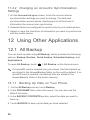
12 Using Other Applications.............................................. 58
12.1
12.2
12.3
12.4
12.5
12.6
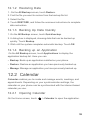
All Backup...........................................................................58
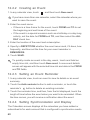
Calendar .............................................................................59
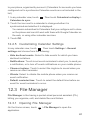
File Manager.......................................................................61
Clock...................................................................................63
Calculator............................................................................64
Notes ..................................................................................64
13 Managing Your Mobile Phone ...................................... 65
13.1
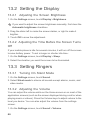
13.2
13.3
13.4
Setting the Date and Time ..................................................65
Setting the Display..............................................................66
Setting Ringers ...................................................................66
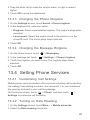
Setting Phone Services ......................................................67
iii
13.5
13.6
13.7
13.8
13.9
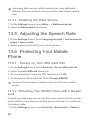
Adjusting the Speech Rate .................................................68
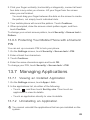
Protecting Your Mobile Phone ............................................68
Managing Applications........................................................69
Resetting Your Mobile Phone .............................................70
Online Update.....................................................................71
14 Appendix ...................................................................... 72
14.1 FAQs...................................................................................72
iv
1 Read Before Proceeding
1.1 Safety Precautions
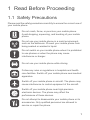
Please read the safety precautions carefully to ensure the correct use of
your mobile phone.
Do not crash, throw, or puncture your mobile phone.
Avoid dropping, squeezing, and bending of your mobile
phone.
Do not use your mobile phone in a moist environment,
such as the bathroom. Prevent your mobile phone from
being soaked or washed in liquid.
Do not switch on your mobile phone when it is prohibited
to use phones or when the phone may cause
interference or danger.
Do not use your mobile phone while driving.
Follow any rules or regulations in hospitals and health
care facilities. Switch off your mobile phone near medical
apparatus.
Switch off your mobile phone in aircraft. The phone may
cause interference to control equipment of the aircraft.
Switch off your mobile phone near high-precision
electronic devices. The phone may affect the
performance of these devices.
Do not attempt to disassemble your mobile phone or its
accessories. Only qualified personnel are allowed to
service or repair the phone.
1
Do not place your mobile phone or its accessories in
containers with a strong electromagnetic field.
Do not place magnetic storage media near your mobile
phone. Radiation from the phone may erase the
information stored on them.
Do not put your mobile phone in a high-temperature
place or use it in a place with flammable gas such as a
gas station.
Keep your mobile phone and its accessories away from
children. Do not allow children to use your mobile phone
without guidance.
Use only approved batteries and chargers to avoid the
risk of explosions.
Observe any laws or regulations on the use of wireless
devices. Respect others' privacy and legal rights when
using your wireless device.
Strictly follow the relevant instructions of this manual
while using the USB cable. Otherwise your mobile phone
or PC may be damaged.
1.2 Personal Information and Data
Security
The use of some functions or third-party applications on your device
could result in your personal information and data being lost or
becoming accessible to others. Several measures are recommended to
help you protect personal and confidential information.
• Place your device in a safe area to prevent it from unauthorized use.
• Set your device screen to lock and create a password or unlock
pattern to open it.
2
• Periodically back up personal information kept on your SIM card,
memory card, or stored in your device memory. If you change to a
different device, be sure to move or delete any personal information
on your old device.
• If you are worried about viruses when you receive messages or
emails from a stranger, you can delete them without opening them.
• If you use your device to browse the Internet, avoid websites that
might pose a security risk to avoid theft of your personal information.
• If you use services such as Bluetooth, set passwords for these
services to prevent unauthorized access. When these services are
not in use, turn them off.
• Install or upgrade device security software and regularly scan for
viruses.
• Be sure to obtain third-party applications from a legitimate source.
Downloaded third-party applications should be scanned for viruses.
• Install security software or patches released by Huawei or third-party
application providers.
• Some applications require and transmit location information. As a
result, a third-party may be able to share your location information.
• Your device may provide detection and diagnostic information to
third-party application providers. Third party vendors use this
information to improve their products and services.
• If you have concerns about the security of your personal information
and data, please contact [email protected].
1.3 Legal Notice
Copyright © Huawei Technologies Co., Ltd. 2013. All rights
reserved.
No part of this document may be reproduced or transmitted in any form
or by any means without prior written consent of Huawei Technologies
Co., Ltd.
The product described in this manual may include copyrighted software
of Huawei Technologies Co., Ltd. and possible licensors. Customers
3
shall not in any manner reproduce, distribute, modify, decompile,
disassemble, decrypt, extract, reverse engineer, lease, assign, or
sublicense the said software, unless such restrictions are prohibited by
applicable laws or such actions are approved by respective copyright
holders.
Trademarks and Permissions
,
, and
are trademarks or registered trademarks of
Huawei Technologies Co., Ltd.
Android is a trademark of Google Inc.
The Bluetooth® word mark and logos are registered trademarks owned
by Bluetooth SIG, Inc. and any use of such marks by Huawei
Technologies Co., Ltd. is under license.
Other trademarks, product, service and company names mentioned are
the property of their respective owners.
Notice
Some features of the product and its accessories described herein rely
on the software installed, capacities and settings of local network, and
therefore may not be activated or may be limited by local network
operators or network service providers. Thus the descriptions herein
may not match exactly the product or its accessories you purchase.
Huawei Technologies Co., Ltd. reserves the right to change or modify
any information or specifications contained in this manual without prior
notice and without any liability.
Third-Party Software Statement
Huawei Technologies Co., Ltd. does not own the intellectual property of
the third-party software and applications that are delivered with this
product. Therefore, Huawei Technologies Co., Ltd. will not provide any
warranty of any kind for these third-party software and applications.
Neither will Huawei Technologies Co., Ltd. provide support to
customers who use these third-party software and applications, nor be
responsible or liable for the functions of these third-party software and
applications.
Third-party software and applications services may be interrupted or
terminated at any time. Huawei Technologies Co., Ltd. does not
guarantee that any content or service would be maintained for any
4
period during its availability. Third-party service providers provide
content and services through network or transmission tools outside of
the control of Huawei Technologies Co., Ltd. To the greatest extent
permitted by applicable law, it is explicitly stated that Huawei
Technologies Co., Ltd. shall not compensate or be liable for services
provided by third-party service providers, or the interruption or
termination of third-party contents or services.
Huawei Technologies Co., Ltd. shall not be responsible for the legality,
quality, or any other aspects of any software installed on this product, or
for any uploaded or downloaded third-party works, such as texts,
images, videos, or software. Customers shall bear the risk for any and
all effects, including incompatibility between the software and this
product, which result from installing software or uploading or
downloading the third-party works.
This product uses the open-source Android™ platform. Huawei
Technologies Co., Ltd. has made necessary changes to the platform.
Therefore, this product may not support all the functions that are
supported by the standard Android platform or may be incompatible
with third-party software. Huawei Technologies Co., Ltd. shall not be
liable for any of such situation.
DISCLAIMER OF WARRANTIES
THE CONTENTS OF THIS MANUAL ARE PROVIDED "AS IS".
EXCEPT AS REQUIRED BY APPLICABLE LAWS, NO WARRANTIES
OF ANY KIND, EITHER EXPRESS OR IMPLIED, INCLUDING BUT
NOT LIMITED TO, THE IMPLIED WARRANTIES OF
MERCHANTABILITY AND FITNESS FOR A PARTICULAR
PURPOSE, ARE MADE IN RELATION TO THE ACCURACY,
RELIABILITY OR CONTENTS OF THIS MANUAL.
LIMITATIONS OF LIABILITY
TO THE MAXIMUM EXTENT PERMITTED BY APPLICABLE LAW, IN
NO EVENT SHALL HUAWEI TECHNOLOGIES CO., LTD. BE LIABLE
FOR ANY SPECIAL, INCIDENTAL, INDIRECT, OR
CONSEQUENTIAL DAMAGES, OR LOST PROFITS, BUSINESS,
REVENUE, DATA, GOODWILL OR ANTICIPATED SAVINGS.
THE MAXIMUM LIABILITY (THIS LIMITATION SHALL NOT APPLY TO
LIABILITY FOR PERSONAL INJURY TO THE EXTENT APPLICABLE
LAW PROHIBITS SUCH A LIMITATION) OF HUAWEI
5
TECHNOLOGIES CO., LTD. ARISING FROM THE USE OF THE
PRODUCT DESCRIBED IN THIS DOCUMENT SHALL BE LIMITED
TO THE AMOUNT PAID BY CUSTOMERS FOR THE PURCHASE OF
THIS PRODUCT.
Import and Export Regulations
Customers shall comply with all applicable export or import laws and
regulations and be responsible to obtain all necessary governmental
permits and licenses in order to export, re-export or import the product
mentioned in this manual including the software and technical data
therein.
Privacy Policy
Please refer to our privacy policy on our websites for the information
about how we protect your personal information.
2 Getting Started
All the pictures in this guide are for your reference only. Your
phone's actual display features may be different to those described
here, depending on its software version.
2.1 Appearance
2.1.1 Key Functions at Your Fingertips
• Press and hold to power on your mobile phone.
• When your mobile phone is powered on, press and hold this
button to display the options menu. You can then choose to
power off the phone or perform shortcut operations.
• Press to lock the screen when your mobile phone is active.
Touch to open the menu on an active screen.
6
• Touch to return to the Home screen.
• Touch and hold to display recently used applications.
• Touch to return to the previous screen or exit the application
you are running.
• Touch to hide the keyboard.
2.2 Setting Up Your Mobile Phone
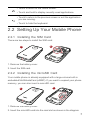
2.2.1 Installing the SIM Card
There are two steps to install the SIM card:
1
2
1. Remove the battery cover.
2. Insert the SIM card.
2.2.2 Installing the microSD Card
Your mobile phone is already equipped with a large-volume built-in
embedded MultiMediaCard (eMMC). If you want to expand your phone
memory, you can also insert a microSD card.
1
2
1. Remove the battery cover.
2. Insert the microSD card into the card slot as shown in the diagram.
7
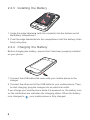
2.2.3 Installing the Battery
b
a
1. Angle the edge labeled a (with the contacts) into the bottom end of
the battery compartment.
2. Push the edge labeled b into the compartment until the battery clicks
firmly into place.
2.2.4 Charging the Battery
Before charging the battery, ensure that it has been properly installed
on your phone.
1. Connect the USB cable that came with your mobile phone to the
charger.
2. Connect the other end of the USB cable to your mobile phone. Then,
to start charging, plug the charger into an electrical outlet.
If you charge your mobile phone while it is powered on, the battery icon
on the notification bar indicates the charging status. When the battery
icon changes to
8
, your mobile phone is fully charged.
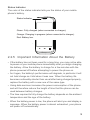
Status Indicator
The color of the status indicator tells you the status of your mobile
phone's battery.
Status Indicator
Green: Fully charged (when connected to charger).
Orange: Charging in progress (when connected to charger).
Red: Battery low.
2.2.5 Important Information About the Battery
• If the battery has not been used for a long time, you may not be able
to power on your mobile phone immediately after you begin charging
the battery. Allow the battery to charge for a few minutes with the
phone powered off before attempting to power the phone on.
• As it ages, the battery's performance will degrade, in particular it will
not hold charge as it did when it was new. When the battery life
becomes noticeably shorter than usual after being charged properly,
replace the battery with a new one of the same type.
• Using data services increases the power consumption of the phone
and will therefore reduce the length of time that the phone can be
used between battery charges.
• The time required to fully charge the battery depends on the ambient
temperature and the age of the battery.
• When the battery power is low, the phone will alert you and display a
message. When the battery power is almost exhausted, your phone
will power off automatically.
9
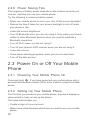
2.2.6 Power Saving Tips
The longevity of battery power depends on the network to which you
connect, and how you use your mobile phone.
Try the following to conserve battery power:
• When your mobile phone is not in use, turn off the screen backlight.
• Reduce the time it takes for your screen backlight to turn off when
your phone is idle.
• Lower the screen brightness.
• Turn off Bluetooth when you are not using it. Only make your phone
visible to other Bluetooth devices when you need to establish a
Bluetooth connection.
• Turn off Wi-Fi when you are not using it.
• Turn off your phone's GPS receiver when you are not using it.
• Lower the volume.
• Close power-draining programs, when you do not need them.
• Turn off the data service.
2.3 Power On or Off Your Mobile
Phone
2.3.1 Powering Your Mobile Phone On
Press and hold
. If you have protected your mobile phone with a
personal identification number (PIN), enter it before using the mobile
phone.
2.3.2 Setting Up Your Mobile Phone
The first time you power on your mobile phone, the phone displays a
setup wizard to help you set up the phone.
The setup wizard helps you:
• Create or sign in to your account
• Make some initial decisions about how you want to use your mobile
phone
10
2.3.3 Powering Off Your Mobile Phone
1. Press and hold
to display the options menu.
2. Touch Power off.
If Quick Pwr On is enabled, the mobile phone will enter deep sleep
mode. If Quick Pwr On is disabled, touch OK to power off the
phone.
2.3.4 Turning On Fast Boot
1. Touch
> Settings.
2. Touch the button next to Quick Pwr On.
Do not turn on Quick Pwr On while on an airplane.
2.3.5 Restarting Your Mobile Phone
1. Press and hold
to display the options menu.
2. Touch Restart.
3. Touch OK.
2.3.6 Using Airplane Mode
Some locations may require you to turn off your phone's wireless
connections. Rather than powering off your phone, you can place it in
Airplane mode.
1. Press and hold
.
2. Touch Airplane mode in the options menu.
11
2.4 Using the Touchscreen
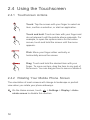
2.4.1 Touchscreen Actions
Touch: Tap the screen with your finger to select an
item, confirm a selection, or start an application.
Touch and hold: Touch an item with your finger and
do not release it until the mobile phone responds. For
example, to open the options menu for the active
screen, touch and hold the screen until the menu
appears.
Flick: Move your finger either vertically or
horizontally across the screen.
Drag: Touch and hold the desired item with your
finger. To move an item, drag the item to any part of
the screen. You can drag an icon to move or delete it.
2.4.2 Rotating Your Mobile Phone Screen
The orientation of most screens will change to landscape or portrait
view when you rotate your phone sideways.
On the Home screen, touch
> Settings > Display > Autorotate screen to disable this function.
12
2.5 Locking and Unlocking the
Screen
2.5.1 Locking the Screen
• When your phone is on, press
to lock the screen. When the
screen is locked, you can still receive messages and calls.
• If your phone is idle for a while, the screen will lock automatically.
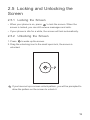
2.5.2 Unlocking the Screen
1. Press
to wake up the screen.
2. Drag the unlocking icon to the small open lock, the screen is
unlocked.
If you have set up a screen unlock pattern, you will be prompted to
draw the pattern on the screen to unlock it.
13
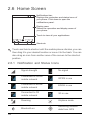
2.6 Home Screen
10:23
Notifications bar:
Displays the reminders and status icons of
your phone. Flick down to open the
notifications panel.
Display area:
Shows the operation and display areas of
your phone.
Touch to view all your applications.
Shortcuts
Touch and hold a shortcut until the mobile phone vibrates, you can
then drag it to your desired location or move it to the trash. You can
also drag an icon from another area of the screen to the shortcut
position.
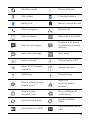
2.6.1 Notification and Status Icons
14
Signal strength
No signal
Connected to GPRS
mobile network
GPRS in use
Connected to EDGE
mobile network
EDGE in use
Connected to 3G
mobile network
3G in use
Roaming
Airplane mode
Bluetooth on
Receiving location
data from GPS
Vibration mode
Ringer silenced
Call muted
Charging battery
Battery full
Battery extremely low
Call in progress
Missed call
Alarm enabled
New mail from Gmail
New text message
Problem with text or
multimedia message
delivery
New chat message
New email
New voicemail
Connected to a PC
Open Wi-Fi network
available
Upcoming event
Uploading
Downloading
Phone storage space
is getting low
Sign-in or
synchronization
problem
Preparing the
mircoSD card
More undisplayed
notifications
Synchronizing data
Synchronization
failed
Connected to a VPN
Disconnected from a
VPN
15
2.6.2 Notification Panel
Your mobile phone will notify you when you receive a new message or
there is an upcoming event. The notification panel also informs you of
alarms and settings. Open the notification panel to see your network
operator or to view a message, reminder, or event notification.
Opening the Notification Panel
1. When a new notification icon appears on the notification bar, place
your finger on the notification bar and flick down to open the
notification panel.
2. On the panel, you can:
• Touch a notification to open the corresponding application.
• Flick left or right on a notification to delete it.
• Touch the cross sign (×) to clear all notifications.
• Touch
to display the settings screen.
Closing the Notification Panel
Touch and hold the bottom of the panel. Then flick up to close it.
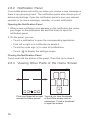
2.6.3 Viewing Other Parts of the Home Screen
10:23
10:23
+
Flick your finger left or right Touch
to view thumbnails
across the Home screen.
of the Home screen and its
extensions. Touch a thumbnail
to open the screen.
16
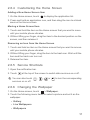
2.6.4 Customizing the Home Screen
Adding a New Home Screen Item
1. On the Home screen, touch
to display the application list.
2. Press and hold an application icon, and then drag the icon to a blank
area on the Home screen.
Moving a Home Screen Item
1. Touch and hold the item on the Home screen that you want to move
until your mobile phone vibrates.
2. Without lifting your finger, drag the item to the desired position on the
screen, and then release it.
Removing an Icon from the Home Screen
1. Touch and hold an item on the Home screen that you want to remove
until your mobile phone vibrates.
2. Without lifting your finger, drag the item to the trash can. Wait until the
item and the trash can turn red.
3. Release the item.
2.6.5 Service Shortcuts
1. Open the notification bar.
2. Touch
at the top of the screen to switch data services on or off.
You can also touch
services on or off.
,
,
or
to turn the corresponding
2.6.6 Changing the Wallpaper
1. On the Home screen, touch
> Wallpaper.
2. Touch the following menu items to select a picture and set it as the
wallpaper:
• Gallery
• Live Wallpapers
• Wallpapers
17
2.6.7 Changing the Theme
On the Home screen, touch
> Theme settings to select a theme.
2.7 Applications and Widgets
The Application screen holds icons for all of the applications on your
phone. You can touch
screen.
on the Home screen to open the application
2.7.1 Moving Icons on the Application Screen
1. On the application screen, touch
.
2. Touch and hold the icon you want to move on the application screen.
3. Without lifting your finger, drag the icon to the desired location, and
then release it.
To move more icons, repeat steps 2 and 3.
4. Touch
or
to save.
2.7.2 Accessing Widgets
On the application screen, touch the WIDGETS tab to switch to the
widget screen. From the widget screen, you can touch and hold a
widget, and then drag it to the Home screen.
2.7.3 Viewing Recently Used Applications
To display the list of recently used applications, press and hold
. To
open an application, touch the corresponding thumbnail. To close the
application, flick left or right across the screen.
18
2.8 Using a microSD Card
2.8.1 Using the microSD Card as a USB Mass
Storage
To transfer all your favorite music and pictures from your PC to your
mobile phone's microSD card, set the microSD card as a USB mass
storage.
1. Connect your mobile phone to your PC with the USB cable provided.
Your PC will detect the microSD card as a removable storage device.
2. Open the notification bar, and then touch USB connected.
3. Touch Turn on USB storage in the dialog box that opens to confirm
that you want to transfer files.
You can now transfer files from your PC to your mobile phone's
microSD card.
When your microSD card acts as a USB mass storage, your mobile
phone will not use this memory space. Ensure that you follow the
correct procedures to disconnect the USB mass storage device
(your mobile phone) from the PC when you have finished
transferring files.
2.8.2 Removing the microSD Card
1. On the Home screen, touch
> Settings.
2. Scroll down the screen, and then touch Storage > Unmount SD
card.
3. Touch OK
4. Carefully remove the microSD card.
19
3 Calling
To make a phone call, you can dial a number using the keypad or touch
a number saved in your contact list, on a webpage, or in other places.
When you are in a call, you can answer other incoming calls or redirect
them to your voicemail. You can also set up conference calls with
several participants.
3.1 Making a Call
To make a call, you can use the Phone application, or select a number
from People.
When you are in a call, you can touch
to use other functions. To
return to the call screen, flick the notification bar down and touch
Current call.
Be careful not to block the microphone at the bottom of your phone
if you want your voice heard by the other parties in a call.
3.1.1 Making a Call with the Phone Application
1. On the Home screen, touch
displayed, touch
> Phone. If the dialer is not
.
2. Enter the phone number.
3. Touch
to initiate the call.
During a call, touch
to enter other numbers on the dialer.
3.1.2 Making a Call from People
1. On the Home screen, touch
> Phone.
2. Touch
to display the contacts saved on your mobile phone.
Select a contact to place a call.
20
3.1.3 Making a Call from the Call Log
1. On the Home screen, touch
display the call log.
2. Touch
> Phone, and then touch
to
on the right of a log entry to dial that number.
3.1.4 Using Voice Dialing
Calls can be placed using voice dialing. When you open the voice
dialing application, your phone's speaker will be enabled.
Background noise will affect the accuracy of voice dialing.
1. On the Home screen, touch
> Voice Dialer.
2. Follow the onscreen instructions, then say your command close to
the microphone. Your phone will identify the command and make a
call.
3.2 Answering or Rejecting a Call
3.2.1 Answering an Incoming Call
When you receive a phone call, the incoming call screen opens. If you
have previously saved the caller's number in People, the caller's name
and number are displayed. If the caller's number is not saved in People,
the caller's number is displayed.
21
Drag
to the right to answer the call.
3.2.2 Ending a Call
During a call, touch
to hang up.
3.2.3 Rejecting an Incoming Call
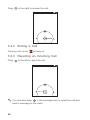
Drag
to the left to reject the call.
You can also drag
to the message icon to reject the call and
send a message to the caller.
22
3.3 Other Operations During a Call
3.3.1 Making a Conference Call
If you receive a new call while you are already in a call, you can add the
second call to the call you are in. This feature is known as conference
calling. You can also set up a conference call with multiple callers.
Contact your network operator to ask if conference calls are
supported and, if yes, how many parties can participate.
1. To initiate a conference call, dial the number of the first participant.
After you have connected to the first participant, keep the connection
open, touch
.
2. Enter the phone number of the next person you want to invite for the
conversation and touch
, or select someone from your
or
. The first participant is automatically placed on hold while you do
this.
3. Once you have connected to the second person, touch
the conference call.
to begin
4. To end the conference call and disconnect from everyone, touch
.
3.3.2 Switching Between Calls
If you receive a new call while you are already in a call, you can switch
between the two calls.
1. While you are in the first call and the second call comes in, answer
the incoming call, and then touch
.
2. The current call is placed on hold and you are connected to the first
call.
4 People
The People application enables you to save and manage information
such as phone numbers and addresses of your contacts. After you save
23
contact information on your mobile phone, you have easy access to the
people with whom you want to communicate.
4.1 Opening the People
Application
On the Home screen, touch
application.
> People to open the People
• If you have not yet added any contacts to your mobile phone, touch
to create a contact.
• Any contacts that are already saved on your mobile phone are
displayed alphabetically in a list that you can scroll through.
4.2 Importing Contacts from a SIM
Card
1. In the contacts list, touch
> Manage contacts.
2. Touch Copy from SIM card.
3. Wait for the SIM card contents to be loaded. Touch one contact to
import that contact individually to your mobile phone, or touch
SELECT ALL to import all contacts to your mobile phone.
4. Touch COPY.
5. If you have more than one account on your phone, touch the account
into which you want to import the contacts.
4.3 Adding a Contact
1. In the contact list, touch
.
2. From the screen displayed, create a contact in your mobile phone,
SIM card or your account. Add a new account if you do not have one.
3. Enter the contact's name, and then add detailed information such as
phone numbers and address.
24
4. Touch DONE to save the contact information.
To save a contact from your call log, touch and hold the desired
phone number to display the options menu, and then touch Add to
contacts.
4.4 Adding a Contact to Your
Favorites
Select a contact and touch the star on the right of the contact's name. If
the
icon is highlighted, the contact is in your favorites list.
4.5 Searching for a Contact
1. In the contact list, touch
.
2. Enter the name of the contact you wish to search for. As you type,
contacts with matching names appear below the search box.
4.6 Editing a Contact
You can make changes to the information you have stored for a contact
at any time.
1. In the contacts list, touch the contact whose details you want to edit,
and then touch
.
2. Touch the category of contact information you wish to change: name,
phone number, email address, or any other information you recorded
earlier.
3. Make the desired changes to the contact information, and then touch
DONE. To cancel all of your changes, touch
> Cancel.
25
4.7 Communicating with Your
Contacts
You can quickly call or send a text (SMS) or multimedia (MMS)
message to a contact's default phone number. You can also open
details to view a list of all the ways you can communicate with that
contact. This section describes how to communicate with a contact
when viewed in your contacts list.
4.7.1 Using Quick Contact for Android
1. Touch the contact's picture or picture frame (if you have not assigned
a picture to the contact) to open Quick Contact for Android.
2. Touch the icon for the way you want to communicate with the contact.
The icons available depend on the information you have entered for
the contact, the applications installed on your phone, and the
accounts you have.
4.7.2 Communicating with a Contact
1. In the contacts list, touch the contact that you want to communicate
with.
2. On the contact's details screen, you can communicate with the
contact in one of the following ways:
• Touch the phone number to place a call.
• Touch the email address to send an email.
• Touch
to send a text message.
4.8 Deleting a Contact
1. In the contact list, touch the contact that you want to delete, and then
touch
> Delete.
2. Touch OK to confirm that you want to delete the contact.
26
4.9 Backing Up and Synchronizing
Contacts
You can back up contacts from your phone to a microSD card, or
synchronize phone contacts with a server using your Google account.
4.9.1 Using a microSD Card to Back Up Contacts
Backing Up Contacts
1. In the contact list, touch
> Manage contacts.
2. From the displayed menu, touch Export to storage.
After touching Export to storage, a message is displayed to show
the storage location of the .vcf file to which your contacts will be
exported.
3. Touch OK to export your phone contact's information to the installed
microSD card.
You can copy the .vcf files backed up on the microSD card to your
computer.
Restoring Contacts
1. In the contact list, touch
> Manage contacts.
2. Touch Import from storage in the displayed menu.
If there is more than one .vcf files saved on the microSD card, you can
choose to restore one, multiple, or all the of them.
4.9.2 Using a Google Account to Synchronize
Contacts
You can synchronize contacts using your Google account. For details,
see Changing an Account's Synchronization Settings.
27
4.10 Managing Groups
4.10.1 Creating a Group
1. On the Home screen, touch
2. Touch
> People, and then touch
.
in the group list.
3. Enter the name you want to assign to the group.
4. Touch DONE to save the group.
4.10.2 Editing a Group
You can always make changes to the information you have saved for a
group.
1. In the groups list, touch the group that you want to edit, and then
touch
> Edit.
2. Make the desired changes to the group information, and then touch
DONE. To cancel all changes you made to the group information,
touch
> Discard.
4.10.3 Adding a Contact to Your Groups
Select a group, touch
ADD MEMBERS.
to select the desired contact, and then touch
You can only add contacts saved in your phone memory to a group,
you cannot add contacts saved in your SIM card.
4.11 Joining and Separating
Contacts
You may have duplicate contacts if you import contacts by:
• Adding an account, such as a Gmail account.
• Using other methods, such as exchanging emails.
To avoid duplication, join two or more contacts together to form a single
contact.
28
4.11.1 Joining Contacts
1. On the Home screen, touch
> People.
2. Touch a duplicated contact.
3. Touch Manage joined contacts, and then touch Add contact.
4. Select the contact to be joined to combine two duplicate contacts.
Two contacts will be joined together and displayed as one contact.
Touch the contact to view the joined information. You can see that the
contact is joined together by two contacts. You can also combine more
than two contacts.
4.11.2 Separating Contacts
If contact information from different sources was joined together in
error, you can separate the contacts.
1. On the Home screen, touch
> People.
2. Touch the joint contact to be separated.
3. Touch Manage joined contacts.
4. Select the contact to be separated from the joint contact.
The joint contact is then separated into two contacts displayed
separately in People.
4.12 Sending Contacts
You can send contact information as a .vcf file via Bluetooth or Email.
1. Select a contact from the contacts list.
2. Touch
> Share.
3. Select your preferred method to send the contacts you have selected,
for example Bluetooth or Email.
29
5 Text Input
5.1 Displaying the Keyboard
To enter text, use the onscreen keyboard. The keyboard is displayed
automatically when you run certain applications. If not, touch a text field
to open the keyboard.
Touch
to hide the keyboard.
5.2 Choosing an Input Method
1. When the keyboard is displayed, the keyboard icon is shown on the
notification bar. Flick the notification bar downwards to open the
notification panel.
2. Touch Select input method.
3. Select the desired input method.
You can also change the default input method. To do so, touch
>
Settings > Language & input > Default on the Home screen, and then
select an input method.
30
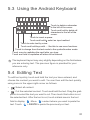
5.3 Using the Android Keyboard
1
2
3
q w e r
4
5
6
7
9
8
t y u i o p
0
a s d f g h j k l
Touch to delete a character
to the left of the cursor.
Touch and hold to delete all
:-)
characters to the left of the
cursor.
Touch to insert a space.
Touch and hold to select an input method.
z x c v b n m
?123
Touch to enter text by voice.
Touch and hold keys with … like this to use more functions.
Touch to change from the text mode to the symbol/number mode.
Touch once to capitalize the next letter you type.
Touch and hold to capitalize all letters to be entered.
The keyboard layout may vary slightly depending on the field where
you are entering text. The previous figure is provided for your
reference only.
5.4 Editing Text
To edit text quickly, touch and hold the text you have entered, and
choose the content you want to edit. You can then edit the text quickly
using icons in the upper right corner as follows:
•
•
: Select all content.
: Cut the selected content. Touch and hold the text. Drag the grab
points to select the text you want to cut. Then touch this button to cut
the selected text. After the text is cut, touch a blank area in the text
field to display
text. Touch
. Move
to select where you want to paste the
> PASTE to paste the previously cut text.
31
•
: Copy the selected text. Touch and hold the text. Drag the grab
points to select text you want to copy. Touch this button to copy the
text. After the text is copied, touch a blank area in the text field to
display
. Move
to where you want to paste the text. Touch
> PASTE to paste the previously copied text.
•
: Move the cursor to an input position. Touch this icon to replace
the selected content with what you just cut or copied.
5.5 Using the Landscape
Keyboard
If you find the keyboard inconvenient or difficult to use, turn your mobile
phone sideways. The screen will display the keyboard in landscape
orientation, providing you with a wider keyboard layout.
5.6 Customizing Your Keyboard
Settings
1. On the Home screen, touch
> Settings > Language & input.
2. In KEYBOARD & INPUT METHODS, touch
method to customize the input method.
next to an input
6 Messaging
The Messaging application allows you to exchange text messages
(SMS) and multimedia messages (MMS) with anyone using an SMS-orMMS-capable phone.
6.1 Opening Messaging
On the Home screen, touch
application.
32
> Messaging to open the message
6.2 Creating and Sending a Text
Message
1. Touch
> Messaging, then
.
2. Enter a phone number or a contact's name in the To field, or touch
to select a contact from People.
As you enter the phone number or the contact's name, the phone
displays possible matches from your contacts. Select a contact
from the list of possible matches or continue entering.
After you select a contact or finish entering a number, you can enter
another recipient.
3. Touch the composition text box to start composing your message.
4. When you are ready to send the message, touch Send.
Sent and received messages will be displayed in a message thread and
grouped together in a conversation.
6.3 Creating and Sending a
Multimedia Message
You can use multimedia messages to make everyday communications
very special. You can record a message and send it as an audio file, for
example, sing "Happy Birthday" and send it to a friend, or send a
slideshow of photographs of a special event. The possibilities are
enormous.
1. Touch
> Messaging, then
.
2. Enter a phone number in the To field, or touch
from People.
to select a contact
3. Touch the composition text box to start composing your message.
If you want to enter a smiley, touch
, then Insert smiley.
4. Touch
to attach a picture, an audio file, or a video clip to the
message.
33
5. When you are ready to send the message, touch Send MMS.
You can select a media file (music, video, or picture) and send it as
an attachment in a multimedia message. In File Manager, touch
and hold a media file, and then touch Share > Messaging.
6.3.1 Adding a Slideshow
If you want to attach more than one file to your message, use the
Slideshow option.
1. On the message composing screen, touch
panel.
to display the options
2. Touch Slideshow, and then select a slide to edit.
3. Touch
then Add slide to add more slides.
4. Touch Done to return to the multimedia message screen when you
finish editing the message.
5. To modify your multimedia message, touch Edit on the multimedia
message screen. When you are ready to send the message, touch
Send.
6.4 Opening and Viewing a
Multimedia Message
1. In the message list, touch the message thread you wish to view.
2. Touch the multimedia message to view the message.
6.5 Replying to a Message
1. In the message list, touch a text or multimedia message thread to
open it.
2. Touch the text box to compose your message. Once finished, touch
Send.
34
6.6 Searching for a Message
To find a message quickly: On the messages list screen, touch
enter the message content to search for.
and
6.7 Customizing Message Settings
In the message list, touch
the message settings.
, and then touch Settings to customize
7 Getting Connected
7.1 Mobile Networks
Your mobile phone will be automatically configured to use your network
operator's wireless service (if available) when you turn on the phone for
the first time. Note that the SIM card must be inserted.
7.1.1 Checking the Network Connection
1. Touch
> Settings.
2. Under WIRELESS & NETWORKS, touch More... > Mobile
networks.
3. Touch Network operators or Access Point Names to check the
network connection.
Your phone will automatically read the access point settings from
the SIM card (if any). Therefore, do not change the access point
parameters; otherwise, you might not be able to access network
resources.
7.1.2 Turning On the Data Service
1. Touch
> Settings.
2. Under WIRELESS & NETWORKS, touch More... > Mobile
networks.
35
3. Select the Data enabled check box to turn on the data connection.
If you do not need to access a wireless data network, you can clear
the Data enabled check box to save data traffic costs.
7.2 Wi-Fi
Wi-Fi gives you wireless access to broadband Internet. To use Wi-Fi on
your mobile phone, you must have an access to wireless access points
(hotspots). Obstacles that block the Wi-Fi signal will reduce its strength.
7.2.1 Turning On Wi-Fi
1. Touch
> Settings.
2. Under WIRELESS & NETWORKS, touch the button next to Wi-Fi.
7.2.2 Connecting to a Wireless Network
1. After turning on Wi-Fi, touch
> Settings.
2. Under WIRELESS & NETWORKS, touch Wi-Fi to display the Wi-Fi
screen. You will see a list of detected Wi-Fi networks.
3. Touch a Wi-Fi network to connect to it.
• If you select an open network, your mobile phone will
automatically connect to it.
• If you select a network that is secured with Wired Equivalent
Privacy (WEP) and it is the first time that you have connected to it,
enter the password as prompted, and then touch Connect. If you
connect to a secured wireless network that you have already used,
you will not be prompted to enter the password again unless you
have reset your mobile phone to its default settings.
On the Wi-Fi screen, touch ADD NETWORK to add a new Wi-Fi
network.
7.3 Controlling Data Usage
With Data usage, you can set a data usage cycle and the mobile data
limit for this period. You will be notified when data usage reaches the set
36
limit. You can also query the data usage within a certain period or by a
certain application.
On the Home screen, touch
the data usage settings:
> Settings > Data usage to configure
• Touch Mobile data to turn on or off the mobile data function. The
mobile data function must be turned on to configure data control and
query data usage.
• Select the Set mobile data limit check box. When data traffic
reaches the preset limit, your phone's mobile data connection will be
disabled.
• Touch the scroll arrow beside Data usage cycle, then Change
cycle.... After setting the data usage cycle, touch Set.
• Drag the red line to set a data usage limit or the orange line to set a
warning limit. When data traffic reaches the yellow line, you will be
notified; when data traffic reaches the red line, your phone's mobile
networks data connection will be disabled.
• Scroll the white time axis to view data usage within a certain period.
• Touch an application to check its data usage.
7.4 Browser
Your mobile phone comes with an Internet browser pre-installed.
7.4.1 Basic Operations
Touch
> Browser to open the home page.
When known or open Wi-Fi networks and mobile data networks are
available at the same time, your phone will preferably select a WiFi network for Internet access.
Touch
on the upper section of the screen, and all web pages
currently open are displayed. You can:
• Touch one page to enlarge it.
• Touch (×) to close that page.
• Touch (+) to open a new browser window.
37
Touch
to open the browser options menu and perform one of the
following operations:
• Bookmarks: Touch to display bookmarks.
• Refresh: Touch to refresh the current webpage.
• Forward: Touch to navigate to the web page from which you returned
to the current web page.
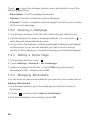
7.4.2 Opening a Webpage
1. In a browser window, touch the URL field at the top of the screen.
2. Use the keyboard to enter a webpage address. You can touch
enter the web page address by voice.
to
3. As you enter the address, matching webpage addresses will appear
on the screen. If you see the address you want, touch it and go
directly to that webpage or complete entering your desired webpage.
7.4.3 Setting a Home Page
1. In a browser window, touch
.
2. Touch Settings > General > Set homepage.
3. Select one page from the list, or touch Other to enter desired
homepage's URL, and then touch OK.
7.4.4 Managing Bookmarks
You can store as many bookmarks as you want on your mobile phone.
Adding a Bookmark
1. In a browser window, go to the webpage you want to save as a
bookmark.
2. Touch
, and then touch Save to bookmarks.
3. Edit the bookmark name and then touch OK.
38
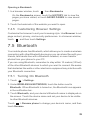
Opening a Bookmark
1. In a browser window, touch
, then Bookmarks
On the Bookmarks screen, touch the HISTORY tab to view the
pages you have visited, or touch SAVED PAGES to view saved
pages.
2. Touch the bookmark of the website you want to open.
7.4.5 Customizing Browser Settings
Customize the browser to suit your browsing style. Use Browser to set
page content, privacy, and security preferences. In a browser window,
touch
, and then touch Settings.
7.5 Bluetooth
Your mobile phone has Bluetooth, which allows you to create a wireless
connection with other Bluetooth devices so you can share files with your
friends, talk hands-free with a Bluetooth headset, or even transfer
photos from your phone to your PC.
If you are using Bluetooth, remember to stay within 10 meters (33 feet)
of the other Bluetooth devices to which you want to connect. Be aware
that obstacles like walls or other electronic equipment may interfere with
your Bluetooth connection.
7.5.1 Turning On Bluetooth
1. Touch
> Settings.
2. Under WIRELESS & NETWORKS, touch the button next to
Bluetooth. When Bluetooth is turned on, the Bluetooth icon appears
in the notification bar.
3. Touch Bluetooth, and your device's Bluetooth name is displayed on
the screen. Touch the device name and set your device to be visible
to other Bluetooth devices.
Touch
> Rename phone to change your device's name, and then
touch Rename.
39
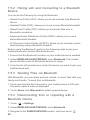
7.5.2 Pairing with and Connecting to a Bluetooth
Device
You can do the following by using the Bluetooth:
• Hands Free Profile (HFP): allows you to use a hands-free Bluetooth
device.
• Headset Profile (HSP): allows you to use a mono Bluetooth headset.
• Object Push Profile (OPP): allows you to transfer files over a
Bluetooth connection.
• Advanced Audio Distribution Profile (A2DP): allows you to use a
stereo Bluetooth headset.
• A/V Remote Control Profile (AVRCP): allows you to remotely control
audio playing using a Bluetooth headset.
Before using the Bluetooth, perform the following steps to pair your
mobile phone with another Bluetooth device:
1. Ensure that the Bluetooth function on your mobile phone is enabled.
2. Under WIRELESS & NETWORKS, touch Bluetooth.Your mobile
phone will then scan for Bluetooth devices in range.
3. From the list of found devices, touch the device you want to pair your
mobile phone with.
7.5.3 Sending Files via Bluetooth
With Bluetooth, you can share pictures, videos, or music files with your
family and friends. To send files via Bluetooth:
1. Touch and hold the file to be sent in your mobile phone or SD card.
The active options menu is displayed.
2. Touch Share, then Bluetooth to select a paired device.
7.5.4 Disconnecting from or Unpairing with a
Bluetooth Device
1. Touch
> Settings.
2. Under WIRELESS & NETWORKS, touch Bluetooth.
3. Navigate to the PAIRED DEVICES section, and then touch
40
.
4. Touch Unpair to disconnect from the device.
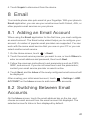
8 Email
Your mobile phone also puts email at your fingertips. With your phone's
Email application, you can use your email account with Yahoo!, AOL, or
other popular email services on your phone.
8.1 Adding an Email Account
When using the Email application for the first time, you must configure
an email account. The Email setup wizard helps you to configure your
account. A number of popular email providers are supported. You can
work with the same email service that you use on your PC or you can
select another email service.
1. On the Home screen, touch
> Email.
2. Touch the email service provider you want to use, or touch Others to
enter an email address and password, then touch Next.
3. Follow the onscreen instructions to set parameters such as POP3,
IMAP, and account. If you do not know how to set the parameters,
contact your email service provider or search online.
4. Touch Next, and the Inbox of the newly configured email account will
be displayed.
After creating your initial email account, touch
> Settings > ADD
ACCOUNT on the Inbox screen to add more email accounts.
8.2 Switching Between Email
Accounts
On the Inbox screen, touch the email address bar on the top, and
choose an email account from the email account list displayed. The
selected account's Inbox is then displayed by default.
41
8.3 Viewing an Email Message
On the Inbox screen, touch the email message you want to view.
You can also touch
and select another folder to view.
8.4 Saving an Email Attachment
1. On the Inbox screen, touch the email message you want to view.
2. Touch the attachment tab to display the attachment.
3. Touch SAVE to download the attachment.
After being downloaded, the attachment is saved in the Download
folder on the microSD card.
8.5 Creating and Sending an
Email Message
1. On the Inbox screen, touch
.
2. In the To field, enter the recipient's name or email address.
3. Enter the subject of your message and compose the message.
To send an attachment with the message, touch
4. Touch
If you are not ready to send the message, touch
or
.
.
> Save draft
to save the message as a draft.
8.6 Replying to an Email Message
1. On the Inbox screen, touch the email message to which you want to
reply.
2. Touch
42
or
> Reply all to reply to the email message.
8.7 Deleting an Email Account
1. On the Inbox screen, touch
configuration screen.
> Settings to enter the account
2. Select an email account.
3. In the menu at the bottom, touch Remove account then touch OK.
8.8 Changing Email Account
Settings
You can change a number of account settings, including the email
checking frequency, new mail notification method, and details about the
account's email sending and receiving servers.
Your account's incoming and outgoing settings depend on the kind
of email service you are using. You can enter the necessary details
manually, although you may need to contact your email service
provider to obtain the correct information.
1. On the Inbox screen, touch
configuration screen.
> Settings to enter the account
2. Select an email account.
3. Change the account settings, such as DATA USAGE,
NOTIFICATION SETTINGS, and SERVER SETTINGS.
9 Entertainment
In addition to being a communication device and personal assistant,
your mobile phone also provides you with a multitude of entertainment
possibilities. You can take photos, create videos and audio clips, and
download and listen to music.
43
9.1 Taking Photos and Recording
Videos
The camera is a combination of camera and camcorder that you can
use to shoot and share pictures and videos.
9.1.1 Opening Your Camera
• Touch
> Camera to open the camera.
• Touch
to close the camera.
Drag up to take
photos, drag down
to record videos.
Touch to take a
photo.
Auto
Thumbnail of last
photo. Touch to
preview the photos
or videos.
Touch to customize the camera settings.
9.1.2 Taking a Photo
1. Open your camera application and switch it to camera mode.
2. If necessary, change the camera settings. The preview changes as
you change the settings.
3. Frame your photo within the photo capture screen.
4. Touch
to take your photo.
Photos taken are displayed for a moment. You can take another photo
or review your photos.
44
9.1.3 Viewing Your Photos
1. After taking a photo, a thumbnail of the photo you have just taken is
shown in the lower right corner of the capture screen. Touch the
thumbnail to view the photo.
2. Touch the onscreen buttons for the following functions:
• Touch
to enter the gallery.
• Touch
>
to send the photo via Bluetooth.
• Touch
>
to send the photo via a multimedia message.
3. If you want to view more photos, flick your finger left or right across
the screen.
9.1.4 Recording a Video
1. Open the camera application, and then switch it to camcorder mode.
2. If necessary, change the camcorder settings.
3. Frame the scene with which you want to start your video.
4. Touch
to start recording a video.
5. Touch
to stop recording.
9.1.5 Viewing Your Videos
1. After recording a video, a thumbnail of the video you have just
recorded is shown in the lower right corner of the capture screen.
Touch the thumbnail to view it.
2. Touch the onscreen button to do any of the following:
• Touch
to enter the gallery.
• Touch
>
to send the video via Bluetooth.
• Touch
>
to send the video via a multimedia message.
3. If you want to view more videos, flick your finger left or right across
the screen.
45
9.2 Using the Gallery
Your Gallery application can automatically search for pictures and
videos on your mobile phone and microSD card. Use Gallery to sort
photos and videos into folders, view and edit pictures, watch videos,
and set a picture as wallpaper or as a photo for a contact.
9.2.1 Opening the Gallery
On the Home screen, touch
> Gallery.
The Gallery application categorizes your pictures and videos by
storage location and displays these files in folders. Touch a folder to
view the pictures or videos inside.
9.2.2 Viewing a Picture
1. In Gallery, touch the folder that contains the pictures you want to
view.
2. Touch the picture to view it in full-screen mode.
The picture viewer supports the automatic rotation function. When
you rotate your mobile phone, the picture adjusts itself to the
rotation.
9.2.3 Rotating a Picture
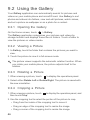
1. When viewing a picture, touch
to display the operations panel.
2. Select either Rotate Left or Rotate Right. The picture is saved with
the new orientation.
9.2.4 Cropping a Picture
1. When viewing a picture, touch
then touch Crop.
to display the operation panel, and
2. Use the cropping tool to select the portion of the picture to crop.
• Drag from the inside of the cropping tool to move it.
• Drag an edge of the cropping tool to resize the image.
• Drag a corner of the cropping tool to resize the image.
46
3. Touch SAVE to save the cropped picture. Touch CANCEL to discard
the changes.
9.3 Enjoying Music
9.3.1 Opening the Music Library
Touch
> Play Music to open the music library.
The music library automatically scans for music stored on your microSD
card and displays them in ALBUMS, SONGS, PLAYLISTS.
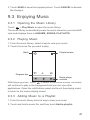
9.3.2 Playing Music
1. From the music library, select a way to view your music.
2. Touch the music file you want to play.
Back
Playlist screen
Progress bar
Music player
controls
While playing music, touch
to return to the Home screen, the music
will continue to play in the background and you can use other
applications. Open the notifications panel and touch the playing music
to return to the music playing screen.
9.3.3 Adding Music to a Playlist
1. From the music library select a way to view your music.
2. Touch and hold a music file, and then touch Add to playlist.
47
9.3.4 Playing Music in a Playlist
1. In music library, touch PLAYLISTS.
2. Touch and hold the playlist you want to play.
3. Touch Play to play the playlist.
9.4 Listening to the FM Radio
The FM radio lets you listen to FM radio programs on your mobile
phone. Since the FM radio uses the provided wired stereo headset as
its antenna, before opening the application, connect the headset to your
phone's the audio jack.
9.4.1 Opening the FM Radio
1. On the Home screen, touch
> FM Radio to open the application.
2. The first time you open FM radio, touch Auto tuning, which
automatically scans for available FM channels, saves them as
presets, and plays the first FM channel found.
9.4.2 Tuning the FM Radio
Open the FM Radio application, and then do the following:
• Touch
or
to tune the radio to the previous or next channel.
• Slide the knob left or right to perform precision tuning. When a
channel is found, touch
, then Save station. Enter the channel
name, touch OK, and then select an empty channel to save the new
channel to the channel list.
• Touch
> Auto tuning to scan automatically for available FM
channels.
10 Google Services
Availability of Google applications, services, and features may vary
according to your country or carrier. Please follow local laws and
regulations to use them.
48
When you turn on your mobile phone for the first time, touch a Google
services such as Talk, Gmail, or Play Store, and you will be prompted
to sign in to your Google account.
Ensure that your mobile phone has an active data connection (3G/
GPRS) before you sign in to your Google account.
If you already have a Google account, touch Existing and enter your
username and password.
10.1 Creating a Google Account
If you do not have a Google account, you can create one:
1. After reading the setup information, touch New.
2. Enter the first name, last name, and then touch Next.
3. Enter the user name for your Google account, and then touch Next.
The mobile phone will connect to a Google server to check whether
the username is available. If the username you entered is already in
use, you will be prompted to choose another one or select one from a
list.
4. Enter and confirm your Google account password, and then touch
Next
5. Select a security question from the drop-down menu, and then enter
the answer, and then touch Next.
6. When the Finish creating account screen appears, touch I accept.
7. Enter the characters that appear on the screen, and then touch Next.
To use another Google account, go to the Accounts & sync
screen, and touch ADD ACCOUNT to select which type of
accounts you want to add.
10.2 Gmail
Gmail is Google's web-based email service. When you first set up your
phone, you may have configured it to use an existing Gmail account or
create a new account. The first time you open the Gmail application on
49
your phone, your Inbox will contain the messages from your Gmail web
account.
10.2.1 Opening Gmail
On the Home screen, touch
> Gmail. The Inbox mail list appears.
Any emails you decide to keep on your mobile phone will go to your
Inbox folder.
10.2.2 Switching Between Accounts
1. In the mail list, touch
> Settings.
2. Touch the account that contains the email you want to read.
10.2.3 Creating and Sending an Email
1. In the mail list, touch
.
2. Enter the message recipient's email address in the To field. If you are
sending the email to several recipients, separate the email addresses
with commas. You can add as many message recipients as you want.
If you want to send a copy (Cc) or a blind copy (Bcc) of the email to
other recipients, touch
, and then touch Add Cc/Bcc.
3. Enter the email subject and write your email.
If you want to add a picture attachment, touch
, and then touch
Attach file to select the picture you want to attach.
4. After writing your email, touch
.
10.2.4 Replying to or Forwarding an Email
1. In the mail list, touch the email that you want to reply to or forward.
2. Touch
to reply. You can also touch
or Forward.
, and then touch Reply all
3. Do one of the following:
• If you selected Reply all, enter your message.
• If you selected Forward, specify the message recipients and add
any additional text you want to include in the forwarded message.
50
4. Touch
to send, or touch
to save as a draft.
10.2.5 Searching for an Email
1. In the mail list, touch
.
2. Enter the search keywords in the box, and then touch
.
10.2.6 Customizing Your Gmail Settings
In the mail list, touch
> Settings to customizing your Gmail.
10.3 Talk
Talk is Google's instant messaging service. You can use it to
communicate in real time with other people using Talk on a phone or on
the web.
10.3.1 Opening Talk
On the Home screen, touch
> Talk to open the application.
Your Talk account is based on the Google account you set up with
your mobile phone.
10.3.2 Adding a Friend
1. In the friends list, touch
.
2. Enter the Gmail address of the friend you want to add.
3. Touch
.
10.3.3 Accepting an Invitation
1. If someone else has invited you to chat, this information will appear in
the friends list.
2. Touch a pending invitation, and then touch Accept.
10.3.4 Starting a Chat
1. In the friends list, touch a friend's name in the friends list.
51
2. Use the onscreen keyboard to enter text and chat with your friend.
3. After entering your message, touch
.
10.3.5 Setting Notifications for New Instant
Messages
Whenever you receive an instant message, your mobile phone can play
a sound, vibrate, or display an icon. To set up one of these handy
notifications, start in the friends list, and then touch
> Settings.
Then touch the account that you want to set. Now choose from one of
the following:
IM
notifications
Select the check box to receive a notification on
the notification bar when you receive an instant
message.
Notification
ringtone
Touch to choose the ringtone used for a new
instant message. You will hear a short sample of
the ringtone when you select it. To turn the
ringtone off, select Silent.
Vibrate
Select the check box to make your mobile phone
vibrate when you receive a new instant message.
10.3.6 Signing out of Talk
On the friends list screen, touch
Talk.
, and then touch Sign out to quit
10.4 Maps
Maps lets you find your current location, view real-time traffic conditions
(depending on availability in your locale), and get detailed directions to
various destinations. You can view satellite images, traffic maps, or
other kinds of maps of your current or other locations.
52
10.4.1 Enabling the Location Service
Before you open Maps to find your location or search for places of
interest, you must enable the location service.
1. On the Home screen, touch
> Settings.
2. Touch Location services.
3. Select the Google's location service check box, the GPS satellites
check box, or both.
10.4.2 Opening Maps
On the Home screen, touch
> Maps to open the application.
10.4.3 Searching for Places of Interest
1. On the map, touch
.
2. Enter the place you want to search for in the search box, and then
touch the Search icon.
3. Your search results will then be displayed. Touch a place you are
interested in and the application will show where it is on the map.
10.4.4 Getting Directions
1. While viewing a map, touch
.
2. Enter the starting point in the first text box, and then enter your
destination in the second text box.
3. Touch the icon for car, public transit, or walking directions.
4. Touch GET DIRECTIONS. Your directions will appear in a list.
5. Touch a direction item on the list to show it on the map.
6. When you finish viewing or following the directions, touch
then touch Clear Map to reset the map.
, and
10.5 YouTube
YouTube is Google's free online video streaming service for watching,
searching for, and uploading videos.
53
10.5.1 Opening YouTube
On the Home screen, touch
YouTube screen.
> YouTube. You will then see the
10.5.2 Searching for a Video
1. On the YouTube screen, touch
.
2. Enter a search keyword, and then touch the Search icon.
3. You will see a number of search results displayed below the
notification bar. Scroll through the results and touch a video to watch
it.
10.5.3 Sharing a Video
From the video list on the YouTube screen, select a video clip and
touch
to share the video.
10.6 Play Store
Android Play Store provides direct access to applications and games
which you can download and install on your phone.
10.6.1 Opening Play Store
1. On the Home screen, touch
> Play Store.
2. When you open Play Store for the first time, the Google Play Terms
of Service window will appear. Touch Accept to continue.
10.6.2 Installing an Application
1. In the Play Store, select a category, and then touch the application
you want to download. On the application details screen, you can
view more information about the selected application, such as its
cost, overall rating, user comments, and similar applications in which
you might be interested. You can also scroll down to view information
about the application developer, including other applications from the
same developer and a link to the developer's website. In addition, you
can send the developer an email.
54
2. Follow the onscreen instructions to download and install the
application.
3. To check the progress of a download, open the notification panel.
Most applications are installed within seconds. To stop an application
from downloading, touch the cross (×).
After the application has been downloaded and installed on your mobile
phone, the content download icon appears in the notification bar.
If you want to install a non-Play Store application, touch
>
Settings > Security, and then select the Unknown sources check
box to allow installation of the non-Play Store application.
10.6.3 Uninstalling an Application
1. On the Play Store screen, touch
> My Apps.
2. Touch the application you want to uninstall, and then touch Uninstall.
3. When prompted, touch OK to remove the application from your
mobile phone.
11 Synchronizing Information
Some applications on your mobile phone give you access to the same
personal information that you can add, view, and edit on your computer.
If you add, change, or delete your information in any of these
applications on the web, the updated information also appears on your
mobile phone.
This is made possible through over-the-air data synchronization. The
process occurs in the background and does not interfere with use of
your mobile phone. When your phone is synchronizing, a data
synchronization icon will be shown in the notification bar.
11.1 Managing Your Accounts
You can synchronize contacts, email, and other information on your
mobile phone with multiple Google accounts or other kinds of accounts,
depending on the applications installed on your mobile phone.
55
For example, you can start by adding your personal Google account, so
your personal email, contacts, and calendar are always available. You
could then add a work account, so your work-related emails and work
contacts are handy. If you like, you may add multiple Google accounts
or other accounts.
11.1.1 Adding an Account
When you add an account, the People application compares contacts
from the newly synchronized account with contacts from your existing
mobile phone accounts and attempts to merge duplicates into a single
entry in People. While it is presented as a single contact entry, the
contact data itself is not merged.
1. On the Home screen, touch
> Settings > Accounts & sync. The
screen displays your current synchronization settings and a list of
your current accounts.
In some cases, you may need to obtain account details from IT
support. For example, you may need to know the account's domain
or server address.
2. Touch ADD ACCOUNT.
3. Touch the kind of account to add.
4. Follow the onscreen steps to enter the required and optional
information about the account. Most accounts require a username
and password, but the details depend on the kind of account and the
configuration of the service to which you are connecting.
5. Configure the account. Depending on the kind of account, you may
be asked to configure what kind of data you want to synchronize to
the mobile phone, to name the account, and for other details. When
you are finished, the account is added to the list on the Accounts &
sync screen.
11.1.2 Adding an Exchange Account
1. On the Home screen, touch
> Settings > Accounts & sync.
2. Touch ADD ACCOUNT > Corporate.
56
3. Follow the instructions and enter the required information about the
exchange account you want to add. For details, contact the server
administrator.
4. Touch Next to display the Account setup screen. Configure the
synchronization settings for this account.
5. Touch Next to finish configuring the account settings. If emails are
not synchronized properly, contact the server administrator.
11.1.3 Removing an Account
1. On the Accounts & sync screen, touch the account to be deleted.
2. Touch
> Remove account.
3. Confirm that you want to remove the account.
11.2 Customizing Your Account
Synchronization
You can configure background data use and synchronization options for
all the applications on your phone. You can also configure what kind of
data you synchronize for each account.
For some accounts, synchronization is bi-directional; changes that you
make to the information on your mobile phone are made to the copy of
that information on the web. Some accounts support only one-way
synchronization; the information on your mobile phone is read-only.
11.2.1 Configuring General Synchronization
Settings
Touch the button at the top of the Accounts & sync screen.
In the account list, touch the account you want to synchronize, then
configure whether changes you make to information on the phone or on
the web are automatically synchronized with each other.
57
11.2.2 Changing an Account's Synchronization
Settings
1. On the Accounts & sync screen, touch the account whose
synchronization settings you want to change. The data and
synchronization screen opens, displaying a list of the kinds of
information the account can synchronize.
2. Selected items are configured to synchronize to your mobile phone.
3. Select or clear the check box of information you want to synchronize
with the mobile phone.
12 Using Other Applications
12.1 All Backup
You can back up data using All Backup, which provides the following
options: Backup, Restore, Quick backup, Scheduled backup, and
Applications.
To open All Backup, touch
> All Backup on the Home screen.
If a microSD card is inserted into your phone, the files backed up
are stored in the HuaweiBackup folder on the card by default; if no
microSD card is inserted, the backup files are stored in the
HuaweiBackup folder in the phone memory.
12.1.1 Backing Up Data on Your Phone
1. On the All Backup screen, touch Backup.
2. In the FILE NAME field, enter a file name. You can also use the
default file name.
3. In the BACKUP CONTENTS section, select the data you want to
back up.
4. Touch BACKUP to back up the data you have selected.
58
12.1.2 Restoring Data
1. On the All Backup screen, touch Restore.
2. Find the file you want to restore from the backup file list.
3. Select the file.
4. Touch RESTORE, and follow the onscreen instructions to complete
data restoration.
12.1.3 Backing Up Data Quickly
1. On the All Backup screen, touch Quick backup.
2. A dialog box is displayed, showing data that can be backed up
quickly. Touch Backup.
3. Wait until the system completes automatic backup. Touch OK.
12.1.4 Backing up an Application
On the All Backup screen, touch Applications to display the
application backup list. Here you can:
• Backup: Back up an application installed on your phone.
• Restore: Restore an application you have previously backed up.
• Manage: Manage an application you have previously backed up.
12.2 Calendar
Calendar enables you to create and manage events, meetings, and
appointments. Depending on your synchronization settings, the
calendar on your phone can be synchronized with the internet-based
calendar you use.
12.2.1 Opening Calendar
On the Home screen, touch
> Calendar to open the application.
59
12.2.2 Creating an Event
1. In any calendar view, touch
, and then touch New event.
If you have more than one calendar, select the calendar where you
want to save the event.
2. Enter the event name.
• If there is a time frame for the event, touch FROM and TO to set
the beginning and end times of the event.
• If the event is a special occasion such as a birthday or a day-long
activity, set the date for FROM and TO, and then select the ALL
DAY check box.
3. Enter the location of the event and a description.
4. Specify in REPETITION whether the event recurs and, if it does, how
frequently, and then set the time for your event reminder in
REMINDERS.
5. Touch SAVE.
To quickly create an event in the day, week, touch and hold an
empty time slot, and then touch New event. A new event details
screen will appear with the selected time slot and date in the FROM
and TO fields.
12.2.3 Setting an Event Reminder
1. In any calendar view, touch an event to view its details or an event
summary.
2. Touch the Add reminder button to add a reminder, or touch the
reminder's
button to delete an existing reminder.
3. Touch the reminder time, and then, from the list displayed, touch the
length of time before the event when you want to be reminded. When
the time comes, you will receive a notification about the event.
12.2.4 Setting Synchronization and Display
The Calendars screen displays all the calendars you have added or
subscribed to for each account that is configured to synchronize events
60
to your phone, organized by account. (Calendars for accounts you have
configured not to synchronize Calendar events are not included in the
list.)
1. In any calendar view, touch
Calendars to sync.
. Then touch Calendars to display >
2. Touch the icon next to a calendar to change whether it is
synchronized and whether it is displayed.
You remain subscribed to Calendars that you configure not to store
on the phone and can still work with them with Google Calendar on
the web, or using other calendar services.
3. Touch OK.
12.2.5 Customizing Calendar Settings
In any calendar view, touch
. Then touch Settings > General
settings and choose from the following:
• Hide declined events: Select to hide events for which you have
declined invitations.
• Notifications: Touch to set event reminders to alert you, to send you
a notification, or to turn off event notifications on your mobile phone.
• Choose ringtone: Touch to select the ringtone to sound when you
receive an event reminder.
• Vibrate: Select to vibrate the mobile phone when you receive an
event notification.
• Default reminder time: Touch to select the default time before an
event for event reminders to occur.
12.3 File Manager
File Manager is like having a pocket-sized personal assistant (PA),
letting you organize, edit, and delete files and folders.
12.3.1 Opening File Manager
On the Home screen, touch
application.
> File Manager to open the
61
Before performing operations on the SD card list, ensure that a
microSD card is inserted.
12.3.2 Creating a Folder
1. On the File Manager screen, touch Internal or SD card.
2. Touch
> New folder.
3. Enter the name of the new folder in the text box.
4. Touch Save.
12.3.3 Moving or Copying a File
1. On the File Manager screen, touch Internal or SD card, and then
touch
> Select item(s).
2. Touch the file or folder you want to move or copy.
3. Touch
, and then touch Cut or Copy.
4. Select the path where you want the file to be copied or moved to.
Touch
to move or copy the file to the selected path.
12.3.4 Searching for a File
1. On the File Manager screen, touch Internal or SD card, and then
touch a folder to access the directory where the file you want is
located.
2. Touch
.
3. In the search box, enter a word contained in the name of the file you
are searching for.
4. Touch Go. Your mobile phone will start the search.
5. A list of search results will be displayed. Touch a file in the list to open
it.
6. Touch
to return to the file manager screen.
12.3.5 Compressing or Extracting Files
Your phone supports compressing and extracting files.
62
You can only compress files and folders into .zip files, but can
extract both .zip and .rar files.
Compressing Files
1. On the File Manager screen, touch Internal or SD card, and then
touch
> Select item(s).
2. Select the files or folders you want to compress.
3. Touch
> Compress.
4. Edit the save path and the name of the target file, and then touch OK
to start compressing the files and folders.
Extracting a File
1. Touch and hold a compressed file.
2. Touch Extract.
3. Edit the save path for the extracted files.
4. Touch OK to start extracting.
12.3.6 Viewing Your Memory Status
On the File Manager screen, touch
to open the options panel, and
then touch Storage. The memory management screen will be
displayed. This screen allows you to view the memory status and
available memory on your mobile phone and microSD card.
12.4 Clock
Clock displays the date and time. You can also use Clock to turn your
mobile phone into an alarm clock.
12.4.1 Opening the Clock
On the Home screen, touch
> Clock to open the application.
12.4.2 Opening the Alarms
On the Clock screen, touch
to open the Alarms.
63
Adding an Alarm
1. On the alarm list screen, touch Add alarm.
2. Set the alarm, and then touch OK.
Setting an Alarm
1. On the alarm list screen, touch one of the alarms on the screen.
2. Touch Time to set the time of the alarm.
3. Touch Repeat to set the days when you want the alarm to sound.
4. Touch Ringtone to select a ringtone for the alarm.
5. Select the Vibrate check box to enable the phone to vibrate, in
addition to playing the ringtone.
6. Touch Label to enter a name for the alarm.
7. Touch OK.
Customizing Alarm Settings
On the alarm list screen, touch
, and then touch Settings.
12.5 Calculator
Use Calculator to solve simple arithmetic problems or use its advanced
operators to solve more complex equations.
12.5.1 Opening Calculator
On the Home screen, touch
> Calculator to open the application.
12.5.2 Switching Between Basic and Advanced
panel
On the Calculator screen, flick the screen to the right or left to switch
between Advanced panel and Basic panel.
12.6 Notes
Notes features a simple text processor. In the note list, you can add,
edit, and delete notes.
64
1. On the Home screen, touch
2. Touch
to create a note.
3. Touch
to save the note.
> Notes to open the application.
13 Managing Your Mobile
Phone
To configure your mobile phone, touch
> Settings.
13.1 Setting the Date and Time
When your phone is using the date and time settings provided
automatically by the network, you cannot change the settings.
1. On the Settings screen, touch Date & time.
2. Clear the Automatic date & time and the Automatic time zone
check boxes.
3. Touch Set date. On the set date screen, touch
or
to adjust
the date, month, and year, and then touch Set when the configuration
is complete.
4. Touch Set time. On the set time screen, touch
or
to adjust
the hour and minute. Touch Set when the configuration is complete.
5. Touch Select time zone, and then select the desired time zone from
the list. Scroll to view more time zones.
6. Select or clear the Use 24-hour format check box to switch between
24-hour and 12-hour formats.
7. Touch Select date format to select how you want the date to be
displayed.
65
13.2 Setting the Display
13.2.1 Adjusting the Screen Brightness
1. On the Settings screen, touch Display > Brightness.
If you want to adjust the screen brightness manually, first clear the
Automatic brightness checkbox.
2. Drag the slider left to make the screen darker, or right to make it
brighter.
3. Touch OK to save the adjustment.
13.2.2 Adjusting the Time Before the Screen Turns
Off
If your mobile phone is idle for several minutes, it will turn off the screen
to save battery power. To set a longer or shorter idle time:
1. On the Settings screen, touch Display > Sleep.
2. Select the duration you want the screen to be illuminated.
13.3 Setting Ringers
13.3.1 Turning On Silent Mode
1. On the Settings screen, touch Sound.
2. Select Silent mode to silence all sounds except alarms, music, and
video media.
13.3.2 Adjusting the Volume
You can adjust the volume while on the Home screen or on most of the
application screens (such as the screen displayed during a call or when
playing music or videos). Press the Volume keys to adjust volume to the
level you desire. You can also adjust the volume from the settings
screen.
1. On the Settings screen, touch Sound > Volume.
66
2. Drag the slider left to make the volume lower, or right to make it
higher.
3. Touch OK to save the adjustment.
13.3.3 Changing the Phone Ringtone
1. On the Settings screen, touch Sound > Phone ringtone.
2. In the displayed list, select an option:
• Ringtone: Select a preinstalled ringtone. The ringtone plays when
selected.
• Local music: Select the music stored in the phone or on the
microSD card. The music plays when selected.
3. Touch OK.
13.3.4 Changing the Message Ringtone
1. On the Home screen, touch
2. In the message list, touch
> Messaging.
> Settings > Choose ringtone.
3. Touch the ringtone you want to use. The ringtone plays when
selected.
4. Touch OK.
13.4 Setting Phone Services
13.4.1 Customizing Call Settings
Mobile phone service providers offer services including call forwarding,
call waiting, fixed dialing numbers, and voicemail. You can customize
the services included in your call fee package.
On the Home screen, touch
> Phone, and then touch
Settings to customize call functions.
>
13.4.2 Turning on Data Roaming
1. On the Settings screen, touch More... > Mobile networks.
2. Select the Data roaming check box.
67
Accessing data services while roaming may incur additional
charges. Ask your wireless service provider about data roaming
fees.
13.4.3 Disabling the Data Service
1. On the Settings screen, touch More... > Mobile networks.
2. Clear the Data enabled check box.
13.5 Adjusting the Speech Rate
1. On the Settings screen, touch Language & input > Text-to-speech
output > Speech rate.
2. Select a speed at which the text is to be spoken.
13.6 Protecting Your Mobile
Phone
13.6.1 Turning on Your SIM Card PIN
1. On the Settings screen, touch Security > Set up SIM card lock.
2. Select the Lock SIM card check box.
3. Use the keyboard to enter the PIN, and then touch OK.
4. To change the PIN at any time, touch Change SIM PIN.
You can dial emergency numbers any time from your mobile
phone.
13.6.2 Protecting Your Mobile Phone with a Screen
Lock
To keep your data more secure, lock the screen and/or require a screen
unlock pattern every time your mobile phone is turned on or wakes up
from sleep mode.
1. On the Settings screen, touch Security > Screen lock > Pattern.
68
2. Flick your finger vertically, horizontally or diagonally, connect at least
four dots in any order you choose. Lift your finger from the screen
when you are finished.
You must drag your finger between the dots on the screen to create
the pattern, not simply touch individual dots.
3. Your mobile phone will record the pattern. Touch Continue.
4. When prompted, draw the screen unlock pattern again, and then
touch Confirm.
To change your unlock screen pattern, touch Security > Screen lock >
Pattern.
13.6.3 Protecting Your Mobile Phone with a Numeric
PIN
You can set up a numeric PIN to lock your phone.
1. On the Settings screen, touch Security > Screen lock > PIN.
2. Enter at least four characters.
3. Touch Continue.
4. Enter the same characters again and touch OK.
To change your PIN, touch Security > Screen lock > PIN.
13.7 Managing Applications
13.7.1 Viewing an Installed Application
1. On the Settings screen, touch Apps > ALL.
2. In the applications list, do either of the following:
• Touch
, and then touch Sort by size. Then touch an
application to view its details.
• Touch an application directly to view its details.
13.7.2 Uninstalling an Application
You cannot uninstall the applications that are pre-installed on the
system.
69
1. On the Settings screen, touch Apps.
2. Touch an application, and then touch Uninstall.
13.7.3 Moving an Application to the microSD Card
Some applications are designed to be stored on your phone's USB
storage or microSD card (depending on the model of your phone),
rather than in its internal storage. Others are designed so you can
change where they are stored. You may find it helpful to move large
applications off your internal storage, to make more room for other
applications that do not offer the option.
1. On the Settings screen, touch Apps.
2. Touch an application in the list. Then touch Move to SD card to move
the bulk of the application from the phone's internal storage.
The Move to phone section of the application's details screen shows
details about the memory used by the application. If the application can
be moved, the Move to SD card button is active.
Touch Move to phone to move the application back to the phone's
internal storage.
13.7.4 Ways to Free Up Your Mobile Phone Memory
• Move files and email attachments to the microSD card.
• In Browser, clear all temporary Internet files and Browser history
information.
• Move applications to the microSD card.
• Uninstall any downloaded programs that you no longer use.
• Reset your mobile phone.
13.8 Resetting Your Mobile Phone
13.8.1 Backing Up My Data
You can use your Google account to back up your mobile phone's
settings to Google servers. If you replace your mobile phone, the
70
settings you have backed up will be transferred to the new mobile phone
the first time you sign in to your Google account.
1. On the Settings screen, touch Backup & reset.
2. Select the Back up my data check box.
13.8.2 Restoring Factory Data
If you reset your phone to its factory settings, all of your personal data
stored on the phone, including information about your Google account,
any other accounts that you have configured, your system and
application settings, and any applications you have installed will be
erased. Resetting the phone does not erase any system updates you
have downloaded. Using the check box provided, you can also select to
erase all the data stored on your SD card or on the phone's internal SD
card, which includes files that you have downloaded or copied there,
such as music or photos.
1. On the Settings screen, touch Backup & reset > Factory data
reset.
2. When prompted, touch Reset phone, and then touch Erase
everything. The mobile phone resets the settings to the original
factory settings, and then restarts.
13.9 Online Update
Your mobile phone has pre-installed the online update function. When there is new
software available, the version information appears and prompts you to update. You
can also touch Settings > About phone > Online update to check whether the new
software is available.
When updating:
1. Back up your personal information. All personal information will be
removed after the update.
2. Make sure that your microSD card has sufficient space to store the new
software version.
3. Perform the online update following the onscreen instructions.
71
14 Appendix
14.1 FAQs
How Can I Use a microSD Card to Import Contacts to My Phone
from Another Phone?
Your mobile phone supports contact files in the .vcf format only.
1. Save the contacts you want to import to your mobile phone to a
microSD as a .vcf file.
2. Insert the microSD card into your mobile phone and find the .vcf file
using File Manager.
3. Touch the .vcf file. The mobile phone displays a message asking
whether you want to import the contacts.
4. Touch OK to import the contacts.
Compatibility problems may occur with .vcf files created by different
phones, and certain contact information may be lost when contacts
are imported.
How Do I Disable Automatic Change of Screen Orientation When
Rotating My Phone?
On the Home screen, touch
> Settings > Display, and then clear
the Auto-rotate screen check box to disable this function.
How Do I Set an Unlock Pattern?
On the Home screen, touch
> Pattern.
> Settings > Security > Screen lock
How Do I Stop the Song Playing in the Background?
Flick the notification bar downwards to open the notifications panel,
touch the music playing notification to go to the music playing screen,
and then stop playing the song.
How Do I Return to the Call Screen?
If you switched to another screen during a call, flick the notification bar
downwards to open the notifications panel, and then touch the current
call notification to return to the call screen.
72
How Do I Create an Application Shortcut on the Home Screen?
Touch and hold an application icon on the application screen until the
Home screen is displayed. Then drag the icon to where you want to
place it and release your finger.
How Do I Hide the Keyboard?
Touch
to hide the keyboard.
How Do I Forward a Message?
On the message viewing screen, touch and hold a message, and then
select Forward from the displayed menu.
Why Am I Unable to Use Navigation?
Navigation is unavailable in some countries or regions.
73
HUAWEI U8687
V100R001_01