1
X-Lite 4 for Mac User Guide
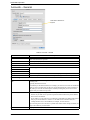
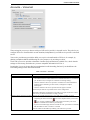
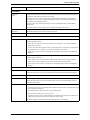
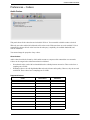
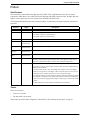
Table 7: Accounts – Advanced
Field
Session timer preference
Description
This field specifies your preference for which party should send the refresh. The preference is not
a guarantee that the refresh will be performed by the specified party. The choices are:
•
•
•
•
Send SIP keep-alives
Use rport
Send outgoing request
directly to target
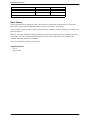
Use old style hold
None: No preference.
Local refreshes: Your computer sends.
Remote refreshes: The other party sends.
UAC refreshes: The user agent client (the party that initiated establishment of the
communications) sends.
• UAS refreshes: The user agent server (the other party) sends.
Typically on, to instruct X-Lite 4 to send SIP keep-alive messages in order to maintain a
“pinhole” through your firewall for SIP messaging.
Typically on.
When checked, requests with a complete URI ([email protected]) go to ABC.com and the “Send
outbound via” field on the General tab (page 26) is ignored.
If you check this field, make sure you also set “Send outbound via” (on Accounts > Account) to
“Domain”.
Typically off. This field is intended for test labs and may cause problems in a NAT environment.
Check this box only if your VoIP service provider advises you to do so.
33