1
7
Testing Payflow Link
Testing Credit Card Transactions
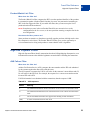
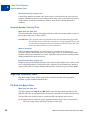
Alternative Methods for Generating Specific Result Codes
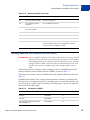
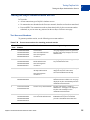
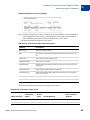
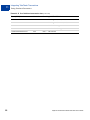
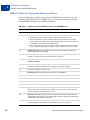
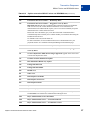
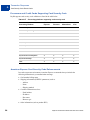
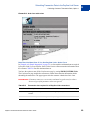
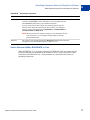
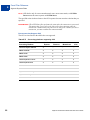
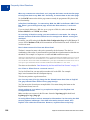
TABLE 7.3
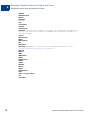
Result codes supporting the amount control
Processing Platform
Result Codes Available for Testing
American Express Phoenix
American Express Brighton
0, 12, 13, 104, 1000
First Data Merchant Services Nashville
0, 12, 13, 104
First Data Merchant Services South
0, 12, 13, 104
Global Payments Central
0, 4, 5, 8, 12, 13, 23, 24, 104, 111, 114, 1000
Global Payments East
0, 4, 5, 12, 13, 23, 24, 30, 100, 104, 114, 1000
Nova
0, 12, 13, 104
Paymentech New Hampshire
0, 12, 13, 104
Vital
0, 4, 12, 13, 23, 104, 114, 1000
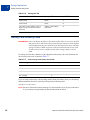
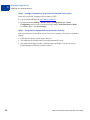
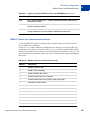
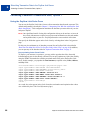
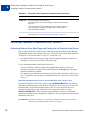
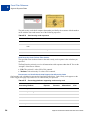
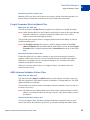
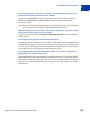
In some cases, you may get the results shown in Table 7.4 using the result code plus 1000 even
though this table suggests another means of obtaining the result code.
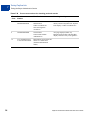
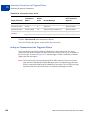
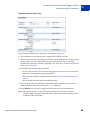
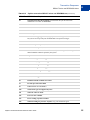
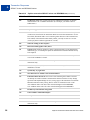
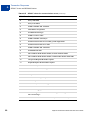
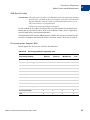
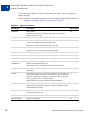
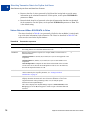
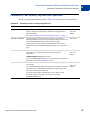
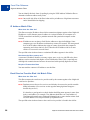
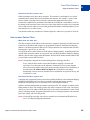
TABLE 7.4
32
Obtaining PayPal result code
Result
Definition
How to test using Payflow Link
0
Approved
Use an AMOUNT of $1000 or less. Credit (C) and Force (F)
transactions will always be approved regardless of dollar
amount or card number.
1
User authentication failed
Use an invalid PWD
2
Invalid tender
Use an invalid TENDER, such as G
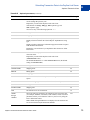
3
Invalid transaction type
Use an invalid TRXTYPE, such as G
4
Invalid amount
Use an invalid AMOUNT, such as –1
12
Declined
Use an AMOUNT of 1012 or an AMOUNT of 2001 or more
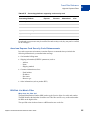
13
Referral
Use an AMOUNT of 1013
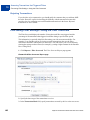
19
Original transaction ID
not found
Submit a Delayed Capture transaction with an invalid
ORIGID
23
Invalid account number
Submit an invalid account number, for example,
000000000000000
24
Invalid expiration date
Submit an invalid expiration date, for example, 0298
25
Transaction type not
mapped to this host
Submit a transaction for a card or tender you are not
currently set up to accept, for example, a Diners card if you
aren’t set up to accept Diners.
Payflow Link Fraud Protection Services User’s Guide