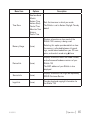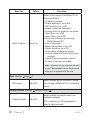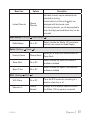
1
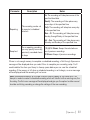
Live Portable Satellite Radio
User Guide
Congratulations on the purchase of your new Stiletto 100!
The Stiletto 100™ is SIRIUS’s first live personal satellite radio. It includes everything you
need to listen live to SIRIUS® radio almost anywhere you want to go. Powerful features allow
you to record up to 100 hours of your favourite songs and shows, and even download your
personal MP3 & WMA files for continuous entertainment.
With your Stiletto 100, you can:
• Listen live to 110 SIRIUS satellite channels of 100% commercial free music, sports, and
talk programming.
• Listen live to SIRIUS Internet Radio over an available Wi-Fi network.
• Store up to 100 hours of your favourite songs, SIRIUS shows, and personal MP3 & WMA
music files.
• Schedule recordings up to 6 hours long so you never miss your favourite shows.
• Mark any music you hear as a “Favourite” and then go online to purchase and download
from almost any Windows Media® based music service.
The Stiletto 100 includes My Sirius Studio™ and Yahoo! Music Engine™ software to help you
create and manage your personal playlists, and supports the download of both purchased and
subscription based music content.
Table of Contents
Table of Contents. . . . . . . . . . . . . . . . . . . . . . . . . . . . . . 2
Warning and Safety Information. . . . . . . . . . . . . . . . . . . . . . 4
IC Caution. . . . . . . . . . . . . . . . . . . . . . . . . . . . . . . . . . . 4
General Precautions . . . . . . . . . . . . . . . . . . . . . . . . . . . . . . . 5
Package Contents. . . . . . . . . . . . . . . . . . . . . . . . . . . . . . 8
Battery Life, Installation, and Charging. . . . . . . . . . . . . . . . . . 11
Controls. . . . . . . . . . . . . . . . . . . . . . . . . . . . . . . . . .
Stiletto 100 Reference Guide . . . . . . . . . . . . . . . . . . . . . . . . . . .
Vehicle Dock Button and Connector Guide. . . . . . . . . . . . . . . . . . . . . Remote Control Reference Guide. . . . . . . . . . . . . . . . . . . . . . . . . Using the Media Dial. . . . . . . . . . . . . . . . . . . . . . . . . . . . . . 14
14
18
20
22
Getting Started . . . . . . . . . . . . . . . . . . . . . . . . . . . . . . .
Turning the Stiletto 100 On/Off, Sleep, and Lock Modes . . . . . . . . . . . . . . . .
Navigating Menus and Lists . . . . . . . . . . . . . . . . . . . . . . . . . . . Receiving the SIRIUS Satellite Signal. . . . . . . . . . . . . . . . . . . . . . . .
Subscribing to the SIRIUS Service. . . . . . . . . . . . . . . . . . . . . . . . .
Connecting the Stiletto 100 to a PC Computer. . . . . . . . . . . . . . . . . . . .
23
23
24
26
26
28
Operation . . . . . . . . . . . . . . . . . . . . . . . . . . . . . . . . . .
Satellite Radio. . . . . . . . . . . . . . . . . . . . . . . . . . . . . . . . .
Internet Radio. . . . . . . . . . . . . . . . . . . . . . . . . . . . . . . . . Library . . . . . . . . . . . . . . . . . . . . . . . . . . . . . . . . . . . .
Radio Replays. . . . . . . . . . . . . . . . . . . . . . . . . . . . . . . . .
Recording . . . . . . . . . . . . . . . . . . . . . . . . . . . . . . . . . . Settings. . . . . . . . . . . . . . . . . . . . . . . . . . . . . . . . . . . 29
30
43
48
56
59
63
Vehicle Docking Station Installation & Use. . . . . . . . . . . . . . . .
Installing the Vehicle Docking Station. . . . . . . . . . . . . . . . . . . . . . . .
Installing the Antenna . . . . . . . . . . . . . . . . . . . . . . . . . . . . . .
Connecting the Cigarette Lighter Adapter . . . . . . . . . . . . . . . . . . . . . .
68
68
73
75
[ Table of Contents ]
SL100TK1C
Docking and Un-docking the Stiletto 100 .
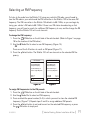
Selecting an FM Frequency. . . . . . .
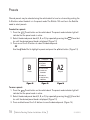
Presets . . . . . . . . . . . . . . .
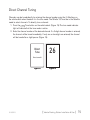
Direct Channel Tuning. . . . . . . . .
.
.
.
.
.
.
.
.
.
.
.
.
.
.
.
.
.
.
.
.
.
.
.
.
.
.
.
.
.
.
.
.
.
.
.
.
.
.
.
.
.
.
.
.
.
.
.
.
.
.
.
.
.
.
.
.
.
.
.
.
.
.
.
.
.
.
.
.
.
.
.
.
.
.
.
.
.
.
.
.
.
.
.
.
76
77
78
79
My Sirius Studio Software Installation. . . . . . . . . . . . . . . . . . 80
Troubleshooting. . . . . . . . . . . . . . . . . . . . . . . . . . . . . . 82
Optional Accessories. . . . . . . . . . . . . . . . . . . . . . . . . . . . 84
Specifications. . . . . . . . . . . . . . . . . . . . . . . . . . . . . . . . 86
Warranty. . . . . . . . . . . . . . . . . . . . . . . . . . . . . . . . . . 87
End User License Agreement . . . . . . . . . . . . . . . . . . . . . . . . 88
Copyrights & Trademarks . . . . . . . . . . . . . . . . . . . . . . . . . 95
Copyrighted Broadcast Material . . . . . . . . . . . . . . . . . . . . . . . . . . 95
Copyrights & Trademarks . . . . . . . . . . . . . . . . . . . . . . . . . . . . 95
SIRIUS ID. . . . . . . . . . . . . . . . . . . . . . . . . . . . . . . . . . . 96
Index. . . . . . . . . . . . . . . . . . . . . . . . . . . . . . . . . . . . . 97
SL100TK1C
[ Table of Contents ]
Warning and Safety Information
IC Caution
Operation is subject to the following two conditions: (1) this device may not cause interference, and (2) this device must accept any interference, including interference that may cause
undesired operation of the device.
To reduce potential radio interference to other users, the antenna type and its gain should
be so chosen that the equivalent isotropically radiated power (EIRP) is not more than that
required for successful communication. This device has been designed to operate with an
antenna having a maximum gain of 2 dBi. Antenna having a higher gain is strictly prohibited
per regulations of Industry Canada. The required antenna impedance is 50 ohms.
To reduce potential radio interference to other users, the antenna type and its gain should
be so chosen that the equivalent isotropically radiated power (e.i.r.p.) is not more than that
permitted for successful communication.
IMPORTANT NOTE:
IC Radiation Exposure Statement
This EUT is compliance with SAR for general population/uncontrolled exposure limits in IC
RSS-102 and had been tested in accordance with the measurement methods and procedures
specified in IEEE 1528. This equipment should be installed and operated with minimum distance 1.5cm between the radiator & your body.
Body Worn Operation
To maintain compliance with IC RF exposure requirements, use only belt-clips, holsters
or similar accessories that does not contain metallic components in its assembly. The
use of accessories that do not satisfy these requirements may not comply with IC RF
exposure requirements, and should be avoided.
This device and its antenna(s) must not be co-located or operating in conjunction with any
other antenna or transmitter.
[ Warning and Safety Information ]
SL100TK1C
General Precautions
SIRIUS disclaims all liability for hearing loss, bodily injury, or property damage as a result of
the use or misuse of this product.
Volume and Hearing Safety Precautions
• When listening to your Stiletto, be aware of your surroundings. The use of earbuds or
headphones while riding a bike or operating a vehicle or motorcycle may be prohibited by
law, and is not recommended.
• If you experience ringing in the ears while listening, stop using the Stiletto and consult a
medical professional.
• When using your Stiletto, start the volume low and gradually turn it up to a medium level
which you can hear. If the ambient sounds around you are noisy or loud, do not turn the
volume up to high level. Find a quieter location instead.
• Permanent hearing loss can occur if you set the volume too high. Your ears adapt to the
loud volume and can be permanently damaged.
• The use of earbuds or headphones for an extended period of time can cause serious
damage to your ears. Wearing them for prolonged periods of time or while sleeping is not
recommended.
Liquid Crystal Precautions
If the LCD screen on the Stiletto is damaged, do not to touch the liquid crystal fluid. If any of
the following situations happen, take the action indicated:
1. If the liquid crystal fluid comes in contact with your skin, wipe the skin area with a cloth
and then wash the skin thoroughly with soap and running water.
2. If the liquid crystal fluid gets into your eye, flush the eye with clean water for at least 15
minutes. Seek medical care.
3. If the liquid crystal fluid is ingested, flush your mouth thoroughly with water. Drink large
quantities of water and induce vomiting. Seek medical care.
General Safety Precautions
Be sure to observe the following warnings. Failure to follow these safety instructions and
warnings may result in a serious accident.
SL100TK1C
[ Warning and Safety Information ]
• Do not expose the Stiletto to moisture or use it near or in water. Do not handle it with wet
hands, or let water or any other liquid spill on or in it.
• Do not operate the Stiletto in a way that might divert your attention from driving safely. As
a driver, you alone are responsible for safely operating your vehicle in accordance with
traffic safety laws at all times.
• Be sure the unit is installed as described in the installation instructions in this guide. When
installing the unit using a Vehicle Kit, Home Kit or Executive Sound System, follow the
installation instructions included with those accessories.
• To avoid short circuits, do not open the unit, and never put or leave any metallic objects
(coins, tools, etc.) inside the unit.
• If the unit emits smoke or unusual odors, turn the power off immediately, and disconnect
the unit from any power source.
• Do not drop the unit or subject it to strong shocks.
• If the unit doesn’t seem to be working properly, turn the unit off, remove the battery from
the unit, wait 10 seconds, replace the battery and then turn it on again.
My Sirius Studio Software
The My Sirius Studio software CD-ROM included with the Stiletto 100 will allow you to connect your Stiletto 100 to your PC computer running the Windows® XP operating system with
Service Pack 2. It is important that this software be used to transfer and manage information
on your Stiletto 100 to ensure that the operating system software essential to the operation of
the Stiletto 100 is not removed or damaged.
The software also provides for upgrading features and functionality as they become available
from SIRIUS. Be sure to periodically connect the Stiletto 100 to your PC computer to load the
latest updates. Refer to the user guide included on the software CD-ROM for further information on installing and using the software.
The My Sirius Studio software should be installed before connecting the Stiletto 100 to your
PC computer.
[ Warning and Safety Information ]
SL100TK1C
Operating Temperature
The Stiletto 100 is designed to operate between -5° to +40° C (23° to 104° F). Avoid leaving
the unit in a vehicle or elsewhere where the temperature may fall outside this range. Extreme
temperatures or extreme temperature fluctuations can degrade the performance of the LCD
display screen, and possibly damage it.
Cleaning and Maintenance
If the Stiletto 100 becomes dirty, turn the power off and wipe it clean with a soft clean cloth.
Do not use hard cloths, paint thinner, alcohol, or other volatile solvents to clean. These may
cause damage to the unit.
SL100TK1C
[ Warning and Safety Information ]
Package Contents
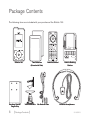
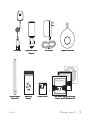
The following items are included with your purchase of the Stiletto 100:
mute
back
home
options
display
+
back
options
home
display
Stiletto 100
\Docking Station
Two Batteries
(Standard & Slim)
Vehicle Mounts
Finger Grip
[ Package Contents ]
preset
tune
1
2
3
4
5
6
7
8
9
jump
0
FM
Remote Control
Ear Buds & Pads
1
2
3
4
6
7
8
9
preset
tune
5
0
jump
Vehicle Docking
Station
Antenna Headphones
SL100TK1C
USB Cable
Cigarette Lighter
Adapter
AC Adapter
Magnetic Antenna
MY SIRIUS STUDIO
STILETT0 100
SOFTWARE VERSION XXXX
Personal Satellite Radio Receiver
STILETT0 100
©
20
05
Si
ri
us
,
I nc
. A
ll
Personal Satellite Radio Receiver
r igh
e
or r
t s re
y i ng
s er ve
d. U nauthor i zed c op
p ro
c ti
du
on
i
ib
oh
pr
d
te
.
Quick Start Guide
User Guide
Antenna Cable
Cover/Tail
SL100TK1C
Mounting
Screws
Alcohol Swab
User Guide, Quick Start Guide,
Inserts, and PC Software CD
[ Package Contents ]
Enhancing the versatility of Your Stiletto
Stiletto Vehicle Kit (Model SLV1C)
In order to use your Stiletto in a vehicle, you will need the Stiletto Vehicle Kit. The kit includes
a compact docking cradle that rapidly charges your Stiletto’s battery, connects to an externally mounted antenna for more reliable reception, and plays audio through your vehicle’s stereo
system. Ten (10) dedicated presets and an included remote control make it easy to tune and
operate your Stiletto without taking your eyes from the road.
Stiletto Home Kit (Model SLH1C)
The Stiletto Home Kit provides everything you need to use the Stiletto in your home or office.
The sleek docking cradle provides a convenient way to charge your Stiletto’s battery along
with an extra slot for charging a spare battery. The included indoor/outdoor antenna provides
improved reception, while audio cables enable you to connect the Stiletto to amplified speakers or a home entertainment system. A remote control is included, along with USB cable and
PC computer software for optionally connecting the home dock to your PC computer.
10 [ Package Contents ]
SL100TK1C
Battery Life, Installation, and Charging
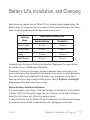
Two batteries are supplied with your Stiletto 100, a slim battery and a standard battery. The
batteries when fully charged will provide a range of listening times depending on the listening
mode. The following table provides the approximate listening times:
Listening
Mode
Satellite Radio
Internet Radio
Approximate Listening Time
Standard Battery
Slim Battery
4 hours
2 hours
8 hours
4 hours
Library
20 hours
10 hours
Radio Replays
20 hours
10 hours
As batteries age, the amount of listening time diminishes. Replacement (or spare) batteries
are available from your SIRIUS product distributor.
The amount of listening time the battery provides is dependent upon several settings: decreasing the length of time the backlight of the display screen remains on will prolong battery
life as well as adjusting the brightness of the display screen to a dimmer setting. Both of
these adjustments are made through the Settings menu. Refer to Brightness and Backlight
Timer on page 63 for details about these settings.
Stiletto 100 Battery Installation and Removal
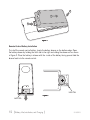
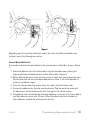
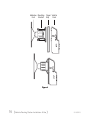
To install the battery, refer to Figure 1 and slide the bottom of the battery (1) into the bottom
of Stiletto 100 (2) until the battery engages the clips. Then press the left side of the battery
down (3) until the release latch (4) locks the battery in place.
To remove the battery from the Stiletto 100, pull the release latch (4). When the battery pops
up, grasp the battery and slide it toward the latch until it disengages from the radio.
SL100TK1C
[ Battery Life, Installation, and Charging ]
11
2
3
1
4
Figure 1
Remote Control Battery Installation
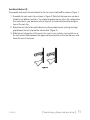
To install the remote control battery, locate the battery drawer on the bottom edge. Open
the battery drawer by holding the latch tab to the right and sliding the drawer out as shown
in Figure 2. Place the battery in drawer with the + side of the battery facing up and slide the
drawer back into the remote control.
+
Latch Tab
Latch Tab
Figure 2
12 [ Battery Life, Installation, and Charging ]
SL100TK1C
Battery Charging
The battery in the Stiletto 100 is shipped partially charged but should be fully charged before
using. For the fastest charging time the Stiletto 100 should be turned off. When off, a fully
discharged slim battery will charge in 2 hours and a standard battery will charge in 4 hours.
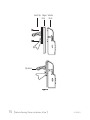
To charge the Stiletto, power the unit off and connect the AC Adapter as shown in Figure 2.
The battery may be charged in several ways:
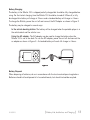
In the vehicle docking station. The battery will be charged when the portable player is in
the vehicle dock and the vehicle is on.
display
options
back
home
Using the AC adapter. The AC adapter may be used to charge the battery when the
Stiletto 100 is not in the dock. To use the AC adapter, power the unit off and connect the
ac adapter as shown in Figure 3. A standard battery will reach full charge in 4 hours.
Figure 2
Battery Disposal
When disposing of batteries, do so in accordance with the local waste disposal regulations.
Batteries should not be disposed of in household waste, but should instead be recycled.
SL100TK1C
[ Battery Life, Installation, and Charging ]
13
Controls
Stiletto 100 Reference Guide
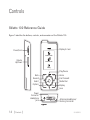
Figure 1 identifies the buttons, controls, and connectors of the Stiletto 100.
Display Screen
Power/Lock
Satellite Radio
+
Volume
Up/Down
Internet Radio
Library
Play/Pause
Back
Rewind
Select
Options
back
options
home
display
Home
Fast Forward
Media Dial
Display
Love
Power
Connector
Headphone
Jack
Antenna Headphones/
Docking Connector
Figure 1
14 [ Controls ]
SL100TK1C
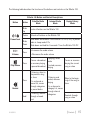
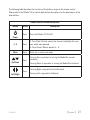
The following table describes the functions of the buttons and controls on the Stiletto 100.
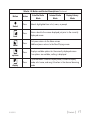
Stiletto 100 Button and Control Descriptions
Button
/
Power/Lock
+/–
Volume
Action
Satellite Radio
Mode
Slide
Up
Locks all buttons on the Stiletto 100
Center
Unlocks all buttons on the Stiletto 100
Slide
Down
Press
Press
Play/Pause
Press
Rewind
Hold
Replay/Library
Mode
Slide down and release: Turns Stiletto 100 On (if Off), or places
radio in sleep mode if On
Slide down and hold for 5 seconds: Turns the Stiletto 100 Off
+ Increases the audio volume
— Decreases the audio volume
Pauses a broadcast
or resumes playing
a paused broadcast
If listening, skips to
the previous song
or show
SL100TK1C
Internet Radio
Mode
If in a channel or
preset list, moves
through categories
or preset banks
If listening, rewinds
through a broadcast
If playing, mutes
audio
If muted, resumes
playing
If listening and
muted, resumes
playing
If in a channel or
category list, moves
through channel
categories
Pauses or resumes
playing the current
song or show
Skips to the beginning of the song or
show
Rewinds through
song or show
[ Controls ]
15
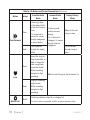
Stiletto 100 Button and Control Descriptions Continued
Button
Action
Press
Fast-Forward
Hold
Press
Satellite Radio
Mode
If listening, skips
in the replay buffer
to the next song or
show
If in a channel or
preset list, moves
through categories
or preset banks
Fast-Forwards
through the replay
buffer
If listening and
muted, resumes
playing
If in a channel or
category list, moves
through channel
categories
Replay/Library
Mode
Skips to the next
song or show
Fast-Forwards
through song or
show
Saves the song or
show if possible, or
adds to favourites
when song/show
cannot be saved
While recording,
prompts to stop
recording
Love
Internet Radio
Mode
Adds the artist/song to the favourites list
Displays recording
setup screen
Hold
Scroll
Media Dial
16 [ Controls ]
While recording,
prompts to stop
recording
If listening, displays channel or category list
If in a list, menu, or prompt, scrolls to next or previous item
SL100TK1C
Stiletto 100 Button and Control Descriptions Continued
Button
Select
Action
Replay/Library
Mode
Selects highlighted item in list, menu, or prompt
Press
Returns back to the screen displayed just prior to the currently
displayed screen
Press
home
Press
options
Press
SL100TK1C
Internet Radio
Mode
Press
back
display
Satellite Radio
Mode
First press returns to the Home screen
Additional press returns to the Now Playing screen
Displays available options for the currently displayed screen
If no options are available, nothing is displayed
Cycles between 3-channel display mode, 6-channel display
mode, artist name, and song title when in the channel browsing
mode
[ Controls ]
17
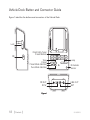
Vehicle Dock Button and Connector Guide
Figure 1 identifies the buttons and connectors of the Vehicle Dock.
lock
Lock
Direct Entry Tune/
Preset Buttons
FM
FM
Tune
Preset
Preset Mode Indicator
Tune Mode Indicator
FM OUT
DC5V
1
2
3
4
6
7
8
9
preset
tune
5
0
Jump
jump
IR Remote
Sensor
LINE OUT
ANT
Figure 1
18 [ Controls ]
SL100TK1C
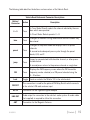
The following table identifies the buttons and connectors of the Vehicle Dock.
Vehicle Dock Button and Connector Descriptions
Button/
Connector
0–9
Action
Press
Description
In Tune Mode: Directly selects the channel indicted by the numbers which were pressed
In Preset Mode: Selects presets 0 – 9
tune
Press
preset
Press
jump
Press
Changes to the direct tuning mode where channel numbers may
be entered
Changes to the preset mode and displays the list of preset
channels
A second and subsequent press cycles through the preset
banks, A, B, and C
Jumps to a preselected traffic/weather channel, or other preselected channel
A second press returns to the previous channel or song/show
FM
Press
Displays the FM Frequency screen where the FM transmitter
frequency can be selected, or a FM preset selected using the
0 – 9 buttons
Lock
Toggle
Locks or unlocks the Stiletto 100 in the vehicle dock
FM OUT
DC 5V
LINE OUT
ANT
SL100TK1C
This connection is used for the optional FM Relay Switch which connects
to the vehicle’s FM radio antenna input
Connection for the Cigarette Lighter Adapter
Audio output for connection to the vehicle’s audio system. An audio cable
(not supplied) is required to utilize this connection
Connection for the Magnetic Antenna
[ Controls ]
19
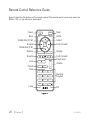
Remote Control Reference Guide
Figure 3 identifies the buttons of the remote control. The remote control works only when the
Stiletto 100 is in the vehicle or home dock.
Power
Back
back
mute
Mute
home
Home
Select
Media Dial (CCW)
Rewind
Media Dial (CW)
Options
Fast-Forward
options
display
Rewind
Love
Preset
Tune
Jump
+
preset
tune
1
2
3
4
5
6
7
8
9
jump
0
FM
Display
Fast-Forward
Play/Pause
Volume
Numeric
Keypad
FM
Figure 3
20 [ Controls ]
SL100TK1C
The following table describes the functions of the buttons unique to the remote control.
Please refer to the Stiletto 100 or vehicle dock button descriptions for the descriptions of the
other buttons.
Remote Control Button Descriptions
Button
Action
Description
Press
Turns the Stiletto 100 On/Off
0-9
Press
In Tune Mode: Directly selects the channel indicted by the numbers which were pressed
Mute
Press
Mutes (or un-mutes) the audio
Press
Pressing Up is equivalent to turning the Media Dial counterclockwise
Power
In Preset Mode: Selects presets 0 – 9
Up/Down
Pressing Down is equivalent to turning the Media Dial clockwise
Press
Left/Right
SL100TK1C
Pressing Right is equivalent to Fast-Forward
Pressing Left is equivalent to Rewind
[ Controls ]
21
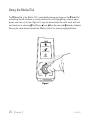
Using the Media Dial
The Media Dial of the Stiletto 100 is controlled by placing your finger on the Media Dial
and rotating the dial clockwise or counter-clockwise to scroll, highlighting a channel, genre,
preset, menu item, or list item. (Figure 4) It may also be pressed at the north, south, east and
west locations for selecting Play/Pause, Love, Fast-Forward, and Rewind as labeled.
Pressing the center button provides the Select function for selecting highlighted items.
Satellite Radio
Internet Radio
Library
home
back
options
display
Figure 4
22 [ Controls ]
SL100TK1C
Getting Started
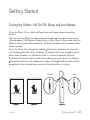
Turning the Stiletto 100 On/Off, Sleep, and Lock Modes
To turn the Stiletto 100 on, slide the
release it.
Power/Lock switch down momentarily and then
When on, to put the Stiletto into sleep mode, slide the Power/Lock switch down momentarily and release it. The Stiletto will display Going to Sleep. (Figure 1) Sleep mode allows the
Stiletto to start up quickly when powered on. The Stiletto will power itself completely off after
18 hours of sleep.
To turn the Stiletto 100 completely off, hold the Power/Lock switch down for 5 seconds
until the display goes blank. When completely off, the battery will remain charged for several
weeks. When completely off, the Stiletto will take 1–2 minutes to power up. (Figure 2)
The Stiletto 100 may be locked to prevent the accidental pressing of a button by sliding the
Power/Lock switch up to the locked position (Figure 3) The Power/Lock switch must be
placed back into the unlocked (center) position for the other buttons to function.
Unlocked
Locked
+
Going To Sleep
Figure 1
SL100TK1C
Figure 2
Figure 3
[ Getting Started ]
23
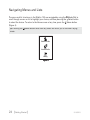
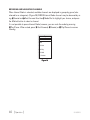
Navigating Menus and Lists
The menu and list structures in the Stiletto 100 are navigated by using the Media Dial to
scroll through a menu or list to highlight your choice, and then pressing the Select button
to select the choice. To return to the Home screen at any time, press the Home button.
(Figure 4)
Tip: Pressing the
screen.
Home button twice from any menu will return you to the Now Playing
Satellite Radio
Internet Radio
Library
Figure 4
24 [ Getting Started ]
SL100TK1C
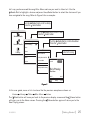
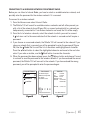
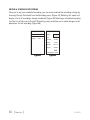
Let’s say you have saved the song Blue Moon and now you want to listen to it. Use the
Media Dial to highlight a choice and press the Select button to select the choice until you
have navigated to the song. Refer to Figure 5 for an example.
Turn the Media Dial to scroll to Library
Press the Select button
Turn the Media Dial to scroll to Titles
Press the Select button
Satellite Radio
Turn the Media Dial to scroll to Blue Moon
Press the Select button
Library
Internet Radio
Sirius Recordings
Artists
Library
Titles
Albums
Listen to the song
What’s Left Of Me
Titles
Genres
Playlists
It’s Only Rock And Roll
Recorded
from 13
Don’t Look Back
Blue Moon
Stand Up And Be Strong
Fire
Back
Elvis Presley
Blue Moon
00:37
+
01:44
Library
4/10
Figure 5
In this user guide, menu or list structures like the previous example are shown as:
Home Library Titles Blue Moon Listen.
The Back button will move you back to the previous display screen and the Home button
will return you to the Home screen. Pressing the Home button again will return you to the
Now Playing screen.
SL100TK1C
[ Getting Started ]
25
Receiving the SIRIUS Satellite Signal
The SIRIUS satellite signal is broadcast from satellites covering almost all of North America.
To receive the satellite signal your Stiletto must have a clear view of the sky. Obstructions
such as buildings, trees, bridges and high voltage power lines can easily interfere with the
satellite signal. For that reason Sirius also broadcasts its signal from terrestrial radio towers in
most major cities.
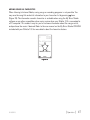
To activate or use your Stiletto 100 in portable mode, first be sure you have a strong satellite
or terrestrial signal. You may view the signal strength in your location by navigating to
Settings Device Antenna Aiming. (Figure 3) At least one of the signals should be
greater than 50% to reliably activate and use the Stiletto 100.
Antenna Aiming
Adjust your antenna
position to maximize signal
strength.
SATELLITE
TERRESTRIAL
Press SELECT when done
Figure 3
Signal reception can be greatly improved by installing the Stiletto 100 in the vehicle dock, or
by attaching the antenna headset (included). For best performance it is recommended that
you use your Stiletto 100 with one of these accessories when activating your subscription.
Subscribing to the SIRIUS Service
Before you can listen to the SIRIUS service, you need to activate your subscription. To subscribe, do the following:
1. Be sure that the Stiletto 100 is correctly installed, is in the vehicle dock, and that the
antenna is oriented to receive the SIRIUS signal.
26 [ Getting Started ]
SL100TK1C
2. Turn on the Stiletto 100. After the startup sequence, Select Satellite Radio All Channels and tune to channel 184. The SIRIUS channel line-up will begin updating. Wait until
the channel updates have completed before pressing any buttons.
3. Once the channels have been updated, the display will change to Call 1-888-539SIRIUS to Subscribe. You will not be able to listen to other channels until you activate
your SIRIUS subscription.
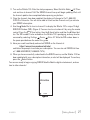
4. Use the Media Dial to tune to channel 0 to display the Stiletto 100’s unique 12-digit
SIRIUS ID Number (SID). (Figure 4) You can also tune to channel 0 by using the remote
control: Press the tune Tune button, then the 0 (zero) button and then the Select button. The SID number is also available on the Stiletto 100’s packaging, and may also be
accessed by selecting Settings Device Sirius ID. Write the SID number down in
the space provided near the end of this guide.
5. Have your credit card handy and contact SIRIUS on the Internet at:
https://www.siriuscanada.ca/activate/
and follow the prompts to activate your subscription. You can also call SIRIUS toll-free
at: 1-888-539-SIRIUS (1-888-539-7474).
6. When you have successfully subscribed to the SIRIUS service, and the Stiletto 100 has
been updated with your subscription information, an alert will be displayed. To continue,
press the Select button.
You are now ready to begin enjoying SIRIUS Satellite Radio’s digital entertainment, and can
tune to other channels!
00
112233445566
SID
Satellite
Figure 4
SL100TK1C
[ Getting Started ]
27
Connecting the Stiletto 100 to a PC Computer
Before connecting the Stiletto 100 to your PC computer, install the My Sirius Studio software
that came with your Stiletto. Refer to the My Sirius Studio Software Installation section on
page 80 for more information.
display
options
Library
back
Internet Radio
Satellite Radio
home
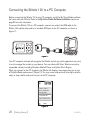
To connect the Stiletto 100 to a PC computer, connect one end of the USB cable to the
Stiletto 100 and the other end to an available USB port on the PC computer, as shown in
Figure 11.
Figure 11
Your PC computer software will recognize the Stiletto and ask you which application you want
to use to manage the content on your device. You may choose My Sirius Studio or any other
compatible software including Windows Media® Player and Yahoo! Music Engine.
When you connect to the PC computer, the Stiletto will display a message asking you to turn
off Satellite Radio and connect. (Figure 12) You may cancel and continue listening to satellite
radio, or stop satellite radio and connect to the PC computer.
28
In order to connect to
your PC, satellite radio
must stop playing.
Stop satellite radio
Cancel connection to PC
Satellite
Figure 12
28 [ Getting Started ]
SL100TK1C
Operation
The Stiletto 100 delivers great audio entertainment in four distinct listening environments:
• Satellite Radio. Listen live to satellite broadcasts of all SIRIUS 100% commercial free
music channels, talk, and sports programing. (Page 30)
• Internet Radio. Listen to SIRIUS commercial free music and select talk channels streamed
over the Internet via a Wi-Fi network connection. (Page 43)
• Library. Listen to saved songs and shows, and content you have downloaded from your
PC computer to the Stiletto 100. (Page 48)
• Radio Replays. Listen to content which has been automatically saved from your favourite
music channels. (Page 56)
Each of these environments are described in detail in the sections following along with:
• Recording. Set up scheduled recordings to record SIRIUS broadcasts. (Page 59)
• Settings. Make changes to the global settings of the Stiletto 100 to personalize your
experience. (Page 63)
SL100TK1C
[ Operation ]
29
Satellite Radio
Satellite Radio
Satellite Radio allows you to receive live SIRIUS broadcasts when you are receiving a signal
from the SIRIUS satellite or terrestrial transmitters. You can browse and select the SIRIUS
channels, and see information about the songs, artists, sports, news, weather, and traffic being broadcast.
30 [ Operation ]
SL100TK1C
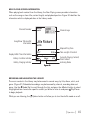
Now Playing Screen Information
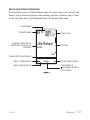
The Now Playing screen for Satellite Radio provides information such as the currently tuned
channel, song or show being played, mode, recording, and other information. Figure 1 identifies the information which may be displayed when in the Satellite Radio mode.
Preset Number
Channel Number
Song/Show Title & Artist or
Sports Team & Game Score
Information
24
A1
Channel Logo
Little Richard
Lucille
-05:00
Replay Buffer Time Information
Battery Condition Indicator
+
Satellite
Battery Charging Indicator
Figure 1
SL100TK1C
Scroll Bar
Signal Strength Indicator
Listening Mode or
Recording Indicator or
Jump Indicator
[ Operation ]
31
Browsing and Navigating Channels
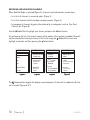
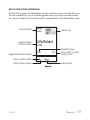
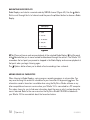
When Satellite Radio is selected (Figure 2), channels may be browsed in several ways:
• In a list of all channels in numerical order. (Figure 3)
• In a list of channels which have been saved as presets. (Figure 4)
• In groupings of channels by genre (also referred to as categories) such as Pop, Rock,
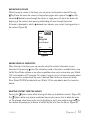
Country, etc. (Figure 5)
Use the
Media Dial to highlight your choice, and press the Select button.
As you browse the lists, the channel names will be spoken if this feature is enabled. Channels
may be selected for listening from any of the lists by using the Media Dial to scroll and
highlight a selection and then pressing the Select button.
Satellite Radio
All Channels
Presets
28 Faction
Dead Leaves And The D
The White Stripes
Pop
30 The Coffee House
All Channels
Herbman Hustling
Sugar Minott
Rock
Electronic/Dance
Hip-Hop
Figure 2
31 Margaritaville
Wave On Wave
Pat Green
Figure 3
Presets (A)
Pop
A1 Margaritaville
01 Sirius Hits 1
Why Don’t You & I
Santana
A2 Sirius Disorder
24 Cure For Love
Bonnie Raitt
02 StarLite
A3 (empty)
Press & hold SELECT
to save channel 31
03 Sirius Love
31 Everywhere
Tim McGraw
Figure 4
Back In The High Life Again
Steve Winwood
The Power Of Love
Celine Dion
Figure 5
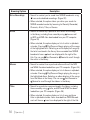
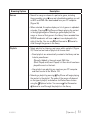
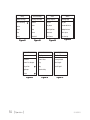
The Display button toggles the display screen between a 3 channel list mode and a 6 channel list mode. (Figures 6 & 7)
32 [ Operation ]
SL100TK1C
All Channels
All Channels
28 Faction
Dead Leaves And The D
The White Stripes
28 Faction
30 The Coffee House
30 Margaritaville
Herbman Hustling
Sugar Minott
31 Margaritaville
Wave On Wave
Pat Green
Figure 6
29 Coffee House
31 Reggae
32 Area 33
33 Boombox
Figure 7
Channel Presets
Channels which you tune frequently and want to be able to access quickly may be added to a
list of presets. Presets are grouped into three banks, A, B, and C which store 10 presets each
for a total of 30 presets. Presets are displayed as A1, A2, B1, B2, etc. (Figure 4)
Tuning to a Saved Preset
Saved presets may be selected by browsing the Presets category:
1. Select Presets from the Satellite Radio screen. (Figure 2)
2. Use Rewind and Fast Forward to navigate between the A, B, and C banks of
presets. (Figure 4)
3. Use the Media Dial to highlight a preset and press the Select button.
Saving Channels as Presets
To save a channel as a preset:
1.
2.
3.
4.
Tune to the desired channel.
Press the Options button.
Highlight Save Channel as Preset and press the Select button. (Figure 8)
The Presets screen will be displayed. Use Rewind and Fast Forward to navigate
between the A, B, and C banks of presets, and use the Media Dial to highlight the
preset where you want the channel saved. Press and hold the Select button to save
the channel as a preset.
If you have chosen a preset which has already been assigned to a channel, the preset will be
replaced with the new channel.
SL100TK1C
[ Operation ]
33
Removing a Channel Preset
To remove a channel as a preset:
1. Select Presets from the Satellite Radio screen. (Figure 2)
2. Use Rewind and Fast Forward to navigate between the A, B, and C, banks of
presets. (Figure 3)
3. Use the Media Dial to highlight the preset you want to remove and press the Options button.
4. Highlight Remove this Preset and press the Select button to remove the preset.
(Figure 9)
Presets (A)
06
A1 ‘60s Vibrations
06 Ride My See-Saw
Ride My See-Saw
The Moody Blues
The Moody Blues
A2 (empty)
Options
Save channel as a Preset
Hide this channel
Figure 8
34 [ Operation ]
Options
Remove this Preset
Figure 9
SL100TK1C
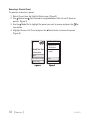
Pausing, Rewinding, and replaying live radio
While listening to satellite radio, up to the most recent 60 minutes of the broadcast may be
put into a temporary replay buffer. At any time you may rewind to replay something you just
heard or you may press Play/Pause to pause the live broadcast. You may resume listening
to the broadcast at any time, beginning from the point where the broadcast was paused, or
you can fast-forward or rewind through the replay buffer, pause the replay buffer again, or
return to the live broadcast.
The replay buffer is retained until the memory becomes full. When memory becomes full, the
oldest part of the replay buffer is deleted to make room for the new material so that the live
broadcast can continue to be added to the replay buffer. The replay buffer is discarded when
the Stiletto 100 is either turned off or tuned to another channel or to a playlist.
Pausing a Live Broadcast
To pause a live broadcast:
1. Press Play/Pause to pause a live broadcast.
2. The audio will mute and a time bar will be shown near the bottom of the display screen
indicating how much of the replay buffer is filled with the broadcast. (Figure 10)
01
No Dignity
Blackstreet
-01:54
Satellite
Figure 10
Playing a Paused Broadcast
Press Play/Pause to begin playing a paused broadcast from the point at which it was
paused. To jump ahead to the live broadcast, press Fast-Forward until you reach the live
broadcast.
SL100TK1C
[ Operation ]
35
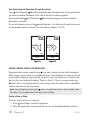
Fast-Forwarding and Rewinding Through Broadcasts
Press Fast-Forward or Rewind to navigate through the replay buffer. Pressing and releasing moves forwards or backwards to the start of the next or previous segment.
Pressing and holding Fast-Forward or
backwards in the buffer.
Rewind moves progressively faster forward or
As you fast-forward or rewind, the diamond indicator in the time bar will move to show your
current playback position relative to the live broadcast. (Figures 11 & 12)
01
01
No Dignity
No Dignity
Blackstreet
Blackstreet
-02:07
-00:52
Satellite
Satellite
Figure 11
Figure 12
Saving content from a Live Broadcast
Songs and shows can be saved by using Love when listening to a live satellite broadcast.
When saving a song or show, it is recorded exactly as it was broadcast. If a channel is tuned
in the middle of playing a song/show that you want to save, the song/show is saved from the
point at which you tuned to the channel. There is a limit of 10 hours on songs saved using
Love. If there is not enough space to save a song or show, the oldest content is deleted in
order to make room for the new content.
Note: Saving songs and shows using Love is only possible while in Satellite Radio mode.
The feature is not enabled when listening to Internet Radio.
Saving a Song or Show
To save a song or show as it is playing:
1. Press Love to begin saving the song/show.
2. While the song/show is being saved, the love icon will be displayed briefly, and then
36 [ Operation ]
SL100TK1C
the heart icon is displayed at the bottom center until the content has finished saving.
(Figure 13)
3. The song/show is saved in the Library. Refer to the Library section on page 48 for information on playing back the song/show.
4. The Stiletto 100 will attempt to retrieve as much of the elapsed song or show as is available in the replay buffer.
If you attempt to tune away before the song/show is complete, or fast-forward or rewind, you
will be prompted to confirm that you wish to stop recording. You may continue recording, or
save or discard the partial recording. (Figure 14)
10
10
Country Bord
channel
10.
No
Dignity
James
Continue recording
Blackstreet
Recording
“The Bridge” is
currently recording on
Stop (keep partial)
Stop (delete partial)
Satellite
Figure 13
Figure 14
Recording a Block of Time
To record a concert or a whole talk or entertainment show, a block of time can be selected for
recording using Love. Time recordings are limited to a maximum duration of 6 hours.
To record a block of time:
1. Press and hold Love to begin the recording. You will be prompted to select to record
to the next hour (for example, Record until 7:00 PM), or to select Recording options...
where you can customize the recording. (Figure 15) If you select to record to the next
hour, recording will begin immediately.
2. If you have chosen Recording options..., you will be presented with a screen where you
can change the parameters for the recording. (Figure 16)
3. Use the Media Dial to highlight the parameter you want to change and press the
Select button.
4. Use the Media Dial to scroll and change the parameter. When your selection is comSL100TK1C
[ Operation ]
37
plete, press the Select button.
5. When all the parameters have been set press the Options button and select Schedule
this recording. The recording will then begin if you have set the parameters to begin
immediately. The heart icon will be displayed at the bottom center of the screen to
indicate that a recording is in progress. (If you have selected for the recording to begin
at a later time, the recording will begin at the scheduled time. Refer to the Recording
section on page 59 for more information.)
6. The recording is saved in the Library. Refer to the Library section on page 48 for information on playing back the recording.
New Recording
10
Recording options allow
you to change the
duration or setup repeat
recordings.
Record until 7:00 PM
Recording options...
Channel:
Date:
10
Mon 04/10
Start Time:
Duration:
Repeating:
6:00 PM
60 min
No
Done
Press SELECT to change
Figure 15
38 [ Operation ]
Figure 16
SL100TK1C
Other Features
Game Alert
You can program the Stiletto 100 to remember your favourite sports teams. The Stiletto 100
will then automatically alert you when any of your favourite sports teams are playing in a game.
There is no limit on the number of teams you can select for game alerts.
Adding and Removing Favourite Teams for Game Alerts
To add or remove favourite teams for game alerts:
1. From the Home screen select Settings Sports Favourite Teams and select the
sports league or college for the team you want to add or remove. (Figure 17)
To add teams for game alerts, select an individual team. (Figure 18)
Selected teams will appear in the list with a 4 check mark in the box next to the team
name.
To remove teams, select the team you want to remove. The 4 check mark next to
the team name will be removed indicating it is no longer selected for game alerts.
2. You may continue selecting or removing teams from other sports leagues by using the
Back button to navigate back in the menu structure to select another league or college.
NBA Basketball
Favorite Teams
19
NFL Football
[3]
76ers
NBA Basketball
[0]
Bobcats
Dio
NHL Hockey
[0]
Bucks
Rainbow In The Dark
College Football
[0]
Bulls
College Basketball
[0]
Cavaliers
Celtics
Figure 17
Figure 18
On now
Ohio St vs Florida St (bdcas
Figure 19
Whenever you’re listening to Satellite Radio, either live or from the replay buffer, you’ll receive
an alert if any of your favourite teams are playing. (Figure 19) If you wish to tune to the channel playing the game, press the Options button and select the Listen to... option.
SL100TK1C
[ Operation ]
39
Game Zone
The Game Zone category lists all the sports games which are currently playing for your favourite teams, and can be browsed for the games scores. (Figure 20) You can scroll though the
list and select a game to tune to the channel where the game is being broadcast.
Game Zone
Devils
Sharks
3
1
3rd period
Vanderbuilt
10
S Mississippi (bdcas 3
1st quarter
Vanderbuilt (bdcast) 3
S Mississippi
10
1st quarter
Figure 20
40 [ Operation ]
SL100TK1C
Sports Ticker
While you are listening to the Stiletto 100, you can have a sports ticker displayed which will
show the scores of all your favourite teams which are currently playing. (Figure 21) The sports
ticker is enabled through the Settings menu, as described in Sports Ticker on page 67.
19
Dio
Rainbow In The Dark
Ohio St
Florida St (bdcast)
0
1Q
0
Figure 21
Parental Controls
The parental controls feature sets a password for access to specific channels. This will prevent access to these locked channels until the password is entered. (Figure 22)
No details about the current content of a locked channel will be displayed. When you attempt
to access a locked channel, you will be prompted to enter your password before you can
proceed. (Figure 23) The parental control feature is accessed through the Settings menu, as
described in Parental Controls on page 66.
Hiding channels and genres, as described in the next section, can be an alternative to locking
channels.
SL100TK1C
[ Operation ]
41
All Channels
100 Howard
The Howard Stern Show
Belle & Sebastian
101 Howard 2
Ferrall
Replay
108
Enter Password
Turn the dial and press
SELECT to enter your
Parental Controls password.
0
103 Sirius Stars
George Lopez
Fame
Figure 22
Satellite
Figure 23
Hide Channels and Genres
The hide feature allows you to designate channels and genres to not be displayed when
browsing channel and genre lists. The hide feature differs from the parental control lock
feature in that a locked channel will be displayed while browsing a list (but is password protected), while a hidden channel will never appear in a list.
Hidden channels are not locked, but can only be tuned by directly entering the channel
number using the numeric keypad on the remote control when the Stiletto 100 is in a docking
station. The hide feature is accessed through the Settings menu, as described in Channels
on page 64.
42 [ Operation ]
SL100TK1C
Internet Radio
Internet Radio
Internet Radio allows you to listen to all of the SIRIUS music channels and select talk channels live using a wireless internet connection (Wi-Fi). Your SIRIUS subscription includes
Internet Radio and the subscription must be active to use this feature.
Note: Because Internet Radio is streamed and not broadcast, certain features available
when listening to Satellite Radio are not supported. It is not possible to record any material
from Internet Radio or pause and rewind live content.
To access Internet Radio on your Stiletto 100, from the Home screen use the
highlight Internet Radio and press the Select button.
SL100TK1C
Media Dial to
[ Operation ]
43
Now Playing Screen Information
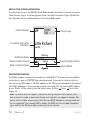
The Now Playing screen for SIRIUS Internet Radio provides information such as the currently
tuned channel, song or show being played, mode, and other information. Figure 24 identifies
the information which is displayed when in the Internet Radio mode.
Channel Number
Song/Show Title & Artist
Information
24
Little Richard
Lucille
Buffering
Buffering Indicator
Battery Condition Indicator
Battery Charging Indicator
Channel Logo
+
Internet
Figure 24
Signal Strength Indicator
Listening Mode
Supported Networks
The Stiletto supports a connection through any standard 802.11b access point provided the
access point is open or WEP/WPA password protected. To connect to networks which restrict access by MAC address, the MAC address of the Stiletto must be added to the allowed
list of MAC addresses in the access point before connecting. You can find the MAC address
of your Stiletto 100 by selecting from the Home screen, Settings Device Device Info.
(Figure 27)
Note: The Stiletto does not support a connection through networks which require a user
name or account number to be entered, though such networks may appear to be open. Networks in which multiple access points utilize the same SSID (repeater or roaming mode) are
also not supported. If the network SSID is hidden, the SSID must be un-hidden (broadcasting) in order for the Stiletto to detect and connect to the network.
44 [ Operation ]
SL100TK1C
Connecting to a Wireless Network for Internet Radio
Before you can listen to Internet Radio, you have to select an available wireless network, and
possibly enter the password for the wireless network if it is secured.
To connect to a wireless network:
1. From the Home screen select Internet Radio.
2. The Stiletto 100 will search for available wireless networks and will either present you
with a list of the networks found (Figure 25), or connect automatically to a network you
had previously connected to. If no wireless networks are found, the list will be empty.
3. From the list of wireless networks, select the network to which you want to connect.
A lock icon next to the name indicates that the network is secured and will require a
password.
4. If you choose an unsecured network, the Stiletto 100 will connect to the network. If you
choose a network that is secured, you will be prompted to enter the password. (Figure
26) Use the Media Dial to scroll the list of characters and highlight each character.
Press the Select button to select the highlighted character and move to the next character. If you make a mistake, use the Back button to erase the character.
5. When the password has been entered, press the Options button and choose Connect
to network to send the password to the wireless network. If you have entered the correct
password, the Stiletto 100 will connect to the network. If you have entered the wrong
password, you will be prompted to enter the password again.
Choose Wi-Fi Network
Area25
Middletown
Enter Password
Turn the dial and press
SELECT to enter password
for “Area25”.
Press BACK to erase.
revolution
Device Info
ZAP:
OS:
Baseband:
Boot loader:
Device ID:
MAC Addr:
1.0.0.12972r
1.0.0.12972
00.07.08
12676
000c07142060ba8
363d7065ff00ad20
00:0B6B:C0:02:1B
A B C D E
Figure 25
SL100TK1C
Press OPTIONS when done
Press SELECT when done
Figure 26
Figure 27
[ Operation ]
45
Browsing and Navigating Channels
When Internet Radio is selected, available channels are displayed in groups by genre (also
referred to as categories). (Figure 28) SIRIUS Internet Radio channels may be browsed by using Rewind and Fast Forward. Use the Media Dial to highlight your choice, and press
the Select button to select a channel.
It is not possible to pause Internet Radio, however, you can mute the audio by pressing
Play/Pause. When muted, press Fast-Forward, Rewind, or Play/Pause to resume
listening.
Pop
SIRIUS Hits 1
Starlite
SIRIUS Love
Movin’ Easy
SIRIUS Gold
‘60’s Vibrations
Figure 28
46 [ Operation ]
SL100TK1C
Adding Songs as Favourites
When listening to Internet Radio, saving songs or recording programs is not possible. You
may save the song title and artist information to your favourites list by pressing Love.
(Figure 29) The information saved in favourites is available when using the My Sirius Studio
software or any other compatible online music service when your Stiletto 100 is connected to
a PC computer. This makes it easy for you to find more information about the song or artist,
and purchase the music if desired. Refer to the user manual on the My Sirius Studio CD-ROM
included with your Stiletto 100 for more details about the favourites feature.
01
The All American
Rejects
Move Along
Added to Favorites
Internet
Figure 29
SL100TK1C
[ Operation ]
47
Library
Library
The Library contains all the music and SIRIUS programming you have saved from live broadcasts along with any content you have downloaded from your PC computer. All the music,
sports, talk shows, news broadcasts, and talk entertainment can be browsed and selected for
playback from the Library.
To access the Library on your Stiletto 100, from the Home screen use the
highlight Library and press the Select button.
48 [ Operation ]
Media Dial to
SL100TK1C
Now Playing Screen Information
When playing back content from the Library, the Now Playing screen provides information
such as the song or show title, content length, and playback position. Figure 30 identifies the
information which is displayed when in the Library mode.
Channel Number
Song/Show Title & Artist
Information
Recorded
from 24
Channel Logo
Little Richard
Lucille
Elapsed Play Time
Replay Buffer Time Information
Battery Condition Indicator
00:37
+
01:56
Library
Battery Charging Indicator
2/10
Time Length of Content
Currently Playing Content/
Total Content
Listening Mode
Figure 30
Browsing and Navigating the Library
The music content in the Library may be browsed in several ways, by title, album, artist, and
genre. (Figure 31) Scheduled recordings may be browsed by channel, recording date and
genre. Use the Media Dial to scroll through the lists and press the Select button to select
a highlighted item. Locate the specific content you’d like to listen to and press Play/Pause
to begin playback.
While you are listening, the
SL100TK1C
Options button will allow you to turn the shuffle mode on or off.
[ Operation ]
49
Browsing Options
Sirius Recordings
Description
• Search for content you’ve saved from SIRIUS broadcasts using
Love and scheduled recordings. (Figure 32)
• When selected, this option allows you refine your search for
SIRIUS recorded content by browsing for Recently Recorded,
Channels, Artists, Titles, or Genres.
Artists
• Search for content by a particular artist within all the songs
in the library, including those saved by using Love as well
as MP3 and WMA files downloaded from your PC computer.
(Figure 33)
• When selected, this option displays a list of artists in alphabetical order. Pressing Play/Pause will begin playing all the songs
of the highlighted artist. Selecting an artist displays all songs by
that artist contained in the library. Items recorded from SIRIUS
broadcasts have a heart icon displayed to the right of the
title. You can use Fast-Forward or Rewind to scroll through
the artists in the library.
Albums
• Search for content from a particular album within all the MP3
and WMA files downloaded from your PC computer. (Figure 34)
• When selected, this option displays a list of albums in alphabetical order. Pressing Play/Pause will begin playing the songs in
the highlighted album. Selecting an album displays all the songs
from that album in the library. You can use Fast-Forward or
Rewind to scroll through the albums in the library.
Titles
• Search for a particular song contained in the library, including
those saved by using Love, and MP3 and WMA files downloaded from your PC computer. (Figure 35)
• When selected, this option displays a list of song and show
titles in alphabetical order. Items recorded from SIRIUS broadcasts will have a heart icon displayed to the right of the title.
50 [ Operation ]
SL100TK1C
Browsing Options
Genres
Description
• Search for songs or shows of a particular genre, including
those saved by using Love and scheduled recordings, as well
as MP3 and WMA files downloaded from your PC computer.
(Figure 36)
• When selected, this option displays a list of genres in alphabetical order. Pressing Play/Pause will begin playing the content
in the highlighted genre. Selecting a genre displays all the
songs or shows of that genre in the library. Items recorded from
SIRIUS broadcasts will have a heart icon displayed to the
right of the title. You can use Fast-Forward or Rewind to
scroll through the genres in the library.
Playlists
• Select playlists for listening, and songs within a playlist. (Figure
37) There are two kinds of playlists to choose from:
— Smart playlists are automatically created in the library and are
listed in parentheses:
(Recently Added) is the most recent 250 titles.
(Most Played) and (Least Played) list titles which have been
played the most or the least.
— User playlists are playlists you create on your PC computer
and then transfer to the Stiletto 100.
• Selecting a playlist by pressing Play/Pause will begin playing
the content in the playlist. The order of the songs will depend
on the type of playlist, and whether shuffle has been chosen
using the Options button. You can use Fast-Forward or
Rewind to scroll through the playlists in the library.
SL100TK1C
[ Operation ]
51
Recently Recorded
Sirius Recordings
Artists
Albums
Artists
Sirius Recordings
Library
Shuffle All Songs
Ashlee Simpson
Autobiography
Channels
Billy Idol
Billy Idol
Artists
Billy Ocean
Freedom Of Choice
Albums
Titles
Black Eyed Peas
Monkey Business
Titles
Genres
Blackstreet
Office Space
Genres
Shuffle All
Del Shannon
Synchronicity
Figure 32
Figure 31
Titles
Figure 34
Figure 33
Genres
Playlists
Badd
Hip Hop
(Shuffle All)
(Recently Added)
Continuum
Jazz & Blues
Damn It Fe...Gangster
Pop
(Most Played)
King of Pain
Rap
(Least Played)
My Humps
Southern Rap
Whip It
Figure 35
52 [ Operation ]
Figure 36
Figure 37
SL100TK1C
Navigating playback
While listening to content in the library, you can pause, fast-forward, or rewind. Pressing
Play/Pause will pause the content, or begin playing again after a pause. Use Fast-Forward and Rewind to move through the content: a single press will skip to the end or the
beginning of the content, while pressing and holding will move through the content.
A time bar is displayed in which a
the content. (Figure 38)
diamond icon indicates your current listening position in
Recorded
from 16
Bruce
Springsteen
Out In The Street
01:49
00:22
Library
1/1
Figure 38
Adding Songs as Favourites
When listening to the library, you may save the song title and artist information to your
favourites list by pressing Love. The information saved in favourites is available when using
the My Sirius Studio software or any other compatible online music service when your Stiletto
100 is connected to a PC computer. This makes it easy for you to find more information about
the song or artist, and purchase the music if desired. Refer to the user manual on the My
Sirius Studio CD-ROM included with your Stiletto 100 for more details about the favourites
feature.
Deleting Content from the Library
Pressing the Options button while listening will allow you to delete the content. (Figure 39)
The Options button may also be used when browsing the various lists to delete the entire
list. For example, when browsing by artist, highlighting an artist name and pressing the Options button will prompt you to remove all content by that artist from the library. (Figure 40)
SL100TK1C
[ Operation ]
53
Recorded
from 16
Bruce
Springsteen
Out In The Street
Options
Remove this item
Turn shuffle on
Figure 39
Artists
Billy Idol
Black Eyed Peas
Devo
The Geto Boys
Options
Remove ‘Devo’
Figure 40
Supported File Formats FOR DOWNLOADED CONTENT
The Stiletto 100 can store and play MP3 or WMA files from your personal library, and purchased or subscription content from most Windows Media (WMA) based online music sites.
For information on how to download music files, see the My Sirius Studio software user guide
included on the My Sirius Studio CD-ROM.
Storage Limits
The Stiletto 100 limits and automatically manages the allocation of memory for specific types
of content. The following table shows how memory space is prioritized:
Content Type
Individual songs saved
from SIRIUS broadcasts
54 [ Operation ]
Storage
Limitation
Notes
10 hours
A maximum limit of 10 hours of individual songs
may be saved from live broadcasts. Once the 10
hour limit is exceeded, older content is automatically deleted to make space available for recently
added songs.
SL100TK1C
Content Type
Storage
Limitation
Notes
Scheduled Recordings &
Time Block recordings
100 hours
Scheduled recordings will be kept to the
minimum “keep” count with newer recordings
replacing older content. (Refer to the Recording
section on page 59 for more information.)
800 MB
Half of the memory available on the Stiletto
may be used for the storage of downloaded
purchased or subscription content. Once downloaded to the Stiletto, content will remain until it
is deleted by you.
Available
Memory
Radio Replays are automatic recordings of
favourite SIRIUS channels. (Refer to the Radio
Replays section on page 56.) Radio Replays
occupy any unused memory and are deleted
automatically to make space available for other
content.
Downloaded MP3 &
WMA files (purchased
and subscription
content)
Radio Replays
SL100TK1C
[ Operation ]
55
Radio Replays
Radio Replays
Radio Replays are automatic recordings of your favourite SIRIUS music channels. While listening to any SIRIUS music channel, blocks of programming may be saved for you in unused
memory as a virtual channel. This assures that you will always have SIRIUS music to listen to,
even when a Satellite Radio or Internet Radio signal is not available.
Radio Replays are continuously refreshed. Once you have listened to the radio replay content,
it may be deleted to make room for new content.
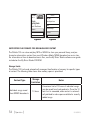
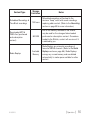
To access Radio Replays, from the Home menu use the
Replays and press the Select button.
56 [ Operation ]
Media Dial to highlight Radio
SL100TK1C
Now Playing Screen Information
The Now Playing screen for Radio Replays provides information such as the channel the content was recorded from, song or show being played, mode, song length, and other information. Figure 41 identifies the information which is displayed when in the Radio Replays mode.
Channel Number
Song/Show Title &
Artist Information
Replayed
from 24
Channel Logo
Little Richard
Lucille
Elasped Play Time
Replay Buffer Time Information
Battery Condition Indicator
00:46
+
02:17
Time Length of Currently
Playing Content
Replays
Battery Charging Indicator
Listening Mode
Figure 41
SL100TK1C
[ Operation ]
57
Navigating Radio Replays
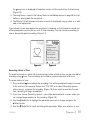
Radio Replays are listed in numerical order by SIRIUS channel (Figure 42). Use the Media
Dial to scroll through the list of channels and the press the Select button to choose a Radio
Replay.
Radio Replays
01 Sirius Hits 1
02
StarLite
03
Sirius Love
06
‘60s Vibrations
07
Totally ‘70s
14
Classic Vinyl
Figure 42
Play/Pause will pause and resume playback of the selected Radio Replay. Fast-Forward
and Rewind allow you to move forward and backward through the content. The Stiletto 100
remembers the last point you paused or stopped in the Radio Replay and resumes playback at
that point when you begin listening again.
The
Options button allows you to delete all auto-recordings from a channel.
Adding Songs as Favourites
When listening to Radio Replays, saving songs or recording programs is not possible. You
may save the song title and artist information to your favourites list by pressing Love. The
information saved in favourites is available when using the My Sirius Studio software or any
other compatible online music service when your Stiletto 100 is connected to a PC computer.
This makes it easy for you to find more information about the song or artist, and purchase the
music if desired. Refer to the user manual on the My Sirius Studio CD-ROM included with
your Stiletto 100 for more details about the favourites feature.
58 [ Operation ]
SL100TK1C
Recording
Recording
Recording allows you to schedule the Stiletto 100 to record programming at a set date and
time. Each recording session may be up to 6 hours in length, and may be set up as a one time
or repeating event. In order for a scheduled recording to occur, the Stiletto 100 must have
adequate power and be able to receive the SIRIUS signal from the satellites or terrestrial
transmitters. If the Stiletto is on or in sleep mode, the Stiletto will automatically tune to the
correct channel and begin recording. If no signal is present at the time the recording is scheduled to start, the recording will be skipped.
Completed scheduled recordings can be found in the Library. To access to your scheduled
recordings, go to Library Sirius Recordings. Scheduled recordings will be listed by the
channel and date/time recorded.
To setup or edit a scheduled recording on your Stiletto 100, from the Home screen use the
Media Dial to highlight Recording and press the Select button.
SL100TK1C
[ Operation ]
59
Scheduling a Recording
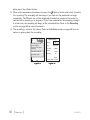
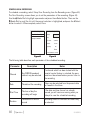
To schedule a recording, select Setup New Recording from the Recording menu. (Figure 43)
The New Recording screen allows you to set the parameters of the recording. (Figure 44)
Use the Media Dial to highlight a parameter and press the Select button. Then use the
Media Dial to scroll the list until the correct selection is highlighted, and press the Select
button to select it. When complete, select Done.
Recording
New Recording 2:24PM
Setup New Recording
Channel:
Already Scheduled
Date:
10
Mon 04/10
Start Time:
Duration:
Repeating:
3:00 PM
60 min
No
Done
Press SELECT to change
Figure 43
Figure 44
The following table describes each parameter of the scheduled recording.
Parameter
Description
Notes
Channel
Any SIRIUS broadcast
channel may be selected
If a channel which has been locked with the
parental control feature is selected, the password must be entered before you can listen to
the recording
Date
The date of the recording
Dates may be selected from the present date
to 4 weeks in the future
Start Time
The time of day the
recording will begin
If the date and time chosen has already
passed, you will receive a warning when you
attempt to save the scheduled recording
Duration
The amount of time to
record
Recording times of 5 minutes to 6 hours may
be selected
60 [ Operation ]
SL100TK1C
Parameter
Description
Notes
No: The recording will take place once at the
specified time/date
Repeating
The recording can be set
to repeat at scheduled
intervals
Weekly: The recording will take place every
seven days at the specified time
Daily: The recording will take place every day
at the specified time
Mon - Fri: The recording will take place every
Monday through Friday at the specified time
Sat - Sun: The recording will take place every
Saturday and Sunday at the specified time
Keep Last
For a repeating recording,
you may specify how many
previously recorded shows
to keep
1,2,3,5,10 Shows: Keeps the selected number of previous recordings
All Shows: Keeps all previous recordings
If there is not enough memory to complete a scheduled recording, a Not Enough Space error
message will be displayed when you select Done to complete your recording setup. You’ll
need to delete files from your library to free up space before you can save the scheduled
recording. If the memory is full when a scheduled recording is set to begin, an error message
will be displayed and the recording will not occur.
Note: Scheduled recordings on multiple channels cannot happen at the same time. If an
attempt is made to create a scheduled recording which will conflict with an existing one, the
Recording Conflict error message will be displayed and give you the option to either cancel
the older conflicting recording or change the settings of the new recording.
SL100TK1C
[ Operation ]
61
Editing a Scheduled Recording
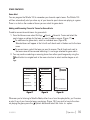
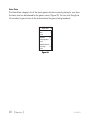
Once you’ve set up a scheduled recording, you can review and edit the recording settings by
choosing Already Scheduled from the Recording menu. (Figure 43) Selecting this option will
display a list of all recordings already scheduled. (Figure 45) Selecting a scheduled recording
from the list will take you to the Edit Recording screen and allow you to make changes to the
parameters for that recording. (Figure 46)
Already Scheduled
Weekdays
7:55 AM
12
Every Mon
1:00 PM
35
Edit Recording 7:30AM
Channel:
Date:
12
Mon 04/24
Start Time:
7:55 AM
Duration:
54 min
Repeating:
Mon - Fri
Keep Last:
All Shows
DONE
Press SELECT to change
Figure 45
62 [ Operation ]
Figure 46
SL100TK1C
Settings
Settings
Settings allows you make changes to the global settings of your Stiletto 100 and personalize
your experience.
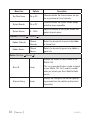
The following table describes each menu item and associated settings. The main Settings
menu items are shown in bold text.
Menu Item
Options
Audio & Display (Settings
Description
Audio & Display
Brightness
5 – 100%
Backlight Timer
2, 5, 10, or 30
Seconds
)
Adjusts the brightness of the display screen
A dimmer setting will prolong battery life
Adjusts how long the backlight of the display
screen remains on after no buttons are
pressed
A shorter setting will prolong battery life
SL100TK1C
[ Operation ]
63
Menu Item
Options
Description
Say Chan Name
On or Off
Chooses whether the channel names are spoken as you browse lists of channels
System Sounds
On or Off
Chooses whether the system sounds, beeps,
and other tones are audible
System Volume
0 – 100%
Adjusts the volume of the system sounds and
spoken channel names
Channels (Settings
Channels
)
Hidden Channels
Choose
Channels
Selects (or de-selects) channels to be hidden
in channel lists
Hidden Genres
Choose
Genres
Selects (or de-selects) genres to be hidden in
genre lists
Device (Settings
Device
)
Displays the SIRIUS ID (SID) number of the
Stiletto 100
Sirius ID
(none)
Antenna Aiming
(none)
64 [ Operation ]
This is a unique identification number assigned
to your Stiletto 100. You’ll need this number
when you activate your Sirius Satellite Radio
service
Displays the strength of the SIRIUS signal being received from the satellites and terrestrial
transmitters
SL100TK1C
Menu Item
Time Zone
Options
Newfoundland
Atlantic
Eastern Time
Indiana (East)
Central Time
Mountain Time
Arizona
Pacific Time
Description
Sets the time zone in which you reside
The Stiletto is set to Eastern Daylight Time by
default
Displays information on how much of the
Stiletto 100’s memory is being used
Memory Usage
Device Info
(none)
(none)
Selecting this option provides details on how
the memory is allocated between all recordings, content downloaded from your PC computer, and content saved using
Love
Displays information about the model number,
and software and hardware versions of your
Stiletto 100
The MAC address of your Stiletto is also
displayed
Service Info
(none)
Displays information that might be required by
SIRIUS Customer Service
Legal Info
(none)
Provides legal and copyright information for
the Stiletto 100
SL100TK1C
[ Operation ]
65
Menu Item
Options
Reset and Erase
Yes or No
Description
Resets all the settings of the Stiletto 100 to
the factory defaults:
— All presets are erased
— Display brightness is set to 80%
— FM Transmitter is set to ON
— Hidden channels are added back
— Favourite teams for game alerts are erased
— Game Alert is set to ON
— Sports Ticker is set to ON
— Clock is set to Eastern time zone and
Daylight Savings ON
— Jump is set to none
— Speak Channel Name is set to ON
— System Sounds are set to ON
— All recordings scheduled are erased
— Channels locked with Parental Controls are
unlocked
— Parental Controls password is cleared
— All items in the Library are erased
Note: If a parental control password has been
set, you’ll be prompted to enter the password
before you can proceed with the reset
Dock (Settings
Dock
FM Transmit
)
On or Off
Parental Controls (Settings
Parental Controls
66 [ Operation ]
Selects whether the FM transmitter is turned
on or off when the Stiletto 100 is in a docking
station
Parental Controls
On or Off
)
Selects whether the parental controls are
enabled or disabled
If On is selected, you will be prompted to
select a 4-digit password
SL100TK1C
Menu Item
Options
Description
Individual channels may be selected (or deselected) for locking
Choose
Channels
Locked Channels
Radio Replays (Settings
Radio Replays
Radio Replays
On or Off
Sports (Settings
Locked channels will have the lock icon
displayed with the channel name
If unlocking channels, you will be prompted to
enter the 4-digit password before they can be
unlocked
)
Selects whether the Stiletto 100 should automatically save content for Radio Replays
)
Sports
Favourite Teams
Choose Teams
Allows you to select your favourite teams for
Game Alerts
Game Alerts
On or Off
Selects whether the Game Alert feature is
enabled or disabled
Sports Ticker
On or Off
Selects whether the Sports Ticker feature is
enabled or disabled
Wi-Fi (Settings
Wi-Fi
)
Wi-Fi Status
On or Off
Turns the Wi-Fi access for connecting to a
wireless network on or off
Network List
Choose
Network
Displays a list of wireless networks to which
the Stiletto 100 has previous connected
SL100TK1C
[ Operation ]
67
Vehicle Docking Station Installation & Use
SIRIUS suggests professional installation of this product in your vehicle. Professional installation provides an experienced technician to install this product in your vehicle, advice for
selecting a suitable mounting location, installation of the antenna, and routing all the necessary wires and cables. If the FM reception within your vehicle proves to be poor, an installer
will have the necessary accessories to install an optional FM relay switch, or an audio cable to
connect the audio output of the Stiletto 100 directly to your vehicle’s audio system. Ask your
SIRIUS retailer if they provide professional installation services, or can recommend a professional installation service.
Installing the Vehicle Docking Station
When installing the dock in your vehicle, choose a location in your vehicle where the unit will
not block your vision, interfere with the vehicle controls, or obstruct the air bag. The location
should be easily accessible and provide good visibility of the display, and should not be
located where it will be in direct sunlight which will affect the visibility of the display screen.
The left side of the vehicle dock which has the FM FM button and the locking button should
also not be obstructed.
The mounting accessories necessary to install the dock in a vehicle are provided. Figure 1
shows two examples of the Stiletto 100 mounted in a vehicle: A is the console mount method
using the adhesive mount, and B is the vent mount method.
68 [ Vehicle Docking Station Installation & Use ]
SL100TK1C
B.
back
home
options
display
1
6
preset
2
3
7
4
8
9
5
0
tune
jump
back
home
options
display
1
6
preset
2
3
7
4
8
9
5
0
tune
jump
A.
Figure 1
Depending upon the mounting method you select, the mount should be assembled as described in one of the following two sections.
Console Mount Method (A)
To assemble and mount the vehicle dock for the console mount method A as shown in Figure
1:
1. Attach the adhesive foot to the vehicle dock using the provided screws, placing the
finger grip between the adhesive dock and the vehicle dock. (Figure 2)
2. Before adhering the mount to the console, be sure to select your mounting position carefully because once the mount has been adhered to a surface, it will not be possible to
remove it and adhere it again.
3. Clean the selected mounting surface area in the vehicle with the alcohol swab.
4. Unscrew the adhesive foot from the mounting bracket. Peel the protective material off
the adhesive on the foot and press the foot firmly against the vehicle surface.
5. The adhesive mount should then be allowed to adhere for a minimum of 2-4 hours before
use. Best adhesion occurs after 24 hours. When the adhesive foot has achieved sufficient adhesion, reattach the vehicle dock to the foot.
SL100TK1C
[ Vehicle Docking Station Installation & Use ]
69
Finger Vehicle
Grip
Dock
lock
Adhesive Mounting
Foot
Bracket
lock
FM
FM
Figure 2
70 [ Vehicle Docking Station Installation & Use ]
SL100TK1C
Vent Mount Method (B)
To assemble and mount the vehicle dock for the vent mount method B as shown in Figure 1:
1. Assemble the vent mount clip as shown in Figure 3. Note that the lower arm may be attached in two different positions. You should assemble the vent clip in the configuration
that works best in your particular vehicle. Figure 3 illustrates both possible configurations of the vent clip.
2. Attach the vent clip to the vehicle dock using the provided screws, placing the finger
grip between the vent clip and the vehicle dock. (Figure 4)
3. Slide the vent clip portion of the mount into a vent in your vehicle, insuring that one of
the vent louvers slides between the upper and lower portions of the two clip arms, and
hooks the rear of the louver.
Figure 3
SL100TK1C
[ Vehicle Docking Station Installation & Use ]
71
lock
Vent Clip Finger Vehicle
Grip
Dock
FM
lock
Clip Arms
FM
Figure 4
72 [ Vehicle Docking Station Installation & Use ]
SL100TK1C
Installing the Antenna
The optimum mounting location for the magnetic antenna is on the roof of the vehicle, with a
minimum unobstructed area of 12 inches by 12 inches, and exactly 6½ inches from the rear
roof edge of the vehicle (the length of the rubber antenna cable cover/tail). It is important to
avoid any obstructions that will block the SIRIUS signal, obstructions such as a roof rack,
a sunroof, roof mounted cargo containers, or other antennas. For convertible vehicles, the
antenna should be installed on the trunk lid.
For best performance, it is recommended that the antenna be installed with the rubber
antenna cable cover/tail. This rubber antenna cable cover/tail provides two benefits: first, it
positions the antenna the recommended distance from the rear window, rear door/hatch, or
trunk edge to give the antenna the best view of the sky. Secondly, it conceals and protects
the exposed antenna cable. The rubber antenna cable cover/tail has adhesive strips that hold
it securely in place.
The following illustrations show the recommended mounting locations of the antenna for
several types of vehicles. (Figure 5) Follow these recommendations for best performance from
the antenna.
Figure 5
Sedan/Coupe. Mount the antenna along the rear center-line of the vehicle roof, located at the
rear of the roof near the rear window.
Pickup Truck. Mount the antenna along the rear center-line of the cab roof, located at the
rear of the roof near the rear window.
SUV/Mini-Van. Mount the antenna along the rear center-line of the vehicle roof, located at the
rear of the roof near the rear door/hatch.
SL100TK1C
[ Vehicle Docking Station Installation & Use ]
73
Convertible. Mount the antenna along the center-line of the trunk lid, with the rubber antenna
cable cover/tail directed toward the rear window.
When you have selected a suitable mounting location, clean the area where the antenna and
rubber antenna cable cover/tail will be mounted with the supplied alcohol swab.
Protective
Strips
Strain
Relief
Adhesive
Rubber Antenna
Cover/Tail
Cable
Figure 6
Figure 7
Connect the rubber antenna cable cover/tail to the antenna cable, making sure that the strainrelief on the antenna sits into the rubber antenna cable cover/tail groove. (Figure 6) Route the
antenna cable through the wire channel in the rubber antenna cable cover/tail. Do not remove
the protective strips yet.
Temporarily position the antenna and rubber antenna cable cover/tail in the selected mounting
area and route the cable from the antenna to the vehicle’s interior by tucking it underneath the
rubber molding around rear window, as shown in Figure 7.
Route the cable from the lowest point of the rear window into the trunk. Take advantage of
any existing cable channels or wiring conduits. For SUVs, mini-vans and 5-door vehicles, bring
the cable into the vehicle under the rubber molding for the tailgate, and continue under the
interior trim.
From the trunk, or rear of the vehicle, route the cable around the passenger compartment and
to the front of the vehicle, to the receiver. Take care not pull the cable across sharp edges
that could damage it, and keep it away from areas where it might entangle feet. Coil any
74 [ Vehicle Docking Station Installation & Use ]
SL100TK1C
excess antenna cable in a location where it can be hidden. Connect the antenna cable to the
ANT connection at the rear of the vehicle dock. (Refer to Figure 1 on page 18 for the location
of this connector.)
Figure 8
Once the antenna cable is routed through the vehicle, and you are satisfied with the cable
routing, peel the protective material from the adhesive strips and press the rubber antenna
cable cover/tail firmly into place on the vehicle. Double check that the location of the antenna
and rubber antenna cable cover/tail are correct, and continue to press firmly down on rubber antenna cable cover/tail for another 30 seconds. (Figure 8) At room temperature (68
degrees), maximum adhesion usually occurs within 72 hours. During this period, avoid car
washes and other contact with the antenna and rubber antenna cable cover/tail.
Connecting the Cigarette Lighter Adapter
Connect the provided cigarette lighter adapter to the DC 5V connection at the rear of the
vehicle dock. (Refer to Figure 1 on page 18 for the location of this connector.)
Do not use any other power adapter for the Stiletto 100, or connect it directly to the vehicle’s
power. Doing so will damage the Stiletto 100. Using anything other than the supplied cigarette lighter adapter to power the vehicle dock will void the warranty.
SL100TK1C
[ Vehicle Docking Station Installation & Use ]
75
Docking and Un-docking the Stiletto 100
When docking the Stiletto 100 be sure the Lock button of the vehicle docking station is in the
unlocked position. (Refer to Figure 1 on page 18 for the location of the Lock button.) Grasp
the vehicle dock with your free hand and place the Stiletto 100 into the dock, as shown in Figure 9, and slide it down until it is fully seated. Place the Lock button into the locked position
to secure the Stiletto 100 in the dock.
To remove the Stiletto 100 from the vehicle dock place the Lock button in the unlocked position. Grasp the dock with your free hand and pull the Stiletto 100 up until it disengages from
the dock.
home
back
options
display
1
2
3
4
6
7
8
9
preset
tune
5
0
jump
Figure 9
76 [ Vehicle Docking Station Installation & Use ]
SL100TK1C
Selecting an FM Frequency
To listen to the audio from the Stiletto 100 using your vehicle’s FM radio, you will need to
tune the FM radio in your vehicle and the FM transmitter in the Stiletto 100 to the same FM
frequency. The FM transmitter in the Stiletto 100 defaults to 88.1 MHz, so you can begin by
tuning your vehicle’s FM radio to 88.1 MHz. If there is an FM station broadcasting on that
frequency, you will have to search for a different FM frequency to use, and the change the FM
frequency that the Stiletto 100 will use to transmit.
To change the FM frequency:
1. Press the FM FM button on the left side of the vehicle dock. (Refer to Figure 1 on page
18 for the location of the FM button.)
2. Use the Media Dial to select a new FM frequency (Figure 10).
OR
Press one of the 0—9 buttons to recall an FM preset (Figure 11).
3. Press the Select button. The Stiletto 100 will now transmit on the selected FM frequency.
FM Transmit
FM Transmit
Turn the Media Dial to
change the frequency.
Turn the Media Dial to
change the frequency.
Use the number keys to
recall or assign FM presets
Use the number keys to
recall or assign FM presets
91.7
103.9
Figure 10
FM4
Figure 11
To assign FM frequencies for the FM presets:
1. Press the FM FM button on the left side of the vehicle dock.
2. Use the Media Dial to select an FM frequency.
3. Press and hold the preset number (0—9) in which you want to store the selected FM
frequency. (Figure 11) Repeat steps 2 and 3 to assign additional FM presets.
4. Press the Select button to exit and transmit on the selected FM frequency, or press
the FM FM button to simply exit.
SL100TK1C
[ Vehicle Docking Station Installation & Use ]
77
Presets
Channel presets may be selected using the vehicle dock to tune to a channel by pushing the
0—9 buttons when the dock is in the preset mode. The Stiletto 100 must be in the Satellite
mode to select presets.
To select to a preset:
1. Press the preset Preset button on the vehicle dock. The preset mode indicator light will
indicate that the preset mode is active.
2. Select the desired preset band (A, B, or C) by repeatedly pressing the preset Preset button until the desired preset band is displayed. (Figure 12)
3. Press one of the 0—9 buttons to select the desired preset.
OR
Use the Media Dial to highlight a preset and press the Select button. (Figure 13)
Presets (B)
B1 Margaritaville
B
Presets
31 Everywhere
Tim McGraw
B2 Sirius Disorder
24 Cure For Love
Bonnie Raitt
A2
Assigned
B3 Roadhouse
62 Honky Tonk Song
Webb Pierce
Figure 12
Figure 13
Figure 14
To save a preset:
1. Press the preset Preset button on the vehicle dock. The preset mode indicator light will
indicate that the preset mode is active.
2. Select the desired preset band (A, B, or C) by repeatedly pressing the preset Preset button until the desired preset band is displayed. (Figure 12)
3. Press and hold one of the 0—9 buttons to save the desired preset. (Figure 14)
78 [ Vehicle Docking Station Installation & Use ]
SL100TK1C
Direct Channel Tuning
Channels may be tuned directly by entering the channel number using the 0—9 buttons on
the vehicle dock when the dock is in the tune mode. The Stiletto 100 must be in the Satellite
mode to select channels. To directly tune a channel:
1. Press the tune Tune button on the vehicle dock. (Figure 15) The tune mode indicator
light will indicate that the tune mode is active.
2. Enter the channel number of the desired channel. If a 3-digit channel number is entered,
the channel will be tuned immediately. If only one or two digits are entered, the channel
will be tuned after a slight pause. (Figure 16)
Direct
Tune
26
Enter channel #
Figure 15
SL100TK1C
Figure 16
[ Vehicle Docking Station Installation & Use ]
79
My Sirius Studio Software Installation
The My Sirius Studio software included with your Stiletto 100 allows you to connect your
Stiletto 100 to your PC computer. The software requires your PC computer to be using the
Microsoft Windows XP operating system with Service Pack 2 installed.
Important: The My Sirius Studio software must be installed before connecting the Stiletto 100
to your PC computer.
The following list provides a few highlights of the capabilities of the software:
• Creating playlists and adding songs to the playlists.
• Streaming SIRIUS music channels over the Internet.
• Checking for updates to the device software and downloading them to the Stiletto 100,
and re-installing deleted device software.
During installation you will be given the opportunity to install Yahoo! Music Engine software.
The Yahoo! Music Engine software will recognize the Stiletto 100 and enable you to manage
playlists and download music files. Yahoo! Music Engine will also allow you to view the song
and artist information saved by you as “Favourites”. By using the Yahoo! Music Engine software, it may be possible to purchase or download this content.
To install the My Sirius Studio software:
1. Place the My Sirius Studio software CD-ROM into your PC computer’s CD-ROM drive to
start the software installation.
2. If the installation does not begin automatically, double click the SiriusStudioSetup icon
to begin the installation.
80 [ My Sirius Studio Software Installation ]
SL100TK1C
3. Follow the prompts of the software to complete the installation.
When the PC computer has rebooted, the My Sirius Studio software will be ready to use.
Please refer to the user guide included on the software CD-ROM for instructions on using the
software.
SL100TK1C
[ My Sirius Studio Software Installation ]
81
Troubleshooting
Symptom
Solution
Stiletto 100 does not
power on
Check the battery to be sure it is installed correctly.
Charge the battery.
Check that the Stiletto 100 is properly seated in the dock.
Check the cigarette lighter adapter to be sure it’s seated in the
cigarette lighter receptacle, and connected to the vehicle dock.
Stiletto 100 displays
No Antenna
The satellite antenna is not connected to the vehicle dock.
Check the satellite antenna connection to the dock.
Check that the Stiletto 100 is properly seated in the dock.
Stiletto 100 displays:
No Signal
No satellite signal is being received.
Check that the Stiletto 100 is properly seated in the dock. Check
for obstacles over or around the satellite antenna.
Change the vehicle location to eliminate nearby obstacles
(bridges, overpasses, etc.).
Audio static or loss of
clarity
The FM frequency contains static.
Locate a quiet FM frequency on your vehicle radio and set the FM
transmitter frequency of the Stiletto 100 to match.
If using the Line Out audio connector, check the cable connections.
82 [ Troubleshooting ]
SL100TK1C
Troubleshooting Continued
Symptom
Solution
No sound
When in the vehicle dock:
Check if the FM radio is set to the wrong frequency. Tune the
vehicle FM radio and the Stiletto 100 to the same FM frequency.
Check if the FM transmitter in the Stiletto 100 is turned off. Turn
the FM transmitter on.
If using the Line Out audio connector, check the cable connections.
When not in a dock: Check that the ear buds are plugged into
the headphone jack securely.
The Stiletto 100 will
not start up
The operating system files on the Stiletto 100 have been deleted.
Connect the Stiletto 100 to your PC using the USB cable, and
use the My Sirius Studio software to download new operating
system files. Follow the software instructions included on the
software CD.
The Stiletto 100 does
not respond to the
Media Dial and other
buttons
Slide and hold the Power/Lock button down for 5 seconds
which will turn the Stiletto 100 off. Then turn it on again by momentarily sliding the Power/Lock button down.
If this does not work, remove the battery, wait 10 seconds,
replace the battery and turn it back on.
SL100TK1C
[ Troubleshooting ]
83
Optional Accessories
The following optional accessories are available for purchase from your SIRIUS retailer to
maximize your SIRIUS Stiletto experience.
Vehicle Kit (Model SLV1C)
If you plan to use your Stiletto 100 in another vehicle, you can purchase
another Stiletto Vehicle Kit. The Stiletto Vehicle Kit will maximize your safety
and provide convenience by positioning the Stiletto for easy viewing and operation. Whether you choose the FM wireless or direct connect option when
installing the kit, the rich digital sound of SIRIUS radio will play through your
vehicle’s stereo system. The dock features preset and direct tune buttons for
quickly tuning to your favourite channels, and a jump button for tuning directly to the traffic/weather channel for your area. It is designed for quick and easy self-installation
and includes a vent and dash mount for flexible mounting options.
1
2
3
4
6
7
8
9
preset
tune
5
0
jump
The kit includes a compact docking cradle that rapidly charges your Stiletto’s battery, a
remote control, dash and vent mounts, cigarette lighter adapter, and a magnetic antenna with
21’ of cable. Detailed installation instructions are included with the kit.
Home Kit (Model SLH1C)
The Stiletto Home Kit is a compact docking cradle that provides everything
you need to use the Stiletto in your home or office. The sleek docking
cradle provides a convenient way to charge your Stiletto’s battery along
with an extra slot for charging a spare battery. The included indoor/outdoor
antenna provides improved reception, while audio cables enable you to
connect the Stiletto to amplified speakers or a home entertainment system.
The kit includes a compact tabletop/desktop docking cradle with FM output for wireless connectivity, a remote control, audio cables, an adjustable indoor/outdoor windowsill antenna with
20’ of cable, and an AC Adapter. Detailed installation instructions are included with the kit.
84 [ Optional Accessories ]
SL100TK1C
Executive Sound System (Model SLEX1C)
The Stiletto Executive Sound System is a portable docking
station and audio system for use with the Stiletto radio. With
the built-in amplifier and speakers, the system delivers rich,
powerful sound indoors or outdoors, and features an auxiliary
input for other audio devices. Included with the system is an
adjustable indoor/outdoor windowsill antenna with 20’ of cable and an AC adapter.
SL100TK1C
[ Optional Accessories ]
85
Specifications
Satellite Frequencies . . . . . . . . . . . . . . . . . . . . . . . . . . . . . . . . . . . . . 2322.293/2330.207 MHz
Terrestrial Frequencies . . . . . . . . . . . . . . . . . . . . . . . . . . . . . . . . . . . . . . . . . . . . . 2326.250 MHz
Power Requirements . . . . . . . . . . . . . . . . . . . . . . . . . . . . . . . 5 Volts, 2.0A Negative Ground, DC
Operation Temperature . . . . . . . . . . . . . . . . . . . . . . . . . . . . . . . -5° C to +40° C (23° to 104° F)
Audio Interface . . . . . . . . . . . . . . . . . . . . . . . . . . . . . . . . . . . . . . . . . . 1/8” / 3.5 mm Stereo Jack
Headphone Output . . . . . . . . . . . . . . . . . . . . . . . . . . . . . . . . . . . . . . . . . . . . . 20mW @ 16 ohms
Signal-to-noise (S/N) . . . . . . . . . . . . . . . . . . . . . . . . . . . . . . . . . . . . . . . . . . . . . . . . 90dB (MP3)
Radio Dimensions (Height x Width x Depth) . . . . . . . . . . . . . . . . 116 mm x 53 mm x 18.25 mm
(4.5” x 2.0” x 0.7”)
Radio Weight . . . . . . . . . . . . . . . . . . . . . . . . . . . . . . . . . . . . . . 132 g (4.6 oz.) with Slim Battery
Memory Capacity . . . . . . . . . . . . . . . . . . . . . . . . . . . . . . . . . . . . . . . . . . . . . . . . . . . . . . . . . 2 GB
Wi-Fi Standard . . . . . . . . . . . . . . . . . . . . . . . . . . . . . . . . . . . . . . . . . . . . . . . . . . . . . . . . 802.11b
Wi-Fi Security . . . . . . . . . . . . . . . . . . . . . . . . . . . . . . . . . . . . . . . . . . WEP and WPA(2) Personal
Wi-Fi Antenna . . . . . . . . . . . . . . . . . . . . . . . . . . . . . . . . . . . . . . . . . . . . . . . . . Integrated Internal
Internal Antenna Type . . . . . . . . . . . . . . . . . . . . . . . . . . . . . . . . . . . Integrated, Low Profile Patch
Vehicular Antenna Type . . . . . . . . . . . . . . . . . . . . . . . . . . . . . . . . . . . . . . . Low Profile Magnetic
Vehicular Antenna Cable Length . . . . . . . . . . . . . . . . . . . . . . . . . . . . . . 21’ (single micro-cable)
Vehicular Antenna Connector Type . . . . . . . . . . . . . . . . . . . . . . . . . . . . . . . . . SMB (right-angle)
Remote Control Dimensions (Height x Width x Depth) . . . . . . . . . 110 mm x 43.5 mm x 12 mm
(4.3” x 1.7” x 0.5”)
Remote Control Battery Requirements . . . . . . . . . . . . . . . . . . . . . . . . . . . . . . . . . . . . . . CR2032
86 [ Specifications ]
SL100TK1C
Warranty
12 Month Warranty
SIRIUS Canada Inc. (the “Company”) warrants to the original retail purchaser of this product that
should this product or any part thereof, under normal use and conditions, be proven defective in
material or workmanship within 12 months from the date of original purchase, such defect(s) will be
replaced with new or reconditioned product (at the Company’s option) without charge for parts and
labor. To obtain replacement within the terms of this Warranty, the product is to be delivered with proof
of warranty coverage (e.g. dated bill of sale), specification of defect(s), transportation prepaid, to the
location shown below under WARRANTY RETURN.
This Warranty does not extend to the elimination of externally generated static or noise, to correction
of antenna problems, to costs incurred for installation, removal or reinstallation of the product, or to
damage to tapes, compact discs, speakers,accessories, or vehicle electrical systems.
This Warranty does not apply to any product or part thereof which, in the opinion of the Company,
has suffered or been damaged through alteration, improper installation, mishandling, misuse, neglect,
accident, or by removal or defacement of the factory serial number/bar code label(s). THE EXTENT
OF THE COMPANY’S LIABILITY UNDER THIS WARRANTY IS LIMITED TO THE REPAIR OR
REPLACEMENT PROVIDED ABOVE AND, IN NO EVENT, SHALL THE COMPANY’S LIABILITY
EXCEED THE PURCHASE PRICE PAID BY PURCHASER FOR THE PRODUCT.
This Warranty is in lieu of all other express warranties or liabilities. ANY IMPLIED WARRANTIES,
INCLUDING ANY IMPLIED WARRANTY OF MERCHANTABILITY, SHALL BE LIMITED TO THE
DURATION OF THIS WRITTEN WARRANTY. ANY ACTION FOR BREACH OF ANY WARRANTY
HEREUNDER INCLUDING ANY IMPLIED WARRANTY OF MERCHANTABILITY MUST BE BROUGHT
WITHIN A PERIOD OF 48 MONTHS FROM DATE OF ORIGINAL PURCHASE. IN NO CASE SHALL
THE COMPANY BE LIABLE FOR ANY CONSEQUENTIAL OR INCIDENTAL DAMAGES FOR
BREACH OF THIS OR ANY OTHER WARRANTY, EXPRESS OR IMPLIED, WHATSOEVER. No
person or representative is authorized to assume for the Company any liability other than expressed
herein in connection with the sale of this product. Some states do not allow limitations on how long an
implied warranty lasts or the exclusion or limitation of incidental or consequential damage so the above
limitations or exclusions may not apply to you. This Warranty gives you specific legal rights and you may
also have other rights which vary from state to state.
WARRANTY RETURN: To obtain a replacement within the terms of this Warranty, please return product
to an authorized Sirius Canada retailer or call Erikson Consumer Customer Service at (800) 567-3275
for an authorized Sirius retailer near you; proof of purchase and description of defect are required.
Products to be returned to an approved warranty station must be shipped freight prepaid.
SL100TK1C
[ Warranty ]
87
End User License Agreement
SIRIUS canada INC.
END USER LICENSE AGREEMENT (EULA)
This End User License Agreement (this “EULA”) sets forth the agreement between you and Sirius Canada Inc. (“Sirius”) for the
use of the software in Stiletto Sirius satellite radio receivers (the “Receiver Software”), the My Sirius Studio computer software (the
“Computer Software” and, together with the Receiver Software, the “Software”) and their use with Stiletto Series Sirius satellite radio
receiver and accessories (the “Receiver”) and Sirius’ satellite radio service (the “Sirius Service”).
In addition, for your use of the Sirius Service, you agree to be bound by the “Terms & Conditions of Service” set forth at: http://www.
siriuscanada.ca (the “Terms and Conditions”).
YOU ACKNOWLEDGE AND AGREE THAT YOU HAVE READ AND UNDERSTAND THIS EULA. BY USING THE RECEIVER AND
THE RECEIVER SOFTWARE, CLICKING ON THE “ACCEPT” BUTTON TO INSTALL THE COMPUTER SOFTWARE, AND/OR
INSTALLING, COPYING OR OTHERWISE USING THE COMPUTER SOFTWARE, YOU AGREE TO BE BOUND BY THE TERMS
OF THIS EULA. IF YOU DO NOT AGREE TO THE TERMS OF THIS EULA, CLICK ON THE “CANCEL” BUTTON IF YOU ARE
INSTALLING THE COMPUTER SOFTWARE SO THAT IT IS NOT INSTALLED, AND DO NOT USE THE RECEIVER.
1. GRANT OF LICENSE. Sirius hereby grants to you a non-exclusive, limited, license to use the Software and any related documentation (the “Documentation”). You may: (a) use the Receiver Software in object code form only as fully integrated into the Receiver
in order to operate the Receiver for its usual purpose, (b) use the Computer Software simultaneously on up to three computers and
(c) copy the Computer Software for back-up and archival purposes; provided that any copy must contain all of the original Software’s
proprietary notices. Sirius, its partners and suppliers, including without limitation, SIRIUS Satellite Radio Inc. (“SIRIUS US”), Microsoft Corporation (“Microsoft”), ZING Systems, Inc. (“ZING”), and their respective partners and suppliers, retain all rights not expressly
granted herein, including without limitation, all world-wide patent, copyright, trademark, trade secret and other proprietary rights associated with the Software. You agree that Sirius’ partners and suppliers (including SIRIUS US, Microsoft and ZING) are third party
beneficiaries of this EULA and may enforce your performance of its terms. This product is protected by certain intellectual property
rights of Microsoft. Use or distribution of such technology outside of this product is prohibited without a license from Microsoft.
2. LICENSE RESTRICTIONS. (a) You must be at least 18 years old to assume the obligations set forth in this EULA. Minors may use
the Software and the Documentation only if a parent or legal guardian assumes the obligations set forth in this EULA and thereby
assumes full responsibility for the minor’s use of the Software and the Documentation.
(b) You may not: (i) permit other individuals to use the Computer Software; (ii) modify, translate, reverse engineer, decompile, extract
source code from, disassemble (except to the extent that this restriction is expressly prohibited by law), reproduce, or create derivative works based upon the Software or the Documentation; (iii) copy the Software or the Documentation (except as permitted by
Section 1(c)); (iv) rent, lease, publicly display, transfer, or otherwise transfer rights to the Software or the Documentation and/or (v)
remove any proprietary notices or labels on the Software or the Documentation. Any violations of this Section 2(b) will immediately
terminate your license to the Software and the Documentation.
(c) You may use the Software and the Documentation only in a manner that complies with all applicable laws in the jurisdictions in
which you use the Software and the Documentation, including without limitation, applicable restrictions concerning copyright and
other intellectual property rights.
(d) You may use the Software only for your private, non-commercial use. You may not use the Software in any way to provide, or as
part of, any commercial service or application. Copying of content files, including without limitation songs and other audio recordings,
which are stored and/or transferred using the Software, may be subject to copyright law or related laws and no authorization is given
hereby for any breach of such laws; copies legally made are for your own personal use only and you may not publicly perform them
or distribute them to third parties.
(e) By storing content on the Receiver, you are making a digital copy. You may not use the Receiver or the Software in an attempt to,
or in conjunction with, any device, program or service designed to circumvent technological measures employed to control access to,
or the rights in, a content file or other work protected by the copyright laws of any jurisdiction.
(f) The Software embodies a serial copying management system. You may not circumvent or attempt to circumvent this system by
88 [ EULA ]
SL100TK1C
any means.
(g) You shall not export or re-export the Software or the Receiver without the appropriate Canadian or foreign government licenses.
(h) MPEG Layer-3 audio coding technology licensed from Fraunhofer IIS and Thomson. Supply of the Receiver and the Software
does not convey a license nor imply any right to distribute content created with this product in revenue-generating broadcast systems
(terrestrial, satellite, cable and/or other distribution channels), streaming applications (via Internet, intranets and/or other networks),
other content distribution systems (pay-audio or audio-on-demand applications and the like) or on physical media (compact discs,
digital versatile discs, semiconductor chips, hard drives, memory cards and the like). An independent license for such use is required.
For details, please visit http://mp3licensing.com.”
3. COMMUNICATIONS FEATURES; USE OF INFORMATION. (a) The Software includes functionality that may automatically
communicate information to Sirius, its partners and suppliers over the Internet as part of its normal operation. The Software may
also contain user-visible features that interact and communicate with internet services operated by Sirius, its partners and suppliers.
An initial list of the communications features is listed below. The communications features may be changed by any updates of the
Software that you install. By installing and/or using the Software and any related updates, you agree to permit the installation and
use of the communications features. You are responsible for any telecommunications or other connectivity charges incurred through
use of the Software.
(b) Once you install the Software and/or connect the Receiver (wired or wirelessly), the Software may provide Sirius with information
regarding the Receiver, including electronic identification number of the Receiver (the “ESN”). The Software may also provide Sirius
with the following non-personally identifying usage information, including, but not limited to: Receiver hardware actions (e.g., keys
pressed, reboots, crashes, upgrades, resets), the hardware and software revision numbers on the Receiver, the channels/streams of
the Sirius Service that you set/delete as presets/favourites on the Receiver, use of parental controls, battery level, available space on
the Receiver, connection method and signal strength. Sirius will not combine this utilization information with any personally identifiable information. Instead, this information will be collected and analyzed to evaluate overall performance of the software and the
related products, for quality control and product enhancement purposes and to keep statistics on the aggregated anonymous use of
the Software and/or the Sirius Service. Your personally identifiable information will not be collected in any way through this software,
nor will your personally identifiable information held by Sirius for other purposes (such as your subscription information) be combined
with this utilization data in any way.
4. DIGITAL RIGHTS MANAGEMENT. (a) The Software and the Device use the Microsoft digital rights management technology
for Windows Media (“WM-DRM”) to protect the integrity of Sirius and third party content (“Secure Content”) so that the intellectual
property, including without limitation, the copyright, in such content is not misappropriated. Portions of the WM DRM software (the
“WM-DRM Software”) use WM-DRM to transfer or play Secure Content. If the WM-DRM Software’s security has been compromised,
owners of Secure Content (“Secure Content Owners”) may request that Microsoft revoke the WM-DRM Software’s right to copy,
display, transfer, and/or play Secure Content. Revocation does not alter the WM-DRM Software’s ability to play unprotected content.
A list of revoked WM-DRM Software is sent to your computer whenever you download a license for Secure Content from the Internet.
Microsoft may, in conjunction with such license, also download revocation lists onto your computer on behalf of Secure Content
Owners. Secure Content Owners may also require you to upgrade some of the WM-DRM components distributed with the WM-DRM
software (“WM-DRM Upgrades”) before accessing their content. When you attempt to play such content, WM-DRM Software built
by Microsoft may notify you that a WM-DRM Upgrade is required and then ask for your consent before the WM-DRM Upgrade is
downloaded. WM-DRM Software used by third parties may do the same. You agree that Microsoft and other third parties may
upgrade the WM-DRM Software without notice to you. If you decline an upgrade, you will not be able to access content that requires
the WM-DRM Upgrade; provided that, you will still be able to access unprotected content and Secure Content that does not require
the upgrade.
(b) You may not take any action to circumvent or defeat the security or content usage rules provided or enforced by the WM-DRM
Software. Sirius is not responsible for the operation of the WM-DRM Software in any way, including without limitation, revocation of
the WM-DRM Software’s right to copy, display, transfer, and/or play Secure Content. Sirius is not responsible for any communications
to or from any Secure Content Owner, or for the collection or use of information by any Secure Content Owner.
5. OWNERSHIP. All title, ownership, rights, and intellectual property rights in and to the Software and the Documentation shall remain
in the property of Sirius and its licensors. The Software includes Microsoft Windows Media Technology. The Software is protected by
the copyright laws of Canada and international copyright treaties.
6. WARRANTIES. (a) Sirius warrants that for a period of 90 days from the date of your acquisition the Software if operated as
directed, will substantially achieve the functionality described in the Documentation and will be free from defects in material and
workmanship. This warranty shall immediately terminate if the Software is used on or in conjunction with hardware or software other
than the unmodified version of Receiver which the Software was designed to be used as described in the Documentation, any modifications are made to the Software during the warranty period, if the media is subjected to accident abuse or improper use, and/or
SL100TK1C
[ EULA ]
89
the terms of this EULA are breached. Sirius does not warrant that use of the Software will be uninterrupted or that the operation of
the Software will be error-free or secure. Depending on manufacturer and model of your Receiver, you may or may not be entitled to
upgrades of the Receiver Software. Please check your Receiver owner’s manual for further information.
(b) SIRIUS LICENSES THE SOFTWARE TO YOU “AS IS”, AND TO THE MAXIMUM EXTENT PERMITTED BY APPLICABLE LAW
SIRIUS, ITS PARTNERS AND SUPPLIERS (INCLUDING SIRIUS US, MICROSOFT AND ZING) HEREBY DISCLAIM ALL OTHER
WARRANTIES EITHER EXPRESS OR IMPLIED, INCLUDING WITHOUT LIMITATION IMPLIED WARRANTIES OF MERCHANTABLE QUALITY AND FITNESS FOR A PARTICULAR PURPOSE WITH REGARD TO THE SOFTWARE AND THE DOCUMENTATION.
(c) Sirius’ sole liability for a breach of its warranties shall be in Sirius’ sole discretion: (i) to replace your defective media, (ii) to advise
you how to achieve substantially the same functionality with the Software as described in the Documentation through a procedure
different from that set forth in the Documentation and/or (iii) if the above remedies are impracticable, to refund the license fee, if any,
you paid for the Software. Repaired, corrected or replaced copies of the Software and the Documentation shall be covered by the
same limited warranty for the period remaining under the warranty that covered the original copy of the Software or if longer for 30
days after the date Sirius either provided you with the repaired or replaced copy of the Software or advised you as to how to operate
the Software so as to achieve the functionality described in the Documentation, whichever is applicable. Sirius will be obligated
to honor its obligations in this Section 6(c) only if you inform Sirius of the problem with the Software during the applicable warranty
period and provide evidence of the date you acquired the Software.
7. INDEMNIFICATION. (a) You shall defend, indemnify and harmless Sirius, its officers, directors and employees, from and against
any losses, damages, fines and expenses, including without limitation, attorneys’ fees and expenses, arising out of or relating to any
claims that you have: (i) viewed, downloaded, encoded, compressed, copied or transmitted any in connection with the Software in
violation of another party’s rights or in violation of any law, or (ii) violated any terms of this EULA and/or the Terms and Conditions.
(b) If you are importing the Software from the United States, you shall defend, indemnify and hold harmless Sirius from and against
any import and export duties or other claims arising from such importation.
8. LIMITATION OF LIABILITY. NEITHER SIRIUS, ITS PARTNERS, NOR SUPPLIERS (INCLUDING SIRIUS US, MICROSOFT AND
ZING) IS RESPONSIBLE FOR ANY SPECIAL, INCIDENTAL, OR CONSEQUENTIAL DAMAGES OR LOSSES RELATING TO THE
USE AND/OR PURCHASE OF THE SOFTWARE, THE DOCUMENTATION, THE RECEIVER AND/OR THE SIRIUS SERVICE,
INCLUDING WITHOUT LIMITATION, COMPUTER FAILURE AND/OR MALFUNCTION, WHETHER BASED ON CONTRACT, TORT
(INCLUDING NEGLIGENCE) OR OTHERWISE, AND WHETHER OR NOT SIRIUS OR SUCH SUPPLIER (INCLUDING SIRIUS US,
MICROSOFT AND ZING) HAS BEEN ADVISED OR COULD REASONABLY FORESEE OF THE POSSIBILITY THEREOF. SIRIUS
TOTAL LIABILITY TO YOU AND ANY OTHER PERSONS USING THE RECEIVER, THE SOFTWARE AND/OR THE DOCUMENTATION, REGARDLESS OF THE CAUSE, WILL IN NO EVENT EXCEED THE AMOUNTS THAT YOU HAVE PAID TO SIRIUS FOR
THE RECEIVER, THE SOFTWARE AND THE DOCUMENTATION. THIS ALLOCATION OF RISK AND THE DISCLAIMER OF
WARRANTIES IS REFLECTED IN SIRIUS’ PRICES AND IS A FUNDAMENTAL ELEMENT OF SIRIUS AGREEMENT TO PROVIDE
YOU WITH THE SOFTWARE AND THE DOCUMENTATION.
9. TERMINATION. (a) This EULA will automatically terminate without notice if you fail to comply with any of its terms
(b) This EULA may also terminate without notice to you in the event Sirius’ or any of its partners or suppliers (including SIRIUS US,
Microsoft and ZING) licenses for technology incorporated into the Software terminates.
(c) You may terminate this EULA at any time by providing Sirius with written notice of termination to: Sirius Canada Inc., 135 Liberty
Street, 4th Floor, Toronto, ON, M6K 1A7, Attention: My Sirius Studio/Stiletto Software Termination.
(d) Upon any termination of this EULA, you shall immediately discontinue use of the Software and shall within three days return to
Sirius, or certify destruction of, all full or partial copies of the Software, documentation and related materials provided by Sirius. Your
obligation to pay accrued charges and fees shall survive any termination of this EULA.
(e) Except for the license granted in paragraph 1, the terms of this EULA shall survive termination under this paragraph 9.
10. RESOLVING DISPUTES. In order to expedite and control the cost of disputes, you agree that any legal or equitable claim (a
“Claim”) relating to the Software, the Documentation and/or this EULA, will be resolved as follows:
(a) Informal Resolution. You and Sirius will first try to resolve any Claim informally. Accordingly, neither you nor Sirius may start a
formal proceeding (except for Claims described in Section 10(d)) for at least 60 days after one of us notifies the other of a Claim in
writing. To initiate a Claim, you must send notice by Canadian mail to: Sirius Canada Inc., 135 Liberty Street, 4th Floor, Toronto, ON,
M6K 1A7, Attention: General Counsel. If Sirius initiates a Claim, notice will be sent to your address on file with Sirius.
(b) Formal Resolution. Except as provided in Section 10(d), if you and Sirius cannot resolve a Claim informally, you and Sirius may
agree that a Claim either of you or Sirius asserts will be resolved only by binding arbitration.
11. MISCELLANEOUS. (a) Notice. Notices to you will be deemed given when deposited in the mail or when sent by email. Notices
90 [ EULA ]
SL100TK1C
may be included in statements or other communications to you. Sirius may also provide notice to you by telephone, which will be
deemed given when a message is left with you, someone answering the telephone at your residence or on an answering machine or
voice mail system at your phone number on record with Sirius. Your notices to Sirius will be deemed given when Sirius receives them
135 Liberty Street, 4th Floor, Toronto, ON, M6K 1A7, Attention: General Counsel.
(b) Applicable Law. The interpretation and enforcement of this EULA shall be governed by the laws of the Province of Ontario and the
laws of Canada applicable therein. This EULA is subject to modification if required by such laws. You agree that the United Nations
Convention on Contracts for the International Sale of Goods is specifically excluded from application to this EULA.
(c) Assignment. Except as set forth in this paragraph 11(c), you may not assign your rights and/or obligations under this EULA to any
third party. If you sell or otherwise transfer the Receiver as a whole, you may transfer the Receiver Software as fully integrated into
the Receiver; provided that you also supply this EULA to the purchaser or recipient of the Receiver, at which time all of your rights under this EULA will immediately cease. Sirius may assign its rights and/or obligations under this EULA to any third party without notice
for any purpose, including without limitation, in the event of an acquisition, corporate reorganization, merger or sale of substantially all
of Sirius’ assets to another entity. You hereby consent to such assignment.
(d) No Waiver. No failure or delay on the part of Sirius, its partners or its suppliers (including SIRIUS US, Microsoft and ZING) in
exercising any right, power or privilege hereunder and no course of dealing by Sirius, its partners or its suppliers (including SIRIUS
US, Microsoft and ZING) shall operate as a waiver of any right, power or privilege hereunder.
(e) Other. This EULA constitutes the entire agreement between you and Sirius relating to your use of the Software and the Documentation. No salesperson or other representative is authorized to change it for you. If any provision is declared by a competent authority
to be invalid, that provision will be deleted or modified to the extent necessary, and the rest of this EULA will remain enforceable.
12. THIRD PARTY LICENSES. The Software contains software, libraries and other tools provided by third parties, which are subject
to the restrictions below.
(a) busybox. Copyright © 2006. Jef Poskanzer. busybox is distributed under the GNU General Public License. A copy of the
GNU General Public License may be found at http://www.gnu.org/copyleft/gpl.html. Portions of the work were modified by Zing
Systems, Inc. 2005-2006. The original and modified source code can be found at www.sirius.com/opensource. THIS SOFTWARE IS
PROVIDED BY THE AUTHOR(S) “AS IS” AND ANY EXPRESS OR IMPLIED WARRANTIES, INCLUDING, BUT NOT LIMITED TO,
THE IMPLIED WARRANTIES OF MERCHANTABILITY AND FITNESS FOR A PARTICULAR PURPOSE ARE DISCLAIMED. IN NO
EVENT SHALL THE AUTHOR(S) BE LIABLE FOR ANY DIRECT, INDIRECT, INCIDENTAL, SPECIAL, EXEMPLARY, OR CONSEQUENTIAL DAMAGES (INCLUDING, BUT NOT LIMITED TO, PROCUREMENT OF SUBSTITUTE GOODS OR SERVICES; LOSS
OF USE, DATA, OR PROFITS; OR BUSINESS INTERRUPTION) HOWEVER CAUSED AND ON ANY THEORY OF LIABILITY,
WHETHER IN CONTRACT, STRICT LIABILITY, OR TORT (INCLUDING NEGLIGENCE OR OTHERWISE) ARISING IN ANY WAY
OUT OF THE USE OF THIS SOFTWARE, EVEN IF ADVISED OF THE POSSIBILITY OF SUCH DAMAGE.
(b) bzip2. Copyright © 1996-2005 Julian Seward. All rights reserved. Redistribution and use in source and binary forms, with or
without modification, are permitted provided that the following conditions are met: Redistributions of source code must retain the
above copyright notice, this list of conditions and the following disclaimer. The origin of this software must not be misrepresented;
you must not claim that you wrote the original software. If you use this software in a product, an acknowledgment in the product
documentation would be appreciated but is not required. Altered source versions must be plainly marked as such, and must not be
misrepresented as being the original software. The name of the author may not be used to endorse or promote products derived
from this software without specific prior written permission. THIS SOFTWARE IS PROVIDED BY THE AUTHOR “AS IS” AND ANY
EXPRESS OR IMPLIED WARRANTIES, INCLUDING, BUT NOT LIMITED TO, THE IMPLIED WARRANTIES OF MERCHANTABILITY AND FITNESS FOR A PARTICULAR PURPOSE ARE DISCLAIMED. IN NO EVENT SHALL THE AUTHOR BE LIABLE
FOR ANY DIRECT, INDIRECT, INCIDENTAL, SPECIAL, EXEMPLARY, OR CONSEQUENTIAL DAMAGES (INCLUDING, BUT NOT
LIMITED TO, PROCUREMENT OF SUBSTITUTE GOODS OR SERVICES; LOSS OF USE, DATA, OR PROFITS; OR BUSINESS
INTERRUPTION) HOWEVER CAUSED AND ON ANY THEORY OF LIABILITY, WHETHER IN CONTRACT, STRICT LIABILITY, OR
TORT (INCLUDING NEGLIGENCE OR OTHERWISE) ARISING IN ANY WAY OUT OF THE USE OF THIS SOFTWARE, EVEN IF
ADVISED OF THE POSSIBILITY OF SUCH DAMAGE.
(c) Curl. Curl is Copyright (c) 1996 - 2006, Daniel Stenberg, <[email protected]>. All rights reserved. Permission to use, copy, modify,
and distribute this software for any purpose with or without fee is hereby granted, provided that the above copyright notice and this
permission notice appear in all copies.
(d) Ezxml. Ezxml is Copyright 2004, 2005 Aaron Voisine. Permission is hereby granted, free of charge, to any person obtaining a
copy of this software and associated documentation files (the “Software”), to deal in the Software without restriction, including without
limitation the rights to use, copy, modify, merge, publish, distribute, sublicense, and/or sell copies of the Software, and to permit persons to whom the Software is furnished to do so, subject to the following conditions: The above copyright notice and this permission
notice shall be included in all copies or substantial portions of the Software.
SL100TK1C
[ EULA ]
91
(e) FreeType. Portions of this software are copyright © 2006 The FreeType Project (www.freetype.org). All rights reserved.
(f) gpg. Copyright (c) 1998-2005 Free Software Foundation, Inc. gpg is distributed under the GNU General Public License. A copy
of the GNU General Public License may be found at http://www.gnu.org/copyleft/gpl.html. The source code can be found at www.
sirius.com/opensource. . THIS SOFTWARE IS PROVIDED BY THE AUTHOR(S) “AS IS” AND ANY EXPRESS OR IMPLIED
WARRANTIES, INCLUDING, BUT NOT LIMITED TO, THE IMPLIED WARRANTIES OF MERCHANTABILITY AND FITNESS FOR A
PARTICULAR PURPOSE ARE DISCLAIMED. IN NO EVENT SHALL THE AUTHOR(S) BE LIABLE FOR ANY DIRECT, INDIRECT,
INCIDENTAL, SPECIAL, EXEMPLARY, OR CONSEQUENTIAL DAMAGES (INCLUDING, BUT NOT LIMITED TO, PROCUREMENT
OF SUBSTITUTE GOODS OR SERVICES; LOSS OF USE, DATA, OR PROFITS; OR BUSINESS INTERRUPTION) HOWEVER
CAUSED AND ON ANY THEORY OF LIABILITY, WHETHER IN CONTRACT, STRICT LIABILITY, OR TORT (INCLUDING
NEGLIGENCE OR OTHERWISE) ARISING IN ANY WAY OUT OF THE USE OF THIS SOFTWARE, EVEN IF ADVISED OF THE
POSSIBILITY OF SUCH DAMAGE.
(g) Linux. Linux is distributed under the GNU General Public License. A copy of the GNU General Public License may be found at
http://www.gnu.org/copyleft/gpl.html. Portions of the work were modified by Zing Systems, Inc. 2005-2006. The original and modified
source code can be found at www.sirius.com/opensource. THIS SOFTWARE IS PROVIDED BY THE AUTHOR(S) “AS IS” AND ANY
EXPRESS OR IMPLIED WARRANTIES, INCLUDING, BUT NOT LIMITED TO, THE IMPLIED WARRANTIES OF MERCHANTABILITY AND FITNESS FOR A PARTICULAR PURPOSE ARE DISCLAIMED. IN NO EVENT SHALL THE AUTHOR(S) BE LIABLE
FOR ANY DIRECT, INDIRECT, INCIDENTAL, SPECIAL, EXEMPLARY, OR CONSEQUENTIAL DAMAGES (INCLUDING, BUT NOT
LIMITED TO, PROCUREMENT OF SUBSTITUTE GOODS OR SERVICES; LOSS OF USE, DATA, OR PROFITS; OR BUSINESS
INTERRUPTION) HOWEVER CAUSED AND ON ANY THEORY OF LIABILITY, WHETHER IN CONTRACT, STRICT LIABILITY, OR
TORT (INCLUDING NEGLIGENCE OR OTHERWISE) ARISING IN ANY WAY OUT OF THE USE OF THIS SOFTWARE, EVEN IF
ADVISED OF THE POSSIBILITY OF SUCH DAMAGE.
(h) lpng128. libpng versions 1.2.6, August 15, 2004, through 1.2.8, December 3, 2004, are Copyright (c) 2004 Glenn Randers-Pehrson, and are distributed according to the same disclaimer and license as libpng-1.2.5 with the following individual added to the list of
Contributing Authors: Cosmin Truta. libpng versions 1.0.7, July 1, 2000, through 1.2.5, October 3, 2002, are Copyright (c) 2000-2002
Glenn Randers-Pehrson, and are distributed according to the same disclaimer and license as libpng-1.0.6 with the following individuals added to the list of Contributing Authors: Simon-Pierre Cadieux, Eric S. Raymond, Gilles Vollant.libpng versions 0.97, January
1998, through 1.0.6, March 20, 2000, are Copyright (c) 1998, 1999, 2000 Glenn Randers-Pehrson, and are distributed according
to the same disclaimer and license as libpng-0.96,with the following individuals added to the list of Contributing Authors: Tom Lane,
Glenn Randers-Pehrson, Willem van Schaik. libpng versions 0.89, June 1996, through 0.96, May 1997, are Copyright (c) 1996, 1997
Andreas Dilger Distributed according to the same disclaimer and license as libpng-0.88, with the following individuals added to the
list of Contributing Authors: John Bowler, Kevin Bracey, Sam Bushell, Magnus Holmgren, Greg Roelofs, Tom Tanner. libpng versions
0.5, May 1995, through 0.88, January 1996, are Copyright (c) 1995, 1996 Guy Eric Schalnat, Group 42, Inc. For the purposes of
this copyright and license, “Contributing Authors” is defined as the following set of individuals: Andreas Dilger, Dave Martindale, Guy
Eric Schalnat, Paul Schmidt, Tim Wegner. The PNG Reference Library is supplied “AS IS”. The Contributing Authors and Group
42, Inc. disclaim all warranties, expressed or implied, including, without limitation, the warranties of merchantability and of fitness for
any purpose. The Contributing Authors and Group 42, Inc. assume no liability for direct, indirect, incidental, special, exemplary, or
consequential damages, which may result from the use of the PNG Reference Library, even if advised of the possibility of such damage. There is no warranty against interference with your enjoyment of the library or against infringement. There is no warranty that
our efforts or the library will fulfill any of your particular purposes or needs. This library is provided with all faults, and the entire risk of
satisfactory quality, performance, accuracy, and effort is with the user.
(i) openssl. Copyright (c) 1998-2005 The OpenSSL Project. All rights reserved. Redistribution and use in source and binary forms,
with or without modification, are permitted provided that the following conditions are met: 1. Redistributions of source code must
retain the above copyright notice, this list of conditions and the following disclaimer. 2. Redistributions in binary form must reproduce
the above copyright notice, this list of conditions and the following disclaimer in the documentation and/or other materials provided
with the distribution. 3. All advertising materials mentioning features or use of this software must display the following acknowledgment: “This product includes software developed by the OpenSSL Project for use in the OpenSSL Toolkit. (http://www.openssl.
org/)” 4. The names “OpenSSL Toolkit” and “OpenSSL Project” must not be used to endorse or promote products derived from this
software without prior written permission. For written permission, please contact [email protected]. 5. Products derived
from this software may not be called “OpenSSL” nor may “OpenSSL” appear in their names without prior written permission of the
OpenSSL Project. 6. Redistributions of any form whatsoever must retain the following acknowledgment: “This product includes software developed by the OpenSSL Project for use in the OpenSSL Toolkit (http://www.openssl.org/)” THIS SOFTWARE IS PROVIDED
BY THE OpenSSL PROJECT ``AS IS’’ AND ANY EXPRESSED OR IMPLIED WARRANTIES, INCLUDING, BUT NOT LIMITED TO,
THE IMPLIED WARRANTIES OF MERCHANTABILITY AND FITNESS FOR A PARTICULAR PURPOSE ARE DISCLAIMED. IN
92 [ EULA ]
SL100TK1C
NO EVENT SHALL THE OpenSSL PROJECT OR ITS CONTRIBUTORS BE LIABLE FOR ANY DIRECT, INDIRECT, INCIDENTAL,
SPECIAL, EXEMPLARY, OR CONSEQUENTIAL DAMAGES (INCLUDING, BUT NOT LIMITED TO, PROCUREMENT OF SUBSTITUTE GOODS OR SERVICES; LOSS OF USE, DATA, OR PROFITS; OR BUSINESS INTERRUPTION) HOWEVER CAUSED
AND ON ANY THEORY OF LIABILITY, WHETHER IN CONTRACT, STRICT LIABILITY, OR TORT (INCLUDING NEGLIGENCE OR
OTHERWISE) ARISING IN ANY WAY OUT OF THE USE OF THIS SOFTWARE, EVEN IF ADVISED OF THE POSSIBILITY OF
SUCH DAMAGE.
(j) SSLeay. Copyright (C) 1995-1998 Eric Young ([email protected]). All rights reserved. This package is an SSL implementation
written by Eric Young ([email protected]). The implementation was written so as to conform with Netscapes SSL. This library is
free for commercial and non-commercial use as long as the following conditions are adheared to. The following conditions apply to
all code found in this distribution, be it the RC4, RSA, lhash, DES, etc., code; not just the SSL code. The SSL documentation included with this distribution is covered by the same copyright terms except that the holder is Tim Hudson ([email protected]). Copyright
remains Eric Young’s, and as such any Copyright notices in the code are not to be removed. If this package is used in a product,
Eric Young should be given attribution as the author of the parts of the library used. This can be in the form of a textual message at
program startup or in documentation (online or textual) provided with the package. Redistribution and use in source and binary forms,
with or without modification, are permitted provided that the following conditions are met: 1. Redistributions of source code must
retain the copyright notice, this list of conditions and the following disclaimer. 2. Redistributions in binary form must reproduce the
above copyright notice, this list of conditions and the following disclaimer in the documentation and/or other materials provided with
the distribution. 3. All advertising materials mentioning features or use of this software must display the following acknowledgement:
“This product includes cryptographic software written by Eric Young ([email protected])” The word ‘cryptographic’ can be left out if
the routines from the library being used are not cryptographic related :-). 4. If you include any Windows specific code (or a derivative
thereof) from the apps directory (application code) you must include an acknowledgement: “This product includes software written by
Tim Hudson ([email protected])” THIS SOFTWARE IS PROVIDED BY ERIC YOUNG “AS IS” AND ANY EXPRESS OR IMPLIED
WARRANTIES, INCLUDING, BUT NOT LIMITED TO, THE IMPLIED WARRANTIES OF MERCHANTABILITY AND FITNESS FOR
A PARTICULAR PURPOSE ARE DISCLAIMED. IN NO EVENT SHALL THE AUTHOR OR CONTRIBUTORS BE LIABLE FOR
ANY DIRECT, INDIRECT, INCIDENTAL, SPECIAL, EXEMPLARY, OR CONSEQUENTIAL DAMAGES (INCLUDING, BUT NOT
LIMITED TO, PROCUREMENT OF SUBSTITUTE GOODS OR SERVICES; LOSS OF USE, DATA, OR PROFITS; OR BUSINESS
INTERRUPTION) HOWEVER CAUSED AND ON ANY THEORY OF LIABILITY, WHETHER IN CONTRACT, STRICT LIABILITY,
OR TORT (INCLUDING NEGLIGENCE OR OTHERWISE) ARISING IN ANY WAY OUT OF THE USE OF THIS SOFTWARE, EVEN
IF ADVISED OF THE POSSIBILITY OF SUCH DAMAGE. The licence and distribution terms for any publicly available version or
derivative of this code cannot be changed. i.e. this code cannot simply be copied and put under another distribution license including
the GNU Public License.
(k) pnet. Copyright (c) 2001-2005 Southern Storm Software, Pty Ltd. pnet is distributed under the GNU Lesser General Public
License. A copy of the GNU Lesser General Public License may be found at http://www.gnu.org/licenses/lgpl.html. Portions of the
work were modified by Zing Systems, Inc. 2005-2006. The original and modified source code can be found at www.sirius.com/
opensource. THIS SOFTWARE IS PROVIDED BY THE AUTHOR(S) “AS IS” AND ANY EXPRESS OR IMPLIED WARRANTIES,
INCLUDING, BUT NOT LIMITED TO, THE IMPLIED WARRANTIES OF MERCHANTABILITY AND FITNESS FOR A PARTICULAR
PURPOSE ARE DISCLAIMED. IN NO EVENT SHALL THE AUTHOR(S) BE LIABLE FOR ANY DIRECT, INDIRECT, INCIDENTAL,
SPECIAL, EXEMPLARY, OR CONSEQUENTIAL DAMAGES (INCLUDING, BUT NOT LIMITED TO, PROCUREMENT OF SUBSTITUTE GOODS OR SERVICES; LOSS OF USE, DATA, OR PROFITS; OR BUSINESS INTERRUPTION) HOWEVER CAUSED
AND ON ANY THEORY OF LIABILITY, WHETHER IN CONTRACT, STRICT LIABILITY, OR TORT (INCLUDING NEGLIGENCE OR
OTHERWISE) ARISING IN ANY WAY OUT OF THE USE OF THIS SOFTWARE, EVEN IF ADVISED OF THE POSSIBILITY OF
SUCH DAMAGE.
(l) resample. Copyright 1994-2002 by Julius O. Smith III. Resample is distributed under the GNU Lesser General Public License.
A copy of the GNU Lesser General Public License may be found at http://www.gnu.org/licenses/lgpl.html. Portions of the code
(SNDLIB) are Copyright 2000 by Bill Schottstaedt. Portions of the work were modified by Zing Systems, Inc. 2005-2006. The original
and modified source code can be found at www.sirius.com/opensource. THIS SOFTWARE IS PROVIDED BY THE AUTHOR(S)
“AS IS” AND ANY EXPRESS OR IMPLIED WARRANTIES, INCLUDING, BUT NOT LIMITED TO, THE IMPLIED WARRANTIES OF
MERCHANTABILITY AND FITNESS FOR A PARTICULAR PURPOSE ARE DISCLAIMED. IN NO EVENT SHALL THE AUTHOR(S)
BE LIABLE FOR ANY DIRECT, INDIRECT, INCIDENTAL, SPECIAL, EXEMPLARY, OR CONSEQUENTIAL DAMAGES (INCLUDING, BUT NOT LIMITED TO, PROCUREMENT OF SUBSTITUTE GOODS OR SERVICES; LOSS OF USE, DATA, OR PROFITS;
OR BUSINESS INTERRUPTION) HOWEVER CAUSED AND ON ANY THEORY OF LIABILITY, WHETHER IN CONTRACT,
STRICT LIABILITY, OR TORT (INCLUDING NEGLIGENCE OR OTHERWISE) ARISING IN ANY WAY OUT OF THE USE OF THIS
SOFTWARE, EVEN IF ADVISED OF THE POSSIBILITY OF SUCH DAMAGE.
SL100TK1C
[ EULA ]
93
(m) uClibc. Copyright (C) 2000-2003 Erik Andersen. UClibc is distributed under the GNU General Public License. A copy of the
GNU General Public License may be found at http://www.gnu.org/copyleft/gpl.html. Portions of the work were modified by Zing
Systems, Inc. 2005-2006. The original and modified source code can be found at www.sirius.com/opensource. THIS SOFTWARE
IS PROVIDED BY THE AUTHOR(S) “AS IS” AND ANY EXPRESS OR IMPLIED WARRANTIES, INCLUDING, BUT NOT LIMITED
TO, THE IMPLIED WARRANTIES OF MERCHANTABILITY AND FITNESS FOR A PARTICULAR PURPOSE ARE DISCLAIMED.
IN NO EVENT SHALL THE AUTHOR(S) BE LIABLE FOR ANY DIRECT, INDIRECT, INCIDENTAL, SPECIAL, EXEMPLARY, OR
CONSEQUENTIAL DAMAGES (INCLUDING, BUT NOT LIMITED TO, PROCUREMENT OF SUBSTITUTE GOODS OR SERVICES;
LOSS OF USE, DATA, OR PROFITS; OR BUSINESS INTERRUPTION) HOWEVER CAUSED AND ON ANY THEORY OF LIABILITY, WHETHER IN CONTRACT, STRICT LIABILITY, OR TORT (INCLUDING NEGLIGENCE OR OTHERWISE) ARISING IN ANY
WAY OUT OF THE USE OF THIS SOFTWARE, EVEN IF ADVISED OF THE POSSIBILITY OF SUCH DAMAGE.
(n) wpa_supplicant. Copyright (c) 2003-2006, Jouni Malinen <[email protected]> and contributors. THIS SOFTWARE IS PROVIDED BY THE COPYRIGHT HOLDERS AND CONTRIBUTORS “AS IS” AND ANY EXPRESS OR IMPLIED WARRANTIES,
INCLUDING, BUT NOT LIMITED TO, THE IMPLIED WARRANTIES OF MERCHANTABILITY AND FITNESS FOR A PARTICULAR
PURPOSE ARE DISCLAIMED. IN NO EVENT SHALL THE COPYRIGHT OWNER OR CONTRIBUTORS BE LIABLE FOR ANY
DIRECT, INDIRECT, INCIDENTAL, SPECIAL, EXEMPLARY, OR CONSEQUENTIAL DAMAGES (INCLUDING, BUT NOT LIMITED
TO, PROCUREMENT OF SUBSTITUTE GOODS OR SERVICES; LOSS OF USE, DATA, OR PROFITS; OR BUSINESS INTERRUPTION) HOWEVER CAUSED AND ON ANY THEORY OF LIABILITY, WHETHER IN CONTRACT, STRICT LIABILITY, OR
TORT (INCLUDING NEGLIGENCE OR OTHERWISE) ARISING IN ANY WAY OUT OF THE USE OF THIS SOFTWARE, EVEN IF
ADVISED OF THE POSSIBILITY OF SUCH DAMAGE.
(o) zlib. Zlib is copyright (C) 1995-2004 Jean-loup Gailly and Mark Adler.
(p) uisp. Copyright (C) 1999-2002 Uros Platise. uisp is distributed under the GNU General Public License. A copy of the GNU
General Public License may be found at http://www.gnu.org/copyleft/gpl.html. Portions of the work were modified by Zing Systems,
Inc. 2005-2006. The original and modified source code can be found at www.sirius.com/opensource. THIS SOFTWARE IS
PROVIDED BY THE AUTHOR(S) “AS IS” AND ANY EXPRESS OR IMPLIED WARRANTIES, INCLUDING, BUT NOT LIMITED TO,
THE IMPLIED WARRANTIES OF MERCHANTABILITY AND FITNESS FOR A PARTICULAR PURPOSE ARE DISCLAIMED. IN NO
EVENT SHALL THE AUTHOR(S) BE LIABLE FOR ANY DIRECT, INDIRECT, INCIDENTAL, SPECIAL, EXEMPLARY, OR CONSEQUENTIAL DAMAGES (INCLUDING, BUT NOT LIMITED TO, PROCUREMENT OF SUBSTITUTE GOODS OR SERVICES; LOSS
OF USE, DATA, OR PROFITS; OR BUSINESS INTERRUPTION) HOWEVER CAUSED AND ON ANY THEORY OF LIABILITY,
WHETHER IN CONTRACT, STRICT LIABILITY, OR TORT (INCLUDING NEGLIGENCE OR OTHERWISE) ARISING IN ANY WAY
OUT OF THE USE OF THIS SOFTWARE, EVEN IF ADVISED OF THE POSSIBILITY OF SUCH DAMAGE.
(q) YAFFS. Copyright (C) 2002 Aleph One Ltd. . YAFFS is distributed under the GNU Lesser General Public License. A copy of the
GNU Lesser General Public License may be found at http://www.gnu.org/licenses/lgpl.html. Portions of the work were modified
by Zing Systems, Inc. 2005-2006. The original and modified source code can be found at www.sirius.com/opensource. THIS
SOFTWARE IS PROVIDED BY THE AUTHOR(S) “AS IS” AND ANY EXPRESS OR IMPLIED WARRANTIES, INCLUDING, BUT
NOT LIMITED TO, THE IMPLIED WARRANTIES OF MERCHANTABILITY AND FITNESS FOR A PARTICULAR PURPOSE ARE
DISCLAIMED. IN NO EVENT SHALL THE AUTHOR(S) BE LIABLE FOR ANY DIRECT, INDIRECT, INCIDENTAL, SPECIAL, EXEMPLARY, OR CONSEQUENTIAL DAMAGES (INCLUDING, BUT NOT LIMITED TO, PROCUREMENT OF SUBSTITUTE GOODS OR
SERVICES; LOSS OF USE, DATA, OR PROFITS; OR BUSINESS INTERRUPTION) HOWEVER CAUSED AND ON ANY THEORY
OF LIABILITY, WHETHER IN CONTRACT, STRICT LIABILITY, OR TORT (INCLUDING NEGLIGENCE OR OTHERWISE) ARISING
IN ANY WAY OUT OF THE USE OF THIS SOFTWARE, EVEN IF ADVISED OF THE POSSIBILITY OF SUCH DAMAGE.
(r) rrload. Copyright (C) 2002 RidgeRun, Inc. rrload is distributed under the GNU General Public License. A copy of the GNU
General Public License may be found at http://www.gnu.org/copyleft/gpl.html. Portions of the work were modified by Zing Systems,
Inc. 2005-2006. The original and modified source code can be found at www.sirius.com/opensource. THIS SOFTWARE IS
PROVIDED BY THE AUTHOR(S) “AS IS” AND ANY EXPRESS OR IMPLIED WARRANTIES, INCLUDING, BUT NOT LIMITED TO,
THE IMPLIED WARRANTIES OF MERCHANTABILITY AND FITNESS FOR A PARTICULAR PURPOSE ARE DISCLAIMED. IN NO
EVENT SHALL THE AUTHOR(S) BE LIABLE FOR ANY DIRECT, INDIRECT, INCIDENTAL, SPECIAL, EXEMPLARY, OR CONSEQUENTIAL DAMAGES (INCLUDING, BUT NOT LIMITED TO, PROCUREMENT OF SUBSTITUTE GOODS OR SERVICES; LOSS
OF USE, DATA, OR PROFITS; OR BUSINESS INTERRUPTION) HOWEVER CAUSED AND ON ANY THEORY OF LIABILITY,
WHETHER IN CONTRACT, STRICT LIABILITY, OR TORT (INCLUDING NEGLIGENCE OR OTHERWISE) ARISING IN ANY WAY
OUT OF THE USE OF THIS SOFTWARE, EVEN IF ADVISED OF THE POSSIBILITY OF SUCH DAMAGE.
94 [ EULA ]
SL100TK1C
Copyrights & Trademarks
Copyrighted Broadcast Material
Several features of the Stiletto 100 enable you to record and store broadcast content for
playback. Broadcast content is subject to copyright laws, and distribution of copyrighted material is prohibited by law without the express permission of the copyright holder. To prevent
unlawful distribution of copyrighted material, the Stiletto 100 prevents you from electronically
copying stored (recorded) songs or shows to another device.
Copyrights & Trademarks
© 2006 Sirius Satellite Radio Inc. All Rights Reserved.
® “SIRIUS” and related marks, the SIRIUS dog logo, channel names and logos are registered
trademarks of Sirius Satellite Radio Inc. “NFL” and the NFL Shield logo, and the NFL Sunday
Drive name and logo are registered trademarks of the National Football League. “NHL” and
the NHL Shield are registered trademarks of the National Hockey League. “NBA” and the NBA
silhouette logo are registered trademarks of NBA Properties Inc. Microsoft, Windows, and
Windows Media are registered trademarks of Microsoft Corporation. T-Mobile is a registered
trademark of Deutsche Telekom AG. All other trademarks, service marks, sports team names,
album art, and logos are the property of their respective owners. All Rights Reserved.
™ My Sirius Studio and Stiletto Series are trademarks of Sirius Satellite Radio Inc. Yahoo!
Music Engine is a trademark of Yahoo! Inc.
MPEG Layer-3 audio coding technology licensed from Fraunhofer IIS and Thomson.
Hardware, subscription, and activation fee required. For full Terms & Conditions, visit
http://siriuscanada.ca. Prices and programming are subject to change. Not available in HI and
AK. Equipment and subscription sold separately. Installation required with some equipment.
SL100TK1C
[ Copyrights & Trademarks ]
95
SIRIUS ID
Write down the SIRIUS ID (SID) of your Stiletto 100 in the space provided below.
SID: _______________________________________
96 [ SIRIUS ID ]
SL100TK1C
Index
A
Antenna
Antenna Aiming. . . . . . . . . . . . . 64
Audio . . . . . . . . See Sounds and Volume
B
Back Button . . . . . . . . . . . . . . . .
Use of. . . . . . . . . . . . . . . . . .
Battery
Average Listening Time. . . . . . . . .
Battery Disposal. . . . . . . . . . . .
Battery Life when Stiletto is Off . . . .
Charging . . . . . . . . . . . . . . . .
Increasing Time Between Charges. . .
Installation and Removal. . . . . . . .
Brightness, Display . . . . . . . . . . . .
Broadcasts
Fast Forwarding and Rewinding. . . .
Pausing. . . . . . . . . . . . . . . . .
Playing . . . . . . . . . . . . . . . . .
Browsing and Navigating Channels
Internet Radio. . . . . . . . . . . . . .
Satellite Radio. . . . . . . . . . . . .
17
25
11
13
23
13
11
11
63
36
35
35
46
32
C
Channel Presets. . . . . . . . . . . . . . 33
Removing. . . . . . . . . . . . . . . . 34
Saving . . . . . . . . . . . . . . . . . 33
Tuning . . . . . . . . . . . . . . . . . 33
Cleaning the Stiletto. . . . . . . . . . . . 7
Computer, Connecting to . . . . . . . . . 28
Copyrighted Broadcast Material. . . . . . 95
Copyrights and Trademarks . . . . . . . . 95
D
Deleting Content. . . . . . . . . . . . . . 53
Device Information. . . . . . . . . . . . . 65
Display Button. . . . . . . . . . . . . . . 17
Use of. . . . . . . . . . . . . . . . . . 32
Display Screen
Backlight Timer. . . . . . . . . . . . . 63
Brightness. . . . . . . . . . . . . . . 63
Downloading Files See also My Sirius Studio
Storage Limits . . . . . . . . . . . . . 54
Supported File Formats. . . . . . . . . 54
E
End User License Agreement . . . . . . . 88
F
Fast Forward Function. . . . . . . . . . .
Selecting . . . . . . . . . . . . . . . .
Favourites
Library . . . . . . . . . . . . . . . . .
Radio Replays . . . . . . . . . . . . .
Satellite Radio. . . . . . . . . . . . .
FM Transmitter, Turning On/Off . . . . . .
16
22
53
58
47
66
G
Game Alert. . . . . . . . . . . . . . . . . 39
See also Sports
H
Hiding/Showing Channels and
Genres. . . . . . . . . . . . . . . . 42, 64
Home Button. . . . . . . . . . . . . . . . 17
[ Index ]
97
Use of. . . . . . . . . . . . . . . . 24, 25
Home Screen. . . . . . . . . . . . . . . 24
Saving a Song or Show. . . . . . . . . 36
Selecting . . . . . . . . . . . . . . . . 22
I
M
Internet Radio . . . . . . . . . . . . . 29, 43
Adding Songs as Favourites . . . . . . 47
Browsing and Navigating Channels . . 46
Connecting to a Wireless Network. . . 45
See also Wi-Fi
MAC Address . . . . . . . . . 44
Supported Wi-Fi Networks . . . . 44
MAC Address. . . . . . . . . . . . 44, 65
Now Playing Screen . . . . . . . . . . 44
MAC Address . . . . . . . . . . . . . 44,
Media Dial. . . . . . . . . . . . . . . . .
Use of. . . . . . . . . . . . . . . . 18,
Memory
Checking Usage. . . . . . . . . . . .
Storage Limits . . . . . . . . . . . . .
My Sirius Studio Software. . . . . . . 6,
Installation . . . . . . . . . . . . . . .
L
Navigating
Channels, Internet Radio . . . . . . . .
Channels, Satellite Radio. . . . . . . .
Library . . . . . . . . . . . . . . . 49,
Menus and Lists . . . . . . . . . . . .
Radio Replays . . . . . . . . . . . . .
Now Playing Screen
Internet Radio. . . . . . . . . . . . . .
Library . . . . . . . . . . . . . . . . .
Radio Replays . . . . . . . . . . . . .
Satellite Radio. . . . . . . . . . . . .
Legal Information . . . . . . . . . . . . . 65
Library . . . . . . . . . . . . . . . . . 29, 48
Adding Songs as Favourites . . . . . . 53
Browsing and Navigating. . . . . . 49, 53
By Albums . . . . . . . . . . 50
By Artists. . . . . . . . . . . 50
By Genres. . . . . . . . . . 51
By Playlists . . . . . . . . . . 51
By Sirius Recordings . . . . . . 50
By Titles. . . . . . . . . . . 50
Checking Memory Usage. . . . . . . . 65
Deleting Content . . . . . . . . . . . . 53
Now Playing Screen . . . . . . . . . . 49
Storage Limits . . . . . . . . . . . . . 54
Supported File Formats. . . . . . . . . 54
Liquid Crystal Precautions. . . . . . . . . 5
Locked Channels . . . . . . . . . . . . . 41
See also Parental Controls
Locking/Unlocking. . . . . . . . . . . 67
Lock Switch . . . . . See Power/Lock Switch
Love Function . . . . . . . . . . . . . 16, 36
Recording a Block of Time . . . . . . . 37
98 [ Index ]
65
16
25
65
54
28
80
N
46
32
53
24
58
44
49
57
31
O
Operating Temperature. . . . . . . . . . . 7
Optional Accessories
Executive Sound System . . . . . . . . 85
Home Kit . . . . . . . . . . . . . . 10, 84
Vehicle Kit . . . . . . . . . . . . . 10, 84
Options Button . . . . . . . . . . . . . . 17
P
Package Contents. . . . . . . . . . . . . 8
Parental Controls . . . . . . . . . . . . . 41
See also Locked Channels
Turning On/Off . . . . . . . . . . . . . 66
Play/Pause Function. . . . . . . . . . . . 15
Selecting . . . . . . . . . . . . . . . . 22
Power/Lock Switch. . . . . . . . . . . . 15
Locking the Stiletto. . . . . . . . . . . 23
Powering the Stiletto Off. . . . . . . . 23
Sleep Mode. . . . . . . . . . . . . . . 23
Presets, Channel. . . . See Channel Presets
R
Radio Replays . . . . . . . . . . . . . 29,
Adding Songs as Favourites . . . . . .
Navigating . . . . . . . . . . . . . . .
Now Playing Screen . . . . . . . . . .
Turning Feature On/Off. . . . . . . . .
Recording . . . . . . . . . . . . . . . 29,
Editing. . . . . . . . . . . . . . . . .
Scheduling . . . . . . . . . . . . . . .
Reference Guide
Buttons, Controls, Connectors. . . . .
Reset and Erase. . . . . . . . . . . . . .
Rewind Function. . . . . . . . . . . . . .
Selecting . . . . . . . . . . . . . . . .
56
58
58
57
67
59
62
60
14
66
15
22
S
Safety Precautions. . . . . . . . . . . . . 5
Satellite Radio. . . . . . . . . . . . . 29, 30
Browsing and Navigating Channels . . 32
Now Playing Screen . . . . . . . . . . 31
Saving Content
Recording a Block of Time . . . . . . . 37
Saving a Song or Show. . . . . . . . . 36
Scheduling a Recording. . . . . . . . 60
Scheduled Recording . . . . See Recording
Select Button. . . . . . . . . . . . . . . 17
Use of. . . . . . . . . . . . . . . . . . 22
Service Information . . . . . . . . . . . . 65
Settings . . . . . . . . . . . . . . . . . . 63
Audio & Display. . . . . . . . . . . . . 63
Backlight Timer . . . . . . . . 63
Brightness . . . . . . . . . . 63
Say Chan Name . . . . . . . . 64
System Sounds. . . . . . . . 64
System Volume . . . . . . . . 64
Channels . . . . . . . . . . . . . . . . 64
Hidden Channels. . . . . . . . 64
Hidden Genres . . . . . . . . 64
Device . . . . . . . . . . . . . . . . . 64
Antenna Aiming. . . . . . . . 64
Device Info. . . . . . . . . . 65
Legal Info. . . . . . . . . . . 65
Memory Usage. . . . . . . . . 65
Reset and Erase . . . . . . . . 66
Service Info. . . . . . . . . . 65
Sirius ID . . . . . . . . . . . 64
Time Zone. . . . . . . . . . 65
Dock. . . . . . . . . . . . . . . . . . 66
FM Transmit. . . . . . . . . . 66
Parental Controls. . . . . . . . . . . . 66
Locked Channels. . . . . . . . 67
Parental Controls. . . . . . . . 66
Radio Replays . . . . . . . . . . . . . 67
Settings Description . . . . . . . . 29, 63
Sports . . . . . . . . . . . . . . . . . 67
Favourite Teams. . . . . . . . 67
Game Alerts. . . . . . . . . . 67
Sports Ticker . . . . . . . . . 67
Wi-Fi . . . . . . . . . . . . . . . . . . 67
Network List. . . . . . . . . . 67
Wi-Fi Status. . . . . . . . . . 67
Sirius ID . . . . . . . . . . . . . . . . 64, 96
Sleep Mode . . . . . . . . . . . . . . . . 23
Sounds
Spoken Channel Names. . . . . . . . 64
[ Index ]
99
System Sounds. . . . . . . . . . . . . 64
Specifications . . . . . . . . . . . . . . . 86
Sports
Game Alert Feature. . . . . . . . . . . 39
Adding/Removing Teams. . . . . 67
Turning On/Off. . . . . . . . . 67
Game Zone Category. . . . . . . . . . 40
Sports Ticker Feature. . . . . . . . . . 41
Turning On/Off. . . . . . . . . 67
T
Table of Contents . . . . . . . . . . . . . 2
Time Zone, Setting. . . . . . . . . . . . . 65
Troubleshooting . . . . . . . . . . . . . . 82
U
USB Connection. . . . . . . . . . . . . . 28
V
Volume
System Volume. . . . . . . . . . . . . 64
Volume Control. . . . . . . . . . . . . 15
Volume and Hearing Safety Precautions. . 5
100 [ Index ]
W
Warning and Safety Information. . . . . . 4
Warranty. . . . . . . . . . . . . . . . . . 87
Wi-Fi. . . . . . . . . See also Internet Radio
Connecting to a Wireless Network. . . 45
MAC Address. . . . . . . . . . . . 44, 65
Network List . . . . . . . . . . . . . . 67
Supported Networks . . . . . . . . . . 44
Turning On/Off . . . . . . . . . . . . . 67
Windows Media Player . . . . . . . . . . 28
Wireless. . . . . . . . . . . . . . See Wi-Fi
Y
Yahoo! Music Engine . . . . . . . . . 28, 80
SIRIUS Customer Service: 1-888-539-7474
[email protected]
SIRIUS Canada Inc.
135 Liberty Street, 4th Floor
Toronto, Ontario M6K 1A7
1-888-539-7474
www.siriuscanada.ca
SIRIUS Satellite Radio Inc.
135 Liberty Street, 4th Floor
Toronto, Ontario M6K 1A7
1-888-539-7474
www.siriuscanada.ca
Stiletto 100 User Guide SL100TK1C (100606a)