1
•
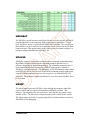
Press the “Run Batch” on the iBATCH page to run all of the scenarios on
the with run flags set to 1. WARNING long run times may result if many
lines are marked with a 1 in the run column.
•
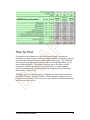
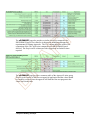
Summary output information is copied back to the iBATCH for each row
entry and to the same row number on the oBATCH page.
In order for ERCBflare to accommodate early versions of MS Excel that are
limited to 255 columns of data, the batch page is divided into inputs (iBATCH)
and outputs oBATCH. Output on the oBATCH page corresponds to the
identical row number on the iBATCH page.
FT
ERCBflare does not perform house-keeping on either the iBATCH nor oBATCH
page. If rows are inserted or deleted on the iBATCH page, the user should also
do so on the oBATCH page to avoid confusion.
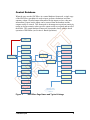
iBATCH PAGE AS A DATABASE
A
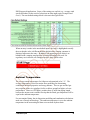
The iBATCH page can be used as a database (a collection of ERCBflare inputs)
in a single location. This allow a single ERCBflare spreadsheet file to be used for
many flaring scenarios configurations rather than having many ERCBflare
spreadsheets with only a single flare configuration in each file.
R
Once an iBATCH page has been populated with entries, a user can scan the page
and readily visualize differences and similarities between scenarios.
The best way to start a batch mode database is to enter all of the input fields in
ERCBflare on the iFACILITY, iFLARING, iTERRAIN, and iNOTES pages.
Press “Save to Batch Page” to save all of the input fields on all of the
ERCBflare pages to the next empty line on the iBATCH page
•
To start an new configuration, the data on the iBATCH page can be
copied and edited or the entries on the iFACILITY, iFLARING,
iTERRAIN, and iNOTES pages can be updated. In the latter case, press
“Save to Batch Page” button once a scenario update has been completed.
The scenario will be copied to the next empty line on the iBATCH page.
•
Add a run flag in the first column of each iBATCH row where 1=run and
0=don’t run. It is a safe practice, to enter “0” on all lines being stored on
the iBATCH. This prevents accidentally processing the entire database
when the “Run Batch” button is pressed.
D
•
7 ERCBflare Batch Operations
108