1
button push. Continuing to press the button will repeat this process. The volume level will remain in
effect for subsequent use.
If auditory cueing is not turned on, the laser will automatically shut off after 4 minutes and the unit will
shut off 4 minutes later. This feature is provided to better manage battery life. The laser time-out may
be adjusted from 4 to 28 minutes. The unit will always shut off 4 minutes after the laser time out. To
adjust the time out, turn the laser on and then press the FAST button. The unit will beep 1 to 7 times.
Each beep indicates 4 minutes of delay. For example, 7 beeps indicate that the laser will shut off after
28 minutes. If the unit beeps 7 times, the next button push will rotate back to the beginning and a
single beep indicating 4 minutes of delay will be heard. The selected value will remain in effect for
subsequent use.
Note: The unit will not time out if auditory cueing is enabled
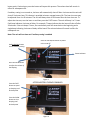
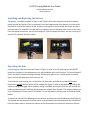
Hold AUDIO ON button
to start auditory cueing
Press the red ON/OFF button to power
unit on and off
Power Indicator
Press the SLOW button
to adjust the volume of
the beeping
Figure 3
Press the FAST
button to speed
up beeping until
desired speed
AFTER AUDITORY CUEING IS ENABLED
Press the SLOW
button to slow
beeping until
desired speed
Figure 4