1
Controlling SkyStopper
Emulating Guide Inputs
4.3 Emulating Guide Inputs
When the carriage is tracking in Lunar speed mode, adjusting Right Ascension tracking using the Green
button precisely adjusts the tracking rate of each step, effectively compensating for the moon's path.
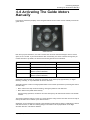
You can send an input signal to the guide pathway using the IR remote control. Pressing the remote button
simulates a 0.10 second pulse on the guide input. Holding the button strings these pulses together,
approximately ten times per second.
The guide port responds to various inputs, including Faster, Slower, Up, and Down. The precision alignment
of SkyStopper requires only short amounts of guide signals for astro-photography. For more information on
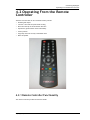
the IR remote control button assignments, see “Remote Controller Functionality” on page 35.
For more information on Auto-guiding, see: www.wikipedia.org/wiki/Autoguider
4.3.1 Adjusting the Tracking Speed
Applying a Moon Tune
You can adjust the Right Ascension tracking rate to compensate for the difference between the moon's
apparent rate and its average rate, relative to the stars.
This is called the Moon Tune mode. It is achieved by changing a global multiplication factor on the tracking
speed, and is independent of any guide inputs applied later. It is only used in Lunar rate.
To apply a Moon Tune:
1. Center an item on the moon, in the eyepiece.
2. Press Green.
3. Adjust the tracking speed:
•
Press Volume Up (Triangle+) to increase the RA tracking speed
•
Press Volume Down (Triangle-) to decrease the RA tracking speed
4. Wait one minute, and when the crater is centered again, press Green again.
The controller will compute the net effect of the guiding commands, and take into account the time
between the two times the crater was indicated as being centered, and adjust the platform tracking
speed to compensate.
This tuning can be repeated at any time and will work relative to whatever tuning is already being
applied.
Discarding the Moon Tune
To totally discard the Moon Tune:
•
Press and hold Blue for five seconds, while tracking in Lunar mode.
The main controller beeps to acknowlege the cancellation of the speed adjustment.
If you change to sidereal or solar speed, for a period of time, the moon tune speed will not be applied.
When you return to Lunar rate to see the moon again, SkyStopper uses the previously set tuning again.
SkyStopper Equatorial Platform User Guide
39