1
To Troubleshoot This
Issue:
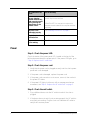
My arm vibration
started automatically
and cannot be turned
off by pressing the
Arms button on the
remote control.
Do the following:
If this occurs, there is a problem with the circuit
board. Replace the backrest:
DEALER NOTE: You may wish to replace the
daughter board instead of the complete backrest
assembly.
My chair is not
massaging properly
See "Massage Functions" on page 5.
My backrest won’t
recline/incline
See "Recline/Incline" on page 9.
My convenience outlet
is not working.
See "Convenience Outlet" on page 10.
Power
Step 1: Check the power LED.
Check the status of the power panel LED, located on the back of the
left-hand armrest above the power switch. If the power LED lights, go to
“Step 4: Replace the AC outlet fuse.”
Step 2: Check the power cord.
1. Verify that the power cord is plugged securely into the chair’s power
panel and is not damaged.
2. If the power cord is damaged, replace the power cord.
3. If the power cord connection is not secure, secure it, then recheck
the power LED status.
4. If the power LED lights, but there is still no massage mechanism
movement, see "Step 4: Replace the AC outlet fuse" on page 3.
Step 3: Check the wall outlet.
1. Plug a different device into the AC outlet into which the chair is
plugged.
2. If the device does not work (is not receiving power), the AC outlet is
most likely not working. Plug the chair into a different AC outlet to
verify that it receives power.
2
HT-1650 Troubleshooting Guide