1
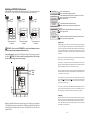
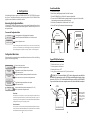
1. A conventional heater (gas or heat pump) and solar can be used to heat both the pool or the spa.
2. The water sensor should be installed prior to any heater or solar and will display the water
temperature. The temperature will only be displayed when the filter pump is running.
3. If any water feature or pressure side cleaner boost pumps are used, be sure to enable the “interlock”
feature (see “Configuration Menu” for details) to ensure that the pumps operate only when the
filter pump is on.
4. The plumbing diagram is intended to be used as a general guideline and is not a complete plumbing
schematic for the pool.
5. The air sensor must be installed if the freeze protection feature is enabled for the filter, valve or aux
outputs.
Solar – the aux relay operates a solar booster pump which will turn on when the filter pump
is running and solar heat is available and the water is less than the desired temperature
setting. It is important to note that “Solar Control” must be enabled in the “Solar Config.”
menu for proper operation to occur.
Low Speed of a 2-speed Filter Pump – the ECOMMAND will operate the aux relay whenever
the low speed operation of the filter pump is required. It is very important that the “2-speed”
filter pump option be selected under the “Filter Config.” Menu for proper operation.
Aux1 Relay
This feature allows the user to select either “Standard” (default) or “Dimmer” type relay for
the Aux1 output. The optional AQL-DIM dimmer kit must be installed if “Dimmer” is desired.
When “Dimmer” is selected, and the Aux1 output is manually turned on, the “+” and “-”
buttons adjust the level from 20% to 100% (default). The level is saved for the next time the
aux1 output is turned from off to on.
3. Electrical Wiring
Aux1 Interlock
If “Enabled”, this feature will override the function (Manual On/Off, Countdown Timer,
Timeclock), selected above and turn the aux1 off when: filter pump is off, first 3 minutes of
filter pump operation (allows the pump to prime and get water flowing), when the pool/spa
suction return valves are in any position other than “pool only”, or for the first 3 minutes
after solar turns on (allows air in the solar panels to be purged). Interlock is not available for
solar, low speed filter pump, or dimmer.
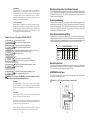
Aux1 connector
for optional
AQL-RELAY-DC-KT
Display/Keypad
Sensor Input
Aux1 Freeze Protection
This function protects the pool, plumbing, and equipment against freeze damage. If Freeze
Protection is enabled and the AIR temperature sensor falls below the selected freeze
temperature threshold, the ECOMMAND will turn on the aux relay to circulate the water.
IMPORTANT: this only enables operation of the AUX output during freeze--see the “Filter
Pump Config.” menu to enable freeze protection for the main circulation system.
High Voltage
Relays
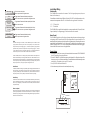
Valve3 Config.
+ to view/change
Valve3 Function
Solar
Subpanel
Control Power
Input
for all functions except solar
and valve3=x
Valve3 Interlock
Disabled
+
>
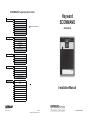
Push to access Valve3 options
Move to previous/next configuration menu item
Rotates between Timeclock (default), Solar, In-Floor Cleaner,
and Valve3=Filter, Valve3=Lights, and Valve3=Aux1
Move to next menu item
>
Toggle between Enabled and Disabled (default) Valve3 Interlock
Move to next menu item
>
Toggle between Enabled and Disabled (default) Valve3 Freeze
Move to previous/next configuration menu
>
+
+
>
Optional
Relay
>
Valve Connector
>
Heater Output
for all functions except solar
and valve3=x
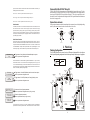
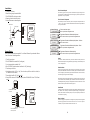
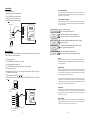
The ECOMMAND Control Center requires both high and low voltage connections. Low voltage connections may be made to an optional actuator, heater and sensors.. High voltage connections will be made
to pumps, lights, and other desired pool equipment, as well as providing direct input power to the Control
Center. Always:
-Ensure that power is disconnected prior to doing any wiring
-Follow all local and NEC (CEC if applicable) codes
-Use copper conductors only
+
>
Valve3 Freeze
Disabled
Valve3 Function
Timeclock (default) – the valve turns on/off at the times set for the valve3 timeclock in the
Timers Menu (see Operations Manual).
Solar – the valve operates when the filter pump is running and solar heat is available and the
water is less than the desired temperature setting. Solar heating must be enabled in the
“Solar Config. menu for proper operation to occur.
In-Floor Cleaner – the valve switches the water returning to the pool between the in-floor
cleaner and the normal return jets which facilitate efficient surface skimming. The valve will
5
18