1
PRX600.UsersGuide.020411.qxd
2/4/11
11:13 AM
Page 24
SETTING THE GAIN
Only a properly set up system will guarantee maximum performance with a minimum of distortion and feedback.
(This is as true for self powered systems as it is for passive systems). An easy rule to follow is: “Everything
should clip at once.”
Following these simple steps will ensure you are getting the optimum performance out of your complete system.
1.
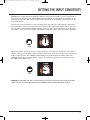
Once the source has been connected to the input of your mixer, adjust the input sensitivity (or trim) so
that the highest input levels are set to just before clip (or when the input LED just starts to flicker).
2.
Position the channel fader for that input to 0 dB.
3.
Position the Master output fader to 0 dB.
4.
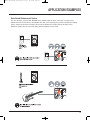
With the “Mic/Line” button set to “Line” (because the system is receiving a line level signal, or commonly
called a +4 dB signal), set the “Level” control to the 12 o’clock position, and adjust until you have
attained an appropriate volume for the room or until the “LIMITER” LED just begins to flicker.
For in-depth articles related to gain structure please refer to the website where you can find the JBL Sound
System Design Reference Manual: http://www.jblpro.com/pub/technote/ssdm_99.pdf
24