1
 IMPORTANTNOTICE
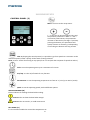
“WAIT‐TEMPERATURE” FUNCTION When you get informed that a recipe (or a step of it) has been completed after reaching a set temperature, and you wish to keep the ingredients at this steady temperature for a while, you need to use the “WAIT‐
TEMPERATURE” function. HOTMIX PRO is capable to find and keep the wished temperature for the programmed time. With this function, the initial temperature of the ingredients is NOT RELEVANT, therefore you get the same results any time. HOTMIX PRO starts the time countdown when the PROGRAMMED temperature has been reached. ACCESS TO THE FUNCTION • Press the temperature icon for 3 seconds, till you hear a beep • The display will show: WAIT‐TEMP, together with the Temperature icon • Set the wished temperature • Press the time icon • The display will show: WAIT‐TEMP, together with the Time icon • Set the wished time 2