1
HOBO® Pro v2
(Part # U23-00X)
Inside this package:
• HOBO Pro v2 logger
• Clamp and mounting screws
Thank you for purchasing a HOBO data logger. With proper
care, it will give you years of accurate, reliable measurements.
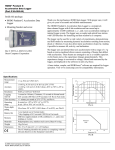
The HOBO Pro v2 logger’s environmentally rugged case is
designed for years of reliable use in outdoor applications. It has
enough memory to record over 42,000 12-bit measurements.
The U23-001 and U23-002 models also feature user-replaceable
RH sensors.
The logger uses an optical USB communications interface (via a
compatible shuttle or base station) for launching and reading out
the logger. The optical interface allows the logger to be
offloaded without compromising the electronics. The USB
compatibility allows for easy setup and fast downloads.
HOBOware® software version 2.2.1 or higher is required for
logger operation. Visit www.onsetcomp.com for compatible
software.
Doc #10694-D, MAN-U23
Onset Computer Corporation
Specifications
Temperature Sensor
Accuracy/Resolution (˚C)
Internal sensors: -40° to 70°C (-40° to 158°F)
U23-002 external temperature sensor: -40° to 70°C
0.8
(-40° to 158°F)
0.7
Operation range
Accuracy
U23-003 and U23-004 external sensors: -40° to 100°C
0.6
Resolution
(-40° to 212°F), with tip and cable immersion in fresh water
0.5
up to 50°C (122°F) for one year
0.4
Accuracy
0.2°C over 0° to 50°C (0.36°F over 32° to 122°F); see Plot A
0.3
Resolution
0.02°C at 25°C (0.04°F at 77°F); see Plot A
0.2
Internal sensors: 40 minutes in air moving 1 m/sec
0.1
U23-002 external temperature sensor: 5 minutes in air moving
0
Response time
1 m/sec
-40
-20
0
20
40
60
80
(typical to 90%)
U23-003 and U23-004 external sensors: 3 minutes in air moving
Temperature (˚C)
1 m/sec; 30 seconds in stirred water
Plot A
Stability (drift)
< 0.1°C (0.18°F) per year
Relative Humidity Sensor (U23-001, U23-002 only)
0-100% RH, -40° to 70°C (-40° to 158°F)
5
Exposure to conditions below -20°C (-4°F) or above 95% RH
Operation range
may temporarily increase the maximum RH sensor error
4
by an additional 1%
Accuracy
± 2.5% from 10 to 90%; see Plot B for full range
3
Resolution
0.03%
2
Response time
U23-001: 40 minute in air moving 1 m/sec with protective cap
(typical to 90%)
U23-002: 10 minutes in air moving 1 m/sec with protective cap
1
Stability (drift)
< 1% per year typical; hysteresis 1%
0
Logger
0
20
40
60
80
Operation range
-40° to 70°C (-40° to 158°F)
Relative Humidity (%)
Real-time clock
± 1 minute per month 0° to 50°C (32° to 122°F)
Plot B
Battery
1/2 AA, 3.6 Volt lithium, user-replaceable (part # HP-B)
Battery life (typical use) 3 years with 1 minute or greater logging interval
Memory (non-volatile)
64K bytes memory (approx. 21,000 temperature and RH measurements)
All models: ASA styrene polymer housing and mounting clamp; polypropylene protective cap; Buna-N o-ring(s);
Materials
U23-001, U23-002 only: ASA styrene polymer RH sensor cap; modified hydrophobic polyethersulfone membrane
Absolute Accuracy (%)
100
100
(continued)
© 2006 Onset Computer Corporation
Part #: MAN-U23, Doc #: 10694-D
HOBO Pro v2
Cables
Environmental rating
Launch modes
Logging interval
U23-001: No cables
U23-002: One 184 cm (6 ft.) PVC cable; sensor diameter 1 cm (0.38 in.)
U23-003: Two 184 cm (6 ft.) PVC cables; sensor diameter 0.5 cm (0.20 in.)
U23-004: One 184 cm (6 ft.) PVC cable; sensor diameter 0.5 cm (0.20 in.)
Electronics housing is NEMA 6P equivalent (tolerant of brief submergence);
Units with RH sensors are NEMA 4 equivalent (splash-resistant)
Immediate start; delayed start
Fixed-rate or multiple logging intervals, with up to 8 user-defined logging intervals and durations; logging intervals
from 1 second to 18 hours (refer to HOBOware software manual)
Offload modes
Offload while logging; stop and offload
Battery indication
Weight
Dimensions
NIST certificate
Battery voltage can be viewed in status screen and optionally logged in datafile. Low battery indication in datafile.
U23-001: 57 g (1.5 oz); U23-002: 118 g (3.1 oz); U23-003: 138 g (3.7 oz); U23-004: 102 g (2.7 oz)
Housing measures 10.2 × 3.8 cm (4.0 × 1.5 in.)
Temperature certificate available for additional charge
The CE Marking identifies this product as complying with the relevant directives in the European Union (EU).
Accessories available
• RH sensor replacement kit for U23-001 (part # HUM-RHPCB-1)
• RH sensor replacement kit for U23-002 (part # HUM-RHPCB-2)
Connecting the logger
The HOBO Pro v2 requires a coupler (Part # COUPLER2-E) and
USB-Optic Base Station (Part # BASE-U-4) or HOBO Waterproof
Shuttle (Part # U-DTW-1) to connect to the computer.
1. Install the logger software on your computer before proceeding.
2. Follow the instructions that came with your base station or shuttle to
attach the base station or shuttle to a USB port on the computer.
3. Make sure the logger’s communications window is clean and dry.
(Use a clean, nonabrasive cloth, if necessary.) If the logger is damp,
wipe off excess moisture.
4. Attach the coupler to the base station or shuttle, then insert the
logger into the coupler with the ridge on the logger aligned with the
ridge on the coupler.
6. If the logger has never been connected to the computer before, it
may take a few seconds for the new hardware to be detected by the
computer.
7. Use the logger software to launch the logger, check the logger’s
status, read it out, stop it manually with the software, or let it
continue to record data until the memory is full. Or, use the HOBO
Waterproof Shuttle to read out and relaunch the logger in the field.
Refer to the software user’s guide for complete details on launching,
reading out, and viewing data from the logger.
Important: USB communications may not function properly at
temperatures below 0°C (32°F) or above 50°C (122°F).
Note: The first time you launch the logger, the deployment number will
be greater than zero. Onset launches the loggers to test them prior to
shipping.
Operation
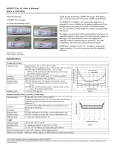
A light (LED) in the communications window of the logger confirms
logger operation. (In brightly lit areas, it may be necessary to shade the
logger to see the LED blink.) The following table explains when the
light blinks during logger operation:
When:
The logger is logging
The logger is awaiting a start
because it was launched in
Start At Interval or Delayed
Start mode
The “OK” light:
Blinks once every one to four seconds
(the shorter the logging interval, the
faster the light blinks); blinks when
logging a sample
Blinks once every eight seconds until
logging begins
Sample and event logging
5. If you are using the HOBO Waterproof Shuttle, briefly press the
coupler lever to put the shuttle into base station mode.
2
The logger can record two types of data: samples and events. Samples
are the sensor measurements recorded at each logging interval (for
example, temperature every minute). Events are independent
occurrences triggered by a logger activity, such as Bad Battery or Host
Connected. Events help you determine what was happening while the
logger was logging.
The logger stores 64K of data, and can record over 42,000 12-bit
measurements.
HOBO Pro v2
Deploying and protecting the logger
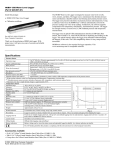
• To clean the logger’s case, use a sponge with
warm, soapy water.
• Use the included clamp to mount the logger to
a surface. The clamp has two holes for the
screws, 44 mm (1.7 inches) apart.
The clamp is slightly tapered to accommodate
the logger. Install the clamp so the logger fits
better with its communication window facing
up. This will prevent condensation from
pooling around the sensor and/or grommet.
• A solar shield is recommended if the logger
will be exposed to sunshine.
• Periodically inspect the desiccant and dry it if
it is not bright blue. The desiccant pack is
located in the cap of the logger. To dry the
desiccant, remove the desiccant pack from the cap and leave the pack
in a warm, dry location until the bright blue color is restored. (Refer
to the “Battery” section for instructions on removing and replacing
the logger cap.)
4. Push gently but firmly to install the new sensor (Onset part #
HUM-RHPCB-1) in the same orientation.
5. Make sure the o-ring is clean and seated properly, and set the
protective membrane on top (either side can face up).
6. Put the sensor cap back on. Push down and turn it slightly clockwise
to close it securely. Do not force it. If the cap does not go on easily,
the sensor may be installed incorrectly. Check the sensor orientation
and try again.
U23-002
1. Grasp the cap and membrane and pull firmly. Discard them.
2. Note the orientation of the small circuit board containing the RH
sensor. Pull it out and discard it.
Cable from logger
Receptacle
RH sensor
Temperature range
(RH > 90%)
Desiccant maintenance
schedule
Less than 30°C (86°F)
Approximately once per year
30° to 40°C (86° to 104°F)
Approximately every six
months
3. Push gently but firmly to install the new sensor (Onset part #
HUM-RHPCB-2) in the same orientation.
Over 40°C (104°F)
Approximately every three
months
4. Put the new sensor cap and membrane on. Do not force the cap. If it
does not go on easily, the sensor may be installed backwards.
Reverse the sensor and try again.
Replacing the RH sensor
The RH sensor (on models U23-001 and U23-002) is protected by an
ASA styrene polymer cap and a modified hydrophobic polyethersulfone
fluid barrier membrane that allows vapor to penetrate while protecting
the sensor from condensation.
RH sensor performance may degrade over time. To replace the RH
sensor in your logger, refer to the diagram and instructions for your
logger:
U23-001
1. Turn the sensor cap counter-clockwise slightly and pull to remove
it.
2. Set the membrane aside. If the o-ring comes off, set it aside as well.
RH sensor cap
& protective membrane
Battery
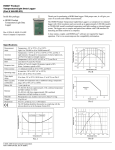
Typical battery life is about three years. Actual battery life is a function
of the number of deployments, logging interval, and operation/storage
temperature of the logger. To obtain a three-year battery life, use a
logging interval of one minute or greater, and operate and store the
logger at temperatures between 0° and 40°C (32° and 104°F).
Frequent deployments with logging intervals of less than one minute,
and continuous storage/operation at temperatures above 40°C, will
result in significantly lower battery life. For example, continuous
logging at a one-second logging interval will result in a battery life of
approximately one month.
The logger can report and log its own battery voltage. If the battery falls
below 3.1 V, the logger will record a “bad battery” event in the datafile.
If the datafile contains “bad battery” events, or if logged battery voltage
repeatedly falls below 3.3 V, the battery is failing and should be
replaced before the next deployment. To change the battery:
1. Turn slightly counter-clockwise and pull to remove the protective
cap. Loosen the cable grommet on the opposite end, if the logger
has an external sensor.
2. Carefully pull out the circuit board containing the battery. (If the
logger has an external sensor, you will probably find it easier to
push the cable(s) into the case to push the circuit board out.)
3. Note the orientation of the small circuit board containing the RH
sensor. Using a pair of small pliers, pull it out and discard it.
3. Examine the desiccant packs that were packed into the case. If the
desiccant is not bright blue, put the desiccant packs in a warm, dry
place until the blue color is restored.
3
HOBO Pro v2
Protective cap
Cable from sensor
(if applicable)
Circuit board
7. Make sure o-ring on the protective cap is still in place. It should not
be pinched, twisted, or trapping dirt or lint, which could interfere
with the protective cap.
Grommet for cable
(if applicable)
Battery
Desiccant packs
4. Install a new 1/2 AA, 3.6 Volt lithium battery (part # HP-B). The
positive end of the battery should face towards the communication
LEDs.
5. Use a clean, dry cloth to wipe away any moisture inside the case.
Service and Support
As part of Onset’s ongoing efforts to provide 100% customer satisfaction, our
Continuing Engineering Group constantly monitors and evaluates all of our products
and software. In the unlikely event any significant defect is found, Onset will notify
you. If you find a defect, please e-mail us at [email protected].
HOBO products are easy to use and reliable. In the unlikely event that you have a
problem with this instrument, contact the company where you bought the logger:
Onset or an Onset Authorized Dealer. Before calling, you can evaluate and often
solve the problem if you write down the events that led to the problem (are you
doing anything differently?) and if you visit the Technical Support section of the
Onset web site at www.onsetcomp.com/support.html. When contacting Onset, ask
for technical support and be prepared to provide the product number and serial
number for the logger and software version in question. Also completely describe
the problem or question. The more information you provide, the faster and more
accurately we will be able to respond.
Onset Computer Corporation
470 MacArthur Blvd., Bourne, MA 02532
Mailing: PO Box 3450, Pocasset, MA 02559-3450
Phone: 1-800-LOGGERS (1-800-564-4377) or 508-759-9500
Fax: 508-759-9100
E-mail: [email protected]
Internet: www.onsetcomp.com
Warranty
Onset Computer Corporation (Onset) warrants to the original end-user purchaser for
a period of one year from the date of original purchase that the HOBO® product(s)
purchased will be free from defect in material and workmanship. During the
warranty period Onset will, at its option, either repair or replace products that prove
to be defective in material or workmanship. This warranty shall terminate and be of
no further effect at the time the product is (1) damaged by extraneous cause such as
fire, water, lightning, etc. or not maintained in accordance with the accompanying
documentation; (2) modified; (3) improperly installed; (4) repaired by someone
other than Onset; or (5) used in a manner or purpose for which the product was not
intended.
THERE ARE NO WARRANTIES BEYOND THE EXPRESSED
WARRANTY ABOVE. IN NO EVENT SHALL ONSET BE LIABLE FOR
LOSS OF PROFITS OR INDIRECT, CONSEQUENTIAL, INCIDENTAL,
SPECIAL OR OTHER SIMILAR DAMAGES ARISING OUT OF ANY
BREACH OF THIS CONTRACT OR OBLIGATIONS UNDER THIS
CONTRACT, INCLUDING BREACH OF WARRANTY, NEGLIGENCE,
STRICT LIABILITY, OR ANY OTHER LEGAL THEORY.
Limitation of Liability. The Purchaser's sole remedy and the limit of Onset's
liability for any loss whatsoever shall not exceed the Purchaser's price of the
product(s). The determination of suitability of products to the specific needs of the
Purchaser is solely the Purchaser's responsibility. THERE ARE NO
WARRANTIES BEYOND THE EXPRESSED WARRANTY OFFERED
WITH THIS PRODUCT. EXCEPT AS SPECIFICALLY PROVIDED IN
4
6. Push the board and the desiccant packs back into the case, taking
care not to bend the communication LEDs. Align the board with the
grooves inside the case. (If you try to put the board in upside-down,
the battery will get in the way.)
8. Line up the bumps on the protective cap with the notches in the
logger’s case. Push and turn the cap slightly clockwise. Pull the
slack in the sensor cable(s) and-tighten the grommet, if applicable.
WARNING: Do not cut open, incinerate, heat above 100°C
(212°F), or recharge the lithium battery. The battery may explode if
the logger is exposed to extreme heat or conditions that could damage
or destroy the battery case. Do not dispose of the logger or battery in
fire. Do not expose the contents of the battery to water. Dispose of the
battery according to local regulations for lithium batteries.
THIS DOCUMENT, THERE ARE NO OTHER WARRANTIES EXPRESS
OR IMPLIED, INCLUDING BUT NOT LIMITED TO, ANY IMPLIED
WARRANTIES OF MERCHANTIBILITY OR FITNESS FOR A
PARTICULAR PURPOSE. NO INFORMATION OR ADVICE GIVEN BY
ONSET, ITS AGENTS OR EMPLOYEES SHALL CREATE A WARRANTY
OR IN ANY WAY INCREASE THE SCOPE OF THE EXPRESSED
WARRANTY OFFERED WITH THIS PRODUCT.
Indemnification. Products supplied by Onset are not designed, intended, or
authorized for use as components intended for surgical implant or ingestion into the
body or other applications involving life-support, or for any application in which the
failure of the Onset-supplied product could create or contribute to a situation where
personal injury or death may occur. Products supplied by Onset are not designed,
intended, or authorized for use in or with any nuclear installation or activity.
Products supplied by Onset are not designed, intended, or authorized for use in any
aeronautical or related application. Should any Onset-supplied product or equipment
be used in any application involving surgical implant or ingestion, life-support, or
where failure of the product could lead to personal injury or death, or should any
Onset-supplied product or equipment be used in or with any nuclear installation or
activity, or in or with any aeronautical or related application or activity, Purchaser
will indemnify Onset and hold Onset harmless from any liability or damage
whatsoever arising out of the use of the product and/or equipment in such manner.
Returns
Please direct all warranty claims and repair requests to place of purchase.
Before returning a failed unit directly to Onset, you must obtain a Return
Merchandise Authorization (RMA) number from Onset. You must provide proof
that you purchased the Onset product(s) directly from Onset (purchase order number
or Onset invoice number). Onset will issue an RMA number that is valid for 30
days. You must ship the product(s), properly packaged against further damage, to
Onset (at your expense) with the RMA number marked clearly on the outside of the
package. Onset is not responsible for any package that is returned without a valid
RMA number or for the loss of the package by any shipping company. Loggers must
be clean before they are sent back to Onset or they may be returned to you.
Repair Policy
Products that are returned after the warranty period or are damaged by the customer
as specified in the warranty provisions can be returned to Onset with a valid RMA
number for evaluation.
ASAP Repair Policy. For an additional charge, Onset will expedite the repair of a
returned product.
Data-back™ Service. HOBO data loggers store data in nonvolatile EEPROM
memory. Onset will, if possible, recover your data.
Tune Up Service. Onset will examine and retest any HOBO data logger.
© 2006 Onset Computer Corporation. All rights reserved.
Part #: MAN-U23, Doc #: 10694-D, Patent #: 6,826,664
Onset, HOBO, and HOBOware are registered trademarks of Onset Computer
Corporation. Other products and brand names may be trademarks or registered
trademarks of their respective owners.