1
Chapter
6
Fonts and Typography
Fonts Directory and Declaration
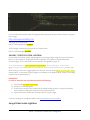
We have used CSS3 Font-Face technology to render fonts in this template. We have defined all font rules via
the following CSS file:
[ROOT FOLDER]/assets/css/typography.css
And we have included all font resource files inside the following folder:
[ROOT FOLDER]/assets/css/fonts
Setting Up Font-Face Rules
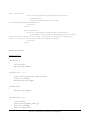
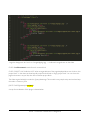
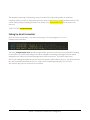
An example usage of Font-Face is defined as follows:
@font-face {
font-family: 'MyFontFamily';
src: url('fonts/mywebfont.eot');
/* IE9 Compat Modes */
src: url('fonts/mywebfont.eot?#iefix') format('embedded-opentype'),
/* IE6-IE8 */
url('fonts/mywebfont.woff') format('woff'),
/* Modern Browsers */
url('fonts/mywebfont.ttf')
/* Safari, Android, iOS */
format('truetype'),
url('fonts/mywebfont.svg#svgFontName') format('svg');
/* Legacy iOS */
}
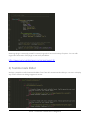
Now apply the font to any element via CSS rule targeting that element, for example if the element is
#something, then we can apply the above declared font as:
REVA – Premium Theme from Designova