1
SUPERSERVER 2027R-WRF USER'S MANUAL
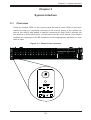
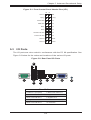
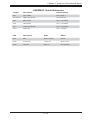
Information LED
See the following table for the status shown by this LED.
Information LED
Status
Description
Continously on and red
An overheat ocondition has occured. (This may be caused by cable congestion.)
Blinking red (1 Hz)
Fan failure: check for an inoperative fan.
Blinking red (0.25 Hz)
Power failure: check for an inoperative power supply.
Solid blue
Local UID has been activated. Use this function to locate the server in a rack
environment.
Blinking blue (300 msec)
Remote UID has been activated. Use this function to locate the server from a
remote location.
3-4
Hard Drive Carrier LEDs
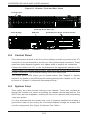
Each hard drive carrier has two LEDs.
•
Green: When illuminated, the green LED on the front of the drive carrier
indicates drive activity. A connection to the SATA backplane enables this LED
to blink on and off when that particular drive is being accessed.
•
Red: The red LED indicates two states. When blinking, it indicates the drive is
rebuilding. When solid, it indicates a drive failure. If a drive fails, you should be
notified by your system management software. Please refer to Chapter 6 for
instructions on replacing failed drives.
3-4