1
LCD Icons
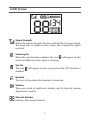
Signal Strength
Shows the signal strength. Five bars indicate the strongest signal.
The more bars of signals on the screen, the stronger the signal
received.
Scanning On
When the scan function enabled, the icon
screen and flash once the signal is receiving.
Vox On
The icon
enabled.
will appear on the
will appear on the screen when the VOX function is
Headset
The icon is lit up when the headset is connected.
Volume
There are a total of eight levels display, and 16 levels of volume
adjustment / control.
Channel Number
Indicates the current channel.
2