1
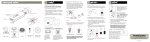
LM5 Overview The LM5 can be operated as a standalone instrument. Complete with 4 alkaline “AA” batteries the LM5 will operate on full power for at least 3 days. The LCD panel back light does go out after 20 seconds when not in use in order to conserve energy. If using the LM5 with an external sensor it must be connected to an external battery. Note: The LM5 is not programmed for auto shut-off. It is recommended user turn off the unit when not in use. The LM5 is also expandable to include a remote sensor. This sensor can be installed on moving parts such as blades, buckets and forks etc. depending on the application. The Menu will change to “EXT” when cable is connected. Menu Options 0.1 % INT 3.4% 100% When you first power up the LM5, the display will briefly show the product version. Then the following; Desired grade selection (top left) Real-time grade (top right) Internal vial (INT) or External Sensor (EXT) and battery percentage (if internal battery is being used) INT Selecting the Menu button will allow the user to scroll thru the various functions and features of the LM-5. Any changes made to the menu items will be saved automatically when you scroll thru to the next menu item Back Light Timer Enable Next The first menus item is for selecting the backlight configuration. Select the Flip button to enable or disable the backlight option. *Note: Battery life for time enabled is rated for 200 hours and disabled 12 hours of battery life. Select Next for following menu INT Horn Using either arrow keys you can turn the Horn option on or off. Select Next for following menu INT Alarm Grade OFF Next dead band 1.0 % INT Control axis Cross INT Next If horn is enabled the dead band grade settings can be changed. Alarm will sound when you go past the dialed in grade plus this offset. (ex. If grade setting is set at 0% and dead band is set at 1.0% the alarm will sound at any grade +1% and at any grade less than -1% slope) This menu allows the user to indicate which sensor orientation to use for their machine. There is 2 options either Cross rotation (left and right) or Fwd/Back (front and back).