1
M1 Cross Platform Controllers - User Guide
TABLE OF CONTENTS
Understanding The Keypad ........................................................................... 4
System Notes ................................................................................................. 6
Operating The System ................................................................................... 7
User Codes .............................................................................................................. 7
Checking the Ready Status ................................................................................... 7
Arming in the “Away” Mode .................................................................................. 8
Arming in the “Vacation” Mode ............................................................................ 8
Arming in the “Stay” Mode .................................................................................... 8
Auto Stay Arming .................................................................................................... 9
Using the Quick Arm .............................................................................................. 9
Changing Stay Modes While Armed ..................................................................... 9
Bypassing Zones .................................................................................................. 10
Quick Bypassing of Violated Zones ................................................................... 10
Disarming and Resetting the System ................................................................ 11
Alarm Acknowledgments ..................................................................................... 12
Troubles ................................................................................................................. 12
Chime Mode, Turning On and Off ....................................................................... 13
Keypad Menus .............................................................................................. 14
Menu 1-View/Control Automation Functions .................................................... 14
Menu 2-Reset Smoke Detectors ......................................................................... 16
Menu 3-Walk Test Area (zones) ........................................................................... 17
Menu 4-View History Log .................................................................................... 17
Menu 5-View (Zone) Status ................................................................................. 18
Menu 6-Change User Codes ............................................................................... 18
Menu 7-Automation Custom Settings ................................................................ 19
Menu 8-System Settings ...................................................................................... 19
Operation Via Telephone ............................................................................. 21
Fire Safety & Maintenance .......................................................................... 23
Silencing a Fire Alarm .......................................................................................... 23
Resetting Smoke Detectors ................................................................................ 23
Acknowledge/Reset an Alarm ............................................................................. 23
Household Fire Safety Audit ............................................................................... 23
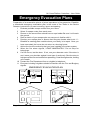
Emergency Evacuation Plans ..................................................................... 24
System Testing ............................................................................................. 25
FCC Statements (Part 15 & 68) ................................................................... 26
Glossary ........................................................................................................ 27
Page 3