1
Netbay Internet – Email troubleshooting: increase timeout for Microsoft Outlook 2003
Email troubleshooting: increase timeout for Microsoft Outlook 2003
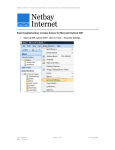
1. Open up MS outlook 2003, click on Tools – E-mail Accounts.
2. Select View or change existing e-mail accounts and click Next.
Last updated:
Ben L & Kein C
Page 1 of 5
25 Aug 2009
Netbay Internet – Email troubleshooting: increase timeout for Microsoft Outlook 2003
3. Left Click your email account name once, and click on Change
Last updated:
Ben L & Kein C
Page 2 of 5
25 Aug 2009
Netbay Internet – Email troubleshooting: increase timeout for Microsoft Outlook 2003
4. Click on “More Setting”
Last updated:
Ben L & Kein C
Page 3 of 5
25 Aug 2009
Netbay Internet – Email troubleshooting: increase timeout for Microsoft Outlook 2003
5. Click on the Advanced tab
Last updated:
Ben L & Kein C
Page 4 of 5
25 Aug 2009
Netbay Internet – Email troubleshooting: increase timeout for Microsoft Outlook 2003
6. Adjust the Server Timeouts to 5 mintues and click OK
7.
Click on Next then click Finish
Last updated:
Ben L & Kein C
Page 5 of 5
25 Aug 2009