1
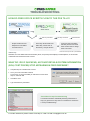
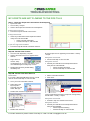
TROUBLESHOOTING HOW DO FRED OFFICE SCRIPTS FLOW TO THE POS TILLS? Dispense Back Office Point of Sale Till One way Connector Scripts travel from Fred Dispense to Fred Office via Fred Connect. Once they arrive inside Fred Office they can be seen in the Activity > Scripts section. Two way Connector Web Services From here, the Fred Office Services process* and send them onto the POS or charge them to accounts. * based on the Script rules set up at installation Additionally QuickPad, Account details and Item information (SOH, Cost prices) which display in Fred Dispense, do so because of Web Services accesed via Fred Connect. WHAT DO I DO IF QUICKPAD, ACCOUNT DETAILS OR ITEM INFORMATION (SOH, COST PRICES) STOP APPEARING IN FRED DISPENSE? Complete step 2A: „Restart Fred Connect‟ Go to your main Fred Office machine Please Note: If you have a SBS you will need to contact Fred Help on 1300 731 888 Click Start > Run Type “iisreset‟ then press Enter Fred Office F1 Help Troubleshooting For further information and details (including screenshots to help you) press the F1 key when in Fred Office to access the F1 Help Troubleshooting! For further assistance please contact Fred Help on 1300 731 888 or [email protected]