1
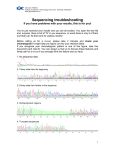
Sanger Sequencing: Troubleshooting Guide Description 3 Troubleshooting When troubleshooting sequencing data, follow the workflow below to try to identify the cause of your problem. The following steps in this section use Sequencing Analysis Software or Sequence Scanner Software. 3.1 Reviewing the Sequence 3.1.1 Electropherogram Select the Electropherogram tab and review the sequence for data quality. Check the following: Well-defined peak resolution – minimal fluorescence overlap from one peak to the next with a sharp peak top. Uniform peak spacing – peak spacing is consistent throughout the trace. Signal-to-noise ratios and variation in peak heights – High signal to noise ratio and even peak height characterize good quality sequence. (Please note: the analysed view is re-scaled, the peak heights are not representative of raw fluorescence detected by the AB 3730xl.) 3.1.2 Raw Sequence Select the Raw tab and review the unprocessed fluorescence data to assess the signal quality. Check the following: Artifacts – Are there any artifacts, such as four-color spikes? Peak heights – Are peaks well-resolved, with acceptable heights? Data start points – Do any data start points deviate from others in the same submission? Length of read – Was the expected length of read obtained? Does the signal stop suddenly? Baseline – Is there background noise for all the peaks? Zoom in horizontally and vertically to verify the baseline noise. Page 4 of 11 Sanger Sequencing Troubleshooting Guide (GNGFM00346) v1.1 Approved By: Ken McGrath Release Date: 11/12/2014