1
mx7000_gb_trb.book
37 ページ
2006年4月13日 木曜日 午後12時50分
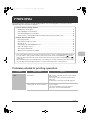
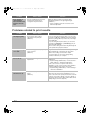
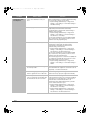
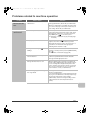
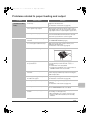
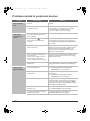
Problems related to paper feeding and output
Problem
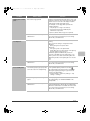
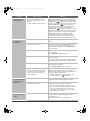
The original misfeeds
(automatic document
feeder).
The paper misfeeds.
Point to check
Solution
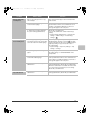
Is too much paper loaded in document
feeder tray?
Make sure that the stack of paper in the tray is not
higher than the indicator line.
☞ Illustration of the machine (L) (page 45)
Is the original a long original?
When using the automatic document feeder to scan a
long original, set the scan size to [Long Size]. (Note that
long originals cannot be copied using the copy function.)
Is the original on thin paper?
Use the document glass to scan the original. If you need
to use the automatic document feeder, use slow scan
mode in the special modes to scan the original.
Is a torn piece of paper remaining in the
machine?
Make sure all paper is removed.
☞ REMOVING MISFEEDS (page 3)
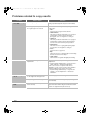
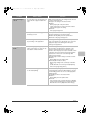
Is too much paper loaded in the tray?
Make sure that the stack of paper in the tray is not
higher than the indicator line.
☞ Illustration of the machine (I) (page 44)
Are multiple sheets feeding at once?
Fan the paper well before loading it.
Are you using paper that is not within
the specifications?
Use SHARP-recommended paper. Using paper that is
not supported may result in misfeeds, creases, or
smudges.
☞ "SUPPLIES" in the Safety Guide
* For paper that is prohibited or not recommended, see
"USEABLE PAPER" in the User's Guide.
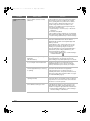
Has the paper in the tray absorbed
moisture?
If you will not be using paper in a tray for a long time,
remove the paper from the tray and store it in a bag in a
dark and dry location.
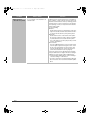
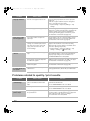
Are the bypass tray guides adjusted to
the width of the paper?
Adjust the bypass tray guides to the width of the paper.
☞ Illustration of the machine (F) (page 44)
Is the bypass tray extension pulled out?
When loading a large size of paper, pull out the
extension.
☞ Illustration of the machine (H) (page 44)
Is the bypass feed roller dirty?
Clean the surface of the bypass feed roller.
☞ "5. MAINTENANCE" in the User's Guide
Is A5 (5-1/2" x 8-1/2") size paper
loaded?
Load A5 (5-1/2" x 8-1/2") size paper in tray 3 (the
second tray) or in the bypass tray.
* When loading A5 (5-1/2" x 8-1/2") size paper, place
the paper in the horizontal (A5R (5-1/2" x 8-1/2"R))
orientation.
37