Transcript
RC-6 Operating Instructions
Universal Learning Remote Control
PROGRAMMING INSTRUCTIONS
Any of the Selector’s inputs may be chosen via remote control
commands. An ARC-40 remote control is supplied with each Input
Selector.
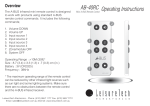
The ARC-40 remote control has four input selection buttons
(1,2,3,4) which will also power up the A-BUS system if it is on
standby. There are two ‘OFF’ buttons. The left hand button turns off
power modules equipped with individual power switching. The right
hand button turns the whole system off.
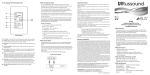
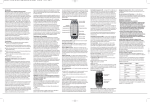
To Learn Infrared Codes
Tx Batt
LEARN BUTTON
Used to learn infrared
codes and to program
Sequence buttons
Rew
Play
FF
Learn
Stop
Pause
1
2
3
4
5
6
FUNCTION BUTTONS
Control operation of
source devices
7
Power
SEQUENCE BUTTONS
Execute a consecutive
series of functions
Learn Error
All Off
Select
Off
BANK BUTTONS
Tuner
CD
Pay
Select source devices
VCR
DVD
TV
RC-6
OVERVIEW
Pressing any of the six Bank buttons at the bottom of the RC-6
is the equivalent of picking up that remote control.
Example:
To play a CD
1. Press the CD Bank button. This will set the RC-6 to control
your CD player.
2. Press the Select button. This will tell the sound system
that you want to listen to the CD.
3. Use the Function buttons for Stop, Play, Pause, Volume
up and Volume down.
At any time another Bank button can be pressed to control
another
component. Unless the Select button is pressed the previous
source will continue to play. This feature will allow you to control
any component without interrupting the current selected input.
To switch to another source the Select button must be pressed.
Sequence buttons
The sequence buttons can be used to turn the power of the
whole Audio System On or Off. Care should be taken when
programming the Sequence buttons. We recommend that you
ask your dealer for assistance.
1. Point the RC-6 and the original Handset towards each other,
about 50mm apart.
2. Select one of the six Bank buttons at bottom of RC-6 (Tuner, CD,
Pay, VCR, DVD or TV)
3. Press the “Learn” button on the RC-6. The Learn LED will
illuminate.
4. Press and hold both the button to be taught on the RC-6 and the
relevant button on the original handset until “Tx” LED illuminates.
5. Repeat as necessary
6. Pressing any of the bank buttons or the “Learn” button will turn
the Learn mode off. Leaving the RC-6 for 32 seconds will also turn
off the Learn mode.
Sequence Buttons
The RC-6 remote handset comes with four coloured Sequence
buttons. Sequences can be made from any functions on any of the
banks of the RC-6.
One sequence could for example, turn on the Sound system, turn
on the TV, select the correct channel and start
a movie playing. Another could turn the whole system off at the
end.
Care should be taken with long sequences as it can take several
seconds for all of the infrared commands to be
sent. During this time the RC-6 will need to be pointed at the
infrared eye. Failure to do so can lead to some commands being
skipped.
To Program Sequence Buttons
1. Press the “Learn” button on the RC-6. The Learn LED will
illuminate.
2. Press one of the Sequence buttons. The Error LED will illuminate.
3. Press one of the Bank buttons then one of the Function buttons.
4. Repeat this to a maximum of eight times.
5. Press the sequence button again. The Error LED will go out.
To Delete Functions
1. Press one of the Bank buttons
2. Press and hold the “Learn” key and the Function key to be
deleted.
3. Release the keys after the Learn LED has flashed twice.
INPUTS
INPUT
RC-6*
1
2
3
4
5
6
Tuner
CD
Pay
VCR
DVD
TV
* The SELECT button must be pressed after the required BANK button to change
input or power up the Andrew’s Audio system and/or individual power module.
Note: When “Batt” LED is illuminated.
Change the batteries as soon as possible.
LeisureTech Electronics - Phone: (612) 9557 1177 Fax: (612) 9557 7721 Email: [email protected] Internet: www.leisuretech.com.au