1
KaVo Primus® 1058 S/TM/C/G.
These brief operating instructions cover only the essential control functions.
They do not replace the standard operating instructions which form part of
the delivery. It is essential to consult the standard operating instructions in
order to avoid faults and damage.
Patient´s chair
Control
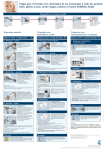
Save automatic position.
Set desired chair position using keys
or
using multifunctional foot
control when instruments are
replaced in the holder.
Press key LP/AP briefly.
LEDs flash for about 4 seconds.
Press required key for about 4
seconds until a signal is heard.
2
+
Keep foot switch and AP key
depressed and also press desired
key on the dentist's or assistant's
element until a signal is heard.
+
Assignment of the AP keys on
the multifunctional foot control.