1
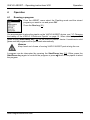
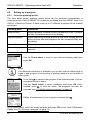
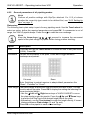
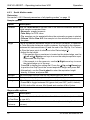
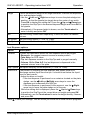
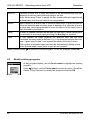
VIAFLO ASSIST – Operating instructions V00 4.2.6 Operation Custom program mode The custom program allows for a step-based set up of individual pipetting protocols. Each program can contain up to 98 steps. From the ASSIST Menu select “Custom”, press OK and define a name of your program. The first line is highlighted. Press OK. Use the Touch wheel to select a first step from the menu. Press OK, define the required parameters and press OK to add the step. After adding the first step, the selection should now be on the second line. Press OK again to define the second step. Continue adding steps until your entire pipetting protocol is defined. The individual steps based upon the following basic operations: Step Description Aspirate Sets an aspiration volume and speed. Dispense Sets a dispense volume and speed. Mix Performs a mixing cycle. Defines the number of mix cycles, mixing volume and mix speed. Purge Purges all remaining liquid currently in the GripTips with the selected purge speed. Prompt Pauses the program and displays a message. Three lines with a total of 30 characters are available. To continue the program, press the Run key. Move X,Z Moves the pipette in Z direction and the plate sledge in X direction to the selected coordinates. Then use the Arrow keys on VIAFLO ASSIST to teach the position or enter the coordinates manually on the pipette’s screen. To show the actual coordinates, tap any of the Arrow keys on the VIAFLO ASSIST device. Click on the pipette to set the coordinates. Move X The plate sledge travels the set distance in X-direction relative to the current position by X mm. Setting a negative value (mm) moves it to the left, setting a positive value (mm) moves it to the right. The distance from well to well for a 96 well plate is 9 mm and for a 384 well plate 4.5 mm. Move Z Moves the pipette in Z direction to the selected coordinates. Use the Arrow keys on VIAFLO ASSIST to teach the position or dial the height manually on the pipette’s screen. Press OK on the pipette to accept the settings. www.integra-biosciences.com 21