1
Audio options
[Cyrillic]
[Greek]
[Baltic]
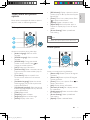
Press
repeatedly to cycle through the
following options.
• Repeat the current track.
• Repeat all the tracks on the disc or folder.
• Play audio tracks in a random loop.
• Turn off a repeat mode.
Bulgarian, Belorussian, English,
Macedonian, Moldavian, Russian,
Serbian, and Ukrainian
Greek
Northern Europe
Note
•• To play DivX DRM protected files from a USB storage
device, connect this player to a TV through HDMI.
•• To use the subtitles, make sure that the subtitle file
has the same name as the DivX video file name. For
example, if the DivX video file is named “movie.avi",
save the subtitle file as “movie.srt”, or “movie.sub”.
•• This player can play subtitle files in the following
formats: .srt, .sub, .txt, .ssa, and .smi.
DivX videos
You can play DivX videos from a disc or a USB
storage device.
VOD code for DivX
• Before you purchase DivX videos and play
them on this player, register this player on
www.divx.com using the DivX VOD code.
• Display the DivX VOD code: press , and
select [Setup] > [Advanced] > [DivX®
VOD Code].
DivX subtitles
• Press SUBTITLE to select a language.
• If the subtitle is not displayed correctly,
change the character set that supports the
DivX subtitle. Select a character set: press
, and select [Character Set].
Character
set
[Standard]
[Central
Europe]
Languages
English, Albanian, Danish,
Dutch, Finnish, French, Gaelic,
German, Italian, Kurdish (Latin),
Norwegian, Portuguese, Spanish,
Swedish, and Turkish
Albanian, Croat, Czech, Dutch,
English, German, Hungarian, Irish,
Polish, Romanian, Slovak, Slovene,
and Serbian
Play a musical slideshow
Play music and pictures simultaneously to create
a musical slideshow.
1
2
3
4
5
From a disc or connected USB storage
device, play a music file.
Press , and go to the picture folder.
Select a picture from the same disc or
USB, and press OK to start slideshow.
Press
to stop slideshow.
Press
again to stop music play.
BonusView on Blu-ray
View special content (such as commentaries) in
a small screen window.
This feature is only applicable to Blu-ray discs
compatible with BonusView (also known as
picture in picture).
1
2
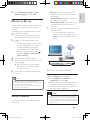
During play, press .
»» The options menu is displayed.
Select [PIP Selection] > [PIP], and press OK.
»» PIP options [1]/[2] depend on the
video contents.
»» The secondary video window is displayed.
10
EN
BDP2100_79_UM_EN.indd 10
4/9/2013 3:10:17 PM