1
VM0808H User Manual
Power On Detection Commands
Enabling Power On Detection means that the VM0808H automatically
switches to the next powered on device when one of the HDMI source devices
is powered off.
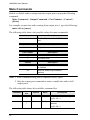
The formula for Power On Detection commands is as follows:
Power On Detection + Control command [Enter]
For example, to turn on the Power On Detection feature, input the following:
pod on [Enter]
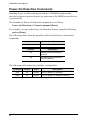
The following tables show the possible values for the Power on Detection
commands:
Command
pod
Description
Power On Detection function
Control
Description
on
Enable power on detection
function
off
Disable power on detection
function (default)
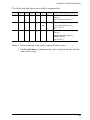
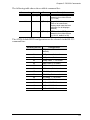
The following table shows the available command list:
54
Command
Control
Enter
Description
pod
on
[Enter]
Turn on power on detection
pod
off
[Enter]
Turn on power off detection (default)