1
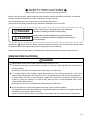
SAFETY PRECAUTIONS
(Always read these precautions before using this equipment.)
Before using this product, please read this manual and the relevant manuals introduced in this manual
carefully and pay full attention to safety to handle the product correctly.
The precautions given in this manual are concerned with this product.
In this manual, the safety precautions are ranked as "DANGER" and "CAUTION".
DANGER
Indicates that incorrect handling may cause hazardous
conditions, resulting in death or severe injury.
CAUTION
Indicates that incorrect handling may cause hazardous
conditions, resulting in medium or slight personal injury or
physical damage.
Note that the
caution level may lead to a serious accident according to the circumstances. Always follow
the instructions of both levels because they are important to personal safety.
Please save this manual to make it accessible when required and always forward it to the end user.
[DESIGN PRECAUTIONS]
DANGER
Some failures of the GOT or cable may keep the outputs on or off.
An external monitoring circuit should be provided to check for output signals which may lead to a
serious accident.
Not doing so can cause an accident due to false output or malfunction.
If a communication fault (including cable disconnection) occurs during monitoring on the GOT,
communication between the GOT and PLC CPU is suspended and the GOT becomes inoperative.
A system where the GOT is used should be configured to perform any significant operation to the
system by using the switches of a device other than the GOT on the assumption that a GOT
communication fault will occur.
Not doing so can cause an accident due to false output or malfunction.
Do not use the GOT as the warning device that may cause a serious accident.
An independent and redundant hardware or mechanical interlock is required to configure the device
that displays and outputs serious warning.
Failure to observe this instruction may result in an accident due to incorrect output or malfunction.
A-1
[DESIGN PRECAUTIONS]
DANGER
Incorrect operation of the touch switch(es) may lead to a serious accident if the GOT backlight is
gone out.
When the GOT backlight goes out, the monitor screen turns black, while the input of the touch
switch(s) remains active.
This may confuse an operator in thinking that the GOT is in "screensaver" mode, who then tries to
release the GOT from this mode by touching the display section, which may cause a touch switch to
operate.
For GT105 , the following phenomenon occurs when the backlight goes out.
• The POWER LED flickers (green/orange) and the monitor screen appears blank
CAUTION
Do not bundle the control and communication cables with main-circuit, power or other wiring.
Run the above cables separately from such wiring and keep them a minimum of 100mm (3.94in.)
apart. Not doing so noise can cause a malfunction.
[MOUNTING PRECAUTIONS]
DANGER
Be sure to shut off all phases of the external power supply used by the system before mounting or
removing the GOT to/from the panel.
Not doing so can cause the unit to fail or malfunction.
When installing the battery or memory board wear an earth band etc. to avoid the static electricity.
The static electricity can cause the unit to fail or malfunction.
Be sure to shut off all phases of the external power supply used by the system before mounting or
removing the memory board on to/ from the GOT.
Not doing so can cause the unit to fail or malfunction.
CAUTION
Use the GOT in the environment that satisfies the general specifications described in this manual.
Not doing so can cause an electric shock, fire, malfunction or product damage or deterioration.
When mounting the GOT to the control panel, tighten the mounting screws in the specified torque
range.
Undertightening can cause the GOT to drop, short circuit or malfunction.
Overtightening can cause a drop, short circuit or malfunction due to the damage of the screws or the
GOT.
Securely connect the memory board to the connector provided for the board.
A-2
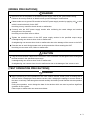
[WIRING PRECAUTIONS]
DANGER
Be sure to shut off all phases of the external power supply used by the system before wiring.
Failure to do so may result in an electric shock, product damage or malfunctions.
Please make sure to ground FG terminal of the GOT power supply section by applying 100
which is used exclusively for the GOT.
Not doing so may cause an electric shock or malfunction.
or less
Correctly wire the GOT power supply section after confirming the rated voltage and terminal
arrangement of the product.
Not doing so can cause a fire or failure.
Tighten the terminal screws of the GOT power supply section in the specified torque range.
Undertightening can cause a short circuit or malfunction.
Overtightening can cause a short circuit or malfunction due to the damage of the screws or the GOT.
Exercise care to avoid foreign matter such as chips and wire offcuts entering the GOT.
Not doing so can cause a fire, failure or malfunction.
CAUTION
Plug the communication cable into the connector of the connected unit and tighten the mounting and
terminal screws in the specified torque range.
Undertightening can cause a short circuit or malfunction.
Overtightening can cause a short circuit or malfunction due to the damage of the screws or unit.
[TEST OPERATION PRECAUTIONS]
DANGER
Before performing the test operations of the user creation monitor screen (such as turning ON or
OFF bit device, changing the word device current value, changing the settings or current values of
the timer or counter), read through the manual carefully and make yourself familiar with the operation
method.
During test operation, never change the data of the devices which are used to perform significant
operation for the system.
False output or malfunction can cause an accident.
A-3
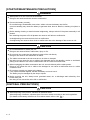
[STARTUP/MAINTENANCE PRECAUTIONS]
DANGER
When power is on, do not touch the terminals.
Doing so can cause an electric shock or malfunction.
Connect the battery correctly.
Do not discharge, disassemble, heat, short, solder or throw the battery into the fire.
Incorrect handling may cause the battery to generate heat, burst or take fire, resulting in injuries or
fires.
Before starting cleaning or terminal screw retightening, always switch off the power externally in all
phases.
Not switching the power off in all phases can cause a unit failure or malfunction.
Undertightening can cause a short circuit or malfunction.
Overtightening can cause a short circuit or malfunction due to the damage of the screws or unit.
CAUTION
Do not disassemble or modify the unit.
Doing so can cause a failure, malfunction, injury or fire.
Do not touch the conductive and electronic parts of the unit directly.
Doing so can cause a unit malfunction or failure.
The cables connected to the unit must be run in ducts or clamped.
Not doing so can cause the unit or cable to be damaged due to the dangling, motion or accidental
pulling of the cables or can cause a malfunction due to a cable connection fault.
When unplugging the cable connected to the unit, do not hold and pull the cable portion.
Doing so can cause the unit or cable to be damaged or can cause a malfunction due to a cable
connection fault.
Do not drop or apply any impact to the battery.
If any impact has been applied, discard the battery and never use it.
The battery may be damaged by the drop or impact.
Before touching the unit, always touch grounded metal, etc. to discharge static electricity from
human body, etc.
Not doing so can cause the unit to fail or malfunction.
[DISPOSAL PRECAUTIONS]
CAUTION
When disposing of the product, handle it as industrial waste.
When disposing of batteries, separate them from other wastes according to the local regulations.
.)
(For details of the battery deirective in EU member states, refer to 18.4
A-4
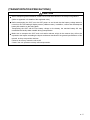
[TRANSPORTATION PRECAUTIONS]
CAUTION
When transporting lithium batteries, make sure to treat them based on the transport regulations.
(Refer to Appendix 3 for details of the regulated units.)
Before transporting the GOT, turn the GOT power on and check that the battery voltage status is
normal on the Time setting & display screen (utilities screen). In addition, confirm that the adequate
battery life remains on the rating plate.
Transporting the GOT with the low battery voltage or the battery the reached battery life may
unstabilize the backup data unstable during transportation.
Make sure to transport the GOT main unit and/or relevant unit(s) in the manner they will not be
exposed to the impact exceeding the impact resistance described in the general specifications of this
manual, as they are precision devices.
Failure to do so may cause the unit to fail.
Check if the unit operates correctly after transportation.
A-5
REVISIONS
The manual number is given on the bottom left of the back cover.
Print Date
Manual Number
Ver.
Nov., 2006
JY997D24701
A
Jun, 2007
JY997D24701
B
Revision
First edition
Partial correcting
SAFETY PRECAUTIONS, ABBREVIATIONS AND GENERIC TERMS IN
THIS MANUAL, HOW TO READ THIS MANUAL, Section 1.1, 2.2, 3.2, 3.3,
Chapter 4, Section 6.2, 6.3, 7.1, 8.1, 8.2, Chapter 9, Section 11.1, Chapter
12, 13, Section 14.1, Chapter 15, Section 16.2, App - 1, App - 2, App - 4
Additions
Section 8.3, 16.4, App - 3
Dec, 2007
JY997D24701
C
Partial correcting
SAFETY PRECAUTIONS, ABBREVIATIONS AND GENERIC TERMS IN
THIS MANUAL, HOW TO READ THIS MANUAL, Section 3.2, 9.1, 11.2.3,
Chapter 12, App-4
Feb., 2008
JY997D24701
D
Partial correcting
ABBREVIATIONS AND GENERIC TERMS IN THIS MANUAL, HOW TO
READ THIS MANUAL, Chapter 2, Section 8.2, Chapter 11, Section 15.2,
App-1, App-4, Index-1
Additions
Section 8.4
Oct., 2008
JY997D24701
E
Partial correcting
ABBREVIATIONS AND GENERIC TERMS IN THIS MANUAL, HOW TO
READ THIS MANUAL, Chapter 1, Chapter 2, Chapter 3, Chapter 4,
Chapter 5, Chapter 6, Chapter 7, Chapter 8, Chapter 9, Chapter 11,
Chapter 12, Chapter 13, Chapter 14, Chapter 17, Chapter 18, App-1,
App-2, Index
Additions
Chapter 15, 16
Dec., 2008
JY997D24701
F
Partial correcting
ABBREVIATIONS AND GENERIC TERMS IN THIS MANUAL, HOW TO
READ THIS MANUAL, Section1.1, Chapter 2, Chapter 3, Chapter 4,
Chapter 5, Chapter 6, Chapter 7, Chapter 8, Chapter 9, Chapter 11,
Chapter 12, Chapter 13, Chapter 14, Chapter 15, Chapter 17, Chapter 18,
App-1, App-2, App-4
Additions
Section11.1.4, Section11.1.5, Section14.3
Jan., 2009
JY997D24701
G
Partial correcting
Section 7.1.2
A-6
Print Date
Manual Number
Ver.
Mar., 2009
JY997D24701
H
Revision
Partial correcting
SAFETY PRECAUTIONS, ABBREVIATIONS AND GENERIC TERMS,
HOW TO READ THIS MANUAL, Chapter 2, Section 3.1, 3.2, Section 4.2,
Section 8.3, Section 9.1, Section 12.1, Section 18.4, App-1, App-2, App-4,
Index
Additions
Section 8.8, Section 8.9
Aug, 2009
JY997D24701
J
Partial correcting
ABBREVIATIONS AND GENERIC TERMS, HOW TO READ THIS
MANUAL, Section 2.2, Chapter 3, Chapter 4, Chapter 5, Section 7.1,
Section 8.8, Section 11.1, App-4
Oct, 2009
JY997D24701
K
Partial correcting
ABBREVIATIONS AND GENERIC TERMS, ABOUT MANUALS, HOW TO
READ THIS MANUAL, Chapter 1, Section 2.2, Chapter 3, Chapter 8,
Chapter 9, Chapter 11, Chapter 12, Chapter 15, Chapter 17, Chapter 18,
App-2
Additions
Section 11.1.6, Section11.1.7, Section 15.3
This manual confers no industrial property rights or any rights of any other kind, nor does it confer any patent licenses.
Mitsubishi Electric Corporation cannot be held responsible for any problems involving industrial property rights which may
occur as a result of using the contents noted in this manual.
© 2006 MITSUBISHI ELECTRIC CORPORATIONs
A-7
INTRODUCTION
Thank you for choosing the Mitsubishi Graphic Operation Terminal.
Before using the equipment, please read this manual carefully to use the equipment to its optimum.
OUTLINE PRECAUTIONS
• This manual provides information for the use of the graphic operation terminal. The manual has been written
to be used by trained and competent personnel. The definition of such a person or persons is as follows;
1) Any engineer who is responsible for the planning, design and construction of automatic equipment using
the product associated with this manual should be of a competent nature, trained and qualified to the local
and national standards required to fulfill that role. These engineers should be fully aware of all aspects of
safety with regards to automated equipment.
2) Any commissioning or service engineer must be of a competent nature, trained and qualified to the local
and national standards required to fulfill that job. These engineers should also be trained in the use and
maintenance of the completed product. This includes being completely familiar with all associated
documentation for the said product. All maintenance should be carried out in accordance with established
safety practices.
3) All operators of the completed equipment should be trained to use that product in a safe and coordinated
manner in compliance to established safety practices. The operators should also be familiar with
documentation which is connected with the actual operation of the completed equipment.
Note: the term 'completed equipment' refers to a third party constructed device which contains or uses the
product associated with this manual.
• This product has been manufactured as a general-purpose part for general industries, and has not been
designed or manufactured to be incorporated in a device or system used in purposes related to human life.
• Before using the product for special purposes such as nuclear power, electric power, aerospace, medicine or
passenger movement vehicles, consult with Mitsubishi Electric.
• This product has been manufactured under strict quality control. However when installing the product where
major accidents or losses could occur if the product fails, install appropriate backup or failsafe functions in the
system.
• When using this product combining other products, please confirm the standard and the code, or regulation
which a user should suit. Moreover, please confirm the compatibility of this product to the system, machine,
and apparatus with which a user is used for user itself.
• If in doubt at any stage of the installation of the product always consult a professional electrical engineer who
is qualified and trained to the local and national standards. If in doubt about the operation or use, please
consult the nearest Mitsubishi Electric distributor.
• Since the example indicated by this manual, technical bulletin, the catalog, etc. is reference, please use it
after confirming the function and safety of equipment and system when employing. Mitsubishi Electric will
accept no responsibility for actual use of the product based on these illustrative examples.
• About this manual content, specification etc. may be changed without a notice for improvement.
• The information in this manual has been carefully checked and is believed to be accurate; however, you have
noticed a doubtful point, a doubtful error, etc., please contact the nearest Mitsubishi Electric distributor.
A-8
CONTENTS
SAFETY PRECAUTIONS ...............................................................................................A-1
REVISIONS.....................................................................................................................A-6
INTRODUCTION.............................................................................................................A-8
OUTLINE PRECAUTIONS..............................................................................................A-8
CONTENTS ....................................................................................................................A-9
ABOUT MANUALS .......................................................................................................A-14
ABBREVIATIONS AND GENERIC TERMS..................................................................A-15
HOW TO READ THIS MANUAL ...................................................................................A-20
1. OVERVIEW.......................................................... 1-1 to 1-5
1.1 Features ..................................................................................................................... 1-4
1.2 Rough Pre-operation Procedure ................................................................................ 1-5
2. SYSTEM CONFIGURATION ............................. 2-1 to 2-11
2.1 Overall Configuration ................................................................................................. 2-1
2.2 Component List .......................................................................................................... 2-3
2.2.1 GOT (GT10).................................................................................................................................... 2-5
2.2.2 Option (Optional components for GT10)......................................................................................... 2-6
3. SPECIFICATIONS ............................................. 3-1 to 3-15
3.1 General Specifications ............................................................................................... 3-1
3.2 Performance Specifications ....................................................................................... 3-2
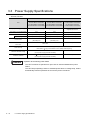
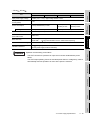
3.3 Power Supply Specifications .................................................................................... 3-14
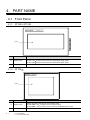
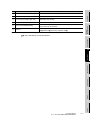
4. PART NAME...................................................... 4-1 to 4-12
4.1 Front Panel................................................................................................................. 4-1
4.1.1 GT1020, GT1030 ............................................................................................................................ 4-1
4.1.2 GT104[ ] ......................................................................................................................................... 4-1
4.1.3 GT105[ ] ......................................................................................................................................... 4-2
4.2 Back Panel ................................................................................................................. 4-3
4.2.1 GT1020-LBD/LWD/LBDW/LWDW .................................................................................................. 4-3
4.2.2 GT1020-LBD2/LWD2/LBDW2/LWDW2 .......................................................................................... 4-5
4.2.3 GT1020-LBL/LWL/LBLW/LWLW .................................................................................................... 4-6
4.2.4 GT1030-LBD/LWD/LBDW/LWDW .................................................................................................. 4-7
4.2.5 GT1030-LBD2/LWD2/LBDW2/LWDW2 .......................................................................................... 4-9
4.2.6 GT1030-LBL/LWL/LBLW/LWLW .................................................................................................. 4-10
4.2.7 GT1045-QSBD/GT1040-QBBD .................................................................................................... 4-11
4.2.8 GT1055-QSBD/GT1050-QBBD .................................................................................................... 4-12
5. EMC DIRECTIVE ................................................. 5-1 to 5-3
5.1 Requirements for Conformance to EMC Directive ..................................................... 5-1
5.1.1 Standards applicable to the EMC Directive .................................................................................... 5-1
5.1.2 About models applicable to the EMC Directive............................................................................... 5-2
5.1.3 About the cable used ...................................................................................................................... 5-3
A-9
6. INSTALLATION..................................................6-1 to 6-11
6.1 Control Panel Inside Dimensions for Mounting GOT..................................................6-2
6.1.1 GT1020 ...........................................................................................................................................6-2
6.1.2 GT1030 ...........................................................................................................................................6-3
6.1.3 GT104[ ] .........................................................................................................................................6-4
6.1.4 GT105[ ] .........................................................................................................................................6-5
6.2 Panel Cutting Dimensions ..........................................................................................6-6
6.2.1 Panel cutting dimensions ................................................................................................................6-6
6.3 Mounting Position .......................................................................................................6-7
6.3.1 Mounting position............................................................................................................................6-7
6.4 Control Panel Temperature and Mounting Angle .......................................................6-9
6.4.1 Control panel temperature and mounting angle..............................................................................6-9
6.5 Installation Procedure...............................................................................................6-10
6.5.1 Installation procedure....................................................................................................................6-10
7. WIRING.................................................................7-1 to 7-9
7.1 Power Supply Wiring ..................................................................................................7-2
7.1.1 Cable types and wire end processing (GT1020, GT1030, GT104[ ]).............................................7-2
7.1.2 Cable types and wire end processing (GT105[ ])...........................................................................7-3
7.1.3 Wiring example (GT1020, GT1030)................................................................................................7-3
7.1.4 Wiring example (GT104[ ]).............................................................................................................7-4
7.1.5 Wiring example (GT105[ ]).............................................................................................................7-4
7.1.6 GOT’s ground .................................................................................................................................7-5
7.1.7 The cause of malfunctions related wiring/Remedy .........................................................................7-6
7.2 Wiring inside and outside the panel............................................................................7-8
7.2.1 Wiring inside ...................................................................................................................................7-8
7.2.2 Outside the panel............................................................................................................................7-8
7.2.3 Attaching surge killers to control equipment ...................................................................................7-9
8. OPTION ..............................................................8-1 to 8-24
8.1 Protective Sheet .........................................................................................................8-1
8.1.1 Applicable protective sheet .............................................................................................................8-1
8.1.2 Installing procedure.........................................................................................................................8-2
8.2 RS-232/USB conversion adaptor ...............................................................................8-3
8.2.1 Shape, Dimensions, and Names of Adaptor Components .............................................................8-3
8.2.2 Installing procedure.........................................................................................................................8-4
8.2.3 Driver installation ............................................................................................................................8-5
8.2.4 Method for Uninstalling Driver.........................................................................................................8-8
8.3 Battery ........................................................................................................................8-9
8.3.1 Applicable battery ...........................................................................................................................8-9
8.3.2 Battery specifications ......................................................................................................................8-9
8.3.3 Battery replacement procedure.....................................................................................................8-10
8.4 Memory loader..........................................................................................................8-12
8.4.1 Part Name.....................................................................................................................................8-13
8.4.2 Function specification ...................................................................................................................8-14
8.5 Memory board ..........................................................................................................8-16
8.5.1 Applicable memory board .............................................................................................................8-16
8.5.2 Installing and removing procedures of the memory board............................................................8-16
8.6 Stand ........................................................................................................................8-18
8.6.1 Applicable stand............................................................................................................................8-18
A - 10
8.6.2 Installing procedure....................................................................................................................... 8-18
8.7 Protective cover for oil.............................................................................................. 8-19
8.7.1 Applicable protective cover for oil ................................................................................................. 8-19
8.7.2 Installing procedure....................................................................................................................... 8-19
8.8 Serial Multi-Drop Connection Unit............................................................................ 8-21
8.8.1 Serial multi-drop connection unit................................................................................................... 8-21
8.8.2 Applicable serial multi-drop connection unit.................................................................................. 8-22
8.8.3 Part name ..................................................................................................................................... 8-22
8.8.4 Installation..................................................................................................................................... 8-23
8.8.5 Caution for compliance with EMC Directive.................................................................................. 8-23
8.9 Connector Conversion Adapter................................................................................ 8-24
8.9.1 Applicable connector conversion adapter ..................................................................................... 8-24
8.9.2 Installing procedure....................................................................................................................... 8-24
9. UTILITY FUNCTION ............................................ 9-1 to 9-7
9.1 Utility Function List ..................................................................................................... 9-1
9.2 Utility Display.............................................................................................................. 9-3
9.2.1 Display operation of main menu ..................................................................................................... 9-3
9.2.2 Utility basic configuration ................................................................................................................ 9-6
10. LANGUAGE SETTING (Language)........................... 10-1
10.1 Display language setting ........................................................................................ 10-1
10.1.1 Display language setting function ............................................................................................... 10-1
10.1.2 Language display operation........................................................................................................ 10-1
10.1.3 Language setting operation ........................................................................................................ 10-1
11. COMMUNICATION INTERFACE SETTING
(COMMUNICATION SETTING)................... 11-1 to 11-24
11.1 Standard I/F Setting ............................................................................................... 11-1
11.1.1 Standard I/F functions................................................................................................................. 11-1
11.1.2 Standard I/F display operation .................................................................................................... 11-1
11.1.3 Display contents of standard I/F ................................................................................................. 11-2
11.1.4 Detail information setting operation ............................................................................................ 11-6
11.1.5 Channel setting operation ........................................................................................................... 11-9
11.1.6 Driver setting operation............................................................................................................. 11-10
11.1.7 AT command operation............................................................................................................. 11-11
11.1.8 Installing of communication driver............................................................................................. 11-12
11.2 Data Transfer ....................................................................................................... 11-13
11.2.1 Data transfer functions.............................................................................................................. 11-13
11.2.2 Data transfer operation ............................................................................................................. 11-13
11.2.3 Data transfer display ................................................................................................................. 11-14
11.3 Communication Monitor ....................................................................................... 11-15
11.3.1 Communication Monitor functions............................................................................................. 11-15
11.3.2 Communication Monitor display operation................................................................................ 11-15
11.3.3 Screen display content.............................................................................................................. 11-16
11.4 Keyword ............................................................................................................... 11-18
11.4.1 Keyword functions..................................................................................................................... 11-18
11.4.2 Keyword display operation........................................................................................................ 11-18
11.4.3 Regist........................................................................................................................................ 11-19
11.4.4 Delete ....................................................................................................................................... 11-22
11.4.5 Clear ......................................................................................................................................... 11-23
A - 11
11.4.6 Protect.......................................................................................................................................11-24
12. DISPLAY AND OPERATION SETTINGS (GOT SET UP)
............................................................................12-1 to 12-16
12.1 Display Settings......................................................................................................12-2
12.1.1 Display setting functions .............................................................................................................12-2
12.1.2 Display operation of display setting ............................................................................................12-3
12.1.3 Display setting operations...........................................................................................................12-4
12.2 Operation Settings..................................................................................................12-8
12.2.1 Operation setting functions .........................................................................................................12-8
12.2.2 Display operation of operation setting.........................................................................................12-9
12.2.3 Setting operation of operation...................................................................................................12-10
13. CLOCK SETTINGS AND BATTERY STATUS DISPLAY
(TIME SETTING AND DISPLAY) ...................13-1 to 13-2
13.1 Time Setting and Display........................................................................................13-1
13.1.1 Time setting and display functions..............................................................................................13-1
13.1.2 Clock display and setting operation ............................................................................................13-1
13.1.3 Clock setting operations..............................................................................................................13-2
14. FILE DISPLAY (DATA) ................................14-1 to 14-10
14.1 Data Storage Location............................................................................................14-1
14.2 OS Information .......................................................................................................14-2
14.2.1 Function of OS information .........................................................................................................14-2
14.2.2 Display operation of OS information screen ...............................................................................14-2
14.2.3 OS information operation ............................................................................................................14-3
14.3 Font Data................................................................................................................14-4
14.3.1 Function of font data ...................................................................................................................14-4
14.3.2 Display operation of font data screen .........................................................................................14-4
14.3.3 Font data operation.....................................................................................................................14-5
14.4 Clear data ...............................................................................................................14-6
14.4.1 Clear data functions ....................................................................................................................14-6
14.4.2 Clear data display .......................................................................................................................14-6
14.4.3 Clear data operation ...................................................................................................................14-6
14.5 GT10-50FMB..........................................................................................................14-7
14.5.1 GT10-50FMB functions (For GT104[ ], GT105[ ] only) .............................................................14-7
14.5.2 GT10-50FMB display operation ..................................................................................................14-7
14.5.3 GT10-50FMB operation ..............................................................................................................14-8
14.5.4 Error display..............................................................................................................................14-10
15. GOT DEBUG ................................................15-1 to 15-42
15.1 Debug .....................................................................................................................15-1
15.2 Device Monitor........................................................................................................15-1
15.2.1 System cofiguration ....................................................................................................................15-1
15.2.2 Devices that can be monitored ...................................................................................................15-2
15.2.3 Precautions .................................................................................................................................15-2
15.2.4 Display operation of device monitor............................................................................................15-3
15.2.5 Information displayed on the device monitor screen and key functions......................................15-4
15.2.6 Basic operation of device monitor...............................................................................................15-6
15.2.7 Device registration ......................................................................................................................15-7
A - 12
15.2.8 Quick test .................................................................................................................................. 15-10
15.3 FX List Editor (For GT104[ ], GT105[ ] only) ...................................................... 15-13
15.3.1 Display operation of FX list editor ............................................................................................. 15-13
15.3.2 Specifications............................................................................................................................ 15-15
15.3.3 Access range ............................................................................................................................ 15-16
15.3.4 Precautions ............................................................................................................................... 15-17
15.3.5 Display ...................................................................................................................................... 15-18
15.3.6 Operation Procedures............................................................................................................... 15-20
15.3.7 Selection and operation of modes ............................................................................................ 15-22
15.3.8 Sequence program display ....................................................................................................... 15-23
15.3.9 Searching commands and devices ........................................................................................... 15-25
15.3.10 Writing commands .................................................................................................................. 15-27
15.3.11 Changing operands, set values .............................................................................................. 15-30
15.3.12 Deleting commands ................................................................................................................ 15-31
15.3.13 Sequence program all clear .................................................................................................... 15-32
15.3.14 PLC diagnostics ...................................................................................................................... 15-33
15.3.15 Parameter setting.................................................................................................................... 15-35
15.3.16 Keywords ................................................................................................................................ 15-38
15.3.17 List monitor ............................................................................................................................. 15-40
15.3.18 Action for an incorrect key input.............................................................................................. 15-42
15.3.19 Error Messages and Corrective Actions ................................................................................. 15-42
16. CLEANING OF DISPLAY SECTION (CLEAN) .......... 16-1
16.1 Clean...................................................................................................................... 16-1
16.1.1 Display operation of clean........................................................................................................... 16-1
17. OS INSTALLATION....................................... 17-1 to 17-4
17.1 About the OS.......................................................................................................... 17-1
17.2 Standard monitor OS/ Communication Driver Installation...................................... 17-1
17.3 Standard Monitor OS/Communication Driver Installation Using Memory Board .... 17-3
17.3.1 Installation method when the GOT is turned on.......................................................................... 17-3
18. MAINTENANCE AND INSPECTION............. 18-1 to 18-6
18.1 Daily Inspection...................................................................................................... 18-2
18.2 Periodic Inspection................................................................................................. 18-2
18.3 Cleaning Method .................................................................................................... 18-3
18.4 Battery Voltage Low Detection and Battery Replacement ..................................... 18-4
18.5 Backlight Shutoff Detection .................................................................................... 18-6
18.5.1 Backlight shutoff detection and external alarm ........................................................................... 18-6
APPENDICES............................................ App-1 to App-19
Appendix 1 External Dimensions ..............................................................................App- 1
Appendix 2 Usage Condition of Utility Function......................................................App- 11
Appendix 3 Transportation Precautions..................................................................App- 13
Appendix 4 List of Functions Added by GT Designer2 Version Upgrade (For GOT1000
Series)..................................................................................................App- 14
INDEX .......................................................Index-1 to Index-2
A - 13
ABOUT MANUALS
The following manuals are also related to this product.
In necessary, order them by quoting the details in the tables below.
Related Manuals
Manual Number
Manual Name
(Model Code)
GT Designer2 Version2 Basic Operation/Data Transfer Manual (For GOT1000 Series)
Describes methods of the GT Designer2 installation operation, basic operation for drawing and transmitting data
to GOT1000 series
SH-080529ENG
(1D7M24)
(Sold separately) *1
GT Designer2 Version2 Screen Design Manual (For GOT1000 Series) 1/3
GT Designer2 Version2 Screen Design Manual (For GOT1000 Series) 2/3
SH-080530ENG
GT Designer2 Version2 Screen Design Manual (For GOT1000 Series) 3/3
(1D7M25)
Describes specifications and settings of the object functions used in GT Designer2
(Sold separately) *1
GOT1000 Series Connection Manual (1/3, 2/3, 3/3)
Describes system configurations of the connection method applicable to GOT1000 series and cable creation
SH-080532ENG
method
(1D7M26)
(Sold separately)
*1
GT Designer3 Version1 Screen Design Manual (For GOT1000 Series) (Fundamentals)
Describes methods of the GT Designer3 installation operation, basic operation for drawing and transmitting data
to GOT1000 series
SH-080866ENG
(1D7MB9)
(Sold separately) *1
GT Designer3 Version1 Screen Design Manual (For GOT1000 Series) (Functions) 1/2
GT Designer3 Version1 Screen Design Manual (For GOT1000 Series) (Functions) 2/2
Describes methods of the GT Designer3 installation operation, basic operation for drawing and transmitting data
to GOT1000 series
SH-080867ENG
(1D7MC1)
(Sold separately) *1
GOT1000 Series Connection Manual (Mitsubishi Products)
Describes system configurations of the connection method applicable to GOT1000 series and cable creation
SH-080868ENG
method
(1D7MC2)
(Sold separately)
*1
GOT1000 Series Connection Manual (Non-Mitsubishi Products 1)
Describes system configurations of the connection method applicable to GOT1000 series and cable creation
SH-080869ENG
method
(1D7MC3)
(Sold separately)
*1
GOT1000 Series Connection Manual (Non-Mitsubishi Products 2)
Describes system configurations of the connection method applicable to GOT1000 series and cable creation
SH-080870ENG
method
(1D7MC4)
(Sold separately)
*1
GOT1000 Series Connection Manual (Microcomputer, MODBUS Products, Peripherals)
Describes system configurations of the connection method applicable to GOT1000 series and cable creation
SH-080871ENG
method
(1D7MC5)
(Sold separately)
*1
*1 The manual in PDF-format is included in the GT Works2, GT Designer2, GT Works3 and GT Designer3 products.
A - 14
ABBREVIATIONS AND GENERIC TERMS
Abbreviations and generic terms used in this manual are as follows:
GOT
Abbreviations and generic terms
GT SoftGOT1000
Abbreviation of GT SoftGOT1000
GT1695
GT1695M-X
Abbreviation of GT1695M-XTBA, GT1695M-XTBD
GT1685
GT1685M-S
Abbreviation of GT1685M-STBA, GT1685M-STBD
GT1675M-S
Abbreviation of GT1675M-STBA, GT1675M-STBD
GT1675M-V
Abbreviation of GT1675M-VTBA, GT1675M-VTBD
GT1665M-S
Abbreviation of GT1665M-STBA, GT1665M-STBD
GT1665M-V
Abbreviation of GT1665M-VTBA, GT1665M-VTBD
GT1675
GT1665
GT16
GT1595
GT1585
GT157
GT156
GOT1000 Series
Description
GT155
GT15
GT115
, GT16
Abbreviation of GT1695,GT1685, GT1675, GT1665
GT1595-X
Abbreviation of GT1595-XTBA, GT1595-XTBD
GT1585V-S
Abbreviation of GT1585V-STBA, GT1585V-STBD
GT1585-S
Abbreviation of GT1585-STBA, GT1585-STBD
GT1575V-S
Abbreviation of GT1575V-STBA, GT1575V-STBD
GT1575-S
Abbreviation of GT1575-STBA, GT1575-STBD
GT1575-V
Abbreviation of GT1575-VTBA, GT1575-VTBD
GT1575-VN
Abbreviation of GT1575-VNBA, GT1575-VNBD
GT1572-VN
Abbreviation of GT1572-VNBA, GT1572-VNBD
GT1565-V
Abbreviation of GT1565-VTBA, GT1565-VTBD
GT1562-VN
Abbreviation of GT1562-VNBA, GT1562-VNBD
GT1555-V
Abbreviation of GT1555-VTBD
GT1555-Q
Abbreviation of GT1555-QTBD, GT1555-QSBD
GT1550-Q
Abbreviation of GT1550-QLBD
, GT15
GT1155-Q
Abbreviation of GT1595, GT1585, GT157 , GT156 , GT155
Abbreviation of GT1155-QTBDQ, GT1155-QSBDQ, GT1155-QTBDA, GT1155-QSBDA,
GT1155-QTBD, GT1155-QSBD
GT1150-Q
Abbreviation of GT1150-QLBDQ, GT1150-QLBDA, GT1150-QLBD
Handy
GT1155HS-Q
Abbreviation of GT1155HS-QSBD
GOT
GT1150HS-Q
Abbreviation of GT1150HS-QLBD
GT11
GT105
GT104
, GT11
Abbreviation of GT1155-Q, GT1150-Q, GT11 Handy GOT
GT1055-Q
Abbreviation of GT1055-QSBD
GT1050-Q
Abbreviation of GT1050-QBBD
GT1045-Q
Abbreviation of GT1045-QSBD
GT1040-Q
Abbreviation of GT1040-QBBD
Abbreviation of GT1030-LBD, GT1030-LBD2, GT1030-LBL, GT1030-LBDW, GT1030-
GT1030
LBDW2, GT1030-LBLW, GT1030-LWD, GT1030-LWD2, GT1030-LWL, GT1030-LWDW,
GT1030-LWDW2, GT1030-LWLW
Abbreviation of GT1020-LBD, GT1020-LBD2, GT1020-LBL, GT1020-LBDW, GT1020-
GT1020
LBDW2, GT1020-LBLW, GT1020-LWD, GT1020LWD2, GT1020-LWL, GT1020-LWDW,
GT1020-LWDW2, GT1020-LWLW
GT10
, GT10
Abbreviation of GT105 , GT104 , GT1030, GT1020
GOT900 Series
Abbreviation of GOT-A900 series, GOT-F900 series
GOT800 Series
Abbreviation of GOT-800 series
A - 15
Communication unit
Abbreviations and generic terms
Description
GT15-QBUS,
GT15-QBUS2,
GT15-ABUS,
GT15-ABUS2,
GT15-75QBUSL,
GT15-75QBUS2L,
GT15-75ABUSL,
GT15-75ABUS2L
Serial communication unit
GT15-RS2-9P,
GT15-RS4-9S,
GT15-RS4-TE
RS-422 conversion unit
GT15-RS2T4-9P,
GT15-RS2T4-25P
Ethernet communication unit
GT15-J71E71-100
MELSECNET/H communication unit
GT15-J71LP23-25,
GT15-J71BR13
MELSECNET/10 communication unit
GT15-75J71LP23-Z*1,
GT15-75J71BR13-Z*2
Bus connection unit
CC-Link IE controller network communication
unit
GT15-J71GP23-SX
CC-Link communication unit
GT15-J61BT13,
CC-Link interface unit
GT11HS-CCL
Interface converter unit
GT15-75IF900
Serial multi-drop connection unit
GT01-RS4-M
Connection Conversion Adapter
GT10-9PT5S
*1
A9GT-QJ71LP23 + GT15-75IF900 set
*2
A9GT-QJ71BR13 + GT15-75IF900 set
*3
A8GT-J61BT13 + GT15-75IF900 set
GT15-75J61BT13-Z*3
Option unit
Abbreviations and generic terms
Printer unit
Video/RGB unit
Description
GT15-PRN
Video input unit
GT16M-V4,
GT15V-75V4
RGB input unit
GT16M-R2,
GT15V-75R1
Video/RGB input unit
GT16M-V4R1,
GT15V-75V4R1
RGB output unit
GT16M-ROUT,
GT15V-75ROUT
Multimedia unit
GT16M-MMR
CF card unit
GT15-CFCD
*1
CF card extension unit
GT15-CFEX-C08SET
External I/O unit
GT15-DIO,
Sound output unit
GT15-SOUT
Fingerprint unit
GT15-80FPA
*1
A - 16
GT15-DIOR
GT15-CFEX + GT15-CFEXIF + GT15-C08CF set.
Option
Abbreviations and generic terms
Memory card
CF card
Memory card adaptor
Option function board
Battery
Description
GT05-MEM-16MC,
GT05-MEM-32MC,
GT05-MEM-256MC
GT05-MEM-512MC, GT05-MEM-1GC,
GT16-MESB,
GT15-FNB,
GT15-QFNB,
GT15-QFNB16M,
GT15-QFNB32M,
GT15-QFNB48M,
GT15-MESB48M,
GT11-50FNB
GT15-BAT,
GT11-50BAT
For GT15
Protective Sheet
For GT11
For GT10
USB environmental protection cover
Stand
Attachment
Backlight
GT05-MEM-128MC,
GT05-MEM-2GC
GT05-MEM-ADPC
For GT16
Protective cover for oil
GT05-MEM-64MC,
GT16-90PSCB,
GT16-90PSGB,
GT16-90PSCW,
GT16-90PSGW,
GT16-80PSCB,
GT16-80PSGB,
GT16-80PSCW,
GT16-80PSGW,
GT16-70PSCB,
GT16-70PSGB,
GT16-70PSCW,
GT16-70PSGW,
GT16-60PSCB,
GT16-60PSGB,
GT16-60PSCW,
GT16-60PSGW
GT15-90PSCB,
GT15-90PSGB,
GT15-90PSCW,
GT15-90PSGW,
GT15-80PSCB,
GT15-80PSGB,
GT15-80PSCW,
GT15-80PSGW,
GT15-70PSCB,
GT15-70PSGB,
GT15-70PSCW,
GT15-70PSGW,
GT15-60PSCB,
GT15-60PSGB,
GT15-60PSCW,
GT15-60PSGW,
GT15-50PSCB,
GT15-50PSGB,
GT15-50PSCW,
GT15-50PSGW
GT11-50PSCB,
GT11-50PSGB,
GT11-50PSCW,
GT11-50PSGW,
GT10-50PSCB,
GT10-50PSGB,
GT10-50PSCW,
GT10-50PSGW,
GT10-40PSCB,
GT10-40PSGB,
GT10-40PSCW,
GT10-40PSGW,
GT10-30PSCB,
GT10-30PSGB,
GT10-30PSCW,
GT10-30PSGW,
GT10-20PSCB,
GT10-20PSGB,
GT10-20PSCW,
GT10-20PSGW
GT11H-50PSC
GT05-90PCO,
GT05-80PCO,
GT05-70PCO,
GT05-60PCO,
GT16-UCOV,
GT15-UCOV,
GT11-50UCOV
GT15-90STAND,
GT15-80STAND,
GT15-70STAND,
A9GT-50STAND,
GT15-60ATT-96,
GT05-50PCO
GT05-50STAND
GT15-70ATT-98,
GT15-70ATT-87,
GT15-60ATT-97,
GT15-60ATT-87,
GT15-60ATT-77,
GT15-50ATT-95W,
GT15-50ATT-85
GT16-90XLTT,
GT16-80SLTT,
GT15-90XLTT,
GT15-80SLTT,
GT16-70SLTT,
GT16-70VLTT,
GT16-60SLTT,
GT16-60VLTT,
GT15-70SLTT,
GT15-70VLTT,
GT15-70VLTN,
GT15-60VLTT,GT15-
60VLTN
Multi-color display board
GT15-XHNB,
Connector conversion box
GT11H-CNB-37S
Emergency stop sw guard cover
GT11H-50ESCOV
Memory loader
GT10-LDR
Memory board
GT10-50FMB
GT15-VHNB
A - 17
Software
Abbreviations and generic terms
Description
GT Works3
Abbreviation of the SW DNC-GTWK3-E and SW DNC-GTWK3-EA
GT Designer3
Abbreviation of screen drawing software GT Designer3 for GOT1000 series
GT Simulator3
Abbreviation of screen simulator GT Simulator3 for GOT1000/GOT900 series
GT Works2 Version
SW D5C-GTWK2-E, SW D5C-GTWK2-EV
GT Designer2 Version
SW D5C-GTD2-E, SW D5C-GTD2-EV
GT Designer2
Abbreviation of screen drawing software GT Designer2 for GOT1000/GOT900 series
GT Converter2
Abbreviation of data conversion software GT Converter2 for GOT1000/GOT900 series
GT Designer2 Classic
Abbreviation of screen drawing software GT Designer2 Classic for GOT900 series
GT Simulator2
Abbreviation of screen simulator GT Simulator 2 for GOT1000 / GOT900 series
GT SoftGOT1000
Abbreviation of monitoring software GT SoftGOT1000
GT SoftGOT2
Abbreviation of monitoring software GT SoftGOT2
GX Developer
Abbreviation of SW D5C-GPPW-E(-EV)/SW D5F-GPPW-E type software package
GX Simulator2
Abbreviation of GX Works2 with the simulation function
GX Simulator
Abbreviation of SW D5C-LLT-E(-EV) type ladder logic test tool function software packages
(SW5D5C-LLT (-EV) or later versions)
Document Converter
Abbreviation of document data conversion software Document Converter for GOT1000 series
PX Developer
Abbreviation of SW D5C-FBDQ-E type FBD software package for process control
MT Works2
MT Developer
Abbreviation of motion controller engineering environment MELSOFT MT Works2 (SW DNCMTW2-E)
Abbreviation of SW RNC-GSV type general start-up support software for motion controller Q
series
MR Configurator
Abbreviation of MRZJW -SETUP type servo set up software
FR Configurator
Abbreviation of Inverter Setup Software (FR-SW -SETUP-WE)
FX Configurator-FP
Abbreviation of parameter setting, monitoring, and testing software packages for FX3U-20SSCH (SW D5C-FXSSC-E)
FX3U-ENET-L Configuration tool
Abbreviation of FX3U-ENET-L type Ethernet module setting software (SW1D5-FXENETL-E)
RT ToolBox2
Abbreviation of robot program creation software (3D-11C-WINE)
License key (for GT SoftGOT1000)
Abbreviations and generic terms
License
Description
GT15-SGTKEY-U, GT15-SGTKEY-P
License key (for GT SoftGOT2)
Abbreviations and generic terms
Description
License key
A9GTSOFT-LKEY-P (For DOS/V PC)
License key FD
SW5D5F-SGLKEY-J (For PC CPU module)
A - 18
Others
Abbreviations and generic terms
Description
OMRON PLC
Abbreviation of PLC manufactured by OMRON Corporation
KEYENCE PLC
Abbreviation of PLC manufactured by KEYENCE CORPORATION
KOYO EI PLC
Abbreviation of PLC manufactured by KOYO ELECTRONICS INDUSTRIES CO., LTD.
SHARP PLC
Abbreviation of PLC manufactured by Sharp Manufacturing Systems Corporation
JTEKT PLC
Abbreviation of PLC manufactured by JTEKT Corporation
TOSHIBA PLC
Abbreviation of PLC manufactured by TOSHIBA CORPORATION
TOSHIBA MACHINE PLC
Abbreviation of PLC manufactured by TOSHIBA MACHINE CO., LTD.
HITACHI IES PLC
Abbreviation of PLC manufactured by Hitachi Industrial Equipment Systems Co., Ltd.
HITACHI PLC
Abbreviation of PLC manufactured by Hitachi, Ltd.
FUJI FA PLC
Abbreviation of PLC manufactured by Fuji Electric FA Components & Systems Co., Ltd.
PANASONIC PLC
Abbreviation of PLC manufactured by Panasonic Electric Works Co., Ltd.
YASKAWA PLC
Abbreviation of PLC manufactured by YASKAWA Electric Corporation
YOKOGAWA PLC
Abbreviation of PLC manufactured by Yokogawa Electric Corporation
ALLEN-BRADLEY PLC
Abbreviation of Allen-Bradley PLC manufactured by Rockwell Automation, Inc.
GE FANUC PLC
Abbreviation of PLC manufactured by GE Fanuc Automation Corporation
LS IS PLC
Abbreviation of PLC manufactured by LS Industrial Systems Co., Ltd.
SCHNEIDER PLC
Abbreviation of PLC manufactured by Schneider Electric SA
SIEMENS PLC
Abbreviation of PLC manufactured by Siemens AG
OMRON temperature
controller
SHINKO indicating
controller
CHINO controller
Temperature
controller
FUJI SYS temperature
controller
YAMATAKE temperature
controller
YOKOGAWA temperature
controller
RKC temperature
controller
Abbreviation of temperature controller manufactured by OMRON Corporation
Abbreviation of temperature controller manufactured by Shinko Technos Co., Ltd.
Abbreviation of temperature controller manufactured by CHINO CORPORATION
Abbreviation of temperature controller manufactured by Fuji Electric Systems Co., Ltd.
Abbreviation of temperature controller manufactured by Yamatake Corporation
Abbreviation of temperature controller manufactured by Yokogawa Electric Corporation
Abbreviation of temperature controller manufactured by RKC INSTRUMENT INC.
PC CPU module
Abbreviation of PC CPU Unit manufactured by CONTEC CO., LTD
GOT (server)
Abbreviation of GOTs that use the server function
GOT (client)
Abbreviation of GOTs that use the client function
Windows
font
Intelligent function module
MODBUS
/RTU
MODBUS
/TCP
Abbreviation of TrueType font and OpenType font available for Windows
(Differs from the True Type fonts settable with GT Designer2)
Indicates the modules other than the PLC CPU, power supply module and I/O module that are
mounted to the base unit.
Generic term for protocols designed to use MODBUS
protocol messagages on a serial
communication.
Generic term for the protocol designed to use MODBUS
protocol messages on a TCP/IP
network.
A - 19
HOW TO READ THIS MANUAL
1 Functions
This manual describes functions available for the GT Designer2 Version2.98C, GT Designer3
Version1.01B.
For the added functions by the product version upgrade, refer to the list of functions added by GT
Designer2 version upgrade in Appendices.
2 Symbols
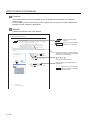
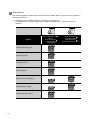
Following symbols are used in this manual.
13.3.3 Memory check operation
Carries out write/read check of memory.
Refers to the information
required.
When drive is not displayed
When the drive (memory) to check is not displayed, confirm the mounting procedure
or memory type with reference to the following.
• CF card inserting/removing method
Remark
Section 7.1 CF Card
Refers to the supplementary
explanations for reference.
When no faults are found in mounting, etc, a memory failure may be arosen.
Replace the CF card or Flash memory.
For details of Flash memory, contact your nearest sales office or FA Center.
The following example explains about Memory Check using Flash memory.
For the CF card memory check, install the CF card before carrying out the same key operations as built-in
flash memory.
1 Select [Flash Memory] in the Memory check
setting screen, and touch the Check button.
If select the OK button, the numeric keyboard
window is displayed.
If select the Cancel button, the screen returns
to the initial menu.
2 Touch 5 9 2 0 and then Enter .
3 (The password is fixed to 5920.)
4 Touching Enter executes read/write check for
the flash memory.
Indicates the items in which the detailed
explanation is described (manual, chapter,
section, item of the manual).
....
Indicates the operation steps.
Menu and items are differentiated with
parentheses.
[
] : refers to the menu of GOT utility.
: refers to the button in the dialog
box of GOT utility.
13 - 4
A - 20
13.3 Memory Check
13.3.3 Memory check operation
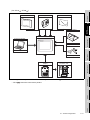
1. OVERVIEW
OVERVIEW
1
1 About GOT
2
SYSTEM
CONFIGURATION
PLC
Connector for
program
For the display screen, two kinds of screens are available : user screen
and utility screen.
GOT
(1) User screen
The user screen is a screen drawn by drawing software.
The objects "Touch switch", "Lamp display", "Comment display", and "Numeric display" can be
arditrarily arranged on the display.
A "horizontal format" or "vertical format" may be selected for displaying a user’s project.
Moreover, multiple screens created within drawing software can be individually selected or
overlapped for the display.
3
SPECIFICATIONS
A GOT is installed on the panel surface of a control panel or operating
panel and connects to the PLC within the control panel. The GOT
carries out switch operation, lamp display, data display, message
display, etc.
4
Basic Operation/Data Transfer Manual
Screen Design Manual
Screen Design Manual
(2) Utility Screen
The utility screen is a factory drawn horizontal screen that cannot be edited.
The utility screen has options for "Contrast ", "Buzzer volume ", etc, and the format is horizontal
only.
For details, refer to the following.
5
EMC DIRECTIVE
GT Designer2 Version
GT Designer2 Version
GT Designer3 Version
PART NAME
For details, refer to the following.
6
INSTALLATION
Chapter 9 to Chapter 17
WIRING
7
OPTION
8
1-1
2 About Manual
The following manuals related to GOT 1000 series are available. Refer to each manual in accordance
with the intended use.
(1) Installation of the software programs
Drawing
Data transfer
For operations from creating project data to transferring data to GOT, refer to the following
manuals.
Purpose
GT Designer2 Version
Basic Operation/Data Transfer
Manual*1
GT Designer3 Version
Screen Design Manual
(Fundamentals)*1
Installing product on PC
Detailed
Creating projects
Detailed
Creating screens
Detailed
Drawing figures
Detailed
GT Designer2 Version
Screen Design Manual*1
GT Designer3 Version
Screen Design Manual (Functions)*1
Making Common Settings
Detailed
Overview
Placing/Setting objects
Detailed
Overview
Transferring data to GOT
Detailed
*1 Stored in the GT Works 2/GT Designer2/GT Works 3/GT Designer3 in PDF format.
1-2
SPECIFICATIONS
3
Detailed
Overview
Detailed
4
Overview
Confirming the mounting method for
communication units or option
devices
Detailed
Overview
Confirming the PLC connection
method
Confirming the utility operation
method
Confirming error codes (system
alarm) displayed on the GOT
PART NAME
Confirming the GOT installation
method
GOT1000 Series
Connection Manual*1
5
Detailed
EMC DIRECTIVE
Confirming part names and
specifications of the GOT
GT15 User's Manual
GT11 User's Manual
GT10 User's Manual
Detailed
6
Detailed
*1 Stored in the GT Works2/GT Designer2/GT Works 3/GT Designer3 in PDF format.
(3) Other manuals
The following manuals are also available.
The following manuals are stored in the GT Works2/GT Designer2/GT Works3/GT Designer3 in
PDF format.
7
WIRING
(a) GOT1000 Series Gateway Functions Manual
Describes how to use the gateway function.
INSTALLATION
Purpose
SYSTEM
CONFIGURATION
2
(Included)
GT15 General
Description
GT 11 General
Description
GT 10 General
Description
1
OVERVIEW
(2) Installing a GOT
connection to a PLC
For the operations from installing a GOT to communicating with a PLC CPU, refer to the following
manuals.
(b) GT Simulator 2 Version Operation Manual
Describes how to simulate the created project data with GT Simulator2.
8
OPTION
(c) GT Converter2 Version Operating Manual
Describes how to use the GT Converter2.
1-3
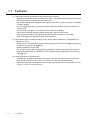
1.1 Features
(1) Improved monitoring performance and connectivity to FA devices
• Multiple languages are displayed using the Unicode2.1-compatible fonts and beautiful characters
are drawn using the TrueType and high quality fonts
• For GT1020 and GT1030, 3 backlight colors (green, red, orange or white, red, pink) are available
for status displays
• For GT104 and GT105 , two types of display modes are available: 256 colors display and
monochrome
In the monochrome display, 16 scales are used to improve the display
• Improved layout design flexibility with the analog touch panel on the GT1020
• High speed monitoring through high speed communication at maximum of 115.2kbps
• High speed display and high speed touch switch response
(2) More efficient GOT operations including screen design, startup, adjustment, management and
maintenance works
• Recipe function, Device monitor function and FX list editor function (for GT104 , GT105 only)
and Device monitor (for GT105 only)
• Factory-installed OS on the GOT
• For GT1020, GT1030 and GT104 , LED-type backlight is adopted (no replacement required)
• High speed data transfer of project data, OS and others using the USB interface (for GT104 ,
GT105 only)
(3) Enhanced support of FA setup tools
• Transferring or monitoring the sequence programs using the personal computer connected to
GOT, during connection to A, Q, QnA, or FX series PLC CPU (Transparent function)
• Allows the connection of multiple GOT units via the serial interface when connected to the CPU
on the A, Q, QnA, or FX series of PLC
1-4
1.1 Features
1
1.2 Rough Pre-operation Procedure
OVERVIEW
The outline procedure before operating GOT is shown.
Start
SYSTEM
CONFIGURATION
Refer to GT Designer2 Version
Screen Design Manual.
Refer to GT Designer3 Version
Screen Design Manual (Functions)
Wire for the GOT power supply.
Refer to Chapter 7 WIRING.
Connect GOT and PC with a RS-232/USB
conversion adaptor or RS-232 cable.
Refer to Chapter 8 OPTION.
1) Install a communication driver on the GOT that
is compatible with the controller.
(The communication driver for the FX series is
factory-installed.)
2) Install the project data that were created with
GT Designer2 or GT Designer3 on the GOT.
2
3
SPECIFICATIONS
Create project data.
Refer to GT Designer2 Version
Basic Operation/Data Transfer Manual.
Refer to GT Designer3 Version
Screen Design Manual (Fundamentals)
Refer to GT Designer2 Version
Basic Operation/Data Transfer Manual.
Refer to GT Designer3 Version
Screen Design Manual (Fundamentals)
4
PART NAME
Install GT Designer2 or GT Designer3 in the PC.
Check the communication settings.
Connect the GOT and the destination connector.
Refer to GOT1000 Series Connection Manual.
5
EMC DIRECTIVE
Turn on the GOT power and the system of the
connection destination.
Start the monitor. (Display each screen.)
End
INSTALLATION
6
WIRING
7
OPTION
8
1.2 Rough Pre-operation Procedure
1-5
2. SYSTEM CONFIGURATION
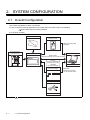
2.1 Overall Configuration
The overall configuration of GOT is as follows.
For the connection methods applicable to GOT1000 series and cable, refer to the following.
GOT1000 Series Connection Manual
(For GT1020, GT1030)
Protective sheet
GT10-LDR
Memory Loader
USB connecting cable
(supplied)
Serial multi-drop
connection unit
Personal computer
GOT
RS-232 cable
(designed exclusively for use with the GOT)
MITSUBISHI
GOT 1000
RS-232
Connect to the RS-232
connector of the RS232/USB
conversion adaptor
RD
SD
POWER
GOT
(RS-232)
RS-232/USB
conversion adaptor
Bar code reader
Commercially available
• GT10
2-1
cannot be connected to printers.
2.1 Overall Configuration
Commercially available
USB cable
(designed exclusively
for use with the GOT)
, GT105
1
)
Memory board
Protective cover for oil
Protective sheet
OVERVIEW
(For GT104
SYSTEM
CONFIGURATION
2
Debug stand
3
GOT
MITSUBISHI
SPECIFICATIONS
Personal computer
GOT 1000
Bar code reader
4
PART NAME
Commercially available
Commercially available
5
Serial multi-drop
connection unit
EMC DIRECTIVE
Connector conversion
adapter
6
cannot be connected to printers.
WIRING
7
8
OPTION
• GT10
.
INSTALLATION
• Debug stand and protective cover for oil are only available for GT105
2.1 Overall Configuration
2-2
2.2 Component List
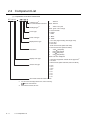
(1) Explanation of the GOT model name
GT 1 0 2 0
Interface type*2
for communication with PLC
2
: RS-232
Blank : RS-422
Backlight type*2
W
: white / red / pink
Blank : green / red / orange
Power type
Panel color type
Display device type
Resolution
Display color type
Screen size type
A : 100 to 240VAC
D : 24VDC
L : 5VDC
B : Black
W : White
T : TFT color (High intensity, wide angle view)
N : TFT color
S : STN color
L : STN monochrome (black and white)
B : STN monochrome (blue and white)
: 1024 768 (XGA)
X
: 800 600 (SVGA)
S
: 640 480 (VGA)
V
: 320 240 (QVGA)
Q
Blank : less than 320 240
5 : 256 colors supported / 65536 colors supported*1
2 : 16 colors
0 : Monochrome (black and white, blue and white)
9 : 15.0"
8 : 12.1"
7 : 10.4"
6 : 8.4"
5 : 5.7"
4 : 4.7"
3 : 4.5"
2 : 3.7"
GOT 1000 series GT15/GT11/GT10
*1:
For GT15 that can display 65536 colors, refer to following.
GT15 User's Manual
*2:
2-3
Dedicated for GT1020, GT1030
2.2 Component List
(2) Explanation of the option model name
1
OVERVIEW
GT
90 : Dedicated for 15.0"
80 : Dedicated for 12.1"
75 : Common for 10.4", 8.4"
70 : Dedicated for 10.4"
60 : Dedicated for 8.4"
50 : Dedicated for 5.7"
40 : Dedicated for 4.7"
30 : Dedicated for 4.5"
20 : Dedicated for 3.7"
SYSTEM
CONFIGURATION
2
15 : For GT15*1
11 : For GT11*1
09 :
05 : For GT15/GT11/GT10*1
01 :
10 : For GT10*1
SPECIFICATIONS
There are optional components common for GT15, GT11 and GT10.
PART NAME
4
EMC DIRECTIVE
5
INSTALLATION
6
WIRING
7
8
OPTION
*1:
3
2.2 Component List
2-4
2.2.1
GOT (GT10)
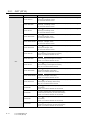
Product name
Model name
Specifications
3.7" [160
GT1020-LBD/LWD
64 dots], STN monochrome (black and white) liquid crystal, 3 colors (green/
red/orange) LED backlight, 24VDC,
PLC connection interface: RS-422
3.7" [160
GT1020-LBD2/LWD2
64 dots], STN monochrome (black and white) liquid crystal, 3 colors (green/
red/orange) LED backlight, 24VDC,
PLC connection interface: RS-232
3.7" [160
GT1020-LBL/LWL
64 dots], STN monochrome (black and white) liquid crystal, 3 colors (green/
red/orange) LED backlight, 5VDC,
PLC connection interface: RS-422
3.7" [160
GT1020-LBDW/LWDW
64 dots], STN monochrome (black and white) liquid crystal, 3 colors (white/
red/pink) LED backlight, 24VDC,
PLC connection interface: RS-422
3.7" [160
GT1020-LBDW2/LWDW2
64 dots], STN monochrome (black and white) liquid crystal, 3 colors (white/
red/pink) LED backlight, 24VDC,
PLC connection interface: RS-232
3.7" [160
GT1020-LBLW/LWLW
64 dots], STN monochrome (black and white) liquid crystal, 3 colors (white/
red/pink) LED backlight, 5VDC,
PLC connection interface: RS-422
4.5" [288
GT1030-LBD/LWD
96 dots], STN monochrome (black and white) liquid crystal, 3 colors
(green/red/orange) LED backlight, built-in battery
24VDC, PLC connection interface: RS-422
4.5" [288
GT1030-LBD2/LWD2
96 dots], STN monochrome (black and white) liquid crystal, 3 colors
(green/red/orange) LED backlight, built-in battery
24VDC, PLC connection interface: RS-232
GOT
4.5" [288
GT1030-LBL/LWL
96 dots], STN monochrome (black and white) liquid crystal, 3 colors
(green/red/orange) LED backlight, built-in battery
5VDC, PLC connection interface: RS-422
4.5" [288
GT1030-LBDW/LWDW
96 dots], STN monochrome (black and white) liquid crystal, 3 colors (white/
red/pink) LED backlight, built-in battery
24VDC, PLC connection interface: RS-422
4.5" [288
GT1030-LBDW2/LWDW2
96 dots], STN monochrome (black and white) liquid crystal, 3 colors (white/
red/pink) LED backlight, built-in battery
24VDC, PLC connection interface: RS-232
4.5" [288
GT1030-LBLW/LWLW
96 dots], STN monochrome (black and white) liquid crystal, 3 colors
(white/red/pink) LED backlight, built-in battery
5VDC, PLC connection interface: RS-422
4.7" [320
GT1045-QSBD
240 dots], STN color liquid crystal, 256 colors,
built-in battery
24VDC, PLC connection interface: RS-422, RS-232
4.7" [320
GT1040-QBBD
240 dots], STN monochrome liquid crystal,
monochrome (blue and white), 16 scales, built-in battery
24VDC, PLC connection interface: RS-422, RS-232
5.7" [320
GT1055-QSBD
240 dots], STN color liquid crystal, 256 colors,
built-in battery
24VDC, PLC connection interface: RS-422, RS-232
5.7" [320
GT1050-QBBD
240 dots], STN monochrome liquid crystal,
monochrome (blue and white), 16 scales, built-in battery
24VDC, PLC connection interface: RS-422, RS-232
2-5
2.2 Component List
2.2.1 GOT (GT10)
1
Option (Optional components for GT10)
Product name
Model name
Cable length
OVERVIEW
PLC connection cable (Sold separately)
Contents
GT01-C10R4-8P
1m
GT01-C30R4-8P
3m
For connecting FXCPU (MINI DIN 8 pins
GT01-C100R4-8P
10m
For connecting FXCPU expansion board (MINI
2
connector) and GOT,
DIN 8 pins connector) and GOT(For GT104
FXCPU direct
GT01-C200R4-8P
20m
GT01-C300R4-8P
30m
GT10-C10R4-8P
1m
GT10-C30R4-8P
3m
GT105
,
)
3
SPECIFICATIONS
connection cable,
FX expansion
board connection
cable
For connecting FXCPU (MINI DIN 8 pins
GT10-C100R4-8P
10m
SYSTEM
CONFIGURATION
2.2.2
4
connector) and GOT,
For connecting FXCPU expansion board (MINI
PART NAME
DIN 8 pins connector) and GOT(For GT1030,
GT1020)
RS-422
GT10-C300R4-8P
30m
GT10-C10R4-8PL*1
1m
GT01-C30R4-25P
3m
GT01-C100R4-25P
10m
GT01-C200R4-25P
20m
5
Cable
QnA/A/FXCPU
direct connection
For connecting QnA/A/FXCPU (D-sub 25 pins
connector) and GOT,
For connecting serial communication unit
(AJ71QC24(N)-R4) and GOT(For GT104
GT105
GT01-C300R4-25P
30m
GT10-C30R4-25P
3m
,
)
cable,
computer link
connection cable
For connecting QnA/A/FXCPU (D-sub 25 pins
GT10-C100R4-25P
10m
connector) and GOT,
20m
6
7
For connecting serial communication unit
GT10-C200R4-25P
EMC DIRECTIVE
20m
INSTALLATION
GT10-C200R4-8P
(AJ71QC24(N)-R4) and GOT(For GT1030,
GT10-C300R4-25P
30m
GT09-C30R4-6C
3m
Computer link
GT09-C100R4-6C
10m
connection cable
GT09-C200R4-6C
20m
GT09-C300R4-6C
30m
For connecting computer link unit/serial
communication unit and GOT(For GT104
GT105
,
8
)
GT10-C10R4-8PL cannot be used for FX0, FX0S, FX0N, FX1, FX2, FX2C, FX1NC, FX2NC, FX3UC(D/DSS), or
FX3G PLC.
OPTION
*1:
WIRING
GT1020)
2.2 Component List
2.2.2 Option (Optional components for GT10)
2-6
Product name
QCPU direct
Model name
Cable length
GT01-C30R2-6P
3m
GT10-C30R2-6P
3m
connection cable
Contents
For connecting QCPU (MINI DIN 6 pins) and
GOT(For GT104
, GT105
)
For connecting QCPU (MINI DIN 6 pins) and
GOT(For GT1030, GT1020)
For connecting FXCPU expansion board (D-sub
FX expansion
9pins connector*2) and GOT(For GT104
board connection
GT105
cable,
FX special
RS-232
GT01-C30R2-9S
3m
adaptor
Cable
adaptor
GT01-C30R2-25P
Computer link
connection cable
3m
GT09-C30R2-9P
3m
)
For connecting computer link unit/serial
communication unit and GOT(For GT104
GT09-C30R2-25P
3m
,
GT105
,
)
Connector shape on the cable is shown in ( ).
Model name
, GT105
) (Sold separately)
Cable length
Description
GT09-C30R40101-9P
3m
GT09-C100R40101-9P
10m
For connecting GOT to OMRON PLC, serial communication
GT09-C200R40101-9P
20m
module, serial communication board
RS-422
GT09-C300R40101-9P
30m
cable
GT09-C30R40102-9P
3m
GT09-C100R40102-9P
10m
For connecting GOT to OMRON rack type host link unit,
GT09-C200R40102-9P
20m
communication board
GT09-C300R40102-9P
30m
GT09-C30R20101-9P
3m
GT09-C30R20102-25S
3m
For connecting GOT to OMRON connection cable
GT09-C30R20103-25P
3m
For connecting GOT to OMRON rack type host link unit
RS-232
cable
For connecting GOT to OMRON PLC, serial communication
module, communication board, serial communication board
Connection cables for KEYENCE PLCs (For GT104
Product
name
2-7
)
25 pins connector*2) and GOT(For GT104
GT105
Connection cables for OMRON PLCs (For GT104
name
,
For connecting FXCPU special adaptor (D-sub
connection
Product
For connecting FXCPU special adaptor (D-sub 9
GT105
FX special
*2:
)
pins connector*2) and GOT(For GT104
connection cable
,
Model name
Cable length
GT09-C30R41101-5T
3m
RS-422
GT09-C100R41101-5T
10m
cable
GT09-C200R41101-5T
20m
GT09-C300R41101-5T
30m
2.2 Component List
2.2.2 Option (Optional components for GT10)
, GT105
) (Sold separately)
Description
For connecting GOT to KEYENCE multi-communication unit
3m
For connecting GOT to KEYENCE PLC
GT09-C30R21102-9S
3m
For connecting GOT to KEYENCE multi-communication unit
GT09-C30R21103-3T
3m
For connecting GOT to KEYENCE multi-communication unit
cable
Cable length
Description
GT09-C30R20901-25P
3m
GT09-C30R20902-9P
3m
GT09-C30R20903-9P
3m
For connecting GOT to the RS232C port of MATSUSHITA PLC
GT09-C30R20904-3C
3m
For connecting GOT to the RS232C port of MATSUSHITA PLC
For connecting GOT to MATSUSHITA RS422/232C
conversion adaptor
For connecting GOT to the tool port or RS232C port of
Model name
Cable length
GT09-C30R40202-14P
3m
RS-422
GT09-C100R40202-14P
10m
cable
GT09-C200R40202-14P
20m
GT09-C300R40202-14P
30m
GT09-C30R20201-9P
3m
GT09-C30R20204-14P
3m
GT09-C30R20205-25P
3m
name
RS-232
cable
, GT105
name
RS-232
cable
Model name
GT09-C30R20701-9S
Cable length
3m
) (Sold separately)
4
Description
For connecting GOT to YASKAWA PLC
5
For connecting GOT to YASKAWA PLC
For connecting GOT to YASKAWA MEMOBUS module
Connection cables for Allen-Bradley PLCs (For GT104
Product
3
MATSUSHITA PLC, computer communication unit
Connection cables for YASKAWA PLCs (For GT104
Product
SYSTEM
CONFIGURATION
Model name
, GT105
) (Sold separately)
6
Description
For connecting GOT to Allen-Bradley PLC
7
WIRING
RS-232
2
) (Sold separately)
8
OPTION
name
, GT105
OVERVIEW
GT09-C30R21101-6P
Connection cables for MATSUSHITA PLCs (For GT104
Product
1
Description
SPECIFICATIONS
cable
Cable length
PART NAME
RS-232
Model name
EMC DIRECTIVE
name
INSTALLATION
Product
2.2 Component List
2.2.2 Option (Optional components for GT10)
2-8
Protective sheet (Sold separately)
Product name
Model name
Contents
GT10-20PSGB
GT10-20PSCB
GT10-20PSGW
Display section antiglare (Frame: transparent) 5 sheets
3.7" protective
sheet
Display section antiglare (Frame: white), With a logo 5 sheets
(For GT1020)
GT10-20PSCW
Display section clear (Frame: white), With a logo 5 sheets
Display section antiglare (Frame: transparent) 5 sheets
GT10-30PSGB
GT10-30PSCB
GT10-30PSGW
Protective
GT10-30PSCW
sheet
GT10-40PSGB
GT10-40PSCB
GT10-40PSGW
4.5" protective
sheet
GT10-50PSCB
GT10-50PSGW
Display section clear (Frame: transparent) 5 sheets
Display section antiglare (Frame: white), With a logo 5 sheets
(For GT1030)
Display section clear (Frame: white), With a logo 5 sheets
Display section antiglare (Frame: transparent) 5 sheets
4.7" protective
Display section clear (Frame: transparent) 5 sheets
sheet
(For GT104
)
GT10-40PSCW
GT10-50PSGB
Display section clear (Frame: transparent) 5 sheets
Display section antiglare (Frame: white), With a logo 5 sheets
Display section clear (Frame: white), With a logo 5 sheets
Display section antiglare (Frame: transparent) 5 sheets
5.7" protective
Display section clear (Frame: transparent) 5 sheets
sheet
(For GT105
GT10-50PSCW
)
Display section antiglare (Frame: white), With a logo 5 sheets
Display section clear (Frame: white), With a logo 5 sheets
Drawing software (Sold separately)
Product name
Model name
SW
GT Designer2
(
indicates the version)*1
SW
GT Designer3
(
*1:
The
D5C-GTD2-E
DNC-GTD3-E
indicates the version)
Stand
Drawing software for GOT1000/GOT900 series
Drawing software for GOT1000 series
is assigned with an integer 2 or more.
Stand (Sold separately) (For GT105
Product name
Contents
)
Model name
GT05-50STAND
Contents
Stand for 5.7" (For GOT1000 Series)
Protective cover for oil (Sold separately) (For GT105
Product name
Protective cover for oil
2-9
)
Model name
GT05-50PCO
Contents
5.7" protective cover for oil
2.2 Component List
2.2.2 Option (Optional components for GT10)
1
PC connection cable (Sold separately)
For connecting PC (drawing software) (D-sub
For connection to
the RS-232 port on
the PC
3m
9 pins: female*2) and GOT(For GT1020,
GT1030)
Data transfer
For connecting PC (drawing software) (D-sub
cable
GT01-C30R2-9S
3m
9 pins: female*2) and GOT(For GT104
GT105
RS-232/USB
)
RS-232/USB conversion adaptor for data
conversion
GT10-
For connection to
adaptor for
RS2TUSB-5S
the USB port on
data transfer
the PC
,
−
transfer (RS-232/USB conversion adaptor
and PC are connected with a GT09-C30USB-
3
5P cable.)
Data transfer
GT09-C30USB-
cable
5P*3
For connecting PC (drawing software) (USB)
3m
and RS-232/USB conversion adaptor,
GOT(For GT104
*2:
Connector shape on the cable is shown in ( ).
*3:
GT09-C30USB-5P is a product of Mitsubishi Electric System Service.
, GT105
)
4
Cable for bar code connections (Sold separately)
Cable for bar code
connections
Model name
Cable length
GT10-C02H-6PT9P
0.2m
Contents
PART NAME
Product name
For connecting GOT and bar code reader
5
Cable for multiple GOT connections (Sold separately)
Product name
Model name
Cable length
Contents
For connecting GOT(GT1020, GT1030) interface for
GT10-C30R2-6P
3m
Cable for multiple
For connecting GOT(GT104
GT01-C30R2-9S
*4:
connection to PC (RS-232) and GOT(GT1020, GT1030)
interface for connection to PLC (RS-232)*4
GOT connections
3m
interface and GOT(GT104
, GT105
, GT105
) RS-232
) RS-232 interface
When multiple GT10 units are connected, use a GT1020-LBD2/LWD2 or GT1030-LBD2/LWD2 for the second
GOT unit.
Battery (Sold separately)
GT11-50BAT
*5
Contents
7
For storing clock data, alarm history and recipe data
At GOT purchase, it is installed in the main unit. (For GT1030, GT104
, GT105
)
WIRING
Battery*5
Model name
6
8
OPTION
Product name
2
SPECIFICATIONS
GT01-C30R2-6P
OVERVIEW
Contents
SYSTEM
CONFIGURATION
Cable length
EMC DIRECTIVE
Model name
INSTALLATION
Product name
2.2 Component List
2.2.2 Option (Optional components for GT10)
2 - 10
Bar code reader (Sold separately)
Product name
Model name
Bar code reader
*6:
-
Contents
Commercially-available bar code reader *6
Some models with the operations checked by our company are usable.
For the operation-checked models, refer to "List of valid devices applicable for GOT1000 series" separately
available (T10-0039).
The Technical News above is available as a reference at the Information site for Mitsubishi industrial automation
products MELFANSweb home page.
(MELFANSweb home page: http://wwwf2.mitsubishielectric.co.jp/melfansweb/english/index_e.htm)
Memory board (Sold separately) (For GT104
Product name
Memory board
, GT105
)
Model name
GT10-50FMB
Contents
For copying project data or the OS
Serial multi-drop connection unit (Sold separately)
Product name
Serial multi-drop
connection unit
Model name
GT01-RS4-M
Contents
For GOT multi-drop connection
Connector conversion adapter (Sold separately) (For GT104
Product name
Connector
conversion adapter
2 - 11
Model name
GT10-9PT5S
, GT105
)
Contents
For GOT multi-drop connection
2.2 Component List
2.2.2 Option (Optional components for GT10)
1
OVERVIEW
3. SPECIFICATIONS
3.1 General Specifications
2
Display section 0 to 50
Storage ambient temperature
Operating ambient
humidity*1
Storage ambient humidity*1
(when horizontally installed), 0 to 50
-20 to 60
3
10 to 90% RH, non-condensing
10 to 90% RH, non-condensing
Conforms to
JIS B3502
and
IEC61131-2
Vibrationresistance
(when vertically installed)
Under
intermittent
vibration
Under
continuous
vibration
Frequency
Acceleration
Halfamplitude
5 to 9Hz
-
3.5mm
9 to 150Hz
9.8m/s2
-
5 to 9Hz
-
1.75mm
9 to 150Hz
4.9m/s2
-
Sweep Count
10 times each
in X, Y and Z
directions
Conforms to JIS B3502, IEC 61131-2 (147 m/s2, 11 ms, Sine half-wave pulse, 3 times
each in the X, Y, and Z directions)
Shock resistance
Operating atmosphere
altitude*2
Must be free of lamp black, corrosive gas, flammable gas, or excessive amount of
electroconductive dust particles and must be no direct sunlight. (Same as for saving)
4
5
2000 m (6562 ft) max.
Installation location
Inside control panel
Overvoltage category*3
II or less
Pollution degree*4
2 or less
Cooling method
Self-cooling
Class D grounding (100
Grounding*5
SPECIFICATIONS
Other than
0 to 55
display section
EMC DIRECTIVE
Operating
ambient
temperature
6
or less),
*1 : The wet bulb temperature is 39
or less.
*2 : Do not use or store the GOT under pressures higher than the atmospheric pressure of altitude 0m (0ft.). Failure
to observe this instruction may cause a malfunction.
When the air inside the control panel is purged by pressurization, the surface sheet may be lifted by high
pressure. As a result, the touch panel may be difficult to press, and the sheet may be peeled off.
*3 : This indicates the section of the power supply to which the equipment is assumed to be connected between the
INSTALLATION
To be connected to the panel when grounding is not possible
7
public electrical power distribution network and the machinery within the premises.
Category II applies to equipment for which electrical power is supplied from fixed facilities.
*4 : This index indicates the degree to which conductive pollution is generated in the environment where the
equipment is used.
In pollution degree 2, only non-conductive pollution occurs but temporary conductivity may be produced due to
8
condensation.
*5:
WIRING
The surge voltage withstand level for up to the raged voltage of 300 V is 2500 V.
Except 5V power supply type.
OPTION
Operating
SYSTEM
CONFIGURATION
Specifications
PART NAME
Item
3.1 General Specifications
3-1
3.2 Performance Specifications
• GT1020
Specifications
Item
Display
section*1
GT1020-LBD/LWD
GT1020-LBD2/LWD2
GT1020-LBL/LWL
Type
STN monochrome (white/black) liquid crystal
Screen size
3.7"
Resolution
160
Display size
W86.4(3.4)
Display character
16-dot standard font: 20 characters
Display color
Monochrome (white/black)
Display angle
Left/Right: 30 degrees, Top: 20 degrees, Bottom: 30 degrees (Horizontal format)
Contrast adjustment
16-level adjustment
Intensity of LCD only
200 [cd/m2] (in green)
Life
Approx. 50,000h. (Time for display intensity to become 1/5 at operating ambient temperature
of 25 )
64 dots (Horizontal format)
H34.5(1.35) [mm](inch) (Horizontal format)
4 lines (Horizontal format)
LED with 3 available colors (green, red, orange) (no replacement required),
Backlight status (colors, ON/BLINK/OFF) control, Adjustable screensaver activation time
Setting the system information*2 enables PLC to control the backlight status.
Backlight
Number of touch keys Maximum 50 keys/screen (Analog resistive film touch panel)
Key size
Touch
panel
Life
User
Memory
Minimum 2
2 dots (per key)
Simultaneous pressing Not supported
of two (or more) areas (Simultaneous pressing of two or more areas on the screen may activate the switch between
(2-point press)
those areas.)
1 million times or more (operating force 0.98N max.)
memory*3
Life (Number of
write times)
Flash memory (Internal), for storing project data (512 Kbytes or less), OS, Alarm history and
Recipe data
100,000 times
• RS-422 1ch
Transmission speed:
115,200/57,600/38,400/
19,200/9,600/4,800bps
Connector shape:
Connector terminal block 9
pins
Application:
PLC communication
(Hardware version A to D)
PLC communication
Built-in
interface
PC communication
• RS-422/485 1ch
Transmission speed:
115,200/57,600/38,400/
19,200/9,600/4,800bps
Connector shape:
Connector terminal block 9
pins
Application:
PLC communication
Terminating resistor*4:
Open/110 /330
(Switched by terminating
resistor selector switch) (At
factory shipment: 330 )
(Hardware version E or later)
RS-232 1ch
Transmission speed
Connector shape
Application
RS-232 1ch
Transmission speed:
115,200/57,600/38,400/
19,200/9,600/4,800bps
Connector shape:
Connector terminal block 9
pins
Application:
PLC communication
RS-422 1ch
Transmission speed:
115,200/57,600/38,400/
19,200/9,600/4,800bps
Connector shape:
Connector terminal block 9
pins
Application:
PLC communication
: 115,200/57,600/38,400/19,200/9,600/4,800bps
: MINI DIN 6 pins (Female)
: PC communication (Project data upload/download, OS installation,
transparent function)
Buzzer output (a buzzer that sounds Single tone (LONG/SHORT/OFF adjustable)
when touch keys are pressed)
Environmental protective structure*5 Equivalent to IP67 (JEM1030) (front section) (Horizontal format)
3-2
External dimensions
W113(4.44)
H74(2.91)
Panel cutting dimensions
W105(4.13)
H66(2.59) [mm](inch) (Horizontal format)
3.2 Performance Specifications
D27(1.06) [mm](inch) (Horizontal format)
GT1020-LBD2/LWD2
Compatible software package
GT Designer2 Version2.43V or later/GT Designer3 Version1.01B or later
*1: Bright dots (always lit) and dark dots (unlit) may appear on a liquid crystal display panel. It is impossible to
completely avoid this symptom, as the liquid crystal display comprises of a great number of display elements.
Flickers may be observed depending on the display color. Please note that these dots appear due to its
characteristic and are not caused by product defect.
Flickers and partial discoloration may be generated on the liquid crystal display panel due to the display contents
or the contrast adjustment. However, please note that these phenomena appear due to its characteristic and are
not caused by product defect.
There is a difference in the display brightness and the color tones between liquid crystal display panels. When
using multiple liquid crystal display panels, please note that there is an individual difference between them.
A crosstalk (shadow as an extension of the display) may appear on the liquid crystal display panel. Please note
that it appears due to its characteristic.
When the display section is seen from the outside of the display angle, the display color seems like it has
changed. Please note that it is due to its characteristic.
Please note that the response time, brightness and color of the liquid crystal display panel may vary depending
on the usage environmental temperature.
When the same screen is displayed for a long time, an incidental color or partial discoloration is generated on the
screen due to heat damage, and it may not disappear. To prevent heat damage, the screen saver function is
effective. For details on the screen saver function, refer to the following.
Chapter 12 DISPLAY AND OPERATION SETTINGS (GOT SET UP)
*2: For the details of system information, refer to the following.
GT Designer2 Version Screen Design Manual
GT Designer3 Version
3
4
EMC DIRECTIVE
5
INSTALLATION
6
7
WIRING
*5:
Screen Design Manual
ROM in which new data can be written without deleting the written data.
Set the terminating resistor selector switch of the GOT in accordance with the connection type when adopting
GOT multidrop connection. For details of GOT multidrop connection, refer to the following.
GOT1000 Series Connection Manual
Note that this does not guarantee all users’ operation environment.
2
8
OPTION
*3:
*4:
OVERVIEW
0.18kg (Excluding mounting
fixtures)
SYSTEM
CONFIGURATION
0.2kg (Excluding mounting fixtures)
GT1020-LBL/LWL
SPECIFICATIONS
Weight
1
Specifications
GT1020-LBD/LWD
PART NAME
Item
3.2 Performance Specifications
3-3
Item
Display
section*1
Specifications
GT1020-LBDW/LWDW
GT1020-LBDW2/LWDW2
Type
STN monochrome (white/black) liquid crystal
Screen size
3.7"
Resolution
160
Display size
W86.4(3.4)
GT1020-LBLW/LWLW
64 dots (Horizontal format)
H34.5(1.35) [mm](inch) (Horizontal format)
Display character
16-dot standard font: 20 characters
Display color
Monochrome (white/black)
Display angle
Left/Right: 30 degrees, Top: 20 degrees, Bottom: 30 degrees (Horizontal format)
Contrast adjustment
16-level adjustment
Intensity of LCD only
300 [cd/m2] (in white)
Life
Approx. 50,000h. (Time for display intensity to become 1/5 at operating ambient temperature
of 25 )
4 lines (Horizontal format)
LED with 3 available colors (white, red, pink) (no replacement required),
Backlight status (colors, ON/BLINK/OFF) control, Adjustable screensaver activation time
Setting the system information*2 enables PLC to control the backlight status.
Backlight
Number of touch keys Maximum 50 keys/screen (Analog resistive film touch panel)
Key size
Touch
panel
Memory
Minimum 2
2 dots (per key)
Simultaneous pressing Not supported
of two (or more) areas (Simultaneous pressing of two or more areas on the screen may activate the switch between
(2-point press)
those areas.)
Life
1 million times or more (operating force 0.98N max.)
User memory*3
Flash memory (Internal), for storing project data (512 Kbytes or less), OS, Alarm history and
Recipe data
Life (Number of
write times)
100,000 times
• RS-422 1ch
Transmission speed:
115,200/57,600/38,400/
19,200/9,600/4,800bps
Connector shape:
Connector terminal block 9
pins
Application:
PLC communication
(Hardware version A to D)
PLC communication
Built-in
interface
PC communication
• RS-422/485 1ch
Transmission speed:
115,200/57,600/38,400/
19,200/9,600/4,800bps
Connector shape:
Connector terminal block 9
pins
Application:
PLC communication
Terminating resistor*4:
Open/110 /330
(Switched by terminating
resistor selector switch) (At
factory shipment: 330 )
(Hardware version E or later)
RS-232 1ch
Transmission speed
Connector shape
Application
RS-232 1ch
Transmission speed:
115,200/57,600/38,400/
19,200/9,600/4,800bps
Connector shape:
Connector terminal block 9
pins
Application:
PLC communication
RS-422 1ch
Transmission speed:
115,200/57,600/38,400/
19,200/9,600/4,800bps
Connector shape:
Connector terminal block 9
pins
Application:
PLC communication
: 115,200/57,600/38,400/19,200/9,600/4,800bps
: MINI DIN 6 pins (Female)
: PC communication (Project data upload/download, OS installation,
transparent function)
Buzzer output (a buzzer that sounds
Single tone (LONG/SHORT/OFF adjustable)
when touch keys are pressed)
Environmental protective structure*5 Equivalent to IP67 (JEM1030) (front section) (Horizontal format)
3-4
External dimensions
W113(4.44)
H74(2.91)
Panel cutting dimensions
W105(4.13)
H66(2.59) [mm](inch) (Horizontal format)
Weight
0.2kg (Excluding mounting fixtures)
Compatible software package
GT Designer2 Version2.58L or later/GT Designer3 Version1.01B or later
3.2 Performance Specifications
D27(1.06) [mm](inch) (Horizontal format)
0.18kg (Excluding mounting
fixtures)
OVERVIEW
SYSTEM
CONFIGURATION
PART NAME
4
5
EMC DIRECTIVE
*5:
ROM in which new data can be written without deleting the written data
Set the terminating resistor selector switch of the GOT in accordance with the connection type when adopting
GOT multidrop connection. For details of GOT multidrop connection, refer to the following.
GOT1000 Series Connection Manual
Note that this does not guarantee all users’ operation environment.
3
6
INSTALLATION
*3:
*4:
Screen Design Manual
2
SPECIFICATIONS
GT Designer3 Version
1
7
WIRING
*2:
Bright dots (always lit) and dark dots (unlit) may appear on a liquid crystal display panel. It is impossible to
completely avoid this symptom, as the liquid crystal display comprises of a great number of display elements.
Flickers may be observed depending on the display color.
Please note that these dots appear due to its characteristic and are not caused by product defect.
Flickers and partial discoloration may be generated on the liquid crystal display panel due to the display contents
or the contrast adjustment. However, please note that these phenomena appear due to its characteristic and are
not caused by product defect.
There is a difference in the display brightness and the color tones between liquid crystal display panels. When
using multiple liquid crystal display panels, please note that there is an individual difference between them.
A crosstalk (shadow as an extension of the display) may appear on the liquid crystal display panel. Please note
that it appears due to its characteristic.
When the display section is seen from the outside of the display angle, the display color seems like it has
changed. Please note that it is due to its characteristic.
Please note that the response time, brightness and color of the liquid crystal display panel may vary depending
on the usage environmental temperature.
When the same screen is displayed for a long time, an incidental color or partial discoloration is generated on the
screen due to heat damage, and it may not disappear.
To prevent heat damage, the screen saver function is effective.
For details on the screen saver function, refer to the following.
Chapter 12 DISPLAY AND OPERATION SETTINGS (GOT SET UP)
For the details of system information, refer to the following.
GT Designer2 Version Screen Design Manual
8
OPTION
*1:
3.2 Performance Specifications
3-5
• GT1030
Specifications
Item
Display
section*1
GT1030-LBD/LWD
GT1030-LBD2/LWD2
GT1030-LBL/LWL
Type
STN monochrome (white/black) liquid crystal
Screen size
4.5"
Resolution
288
Display size
W109.42(4.3)
Display character
16-dot standard font: 36 characters
12-dot standard font: 48 characters
Display color
Monochrome (white/black)
Display angle
Left/Right: 30 degrees, Top: 20 degrees, Bottom: 30 degrees (Horizontal format)
96 dots (Horizontal format)
H35.98(1.41) [mm](inch) (Horizontal format)
6 lines (Horizontal format)
8 lines (Horizontal format)
Contrast adjustment
16-level adjustment
Intensity adjustment
8-level adjustment
Intensity of LCD only
200 [cd/m2] (in green)
Life
Approx. 50,000h. (Time for display intensity to become 1/5 at operating ambient temperature
of 25 )
LED with 3 available colors (green, red, orange) (no replacement required),
Backlight status (colors, ON/BLINK/OFF) control, Adjustable screensaver activation time
Setting the system information*2 enables PLC to control the backlight status.
Backlight
Number of touch keys Maximum 50 keys/screen (Matrix resistive film touch panel)
Key size
Touch
panel
Memory
16 dots (per key)
Minimum 16
Simultaneous pressing
of two (or more) areas Enable
(2-point press)
Life
1 million times or more (operating force 0.98N max.)
User memory*3
Flash memory (Internal), for storing project data (1.5Mbytes or less), OS
Life (Number of
write times)
Battery
100,000 times
GT11-50BAT lithium battery
Backup target
Clock data, alarm history and recipe data
Life
Approx. 5 years (Operating ambient temperature of 25
PLC communication
• RS-422 1ch
Transmission speed:
115,200/57,600/38,400/
19,200/9,600/4,800bps
Connector shape:
Connector terminal block 9
pins
Application:
PLC communication
(Hardware version A)
• RS-422/485 1ch
Transmission speed:
115,200/57,600/38,400/
19,200/9,600/4,800bps
Connector shape:
Connector terminal block 9
pins
Application:
PLC communication
Terminating resistor*4:
Open/110 /330 (Switched
by terminating resistor
selector switch) (At factory
shipment: 330 )
(Hardware version B or later)
PC communication
RS-232 1ch
Transmission speed
Connector shape
Application
Built-in
interface
)
RS-232 1ch
Transmission speed:
115,200/57,600/38,400/
19,200/9,600/4,800bps
Connector shape:
Connector terminal block 9
pins
Application:
PLC communication
RS-422 1ch
Transmission speed:
115,200/57,600/38,400/
19,200/9,600/4,800bps
Connector shape:
Connector terminal block 9
pins
Application:
PLC communication
: 115,200/57,600/38,400/19,200/9,600/4,800bps
: MINI DIN 6 pins (Female)
: PC communication (Project data upload/download, OS installation,
transparent function)
Buzzer output (a buzzer that sounds
Single tone (LONG/SHORT/OFF adjustable)
when touch keys are pressed)
Environmental protective structure*5 Equivalent to IP67 (JEM1030) (front section) (Horizontal format)
External dimensions
3-6
W145(5.7)
3.2 Performance Specifications
H76(2.99)
D29.5(1.16) [mm](inch) (Horizontal format)
1
Specifications
GT1030-LBD/LWD
GT1030-LBD2/LWD2
GT1030-LBL/LWL
Panel cutting dimensions
W137(5.39)
Weight
0.3kg (Excluding mounting fixtures)
0.28kg
(Excluding mounting fixtures)
Compatible software package
GT Designer2 Version2.58L or later/
GT Designer3 Version1.01B or later
GT Designer2 Version2.97B
or later/
GT Designer3 Version1.01B
or later
GT Designer3 Version
OVERVIEW
SYSTEM
CONFIGURATION
SPECIFICATIONS
5
EMC DIRECTIVE
*5:
Screen Design Manual
ROM in which new data can be written without deleting the written data.
Set the terminating resistor selector switch of the GOT in accordance with the connection type when adopting
GOT multidrop connection. For details of GOT multidrop connection, refer to the following.
GOT1000 Series Connection Manual
Note that this does not guarantee all users’ operation environment.
4
6
INSTALLATION
*3:
*4:
3
7
WIRING
*2:
Bright dots (always lit) and dark dots (unlit) may appear on a liquid crystal display panel. It is impossible to
completely avoid this symptom, as the liquid crystal display comprises of a great number of display elements.
Flickers may be observed depending on the display color.
Please note that these dots appear due to its characteristic and are not caused by product defect.
Flickers and partial discoloration may be generated on the liquid crystal display panel due to the display contents
or the contrast adjustment. However, please note that these phenomena appear due to its characteristic and are
not caused by product defect.
There is a difference in the display brightness and the color tones between liquid crystal display panels. When
using multiple liquid crystal display panels, please note that there is an individual difference between them.
A crosstalk (shadow as an extension of the display) may appear on the liquid crystal display panel. Please note
that it appears due to its characteristic.
When the display section is seen from the outside of the display angle, the display color seems like it has
changed. Please note that it is due to its characteristic.
Please note that the response time, brightness and color of the liquid crystal display panel may vary depending
on the usage environmental temperature.
When the same screen is displayed for a long time, an incidental color or partial discoloration is generated on the
screen due to heat damage, and it may not disappear.
To prevent heat damage, the screen saver function is effective.
For details on the screen saver function, refer to the following.
Chapter 12 DISPLAY AND OPERATION SETTINGS (GOT SET UP)
For the details of system information, refer to the following.
GT Designer2 Version Screen Design Manual
2
8
OPTION
*1:
H66(2.59) [mm](inch) (Horizontal format)
PART NAME
Item
3.2 Performance Specifications
3-7
Item
Display
section*1
Specifications
GT1030-LBDW/LWDW
GT1030-LBDW2/LWDW2
Type
STN monochrome (white/black) liquid crystal
Screen size
4.5"
GT1030-LBLW/LWLW
Resolution
288
Display size
W109.42(4.3) H35.98(1.41) [mm](inch) (Horizontal format)
Display character
16-dot standard font: 36 characters
12-dot standard font: 48 characters
Display color
Monochrome (white/black)
Display angle
Left/Right: 30 degrees, Top: 20 degrees, Bottom: 30 degrees (Horizontal format)
Contrast adjustment
16-level adjustment
96 dots (Horizontal format)
6 lines (Horizontal format)
8 lines (Horizontal format)
Intensity adjustment
8-level adjustment
Intensity of LCD only
300 [cd/m2] (in white)
Life
Approx. 50,000h. (Time for display intensity to become 1/5 at operating ambient temperature
of 25 )
LED with 3 available colors (white, red, pink) (no replacement required),
Backlight status (colors, ON/BLINK/OFF) control, Adjustable screensaver activation time
Setting the system information*2 enables PLC to control the backlight status.
Backlight
Number of touch keys Maximum 50 keys/screen (Matrix resistive film touch panel)
Key size
Touch
panel
Life
User
Memory
16 dots (per key)
Minimum 16
Simultaneous pressing
of two (or more) areas Enable
(2-point press)
1 million times or more (operating force 0.98N max.)
memory*3
Life (Number of
write times)
Battery
Flash memory (Internal), for storing project data (1.5Mbytes or less), OS
100,000 times
GT11-50BAT lithium battery
Backup target
Clock data, alarm history and recipe data
Life
Approx. 5 years (Operating ambient temperature of 25
PLC communication
• RS-422 1ch
Transmission speed:
115,200/57,600/38,400/
19,200/9,600/4,800bps
Connector shape:
Connector terminal block 9
pins
Application:PLC
communication
(Hardware version A)
• RS-422/485 1ch
Transmission speed:
115,200/57,600/38,400/
19,200/9,600/4,800bps
Connector shape:
Connector terminal block 9
pins
Application:PLC
communication
Terminating resistor*4:
Open/110 /330 (Switched
by terminating resistor
selector switch) (At factory
shipment: 330 )
(Hardware version B or later)
PC communication
RS-232 1ch
Transmission speed
Connector shape
Application
Built-in
interface
)
RS-232 1ch
Transmission speed:
115,200/57,600/38,400/
19,200/9,600/4,800bps
Connector shape:
Connector terminal block 9
pins
Application:
PLC communication
RS-422 1ch
Transmission speed:
115,200/57,600/38,400/
19,200/9,600/4,800bps
Connector shape:
Connector terminal block 9
pins
Application:
PLC communication
: 115,200/57,600/38,400/19,200/9,600/4,800bps
: MINI DIN 6 pins (Female)
: PC communication (Project data upload/download, OS installation,
transparent function)
Buzzer output (a buzzer that sounds Single tone (LONG/SHORT/OFF adjustable)
when touch keys are pressed)
Environmental protective structure*5 Equivalent to IP67 (JEM1030) (front section) (Horizontal format)
3-8
External dimensions
W145(5.7)
Panel cutting dimensions
W137(5.39)
3.2 Performance Specifications
H76(2.99)
D29.5(1.16) [mm](inch) (Horizontal format)
H66(2.59) [mm](inch) (Horizontal format)
GT1030-LBDW/LWDW
GT1030-LBDW2/LWDW2
GT1030-LBLW/LWLW
Weight
0.3kg (Excluding mounting fixtures)
0.28kg (Excluding mounting
fixtures)
Compatible software package
GT Designer2 Version2.58L or later/
GT Designer3 Version1.01B or later
GT Designer2 Version2.97B
or later/
GT Designer3 Version1.01B
or later
1
OVERVIEW
Specifications
Item
SPECIFICATIONS
EMC DIRECTIVE
5
INSTALLATION
6
7
WIRING
*5:
Screen Design Manual
ROM in which new data can be written without deleting the written data.
Set the terminating resistor selector switch of the GOT in accordance with the connection type when adopting
GOT multidrop connection. For details of GOT multidrop connection, refer to the following.
GOT1000 Series Connection Manual
Note that this does not guarantee all users’ operation environment.
4
PART NAME
GT Designer3 Version
*3:
*4:
3
8
OPTION
*2:
Bright dots (always lit) and dark dots (unlit) may appear on a liquid crystal display panel. It is impossible to
completely avoid this symptom, as the liquid crystal display comprises of a great number of display elements.
Flickers may be observed depending on the display color.
Please note that these dots appear due to its characteristic and are not caused by product defect.
Flickers and partial discoloration may be generated on the liquid crystal display panel due to the display contents
or the contrast adjustment. However, please note that these phenomena appear due to its characteristic and are
not caused by product defect.
There is a difference in the display brightness and the color tones between liquid crystal display panels. When
using multiple liquid crystal display panels, please note that there is an individual difference between them.
A crosstalk (shadow as an extension of the display) may appear on the liquid crystal display panel. Please note
that it appears due to its characteristic.
When the display section is seen from the outside of the display angle, the display color seems like it has
changed. Please note that it is due to its characteristic.
Please note that the response time, brightness and color of the liquid crystal display panel may vary depending
on the usage environmental temperature.
When the same screen is displayed for a long time, an incidental color or partial discoloration is generated on the
screen due to heat damage, and it may not disappear.
To prevent heat damage, the screen saver function is effective.
For details on the screen saver function, refer to the following.
Chapter 12 DISPLAY AND OPERATION SETTINGS (GOT SET UP)
For the details of system information, refer to the following.
GT Designer2 Version Screen Design Manual
SYSTEM
CONFIGURATION
2
*1:
3.2 Performance Specifications
3-9
• GT104
Item
Type
Screen size
Resolution
Display size
Display character
Display
section*1
Display color
Display angle
Contrast adjustment
Specifications
GT1045-QSBD
STN color liquid crystal
4.7"
320
GT1040-QBBD
STN monochrome (white/blue) liquid crystal
240 dots (Horizontal format)
W96(3.77)
H72(2.83) [mm](inch) (Horizontal format)
16-dot standard font: 40 characters 15 lines (Horizontal format)
12-dot standard font: 53 characters 20 lines (Horizontal format)
256 colors
Monochrome (white/blue), 16 scales
Left/Right: 50 degrees, Top: 40 degrees,
Left/Right: 45 degrees, Top: 20 degrees,
Bottom: 70 degrees (Horizontal format)
Bottom: 40 degrees (Horizontal format)
16-level adjustment
150 [cd/m2]
300 [cd/m2]
Approx. 50,000h. (Time for display intensity to become 1/5 at operating ambient temperature
Life
of 25 )
LED Backlight off/screen saving time can be set.
Number of touch keys Maximum 50 keys/screen (Matrix resistive film touch panel)
Key size
Minimum 16 16 dots (per key)
Number of points
Maximun of 2 points
touched simultaneously
Life
1 million times or more (operating force 0.98N max.)
Flash memory (Internal), for storing project data (3Mbytes or less), OS
User memory*2
Life (Number of
100,000 times
write times)
GT11-50BAT lithium battery
Backup target
Clock data, alarm history and recipe data
Intensity of LCD only
Backlight
Touch
panel
Memory
Battery
Life
RS-422
Built-in
interface
RS-232
USB
Approx. 5 years (Operating ambient temperature of 25 )
RS-422/485 1ch
Transmission speed :115,200/57,600/38,400/19,200/9,600/4,800bps
Connector shape
:D-sub 9 pins (Female)
Application
:PLC communication
Terminating resistor*4 :Open/110 /330 (Switched by terminating resistor selector switch)
RS-232 1ch
Transmission speed :115,200/57,600/38,400/19,200/9,600/4,800bps
Connector shape
:D-sub 9 pins (Male)
Application
:PLC communication, bar code reader connection, PC
communication (Project data upload/download, OS installation,
transparent function)
USB (Full Speed 12Mbps) 1ch
Connector shape
:Mini-B (Receptacle)
Application
:PC communication (Project data upload/download, OS installation,
transparent function)
For connecting memory board (GT10-50FMB), 1ch
Memory board
Buzzer output (a buzzer that sounds Single tone (LONG/SHORT/OFF adjustable)
when touch keys are pressed)
Environmental protective structure*3 Equivalent to IP67 (JEM1030) (front section) (Horizontal format)
External dimensions
W139(5.47) H112(4.4)
(Horizontal format)
Panel cutting dimensions
Weight
Compatible software package
W130(5.11) H103(4.05) [mm](inch) (Horizontal format)
0.45kg (Excluding mounting fixtures)
GT Designer2 Version2.90U or later/GT Designer3 Version1.01B or later
3 - 10
3.2 Performance Specifications
D41(1.61) (Excluding mounting fixtures) [mm](inch)
OVERVIEW
1
SYSTEM
CONFIGURATION
2
SPECIFICATIONS
3
PART NAME
4
EMC DIRECTIVE
5
INSTALLATION
6
7
WIRING
*2:
*3:
*4:
Bright dots (always lit) and dark dots (unlit) may appear on a liquid crystal display panel. It is impossible to
completely avoid this symptom, as the liquid crystal display comprises of a great number of display elements.
Flickers may be observed depending on the display color.
Please note that these dots appear due to its characteristic and are not caused by product defect.
Flickers and partial discoloration may be generated on the liquid crystal display panel due to the display contents
or the contrast adjustment. However, please note that these phenomena appear due to its characteristic and are
not caused by product defect.
There is a difference in the display brightness and the color tones between liquid crystal display panels. When
using multiple liquid crystal display panels, please note that there is an individual difference between them.
A crosstalk (shadow as an extension of the display) may appear on the liquid crystal display panel. Please note
that it appears due to its characteristic.
When the display section is seen from the outside of the display angle, the display color seems like it has
changed. Please note that it is due to its characteristic.
Please note that the response time, brightness and color of the liquid crystal display panel may vary depending
on the usage environmental temperature.
When the same screen is displayed for a long time, an incidental color or partial discoloration is generated on the
screen due to heat damage, and it may not disappear.
To prevent heat damage, the screen saver function is effective.
For details on the screen saver function, refer to the following.
Chapter 12 DISPLAY AND OPERATION SETTINGS (GOT SET UP)
ROM in which new data can be written without deleting the written data.
Note that this does not guarantee all users' operation environment.
Set the terminating resistor selector switch of the GOT in accordance with the connection type when adopting
GOT multidrop connection.
For details of GOT multidrop connection, refer to the following.
GOT1000 Series Connection Manual
8
OPTION
*1:
3.2 Performance Specifications
3 - 11
• GT105
Specifications
Item
Display
section*1
GT1055-QSBD
GT1050-QBBD
Type
STN color liquid crystal
STN monochrome (white/blue) liquid crystal
Screen size
5.7"
Resolution
320
Display size
W115(4.53)
Display character
16-dot standard font: 40 characters
12-dot standard font: 53 characters
Display color
256 colors
Monochrome (white/blue), 16 scales
Display angle
Left/Right: 55 degrees, Top: 65 degrees,
Bottom: 70 degrees (Horizontal format)
Left/Right: 45 degrees, Top: 20 degrees,
Bottom: 40 degrees (Horizontal format)
Contrast adjustment
16-level adjustment
Intensity of LCD only
380 [cd/m2]
Life
Approx. 50,000h. (Time for display intensity to become 1/5 at operating ambient temperature
of 25 )
240 dots (Horizontal format)
H86(3.39) [mm](inch) (Horizontal format)
15 lines (Horizontal format)
20 lines (Horizontal format)
260 [cd/m2]
Cold cathode fluorescent tube (irreplaceable by a user) backlight shutoff detection function is
included. Backlight off/screen saving time can be set.
Backlight
Approx. 75,000h or longer (Time for display
intensity reaches 50% at the operating
ambient temperature of 25 )
Life*2
Approx. 54,000h or longer (Time for display
intensity reaches 50% at the operating
ambient temperature of 25 )
Number of touch keys Maximum 50 keys/screen (Matrix resistive film touch panel)
Touch
panel
Key size
Life
User
Memory
Minimum 16
16 dots (per key)
Number of points
touched simultaneously Maximun of 2 points
1 million times or more (operating force 0.98N max.)
memory*3
Life (Number of
write times)
Battery
Flash memory (Internal), for storing project data (3Mbytes or less), OS
100,000 times
GT11-50BAT lithium battery
Backup target
Clock data, alarm history and recipe data
Life
Approx. 5 years (Operating ambient temperature of 25
RS-422
• RS-422 1ch
Transmission speed :115,200/57,600/38,400/19,200/9,600/4,800bps
Connector shape
:D-sub 9 pins (Female)
Application
:PLC communication
(Hardware version A to B)
• RS-422/485 1ch
Transmission speed :115,200/57,600/38,400/19,200/9,600/4,800bps
Connector shape
:D-sub 9 pins (Female)
Application
:PLC communication
Terminating resistor*4 :Open/110 /330 (Switched by terminating resistor selector switch)
(At factory shipment: 330 )
(Hardware version C or later)
Built-in
interface
RS-232
RS-232 1ch
Transmission speed
Connector shape
Application
)
:115,200/57,600/38,400/19,200/9,600/4,800bps
:D-sub 9 pins (Male)
:PLC communication, bar code reader connection, PC
communication (Project data upload/download, OS installation,
transparent function)
USB
USB (Full Speed 12Mbps) 1ch
Connector shape
:Mini-B (Receptacle)
Application
:PC communication (Project data upload/download, OS installation,
transparent function)
Memory board
For connecting memory board (GT10-50FMB), 1ch
Buzzer output (a buzzer that sounds
Single tone (LONG/SHORT/OFF adjustable)
when touch keys are pressed)
Environmental protective structure*5 Equivalent to IP67 (JEM1030) (front section) (Horizontal format)
External dimensions
W164(6.46) H135(5.32)
(Horizontal format)
Panel cutting dimensions
W153(6.03)
Weight
0.7kg (Excluding mounting fixtures)
Compatible software package
GT Designer2 Version2.90U or later/GT Designer3 Version1.01B or later
3 - 12
3.2 Performance Specifications
D56(2.21) (Excluding mounting fixtures) [mm](inch)
H121(4.77) [mm](inch) (Horizontal format)
OVERVIEW
SYSTEM
CONFIGURATION
SPECIFICATIONS
3
PART NAME
4
5
EMC DIRECTIVE
*5:
2
6
INSTALLATION
*3:
*4:
1
7
WIRING
*2:
Bright dots (always lit) and dark dots (unlit) may appear on a liquid crystal display panel. It is impossible to
completely avoid this symptom, as the liquid crystal display comprises of a great number of display elements.
Flickers may be observed depending on the display color.
Please note that these dots appear due to its characteristic and are not caused by product defect.
Flickers and partial discoloration may be generated on the liquid crystal display panel due to the display contents
or the contrast adjustment. However, please note that these phenomena appear due to its characteristic and are
not caused by product defect.
There is a difference in the display brightness and the color tones between liquid crystal display panels. When
using multiple liquid crystal display panels, please note that there is an individual difference between them.
A crosstalk (shadow as an extension of the display) may appear on the liquid crystal display panel. Please note
that it appears due to its characteristic.
When the display section is seen from the outside of the display angle, the display color seems like it has
changed. Please note that it is due to its characteristic.
Please note that the response time, brightness and color of the liquid crystal display panel may vary depending
on the usage environmental temperature.
When the same screen is displayed for a long time, an incidental color or partial discoloration is generated on the
screen due to heat damage, and it may not disappear.
To prevent heat damage, the screen saver function is effective.
For details on the screen saver function, refer to the following.
Chapter 12 DISPLAY AND OPERATION SETTINGS (GOT SET UP)
Using the GOT Backlight OFF function can prolong the life of the backlight.
For details on the Backlight OFF function, refer to the following.
Chapter 12 DISPLAY AND OPERATION SETTINGS (GOT SET UP)
ROM in which new data can be written without deleting the written data.
Set the terminating resistor selector switch of the GOT in accordance with the connection type when adopting
GOT multidrop connection. For details of GOT multidrop connection, refer to the following.
GOT1000 Series Connection Manual
Note that this does not guarantee all users’ operation environment.
8
OPTION
*1:
3.2 Performance Specifications
3 - 13
3.3 Power Supply Specifications
• GT1020, GT1030
Specifications
Item
Input power supply voltage
GT1020-LBD GT1020-LWD
GT1030-LBD GT1030-LWD
GT1020-LBL GT1020-LWL
GT1020-LBD2 GT1020-LWD2
GT1030-LBD2 GT1030-LWD2
GT1020-LBLW GT1020-LWLW
GT1020-LBDW GT1020-LWDW
GT1030-LBDW GT1030-LWDW
GT1030-LBL GT1030-LWL
GT1020-LBDW2 GT1020-LWDW2
GT1030-LBDW2 GT1030-LWDW2
GT1030-LBLW GT1030-LWLW
24VDC (+10% -15%), ripple voltage 200mV or less
5VDC (±5%),
supplied from the PLC
Fuse (built-in, not exchangeable)
0.4A
0.5A
-
Power consumption
1.9W (80mA/24VDC) or less
2.2W (90mA/24VDC) or less
1.1W (220mA/5VDC) or less
1.2W (50mA/24VDC) or less
1.7W (70mA/24VDC) or less
0.6W (120mA/5VDC) or less
At backlight off
Inrush current
13A or less
18A or less
(26.4VDC) 1ms
(26.4VDC) 1ms
Permissible instantaneous power
Within 5ms
failure time
Noise width: 1
s (by noise simulator of 30 to 100Hz noise frequency)
500VAC for 1 minute
Dielectric withstand voltage
Remark
Noise voltage: 1000Vp-p
Noise immunity
Insulation resistance
-
(across power supply terminals and earth)
10M
or larger by insulation resistance tester
(across power supply terminals and earth)
-
-
Operation at momentary power failure
The GOT continues to operate even upon 5ms or shorter instantaneous power
failure.
The GOT stops operating if there is extended power failure or voltage drop, while it
automatically resumes operation as soon as the power is restored.
3 - 14
3.3 Power Supply Specifications
1
, GT105
Input power supply voltage
Fuse (built-in, not
GT1040-QBBD
GT1055-QSBD
GT1050-QBBD
24VDC (+10% -15%), ripple voltage 200mV or less
1.0A
exchangeable)
Power consumption
3.6W (150mA/24VDC) or less
At backlight off
2.9W (120mA/24VDC) or less
9.36W (390mA/
24VDC) or less
24VDC) or less
4.32W (180mA/24VDC) or less
15A or less (26.4VDC) 2ms
Permissible instantaneous
power failure time
Within 5ms
3
Noise immunity
Noise voltage : 1000Vp-p
Noise width : 1 s (by noise simulator of 30 to 100Hz noise frequency)
Dielectric withstand voltage
500VAC for 1 minute (across power supply terminals and earth)
or larger by insulation resistance tester
(across power supply terminals and earth)
4
Operation at momentary power failure
5
EMC DIRECTIVE
The GOT continues to operate even upon 5ms or shorter instantaneous power
failure.
The GOT stops operating if there is extended power failure or voltage drop, while it
automatically resumes operation as soon as the power is restored.
INSTALLATION
6
7
WIRING
Remark
10M
8
OPTION
Insulation resistance
2
SPECIFICATIONS
Inrush current
9.84W (410mA/
SYSTEM
CONFIGURATION
GT1045-QSBD
OVERVIEW
Specifications
Item
PART NAME
• GT104
3.3 Power Supply Specifications
3 - 15
4. PART NAME
4.1 Front Panel
4.1.1
GT1020, GT1030
MITSUBISHI
GOT 1000
1) 2)
No.
Name
Specifications
1)
Display screen
Displays the utility screen and the user creation screen.
GT1020 : 160 64 dots, STN monochrome (white/black) liquid crystal
GT1030 : 288 96 dots, STN monochrome (white/black) liquid crystal
2)
Touch key
For operating the touch switches in the utility screen and the user creation screen
4.1.2
GT104
[
]
MITSUBISHI
GOT 1000
1) 2)
No.
4-1
Name
Specifications
1)
Display screen
Displays the utility screen and the user creation screen.
GT1045-QSBD : 320 240 dots, STN color liquid crystal
GT1040-QBBD : 320 240 dots, STN monochrome (white/blue) liquid crystal
2)
Touch key
For operating the touch switches in the utility screen and the user creation screen
4.1 Front Panel
4.1.1 GT1020, GT1030
GT105
[
1
]
OVERVIEW
4.1.3
SYSTEM
CONFIGURATION
2
1) 2)
SPECIFICATIONS
3
3)
No.
Name
4
Specifications
1)
2)
Display screen
Touch key
GT1055-QSBD : 320
240 dots, STN color liquid crystal
GT1050-QBBD : 320
240 dots, STN monochrome (white/blue) liquid crystal
PART NAME
Displays the utility screen and the user creation screen.
For operating the touch switches in the utility screen and the user creation screen
Green light : Power is supplied
5
Orange light : Screeen saving (At backlight off)
EMC DIRECTIVE
Green / Orange flashing : Blown backlight bulb
POWER LED is not lit : Power is not supplied
INSTALLATION
6
7
WIRING
POWER LED
8
OPTION
3)
4.1 Front Panel
4.1.3 GT105[ ]
4-2
4.2 Back Panel
4.2.1
GT1020-LBD/LWD/LBDW/LWDW
(Hardware version A to D)
1)
2)
1)
2)
3)
+ INPUT
- 24VDC
(FG)
RS-422
SDA
SDB
RDA
RDB
SG
RSA
RSB
CSA
CSB
4)
RS-232
(Hardware version E or later)
6)
5)
4-3
4.2 Back Panel
4.2.1 GT1020-LBD/LWD/LBDW/LWDW
5)
Name
1
Specifications
1)
PLC connection interface (RS-422)
For connection to a controller (PLC) (9-pin connector terminal block)
2)
Power terminal
24VDC (+10% -15%)
3)
PC connection interface (RS-232)
For PC connection (OS installation, Project data, download, transparent)
(MINI-DIN 6 pins, female)
4)
Rating plate (nameplate)
5)
Hole for unit installation fitting
Hole for mounting fitting (supplied) to mount the GOT on the panel
(4 holes at the top and bottom)
6)
Terminating resistor selector switch
(TERM.)
Terminating resistor selector of RS422/485
(330 /OPEN/110 ) (At factory shipment: 330 )
−
OVERVIEW
No.
SYSTEM
CONFIGURATION
2
For the connection to the controller (PLC) or PC, refer to the following.
GOT 1000 Series Connection Manual
SPECIFICATIONS
3
PART NAME
4
EMC DIRECTIVE
5
INSTALLATION
6
WIRING
7
OPTION
8
4.2 Back Panel
4.2.1 GT1020-LBD/LWD/LBDW/LWDW
4-4
4.2.2
GT1020-LBD2/LWD2/LBDW2/LWDW2
1)
2)
1)
2)
3)
+ INPUT
- 24VDC
(FG)
RS-232
4)
SD
RD
ER
DR
SG
RS
RS-232
CS
NC
NC
5)
No.
Name
5)
Specifications
1) PLC connection interface (RS-232)
For connection to a controller (PLC) (9-pin connector terminal block)
2) Power terminal
24VDC (+10% -15%)
3) PC connection interface (RS-232)
For PC connection (OS installation, Project data, download, transparent)
(MINI-DIN 6 pins, female)
−
4) Rating plate (nameplate)
5) Hole for unit installation fitting
Hole for mounting fitting (supplied) to mount the GOT on the panel
(4 holes at the top and bottom)
For the connection to the controller (PLC) or PC, refer to the following.
GOT 1000 Series Connection Manual
4-5
4.2 Back Panel
4.2.2 GT1020-LBD2/LWD2/LBDW2/LWDW2
1
GT1020-LBL/LWL/LBLW/LWLW
1)
1)
2)
OVERVIEW
4.2.3
3)
RS-422
SDA
SDB
RDA
RDB
SG
RSA
RSB
SYSTEM
CONFIGURATION
2
3
RS-232
-- INPUT
SPECIFICATIONS
+ 5VDC
No.
Name
4)
5
Specifications
1)
PLC connection interface (RS-422)
For connection to a controller (PLC) (9-pin connector terminal block)
2)
PC connection interface (RS-232)
For PC connection (OS installation, Project data download, transparent)
(MINI-DIN 6 pins, female)
3)
Rating plate (nameplate)
4)
Hole for unit installation fitting
−
Hole for mounting fitting (supplied) to mount the GOT on the panel
(4 holes at the top and bottom)
EMC DIRECTIVE
4)
PART NAME
4
6
INSTALLATION
For the connection to the controller (PLC) or PC, refer to the following.
GOT 1000 Series Connection Manual
WIRING
7
OPTION
8
4.2 Back Panel
4.2.3 GT1020-LBL/LWL/LBLW/LWLW
4-6
4.2.4
GT1030-LBD/LWD/LBDW/LWDW
1)
2)
(Hardware version A)
1) 2)
3)
3)
4)
6)
(Hardware version B or later)
8)
Battery cover opened
7)
5)
4-7
4.2 Back Panel
4.2.4 GT1030-LBD/LWD/LBDW/LWDW
5)
1
Specifications
1)
PLC connection interface (RS-422)
For connection to a controller (PLC) (9-pin connector terminal block)
2)
Power terminal
24VDC (+10% -15%)
3)
PC connection interface (RS-232)
For PC connection (OS installation, Project data, download, transparent)
(MINI-DIN 6 pins, female)
4)
Rating plate (nameplate)
5)
Hole for unit installation fitting
Hole for mounting fitting (supplied) to mount the GOT on the panel
(4 holes at the top and bottom)
6)
Battery cover
Open or close when replacing the battery.
7)
Battery
GT11-50BAT battery for storing clock data, alarm history and recipe data
(The project data is stored in the built-in flash memory.)
8)
Terminating resistor selector switch
(TERM.)
Terminating resistor selector of RS422/485
(330 /OPEN/110 ) (At factory shipment: 330 )
−
OVERVIEW
Name
2
SYSTEM
CONFIGURATION
No.
3
SPECIFICATIONS
For the connection to the controller (PLC) or PC, refer to the following.
GOT 1000 Series Connection Manual
PART NAME
4
EMC DIRECTIVE
5
INSTALLATION
6
WIRING
7
OPTION
8
4.2 Back Panel
4.2.4 GT1030-LBD/LWD/LBDW/LWDW
4-8
4.2.5
GT1030-LBD2/LWD2/LBDW2/LWDW2
1)
2)
1)
2)
3)
4)
SD
RD
ER
DR
SG
RS
CS
NC
NC
6)
Battery cover opened
7)
5)
No.
Name
5)
Specifications
1) PLC connection interface (RS-232)
For connection to a controller (PLC) (9-pin connector terminal block)
2) Power terminal
24VDC (+10% -15%)
3) PC connection interface (RS-232)
For PC connection (OS installation, Project data, download, transparent)
(MINI-DIN 6 pins, female)
−
4) Rating plate (nameplate)
5) Hole for unit installation fitting
Hole for mounting fitting (supplied) to mount the GOT on the panel
(4 holes at the top and bottom)
6) Battery cover
Open or close when replacing the battery.
7) Battery
GT11-50BAT battery for storing clock data, alarm history and recipe data
(The project data is stored in the built-in flash memory.)
For the connection to the controller (PLC) or PC, refer to the following.
GOT 1000 Series Connection Manual
4-9
4.2 Back Panel
4.2.5 GT1030-LBD2/LWD2/LBDW2/LWDW2
4.2.6
1
GT1030-LBL/LWL/LBLW/LWLW
1)
2)
OVERVIEW
1)
5)
2
SYSTEM
CONFIGURATION
3)
SPECIFICATIONS
3
Battery cover opened
6)
4)
No.
Name
4)
Specifications
PLC connection interface (RS-422)
For connection to a controller (PLC) (9-pin connector terminal block)
2)
PC connection interface (RS-232)
For communicating with controller (PLC, microcomputer board, etc)
(D-sub 9-pin female)
3)
Rating plate (nameplate)
5
EMC DIRECTIVE
1)
PART NAME
4
−
Hole for unit installation fitting
5)
Battery cover
Open or close when replacing the battery.
6)
Battery
GT11-50BAT battery for storing clock data, alarm history and recipe data
(The project data is stored in the built-in flash memory.)
6
INSTALLATION
4)
Hole for mounting fitting (supplied) to mount the GOT on the panel
(4 holes at the top and bottom)
For the connection to the controller (PLC) or PC, refer to the following.
GOT 1000 Series Connection Manual
WIRING
7
OPTION
8
4.2 Back Panel
4.2.6 GT1030-LBL/LWL/LBLW/LWLW
4 - 10
4.2.7
GT1045-QSBD/GT1040-QBBD
6)
Battery cover opened
12)
1)
9)
8)
2)
10) 11)
3) 4)
5)
7)
7)
No.
Name
Specifications
1) PLC connection interface (RS-232)
For communicating with controller (PLC, microcomputer board, bar code
reader, etc) or personal computer (OS installation, project data download,
transparent) (D-sub 9-pin male)
2) PLC connection interface (RS-422)
For communicating with controller (PLC, microcomputer board, etc)
(D-sub 9-pin female)
3) USB interface
For PC connection (OS installation, project data download, transparent)
(Mini-B Receptacle)
4) USB cover
Open or close when using the USB interface
5) Power terminal
Power terminal and FG terminal (for power supply (24VDC) to GOT and
grounding)
−
6) Rating plate (nameplate)
7) Hole for unit installation fitting
Hole for the inserting installation fittings (accessory) during the GOT
installation to the panel (4 holes at top and bottom)
8) Battery cover
Open or close when replacing the battery.
9) Battery
GT11-50BAT battery for storing clock data, alarm history and recipe data
(The project data is stored in the built-in flash memory.)
10) Memory board cover
Remove when using the memory board.
11) Memory board interface
Interface for mounting the memory board to the GOT.
12) Terminating resistor selector switch
Terminating resistor selector of RS422/485
(330 /OPEN/110 ) (At factory shipment: 330 )
For the connection to the controller (PLC) or PC, refer to the following.
GOT 1000 Series Connection Manual
4 - 11
4.2 Back Panel
4.2.7 GT1045-QSBD/GT1040-QBBD
1
GT1055-QSBD/GT1050-QBBD
1) 2)
7)
OVERVIEW
4.2.8
Battery cover opened
(Hardware version A to B)
SYSTEM
CONFIGURATION
2
10)
5) 6)
9)
3
Power supply
terminal layout
SPECIFICATIONS
(Hardware version
C or later)
3) 4) 11)12)
4
Name
Specifications
1)
PLC connection interface (RS-232)
For communicating with controller (PLC, microcomputer board, bar code
reader, etc) or personal computer (OS installation, project data download,
transparent) (D-sub 9-pin male)
2)
PLC connection interface (RS-422)
For communicating with controller (PLC, microcomputer board, etc)
(D-sub 9-pin female)
3)
USB interface
For PC connection (OS installation, project data download, transparent)
(Mini-B Receptacle)
4)
USB cover
Open or close when using the USB interface
5)
Power terminal
Power terminal and FG terminal (for power supply (24VDC) to GOT and
grounding)
6)
Power terminal cover
Open or close when connecting a power terminal. (Color: transparent)
(Hardware version B or later)
7)
Rating plate (nameplate)
8)
Hole for unit installation fitting
Hole for the inserting installation fittings (accessory) during the GOT
installation to the panel (4 holes at top and bottom)
9)
Battery cover
Open or close when replacing the battery.
−
5
EMC DIRECTIVE
No.
8)
6
INSTALLATION
8)
PART NAME
13)
10) Battery
GT11-50BAT battery for storing clock data, alarm history and recipe data
(The project data is stored in the built-in flash memory.)
11) Memory board cover
Remove when using the memory board.
12) Memory board interface
Interface for mounting the memory board to the GOT.
WIRING
7
resistor selector switch
13) Terminating
(TERM.)
Terminating resistor selector of RS422/485
(330 /OPEN/110 ) (At factory shipment: 330 )
8
For the connection to the controller (PLC) or PC, refer to the following.
OPTION
GOT 1000 Series Connection Manual
4.2 Back Panel
4.2.8 GT1055-QSBD/GT1050-QBBD
4 - 12
5. EMC DIRECTIVE
For the products sold in European countries, the conformance to the EMC Directive, which is one of the
European Directives, has been a legal obligation since 1996. Also, conformance to the Low Voltage
Directive, another European Directives, has been a legal obligation since 1997.
Manufacturers who recognize their products must conform to the EMC required to declare that their products
conform to these Directives and put a "CE mark" on their products.
Products that the EMC Directive applies to are marked with the CE mark logo.
Authorized representative in Europe
• This product is designed for use in industrial applications.
• Manufactured by: Mitsubishi Electric Corporation
2-7-3 Marunouchi, Chiyoda-ku, Tokyo 100-8310 Japan
• Manufactured at: Mitsubishi Electric Corporation Himeji Works
840 Chiyoda-machi, Himeji, Hyogo 670-8677 Japan
• Authorized Representative in the European Community: Mitsubishi Electric Europe B.V.
Gothaer Str. 8, 40880 Ratingen, Germany.
5.1 Requirements for Conformance to EMC Directive
The EMC Directive specifies that products placed on the market must "be so constructed that they do not
cause excessive electromagnetic interference (emissions) and are not unduly affected by electromagnetic
interference (immunity)".
The applicable products are requested to meet these requirements.
The sections 5.1.1 through 5.1.3 summarize the precautions on conformance to the EMC Directive of the
machinery constructed using the GOT.
The details of these precautions has been prepared based on the requirements and the applicable standards
control. However, we will not assure that the overall machinery manufactured according to these details
conforms to the above-mentioned directives. The method of conformance to the EMC Directive and the
judgment on whether or not the machinery conforms to the EMC Directive must be determined finally by the
manufacturer of the machinery.
5.1.1
Standards applicable to the EMC Directive
The following products have shown compliance through direct testing (to the identified standards) and
design analysis (forming a technical construction file) to the European Directive for Electromagnetic
Compatibility (2004/108/EC) when used as directed by the appropriate documentation.
Type :
Programmable Controller (Open Type Equipment)
Standard
EN61131-2 : 2003
Remark
EMI
Compliance with all relevant aspects of the standard.
(Radiated Emissions)
Programmable controllers
Compliance with all relevant aspects of the standard.
- Equipment, requirement and tests EMS
(ESD,RF electromagnetic field, EFTB, Surge, RF conducted
disturbances and Power frequency magnetic field)
For more details please contact the local Mitsubishi Electric sales site.
5-1
5.1 Requirements for Conformance to EMC Directive
5.1.1 Standards applicable to the EMC Directive
5.1.2
1
About models applicable to the EMC Directive
Hardware version
A
2
Item
EMC Directive
GT1020-LBD/LWD/LBD2/LWD2/LBL/LWL/
LBDW/LWDW/LBDW2/LWDW2/LBLW/LWLW
GT1030-LBD/LWD/LBD2/LWD2/LBDW/LWDW/
SYSTEM
CONFIGURATION
: Not compliant with EMC Directive
A
LBDW2/LWDW2
GT1045-QSBD, GT1040-QBBD
A
GT1055-QSBD, GT1050-QBBD
A
3
SPECIFICATIONS
: Compliant with EMC Directive
OVERVIEW
The following table lists the modules compliant with the EMC Directive.
Please use the GOT whose hardware version is later than that described.
Confirm the hardware version with the products rating plate.
(Products that the EMC Directive applies to are marked with the CE mark logo.)
4
GRAPHIC OPERATION TERMINAL
SERIAL
PART NAME
MODEL GT1020-LBD
IN 20.4 26.4VDC POWER 1.9W MAX
AB
6Y0001 AB
Hardware version
MITSUBISHI ELECTRIC CORPORATION
MADE IN JAPAN
JY204D42501C
5
EMC DIRECTIVE
80M1 IND. CONT. EQ
US LISTED
INSTALLATION
6
WIRING
7
OPTION
8
5.1 Requirements for Conformance to EMC Directive
5.1.2 About models applicable to the EMC Directive
5-2
5.1.3
About the cable used
1 General notes on the use of communication cables
Any device which utilizes a data communication function is susceptible to the wider effects of local EMC
noise. Therefore, when installing any communication cables care should always be taken with the
routing and location of those cables. The GOT units identified on the previous page are compliant with
the EMC requirement when the following communication cables are used.
GOT Unit
Existing Cables
GT1020-LBD/LWD/LBL/LWL/
LBDW/LWDW/LBLW/LWLW
GT1030-LBD/LWD/LBDW/LWDW
User Made Cables
GT10-C30R4-8P
-
(For Melsec FX series PLC)
GT1020-LBD2/LWD2/
LBDW2/LWDW2
GT10-C30R2-6P
GT1030-LBD2/LWD2/
(For Melsec Q series PLC)
-
LBDW2/LWDW2
GT1045-QSBD
GT01-C30R4-8P
GT1040-QBBD
modified as shown in EX.1
GT1055-QSBD
GT01-C30R4-8P
GT1050-QBBD
modified as shown in EX.1
Those cables need to be independently tested by the user
to demonstrate EMC compatibility when they are used with
Mitsubishi GOT unit and FX3U Programmable Controllers.
Those cables need to be independently tested by the user
to demonstrate EMC compatibility when they are used with
Mitsubishi GOT unit and FX3U Programmable Controllers.
Ex.1
F = Ferrite core
Ex. NEC TOKIN - ESD-R-17S or similar
GT01-C30R4-8P
250mm
(9.84inch)
Programmable
controller
100mm
(3.93inch)
F
140mm
(5.51inch)
F
F
GOT units
Comes equipped
Added by user
Added by user
2 General notes on the use of the power cable
The GT1020-LBD/LWD/LBD2/LWD2/LBDW/LWDW/LBDW2/LWDW2 and GT1030-LBD/LWD/LBD2/
LWD2/LBDW/LWDW/LBDW2/LWDW2 unit demand that the cable for the power supply is 10m or less.
5-3
5.1 Requirements for Conformance to EMC Directive
5.1.3 About the cable used
INPUT
24V DC
-
+
Up to
75mm
(2.95inch)
TDK
The GT1045-QSBD, GT1040-QBBD, GT1055-QSBD and GT1050QBBD unit requires an additional ferrite filter to be attached to the
24V DC power supply cables. The filter should be attached in a
similar manner as shown in the figure opposite, i.e. the power
cables are wrapped around the filter.
However, as with all EMC situations the more correctly applied
precautions the better the systems Electro-magnetic Compatibility.
The ferrite recommended is a TDK ZCAT3035-1330 or similar.
The ferrite should be placed as near to the 24V DC terminals of
the GT1045-QSBD, GT1040-QBBD, GT1055-QSBD and GT1050QBBD as possible (which should be within 75mm of the GOT
terminal).
6. INSTALLATION
OVERVIEW
Be sure to shut off all phases of the external power supply used by the system before mounting or
removing the memory board on to/ from the GOT.
Not doing so can cause the unit to fail or malfunction.
When installing the memory board and the battery wear an earth band etc. to avoid the static
electricity.
The static electricity can cause the unit to fail or malfunction.
CAUTION
3
4
Use the GOT in the environment that satisfies the general specifications described in this manual.
Not doing so can cause an electric shock, fire, malfunction or product damage or deterioration.
When mounting the GOT to the control panel, tighten the mounting screws in the specified torque
range.
Undertightening can cause the GOT to drop, short circuit or malfunction.
Overtightening can cause a drop, short circuit or malfunction due to the damage of the screws or the
GOT.
Securely connect the memory board to the connector provided for the board.
PART NAME
MOUNTING PRECAUTIONS
2
SYSTEM
CONFIGURATION
Be sure to shut off all phases of the external power supply used by the system before mounting or
removing the GOT to/from the panel.
Not doing so can cause the unit to fail or malfunction.
SPECIFICATIONS
DANGER
5
EMC DIRECTIVE
MOUNTING PRECAUTIONS
1
INSTALLATION
6
WIRING
7
OPTION
8
6-1
6.1 Control Panel Inside Dimensions for Mounting
GOT
6.1.1
GT1020
Mount the GOT onto the control panel while considering the following control panel inside dimensions.
Horizontal format
23(0.9")
4
(0.15")
80(3.14") or more
9.5
(0.37")
3(0.11")
104(4.09")
10
(0.39")
10
(0.39")
76(2.99")
Mounting
fixtures
RS-232 cable
for connecting
personal computer
5
(0.19")
25(0.98") to 28(1.1")
65(2.55")
RS-422
SDA
SDB
RDA
RDB
SG
RSA
RSB
CSA
CSB
84(3.3")
+ INPUT
- 24VDC
(FG)
RS-232
76(2.99")
10
(0.39")
10
(0.39")
Unit: mm(inch)
Vertical format
(If the vertical format is selected, the dimension, which is rotated 90 degrees clockwise looking from the
display section side, is required.)
84(3.3")
Mounting
fixtures
10
(0.39")
65(2.55")
3(0.11")
25(0.98") to 28(1.1")
RS-232
RS-422
SDA
SDB
RDA
RDB
SG
RSA
RSB
CSA
CSB
+ INPUT
- 24VDC
(FG)
76(2.99")
76(2.99")
104(4.09")
10
(0.39")
9.5
(0.37")
RS-232 cable
for connecting
personal computer
10
(0.39")
80(3.14") or more
5
(0.19")
23(0.9")
10
(0.39")
4
(0.15")
Unit: mm(inch)
Applicable cable
Some cables may need to be longer than the specified dimensions when connecting
to the GOT. Therefore, consider the connector dimensions and bending radius of the
cable as well for installation.
6-2
6.1 Control Panel Inside Dimensions for Mounting GOT
6.1.1 GT1020
6.1.2
GT1030
1
Mount the GOT onto the control panel while considering the following control panel inside dimensions.
2
RS-232 cable
for connecting
personal
computer
25.5(1") to 28.5(1.12")
17
10
(0.66") (0.39")
84(3.3")
SYSTEM
CONFIGURATION
84(3.3")
Mounting
fixtures
10
(0.39")
3
SPECIFICATIONS
10
16
(0.62") (0.39")
65(2.55")
(0.17")
136(5.35")
84(3.3")
25(0.98")
4.5
9.5
(0.37")
80(3.14") or more
OVERVIEW
Horizontal format
10
Unit: mm(inch)
(0.39")
4
Vertical format
(If the vertical format is selected, the dimension, which is rotated 90 degrees clockwise looking from the
display section side, is required.)
EMC DIRECTIVE
10
(0.39")
5
6
INSTALLATION
84(3.3")
7
Unit: mm(inch)
WIRING
10
16
(0.62") (0.39")
9.5
(0.37")
136(5.35")
Applicable cable
Some cables may need to be longer than the specified dimensions when connecting
to the GOT. Therefore, consider the connector dimensions and bending radius of the
cable as well for installation.
8
OPTION
25.5(1") to 28.5(1.12")
RS-232 cable
for connecting
personal
computer
PART NAME
65(2.55")
10
(0.39")
(0.17")
84(3.3")
Mounting
fixtures
84(3.3")
80(3.14") or more
17
10
(0.66") (0.39")
25(0.98")
4.5
6.1 Control Panel Inside Dimensions for Mounting GOT
6.1.2 GT1030
6-3
6.1.3
GT104
[
]
Mount the GOT onto the control panel while considering the following control panel inside dimensions.
Horizontal format
102(4.01")
121(4.76")
129(5.07")
40
(1.57")
Unit: mm(inch)
Vertical format
(If the vertical format is selected, the dimension, which is rotated 90 degrees clockwise looking from the
display section side, is required.)
121(4.76")
40(1.57")
129(5.07")
102(4.01")
Unit: mm(inch)
Applicable cable
Some cables may need to be longer than the specified dimensions when connecting
to the GOT. Therefore, consider the connector dimensions and bending radius of the
cable as well for installation.
6-4
6.1 Control Panel Inside Dimensions for Mounting GOT
6.1.3 GT104[ ]
GT105
[
1
]
OVERVIEW
Mount the GOT onto the control panel while considering the following control panel inside dimensions.
Horizontal format
152 (5.99")
140 (5.52")
SYSTEM
CONFIGURATION
2
3
SPECIFICATIONS
120 (4.73")
30
(1.19")
Unit:mm(inch)
Vertical format
(If the vertical format is selected, the dimension, which is rotated 90 degrees clockwise looking from the
display section side, is required.)
4
PART NAME
140 (5.52")
120 (4.73")
6
INSTALLATION
30
(1.19")
152 (5.99")
EMC DIRECTIVE
5
Unit:mm(inch)
7
Applicable cable
Some cables may need to be longer than the specified dimensions when connecting
to the GOT. Therefore, consider the connector dimensions and bending radius of the
cable as well for installation.
WIRING
6.1.4
OPTION
8
6.1 Control Panel Inside Dimensions for Mounting GOT
6.1.4 GT105[ ]
6-5
6.2 Panel Cutting Dimensions
6.2.1
Panel cutting dimensions
Cut holes in the following dimensions on the panel.
A space of top and bottom is required to allow for the attachment of mounting fixtures.
C
Horizontal format
C
B
A
Unit: mm(inch)
Vertical format
C
B
C
A
GOT
GT1020
GT1030
GT104
GT105
A [mm] (inch)
6.2 Panel Cutting Dimensions
6.2.1 Panel cutting dimensions
C [mm] (inch)
105 (4.13)
66 (2.59)
13 (0.51”)
(+1(0.03), 0(0))
(+1(0.03), 0(0))
or more
137 (5.39)
66(2.59)
13 (0.51”)
(+1(0.03), 0(0))
(+1(0.03), 0(0))
or more
130(5.11)
103(4.05)
13 (0.51”)
(+1(0.03), 0(0))
(+1(0.03), 0(0))
or more
153 (6.03)
121 (4.77)
10 (0.39”)
(+2(0.07), 0(0))
(+2(0.07), 0(0))
or more
Unit: mm(inch)
6-6
B [mm] (inch)
Mounting position
When mounting the GOT, the following clearances must be maintained from other structures and devices.
2
Horizontal format (GT1020, GT1030)
Installation Environment
A
B
C
In the presence of radiated-noise or
heat-generating equipment nearby
50 mm (1.97”)
or more
50 mm (1.97”)
or more
50 mm (1.97”)
or more
In the absence of radiated-noise or
heat-generating equipment nearby
20 mm (0.79”)
or more*1
20 mm (0.79”)
or more
20 mm (0.79”)
or more
50 mm (1.97”)
or more
E
80 mm (3.14”)
or more
20 mm (0.79”)
or more*2
50 mm (1.97”) or more if an RS-232/USB conversion adaptor is used.
80 mm (3.14”) or more if a PC connection cable is used or if an RS-232 interface for PC is used to connect
multiple GOT units.
50 mm (1.97”) or more if an RS-232/USB conversion adaptor is used and is connected to the RS-232 interface
for PC.
3
A
B
C
D
E
SPECIFICATIONS
*1
*2
D
SYSTEM
CONFIGURATION
6.3.1
OVERVIEW
1
6.3 Mounting Position
In the presence of radiated-noise or
heat-generating equipment nearby
50 mm (1.97”)
or more
80 mm (3.14”)
or more
50 mm (1.97”)
or more
50 mm (1.97”)
or more
100 mm (3.94”)
or more
4
In the absence of radiated-noise or
heat-generating equipment nearby
20 mm (0.79”)
or more
20 mm (0.79”)
or more
20 mm (0.79”)
or more*1
, GT105
Installation Environment
20 mm (0.79”)
or more
20 mm (0.79”)
or more
80 mm (3.14”) or more if an USB cable, memory board is used.
Other device or control panel
5
GOT 1000
D
C
E
INSTALLATION
6
A
7
WIRING
MITSUBISHI
EMC DIRECTIVE
B
8
OPTION
*1
)
PART NAME
Horizontal format (GT104
6.3 Mounting Position
6.3.1 Mounting position
6-7
Vertical format (GT1020, GT1030)
Installation Environment
A
In the presence of radiated-noise or
heat-generating equipment nearby
In the absence of radiated-noise or
heat-generating equipment nearby
*1
*2
50 mm (1.97”)
or more
B
C
D
E
50 mm (1.97”)
or more
50 mm (1.97”)
or more
50 mm (1.97”)
or more
80 mm (3.14”)
or more
20 mm (0.79”)
or more
20 mm (0.79”)
or more*1
20 mm (0.79”)
or more
20 mm (0.79”)
or more*2
50 mm (1.97”) or more if an RS-232/USB conversion adaptor is used.
80 mm (3.14”) or more if a PC connection cable is used or if an RS-232 interface for PC is used to connect
multiple GOT units.
50 mm (1.97”) or more if an RS-232/USB conversion adaptor is used and is connected to the RS-232 interface
for PC.
Vertical format (GT104
, GT105
)
Installation Environment
A
B
C
D
E
In the presence of radiated-noise or
heat-generating equipment nearby
50 mm (1.97”)
or more
50 mm (1.97”)
or more
80 mm (3.14”)
or more
50 mm (1.97”)
or more
100 mm (3.94”)
or more
In the absence of radiated-noise or
heat-generating equipment nearby
20 mm (0.79”)
or more
20 mm (0.79”)
or more
20 mm (0.79”)
or more
20 mm (0.79”)
or more
20 mm (0.79”)
or more*1
*1
80 mm (3.14”) or more if an USB cable, memory board is used.
Other device or control panel
B
MITSUBISHI
GOT 1000
C
A
6-8
6.3 Mounting Position
6.3.1 Mounting position
D
E
6.4 Control Panel Temperature and Mounting Angle
OVERVIEW
Control panel temperature and mounting angle
When mounting the main unit to a control panel or similar fixture, set the GOT display section as shown
below.
2
1 Horizontal installation
When the temperature inside the control panel is 40 to 55
from 60 to 105 degrees.
, the mounting angle should be in the range
GOT
back panel
SPECIFICATIONS
3
105°
GOT
display
section
SYSTEM
CONFIGURATION
6.4.1
1
60°
Control panel,
etc.
4
• The GOT will have a longer lifetime if used within the mounting angles shown above.
2 Vertical installation
When the temperature inside the control panel is 40 to 50
from 60 to 105 degrees.
, the mounting angle should be in the range
5
EMC DIRECTIVE
GOT
back panel
105°
GOT
display
section
PART NAME
Ideally, the temperature inside the control panel should not exceed 0 to 40
60°
6
INSTALLATION
Control panel,
etc.
• The GOT will have a longer lifetime if used within the mounting angles shown above.
Ideally, the temperature inside the control panel should not exceed 0 to 40 .
WIRING
7
OPTION
8
6.4 Control Panel Temperature and Mounting Angle
6.4.1 Control panel temperature and mounting angle
6-9
6.5 Installation Procedure
6.5.1
Installation procedure
The GOT is designed to be embedded into a panel.
Mount the GOT by following the procedure below.
For panel cutting dimensions, refer to Section 6.2.
Note that the panel thickness should be within 1 to 4mm for GT1020 and GT1030 and within 2 to 5mm for
GT104 and GT105 .
1 Installing the packing
Install packing to the packing installation groove on
the back panel of the GOT.
Packing
Magnified
illustration
Packing
Packing installation groove
Packing
• For GT105
While referring to the cross sectional view of the
packing shown right, push the thinner side into the
packing groove. (Right drawing is the example of
lateral format.)
Magnified
illustration
Packing
Packing installation groove
Packing cross sectional view
Inserting direction
2 Inserting into the panel face
Insert the GOT from the front side of the panel.
(Right drawing is the example of lateral format.)
Mounting hole
6 - 10
6.5 Installation Procedure
6.5.1 Installation procedure
1) Insert the hooks on the mounting fittings (supplied) into the mounting holes on the GOT unit.
2) Slide the mounting fittings to the back end.
3) Slide them to the left to lock them in place, and then fix them with the mounting screws (supplied).
The GOT will be fixed in 4 upper/lower parts.
Tighten the mounting screw with the specified torque.
(Failure to do so may distort the panel and make a surface waviness on the protective sheet.)
Tightening torque
Mounting
screw
0.20 to 0.25 N•m
SYSTEM
CONFIGURATION
GT1020, GT1030, GT104
2
GT105
0.3 to 0.5 N•m
Magnified illustration
Mounting
fitting
3
SPECIFICATIONS
GOT
2)
3)
Mounting fitting
1)
4
PART NAME
Mounting screw
For GT1020, GT1030, GT104
OVERVIEW
1
3 Fixing the GOT
For GT105
5
EMC DIRECTIVE
4 A protection film is attached on the display section of GOT prior to shipment.
Remove the film when the installation is completed.
INSTALLATION
6
WIRING
7
OPTION
8
6.5 Installation Procedure
6.5.1 Installation procedure
6 - 11
7. WIRING
WIRING PRECAUTIONS
DANGER
Be sure to shut off all phases of the external power supply used by the system before wiring.
Failure to do so may result in an electric shock, product damage or malfunctions.
Please make sure to ground FG terminal of the GOT power supply section by applying 100
which is used exclusively for the GOT.
Not doing so may cause an electric shock or malfunction.
or less
Correctly wire the GOT power supply section after confirming the rated voltage and terminal
arrangement of the product.
Not doing so can cause a fire or failure.
Tighten the terminal screws of the GOT power supply section in the specified torque range.
Undertightening can cause a short circuit or malfunction.
Overtightening can cause a short circuit or malfunction due to the damage of the screws or the GOT.
Exercise care to avoid foreign matter such as chips and wire offcuts entering the GOT.
Not doing so can cause a fire, failure or malfunction.
WIRING PRECAUTIONS
CAUTION
Plug the communication cable into the connector of the connected unit and tighten the mounting
and terminal screws in the specified torque range.
Undertightening can cause a short circuit or malfunction.
Overtightening can cause a short circuit or malfunction due to the damage of the screws or unit.
This chapter describes the wiring to the GOT power supply section.
(1) For the connection with a PLC, refer to the following.
GOT1000 Series Connection Manual
Remark
General preventive measures against noise
There are two kinds of noises: Radiated noise that is transmitted into the air and
Conductive noise that is directly transmitted along connected lines.
Countermeasures must be taken considering both kinds of noises and referring to
the following 3 points.
(1) Protecting against noise
(a) Keep signal lines away from noise sources such as a power cable or a highpower drive circuit.
(b) Shield the signal lines.
(2) Reducing generated noise
(a) Use a noise filter, etc. to reduce the level of the noise generated due to a
source such as a high-power motor drive circuit.
(b) Attach surge killers to the terminals on the no fuse breakers (NFB),
electromagnetic contactors, relays, solenoid valves, and generators to
suppress noise interference.
(3) Releasing noise to the ground
(a) Make sure to connect the ground cable to the ground.
(b) Use a short and thick cable to lower its ground resistance.
(c) Ground the power system and the control system separately.
7-1
[
]
)
Process the end of the electrical wire (solid or stranded), or attach a ferrules with plastic sleeve to the wire
end.
1 Electrical wire size
Electrical wire size
0.14 to
1
Stranded wire
1.5mm2
0.14 to
AWG26 to AWG16
2
Ferrules with plastic sleeve
1.0mm2
0.25 to 0.5 mm2
AWG26 to AWG16
0.14 to 0.5mm2
0.14 to 0.2mm2
AWG26 to AWG20
AWG26 to AWG24
AWG24 to AWG20
−
2 Wire end processing
5
(1) Connecting the wire directly
(a) Twist the end of the stranded wire. Make sure there are no wire whiskers.
(b) Do not solder the wire end.
Approx. 5mm
(2) Using a ferrules with plastic sleeve to connect the wire
A wire with a too thick of a wire sheath may not fit the insulation sleeve.
Refer to the outline drawing for how to select the proper size wire.
Insulation sleeve
Terminal
contact
section
6mm
2 to 2.5mm
Manufacturer
Model name
10.5 to 12mm
Crimper type
AI 0.34-6TQ (AWG22)
6
7
AI 0.25-6BU (AWG24)
Phoenix Contact Inc.
4
PART NAME
Solid wire
3
EMC DIRECTIVE
No. of wire per terminal
SYSTEM
CONFIGURATION
Cable types and wire end processing (GT1020, GT1030, GT104
INSTALLATION
7.1.1
2
SPECIFICATIONS
Connect the power supply to the power terminals on the back panel of the GOT.
Use a specified size power supply wire to prevent voltage drop, and tighten the terminal screws firmly to a
specified torque.
Do not exceed the number of wires that are allowed to be connected.
Secure the wires to prevent stress from being directly applied to the terminal block or wire connections.
In the case of GT1020-LBL/LWL/LBLW/LWLW and GT1030-LBL/LWL/LBLW/LWLW, GOT power is supplied
via the communication cable.
OVERVIEW
1
7.1 Power Supply Wiring
CRIMPFOXZA3
WIRING
AI 0.5-6WH (AWG20)
3 Tools
Use a small driver with a straight, untapered blade as shown on the right
to tighten the power terminals.
Phoenix Contact Inc.
8
Model name
SZS 0.4
2.5
0.4mm
2.5mm
OPTION
Manufacturer
Use a driver
with a flat end
7.1 Power Supply Wiring
7.1.1 Cable types and wire end processing (GT1020, GT1030, GT104[ ])
7-2
7.1.2
Cable types and wire end processing (GT105
[
)
]
Use 0.75mm2 or thicker cables to avoid voltage drop and tighten the terminal screw with the specified torque
securely.
1 Electrical wire size, Recommended terminal shape
Terminal Solderless
screw
terminal
Terminal Solderless
screw
terminal
3.2
6.2mm
or less
3.2
6.2mm
or less
When wiring one cable to
one terminal
When wiring two cables to
one terminal
For power supply: 0.75mm2 min. For grounding: 2mm2 min.
Cable size
M3 solderless terminal :
Recommended applicable solderless terminal
Solderless terminal
JST Part No. FV0.5-3, Pressure Bonding Tool YHT-2622
JST Part No. FV1.25-B3A, Pressure Bonding Tool YNT-2216
JST Part No. FV2-MS3, Pressure Bonding Tool YNT-1614
7.1.3
Wiring example (GT1020, GT1030)
DC24V
+10%
-15%
Power terminals
on the GOT
Class D
grounding
Tightening torque for the power terminals
7-3
7.1 Power Supply Wiring
7.1.2 Cable types and wire end processing (GT105[ ])
0.22 to 0.25 N•m
Wiring example (GT104
[
]
1
)
OVERVIEW
7.1.4
2
SYSTEM
CONFIGURATION
INPUT
24V DC
DC24V
+10%
-15%
3
Tightening torque for the power terminals
0.22 to 0.25 N•m
[
]
)
4
PART NAME
Wiring example (GT105
INPUT
24V DC
DC24V
EMC DIRECTIVE
5
+10%
-15%
Class D
grounding
INSTALLATION
0.5 to 0.8 N•m
7
WIRING
Tightening torque for the power terminals
6
8
OPTION
7.1.5
SPECIFICATIONS
Class D
grounding
7.1 Power Supply Wiring
7.1.4 Wiring example (GT104[ ])
7-4
7.1.6
GOT’s ground
1 Grounding the GOT and other devices
Make sure to carry out the followings for grounding.
Except 5V power supply type.
• Carry out the independent grounding if possible.
Provide class D (class 3) grounding. (Ground resistance must be 100Ω or less.)
• If the independent grounding is impossible, carry out the shared grounding as shown in fig.2) below.
Other
device
GOT
Grounding
(100 or less)
(1) Independent ground
...... Best condition
GOT
Other
device
GOT
Other
device
Grounding
(100 or less)
(2) Shared grounding
...... Good condition
(3) Common grounding
...... Not allowed
• Set the grounding point closer to the GOT to make the grounding cable short as possible.
Provide grounding using a single grounding wire. Refer to the table below to select the proper size
grounding wire.
(For GT1020, GT1030, GT104 )
Ground wire size
Solid wire
1.5mm2,
AWG16
Stranded wire
1.0mm2,
AWG16
(For GT105 )
Ground wire size
2mm2 or more
7-5
7.1 Power Supply Wiring
7.1.6 GOT’s ground
Ferrules with plastic sleeve
0.5mm2, AWG20
Grounding of the GOT may cause electric potential difference and noise interference, which may result in
GOT malfunctions.
These problems may be resolved by taking the following measures.
1 Wiring path of the GOT's ground cable and power line
Bundling the GOT's ground cable and power line together can cause interference noise, which may
result in malfunctions.
Keeping the GOT's ground cable and power line away from each other will help minimize noise
interference.
FG
MITSUBISHI
GOT 1000
FG
MITSUBISHI
GOT 1000
OVERVIEW
1
The cause of malfunctions related wiring/Remedy
2
SYSTEM
CONFIGURATION
7.1.7
SPECIFICATIONS
3
Power supply for power equipment
4
Power supply for power equipment
PART NAME
Bad: Bundling the ground cable and
the power cable
2 Connecting the ground cable from the panel that houses control equipment to the
panel to which the GOT is grounded
When running a single ground cable from the panel that houses such piece of control equipment as a
sequencer to the panel to which the GOT is grounded, the ground cable may have to be directly
connected to the terminal on the GOT.
MITSUBISHI
GOT 1000
Connection cable
5
EMC DIRECTIVE
Good: Wiring the ground cable away
from the power cable
6
FG
INSTALLATION
Ground cable from
the panel that houses
control equipment
7
WIRING
If electric potential difference between the ground points created by it causes malfunctions, lowering the
voltage as shown in Remedy 1 below may solve the problem.
OPTION
8
7.1 Power Supply Wiring
7.1.7 The cause of malfunctions related wiring/Remedy
7-6
• Remedy 1 (Refer to the figures Remedy 1-1 and 1-2 below.)
If the electric potential difference between the ground cable and the panel that houses the GOT is creating
problems, connect the ground cable to the panel also.
If the wiring method as shown in Remedy 1-1 is not feasible, follow Remedy 1-2.
MITSUBISHI
Connection cable
GOT 1000
FG
Connection cable
Ground cable from
the panel that houses
control equipment
Use the thickest
cable possible.
MITSUBISHI
GOT 1000
FG
Ground cable from
the panel that houses
control equipment
Use the thickest
cable possible.
Panel
grounding
Panel
grounding
Remedy1-2
Remedy1-1
If taking Remedy 1 worsens noise interference, taking Remedy 2 may alleviate it.
• Remedy 2 (Refer to the figures Remedy 2-1 and 2-2 below.)
Attach a ferrite core to the cable if noise from the GOT panel has adverse effects on the GOT when
Remedy 1 is taken.
Wind the wire around the ferrite core several times (approx. 3 times), if a ferrite core is used.
If the wiring method as shown in Remedy 2-1 is not feasible, follow Remedy 2-2.
MITSUBISHI
GOT 1000
Connection cable
FG
Ground cable from
the panel that houses
control equipment
Use the thickest
cable possible.
Connection cable
Ground cable from
the panel that houses
control equipment
Use the thickest
cable possible.
GOT 1000
FG
Ferrite core
Ferrite core
Panel
grounding
Panel
grounding
Remedy2-1
7-7
MITSUBISHI
7.1 Power Supply Wiring
7.1.7 The cause of malfunctions related wiring/Remedy
Remedy2-2
Wiring inside
Run power lines, servo amplifier drive wires, and communication cables so that they do not cross each other.
Noise interference that is generated by cables that cross each other may cause malfunctions.
Surge suppressors are an effective way to filter out surge noise that is generated from no fuse breakers
(NFB), electromagnetic contactors (MC), relays (RA), solenoid valves, and induction motors.
Refer to the section to follow for surge killers.
7.2.3 Attaching surge killers to control equipment
GOT connection cable
PLC
NFB
Power
cable
NFB
MC
RA
GOT connection cable
PLC
PLC
I/O wire
PLC I/O wire
MC
3
MC
RA
MC
RA
4
RA
Drive control wire
Drive control wire
Terminal block
PART NAME
Power
cable
Crossing power lines and
communication cables
SPECIFICATIONS
Uncrossed power lines and
communication cables
2
SYSTEM
CONFIGURATION
7.2.1
OVERVIEW
1
7.2 Wiring inside and outside the panel
Terminal block
7.2.2
Outside the panel
To pull the power line and communication cable out of the panel, make two pullout holes away from each
other and pull the cables through.
Putting both cables through the same pullout hole will increase noise interference.
EMC DIRECTIVE
5
6
Power line
INSTALLATION
Power line
Connection
cable
Connection
cable
Pullout hole
7
Pullout hole
Power line
Wiring duct
WIRING
Keep the power line and communication cable inside the duct at least 100 mm away from each other.
If that is not possible, the use of a metal separator inside the duct can reduce noise interference.
Separator
8
100mm or more
Power line
Signal line
OPTION
Signal line
7.2 Wiring inside and outside the panel
7.2.1 Wiring inside
7-8
7.2.3
Attaching surge killers to control equipment
If communication errors happen in synch with the on/off signals from certain control equipment (referred to
as "load" hereafter) such as no fuse breakers, electromagnetic contactors, relays, solenoid valves, and
induction motors, surge noise interference is suspected.
If this problem happens, keep the ground cable and communication cable away from the load.
If that is not possible, an installation of a surge killer will help reduce noise interference.
Place the surge killer as close to the load as possible.
Remedy for AC inductive load
Keep the ground cable and
communication cable away
from each other.
C
Output
L: Load
R
Output equipment
such as PLC output unit
AC
Place the surge killer
near the load.
Remedy for DC inductive load
Keep the ground cable and
communication cable away
from each other.
Output
Output equipment
such as PLC output unit
7-9
L: Load
D
DC
Place the surge killer
near the load.
7.2 Wiring inside and outside the panel
7.2.3 Attaching surge killers to control equipment
8. OPTION
OVERVIEW
1
The protective sheet is used to protect the operation surface from damage or dirt when the touch key of GOT
display section is operated.
For the GOT, a protective film is pasted on the display at factory shipment. Remove
the film when the installation of the GOT is completed.
3
The following protective sheets are applicable for GT10
Model
Contents
Display section antiglare (Frame: transparent) 5 sheets
GT10-20PSGB
sheet
(For GT1020)
Display section clear (Frame: white), With a logo 5 sheets
GT10-30PSGB
GT10-30PSCB
GT10-30PSGW
Protective sheet
Display section antiglare (Frame: transparent) 5 sheets
4.5” protective
sheet
(For GT1030)
GT10-30PSCW
GT10-40PSGW
sheet
(For GT104
)
Display section antiglare (Frame: white), With a logo 5 sheets
sheet
(For GT105
Display section Frame
)
5
6
Display section antiglare (Frame: transparent) 5 sheets
5.7” protective
GT10-50PSCW
Logo (removable)
Display section clear (Frame: transparent) 5 sheets
Display section clear (Frame: white), With a logo 5 sheets
GT10-50PSGB
GT10-50PSGW
Display section antiglare (Frame: white), With a logo 5 sheets
Display section antiglare (Frame: transparent) 5 sheets
4.7" protective
GT10-40PSCW
GT10-50PSCB
Display section clear (Frame: transparent) 5 sheets
Display section clear (Frame: white), With a logo 5 sheets
GT10-40PSGB
GT10-40PSCB
Display section antiglare (Frame: white), With a logo 5 sheets
PART NAME
GT10-20PSCW
4
Display section clear (Frame: transparent) 5 sheets
EMC DIRECTIVE
GT10-20PSGW
3.7” protective
Display section clear (Frame: transparent) 5 sheets
Display section antiglare (Frame: white), With a logo 5 sheets
Display section clear (Frame: white), With a logo 5 sheets
Adhesive part
(back)
INSTALLATION
GT10-20PSCB
.
7
Protective film
m
ve
Fil
cti
ote
Pr
WIRING
Product name
SPECIFICATIONS
Applicable protective sheet
8
Release
paper
OPTION
8.1.1
2
SYSTEM
CONFIGURATION
8.1 Protective Sheet
8.1 Protective Sheet
8.1.1 Applicable protective sheet
8-1
8.1.2
Installing procedure
1 If a protective sheet is on the GOT, peel off the protective sheet from the
bottom-right corner of the GOT display section, and clean the GOT
surface.
2 Peel the release paper from the back of the new protective sheet, and
attach its adhesive side to the GOT display section.
When attaching the protective sheet, make sure to fit it on the display
section closely without leaving any clearance between them.
3 Peel off the protective film on the protective sheet.
Remark
Replacement time of protective sheet
Check the status of the protection sheet visually by to the daily inspection.
The visibility becomes worse when there is too much dirt and cracks, causing
malfunction. Proceeds replacement promptly.
8-2
8.1 Protective Sheet
8.1.2 Installing procedure
GT10-RS2TUSB-5S RS-232/USB conversion adaptor is an adaptor that converts the RS-232 interface for
communication with PC on the GOT(For GT1020, GT1030) to the USB interface.
It is used with a GT09-C30USB-5P USB cable.
The use of a GT10-RS2TUSB-5S RS-232/USB conversion adaptor requires an installation of the USB driver
that is supplied with the package.
Communication driver
Personal computer
2
SYSTEM
CONFIGURATION
GT1020, GT1030
OVERVIEW
1
8.2 RS-232/USB conversion adaptor
Installing
SPECIFICATIONS
3
USB
port
USB cable for connecting a personal computer
(Mitsubishi Electric System Service Co, LTD)
4
+
PART NAME
B
RD
SD
POWER
GOT
8.2.1
(RS-232)
Conversion adaptor
Shape, Dimensions, and Names of Adaptor Components
5
EMC DIRECTIVE
The shape, dimensions, and names of the RS-232/USB conversion adaptor are shown in the figures below.
23
(0.9")
RD
SD
POWER
GOT
(RS-232)
6
75(2.95")
INSTALLATION
40(1.57") 200(7.87")
Display LED (POWER/SD/RD)
15
(0.59")
φ12(0.47")
Communication connector (for RS-232 connection)
Name
7
Unit : mm(inch)
Weight : Approx. 40g
Specifications
Communication connector
MINI-DIN 6 pins (male):
(for RS-232 connection)
For connection to the interface for communication with PC on the GOT
8
Communication connector (for USB connection) USB MINI: For connection to the GT09-C30USB-5P USB cable
Green : Lit when the power is properly supplied
(Lit when connected to the PC with a USB cable)
Display LED (SD)
Red: Lit while sending data (GOT
PC)
Display LED (RD)
Red: Lit while receiving data (PC
GOT)
8.2 RS-232/USB conversion adaptor
8.2.1 Shape, Dimensions, and Names of Adaptor Components
OPTION
Display LED (POWER)
WIRING
6
(0.23")
24
(0.94")
Communication connector (for USB connection)
8-3
8.2.2
Installing procedure
1 Turn off the GOT power.
2 Connect the USB mini connector on the GT09-C30USB-5P USB cable to the RS-232/USB conversion
adaptor.
3 Connect the RS-232 connector on the RS-232/USB conversion adaptor to the GOT.
4 Connect the USB connector on the GT09-C30USB-5P USB cable to the PC.
5 Turn on the GOT power.
6 Turn on the PC power.
7 Confirm that the POWER LED (POWER) on the RS-232/USB conversion adaptor is lit.
(Lit POWER LED on the RS-232/USB conversion adaptor indicates that the power is properly supplied
from the PC.)
8-4
8.2 RS-232/USB conversion adaptor
8.2.2 Installing procedure
1
Driver installation
Procedure for installing the driver is explained below.
Windows XP installation follows.
• Windows 98SE, Windows Millennium Edition, and Windows
2000, the installation method will vary.
2
SYSTEM
CONFIGURATION
Installation of the driver is canceled during the following process, the installation is not carried out correctly.
If the installation is canceled, uninstall the driver and install again.
Please refer to Section 8.2.4 for instructions on uninstalling the driver.
OVERVIEW
8.2.3
Please install the driver with the following procedure.
1 When the USB cable is connected to the personal computer, the following screen is displayed.
(Installation of the software for USB driver)
(For GT Designer2)
SPECIFICATIONS
3
PART NAME
4
Insert the included CD-ROM into the personal computer's CD-ROM drive.
Click [ Next > ].
The installation of the USB driver software will begin.
• If using Windows 98SE, Windows Millennium Edition, and Windows 2000, a window to select the
location of the installation files.
Please select the CD-ROM drive.
6
XP)
INSTALLATION
2 The following screen is displayed. (Only in Windows
EMC DIRECTIVE
5
WIRING
7
OPTION
8
Click [ Continue Anyway ].
8.2 RS-232/USB conversion adaptor
8.2.3 Driver installation
8-5
3 The following screen is displayed.
Click [ Finish ].
The installation of the USB driver software will finish.
• If Windows 98SE or Windows Millennium Edition is used, installation of the USB Serial Port
software begins, and ends automatically.
The CD-ROM can be removed from the personal computer at this time.
• If using Windows
2000 or Windows
XP, proceed to step
.
4 The following screen is displayed.
Click [ Next > ].
The installation of the USB Serial Port software will begin.
• If using Windows 2000, a screen to select the location of the installation files is displayed.
Please select the CD-ROM drive.
5 The screen of
is displayed. (Only in Windows
Click [ Continue Anyway ].
8-6
8.2 RS-232/USB conversion adaptor
8.2.3 Driver installation
XP)
1
OVERVIEW
6 The following screen is displayed.
SYSTEM
CONFIGURATION
2
SPECIFICATIONS
3
Click [ Finish ].
The installation of the USB Serial Port software will finish.
The CD-ROM (USB driver software) can be removed from the personal computer at this time.
PART NAME
4
EMC DIRECTIVE
5
INSTALLATION
6
WIRING
7
OPTION
8
8.2 RS-232/USB conversion adaptor
8.2.3 Driver installation
8-7
8.2.4
Method for Uninstalling Driver
The procedure for uninstalling the driver is explained below.
A Windows XP example follows.
When the driver softwares for FX-USB-AW/FX3U-USB-BD and GT10-RS2TUSB-5S
are installed, uninstalling one of these driver softwares may cause the other not to
function properly.
When this happens, reinstall the driver software.
1 Detach the USB cable from the personal computer.
Click [ Start ] → [ Control Panel ] → [ Add or Remove Programs ] in the menu of
the personal computer, the window below will be displayed.
• In case of Windows 98SE, Windows Millennium Edition, and Windows 2000
A screen that is equivalent to the one below is displayed by clicking [ My Computer ] →
[ Control Panel ] → [ Add/Remove Programs ] in the menu of the personal computer.
Click [ Change/Remove ].
2 The following screen is displayed.
Click [ Continue ].
3 The following screen is displayed.
Click [ Finish ].
8-8
8.2 RS-232/USB conversion adaptor
8.2.4 Method for Uninstalling Driver
8.3 Battery
1
Applicable battery
2
SYSTEM
CONFIGURATION
8.3.1
OVERVIEW
The battery backs up clock data, alarm history and recipe data.
At factory shipment, a battery is built in the GT1030, GT104 , GT105 .
For GT1020, a battery cannot be used. (Data is saved by the internal flash ROM.)
The following battery is applicable for GT1030, GT104 , GT105 .
Model
Contents
Battery for backup of clock data,
GT11-50BAT
alarm history and recipe data
3
Item
Specifications
Type
Magnesium manganese dioxide lithium primary battery
Initial voltage
3.0V
Application
Approx. 5 years (Operating ambient temperature of 25
4
)
For backup of clock data, alarm history and recipe data
PART NAME
Storage life
SPECIFICATIONS
Battery specifications
Remark
For the battery directive in EU member states, refer to 18.4
5
Handling of
EMC DIRECTIVE
Batteries and Devices with Built-in Batteries in EU Member States.
INSTALLATION
6
WIRING
7
8
OPTION
8.3.2
8.3 Battery
8.3.1 Applicable battery
8-9
8.3.3
Battery replacement procedure
Replace battery periodically at intervals of 4 to 5 years as reference.
1 Turn the GOT power off.
2 Open the back cover of the GOT.
3 Remove the old battery from the holder.
Back cover
Back cover
Back cover
Holder
Connector
Holder
Connector
Connector
For GT1030
For GT104
For GT105
4 Disconnect the old battery connector and insert the new battery connector within 30s.
5 Insert the new battery into the holder and close the back cover.
Back cover
Back cover
Back cover
Holder
Connector
Holder
Connector
Connector
For GT1030
For GT104
For GT105
6 Turn the GOT power on.
7 Check if the battery condition is normal with the utility.
Refer to the following for the details of battery status display.
Chapter 13 CLOCK SETTINGS AND BATTERY STATUS DISPLAY (TIME SETTING
AND DISPLAY)
8 - 10
8.3 Battery
8.3.3 Battery replacement procedure
2
GRAPHIC OPERATION TERMINAL
MODEL GT1030-LBD
IN 20.4 26.4VDC POWER 2.2W MAX
SYSTEM
CONFIGURATION
710001 AA
MITSUBISHI ELECTRIC CORPORATION
MADE IN JAPAN
7
Year (example: 2007)
last digit
1
JY550D26301A
0
0
0
1
Control number
Month (example: Jan.). 1 to 9: Jan. to Sep.,
X: Oct., Y: Nov., Z: Dec.
3
The production date of the optional replacement battery can be confirmed by the
lot No. marked on the nameplate (label) affixed on the battery.
Nameplate
Connector
Model name
L OT.5 4
GT11-50BAT
Year (example: 2005)
Month
LOT.54
last digit
(example: Apr.)
1 (Jan.) to 9 (Sep.),
X (Oct.), Y (Nov.), Z (Dec.)
SPECIFICATIONS
SERIAL
1
OVERVIEW
(1) Battery life
The battery life is approximately 5 years.
The production date of the battery built in the purchased GOT can be confirmed
by the production No. (serial No.) marked on the GOT main unit.
PART NAME
4
(2) Battery procurement
The battery is susceptible to natural discharge. Order one when necessary.
EMC DIRECTIVE
5
INSTALLATION
6
WIRING
7
OPTION
8
8.3 Battery
8.3.3 Battery replacement procedure
8 - 11
8.4 Memory loader
GT10-LDR memory loader is the memory transfer module that reads/writes the data to GT1020, GT1030 or
between a PC (GT Designer2 Version2.77F or later, GT Designer3 Version1.01B or later) and GT10-LDR.
When using the memory loader, driver installation, communication port setting is required.
Refer to the following manual for details about driver installation.
GT Designer2 Version
Basic Operation/Data Transfer Manual
GT Designer3 Version
Screen Design Manual (Fundamentals)
GT1020, GT1030
USB connecting
cable (supplied)
PC *1
(GT Designer2, GT Designer3)
*1:
When GT10-LDR is connected to a PC via the USB hub, the power supply of the USB hub must be supplied by
the AC adopter of the USB hub.
GT10-LDR connected to the USB hub may not work properly depending on the PC environment. In the case,
connect the GT10-LDR directly to the USB port on the PC.
8 - 12
8.4 Memory loader
8.3.3 Battery replacement procedure
1
Part Name
1)
2)
3)
12)
13)
OVERVIEW
8.4.1
10)
11)
6)
4)
SYSTEM
CONFIGURATION
2
5)
14)
9)
SPECIFICATIONS
3
4
PART NAME
8)
7)
5
Specifications
1)
POWER LED
LED to show power status
2)
SET/RUN LED
LED to show that the settings are being checked/the transfer is running
3)
ERROR LED
LED to show error status
4)
RD/WR selection switch
Switch to select read/write direction
5)
Data selection switch
Switch to select the data to be transferred
6)
ENT key
7)
Write protection switch
Switch to prevent the memory loader from being written to the data
8)
USB port
Connection port with a PC (with protection cap)
Reference plate
(error contents)
Switch to determine the transfer direction and the data to be transferred, and to
start the transfer
7
Described operating instructions of tne memory loader
Described lighting status of ERROR LED
11)
Transfer cable
Cable to be connected with the GOT
12)
Strap hole
A hole to attach a strap
13)
Part to be labeled
Space to be labeled (created by user)
14)
Rating plate (Nameplate)
WIRING
10)
(operating instructions)
6
8
-OPTION
9)
Reference plate
EMC DIRECTIVE
Name
INSTALLATION
No.
8.4 Memory loader
8.4.1 Part Name
8 - 13
8.4.2
Function specification
1) Standard monitor OS
Font data
Communication driver
Project data
3) Standard monitor OS
Font data
Communication driver
Project data
2) Project data
Resource data
4) Standard monitor OS
Communication driver
Project data
Resource data
PC
(GT Designer2, GT Designer3)
Memory loader
: Available to transfer
selection
switch
1) PC
Memory
loader
2) Memory loader
PC
Project Resource
data
data
Standard
Font
monitor OS
data*2
Communidriver
--
After all data in the
memory loader is
deleted, the data
selected with GT
Designer2 or GT
Designer3 is written to
the memory loader all
at once.
--
The project data or
resource data is read
out from the memory
loader to a PC
+ OS
GOT
PROJECT
PROJECT
+ OS*1
4) GOT
Operation
cation
PROJECT
3) Memory loader
: Unavailable to transfer
Transfer data
Data
Transfer direction
GT1020, GT1030
Memory
loader
PROJECT
All data in the memory
loader is written to the
GOT.
Only the project data
in the memory loader
is written to the GOT.
After all data in the
memory loader is
deleted, all data in the
GOT is read out to the
memory loader.
After all data in the
memory loader is
deleted, only the
project data and
resource data in the
GOT are read out to
the memory loader.
*1 : Ver.01.08.00 or later of the standard monitor OS of the GT10 is applicable.
GT10-LDR Memory loader USER’S MANUAL (Chapter 7 Function specification)
8 - 14
8.4 Memory loader
8.4.2 Function specification
1
*2 : Ver.01.11.00 or later of the standard monitor OS of the GT10 is applicable.
Supported by the memory loader manufactured in November 2008 or later.
When transferring the font data with the memory loader manufactured before November 2008, upgrade the
OVERVIEW
version of memory loader OS from GT Designer2 (Ver.2.91V or later).
For the OS installation to the memory loader, refer to the following.
Screen Design Manual (Fundamentals)
2
(1) When transferring the font data from the memory loader to the GOT
When transferring the font data from the memory loader to the GOT, it takes more
time than transferring only the standard monitor OS and communication driver.
• It takes approximately 1 minute and 45 seconds to transfer "Standard
monitor OS + Communication driver".
• It takes approximately 8 minutes and 10 seconds to transfer "Standard
monitor OS + Communication driver + Font data". (GT1030)
Japanese (supporting Europe) is installed in the GT10 before shipment from the
factory.
It is not necessary to transfer the font data when the used font is not changed.
(2) How to check the manufacturing date of the memory loader
The manufacturing date of the memory loader can be checked with the SERIAL
No. on the memory loader.
SYSTEM
CONFIGURATION
GT Designer3 Version
3
SPECIFICATIONS
Basic Operation/Data Transfer Manual
4
PART NAME
GT Designer2 Version
EMC DIRECTIVE
5
6
INSTALLATION
Control number
Month (example : Jan.). 1 to 9: Jan. to Sep.,
X: Oct., Y: Nov., Z: Dec.
WIRING
7
8
OPTION
Year (example:2007)
last digit
8.4 Memory loader
8.4.2 Function specification
8 - 15
8.5 Memory board
GT10-50FMB type memory board is used for transferring the OS, project data or font data to the GOT (for
GT104 , GT105 only).
8.5.1
Applicable memory board
The following memory board is applicable for GT104
8.5.2
, GT105
.
Model
Contents
GT10-50FMB
For transferring project data, the OS or font data
Installing and removing procedures of the memory board
1 Inrtallation
1 Turn the GOT power off.
2 Remove the memory board cover.
Memory board cover
For GT104
Memory board cover
For GT105
3 Set to OFF the protection switch in the memory board.
4 Mount the memory board to the memory board connector on the GOT rear face.
Memory board
Memory board
For GT104
5 Turn the GOT power on.
6 Make the setting for transferring the data with the utility.
Refer to the following for detailes.
Section 14.5 GT10-50FMB
8 - 16
8.5 Memory board
8.5.1 Applicable memory board
For GT105
1
2 Removing
OVERVIEW
1 Turn the GOT power off.
2 Pull up the memory board vertically and remove it.
Memory board
2
SYSTEM
CONFIGURATION
Memory board
For GT105
For GT104
Precautions for installing/removing the memory board
4
PART NAME
When installing or removing the memory board, be sure to power off the GOT main
unit.
Install the memory board cover when not using the memory board.
SPECIFICATIONS
3
EMC DIRECTIVE
5
INSTALLATION
6
WIRING
7
OPTION
8
8.5 Memory board
8.5.2 Installing and removing procedures of the memory board
8 - 17
8.6 Stand
Stand is used to fix the GOT (For GT105 ) to standing status in order to debug the monitor screen data
easily.
8.6.1
Applicable stand
The following stand is applicable for GT105 .
Product name
Stand
8.6.2
Model
GT05-50STAND
Contents
Stand for 5.7" (For GOT1000 Series)
Installing procedure
1 Adjust the mounting angle of GOT with the angle adjusting fitting of
the stand.
Adjust to
45 , 55 , 65 or 75 .
Angle adjusting fitting
2 Put the GOT into the stand from the stand front side and fix it using
the fixtures.
For how to mount the GOT, refer to the following.
Section 6.5 Installation Procedure
For details of the stand, refer to the following.
GT05-50STAND
GOT1000 Series Stand User's Manual
8 - 18
8.6 Stand
8.6.1 Applicable stand
GOT
mounting face
Use of the protective cover for oil improves waterproof property, oil resistance, and chemical resistance of
the GOT (For GT105 ).
Applicable protective cover for oil
2
8.7.2
GT05-50PCO
Description
For 5.7" GOT
Installing procedure
3
Before attaching protective cover for oil
For attaching the protective cover for oil to the GOT already mounted on the control
panel, follow the procedures as below.
• Remove the GOT from the control panel. Make sure to externally shut off all
phases of the power supply and remove all cables from the GOT in
advance.
• Clean dirt off surfaces of the GOT and control panel.
EMC DIRECTIVE
5
Make sure that corners of
protective cover for oil match
those of GOT front.
6
7
WIRING
2 Spread the protective cover for oil so that it covers the
rubber packing part on the GOT rear face.
For keeping liquids and others out of the control panel,
make sure that the rubber packing part is completely
covered.
Fit the cover to each GOT corner.
4
8
OPTION
1 Check that the rubber packing is installed on the GOT
rear face, and then fit the protective cover for oil to
each corner of the GOT front face.
Position the POWER LED frame of the cover to the
POWER LED on the GOT front face.
SPECIFICATIONS
Protective cover for oil
Model
PART NAME
Product name
SYSTEM
CONFIGURATION
The following protective covers for oil are applicable to the GT105 .
INSTALLATION
8.7.1
OVERVIEW
1
8.7 Protective cover for oil
8.7 Protective cover for oil
8.7.1 Applicable protective cover for oil
8 - 19
3 Mount the GOT onto the control panel.
When the control panel is dirty, clean the control panel.
The panel cutting dimensions and mounting screw
tightening torque with the protective cover for oil are
the same as those without the cover.
Mount the GOT onto the control panel by referring to
Chapter 6.
Protectivecover
for oil
Panel cut
dimensions
Mounting metal fixture
Control panel
Precautions for protective cover for oil
• The protective cover for oil is consumable product.
Check the cover for scratch, damage or dirt at regular intervals, and replace
with new one if necessary.
• Do not push the protective cover for oil with pointed tools, including
mechanical pencils and screwdrivers.
Doing so causes scraches and damages of the cover.
• Do not clean the protective cover for oil with bleaches, thinners, organic
solvents, corrosive chemicals, and others. Doing so causes changes in
shape and color of the cover.
• When the protective cover for oil is attached to the GOT, do not stretch and
bend the cover too much.
Doing so may cause a separation between the sheet and rubber.
• Do not place or use the protective cover for oil in direct sunshine.
• When the protective cover for oil gets dusts, wipe the dusts off with a damp
cloth.
8 - 20
8.7 Protective cover for oil
8.7.2 Installing procedure
Serial multi-drop connection unit
For details of GOT multidrop connection, refer to the following.
GOT1000 Series Connection Manual
3
SPECIFICATIONS
• GT Designer2
• GT Designer3
• Communication driver
• Communication interface
Serial multi drop connection module
2
SYSTEM
CONFIGURATION
GOT multi-drop connection is a communication method for 1:N communication by connecting multiple GOTs
to one PLC, using the GT01-RS4-M serial multi-drop connection module.
• Communication driver
• Communication interface
Connect to the PLC.
4
Varies according to
the connection type.
PART NAME
RS-485 cable
MAX500m
5
(1) GOTs supporting the GOT multi-drop connection
The followings are the GOTs compatible with the GOT multi-drop connection.
Hardware version
GT1055-QSBD, GT1050-QBBD
Version C or later
GT1045-QSBD, GT1040-QBBD
Version A or later
GT1030-LBD/LWD, GT1030-LBDW/LWDW
Version B or later
GT1020-LBD/LWD, GT1020-LBDW/LWDW
Version E or later
Standard monitor OS
Standard monitor OS[01.12.**]
6
INSTALLATION
GOT
EMC DIRECTIVE
8.8.1
OVERVIEW
1
8.8 Serial Multi-Drop Connection Unit
(2) Checking method of hardware version
Confim the hardware version with the products rating plate.
7
GRAPHIC OPERATION TERMINAL
SERIAL
710001 AA
WIRING
MODEL GT1030-LBD
IN 20.4 26.4VDC POWER 2.2W MAX
AA
Hardware version
8
OPTION
MITSUBISHI ELECTRIC CORPORATION
MADE IN JAPAN
JY550D26301A
8.8 Serial Multi-Drop Connection Unit
8.8.1 Serial multi-drop connection unit
8 - 21
8.8.2
Applicable serial multi-drop connection unit
The following serial multi-drop connection unit is applicable.
8.8.3
Model
Contents
GT01-RS4-M
For GOT multi-drop connection
Part name
1)
• Protective cover is installed
• Protective cover is removed
5)
2)
8)
4)
90
72
3)
7)
6)
57
65
2- 4.5
9)
80
12)
10)
No.
1)
2)
Name
Installation hole for the main unit
LED
Specifications
Installation hole
POWER
Lit in green when the power is properly supplied.
SD
Lit in green when the data is being sent to PLC.
RD
Lit in green when the data is being received from PLC.
ERROR
Lit or blinking depending on the status.
3)
Terminating resistor selector
4)
Connector for PLC communication
5)
Connector selection switch for PLC
communication
Can be selected among 110 , OPEN and 330
(set to "OPEN" by default)
D-sub 9-pin (male) For RS-232 connection
Switch for selecting RS-422 or RS-232 (set to "RS-422" by default)
For connecting to a personal computer (for changing the
6)
USB port
7)
Connector for PLC communication
D-sub 9-pin (female) For RS-422 connection
8)
Protective cover
Protect unused D-sub connector, USB port and switches.
Terminal block for the serial multi-drop
Terminal block 5-pin (with a protective cover) M3 Tightening torque
communication
0.5 to 0.6N.m
9)
10)
Power supply connector
11)
Slider for installing the DIN rail
12)
8 - 22
11)
communication driver)
24VDC power supply connector insertion point (A dedicated cable is
included.)
−
Mode selection switch
Do not operate. (Set to right by default. When set to left, the module
(Slide switch)
does not operate normally.)
8.8 Serial Multi-Drop Connection Unit
8.8.2 Applicable serial multi-drop connection unit
1
OVERVIEW
Installation
1 Installed with DIN rail
Install the multi-drop connection module with its hook (1 place) using the DIN rail.
• Applicable DIN rail DIN46277 (width: 35mm)
(Install the DIN rail with screws at intervals of 150mm.)
SYSTEM
CONFIGURATION
2
2 Directly installed to panel
Install the multi-drop connection module to the panel using
8.8.5
4.5mm holes (2 places).
Caution for compliance with EMC Directive
3
Programmable logic controllers are open-type devices that must be installed and used within conductive
control boxes. Please use the Multi-Drop Connection Unit while installed in conductive shielded control
boxes. Please secure the control box lid to the control box (for conduction). Installation within a control box
greatly affects the safety of the system and aids in shielding noise from the Multi-Drop Connection Unit.
SPECIFICATIONS
8.8.4
PART NAME
4
EMC DIRECTIVE
5
INSTALLATION
6
WIRING
7
OPTION
8
8.8 Serial Multi-Drop Connection Unit
8.8.4 Installation
8 - 23
8.9 Connector Conversion Adapter
GT10-9PT5S type connector conversion adapter enables an easy crossover wiring for the multi-dropconnected GOTs.
For the wiring between the connector conversion adapter and the controller, refer to the following manual.
GOT1000 Series Connection Manual
(1) GOTs supporting the connector conversion adapter
The followings are the GOTs compatible with the connector conversion adapter.
GOT
Hardware version
GT1055-QSBD, GT1050-QBBD
Version C or later
GT1045-QSBD, GT1040-QBBD
Version A or later
Standard monitor OS
Standard monitor OS[01.12.**]
(2) Checking method of hardware version
Confim the hardware version with the products rating plate.
GRAPHIC OPERATION TERMINAL
MODEL GT1030-LBD
IN 20.4 26.4VDC POWER 2.2W MAX
SERIAL
710001 AA
AA
MITSUBISHI ELECTRIC CORPORATION
MADE IN JAPAN
JY550D26301A
8.9.1
Hardware version
Applicable connector conversion adapter
The following connector conversion adapter is applicable.
8.9.2
Model
Contents
GT10-9PT5S
For GOT multi-drop connection
Installing procedure
1 Turn the GOT power off.
2 Connect the connection conversion adapter to the RS-422/485
interface on the GOT.
3 Fix the connection conversion adapter to the GOT using the
provided M3 tapping screws.
4 Tightening torque: 0.3 to 0.6N m
8 - 24
8.9 Connector Conversion Adapter
8.9.1 Applicable connector conversion adapter
9. UTILITY FUNCTION
UTILITY FUNCTION
9
The utility functions allow the user to confirm the settings for communication interface, screen display,
operation methods, and clock data as well as OS information.
GT10
is factory-installed with the Standard monitor OS and BootOS.
(An installation of the Standard monitor OS or BootOS is not required to use the utility functions.)
10
LANGUAGE
SETTING
9.1 Utility Function List
The items in the following list can be set/operated on the utility screens.
GT104
GT105
Switches the display language for the utility functions (Japanese/English)
Standard I/F
Displays the detailed information about the communication method and communication driver
Data transfer
Displays the screen for transferring project data between the PC and GOT
(If any device other than the PC is allocated to the interface for communication with PC, the
GOT will not be able to communicate with the PC, except when the Data transfer window is
on the screen.)
Communication monitor
Displays the communication status of each communication port
Keyword
Sets a keyword of the FX series PLC.
Time
Sets the screensaver activation time (from the last time the screen was touched)
Setting range: 0 to 60 min. (Screensaver is disabled when it is set to 0 minute.)
Default
: 0 min.
Backlight
This setting is used to decide whether to turn the backlight on or off when the screensaver
comes on
Default
: OFF
Screen save
Contrast
-
14
-
FILE DISPLAY
Brightness
The title display period at the main unit boot can be set. (0 to 60 sec)
Default
: 5 sec
Opening time
Buzzer volume
Buzzer setting
13
Adjusts the contrast on the liquid crystal display (16 level adjustment, 0 to 15)
Adjusts the intensity
on the liquid crystal
display (8 level
adjustment, 0 to 7)
12
DISPLAY AND
OPERATION
SETTINGS
Language
COMMUNICATION
INTERFACE
SETTING
GT1030
CLOCK SETTINGS
AND BATTERY
STATUS DISPLAY
GT1020
Changes the buzzer settings (OFF/SHORT/LONG)
Default
: SHORT
15
Window move Whether turn ON/OFF buzzer when move window can be selected
Default
: ON
buzzer
Calibrates the touch
panel sensitivity
Security*1
Security level change (security password input of each object)
Utility call
Setting of the menu call key
Key reaction
Display of key reaction speed
Clock setting
Setup the method to adjust the time between GOT clock data and clock data of PLC CPU
connected with GOT
GOT DEBUG
Calibration
-
16
(Continued to next page)
9.1 Utility Function List
9-1
CLEANING OF
DISPLAY SECTION
Item
11
Functions overview
Functions overview
Item
GT1020
GT1030
Sets the clock (clock
data) on the PLC
Time setting
GT104
GT105
Sets the clock (clock data) on the PLC, Display of battery status
OS information Displays the OS (Standard monitor OS, BootOS) and communication driver versions
Data
Clear data
GT10-50FMB
Clears the project data and resource data on the GOT
-
Datas are transferred between the memory
boards.
Device monitor Device monitor of PLC of intelligent module
Debug
FX list editor
Clean
Display the screen to clean the display section
*1:
9-2
-
It is necessary to set the security level with drawing software.
9.1 Utility Function List
The sequence program of FX PLC can be list
edited
9
Display operation of main menu
The following three types of operation can display the main menu.
(The utility function windows appear in the horizontal format, and this format cannot be changed.)
10
LANGUAGE
SETTING
(1) When project data is undownloaded
After the GOT is turned on, a dialog box for notifying of absence of project data is displayed.
After the dialog box is displayed, touch the OK button to display the main menu.
GOT power on
(2) When touching menu call key
If you touch the menu call key while user-created screen is displayed, the main menu is displayed.
The menu call key can be set with the GOT utility screen or drawing software.
(At factory shipment, menu call key position it is set in the top left corner of the GOT screen on the
GT1020.)
(At factory shipment, menu call key is set to “Simultaneous 2 - point presses on GOT screen upper
- right and upper - left corners“ on the GT1030, GT104
or GT105 .)
COMMUNICATION
INTERFACE
SETTING
11
Touch the OK button
12
DISPLAY AND
OPERATION
SETTINGS
9.2.1
UTILITY FUNCTION
9.2 Utility Display
13
CLOCK SETTINGS
AND BATTERY
STATUS DISPLAY
Menu call key
(1-point touch on GOT screen upper-right corner)
For GT1020
FILE DISPLAY
14
Menu call key
(Simultaneous 2-point touch)
15
GOT DEBUG
For GT1030,
GT104 , GT105
CLEANING OF
DISPLAY SECTION
16
9.2 Utility Display
9.2.1 Display operation of main menu
9-3
(3) When touching special function switch
If you touch the special function switch (utility) while user-created screen is displayed, the main
menu is displayed.
The special function switch (utility) can be set as a touch switch that is displayed on a user-created
screen by drawing software.
(When the utilities menu is assigned to the special function switch, the main menu appears when
the switch is touched.)
Special function switch (Utility)
For the details of the special function switch, refer to the following.
GT Designer2 Version
GT Designer3 Version
Remark
Screen Design Manual
Screen Design Manual (Functions)
Lock the utility display by password.
When a password is set on the GOT using drawing software, a password dialog box
is displayed when trying to access the main menu of the utility display.
(The password setting option in drawing software is located in the common menu.)
Enter the password that has been set.
(1) Input operation of password
1)
Input the password after touching 0 to 9 , A to F key.
2)
Define the password by touching Enter key, after inputting password.
3)
To correct the input character, touch Del key to delete the correcting
character and then reinput/retype the new character.
(2) Password input cancel operation
When ESC button is touched, the screen returns to the monitor screen.
Refer to the following for details on setting passwords.
GT Designer2 Version
Screen Design Manual
GT Designer3 Version
Screen Design Manual (Functions)
(3) If an invalid password is entered
If an invalid password is entered, the error message will appear.
Touching the OK button will take the screen back to the monitor screen.
9-4
9.2 Utility Display
9.2.1 Display operation of main menu
When starting the GOT without selecting any language (At factory shipment)
The following screen will be displayed at the initial startup of GOT.
Touching the button of a desired language restarts the GOT and the language is
switched to the selected one.
UTILITY FUNCTION
9
LANGUAGE
SETTING
10
COMMUNICATION
INTERFACE
SETTING
11
DISPLAY AND
OPERATION
SETTINGS
12
CLOCK SETTINGS
AND BATTERY
STATUS DISPLAY
13
FILE DISPLAY
14
GOT DEBUG
15
CLEANING OF
DISPLAY SECTION
16
9.2 Utility Display
9.2.1 Display operation of main menu
9-5
9.2.2
Utility basic configuration
The basic configuration of the screen is as follows.
1 Main Menu
The menu items that can be selected from the GOT utility are displayed.
GT1020
1 Use the
GT104 , GT105
,
buttons to select an item from the menu.
2 Touching a menu item in the main menu will display the setting screen or following selection screen for
the item.
3 Touching the ESC button will take the screen back to the user screen.
9-6
9.2 Utility Display
9.2.2 Utility basic configuration
Title display
9
GT104 , GT105
Close/Return button
Title display
Close/Return button
Scroll button
UTILITY FUNCTION
GT1020
10
LANGUAGE
SETTING
Menu item
Main item
Scroll button
(1) Title display
The screen title name is displayed in title display part.
COMMUNICATION
INTERFACE
SETTING
11
12
DISPLAY AND
OPERATION
SETTINGS
(2) Close/Return button
When a middle screen of the layers is displayed, if the ESC (Close/return) button in the right
corner of screen is touched, returns to the previous screen.
If this button is touched when directly displayed from monitor screen, the screen is closed and
returns to monitor screen.
Scroll one line/window
CLOCK SETTINGS
AND BATTERY
STATUS DISPLAY
13
(3) Scroll button
For screens in which the content does not fit on one screen page, there is a right or down scroll
button on the screen.
FILE DISPLAY
14
GOT DEBUG
15
CLEANING OF
DISPLAY SECTION
16
9.2 Utility Display
9.2.2 Utility basic configuration
9-7
10. LANGUAGE SETTING (Language)
10.1 Display language setting
10.1.1 Display language setting function
This function allows display language selection.
The items which can be set are shown below.
Item
Contents
Language
Setting range
Display language in which the utility functions and dialog windows
Japanese/English
are displayed can be selected or confirmed in this menu
<At factory shipment: Japanese>
10.1.2 Language display operation
Main Menu
Touch [Language].
10.1.3 Language setting operation
1 Language
1 Touch [Language] to bring up the set up
screen.
Main Menu
Touch [Language].
2 Select a display language by touching the
corresponding button.
Touch a language to be displayed.
3 Touch the ESC button to save the setting
and close the window.
Touch
10 - 1
10.1 Display language setting
10.1.1 Display language setting function
11. COMMUNICATION INTERFACE
SETTING
(COMMUNICATION SETTING)
UTILITY FUNCTION
9
11.1 Standard I/F Setting
12
Function
DISPLAY AND
OPERATION
SETTINGS
11.1.1 Standard I/F functions
Contents
Displays the channel number (CH No) that has been assigned by drawing
Channel no. display
software
Communication parameters display
Displays the communication driver that has been assigned by drawing software
13
CLOCK SETTINGS
AND BATTERY
STATUS DISPLAY
Communication driver display
11
COMMUNICATION
INTERFACE
SETTING
The [Communication Setting] menu has the [Standard I/F], [Data Transfer], [Communication Monitor], and
[Keyword] menus.
The [Standard I/F] menu sets the information about the channel numbers, controller name, and detailed
settings of the communication parameters that are allocated to the communication interfaces by drawing
software.
The [Data Transfer] menu displays the screen for transferring project data between the PC and GOT.
The [Communication Monitor] menu displays the communication status of each communication port.
The [Keyword] menu registers, deletes, clears, and protects a keyword of the FX series PLC.
LANGUAGE
SETTING
10
Displays the communication parameters of the controllers that has been
assigned by drawing software
11.1.2 Standard I/F display operation
14
FILE DISPLAY
Main Menu
Touch [Standard I/F].
15
GOT DEBUG
Touch [Comm. Setting].
Standard I/F
CLEANING OF
DISPLAY SECTION
16
11.1 Standard I/F Setting
11.1.1 Standard I/F functions
11 - 1
11.1.3 Display contents of standard I/F
Described below are the display items on the standard I/F setting menu and their functions.
1 Display item column
<For GT1020>
Communication interface selection button
Drv button
<For GT1030>
AT button
Standard interface
display BOX
Driver display BOX
Channel No. specification menu BOX
Channel No. specification menu BOX
Drv button
AT button
<For GT104 , GT105 >
Standard interface display BOX
Channel No.
specification menu BOX
Driver display BOX
Drv button
AT button
(1) Communication interface selection button <For GT1020>
Select the communication interface to be displayed.
Touch Standard I/F-1 .
Touch Standard I/F-2 .
11 - 2
11.1 Standard I/F Setting
11.1.3 Display contents of standard I/F
(a) GT1020, GT1030
The standard interface includes the following two types.
Standard I/F-1: For communication with PLC, microcomputer and other equipment
Standard I/F-2: For communication with PC (drawing software), modem, bar code reader and
transparent
Standard I/F-2
+ INPUT
- 24VDC
(FG)
11
COMMUNICATION
INTERFACE
SETTING
RS-422
SDA
SDB
RDA
RDB
SG
RSA
RSB
CSA
CSB
10
LANGUAGE
SETTING
Standard I/F-1
UTILITY FUNCTION
9
(2) Standard interface display BOX
Displays communication interface.
RS-232
The type of the interface (Standard I/F-2) for connection to PC is always RS-232.
(b) GT104
The standard interface includes the following three types.
Standard I/F-1(RS-422): For communication with PLC, microcomputer and other equipment
Standard I/F-2(RS-232): For communication with PLC, PC (drawing software), modem, other
equipment, bar code reader and transparent
Standard I/F-3(USB):
For communication with PC (drawing software) and transparent
13
CLOCK SETTINGS
AND BATTERY
STATUS DISPLAY
• GT1020-LBD/LWD/LBL/LWL/LBDW/LWDW/LBLW/LWLW,
GT1030-LBD/LWD/LBL/LWL/LBDW/LWDW/LBLW/LWLW: RS-422 fixed
• GT1020-LBD2/LWD2/LBDW2/LWDW2, GT1030-LBD2/LWD2/LBDW2/LWDW2: RS-232 fixed
14
FILE DISPLAY
Whether an RS-422 or an RS-232 interface (Standard I/F-1) for communication with PLC is
used depends on the GOT model.
DISPLAY AND
OPERATION
SETTINGS
12
GOT DEBUG
15
CLEANING OF
DISPLAY SECTION
16
Standard I/F-3 (USB)
Standard I/F-1 (RS-422)
Standard I/F-2 (RS-232)
11.1 Standard I/F Setting
11.1.3 Display contents of standard I/F
11 - 3
(c) GT105
The standard interface includes the following three types.
Standard I/F-1(RS-422): For communication with PLC, microcomputer and other equipment
Standard I/F-2(RS-232): For communication with PLC, PC (drawing software), modem,
other equipment, bar code reader and transparent
Standard I/F-3(USB):
For communication with PC (drawing software) and transparent
[GOT back panel]
Standard I/F-3 (USB)
Standard I/F-1 (RS-422)
Standard I/F-2 (RS-232)
(3) Channel No. specification menu BOX
0:
1:
8:
9:
Set when the communication interface is not used.
Set when connecting to PLC or microcomputer.
(For GT1020 and GT1030, settable only for the interface (Standard I/F-1) for communication
with PLC)
(For GT104 , GT105 , either of standard I/F-1 or standard I/F2 can be set.)
Set when connecting to bar code reader.
Set when connecting to PC (drawing software), modem. (For standard I/F-2 and standard I/F3, the simultaneous setting is possible. However, when either interface is communicating, the
communication is not allowed for another interface.)
• Setting is not allowed for 2 to 7, *.
• Fixed to 9 for the USB interface.
(4) Driver display BOX
The name of the communication driver for which a channel number is assigned is displayed.
"None" is displayed in the driver display box in the following cases :
• The communication driver is not installed. (
Section 14.2 OS Information)
• "0" is set in the channel number specification menu box.
[*****] will appear when the communication driver that was installed on the GOT from drawing
software and the controller setting that was downloaded on to the GOT from drawing software do
not match.
When setting the channel number to "9", the communication driver "Host (PC)" is automatically
assigned.
When the driver display box is touched, the screen jumps to the detail information screen and the
communication parameter appears.
11 - 4
11.1 Standard I/F Setting
11.1.3 Display contents of standard I/F
9
Drv button
UTILITY FUNCTION
(5)
Displays the driver setting screen.
Select the driver to use on the driver setting screen.
Drv button is displayed in the following cases.
• When setting the "ch9" to standard I/F-2.
10
AT button
LANGUAGE
SETTING
Displays the AT command setting screen.
Set the AT command to use for initializing the modem on the AT command setting screen.
AT button is displayed in the following case.
• When "ch9 Host (Modem)" is set to standard I/F-2.
COMMUNICATION
INTERFACE
SETTING
11
DISPLAY AND
OPERATION
SETTINGS
12
CLOCK SETTINGS
AND BATTERY
STATUS DISPLAY
13
FILE DISPLAY
14
GOT DEBUG
15
16
CLEANING OF
DISPLAY SECTION
(6)
11.1 Standard I/F Setting
11.1.3 Display contents of standard I/F
11 - 5
11.1.4 Detail information setting operation
1 Touch Standard I/F-1 driver display box in
the Standard I/F setting window.
Touch [Driver display BOX].
2 The screen jumps to the detailed
information screen and the communication
parameter will appear.
Use the
,
buttons to toggle through
the items when there are multiple items to
be set.
(The
,
buttons will not work when no
other items are available.)
3 Touch the numerical values of baud rate to
switch them repeatedly.
Ex. 4800bps
9600bps
19200bps
The numerical values are set using the
ten-key depending on the setting.
“0” to “9” : Use these keys to enter
numerical values. Enter "0" to
disable the screensaver
function
11 - 6
11.1 Standard I/F Setting
11.1.4 Detail information setting operation
“ESC”
: Closes the ten-key window
without saving any value
entered
“AC”
: Deletes the entire string of
numerical characters that are
being entered
“DEL”
: Deletes a digit from a string of
numerical characters that are
being entered
“ENT”
: Enters the value for the clock
that has been entered and
closes the ten-key pad window
“+ / -”
: Switches between positive and
negative values (Only positive
values are valid for the clock
setting.)
“.”
: Invalid key (not used)
6 Touch the YES button to save the
settings and restart.
11
COMMUNICATION
INTERFACE
SETTING
Touch the NO button to discard the
changes.
The types of items that are in the communication parameter setting menu depend on the type of
communication driver that is installed on the GOT in use.
Refer to the section below for the setting contents of various drivers.
Screen Design Manual
GT Designer3 Version
Screen Design Manual (Fundamentals)
12
DISPLAY AND
OPERATION
SETTINGS
GT Designer2 Version
10
LANGUAGE
SETTING
5 Touch the ESC button to display the
window confirming whether to save the
settings.
9
UTILITY FUNCTION
4 When the ESC button is touched, the
settings are fixed and the window returns
to the previous one. Therefore, touch the
ESC button.
CLOCK SETTINGS
AND BATTERY
STATUS DISPLAY
13
FILE DISPLAY
14
GOT DEBUG
15
CLEANING OF
DISPLAY SECTION
16
11.1 Standard I/F Setting
11.1.4 Detail information setting operation
11 - 7
Precautions for communication between GOT and connected devices
(1) Installing [Communication driver] and downloading [Communication Settings]
To perform communication with the connected device, the following actions are
necessary.
1) Installing [Communication driver] (Up to 1, OS installation)
The driver for [MELSEC-FX] is factory-installed. Install the communication
driver to connect a controller other than a MELSEC-FX.
2) Assigning channel number and communication driver to communication
interface (Communication Setting)
3) Downloading [Communication Settings] (project data) assigned in step 2)
Perform 1), 2) and 3) with drawing software.
To change the communication parameter setting after downloading project data,
change the setting at drawing software again.
For [Communication Settings], refer to the following manual.
GT Designer 2 Version
Screen Design Manual
GT Designer 3 Version
Screen Design Manual (Fundamentals)
For installation of [Communication driver] (OS) and download of project data, refer
to the following manual.
GT Designer 2 Version
Basic Operation/Data Transfer Manual
GT Designer 3 Version
Screen Design Manual (Fundamentals)
(2) When [Communication Settings] has not been downloaded using drawing
software
When [Communication Settings] has not been downloaded, the GOT
automatically assigns the installed communication driver as the standard I/F-1.
When assigning the communication driver to Standard I/F-2 on GT104 ,
GT105 , make the setting in the communication settings of drawing software or in
the communication settings of the utility.
11 - 8
11.1 Standard I/F Setting
11.1.4 Detail information setting operation
1 Channel number setting operation
UTILITY FUNCTION
9
11.1.5 Channel setting operation
10
2 When the channel setting window
appears, select the channel number.
11
Touch
3 When the channel number is selected, the
settings are fixed and the window returns
to the previous one. Therefore, touch the
ESC button.
4 Touch the ESC button to display the
window confirming whether to save the
settings.
12
DISPLAY AND
OPERATION
SETTINGS
Touch
COMMUNICATION
INTERFACE
SETTING
LANGUAGE
SETTING
1 Touch the channel No. specification menu
box to be set.
CLOCK SETTINGS
AND BATTERY
STATUS DISPLAY
13
5 Touch the YES button to save the
settings and restart.
Touch the NO button to discard the
changes.
14
(1) Only channel number 1 is displayed on the standard I/F-1 of GT1020 or GT1030.
(2) Channel number 8 and 9 are displayed on the standard I/F-2 of GT1020 or
GT1030.
FILE DISPLAY
Channel number
GOT DEBUG
15
CLEANING OF
DISPLAY SECTION
16
11.1 Standard I/F Setting
11.1.5 Channel setting operation
11 - 9
11.1.6 Driver setting operation
1 Driver setting operation
1 Touch Drv button to bring up the driver
setting window.
Touch [Drv]
2 The available driver names are displayed
on the driver setting screen. Select the
driver to use.
Touch
Touch
11 - 10
11.1 Standard I/F Setting
11.1.6 Driver setting operation
3 When the driver is selected, the display
returns to the standard IF setting screen.
Touch ESC button.
2 The AT command, set in the drawing
software or in the utility of the main unit, is
displayed.
When editing the AT command, touch
SET button to display the ASCII window.
Input the AT command in the ASCII
window.
Touch
3 Touch following buttons as necessary.
• INIT button: Outputs the AT command
to the modem.
• OFF button: Disconnects the line.
Touch
11
12
FILE DISPLAY
14
15
GOT DEBUG
Touch
4 After settings are completed, touch ESC
button to close the setting screen.
CLOCK SETTINGS
AND BATTERY
STATUS DISPLAY
13
16
CLEANING OF
DISPLAY SECTION
Touch
LANGUAGE
SETTING
Touch [AT]
10
COMMUNICATION
INTERFACE
SETTING
1 Touch AT button to bring up the AT
command setting window.
DISPLAY AND
OPERATION
SETTINGS
1 AT command operation
UTILITY FUNCTION
9
11.1.7 AT command operation
11.1 Standard I/F Setting
11.1.7 AT command operation
11 - 11
11.1.8 Installing of communication driver
GT10
is factory-installed with the driver for MELSEC-FX.
An installation of the communication driver is required when connected to a controller other than a MELSEC-FX.
When installing the communication driver, first bring up the OS installation screen on the GOT, and then install
the communication driver from drawing software.
Bringing up the OS installation screen
Turn the GOT power
on with the lower right
corner touched.
Refer to the chapter below for detailed information on the OS installation screen of the GOT.
Chapter 17. OS INSTALLATION
About the OS installation screen
The OS can be transferred from GT Designer2 or GT Designer3 without displaying
the OS installation screen depending on the combination of the GOT and the
standard monitor OS.
Model
BootOS version
Standard monitor OS
GT1020
BootOS version F or later
Standard monitor OS
GT1030
BootOS version F or later
[01.08.00]
GT Designer2
GT Designer3
Version2.77F or later
GT104
From the first version
Version2.90U or later
GT105
From the first version
Version2.90U or later
From the first version
Refer to the chapter below for how to install the communication driver from drawing software.
GT Designer 2 Version
Basic Operation/Data Transfer Manual
GT Designer 3 Version
Screen Design Manual (Fundamentals)
Checking method of BootOS, Standard monitor OS version
1. Check the version of BootOS or Standard monitor OS installed in GOT at [OS
information] of the utility.
Refer to the following for details.
Section 14.2 OS Information
2. Check the version of BootOS installed in GOT at product shipment on the rating
plate on GOT rear face.
GRAPHIC OPERATION TERMINAL
MODEL GT1030-LBD
IN 20.4 26.4VDC POWER 2.2W MAX
SERIAL
AA
710001 AA
MITSUBISHI ELECTRIC CORPORATION
MADE IN JAPAN
11 - 12
11.1 Standard I/F Setting
11.1.8 Installing of communication driver
JY550D26301A
BootOS Version
9
UTILITY FUNCTION
11.2 Data Transfer
11.2.1 Data transfer functions
Function
Contents
Displays the screen for transferring project data between the PC and GOT.
If any device other than the PC is allocated to the interface for communication
with PC, the GOT will not be able to communicate with the PC, except when the
Data transfer window is on the screen.
LANGUAGE
SETTING
Data transfer screen display
10
11
COMMUNICATION
INTERFACE
SETTING
11.2.2 Data transfer operation
1 Display from the utility main menu
Main Menu
Touch [Comm. Setting].
DISPLAY AND
OPERATION
SETTINGS
12
Touch [Data Transfer].
CLOCK SETTINGS
AND BATTERY
STATUS DISPLAY
13
Data Transfer
If data transfer screen cannot be displayed on the user-created screen, power ON to perform select
mode while pressing and holding the upper left corner of the screen.
The selection screen of [Normal] or [PC Transfer] appears at the startup.
In the [Normal], an initial screen appears when the monitor screen has been created, and the utility
main menu appears when the monitor screen has not been created.
[Data Transfer] screen appears in the [PC Transfer].
Standard I/F-2 is used in the communication mode to the PC.
Bringing up the select mode screen
15
GOT DEBUG
2 Display from the select mode
FILE DISPLAY
14
16
CLEANING OF
DISPLAY SECTION
Turn the GOT power
on with the upper left
corner touched.
11.2 Data Transfer
11.2.1 Data transfer functions
11 - 13
11.2.3 Data transfer display
[Waiting] on the data transfer screen will change to [Transferring...] when project data are transferred from
drawing software.
At the completion of data transfer, the user-created screen will appear.
Transfer of project data
from drawing software
Completion of data transfer
User-created screen
Transfer of project data
If [ESC] button on the display screen is pushed during transfer of project data,
transmission of project data is stopped.
In that case, project data are transfered from drawing software again.
11 - 14
11.2 Data Transfer
11.2.3 Data transfer display
9
UTILITY FUNCTION
11.3 Communication Monitor
11.3.1 Communication Monitor functions
Contents
Communication port-selection
status display
Displays the connection status of Standard I/F-1 and I/F-2
Communication status display
Displays the communication status (SD: send, RD: receive)
10
LANGUAGE
SETTING
Function
Communication error status display Displays an error message when a communication error occurs
11
COMMUNICATION
INTERFACE
SETTING
11.3.2 Communication Monitor display operation
Main Menu
12
Touch
.
DISPLAY AND
OPERATION
SETTINGS
Touch [Comm. Setting].
Communication Monitor
CLOCK SETTINGS
AND BATTERY
STATUS DISPLAY
13
Touch [Comm. Monitor].
14
FILE DISPLAY
Communication Monitor
(When bar code is connected)
GOT DEBUG
15
CLEANING OF
DISPLAY SECTION
16
11.3 Communication Monitor
11.3.1 Communication Monitor functions
11 - 15
11.3.3 Screen display content
2)
1)
3)
1)
Connection status of the communication ports
Indicates the connection status of Standard I/F-1 and I/F-2.
Listed in the table below are display items and the connection status (channel number).
Display item
Channel number
Remarks
PLC
Ch1
"PLC" appears when connected to a controller (PLC or microcomputer)
BCR
Ch8
"BCR" appears when connected to a bar code reader
"TRANS." appears when the controller that is allocated to one of the
TRANS.
Ch9
communication ports supports the transparent mode
"TRANS." automatically changes to "PC" when communicating with
drawing software
PC
2)
Ch9
"PC" appears when the controller that is allocated to one of the
communication ports does not support the transparent mode
Communication status
Communication status of each communication port is displayed on this screen.
The SD and RD symbols appear in black on white ( SD , RD ) while data are being sent or
received, and in white on black ( SD , RD ) at other times. They may appear lit depending on the
communication status.
The SD and RD symbols on the screen indicate normal communication or cable disconnection.
Port
Channel number
Controller type
I/F-1
Ch1
MELSEC-FX
IF-2
Ch8, Ch9
−
[During normal communication (with connection to a device that supports the transparent mode)]
The SD and RD symbols for both I/F-1 and I/F-2 blink.
[When the connecting cable with the controller is disconnected]
Only the SD symbol next to I/F-1 blinks.
11 - 16
11.3 Communication Monitor
11.3.3 Screen display content
9
Display item
NO ERROR
UTILITY FUNCTION
Communication error status
Communication error status of each port is displayed on this screen.
The table below summarizes the types and nature of the errors.
Action
Communication is executed normally.
10
The receive data is sent continuously with a short interval.
ERR Ovr.
Let the baud rate (communication speed) be equivalent between the GOT and counterpart
The communication frames of GOT and PLC are inconsistent.
Confirm the communication settings of GOT and PLC, such as data length, stop bit and baud
rate.
11
The parity check conditions of GOT and PLC are inconsistent.
Let the parity check condition (odd or even) of GOT and PLC be consistent.
The sum data is inconsistent. Or the contents of the receive data are not consistent with the
send command from the GOT.
ERR Text
Let the communication settings and contents of data be consistent between the GOT and
counterpart equipment.
(If NAK is received while the GOT is connected to the micro computer board, a text error occurs.)
Though receiving is started, receive data is not sent.
TIME OUT
COMMUNICATION
INTERFACE
SETTING
ERR Prt.
12
Check the wiring between the GOT and its communication target.
(When the GOT is connected to the micro computer board, confirm the terminator, CR,
wiring, etc.)
The control line is not operating correctly. Confirm the wiring of the control line.
ERR Cmd.
A command contained in the receive data is not consistent with the send command from the GOT.
13
CLOCK SETTINGS
AND BATTERY
STATUS DISPLAY
ERR Line
DISPLAY AND
OPERATION
SETTINGS
ERR Frm.
LANGUAGE
SETTING
equipment.
FILE DISPLAY
14
GOT DEBUG
15
16
CLEANING OF
DISPLAY SECTION
3)
11.3 Communication Monitor
11.3.3 Screen display content
11 - 17
11.4 Keyword
11.4.1 Keyword functions
The operation related to a keyword of the FX series PLC can be performed.
Function
Contents
Regist
Keyword is registered.
Delete
Registered keyword is deleted.
Clear
Keyword protection is cancelled.
Protect
A keyword with cancelled protection is reactivated for protection.
How to use the keyword function
To use a keyword, the standard monitor OS[01.10.**] or later and the communication
driver MELSEC-FX[01.06.**] or later must be installed on the GOT.
For the details of OS installation, refer to the following images.
17. OS INSTALLATION
11.4.2 Keyword display operation
Main Menu
Touch
Touch [Comm. Setting].
GT1020
Touch [keyword].
GT104 , GT105
11 - 18
11.4 Keyword
11.4.1 Keyword functions
.
For the Customer Keyword compatible
models, refer to the manual of the PLC to
be used.
2 Select [Keyword] or [Keyword + Custom].
To register only Keyword and 2nd keyword,
touch [Keyword].
To register Customer Keyword, touch
[Keyword + Custom].
3 Touch the display part of the keyword to be
registered.
Touch
4 The keyboard for entering a keyword is
displayed. Enter a keyword and touch the
ENT key.
Touch
For the keyword, 8 digits from 0 to 9 or A to
F must be set.
5 After completing the keyword entry, touch
Next .
Touch
When [Keyword + Custom] is selected on
the selection screen for the registration, the
Customer Keyword entry screen is
displayed.
Enter it in the same way as for Keyword
and 2nd keyword.
11.4 Keyword
11.4.3 Regist
11 - 19
LANGUAGE
SETTING
).
11
COMMUNICATION
INTERFACE
SETTING
Start the operation from
12
DISPLAY AND
OPERATION
SETTINGS
) is displayed.
13
CLOCK SETTINGS
AND BATTERY
STATUS DISPLAY
Touch
keyword entry screen of
10
14
FILE DISPLAY
For the FX series PLC, which is not
compatible with Customer Keyword, the
15
GOT DEBUG
1 Touch "Regist" to display the selection
screen for the registration.
16
CLEANING OF
DISPLAY SECTION
Keyword is registered.
UTILITY FUNCTION
9
11.4.3 Regist
6 Set Registration conclition.
Touch Registration conclition to change the
setting contents.
Touch
All Protect
Write Protect
R/W Protect
7 After setting Registration conclition, touch
the [Execute] key.
The registration of the keyword is
completed.
Touch
8 After the completion of the keyword
registration, touch OK
Touch
11 - 20
11.4 Keyword
11.4.3 Regist
(1) Selection availability of Registration conclition
The following table lists the PLCs that can select Registration conclition.
Settings
When keyword and 2nd keyword are
registered
Registration options can be selected.
keyword*1
FX PLC not compatible with
*1: Refer to the manual for the PLC in use for the models that are compatible with the 2nd keyword.
*2: Registration options
Options can be selected among "Read/Write Protect", "Write Protect", or "All online operation protection".
For access restrictions of each setting, refer to the manual of the PLC to be used.
(2) Selection of keyword protection level
For the devices which can perform the online operation of FX PLC, 3 levels of
protection can be set.
When the monitoring or setting change by online devices is needed, set the
keyword taking the following into consideration.
(a) When only keyword is registered
13
CLOCK SETTINGS
AND BATTERY
STATUS DISPLAY
Protection level is selected by "Registration options".
(3) Applicability of monitoring for each keyword protection level
The applicability of monitoring for each protection level is as follows.
Setting items
All Protect
Read/
incorrect
write
protection
Erroneous
write
prohibition
When keyword and 2nd keyword are
registered
All online
operation
protection
Read/
Write
prohibition
Write
Protect
Keyword
unregistered/
protection
cancelled
Device monitoring
*1
*1
*1
15
Other than the
above
*1: When the T, C set values are specified indirectly, changing devices is available.
(4) Difference between "All online operation protection" and "All Protect"
When "All online operation protection" is selected, both device display and input
by the programming tool or GOT are prohibited.
When "All Protect" is selected, device display and input are possible although
operations by the programming tool are all prohibited.
11.4 Keyword
11.4.3 Regist
11 - 21
GOT DEBUG
Device
change
T, C setting values
and file register
(from D1000)
14
FILE DISPLAY
When only keyword is registered
12
DISPLAY AND
OPERATION
SETTINGS
Protection level is selected by the head character of keyword.
All Protect: Set the keyword starting with one of A, D to F, or 0 to 9.
Read/incorrect write protection: Set the keyword starting with B.
Erroneous write prohibition: Set the keyword starting with C.
(b) When keyword and 2nd keyword are registered
11
16
CLEANING OF
DISPLAY SECTION
2nd
Registration options*2 cannot be
selected.
-
keyword*1
10
LANGUAGE
SETTING
FX PLC compatible with 2nd
When only keyword is registered
COMMUNICATION
INTERFACE
SETTING
Target PLC
UTILITY FUNCTION
9
11.4.4 Delete
Registered keyword is deleted.
1 Touch [Delete] to display the keyword entry
screen.
Touch
2 Touch the display part of the registered
keyword.
Target PLC
Settings
FX PLC compatible with
2nd keyword
Touch
FX PLC not compatible
with 2nd keyword
Input a keyword to be deleted.
Input a keyword to be deleted only into
"keyword".
"2nd keyword" is ignored.
3 The keyboard for entering a keyword is
displayed. Enter a keyword and touch the
ENT key.
Touch
4 After completing the keyword entry, touch
Next .
Touch
5 Touch the [Execute] key.
Touch
6 The keyword is deleted.
7 Touch
Touch
11 - 22
11.4 Keyword
11.4.4 Delete
OK .
To access an FX PLC where a keyword has been registered, keyword protection is cancelled.
1 Touch [Clear] to display the keyword entry
screen.
UTILITY FUNCTION
9
11.4.5 Clear
2 Touch the display part of the registered
keyword.
Input a keyword or cutomer keyword to
customer keyword
cancel the protection.
2nd keyword
FX PLC not compatible
with 2nd keyword
Input a keyword to cancel the protection.
Input a keyword into "keyword" to cancel
the protection.
COMMUNICATION
INTERFACE
SETTING
FX PLC compatible with
FX PLC compatible with
Touch
11
Settings
12
"2nd keyword" is ignored.
3 The keyboard for entering a keyword is
displayed. Enter a keyword and touch the
ENT key.
DISPLAY AND
OPERATION
SETTINGS
Target PLC
LANGUAGE
SETTING
10
Touch
4 After completing the keyword entry, touch
Next .
14
FILE DISPLAY
Touch
CLOCK SETTINGS
AND BATTERY
STATUS DISPLAY
13
Touch
5 Touch the [Execute] key.
15
GOT DEBUG
Touch
6 The protection is cancelled.
16
OK .
CLEANING OF
DISPLAY SECTION
Touch
Touch
11.4 Keyword
11.4.5 Clear
11 - 23
11.4.6 Protect
A keyword with cancelled protection is reactivated for protection.
Keyword protection function is valid when the 2nd keyword is registered.
1 Touch [Protect] to switch to the keyword
protection status.
Touch
11 - 24
11.4 Keyword
11.4.6 Protect
12. DISPLAY AND OPERATION
SETTINGS (GOT SET UP)
UTILITY FUNCTION
9
10
Setting screen for display and setting screen for operation can be displayed from GOT setup.
In the setting screen for display and the setting screen for operation, the following settings can be set.
GT1020
GT1030
GT104
LANGUAGE
SETTING
Description
GT105
Screen save time
Screen save backlight
Contrast
Bright/Contrast
Contrast
11
Opening time
Calibration
-
Key reaction
Clock setting
Security
Utility call
12
Backlight color change and backlight blink settings
The backlight color change and backlight blink settings of GT1020 and GT1030 are
executed on the drawing software.
Right-click the screen to change the backlight settings on the drawing software, and
select [Screen Property].
On GT Designer2, the [Auxiliary] tab is displayed. On GT Designer3, the [Basic] tab
is displayed.
Select the backlight color and backlight blink and click the
button.
For GT Designer3
13
FILE DISPLAY
14
GOT DEBUG
15
16
Also, the backlight color can be changed from the system information.
For details of the system information, refer to the following manual.
GT Designer2 Version
Screen Design Manual
GT Designer3 Version
Screen Design Manual
CLEANING OF
DISPLAY SECTION
Setting screen for operation
COMMUNICATION
INTERFACE
SETTING
Buzzer volume, Window move buzzer
DISPLAY AND
OPERATION
SETTINGS
Setting screen for display
CLOCK SETTINGS
AND BATTERY
STATUS DISPLAY
Screen
12 - 1
12.1 Display Settings
12.1.1 Display setting functions
Setting regarding display is possible. The items which can be set are shown below.
Contents
Items
GT1020
GT1030
GT104
Setting range
GT105
0 to 60 minutes
Screen save time
The period from the user stops the touch panel operation till the screen save
<At factory shipment: 0 minutes>
function starts can be set.
When set to 0, the function
becomes invalid.
Screen save backlight
Brightness
Whether turn ON or OFF the backlight simultaneously at the screen save
ON/OFF
function start can be specified.
<At factory shipment: OFF>
-
The brightness
can be adjusted.
-
-
8-level adjustment (0 to 7)
16-level adjustment (0 to 15)
Contrast
Contrast can be adjusted.
Opening time
The title display period at the main unit boot can be set.
<At factory shipment: 10>
0 to 60 seconds
<At factory shipment: 5 seconds >
(1) Display setting by drawing software
Set title display period, opening time, screen save time and screen save backlight
at [GOT set up] in [System Environment] of GT Designer2.
When using GT Designer3, execute the settings at [GOT Setup...] in [[GOT
Environmental Setting] of [Common].
When change a part of the setting after downloading the project data, change the
setting by [Display] screen of the GOT.
GT Designer2 Version
Screen Design Manual
GT Designer3 Version
Screen Design Manual (Fundamentals)
(2) Screen save and screen save backlight OFF function
When using the screen save and screen save back light OFF function, select
valid/invalid by the system information reading device in [System Environment] of
GT Designer2.
When using GT Designer3, select valid/invalid by the reading device of [System
Information...] in [GOT Environmental Setting].
For system information details, refer the following.
GT Designer2 Version
GT Designer3 Version
12 - 2
12.1 Display Settings
12.1.1 Display setting functions
Screen Design Manual
Screen Design Manual (Fundamentals)
9
UTILITY FUNCTION
12.1.2 Display operation of display setting
Main Menu
10
LANGUAGE
SETTING
Touch [GOT setup].
GOT setup
COMMUNICATION
INTERFACE
SETTING
11
Touch [Display].
DISPLAY AND
OPERATION
SETTINGS
12
CLOCK SETTINGS
AND BATTERY
STATUS DISPLAY
13
FILE DISPLAY
14
15
GOT DEBUG
Display
.
16
CLEANING OF
DISPLAY SECTION
Touch
12.1 Display Settings
12.1.2 Display operation of display setting
12 - 3
12.1.3 Display setting operations
1 Screen save time
1 Touch [Screen Save] to bring up the
screensaver setting window.
Display
Touch [Screen save].
2 Touch [Time] to bring up the time setting
window.
Touch [Time].
3 Touch the time that appears on the time setting
window to bring up the ten-key pad.
Touch
4 Enter the time using the ten-key pad.
“0” to “9” : Use these keys to enter numerical
values. Enter "0" to disable the
screensaver function
“ESC”
: Closes the ten-key window without
saving any value entered
“AC”
: Deletes the entire string of numerical
characters that are being entered
“DEL”
: Deletes a digit from a string of
numerical characters that are being
entered
“ENT”
: Enters the value for the clock that has
been entered and closes the ten-key
pad window
“+ / −”
: Switches between positive and
negative values (Only positive values
are valid for the clock setting.)
“.”
: Invalid key (not used)
5 When all the settings have been made, touch
the ESC button to close the setting window.
Touch
12 - 4
12.1 Display Settings
12.1.3 Display setting operations
2 Screen save backlight
1 Touch [Screen Save] to bring up the screensaver
setting window.
Display
UTILITY FUNCTION
9
10
2 Touch [Backlight] to bring up the backlight setting
window.
LANGUAGE
SETTING
Touch [Screen save].
3 Touch the OFF / ON button to turn off/turn on
the backlight.
• OFF button: Screen save, Transferring...,
Backlight, Unlit
•
ON
button: Screen save, Transferring...,
Backlight, Lit
FILE DISPLAY
14
15
GOT DEBUG
Touch
4 After changing the settings, touch the ESC
button to save the changes and close the setting
window.
CLOCK SETTINGS
AND BATTERY
STATUS DISPLAY
13
16
CLEANING OF
DISPLAY SECTION
OFF
ON
12
DISPLAY AND
OPERATION
SETTINGS
Touch [Backlight].
COMMUNICATION
INTERFACE
SETTING
11
12.1 Display Settings
12.1.3 Display setting operations
12 - 5
3 Contrast
1 Touch [Contrast] to bring up the setting window.
Display
Touch [Contrast].
2 Touch the [−] and [+] buttons to adjust the
contrast of the screen.
Adjust contrast with the [−]
and [+] buttons.
Touch
3 After changing the settings, touch the ESC
button to save the changes and close the setting
window.
4 Brightness
<For GT1030>
1 Touch [Bright/Contrast] to bring up the setting
window.
Display
Touch [Bright / Contrast].
2 Touch the [−] and [+] buttons to adjust the
brightness of the screen.
Adjust brightness with the [−]
and [+] buttons.
Touch
12 - 6
12.1 Display Settings
12.1.3 Display setting operations
3 After changing the settings, touch the ESC
button to save the changes and close the setting
window.
5 Opening time
1 Touch
window.
Display
to bring up the [Opening time] setting
UTILITY FUNCTION
9
10
LANGUAGE
SETTING
Touch
2 Touch [Opening time] to bring up the setting
window.
Touch [Opening time].
3 Touching the set time (value) can change the
setting.
COMMUNICATION
INTERFACE
SETTING
11
CLOCK SETTINGS
AND BATTERY
STATUS DISPLAY
13
FILE DISPLAY
14
GOT DEBUG
15
16
CLEANING OF
DISPLAY SECTION
Touch
4 After changing the settings, touch the ESC
button to save the changes and close the setting
window.
DISPLAY AND
OPERATION
SETTINGS
12
Touch
12.1 Display Settings
12.1.3 Display setting operations
12 - 7
12.2 Operation Settings
12.2.1 Operation setting functions
Setting regarding GOT operation can be set.
The items which can be set are described below.
Function
Contents
GT1020
GT1030
GT104
Setting range
GT105
OFF/SHORT/LONG
Buzzer volume
Buzzer volume setting can be changed
Window move
Whether turn ON/OFF buzzer when move window can
buzzer volume
be selected
<At factory shipment: SHORT>
ON/OFF
<At factory shipment: ON>
Touch panel
sensitivity
Calibration
can be
−
−
adjusted
<At factory shipment: already adjusted>
using this
function
Key reaction
The sensitivity of touch panel when GOT screen is
±0 to +120 *1
touched can be set
For GT1020 : None, Adjust
Clock setting
Set the method to adjust the time between the GOT
clock data and clock data of the connected controller.
For GT1030, GT104 , GT105
:
None, Adjust, Broadcast, Both
<At factory shipment: Adjust>
Security
Security level screen can be displayed
−
Utility call
Utility call key setting screen can be displayed
−
*1 The more the value set for [Key reaction] is high, the more the key reaction speed slows.
"Key reaction" [ms]
Standard(±0)
+10
+20
+40
+80
+120
For example, when the GOT recognizes touching the GOT screen once as touching the screen twice, set
a higher value for [Key reaction].
Operation settings by drawing software
Set buzzer volume and window move buzzer volume by [GOT setup] in [System
Environment] of GT Designer2.
When using GT Designer3, execute the settings at [GOT Setup...] of [GOT
Environmental Setting].
When change a part of the setting, change the setting by the GOT display setting
after downloading the project data.
GT Designer2 Version
GT Designer3 Version
12 - 8
12.2 Operation Settings
12.2.1 Operation setting functions
Screen Design Manual
Screen Design Manual (Fundamentals)
9
UTILITY FUNCTION
12.2.2 Display operation of operation setting
Main Menu
10
Operation*
.
Touch [GOT setup].
LANGUAGE
SETTING
Touch
GOT setup
COMMUNICATION
INTERFACE
SETTING
11
Touch [Operation].
does not have [Calibration] function.
DISPLAY AND
OPERATION
SETTINGS
12
CLOCK SETTINGS
AND BATTERY
STATUS DISPLAY
13
FILE DISPLAY
14
15
GOT DEBUG
, GT105
16
CLEANING OF
DISPLAY SECTION
*: GT1030, GT104
12.2 Operation Settings
12.2.2 Display operation of operation setting
12 - 9
12.2.3 Setting operation of operation
1 Buzzer volume
1 Touch [Buzzer setting] to bring up the buzzer
volume setting window.
Operation
Touch [Buzzer setting].
2 Touch [Buzzer volume] to bring up the setting
window.
Touch [Buzzer volume].
3 Touch a setting item to change the setting.
(Buzzer volume: SHORT
LONG
OFF )
Touch
Touch
12 - 10
12.2 Operation Settings
12.2.3 Setting operation of operation
4 After changing the settings, touch the ESC
button to save the changes and close the setting
window.
2 Window move buzzer
1 Touch [Buzzer setting] to bring up the buzzer
volume setting window.
Operation
UTILITY FUNCTION
9
10
2 Touch [Window move] to bring up the setting
window.
LANGUAGE
SETTING
Touch [Buzzer setting].
COMMUNICATION
INTERFACE
SETTING
11
Touch [Window move].
3 Touch a setting item to change the setting.
(Window move buzzer: ON
OFF )
12
CLOCK SETTINGS
AND BATTERY
STATUS DISPLAY
13
FILE DISPLAY
14
GOT DEBUG
15
16
CLEANING OF
DISPLAY SECTION
Touch
4 After changing the settings, touch the ESC
button to save the changes and close the setting
window.
DISPLAY AND
OPERATION
SETTINGS
Touch
12.2 Operation Settings
12.2.3 Setting operation of operation
12 - 11
3 Calibration
<For GT1020>
1 Touch [Calibration] to bring up the setting
screen.
Operation
Touch [Calibration].
2 Touch the "+" symbol at the top left corner.
Touch
3 Touch the "+" symbol at the bottom left corner.
Touch
4 Touch the "+" symbol at the top right corner.
Touch
5 Touch the "+" symbol at the bottom right corner.
Touch
6
5 completes the calibration process, and the
[Operation] window will reappear.
12 - 12
12.2 Operation Settings
12.2.3 Setting operation of operation
Touch panel calibration error
If touch panel calibration results in inoperability of the panel, the following message
will appear.
UTILITY FUNCTION
9
button: Aborts calibration without saving any changes to the touch panel
setting.
4 Key reaction
to bring up the [Key reaction] setting
12
Touch
Touch [Key reaction].
3 Touch a setting item to change the setting.
14
Touch
15
GOT DEBUG
4 After changing the settings, touch the ESC
button to save the changes and close the setting
window.
16
CLEANING OF
DISPLAY SECTION
Touch
13
CLOCK SETTINGS
AND BATTERY
STATUS DISPLAY
2 Touch [Key reaction] to bring up the setting
window.
DISPLAY AND
OPERATION
SETTINGS
1 Touch
window.
Operation
11
FILE DISPLAY
NO
COMMUNICATION
INTERFACE
SETTING
YES button: Returns to the touch panel calibration screen.
LANGUAGE
SETTING
10
12.2 Operation Settings
12.2.3 Setting operation of operation
12 - 13
5 Clock setting
Setup the method to adjust the time between GOT data and the clock data of PLC CPU connected with
GOT.
Setting
Contents
Adjust the time of GOT clock data to the clock data of PLC CPU.
Adjust
Same as setting in [GOT setup] in [System Environment] of GT Designer2.
Same as setting in [GOT Setup...] in [GOT Environmental Setting] of GT Designer3.
GT Designer2 Version
Screen Design Manual
GT Designer3 Version
Screen Design Manual (Fundamentals)
Adjust the time of PLC CPU clock data to the clock data of GOT.
Broadcast
Same as setting in [GOT setup] in [System Environment] of GT Designer2.
Same as setting in [GOT Setup...] in [GOT Environmental Setting] of GT Designer3.
GT Designer2 Version
Screen Design Manual
GT Designer3 Version
Screen Design Manual (Fundamentals)
Adjust and Broadcast can be used appropriately.
Both
Same as setting in [GOT setup] in [System Environment] of GT Designer2.
Same as setting in [GOT Setup...] in [GOT Environmental Setting] of GT Designer3.
None
GT Designer2 Version
Screen Design Manual
GT Designer3 Version
Screen Design Manual (Fundamentals)
No adjustment of clock data.
1 Touch [Clock setting] to bring up the setting
window.
Operation
Touch [Clock setting].
2 Touch a setting item to change the setting.
GT1020 : None
GT1030
GT104
GT105
Touch
Touch
12 - 14
12.2 Operation Settings
12.2.3 Setting operation of operation
: None
Adjust
Adjust
Broadcast
Both
3 After changing the settings, touch the ESC
button to save the changes and close the setting
window.
6 Security
1 Touch [Security] to bring up the setting window.
Operation
UTILITY FUNCTION
9
10
DISPLAY AND
OPERATION
SETTINGS
12
CLOCK SETTINGS
AND BATTERY
STATUS DISPLAY
13
FILE DISPLAY
14
15
GOT DEBUG
Touch
3 After changing the settings, touch the ESC
button to save the changes and close the setting
window.
11
16
CLEANING OF
DISPLAY SECTION
Touch
COMMUNICATION
INTERFACE
SETTING
2 Touching [Security level] displays the password
input window.
Inputting the password set in the password input
window can change the security level.
LANGUAGE
SETTING
Touch [Security].
12.2 Operation Settings
12.2.3 Setting operation of operation
12 - 15
7 Utility call
1 Touch [Utility call] to bring up the setting window.
Operation
Touch [Utility call].
Touch bottoms to set for
the Utility call key.
2 Touch
or
displayed on the four corners
of the setting screen.
The button repeats
every time it is
pressed.
Change the part to be set as a key position to
.
3 When the key position is specified by one point,
the time to switch to the utility when the key
position is kept pressing can be set.
Touch the time area.
Touch
4 After changing the settings, touch the ESC
button to save the changes and close the setting
window.
When using GT1020
For the key position, 1 point only can be set.
8
12 - 16
12.2 Operation Settings
12.2.3 Setting operation of operation
13. CLOCK SETTINGS AND BATTERY
STATUS DISPLAY
(TIME SETTING AND DISPLAY)
UTILITY FUNCTION
9
10
LANGUAGE
SETTING
The clock data (date and time) are displayed and set in the clock setting menu.
The voltage status of the built-in battery is also displayed.
13.1 Time Setting and Display
11
COMMUNICATION
INTERFACE
SETTING
13.1.1 Time setting and display functions
Time settings and displaying of the status of GOT built-in battery are possible.
Contents
Function
GT1020
GT1030
GT104
GT105
12
Carry out the
display and setup
Carry out the display and setup of PLC CPU or GOT's clock
of PLC CPU clock
data.
DISPLAY AND
OPERATION
SETTINGS
Clock display
data.
GOT internal battery voltage
status
−
Displays GOT internal battery voltage status.
13
CLOCK SETTINGS
AND BATTERY
STATUS DISPLAY
13.1.2 Clock display and setting operation
Main Menu(For GT1030)
Touch
FILE DISPLAY
14
Touch [Time setting].
.
15
GOT DEBUG
Time setting*
*: GT1020 does not have [Battery voltage].
CLEANING OF
DISPLAY SECTION
16
13.1 Time Setting and Display
13.1.1 Time setting and display functions
13 - 1
13.1.3 Clock setting operations
1 Clock display
Displays and sets up the clock data on the GOT.
When setting the clock data, change the clock data on the GOT and controller regardless of clock
setting.
The setup methods of clock data are shown below.
1 Touch either the date or time to be changed.
Touch the item
to be changed.
2 Enter date or time on the ten-key pad.
The day of the week is displayed automatically
according to the input date.
“0” to “9” : Use these keys to enter numerical
values
Touch
“ESC”
: Closes the ten-key window without
saving any value entered for the date
or time
“AC”
: Deletes the entire string of numerical
characters that are being entered
“DEL”
: Deletes a digit from a string of
numerical characters that are being
entered
“ENT”
: Enters the value for the date or clock
that has been entered and closes the
ten-key pad window
“+ / −”
: Switches between positive and
negative values (Only positive values
are valid for the date or clock setting.)
“.”
: Invalid key (not used)
3 After changing the settings, touch the ESC
button to save the changes and close the setting
window.
2 GOT internal battery voltage status
Displays battery voltage status. <For GT1030, GT104 , GT105 >
Display
Status
Normal
Normal
Low/None
Low voltage
When the battery voltage is low, replace the battery immediately.
Refer to the following for battery replacement procedure.
Section 8.3 Battery
13 - 2
13.1 Time Setting and Display
13.1.3 Clock setting operations
14. FILE DISPLAY (DATA)
This function displays the version of the OS (Standard monitor OS, BootOS) and communication driver that
are written to the GOT. Project data and resource data can be deleted with this function.
UTILITY FUNCTION
9
14.1 Data Storage Location
The following drive name (C or D drive) is assigned to the built-in Flash Memory or SRAM on the GOT.
D drive
Internal SRAM
C drive
Flash Memory (Internal)
D drive
Internal SRAM
C drive
Flash Memory (Internal)
D drive
Internal SRAM
COMMUNICATION
INTERFACE
SETTING
Flash Memory (Internal)
12
DISPLAY AND
OPERATION
SETTINGS
GT105
Flash Memory (Internal)
C drive
13
CLOCK SETTINGS
AND BATTERY
STATUS DISPLAY
GT104
C drive
14
FILE DISPLAY
GT1030
11
Allocation
15
GOT DEBUG
GT1020
Drive name
16
CLEANING OF
DISPLAY SECTION
GOT
LANGUAGE
SETTING
10
14.1 Data Storage Location
14 - 1
14.2 OS Information
14.2.1 Function of OS information
This function displays the version of the OS (Standard monitor OS, BootOS) and communication driver on
the built-in flash memory (C drive).
14.2.2 Display operation of OS information screen
Main Menu
Touch
OS information
<For GT1020>
.
Touch [Data].
Data
Touch [OS information].
<For GT1030>
<For GT104 , GT105 >
14 - 2
14.2 OS Information
14.2.1 Function of OS information
1 OS information display (For GT1020)
10
LANGUAGE
SETTING
1 Touch the
and
buttons to toggle through
the version of the [Standard monitor OS],
[Communication driver], and [BootOS].
UTILITY FUNCTION
9
14.2.3 OS information operation
2 Touch the ESC button to close the screen.
COMMUNICATION
INTERFACE
SETTING
11
DISPLAY AND
OPERATION
SETTINGS
12
CLOCK SETTINGS
AND BATTERY
STATUS DISPLAY
13
FILE DISPLAY
14
GOT DEBUG
15
CLEANING OF
DISPLAY SECTION
16
14.2 OS Information
14.2.3 OS information operation
14 - 3
14.3 Font Data
14.3.1 Function of font data
The types of fonts that are stored in the C: Built-in flash memory.
14.3.2 Display operation of font data screen
Main Menu
Touch
Font data
<For GT1020>
.
Touch [Data].
Data
Touch [Font data].
<For GT1030>
<For GT104 , GT105 >
14 - 4
14.3 Font Data
14.3.1 Function of font data
1 Font data display (For GT1020)
10
LANGUAGE
SETTING
1 Touch
and
button to switch the display of
fonts that are stored in the C: Built-in flash
memory.
UTILITY FUNCTION
9
14.3.3 Font data operation
2 Touch the ESC button to close the screen.
COMMUNICATION
INTERFACE
SETTING
11
DISPLAY AND
OPERATION
SETTINGS
12
CLOCK SETTINGS
AND BATTERY
STATUS DISPLAY
13
FILE DISPLAY
14
GOT DEBUG
15
CLEANING OF
DISPLAY SECTION
16
14.3 Font Data
14.3.3 Font data operation
14 - 5
14.4 Clear data
14.4.1 Clear data functions
This function deletes the project data and resource data that are written to the GOT.
14.4.2 Clear data display
Main Menu
Touch
Clear data
Touch [Data].
.
Data
Touch [Clear data].
14.4.3 Clear data operation
1 Touch the type of data on the screen to be
deleted.
Touch [Project data]
or [Resource data].
2 The dialog mentioned left is displayed for
confirmation.
Touch the YES button to delete the data, or the
NO
button to cancel.
Touch
Remark
Canceling deletion
Data deletion cannot be cancelled once the YES button is pressed at the confirm
deletion prompt. Double check before touching the YES button.
14 - 6
14.4 Clear data
14.4.1 Clear data functions
9
14.5.1 GT10-50FMB functions (For GT104
[
, GT105
]
[
]
UTILITY FUNCTION
14.5 GT10-50FMB
only)
Use the GT10-50FMB type memory board to transfer the project data or OS.
10
Copying from the memory board to the GOT when turning on the power to the GOT.
Refer to the following.
Section 17.3 Standard Monitor OS/Communication Driver Installation
Using Memory Board
11
COMMUNICATION
INTERFACE
SETTING
14.5.2 GT10-50FMB display operation
LANGUAGE
SETTING
Copy from the memory board to the GOT
Main menu
DISPLAY AND
OPERATION
SETTINGS
12
CLOCK SETTINGS
AND BATTERY
STATUS DISPLAY
13
Touch [Data].
14
FILE DISPLAY
Data
15
GOT DEBUG
Touch [GT10-50FMB].
16
CLEANING OF
DISPLAY SECTION
GT10-50FMB
14.5 GT10-50FMB
14.5.1 GT10-50FMB functions (For GT104[ ], GT105[ ] only)
14 - 7
14.5.3 GT10-50FMB operation
1 Select the copy direction.
The selection mark is displayed on the
side of the selected key.
- GOT
FMB:Copy from the GOT to the
memory board
- FMB
GOT: Copy from the memory board
to the GOT
Touch
2 After selecting the direction, touch the
[OK] button.
To abort copy touch the [ABORT] button.
Touch
3 Select the copy target.
The selection mark is displayed on the
side of the selected key.
Touch
- OS+Projectdata: Copies the standard OS,
communication driver and
projectdata
- Projectdata : Copies the projectdata
4 After selecting the copy target, touch the
[OK] button.
To return to the copy direction setting
screen, touch the [CANCEL] button.
Touch
14 - 8
14.5 GT10-50FMB
14.5.3 GT10-50FMB operation
6 Confirm the copy direction and copy
target.
UTILITY FUNCTION
11
12
DISPLAY AND
OPERATION
SETTINGS
When they are set correctly, touch the
[OK] button.
To change the setting, touch the
[CANCEL] button.
10
LANGUAGE
SETTING
Select YES/NO to decide whether to
copy the font data or not.
The selection mark is displayed on the
side of the selected key.
Touch the [OK] button when the setting
is correct, and touch the [CANCEL]
button to return to the copy direction
selection.
9
COMMUNICATION
INTERFACE
SETTING
5 When the transfer direction is set to
"GOT
FMB" and the copy target is set
to "OS+Projectdata" with the ver01.11.**
or later of the standard monitor OS of the
GOT, a window confirming the copy of
the font data is displayed.
Touch
Touch the [YES] button to start copying
and [NO] button to abord.
CLOCK SETTINGS
AND BATTERY
STATUS DISPLAY
13
7 The dialog box on the left is displayed for
confirmation.
FILE DISPLAY
14
Touch
15
GOT DEBUG
8 While the copy is executed, the dialog
box on the left is displayed.
CLEANING OF
DISPLAY SECTION
16
14.5 GT10-50FMB
14.5.3 GT10-50FMB operation
14 - 9
9 Copy is completed.
Touch
Touch the ESC button to close the
screen. If an error occurs during copy, an
error message appears.
For details of error messages, refer to
the following.
Section 14.5.4 Error display
When only the project data was copied
to the GOT, touch the ESC button to
restart the GOT and display the usercreated screen.
When the standard OS was copied, the
GOT will automatically start up and
display the user-created screen.
(If the project data does not exist, a
message appears to notify that the
project data does not exist.)
Precautions for installing/removing the memory board
When installing or removing the memory board, be sure to power off the GOT main
unit.
14.5.4 Error display
When copying is not available between the GOT and the memory board, check the following contents
according to the GOT error display.
Error message
Remedy
The major version of the standard monitor OS of the GOT main
unit does not match with that of the project data in GOT10-50FMB.
The version of the standard monitor OS of
Match the version of the standard monitor OS of the GOT main unit
the GOT main unit does not match with that
to the major version of the project data in GOT10-50FMB.
of the project data in GOT10-50FMB.
The data selected as a copy target is not stored in GT10-50FMB.
Select the copy target correctly and copy it again.
The model set for the data in GOT10-50FMB does not match with
The model information does not match.
that of the copy target GOT.
Use the same model data as that of the copy target GOT.
The write protection switch of GT10-50FMB
The write protection switch of GT10-50FMB is ON.
is ON.
Turn off the write protection switch.
There is no valid copy target data in the
There is no data to be a copy target in the copy source.
copy source.
Store the data to be copied in the copy source and copy it again.
14 - 10
14.5 GT10-50FMB
14.5.4 Error display
15. GOT DEBUG
15.1 Debug
The debug includes functions to check the PLC system status and to improve troubleshooting efficiency.
The following is available as the debug.
GT1020
GT104
GT105
For a controller connected to the GOT, forcibly turning on or off devices of the controller and
changing the set value or present value are available.
FX list editor
Sequence program and parameter change of FX
PLC.
-
15.2 Device Monitor
11
For a controller connected to the GT10
, forcibly turning on or off devices of the controller and changing
the set value or present value are available.
15.2.1 System cofiguration
This section describes the controller names and connection types between the GOT and a controller that are
applicable to the device monitor function.
For details of communication units and cables for each connection type, refer to the following manual.
1 Target controller
Controller*1
Connection type
Direct CPU connection, Computer link connection, CC-Link(G4) connection
QnACPU
Direct CPU connection, Computer link connection
13
CLOCK SETTINGS
AND BATTERY
STATUS DISPLAY
QCPU (Q mode)
ACPU, QCPU (A mode) Direct CPU connection, Computer link connection
FXCPU
Direct CPU connection
*1 : For details of controllers that can be monitored, refer to the following manual.
GT Designer2 Version
Screen Design Manual
14
GOT1000 Series Connection Manual (Mitsubishi Products)
FILE DISPLAY
2 Required OS
The OS shown in the table below is required.
OS
Version
Standard monitor OS
01.09.** or later
15
MELSEC-FX
MELSEC-A
01.04.** or later
AJ71C24/UC24
CC-Link(G4)
16
Checking method of OS, Communication driver version
Check the version of OS or communication driver installed in GOT at [OS
information] of the utility.
Refer to the following for details.
CLEANING OF
DISPLAY SECTION
driver
QnA/Q
GOT DEBUG
Communication
12
DISPLAY AND
OPERATION
SETTINGS
GOT1000 Series Connection Manual
COMMUNICATION
INTERFACE
SETTING
Device monitor
GT1030
LANGUAGE
SETTING
10
Contents
Items
UTILITY FUNCTION
9
Section 14.2 OS Information
15.1 Debug
15.2.1 System cofiguration
15 - 1
15.2.2 Devices that can be monitored
For further information about the monitor device names that can be monitored and the scope, see the
following:
GT Designer2 Version
Screen Design Manual
GT Designer3 Version
Screen Design Manual (Fundamentals)
15.2.3 Precautions
(1) Monitoring and testing real number data
Real number data cannot be monitored and tested.
All word devices containing real number data are monitored in integer data (binary data).
(2) Monitoring devices in 32-bit (two-word) module
When monitoring word devices (T, C, D, W, etc.) in 32-bit (two-word) module, those with 32 bits of
data remaining are monitored.
Devices with 16 bits (one-word) of data remaining are not monitored.
If an odd number is specified for the first monitor device number, the last device number of the
specified controller will not be displayed.
(Example) When the data entry of the A2NCPU is monitored in units of 32 bits from odd numbers
(D1, D3 ...)
D1017 D1018 D1019 D1020 D1021 D1022 D1023 (Device name)
Unit of monitor display
Nothing displayed
(3) Changing the timer/counter set values of QnACPU
The timer/counter set values of QnACPUs whose date on the CPU rating plate is after [9707B] can
be changed.
<Information on the rating plate>
PROGRAMMBLE CONTROLLER
DATE 9707 B
Date of manufacture
Function version
(4) Programs capable of changing timer/counter set values
Only the main program can change the timer/counter set values of AnNCPUs, AnACPUs, and
AnUCPUS.
15 - 2
15.2 Device Monitor
15.2.2 Devices that can be monitored
9
UTILITY FUNCTION
15.2.4 Display operation of device monitor
Main Menu
10
.
Touch [Debug].
LANGUAGE
SETTING
Touch
Device monitor
<For GT1020>
Debug
COMMUNICATION
INTERFACE
SETTING
11
Touch [Device monitor].
12
DISPLAY AND
OPERATION
SETTINGS
<For GT1030>
13
CLOCK SETTINGS
AND BATTERY
STATUS DISPLAY
>
FILE DISPLAY
14
15
GOT DEBUG
, GT105
16
CLEANING OF
DISPLAY SECTION
<For GT104
15.2 Device Monitor
15.2.4 Display operation of device monitor
15 - 3
15.2.5 Information displayed on the device monitor screen and key functions
1 Device monitor screen
The information displayed on the device monitor screen is described below.
For GT104
For GT1030
1)
2)
6) 8)
3)
4)
, GT105
5)
7)
For GT1020
No.
Item
1)
Device name
2)
Device No.
Description of setting
Displays the device name.
Displays the device number.
Displays ON/OFF information of bit devices and timer/counter
3)
Bit device ON/OFF
Timer/Counter contact ON/OFF
contacts
: ON
: OFF
DW : FIndicates that the device value is a 32-bit (two-word) module.
4)
Data type
Nothing displayed: Indicates that the device value is a 16-bit (oneword) module.
[Decimal number]
16-bit (one-word) module: Six digits (including a digit for a sign) are
displayed. (Display example: -12345)
Present value of word device
5)
Present value and set value of timer/
counter*1
32-bit (two-word) module: Ten digits (including a digit for a sign) are
displayed. (Display example: -123456789)
[Hexadecimal number]
16-bit (one-word) module: Four digits are displayed. (Display
example: H AB12)
32-bit (two-word) module: Eight digits are displayed. (Display
example: H ABCDE123)
15 - 4
15.2 Device Monitor
15.2.5 Information displayed on the device monitor screen and key functions
Description of setting
Displays the counting method when registering the counters from
Counting method
C200 to C255.
UP: Up count mode
DOWN: Down count mode
Displays the reset coil state when registering the timer/counter for the
7)
FXCPU.
Reset coil ON/OFF
: ON
: OFF
0 to 4: This item must be set only when the GOT is connected to the
8)
Q series CPU in the multiple CPU system or QnUCPU.
CPU No. specification
Changing the CPU No. cancels the registration for all the devices.
Section 15.2.7 Device registration
*1 : Displays the values set for the timer/counter when registering the timer/counter for the ACPU, QnACPU, or
FXCPU.
11
2 Key functions
The following table describes the key functions displayed on the device monitor screen.
Key switch
Function
Switches the screen to the device registration key window for registering devices to be
DEV
10
LANGUAGE
SETTING
6)
9
UTILITY FUNCTION
Item
monitored.
COMMUNICATION
INTERFACE
SETTING
No.
12
DEC/HEX
Switches the quick test mode between enabled and disabled states.
Section 15.2.8 Quick test
Switches the numerical notation of word device values between decimal and
13
hexadecimal numbers. (GT1030 only)
: Scrolls the list up by one line to display the device number right before the device
number displayed in the top line.
: Scrolls the list down by one line to display the device number right after the device
number displayed in the bottom line.
Exits the device monitor, and then the screen returns to the debug screen.
FILE DISPLAY
14
GOT DEBUG
15
16
CLEANING OF
DISPLAY SECTION
ESC
CLOCK SETTINGS
AND BATTERY
STATUS DISPLAY
TEST
DISPLAY AND
OPERATION
SETTINGS
Section 15.2.7 Device registration
15.2 Device Monitor
15.2.5 Information displayed on the device monitor screen and key functions
15 - 5
15.2.6 Basic operation of device monitor
The following explains basic operations of the device monitor.
Debug
Touch [Device monitor].
With no registered device
With registered devices
DEV
TEST
Touch
Register devices if necessary.
Section 15.2.7 Device
registration
15 - 6
DEC/HEX
Touch
Execute the quick test if
necessary.
Section 15.2.8 Quick test
15.2 Device Monitor
15.2.6 Basic operation of device monitor
Touch
Switch the numerical notation of word
device values between decimal and
hexadecimal numbers if necessary.
9
UTILITY FUNCTION
15.2.7 Device registration
The following explains the procedures for device registration.
Device monitor
LANGUAGE
SETTING
10
Connecting to a Q series CPU
in the multiple CPU system or QnUCPU
Connecting to a CPU
other than the Q series
CPU in the multiple CPU
system and QnUCPU
Touch
12
DISPLAY AND
OPERATION
SETTINGS
Input the CPU No. with the
ten-key, and then touch the
ENT key.
COMMUNICATION
INTERFACE
SETTING
11
Specify a CPU No. for the
devices to be registered.
CLOCK SETTINGS
AND BATTERY
STATUS DISPLAY
13
Touch the DEV key.
Touch
2)
3)
Set 1) to 3) by using the keyboard,
and then touch the ENT key.
The device registration is
completed.
15
GOT DEBUG
Keyboard
For the keyboard operations, refer to the next page.
Item
1)
Data type
2)
Device name
3)
Device No.
Description of setting
16
32 : FIndicates that the device value is a 32-bit (two-word) module.
Nothing displayed: Indicates that the device value is a 16-bit (one-word) module.
CLEANING OF
DISPLAY SECTION
No.
14
FILE DISPLAY
1)
When registering multiple
devices, repeat the
procedures.
Set the device name and device number to be monitored.
15.2 Device Monitor
15.2.7 Device registration
15 - 7
Keyboard operations
(1) Keyboard functions
Ends the device registration.
Select a data type.
[32]: Sets to the two-word.
[16]: Sets to the one-word.
Device name keyboard
Switches device names on the keyboard.
Deletes all input numbers.
Device number keyboard
Ends the device registration.
Registers the input device.
(The device registration is completed.)
(2) Input procedures
Select a data type. (ex:16 bit)
Touch [16] key.
Touch [32] key.
Input a device number. (ex:12)
The device registration is completed by touching the ENT key.
15 - 8
15.2 Device Monitor
15.2.7 Device registration
Input a device name. (ex:D)
UTILITY FUNCTION
9
(2) CPU No. specification
Changing the CPU No. after registering devices cancels the registration for all the
devices.
Check the CPU No. before registering the devices.
(3) Holding registered devices
The registration for the devices is not canceled after exiting the device monitor.
Restarting the GOT cancels the registration for all the devices.
11
12
DISPLAY AND
OPERATION
SETTINGS
(4) The number of registered devices
The number of registered devices must be within the maximum number of devices
that can be displayed on the GOT.
For registering an additional device, the registration for the device in the top line is
canceled and the additional device is displayed in the bottom.
10
LANGUAGE
SETTING
(1) Data type
Device monitor screens display the data type as shown below.
• DW : 32-bit (two-word) module
• Nothing displayed : 16-bit (one-word) module
COMMUNICATION
INTERFACE
SETTING
Precautions for device registration
CLOCK SETTINGS
AND BATTERY
STATUS DISPLAY
13
FILE DISPLAY
14
GOT DEBUG
15
CLEANING OF
DISPLAY SECTION
16
15.2 Device Monitor
15.2.7 Device registration
15 - 9
15.2.8 Quick test
DANGER
Before performing the quick test operations of device monitor (such as turning ON or OFF bit device,
changing the word device current value, changing the settings or current values of the timer or
counter), read through the manual carefully and make yourself familiar with the operation method.
During quick test operation, never change the data of the devices which are used to perform
significant operation for the system.
False output or malfunction can cause an accident.
The quick test operation procedure for monitor devices is described below.
Device monitor
Enable the quick test mode.
Touch
Check that the quick test operation
is enabled.
(1) Quick test of bit devices
15 - 10
15.2 Device Monitor
15.2.8 Quick test
(2) Quick test of word devices
9
Change the status of bit device M12 from OFF
UTILITY FUNCTION
(1) Quick test of bit devices
(Operation example)
to ON
10
LANGUAGE
SETTING
Touch the bit device to
be switched between
ON and OFF states.
The device name and device
number of the selected bit
device are highlighted.
COMMUNICATION
INTERFACE
SETTING
11
DISPLAY AND
OPERATION
SETTINGS
12
Touch
CLOCK SETTINGS
AND BATTERY
STATUS DISPLAY
13
The selected bit device is switched from
(ON).
FILE DISPLAY
14
GOT DEBUG
15
16
CLEANING OF
DISPLAY SECTION
(OFF) to
15.2 Device Monitor
15.2.8 Quick test
15 - 11
(2) Quick test of word devices
(Operation example)
Change the device value of word device D200 from 43 to 100.
Conditions: Data range: 16 bits, device value display format: decimal number
Touch the device value
to be changed.
Input a device value by using the
keyboard.
Input "100" for the operation example.
Touch ENT key.
The device value of D200 is
changed from 43 to 100.
15 - 12
15.2 Device Monitor
15.2.8 Quick test
[
GT104
, GT105
]
9
[
]
UTILITY FUNCTION
15.3 FX List Editor
(For GT104 , GT105
only)
can edit the sequence programs of the connected FXCPU using the list editor.
10
LANGUAGE
SETTING
15.3.1 Display operation of FX list editor
Main menu
COMMUNICATION
INTERFACE
SETTING
11
DISPLAY AND
OPERATION
SETTINGS
12
Touch [Debug].
13
CLOCK SETTINGS
AND BATTERY
STATUS DISPLAY
Debug
14
FILE DISPLAY
Touch [FX list editor].
GOT DEBUG
15
16
CLEANING OF
DISPLAY SECTION
FX list editor
15.3 FX List Editor (For GT104[ ], GT105[ ] only)
15.3.1 Display operation of FX list editor
15 - 13
1 Parameters and sequence programs are easy to maintain.
You can check or partly correct, change or add FX PLC CPU parameters and sequence programs
simply by operating keys.
You can easily edit sequence programs without preparing any peripheral unit other than the GOT.
(Example of changing sequence program commands)
Changed
LD
X000
OUT Y020
LD
X001
LD
OUT
LD
X000
Y030
X001
2 Errors that occur during list editing can be checked easily.
Error messages, error codes, and number of steps for errors that occur in the FX PLC can be checked.
Details can be checked immediately even for errors that occur during list editing.
3 Commands and devices can be searched and displayed.
Commands and devices used in sequence programs can be searched.
The correction position can be searched for cases such as when you want to correct a specific device.
Searched device
M800
Displays the searched device.
LD
OUT
LD
15 - 14
15.3 FX List Editor (For GT104[ ], GT105[ ] only)
15.3.1 Display operation of FX list editor
M 800
T
10
K
100
X 002
9
UTILITY FUNCTION
15.3.2 Specifications
1 System configuration
This section describes the system configuration of the MELSEC-FX list editor.
For further information about communication units and cables for each connection form, see the
following.
10
LANGUAGE
SETTING
GOT1000 Series Connection Manual
2 Controllers that can be edited with the MELSEC-FX list editor
Target controller
3 Connection forms
(
Function
: Available,
: Unavailable)
Connection form between GOT and PLC
12
CC-Link
connection
G4*1
connection
Sequence program writing, parameter setting, PLC
diagnostics and keyword registration, etc.
Indicates CC-Link connection (via G4).
CLOCK SETTINGS
AND BATTERY
STATUS DISPLAY
13
14
FILE DISPLAY
*1
connection
15
GOT DEBUG
MELSEC-FX
list editor
connection
GOT multidrop
DISPLAY AND
OPERATION
SETTINGS
Description
Computer link
16
CLEANING OF
DISPLAY SECTION
Name
Direct CPU
COMMUNICATION
INTERFACE
SETTING
11
FXCPU
15.3 FX List Editor (For GT104[ ], GT105[ ] only)
15.3.2 Specifications
15 - 15
4 Functions list and monitor conditions
The following shows the memory that can be monitored by the MELSEC-FX list editor and the FX PLC
status conditions.
(
: Can be monitored
: Can be monitored under certain conditions
Memory that can be monitored
: Cannot be monitored)
*2
EEPROM
Function
Built-in
RAM memory
memory
cassette
memory
EPROM
FX PLC
cassette, flash
memory
status
memory
cassette
Reference
cassette
Displaying sequence
Reading
sequence
programs
SubSection
programs
RUN/
15.3.8
Searching commands/
STOP
SubSection
devices
Writing
15.3.9
SubSection
Writing commands
sequence
15.3.10
Changing operands/set
programs
SubSection
values
15.3.11
*1
Inserting commands
For Stop
only
15.3.12
SubSection
Sequence program all clear
15.3.13
RUN/
PLC diagnostics
STOP
Display
*1
Set
Keyword
*1
The operation is available only when the protect switch is OFF.
*2
The available memory differs depending on the FX PLC being used.
For Stop
only
15.3 FX List Editor (For GT104[ ], GT105[ ] only)
15.3.3 Access range
15.3.15
15.3.16
The access range is the same as the access range when the GOT is connected to a controller.
Refer to the following manual for details of the access range.
GOT1000 Series Connection Manual (Mitsubishi Products)
SubSection
SubSection
15.3.3 Access range
Screen Design Manual
15.3.14
RUN/
The hardware manual of the FX PLC being used
GT Designer2 Version
SubSection
STOP
For further information, see the following manual.
15 - 16
15.3.10
SubSection
Deleting commands
Parameter setting
SubSection
(3) Sequence program change
Stop the FX PLC before changing (writing, inserting, deleting) a sequence program or changing
parameters.
Operation is not possible with the FX PLC running.
(4) If you press the GO key but the system does not proceed to the next operation (for example, a
search)
Check the input contents (applied instruction number, device value, etc.).
(5) When using list monitor
Only devices to be used for basic instructions can be monitored.
The status of devices (word, bit) to be used for application instructions cannot be monitored.
LANGUAGE
SETTING
10
11
COMMUNICATION
INTERFACE
SETTING
(2) Using other peripheral equipment for sequence program/parameter change
When using the MELSEC-FX list editor, do not change programs or parameters in the PLC CPU
from other peripheral equipment.
If you make a change, temporarily exit the MELSEC-FX list editor after the change is made, then
start the MELSEC-FX list editor again.
If you carelessly change the program on one PLC from multiple units of peripheral equipment
(including GOT), the contents of the program in the PLC CPU and the peripheral equipment may
not be the same, resulting in an unintended operation of the PLC CPU.
12
DISPLAY AND
OPERATION
SETTINGS
(1) Inapplicable GOT
The FX list editor function cannot be used with the GT1030 and GT1020.
UTILITY FUNCTION
9
15.3.4 Precautions
CLOCK SETTINGS
AND BATTERY
STATUS DISPLAY
13
FILE DISPLAY
14
GOT DEBUG
15
CLEANING OF
DISPLAY SECTION
16
15.3 FX List Editor (For GT104[ ], GT105[ ] only)
15.3.4 Precautions
15 - 17
15.3.5 Display
1 Outline until the start
The following explains the outline until the operation screen of MELSEC-FX list editor is displayed.
Start
Turn on the power to the GOT.
Starting from the special function
switch (MELSEC-FX list editor)
set in the project data
Starting from the
utility
Display the utility.
Touch the special function switch.
After the utility is displayed, touch
[Debug & self check]
[Debug]
[MELSEC-FX List editor] from the
main menu.
For how to display the utility, refer
to the user's manual of the GOT to
be used.
Refer to the following manual for
how to set the special function switch.
GT Designer2 Version
Screen Design Manual
GT Designer3 Version
Screen Design Manua (Functions)
When no keyword
is registered in the
connected FX PLC
When a keyword is
registered in the
connected FX PLC
Enter the keyword.
Subsection 15.3.16 Keywords
The MELSEC-FX list editor is started.
End
(1) How to display the utility
For how to display the utility, refer to the following.
Section 9.2 Utility Display
(2) If the project data has not been downloaded
The MELSEC-FX list editor can be started from the utility even if the project data
has not been downloaded to the GOT.
15 - 18
15.3 FX List Editor (For GT104[ ], GT105[ ] only)
15.3.5 Display
9
UTILITY FUNCTION
2 Change screens
This section describes how to change the screen.
Start
10
LANGUAGE
SETTING
Utility Main Menu
or
user-created monitor screen
COMMUNICATION
INTERFACE
SETTING
11
MORE
MORE
12
OP
CLR
OP
[PLC
diagnostics]
DISPLAY AND
OPERATION
SETTINGS
CLR
GO
[Keyword
setup]
GO
14
FILE DISPLAY
GO
*1
[List
Monitor]
With setting special function switches (FX list monitor), the list monitor can be started on the monitor screen.
When the list monitor is started on the monitor screen, the list editor cannot be used.
For how to set special function switches, refer to the following manual.
GT Designer2 Version
Screen Design Manual
GT Designer3 Version
Screen Design Manual (Functions)
15.3 FX List Editor (For GT104[ ], GT105[ ] only)
15.3.5 Display
16
CLEANING OF
DISPLAY SECTION
*1
15
GO
GOT DEBUG
[Parameter
setting]
CLOCK SETTINGS
AND BATTERY
STATUS DISPLAY
13
15 - 19
15.3.6 Operation Procedures
This section describes the contents of the MELSEC-FX list editor and the key functions displayed on the
screen.
1 Key arrangement and a list of key functions
The arrangement and functions of the keys displayed on the MELSEC-FX List Editor window are
described below.
2
Displayed contents
1)
2)
3)
No.
1)
Item
Mode
4)
Description
Displays a mode for MELSEC-FX list editor. (
SubSection 15.3.7 Selection and operation of modes)
[Monitor] is displayed when the list monitor is executed.(
15 - 20
2)
Error message
3)
List display area
4)
Key area
SubSection 15.3.17 List monitor)
Displays the contents of errors that occur with the MELSEC-FX list editor.
(
SubSection 15.3.19 Error Messages and Corrective Actions)
Displays the sequence program in list format (12 digits).
The position (line) that can be edited is displayed with a bar.
Displays the keys that can be used with the MELSEC-FX list editor.
15.3 FX List Editor (For GT104[ ], GT105[ ] only)
15.3.6 Operation Procedures
3 Key functions
The table below shows the functions of the keys that are used for the operation on the MELSEC-FX list
editor screen.
Key
Function
Selects a mode for MELSEC-FX list editor. (
SubSection 15.3.7 Selection and operation of
UTILITY FUNCTION
9
10
modes)
LANGUAGE
SETTING
Displays the PLC diagnostics, parameter setting, and keyword selection menu.
(
"Keyboard switching" in this section)
When inputting commands :Cancels the key input when only part of the command has been input.
(
SubSection 15.3.18 Action for an incorrect key input)
When option menu is displayed: Closes the option menu.
Commands cannot be deleted with this key. (
SubSection 15.3.12 Deleting commands)
Space key.
This key is used when setting timers and counters, writing applied commands, etc.
11
COMMUNICATION
INTERFACE
SETTING
Switches between command keyboard 1 and command keyboard 2.
12
DISPLAY AND
OPERATION
SETTINGS
Displays the list from a specified step No. when the step No. is input.
Moves the list display area bar up and down and switches the line being edited.
Determines the key operation.
CLOCK SETTINGS
AND BATTERY
STATUS DISPLAY
13
Inputs commands, device names, etc.
,
The key contents depend on the input contents.
The commands that can be used differ depending on the target FX PLC.
to
, etc.
Refer to the manual for the FX PLC to be used.
14
Exits the MELSEC-FX list editor.
4 Keyboard switching
Touching the MORE button switches the command keyboard 1 and command keyboard 2.
When you touch the button for a keyboard function, the optimum keyboard for input for that function is
displayed automatically.
Command keyboard 1
15
GOT DEBUG
Command keyboard 2
FILE DISPLAY
to
Touch
CLEANING OF
DISPLAY SECTION
16
Touch
15.3 FX List Editor (For GT104[ ], GT105[ ] only)
15.3.6 Operation Procedures
15 - 21
15.3.7 Selection and operation of modes
The MELSEC-FX list editor has four modes: READ, WRITE, INSERT, and DELETE.
Select an appropriate mode for the intended operation.
For more information on the mode to select, refer to the function operations from subsection 15.3.8 onward.
1 How to change modes
Touch the MODE button.
Each time you touch this button, the mode changes.
Touch the
button.
The current mode is displayed.
2 In the case the mode cannot be changed
In the following cases, only READ mode is allowed.
If you try to change to other than READ mode, an error message is displayed.
To change to other than READ mode, take the action below.
Error Message
PLC is running
Can not write.
Description
The FX PLC is in the RUN status.
Stop the FX PLC.
The protect switch of the EEPROM memory
Switch off the protect switch of the EEPROM
cassette is on.
memory cassette.
The EPROM memory cassette is enabled.
15 - 22
Corrective action
15.3 FX List Editor (For GT104[ ], GT105[ ] only)
15.3.7 Selection and operation of modes
Set a memory other than EPROM as the memory
to write to.
9
UTILITY FUNCTION
15.3.8 Sequence program display
Sequence programs are read from the FX PLC to the GOT and displayed.
There are two displaying methods: specifying the step number, and scrolling one screen at a time.
1 Display using cursor keys
10
(1) Operation
.
LANGUAGE
SETTING
or
(2) Example
Scroll one line upward or downward.
11
MPP
DIV
23
COMMUNICATION
INTERFACE
SETTING
128
129
D56
K200
Scrolling one line upward
128
129
MPP
DIV
Scrolling one line downward
128
129
23
MPP
DIV
12
23
D56
K200
DISPLAY AND
OPERATION
SETTINGS
D56
K200
2 Display specifying the step number
(1) Operation
Input the step number.
13
GO
CLOCK SETTINGS
AND BATTERY
STATUS DISPLAY
STEP
(2) Example
Displaying step number 123.
LD
OUT
LDI
MOV
X 000
Y 000
M 100
14
12
FILE DISPLAY
0
1
2
3
STEP
Step number
123
3
MOV
Input the step number
15
12
123
MOV
GOT DEBUG
GO
12
K 200
D 58
128
16
MPP
When the specified step number is the operand of an applied instruction
If the specified step number is a timer (T) or counter (C) set value or the operand of
an applied instruction, that command section is displayed at the head.
15.3 FX List Editor (For GT104[ ], GT105[ ] only)
15.3.8 Sequence program display
15 - 23
CLEANING OF
DISPLAY SECTION
Scroll with
3 Display scrolling one screen at a time
(1) Operation
MODE
(Read mode)
GO
(2) Example
Displaying with scrolling one screen at a time.
< WRITE >
MODE
< READ >
Set the READ mode.
GO
123
MOV
12
K 200
D 58
128
15 - 24
Displaying with scrolling
one screen at a time.
MPP
15.3 FX List Editor (For GT104[ ], GT105[ ] only)
15.3.8 Sequence program display
9
UTILITY FUNCTION
15.3.9 Searching commands and devices
Displays a command or device by searching it in sequence program from Step 0.
1 Command search
(1) Operation
10
*3
Input the device name and
device number.
Select the command
to search for.
MODE
(Read mode)
*2
GO
GO
LANGUAGE
SETTING
*1
*1 If the command you want to search for is not on the keyboard, touch the MORE key to switch to the other keyboard.
When searching for an applied instruction, touch the FNC key and input the applied instruction number.
When searching for a label, touch P or I and input the pointer number.
11
*3 After the search results are displayed, you can continue searching with the same conditions by touching the
Touching any key other than the
GO
COMMUNICATION
INTERFACE
SETTING
(
SubSection 15.3.10
Writing applied instructions)
*2 Input only when searching for commands requiring a device name and device number.
key.
GO
key ends the search.
(2) Example
Searching for LD M8000.
DISPLAY AND
OPERATION
SETTINGS
12
Search command
< WRITE >
LD
3
MOV
12
13
MODE
Set the
READ mode.
8 LD
9 OUT
0
M
T
K
(
Select the command
to search for.
)
LD
GO
24
25
LD
OUT
28
OUT
X
0
GO
8000
10
100
002
14
(Continue to search with the
same conditions)
M
T
K
T
8000
0
100
1
GOT DEBUG
15
Pointer (P, I) searches
For pointer searches, only labels are searched.
Pointers specified as operands in applied instructions are not searched.
16
CLEANING OF
DISPLAY SECTION
LD
12
0
CLOCK SETTINGS
AND BATTERY
STATUS DISPLAY
< READ >
8
FILE DISPLAY
M
15.3 FX List Editor (For GT104[ ], GT105[ ] only)
15.3.9 Searching commands and devices
15 - 25
2 Device search
(1) Operation
*1
MODE
Input the device name and
device number.
SP
GO
GO
(Read mode)
*1 After the search results are displayed, you can continue searching with the same conditions by touching the
Touching any key other than the
GO
GO
key.
key ends the search.
(2) Example
Searching for LD M8000.
Search device
< WRITE >
M8000
3
MOV
12
MODE
GO
< READ >
Set the
READ mode.
8 LD
9 OUT
12 LD
SP
M
8
0
0
M 8000
10
K
100
X
002
T
0
GO
24 LD
25 OUT
28
OUT
(Continue to search with the
same conditions)
M 8000
0
K
100
T
1
T
Devices that cannot be searched
The following devices cannot be searched.
• Pointers, interrupt pointers
• Constant K, constant H, constant E
• Bit devices with specifying numbers only
• Special function unit/block buffer memory
• Devices specified with the operand of an applied instruction
Pointers and interrupt pointers can be searched for with command searches.
(
15 - 26
1 "Command search" in this section)
15.3 FX List Editor (For GT104[ ], GT105[ ] only)
15.3.9 Searching commands and devices
9
UTILITY FUNCTION
15.3.10 Writing commands
Writes a sequence program to the FX PLC. (Overwrite/Insert)
1 Writing basic commands
(1) Operations
10
(a) Inputting command only (Ex.: ANB, ORB command etc.)
Input the command
MODE
GO
LANGUAGE
SETTING
Stop the FX PLC
For overwriting: (WRITE mode)
For insertion: (INSERT mode)
(b) Inputting command and device (LD, AND commands etc.)
Stop the FX PLC
11
Input the command
MODE
Input the device name and device number
COMMUNICATION
INTERFACE
SETTING
For overwriting: (WRITE mode)
For insertion: (INSERT mode)
GO
(c) Inputting command, No. 1 device, No. 2 device (MC, OUT (T, C) commands, etc.)
Stop the FX PLC
Input the command
MODE
Input the device name and device number
12
GO
Moving the cursor to the position to write the command
When starting to write a command, place the cursor on the command line (the line
on which the step number is displayed).
You cannot write a command with the cursor on an operand or set value line.
2
3
LDI
MOV
M
100
Command line (Place the cursor on this line.)
12
D
D
0
10
Operand, set value line (Cannot operate on this line.)
13
CLOCK SETTINGS
AND BATTERY
STATUS DISPLAY
Input the device name and device number
SP
DISPLAY AND
OPERATION
SETTINGS
For overwriting: (WRITE mode)
For insertion: (INSERT mode)
14
FILE DISPLAY
(2) Example
(a) Writing ORB command
Stop the FX PLC
< READ >
LDI
AND
NOP
NOP
X
X
15
004
005
GOT DEBUG
4
5
6
7
MODE
< WRITE >
With
or
, move the
cursor to the position to
overwrite/insert the command.
4
5
6
7
LDI
AND
ORB
NOP
GO
X
X
16
004
005
15.3 FX List Editor (For GT104[ ], GT105[ ] only)
15.3.10 Writing commands
CLEANING OF
DISPLAY SECTION
ORB
Set the
WRITE or
INSERT
mode
15 - 27
(b)
Inputting LD X000
Stop the FX PLC
0
1
2
3
< READ >
NOP
NOP
NOP
NOP
MODE
LD
< WRITE >
Set the
WRITE or
INSERT
mode.
With
or
, move the
cursor to the position to
overwrite/insert the command.
(c)
0
1
2
3
X
LD
NOP
NOP
NOP
X
0
GO
000
Inputting OUT T100 K19
Stop the FX PLC
100
101
102
103
OUT
NOP
NOP
NOP
M
100
< READ >
OUT
T
100
MODE
< WRITE >
Set the
WRITE or
INSERT
mode.
100
101
OUT
OUT
103
NOP
M
T
SP
With
or
, move the
cursor to the position to
overwrite/insert the command.
100
101
OUT
OUT
104
NOP
K
M
T
K
15 - 28
15.3 FX List Editor (For GT104[ ], GT105[ ] only)
15.3.10 Writing commands
100
100
19
100
100
19
GO
9
UTILITY FUNCTION
2 Writing applied instructions
(1) Operations
*1
FNC
Applied instruction number
D
For overwriting: (WRITE mode)
For insertion: (INSERT mode)
10
Input the device name and
device number.
SP
GO
*2
*1 D (double word command) and P (pulse execution format command) can also be input after the applied instruction number is input.
Inputting in the order P
D is also possible.
*2 When a command specifies multiple devices for operations, input the SP key followed by the device name and device number.
(1) Moving the cursor to the position to write the command
When starting to write a command, place the cursor on the command line (the line
on which the step number is displayed).
You cannot write a command with the cursor on any other line.
2
3
LDI
MOV
M
100
Command line (Place the cursor on this line.)
12
D
D
0
10
Operand, set value line (Cannot operate on this lin
(2) Commands using a text string constant for a command operand (such as ASC
command)
(2) Example
Input "DMOVP D0 D2".
13
FNC
NOP
NOP
NOP
FILE DISPLAY
200
201
202
203
< READ >
*1
MODE
With
or
, move the
cursor to the position to
overwrite/insert the command.
200
DMOVP
203
NOP
D
NOP
NOP
NOP
NOP
200
2
209
15
12
0
SP
DMOVP
D
2
GO
16
12
D
D
FNC
SP
P
GOT DEBUG
< WRITE >
Set the
WRITE or
INSERT
mode.
1
0
2
CLEANING OF
DISPLAY SECTION
D
*1
12
14
Stop the FX PLC
200
201
202
203
11
CLOCK SETTINGS
AND BATTERY
STATUS DISPLAY
With the MELSEC-FX list editor, text string constants cannot be written as
operands. (such as ASC commands)
Use GX Developer for writing such commands.
LANGUAGE
SETTING
*1
P
COMMUNICATION
INTERFACE
SETTING
MODE
DISPLAY AND
OPERATION
SETTINGS
Stop the FX PLC
NOP
The MOV command is FNC12.
15.3 FX List Editor (For GT104[ ], GT105[ ] only)
15.3.10 Writing commands
15 - 29
15.3.11 Changing operands, set values
Changes the operand section of an applied instruction and OUT (T, C) command set value.
1 Operation
MODE
Stop the FX PLC
Input the device name and device number
SP
GO
(Read mode)
*1 For decimal numbers, input K, then the number.
For hexadecimal numbers, input H, then the number.
Moving the cursor to the line on which the operand or set value is to be changed
When starting to change an operand or a set value, place the cursor on the line of
the operand or set value to be changed (the line on which the step number is not
displayed).
If you place the cursor on the command line, the input operation is not possible.
2
3
LDI
MOV
M
100
12
D
D
0
10
Command line (Cannot
operate on this line.)
Operand, set value line
(Place the cursor on this line.)
2 Example
Changing "MOV D0 D10" to "MOV D0 D123".
Stop the FX PLC
3
MOV
8
12
D
D
M
< READ >
LD
0
10
10
MODE
SP
< WRITE >
Set the
WRITE
mode.
Move the cursor to the changed
location with
or
15 - 30
15.3 FX List Editor (For GT104[ ], GT105[ ] only)
15.3.11 Changing operands, set values
3
8
D
MOV
LD
1
2
12
D
0
D
123
M 10
3
GO
9
UTILITY FUNCTION
15.3.12 Deleting commands
Deletes one command at a time from a sequence program.
1 Operation
Stop the FX PLC
MODE
10
GO
Move the cursor to the command to be deleted.
Place the cursor on the command line (the line on which the step number is
displayed).
You cannot delete the command if the cursor is placed on the line of an operand or
set value.
2
3
LDI
MOV
M
100
12
D
D
0
10
Command line (Place the cursor on this line.)
Operand, set value line (Cannot operate on this line.)
11
COMMUNICATION
INTERFACE
SETTING
When moving the cursor to the position where the command is to be deleted.
LANGUAGE
SETTING
(DELETE mode)
12
DISPLAY AND
OPERATION
SETTINGS
2 Example
Deleting "OUT T10 K100".
Stop the FX PLC
13
< READ >
LD
OUT
M
T
K
12
MODE
LD
X
10
10
100
002
CLOCK SETTINGS
AND BATTERY
STATUS DISPLAY
8
9
GO
Set the
DELETE
mode.
Move the cursor to the command to be
deleted with
,
or the STEP key.
8
9
10
13
LD
LD
OR
AND
M
X
X
D
14
10
002
020Z1
1500.F
FILE DISPLAY
<DELETE >
GOT DEBUG
15
CLEANING OF
DISPLAY SECTION
16
15.3 FX List Editor (For GT104[ ], GT105[ ] only)
15.3.12 Deleting commands
15 - 31
15.3.13 Sequence program all clear
Clears all the sequence programs.
1 Operation
Stop the FX PLC
MODE
NOP
A
GO
(WRITE mode)
2
Example
Clears all the sequence programs.
Stop the FX PLC
! Caution
The program will be erased.
Press "OK" to continue.
< READ >
MODE
OK
< WRITE >
Set the
WRITE
mode.
0
1
2
3
NOP
OUT
LDI
MOV
A
OK
0
1
2
3
NOP
Y
M
Cancel
NOP
NOP
NOP
NOP
000
100
12
GO
Items cleared when All Clear for a sequence program is performed
When All Clear is executed, the parameters before program execution are initialized
and Latch Clear is executed.
The memory space becomes the default value, the comment area a 0 block, the file
register space a 0 block, and keywords unregistered.
After All Clear, set the above parameters etc. again.
15 - 32
15.3 FX List Editor (For GT104[ ], GT105[ ] only)
15.3.13 Sequence program all clear
9
UTILITY FUNCTION
15.3.14 PLC diagnostics
Displays the FX PLC error message, error code, and step at which the error occurred.
1 Operation
[PLC diagnostics]
OP
GO
10
OP
or
LANGUAGE
SETTING
Select [PLC diagnostics] with
COMMUNICATION
INTERFACE
SETTING
11
GO
DISPLAY AND
OPERATION
SETTINGS
12
2 PLC diagnostics screen
The following describes the contents displayed on the PLC diagnostics screen and the function of onscreen key.
14
FILE DISPLAY
(1) Displayed contents
CLOCK SETTINGS
AND BATTERY
STATUS DISPLAY
13
No.
2)
Item
3)
Display contents
1)
Error message
Displays the error message. (I/O configuration error/PLC hardware error/PC/HPP
communication error/Serial communication error/Parameter error/Syntax error/Circuit
error/Operation error)
2)
Detail
Displays the error code.
3)
Step
Displays the step number in the sequence program at which the error occurred.
(This is displayed only for a syntax error, circuit error, or operation error.)
15.3 FX List Editor (For GT104[ ], GT105[ ] only)
15.3.14 PLC diagnostics
15 - 33
16
CLEANING OF
DISPLAY SECTION
1)
GOT DEBUG
15
Remark
Error details
For details on an FX PLC error, refer to the manual below.
Programming manual for the FX CPU used
(2) Key functions
The table below shows the functions of the keys that are used for the operation on the PLC
diagnostics screen.
Key
Function
Exits the PLC diagnostics.
15 - 34
15.3 FX List Editor (For GT104[ ], GT105[ ] only)
15.3.14 PLC diagnostics
Sets FX PLC parameters.
1 Parameters that can be changed and change targets
(1) Parameters that can be changed
The parameters that can be changed with the MELSEC-FX list editor and the target FX PLCs are
as follows.
(
: Can be set/changed
UTILITY FUNCTION
9
15.3.15 Parameter setting
10
: Cannot be set/changed)
FX1
/FX0N
FX2(C)
FX1S
FX1N(C)
FX2N(C)
FX3G
FX3U(C)
Memory space setting
File register space setting
*1
Latch range setting
*2
*2
11
*2
RUN terminal setting
Initialization of parameters
*1 When connecting an FX0(S), set "0".
Setting other than "0" causes a parameter error.
*2 When the parameters are initialized, the display on the MELSEC-FX list editor is different from the FX PLC default values, but
do not change the latch range. Changing the latch range causes an error.
(2) Change targets
When a memory cassette is mounted, the parameters in the memory cassette are targeted for
changes.
2 Operation
[Parameter setting]
GO
CLOCK SETTINGS
AND BATTERY
STATUS DISPLAY
OP
*1
Stop the FX PLC
OP
Select [Parameter setting] with
12
13
*1
Stop the FX PLC
COMMUNICATION
INTERFACE
SETTING
FX0(S)
DISPLAY AND
OPERATION
SETTINGS
Item
LANGUAGE
SETTING
Target CPU
or
.
FILE DISPLAY
14
15
GOT DEBUG
GO
CLEANING OF
DISPLAY SECTION
16
*1 When checking parameters (not changing), it is not necessary to stop the PLC.
15.3 FX List Editor (For GT104[ ], GT105[ ] only)
15.3.15 Parameter setting
15 - 35
3 Parameter setting screen
The following describes the contents displayed on the PLC diagnostics screen and the function of onscreen keys.
(1) Displayed contents
1)
2)
3)
4)
5)
No.
Item
Display contents
Sets the memory space (number of steps).
1)
Memory capacity
2)
File reg. capacity
3)
Latch range
4)
RUN terminal input
5)
Default
If you touch the *K
section, you can change the memory space.
Sets the memory space (number of blocks) allocated to the file register.
Touch the
section and input the number of blocks.
Sets the latch range (power failure hold area).
Touch the number display section and input the value.
Sets whether or not to use one of the FX PLC input terminals for RUN input.
Touch the
section and set the device to be set for the RUN terminal.
Initializes the parameters
Memory space for kana comments after changing memory space, file register space
If the memory space is set smaller than the total of the file register space and kana
comment space, the kana comment space is automatically reduced.
(With the MELSEC-FX list editor, the kana comment space is not displayed.)
Note that if any setting as described below is made, the kana comment space is
reduced.
(Settings that reduce kana comment space and the kana comment space after
setting change)
Settings resulting in Nm < Nf 500 + Nk 500 + 500
Kana comment space (steps) after setting change =
Nm - Nf x 500 - 500
500
Nm: Memory space after change (steps)
Nf: File register space after change (blocks)
Nk: Comment space before change (blocks)
Remark
Settable range and default value
The settable range and the default value depend on the FX PLC type.
Refer to the following manual for details of the settable range and the default value.
Programming manual for the FX PLC used
15 - 36
15.3 FX List Editor (For GT104[ ], GT105[ ] only)
15.3.15 Parameter setting
Key
Function
9
UTILITY FUNCTION
(2) Key functions
The table below shows the functions of the keys that are used for the operation on the parameter
setting screen.
10
Initializes the parameters
LANGUAGE
SETTING
Completes the changed setting contents.
Ends parameter setting.
COMMUNICATION
INTERFACE
SETTING
11
DISPLAY AND
OPERATION
SETTINGS
12
CLOCK SETTINGS
AND BATTERY
STATUS DISPLAY
13
FILE DISPLAY
14
GOT DEBUG
15
CLEANING OF
DISPLAY SECTION
16
15.3 FX List Editor (For GT104[ ], GT105[ ] only)
15.3.15 Parameter setting
15 - 37
15.3.16 Keywords
Registers, deletes, releases protection for, and sets protection for the FX PLC keywords.
1 Function usability of the MELSEC-FX list editor for keyword protection levels
The functions that can be used with the MELSEC-FX list editor depend on the keyword protection level.
( : Available,
: Unavailable)
Keyword protection level
Function
All operation protect
(All on-line operation
Read/Incorrect write
protection (Read/write
protect) *2
protect) *2
Incorrect write protect
(Write protect) *2
Keyword not
registered/keyword
protection canceled
Displaying sequence
programs
SubSection
programs
Searching commands/
devices
SubSection
Writing
sequence
programs
Writing commands
Reading
15.3.8
sequence
15.3.9
SubSection
15.3.10
SubSection
Changing operands/set
values
15.3.11
SubSection
Inserting commands
15.3.10
SubSection
Deleting commands
15.3.12
SubSection
Sequence program all clear
PLC diagnostics
15.3.13
SubSection
*1
15.3.14
SubSection
Parameter setting
*1 When the 2nd keyword is set to an FX PLC that supports 2nd keyword, it becomes "
*2 The names within the parentheses ( ) are for when a keyword + 2nd keyword is set.
15 - 38
Reference
15.3 FX List Editor (For GT104[ ], GT105[ ] only)
15.3.16 Keywords
15.3.15
" (cannot be used).
9
OP
[Keyword setup]
UTILITY FUNCTION
2 Operation
GO
OP
Select [Keyword setup] with
or
.
LANGUAGE
SETTING
10
COMMUNICATION
INTERFACE
SETTING
11
GO
DISPLAY AND
OPERATION
SETTINGS
12
When [Keyword setup] is selected with the MELSEC-FX list editor, the keyword screen is displayed.
Refer to the following manual for the procedure for keyword operations.
Section 11.4 Keyword
14
Keywords
Refer to the following manual for details of keyword.
FILE DISPLAY
Programming manual for the FX PLC used
GOT DEBUG
15
16
CLEANING OF
DISPLAY SECTION
Remark
CLOCK SETTINGS
AND BATTERY
STATUS DISPLAY
13
3 Keyword screen and protection level
15.3 FX List Editor (For GT104[ ], GT105[ ] only)
15.3.16 Keywords
15 - 39
15.3.17 List monitor
The status of contacts and coils in a sequence program is displayed.
1 Operation
OP
[ List Monitor ]
GO
OP
Select [List Monitor] with
or
.
GO
When the list monitor is started on the FX list editor screen,
the step numbers displayed on the FX list editor screen is
displayed on the list monitor screen.
Starting list monitor with special function switches (FX list monitor)
With setting special function switches (FX list monitor), the list monitor can be
started on the monitor screen.
When the list monitor is started on the monitor screen, the list editor cannot be used.
For how to set special function switches, refer to the following manual.
15 - 40
GT Designer2 Version
Screen Design Manual
GT Designer3 Version
Screen Design Manual (Functions)
15.3 FX List Editor (For GT104[ ], GT105[ ] only)
15.3.17 List monitor
9
UTILITY FUNCTION
2 Displays and key functions
The following describes the displays for the list monitor.
3)
10
LANGUAGE
SETTING
1)
2)
No.
Item
1)
List display area*1
2)
Keys
COMMUNICATION
INTERFACE
SETTING
11
Display contents
12
The status of contacts and coils is displayed on the left of device displays.
SubSection 15.3.8 Sequence program display)
Ends the list monitor.
3)
When the list monitor is executed on the FX list editor screen, the screen is switched to
the FX list editor screen.
*1
13
The status of contacts and coils is displayed as below.
Status
Type of instructio
Description
Not displayed
LD, AND, OR(Contact instruction (Normal open))
Contact
ON
OFF
LDI, ANI, ORI(Contact instruction (Normal close))
Contact
OFF
ON
TC: Coil
ON
OFF
Except TC: Contact
ON
OFF
TC: Reset
ON
OFF
Value: 0
Value: Except 0
OFF
ON
FILE DISPLAY
Displayed
CLOCK SETTINGS
AND BATTERY
STATUS DISPLAY
(
DISPLAY AND
OPERATION
SETTINGS
The same operations as in the READ mode of the FX list editor can be executed.
Contact
ON
OFF
15
Not monitored
Always
OUT, SET
RST
Word device
Except TC and word
LDP, ANDP, ORP, LDF, ANDF, ORF
(Rise or fall contact instruction)
not displayed
16
CLEANING OF
DISPLAY SECTION
MC, STL
GOT DEBUG
device: Contac
14
15.3 FX List Editor (For GT104[ ], GT105[ ] only)
15.3.17 List monitor
15 - 41
15.3.18 Action for an incorrect key input
If an incorrect key is input, cancel the input contents.
1 Operation
(1) Before touching the GO key (before reading/writing the input contents)
Before touching the GO key, touch the CLR key.
(2)
After touching the GO key (after reading/writing the input contents)
Write the command again. (
SubSection 15.3.10 Writing commands)
Commands finalized by writing and inserting operations are revised (overwritten) with the program
writing.
15.3.19 Error Messages and Corrective Actions
This section describes the error messages displayed when the MELSEC-FX list editor is executed, and
corrective action.
Error Messeage
Description
Can not display while
Corrective action
Check the protected operation.
protected.
The all-operation protect, anti-plagiarism,
Can not operate while
or incorrect write protect keyword is set.
Clear the keyword protection or delete the keyword.
SubSection 15.3.16 Keywords
protected.
PLC parameter error.
An FX PLC parameter is defective.
The communication with the FX PLC is
PLC communications error.
defective.
Set correct parameters in the FX PLC.
Check the FX PLC, cable, and GOT for abnormality.
Check whether the communication settings are correct
or not.
A writing operation etc. has been made
PLC is running.
while the FX PLC is running.
The memory to write to is EPROM.
Can not write.
The protect switch of the EEPROM is
on.
Step number is out of a range.
Not found.
Not found.
The specified step number exceeded the
maximum number.
The specified command cannot be
found.
The specified device cannot be found.
Stop the FX PLC.
Set other than EPROM for the memory to write to.
Switch off the protect switch of the EEPROM.
Specify a step number below the maximum value.
Proceed to the next operation.
Proceed to the next operation.
Check the program memory space and delete commands
Step overflow.
Command error.
The program may exceed the available
space. (Writing is not executed.)
An invalid command (non-existent
command) was specified.
to keep it within the space.
SubSection 15.3.12 Deleting commands
Input the correct command.
How to erase an error message
An error message is not erased even if the cause of the error is eliminated.
To erase an error message, touch a key on the MELSEC-FX list editor screen.
15 - 42
15.3 FX List Editor (For GT104[ ], GT105[ ] only)
15.3.18 Action for an incorrect key input
16. CLEANING OF DISPLAY SECTION
(CLEAN)
UTILITY FUNCTION
9
10
In utility, the screen can be set as not to be effected by touching the screen when clean with clothes.
For cleaning method, refer to "Section 18.3 Cleaning Method".
LANGUAGE
SETTING
16.1 Clean
16.1.1 Display operation of clean
1 Touch [Clean] to bring up the setting window.
Main Menu
COMMUNICATION
INTERFACE
SETTING
11
2 Touching
Touch
key closes the screen.
3 Even if touch points other than the upper left
corner and upper right corner of the screen, the
GOT does not operates.
For details of cleaning method, refer to the following.
Section 18.3 Cleaning Method
13
CLOCK SETTINGS
AND BATTERY
STATUS DISPLAY
Touch [Clean].
DISPLAY AND
OPERATION
SETTINGS
12
FILE DISPLAY
14
GOT DEBUG
15
CLEANING OF
DISPLAY SECTION
16
16.1 Clean
16.1.1 Display operation of clean
16 - 1
17. OS INSTALLATION
17.1 About the OS
GT10
is factory-installed with the BootOS, Standard monitor OS, and communication driver ([MELSEC-FX]).
Standard monitor OS is upgradeable from drawing software.
An installation of the communication driver is required when connected to a controller other than a MELSEC-FX.
(BootOS cannot be installed from drawing software.)
17.2 Standard monitor OS/
Communication Driver Installation
When installing the Standard monitor OS or communication driver, first bring up the OS installation screen on
the GOT, and then install the communication driver from drawing software.
(1) About the OS installation screen
The OS can be transferred from GT Designer2 or GT Designer3 without displaying
the OS installation screen depending on the combination of the GOT and the
standard monitor OS
Model
BootOS version
Standard monitor OS
GT1020
BootOS version F or later
Standard monitor OS
GT1030
BootOS version F or later
[01.08.00]
GT Designer2
GT Designer3
Version2.77F or later
GT104
From the first version
Version2.90U or later
GT105
From the first version
Version2.90U or later
From the first version
For the installation using drawing software, refer to the following chapter.
GT Designer 2 Version
GT Designer 3 Version
Basic Operation/Data Transfer Manual
Screen Design Manual (Fundamentals)
(2) Checking method of BootOS, Standard monitor OS version
(a) Check the version of BootOS or Standard monitor OS installed in GOT at [OS
information] of the utility.
Refer to the following for details.
Section 14.2 OS Information
(b) Check the version of BootOS installed in GOT at product shipment on the
rating plate on GOT rear face.
GRAPHIC OPERATION TERMINAL
MODEL GT1030-LBD
IN 20.4 26.4VDC POWER 2.2W MAX
SERIAL
AA
710001 AA
MITSUBISHI ELECTRIC CORPORATION
MADE IN JAPAN
17 - 1
17.1 About the OS
JY550D26301A
BootOS Version
1 Operation on the OS installation screen
1 Turn on the power while pressing and holding the
bottom right corner of the screen.
OS INSTALLATION
17
18
2 The OS installation screen will appear.
3 Install the Standard monitor OS and
communication driver from drawing software.
Refer to the chapter below for how to install the
Standard monitor OS and communication driver
from drawing software.
APPENDICES
MAINTENANCE AND
INSPECTION
Turn the GOT
power on with
the lower right
corner touched.
Basic Operation/Data Transfer Manual
GT Designer3 Version
Screen Design Manual (Fundamentals)
4 At the completion of Standard monitor OS/
communication driver installation, the GOT
reboots itself and the user-created screen will
appear.
If no project data exist, a dialog will appear
indicating that no project data exist.
Checking the communication driver version
Some versions of the Standard monitor OS and communication driver may not be
compatible with each other, and the communication driver may not function properly.
(e.g., The version of the Standard monitor OS is too old to recognize the newer
version of the communication driver.)
The Standard monitor OS checks the version of the communication driver to see if it
is compatible. If it is not compatible, a dialog that recommends Standard monitor OS
update will appear.
Touching the OK button will take the screen back to the utility display screen.
Normal operation of the unit will require an update of the Standard monitor OS.
17.2 Standard monitor OS/ Communication Driver Installation
17 - 2
INDEX
GT Designer2 Version
17.3 Standard Monitor OS/Communication
Driver Installation Using Memory Board
The memory board can be used only for GT104 , GT105 .
There are the following two types for the standard monitor OS, communication driver installation using
memory board.
(1) Installation method when the GOT is turned on
When the GOT is turned on, all the OS and project data stored in the memory board are transferred
to the GOT.
(2) Installation using GT10-50FMB function (utility)
Select OS or project data stored in the memory board, and then transfer it to the GOT using the
utility function.
For details of GT10-50FMB function, refer to the following.
Section 14.5 GT10-50FMB
17.3.1 Installation method when the GOT is turned on
1 Operation procedure
1 Power OFF the GOT, and attach the memory
board which stores the standard OS and
communication driver to the GOT.
2 While touching the upper left corner and lower
left corner of the GOT screen, power ON the
GOT.
3 The screen on the left is displayed.
Touch the [OK] button to start the installation,
and [CANCEL] for the cancellation.
4 The dialog box on the left is displayed for
confirmation.
Touch [YES] button to start the installation, and
[NO] to abord.
17 - 3
17.3 Standard Monitor OS/Communication Driver Installation Using Memory Board
17.3.1 Installation method when the GOT is turned on
17
OS INSTALLATION
5 While the installation is executed, the dialog box
on the left is displayed.
If an error occurs during copy, an error message
appears.
For details of error messages, refer to the
following.
APPENDICES
6 Installation is completed.
Touch the ESC button to restart the GOT and
displays the user-created to screen.
(If the project data does not exist, a message
appears to notify that the project data does not
exist.)
MAINTENANCE AND
INSPECTION
18
INDEX
Section 14.5.4 Error display
17.3 Standard Monitor OS/Communication Driver Installation Using Memory Board
17.3.1 Installation method when the GOT is turned on
17 - 4
18. MAINTENANCE AND INSPECTION
STARTUP AND MAINTENANCE
PRECAUTIONS
DANGER
When power is on, do not touch the terminals.
Doing so can cause an electric shock or malfunction.
Connect the battery correctly.
Do not discharge, disassemble, heat, short, solder or throw the battery into the fire.
Incorrect handling may cause the battery to generate heat, burst or take fire, resulting in injuries or
fires.
Before starting cleaning or terminal screw retightening, always switch off the power externally in all
phases.
Not switching the power off in all phases can cause a unit failure or malfunction.
Undertightening can cause a short circuit or malfunction.
Overtightening can cause a short circuit or malfunction due to the damage of the screws or unit.
STARTUP AND MAINTENANCE
PRECAUTIONS
CAUTION
Do not disassemble or modify the unit.
Doing so can cause a failure, malfunction, injury or fire.
Do not touch the conductive and electronic parts of the unit directly.
Doing so can cause a unit malfunction or failure.
The cables connected to the unit must be run in ducts or clamped.
Not doing so can cause the unit or cable to be damaged due to the dangling, motion or accidental
pulling of the cables or can cause a malfunction due to a cable connection fault.
When unplugging the cable connected to the unit, do not hold and pull the cable portion.
Doing so can cause the unit or cable to be damaged or can cause a malfunction due to a cable
connection fault.
Do not drop or apply any impact to the battery.
If any impact has been applied, discard the battery and never use it.
The battery may be damaged by the drop or impact.
Before touching the unit, always touch grounded metal, etc. to discharge static electricity from human
body, etc.
Not doing so can cause the unit to fail or malfunction.
DISPOSAL PRECAUTIONS
CAUTION
When disposing of the product, handle it as industrial waste.
The GOT does not include consumable components that will cause the shorten life.
However, the battery(For GT1030, GT104 , GT105 ), liquid crystal screen and backlight(For GT105 )
has life length.
(For the replacement of the liquid crystal screen, please consult your nearest sales office or FA center.)
For the battery, refer to the following.
Section 3.2 Performance Specifications
For the life of the LCD screen or backlight, refer to the following.
Section 3.2 Performance Specifications
18 - 1
17
OS INSTALLATION
18.1 Daily Inspection
No.
Inspection
Method
Criterion
Action
Check for loose
mounting screws.
Securely mounted
Retighten screws within the
specified torque range
Loose terminal screws
Retighten screws
with screwdriver
Not loose
Retighten terminal screws
Loose connectors
Visual check
Not loose
Retighten connector fixing
screws
Dirt on protection sheet
Visual check
Not outstanding
Replace with new one
Foreign material
attachment
Visual check
No foreign matter
sticking
Remove clean
Inspection Item
1
GOT mounting status
2
Connection
status
3
Usage
status
18
MAINTENANCE AND
INSPECTION
Daily inspection items
APPENDICES
Refer to the following for the model names of the protection sheet or the replacement procedure.
Section 8.1 Protective Sheet
18.2 Periodic Inspection
No.
Inspection Item
Ambient
temperature
1
Surrounding
environment Ambient
humidity
Atmosphere
Inspection Method
Make measurement
with thermometer or
hygrometer
Measure corrosive
gas
2
24VDC Measure
Power supply voltage check voltage across
terminals.
3
Mounting
status
4
Connection
status
Criterion
Action
Display section
0 to 50°C
Other portions
0 to 55°C
10 to 90%RH
For use in control panel,
temperature inside control
panel is ambient
temperature
No corrosive gas
20.4 to 26.4VDC
Change supply power
Looseness
Move module
Should be mounted firmly
Retighten screws
Dirt, foreign
matter
Visual check
No dirt, foreign matter
sticking
Remove, clean
Loose
terminal
screws
Retighten screws with
screwdriver
Not loose
Retighten terminal screws
Loose
connectors
Visual check
Not loose
Retighten connector fixing
screws
(Preventive maintenance)
Replace with new battery
when the current battery
has reached the specified
life span, even if battery
voltage is not displayed.
Check the "Battery
voltage" by using the
"Time setting"
function in the utility.
5
INDEX
Yearly or half-yearly inspection items
The following inspection should also be performed when equipment has been moved or modified or the
wiring changed.
Battery
Section 13.1
Time Setting and
Display
18.1 Daily Inspection
18 - 2
18.3 Cleaning Method
Use the GOT always in a clean condition.
To clean the GOT, wipe the dirty part with a soft cloth using neutral detergent.
For the display operation of the [Clean] screen, refer to the following.
Chapter 16 CLEANING OF DISPLAY SECTION (CLEAN)
Precautions for cleaning
Do not use chemicals such as thinner, organic solvents and strong acids, since they
may cause the protective sheet to be deformed or the dissolvable paint on the
surface to peel off.
In addition, do not use spray solvents since they may cause the electrical failure of
the GOT and peripheral devices.
18 - 3
18.3 Cleaning Method
17
OS INSTALLATION
18.4 Battery Voltage Low Detection and Battery
Replacement
The battery (For GT1030, GT104 , GT105 ) is used for backing up the clock data, alarm history or recipe
data.
It is recommended that you replace battery periodically.
Refer to the following for the replacement procedure.
Section 8.3 Battery
18
MAINTENANCE AND
INSPECTION
1 Low battery voltage detection and replacement
The battery voltage low detection can be confirmed by the utility screen and system alarm.
Refer to the following for details of the battery status display by the utility screen.
AND DISPLAY)
Battery replacement timing
When detecting voltage low, replace the battery immediately.
Data can be saved for approximately a month after the battery voltage low detection
and cannot be saved after that.
If it exceeds a month from the voltage low detection to battery replacement, the
clock data or D-drive* (Internal SRAM) data may become indefinite.
Adjust the clock and format the D drive (Internal SRAM).
* : GT1020 does not have D drive.
Example of alarm output to external device (lamp, buzzer, etc.)[For GT1030, GT104 ,
GT105 ]
The following describes an example of outputting the battery voltage low signal from
a FX series PLC to an external device with system information.
Condition: The Write Device is "D20" and all data is used (the Select All button is
clicked on the setting screen of drawing software) for the system
information assignment.
D36 b12: Battery voltage low (System Signal 2-2)
Turned on upon a battery voltage drop.
Used as shown below in the sequence program.
RUN monitor
M8000
MOV D36 K4M20
Battery voltage low
M32
Y***
Output to external device of PLC
Activated the output upon battery
voltage low detection.
"*" indicates the output number at which the external device is connected.
For details of system information, refer to the following.
GT Designer2 Version
Screen Design Manual
GT Designer3 Version
Screen Design Manual (Fundamentals)
18.4 Battery Voltage Low Detection and Battery Replacement
18 - 4
INDEX
APPENDICES
Chapter 13 CLOCK SETTINGS AND BATTERY STATUS DISPLAY (TIME SETTING
2 Handling of Batteries and Devices with Built-in Batteries in EU Member States
This section describes the precautions for disposing of waste batteries in EU member states and
exporting batteries and/or devices with built-in batteries to EU member states.
(1) Disposal precautions
In EU member states, there is a separate collection system for waste batteries. Dispose of batteries
properly at the local community waste collection/recycling center.
The following symbol is printed on the batteries and packaging of batteries and devices with built-in
batteries used for Mitsubishi Graphic Operation Terminal (GOT).
Symbol
This symbol is for EU member states only.
The symbol is specified in the new EU Battery Directive (2006/66/EC) Article 20
"Information for end-users" and Annex II.
The symbol indicates that batteries need to be disposed of separately from other wastes.
(2) Exportation precautions
The new EU Battery Directive (2006/66/EC) requires the follwoing when marketing or exporting
batteries and/or devices with built-in batteries to EU member states.
• To print the symbol on batteries, devices, or their packaging
• To explain the symbol in the manuals of the products
(a) Labelling
To market or export batteries and/or devices with built-in batteries, which have no symbol, to
EU member states on September 26, 2008 or later, print the symbol shown in (1) on the GOT
or their packaging.
(b) Explaining the symbol in the manuals
To export devices incorporating Mitsubishi Graphic Operation Terminal to EU member states
on September 26, 2008 or later, provide the latest manuals that include the explanation of the
symbol.
If no Mitsubishi manuals or any old manuals without the explanation of the symbol are
provided, separately attach an explanatory note regarding the symbol to each manual of the
devices.
Remark
18 - 5
The requirements apply to batteries and/or devices with built-in batteries manufactured
before the enforcement date of the new EU Battery Directive(2006/66/EC).
18.4 Battery Voltage Low Detection and Battery Replacement
(1) Life of backlight
The usable duration of backlight can be extended by setting to "Screen saving backlight off" in the
utility of GOT (GOT set up).
Refer to the following for details.
Chapter 12 DISPLAY AND OPERATION SETTINGS (GOT SET UP)
18
MAINTENANCE AND
INSPECTION
The backlight is built into GOT(For GT105 ) for the liquid crystal display.
When GOT(For GT105 ) detects backlight shutoff, the POWER LED blinks green/orange alternately.
The brightness of the backlight decreases with the lapse of usage period. When backlight shutoff is detected
or the display becomes unclear, replace the backlight.
For replacement of the backlight, contact your nearest sales office or FA Center.
OS INSTALLATION
17
18.5 Backlight Shutoff Detection
GT Designer2 Version
Screen Design Manual
GT Designer3 Version
Screen Design Manual (Fundamentals)
INDEX
When the GOT(For GT105 ) detects a backlight shutoff, the system information set with drawing software
is turned on.
You can issue a backlight shutoff of the GOT from the PLC to external devices (such as the lamp or buzzer),
using system information.
To avoid any screen touch operation by the user who misunderstands it is in screen saving mode, install an
external alarm and interlock the loads that would cause danger.
For details of the system information, refer to the following.
Example of alarm output to external devices (such as lamp or buzzer)
The following provides an example of outputting the backlight shutoff detection
signal from a FX Series PLC to an external device, using system information.
Condition: The Written Device is "D20" and all data is used (the Select All button is
clicked on the setting screen of drawing software) for the system
information assignment.
D36 b14: Backlight shutoff detection (System Signal 2-2)
Turned on upon a backlight shutoff.
Used as shown below in the sequence program.
RUN monitor
M8000
MOV D36 K4M20
Backlight shutoff detection
M34
Y***
Output to external device of PLC
Activated the output upon battery
shutoff detection.
"*" indicates the output number at which the external device is connected.
Precautions for the backlight shutoff status
In the backlight shutoff status, the touch key operates.
18.5 Backlight Shutoff Detection
18.5.1 Backlight shutoff detection and external alarm
APPENDICES
18.5.1 Backlight shutoff detection and external alarm
18 - 6
APPENDICES
Appendix 1 External Dimensions
External dimensions of GT1020
113(4.44")
5
(0.19")
10
76(2.99")
10
9.5
(0.37")
Panel thickness: 1 to 4mm
(0.03" to 0.15")
23(0.9")
(0.39")
84(3.3")
GOT 1000
(0.39")
27(1.06")
80(3.14") or more
7.5
(0.29")
74(2.91")
MITSUBISHI
76(2.99")
10
(0.39")
65(2.55")
10
(0.39")
Unit: mm(inch)
App - 1
Appendix 1 External Dimensions
17
84 (3.3")
10
21
(0.39") (0.82")
65 (2.55")
Panel thickness: 1 to 4mm
(0.03" to 0.15")
18
Unit: mm (inch)
INDEX
25
(0.98")
29.5 (1.16")
10
(0.39")
84 (3.3")
GOT 1000
MAINTENANCE AND
INSPECTION
80(3.14") or more
10 (0.39")
76 (2.99")
MITSUBISHI
84 (3.3")
APPENDICES
4.5 (0.17")
145 (5.7")
10 (0.39")
OS INSTALLATION
External dimensions of GT1030
Appendix 1 External Dimensions
App - 2
External dimensions of GT104
139(5.47")
9.5
10
86(3.38")
(0.39")
10
17.5
41(1.61")
5
(0.19")
52(2.04")
Memory board connected
Unit: mm(inch)
Appendix 1 External Dimensions
M2.6
(Metric screw type)
Panel thickness: 5mm(0.2") or less
(0.39") (0.68")
129(5.07")
App - 3
#4-40UNC
(Inch screw type)
102(4.01")
GOT 1000
112(4.4")
MITSUBISHI
(0.37")
10 15.5
(0.39") (0.61")
9.5
86(3.38")
(0.37")
10
(0.39")
17
(0.4")
23(0.91")
Panel thickness: 5mm(0.2") or less
INDEX
53(2.09")
18
APPENDICES
120(4.73")
6(0.24")
47(1.86")
56(2.21")
22
(0.87")
M2.6
(Metric screw type)
(0.4")
10
120
(4.73")
135(5.32")
#4-40UNC
(Inch screw type)
MAINTENANCE AND
INSPECTION
164(6.46")
120(4.73")
10
22
(0.87")
OS INSTALLATION
External dimensions of GT105
152(5.99")
62(2.44")
Memory board connected
Unit: mm(inch)
Appendix 1 External Dimensions
App - 4
External dimensions of communication cable
GT10-C
R4-8P
30(1.18")
40(1.57")
L
250(9.84")
φ13(0.51")
φ7(0.27")
Model name
L (mm (inch))
GT10-C10R4-8P
1,000 (39.37")
GT10-C30R4-8P
3,000 (118.11")
GT10-C100R4-8P
10,000 (393.7")
GT10-C200R4-8P
20,000 (787.4")
GT10-C300R4-8P
30,000 (1181.1")
GT10-C
φ25
Unit: mm(inch)
33(0.98" 1.29")
Remarks
RS-422 cable for direct connection to FXCPU (8-pin MINI-DIN)
R4-25P
30(1.18")
53(2.08")
L
16(0.62")
250(9.84")
55
(2.16")
φ7(0.27")
φ25
33(0.98" 1.29")
Unit: mm(inch)
Model name
L (mm (inch))
Remarks
GT10-C30R4-25P
3,000 (118.11")
GT10-C100R4-25P
10,000 (393.7")
RS-422 cable for direct connection to FXCPU and A/QnACPU
GT10-C200R4-25P
20,000 (787.4")
(25-pin D-sub)
GT10-C300R4-25P
30,000 (1181.1")
GT10-C30R2-6P
30(1.18")
3000(118.11")
40(1.57")
200(7.87")
Approx. φ30(1.18")
φ13(0.51")
Approx. 48(1.88")
App - 5
Model name
L (mm (inch))
GT10-C30R2-6P
3,000 (118.11")
Appendix 1 External Dimensions
φ7(0.27")
Unit: mm(inch)
Remarks
RS-232 cable for direct connection to QCPU (6-pin MINI-DIN)
17
30(1.18")
1000(39.37")
OS INSTALLATION
GT10-C10R4-8PL
38(1.49")
250(9.84")
φ7(0.27")
φ25
30
(1.18")
33(0.98" 1.29")
Unit: mm(inch)
φ13
(0.51")
L (mm (inch))
GT10-C10R4-8PL
1,000 (39.37")
Remarks
RS-422 cable for direct connection to FXCPU (8-pin MINI-DIN)
APPENDICES
Model name
GT01-C30R4-25P
30000(1181.1")
53(2.09")
16
(0.63")
55(2.17")
35(1.38")
7
(0.28")
INDEX
50(1.97")
16
(0.63")
M2.6
M2.6
Unit: mm(inch)
Model name
L (mm (inch))
GT01-C30R4-25P
3,000 (118.11")
GT01-C
16
(0.63")
Remarks
RS-422 cable for direct connection to FXCPU and A/QnACPU
(25-pin D-sub)
R4-25P
50(1.97")
L
53(2.09")
16
(0.63")
55(2.17")
35(1.38")
7
(0.28")
M2.6
M2.6
Unit: mm(inch)
Model name
L (mm (inch))
GT01-C100R4-25P
10,000 (393.7")
GT01-C200R4-25P
20,000 (787.4")
GT01-C300R4-25P
30,000 (1181.1")
MAINTENANCE AND
INSPECTION
18
Remarks
RS-422 cable for direct connection to FXCPU and A/QnACPU
(25-pin D-sub)
Appendix 1 External Dimensions
App - 6
GT01-C
R4-8P
16
(0.63")
50(1.97")
L
40(1.58")
6
(0.24")
35(1.38")
13
(0.52")
25 33
(0.99") (1.3")
M2.6
Unit: mm(inch)
Model name
L (mm (inch))
GT01-C10R4-8P
1,000 (39.37")
GT01-C300R4-8P
3,000 (118.11")
GT01-C100R4-8P
10,000 (393.7")
GT01-C200R4-8P
20,000 (787.4")
GT01-C300R4-8P
30,000 (1181.1")
Remarks
RS-422 cable for direct connection to FXCPU (8-pin MINI-DIN)
GT01-C30R2-25P
16
(0.63")
50(1.97")
30000(1181.1")
53(2.09")
55(2.17")
35(1.38")
6
16
(0.63")
#4-40UNC
M2.6
Unit: mm(inch)
Model name
L (mm (inch))
GT01-C30R2-25P
3,000 (118.11")
Remarks
RS-232 cable for direct connection to FXCPU special adaptor
(25-pin D-sub)
GT01-C30R2-9S
16
(0.63")
50(1.97")
30000(1181.1")
50(1.97")
#4-40UNC
35(1.38")
35(1.38")
6
16
(0.63")
#4-40UNC
Unit: mm(inch)
App - 7
Model name
L (mm (inch))
GT01-C30R2-9
3,000 (118.11")
Appendix 1 External Dimensions
Remarks
RS-232 cable for direct connection to FXCPU expansion board
(9-pin D-sub)
17
50(1.97")
30000(1181.1")
7
(0.28")
40(1.58")
20 28
(0.79") (1.11")
13
(0.52")
#4-40UNC
18
Unit: mm(inch)
GT01-C30R2-6P
3,000 (118.11")
Remarks
RS-232 cable for direct connection to QCPU (6-pin MINI-DIN)
APPENDICES
L (mm (inch))
INDEX
Model name
MAINTENANCE AND
INSPECTION
35(1.38")
16
(0.63")
OS INSTALLATION
GT01-C30R2-6P
Appendix 1 External Dimensions
App - 8
External dimensions of RS-232/USB conversion adaptor
23(0.9")
RD
75(2.95")
15
(0.59")
200(7.87")
SD
POWER
(RS-232)
GOT
40(1.57")
φ12(0.47")
6
(0.23")
24(0.94")
GT10-RS2TUSB-5S
Unit : mm(inch)
Weight : Approx. 40g
External dimensions of GT10-LDR memory loader
90 (3.54")
110 (4.33")
14
(0.55")
70 (2.75")
21 (0.82")
240 (9.44")
Unit: mm (inch)
Weight: 0.2kg
App - 9
Appendix 1 External Dimensions
17
OS INSTALLATION
External dimensions of memory board
35(1.38")
20(0.79")
36(1.42")
19(0.75")
11
(0.44")
MAINTENANCE AND
INSPECTION
18
Unit: mm (inch)
External dimensions of debug stand
APPENDICES
254(10.0")
121
(4.77")
For angle of 75
153(6.05")
260(10.24")
INDEX
220(8.67")
Unit: mm (inch)
90(3.55")
72(2.84")
External dimensions of serial multi-drop connection unit
2- 4.5
57(2.25")
65(2.56")
80(3.15")
Unit: mm (inch)
48(1.89")
External dimensions of connector conversion adapter
36(1.42")
22
(0.87")
Unit: mm (inch)
Appendix 1 External Dimensions
App - 10
Appendix 2 Usage Condition of Utility Function
Different functions are available on the GOT and drawing software.
: Applicable
Setting items
Language
Function
Message language switching (Japanese/
English)
Connection settings
Detailed settings for the channel number and
Standard I/F
communication driver of the communication
interface
Communication parameter display
Data Transfer
Displays the screen for transferring project
data between the PC and GOT
Communication
Displays the status of the communication
Monitor
ports
Keyword
Display
Setting related to a keyword of FX series
PLC
Screen save time setting
Screen save backlight ON/OFF setting
Opening time setting
GOT Setup
bright/contrast
Operation
Key reaction
Liquid crystal brightness setting
Liquid crystal contrast setting
Buzzer volume setting
Correcting touch position reading error
Key reaction display
Setup the method to adjust the time between
Clock setting
GOT clock data and clock data of PLC CPU
connected with GOT
Security*1
Utility call
Security level change
(security password input of each object)
Setting of the menu call key
Displaying the present time of the clock
Time setting
Setting the present time of the clock
Displaying the battery status
Displays the version of the OS (Standard
Debug
Data
OS information
App - 11
monitor OS, BootOS) and communication
driver versions
Font data
Displays the font type
Clear data
Deletes project data and resource data
GT10-50FMB
Data transfer using a memory board
Device monitor
Device monitor of PLC of intelligent module
FX list editor
List editing PLC program of FX PLC
Appendix 2 Usage Condition of Utility Function
GT1020
GT1030
GT104
GT105
: N/A
Drawing
Setting
(GT
Designer2,
GT
Designer3)
GT1020
GT1030
GT104
GT105
Display the screen to clean the display
section
MAINTENANCE AND
INSPECTION
*1:
18
It is necessary to set the security level with drawing software.
APPENDICES
Clean
OS INSTALLATION
Function
17
INDEX
Clean
Setting items
Drawing
Setting
(GT
Designer2,
GT
Designer3)
Appendix 2 Usage Condition of Utility Function
App - 12
Appendix 3 Transportation Precautions
When transporting lithium batteries, make sure to treat them based on the transport regulations.
Appendix 3.1 Relevant models
The battery for the GOT1000 Series is classified as shown in the table below.
Product name
Battery for GOT1000 Series
Model
Description
Handled as
GT11-50BAT
Lithium coin battery
Non-dangerous goods
Appendix 3.2 Transport guidelines
Products are packed properly in compliance with the transportation regulations prior to shipment. When
repacking any of the unpacked products to transport it to another location, make sure to observe the IATA
Dangerous Goods Regulations, IMDG Code and other local transportation regulations.
For details, please consult your transportation company.
App - 13
Appendix 3 Transportation Precautions
GT Designer2 Version
Basic Operation/Data Transfer Manual
(Appendix 3.2 List of Differences between the GOT1000 series and GOT-900 series
functions)
For using the following functions, use GT Designer2 or OS of the corresponding version or later.
OS INSTALLATION
The following describes the functions added by version upgrade of the GT Designer2 Version2.98C.
For function comparisons among GOTs, refer to the following.
17
18
MAINTENANCE AND
INSPECTION
Appendix 4 List of Functions Added by GT Designer2
Version Upgrade (For GOT1000 Series)
How to use this table
and the following provides description for the functions added with the version
upgrade, and the versions of GT Designer2 and OS with which the function is
compatible.
and the following, there may be a case where the function is not
supported by a particular type of GOT even when the function is compatible with the
version.
In such a case, check the version for the function and the version of the GOT, and
use GT Designer2 or OS of the later version.
Appendix 4.1 For GT10
GT Designer2 Version 2.43V or later is applicable to GT1020.
GT Designer2 Version 2.58L or later is applicable to GT1030.
GT Designer2 Version 2.90U or later is applicable to GT105 .
GT Designer2 Version 2.90U or later is applicable to GT104 .
1 Added GOT main unit
Target Models
Version of GT
Designer2
Version of OS
GT1020-LBD/LWD, GT1020-LBD2/LWD2, GT1020-LBL/LWL
2.43V
-
GT1020-LBDW/LWDW, GT1020-LBDW2/LWDW2, GT1020-LBLW/LWLW
2.58L
-
2.58L
-
GT1055-QSBD, GT1050-QBBD
2.90U
-
GT1045-QSBD, GT1040-QBBD
2.90U
-
GT1030-LBL/LWL, GT1030-LBLW/LWLW
2.97B
-
GT1030-LBD/LWD, GT1030-LBD2/LWD2 , GT1030-LBDW/LWDW,
GT1030-LBDW2/LWDW2
Appendix 4 List of Functions Added by GT Designer2 Version Upgrade
(For GOT1000 Series)
App - 14
INDEX
Regarding
APPENDICES
1 provides the versions of GT Designer2 and OS required for each GOT or
communication unit.
2 Added connection types
: Applicable
Item
Description
Version of GT
Designer2
Direct
: N/A - : Applicable (from the first version)
GT
Version of OS
105 /
104
GT
GT
1030
1020
Standard monitor OS [01.10.**]
connection to
Supporting connection to FX3G series
2.90U
CPU
Communication driver
MELSEC-FX[01.06.**]
Standard monitor OS [01.09.**]
Computer link
Supporting connection to A series PLC
connection
2.82L
Communication driver
-
AJ71C24/UC24[01.04.**]
CC-Link
Standard monitor OS [01.07.**]
connection (Via
Supporting connection to CC-Link (Via G4)
2.73B
G4)
Communication driver
-
CC-Link(G4)[01.00.**]
Standard monitor OS [01.11.**]
GOT multidrop
Supporting the GOT multidrop connection
connection
2.96A
Communication driver
Multidrop(Host) [01.11.**]
Multidrop(Slave) [01.11.**]
Microcomputer
Supporting the data formats of Format 1 and
connection
Format 2.
MODBUS /
RTU connection
Standard monitor OS [01.02.**]
2.47Z
Communication driver
-
-
-
-
Computer[01.02.**]
Supporting MODBUS /RTU connection
2.96A
Supporting connection to OMRON PLC
2.47Z
Standard monitor OS [01.12.**]
MODBUS/ RTU [01.07.**]
Standard monitor OS [01.02.**]
OMRON PLC
connection
Communication driver
OMRON SYSMAC [01.02.**]
Standard monitor OS [01.07.**]
KEYENCE PLC
Supporting connection to KEYENCE PLC
2.73B
-
Communication driver
KEYENCE KV-700/1000[01.00.**]
connection
Supporting connection to KV-3000 and KV-5000
2.77F
Communication driver
KEYENCE KV700/1000 [01.03.**]
-
(Continued to next page)
App - 15
Appendix 4 List of Functions Added by GT Designer2 Version Upgrade
(For GOT1000 Series)
TOSHIBA
MACHINE PLC
connection
Description
Supporting connection to TOSHIBA MACHINE
PLC
GT
Version of GT
Version of OS
Designer2
105 /
104
GT
GT
1030
1020
Communication driver
2.77F
TOSHIBA MACHINE TCmini
-
[01.03.**]
Standard monitor OS [01.07.**]
2.73B
Communication driver
MATSUSHITA MEWNET-FP
PANASONIC
[01.00.**]
PLC connection
Standard monitor OS [01.12.**]
Communication driver name has been changed.
2.96A
18
-
MAINTENANCE AND
INSPECTION
Supporting connection to PANASONIC PLC
Communication driver
Panasonic MEWNET-FP
[01.07.**]
Supporting connection to CP9200SH/MP900
connection
series
2.73B
Standard monitor OS [01.07.**]
-
Communication driver
Supporting connection to MP2000/MP900 series
2.73B
YASKAWA MP [01.00.**]
-
APPENDICES
YASKAWA PLC
Standard monitor OS [01.07.**]
LS IS PLC
connection
Supporting connection to LS IS PLC
2.90U
Communication driver
LS Industrial Systems MASTER-K
[01.05.**]
Supporting connection to MicroLogix 1000/1200/
1500 series.
Standard monitor OS [01.04.**]
2.58L
-
AB MicroLogix [01.00.**]
BRADLEY PLC
connection
Communication driver
Standard monitor OS [01.04.**]
Supporting connection to SLC500 series.
2.58L
Communication driver
-
INDEX
ALLEN-
AB SLC 500 [01.00.**]
Supporting connection to SIEMENS S7-200
SIEMENS PLC
connection
series.
connection
Servo amplifier
connection
Bar code reader
connection
Standard monitor OS [01.04.**]
2.58L
Communication driver
-
SIEMENS S7-200 [01.00.**]
Supporting connection to SIEMENS S7-300/400
series
Inverter
17
OS INSTALLATION
Item
Standard monitor OS [01.10.**]
2.90U
Communication driver
SIEMENS S7-300/400 [01.05.**]
Standard monitor OS [01.07.**]
Supporting connection to inverter
2.73B
Communication driver
-
FREQROL 500/700 [01.00.**]
Standard monitor OS [01.12.**]
Supporting connection to MR-J2S-*CL
2.96A
Communication driver
MELSERVO-J3, J2S/M [01.07.**]
Supporting connection to barcode reader
2.77F
Standard monitor OS [01.08.**]
Appendix 4 List of Functions Added by GT Designer2 Version Upgrade
(For GOT1000 Series)
-
App - 16
3 Added GT Designer2 functions
Item
Version of GT
Description
Designer2
Library
Enables setting the background color of the
workspace
figures in the Library Editor screen.
GT
Version of OS
105 /
104
2.47Z
-
-
2.96A
-
2.96A
-
2.77F
-
2.96A
-
2.77F
-
-
2.77F
-
-
Version of OS
105 /
GT
GT
1030
1020
-
Project data matching is available between data
Project data
stored in the personal computer and data
matching
opened with GT Designer2.
Screen preview
Enables switching screens in the Screen
Preview window.
Enables setting [Specify the touch area.].
-
For the set overlay screen function, the setting to
place the called screen under the basic screen is
Auxiliary setting
added.
For the set overlay screen function, the setting to
disable the background color of the called
screen is added.
Reading BMP or
Enables displaying BMP or JPEG image data
JPEG image
reduced to a resolution of 2000
data
on GT Designer2.
Directly editing
Enables editing the comment group directly in
comment group
settings for the lamps and touch switches.
1600 or less
4 Added common settings/object functions
Item
Version of GT
Description
Designer2
Supporting piping
GT
104
2.73B
Standard monitor OS [01.00.**]
-
2.77F
Standard monitor OS [01.08.**]
-
GT
GT
1030
1020
Enables displaying BMP or JPEG image data
reduced to a resolution of 2000
Figure
1600 or less
on GT Designer2.
Supporting logo text
Supported
soon
Standard monitor OS [01.12.**]
Supporting Japanese
Supporting Japanese (supporting Europe)
Supporting Chinese (Simplified)(supporting
Standard font
Europe)
2.91V
Standard monitor OS [01.11.**]
Supporting Chinese (Traditional)(supporting
Europe)
Supporting the TrueType numerical font (Gothic)
TrueType font
Supporting the TrueType numerical font
Standard monitor OS [01.11.**]
2.91V
(7-segment)
Window screen
GOT internal
device
GOT Setup
Corresponding to the overlap window display
BootOS [01.11.**.G]
Standard monitor OS [01.11.**]
2.73B
Standard monitor OS [01.07.**]
Devices from GS0 to GS1023 are available.
2.96A
Standard monitor OS [01.12.**]
The key reaction speed can be set.
2.82L
Standard monitor OS [01.09.**]
and the superimpose display.
-
-
(Continued to next page)
App - 17
Appendix 4 List of Functions Added by GT Designer2 Version Upgrade
(For GOT1000 Series)
Display/
Numerical input
ASCII input
Comment
Display
Lamp Display
Touch switch
Designer2
GT
Version of OS
105 /
104
GT
GT
1030
1020
2.73B
Standard monitor OS [01.07.**]
-
Format String setting is possible.
2.77F
Standard monitor OS [01.08.**]
-
Enables setting the asterisk display.
2.96A
Standard monitor OS [01.12.**]
The ASCII input can be set.
2.58L
Standard monitor OS [01.03.**]
Enables setting the asterisk display.
2.96A
Standard monitor OS [01.12.**]
The simple comment is added.
2.77F
Standard monitor OS [01.08.**]
-
[Comment Group] can be used.
2.77F
Standard monitor OS [01.08.**]
-
Auto repeat can be used.
2.73B
Standard monitor OS [01.07.**]
-
[Comment Group] can be used.
2.77F
Standard monitor OS [01.08.**]
-
2.82L
Standard monitor OS [01.09.**]
-
The statistics bar graph can be set.
2.58L
Standard monitor OS [01.03.**]
-
-
The statistics pie graph can be set.
2.58L
Standard monitor OS [01.03.**]
-
-
2.63R
Standard monitor OS [01.06.**]
-
Comment group can be used.
2.73B
Standard monitor OS [01.07.**]
-
The scrolling alarm display applicable
2.73B
Standard monitor OS [01.07.**]
-
possible.
18
-
The device monitor and debug function can be
set for the action setting of the special function
switch and the multi action switch.
Graph
17
MAINTENANCE AND
INSPECTION
Numerical
The clock data storage to the GD device is
Version of GT
APPENDICES
Clock function
Description
OS INSTALLATION
Item
Alarm history
comment display suitable for the message
display
display area.
Scrolling alarm
display
INDEX
Enables selecting whether to set the scrolling
5 Other functions added
Item
Installing OS
Description
Enables installing the OS without the OS
installation screen of the GOT.
Version of GT
Designer2
2.77F
GT
Version of OS
105 /
104
Standard monitor OS [01.08.**]
GT
GT
1030
1020
-
Enables installing or uploading the OS,
communication drivers, project data, and others
2.77F
-
2.91V
Standard monitor OS [01.11.**]
2.90U
-
with the GT10-LDR.
Enables installing the OS for the GT10-LDR.
Installing/
Supporting the following fonts when the OS is
uploading with
installed.
GT10-LDR
Japanese
Chinese (Simplified)(supporting Europe)
Chinese (Traditional)(supporting Europe)
TrueType numerical font (7-segment)
TrueType numerical font (Gothic)
MELSEC-FX list
Function to display or edit a sequence program
editor function
read from the FXCPU in the list mode
Appendix 4 List of Functions Added by GT Designer2 Version Upgrade
(For GOT1000 Series)
App - 18
MEMO
App - 19
Appendix 4 List of Functions Added by GT Designer2 Version Upgrade
(For GOT1000 Series)
INDEX
Clean ...................................................................... 16-1
Cleaning of display ................................................... 18-3
Clock setting.................................................. 12-14,13-1
Communication monitor .......................................... 11-15
Communication setting screen ................................... 11-2
Component list........................................................... 2-3
Connector conversion adapter ....................... 2-1,2-2,8-24
Contrast .................................................................. 12-6
[D]
Daily inspection ....................................................... 18-2
Debug..................................................................... 15-1
Device monitor......................................................... 15-1
Display of OS information ......................................... 14-2
Display settings ....................................................... 12-2
[P]
External dimensions ............................................... App-1
[F]
[R]
Features ................................................................... 1-4
File display .............................................................. 14-1
[G]
General specifications ................................................ 3-1
GOT set up ............................................................. 12-1
[I]
Installation ................................................................. 6-1
[K]
Key reaction .......................................................... 12-13
Keyword................................................................ 11-18
[M]
MELSEC-FX LIST EDITOR
Action for an incorrect key input..................... 15-42
Changing operands, set values ..................... 15-30
Deleting commands ....................................... 15-31
Display ........................................................... 15-18
Error Messages and Corrective Actions ........ 15-42
Key arrangement and a list of key functions .. 15-20
Keywords ....................................................... 15-38
List monitor .................................................... 15-40
Operation Procedures.................................... 15-20
Parameter setting........................................... 15-35
PLC diagnostics ............................................. 15-33
OS INSTALLATION
[O]
Opening time ........................................................... 12-7
Operation setting ...................................................... 12-9
Option ................................................................. 2-6,8-1
OS installation ......................................................... 17-1
Overall configuration ................................................... 2-1
Panel cutting dimensions ............................................ 6-6
Part name ................................................................. 4-1
Performance specifications ......................................... 3-2
Periodic inspection ................................................... 18-2
Power supply specifications....................................... 3-14
Protective sheet .....................................2-1,2-2,8-1,18-2
[E]
MAINTENANCE AND
INSPECTION
[C]
18
Rough pre-operation procedure ................................... 1-5
RS-232 cable ............................................................. 2-6
RS-422 cable ............................................................. 2-6
[S]
Security ................................................................. 12-15
Serial multi-drop connection unit .................... 2-1,2-2,8-21
Set up ..................................................................... 12-1
Specifications ............................................................ 3-1
General specifications........................................ 3-1
Performance specifications ................................ 3-2
Power supply specifications ............................. 3-14
Standard monitor OS ........................................ 14-2,17-1
System alarm........................................................... 18-4
System configuration .................................................. 2-1
[T]
Time setting and display ........................................... 13-1
[U]
Utility call ............................................................... 12-16
Utility display ............................................................. 9-3
Utility function list ....................................................... 9-1
[W]
Wiring ....................................................................... 7-1
Index-1
APPENDICES
Bar code ..................................................... 2-1,2-2,2-11
Battery ..................................................4-8,4-9,8-9,18-4
Buzzer volume ....................................................... 12-10
Searching commands and devices ................ 15-25
Selection and operation of modes.................. 15-22
Sequence program all clear ........................... 15-32
Sequence program display ............................ 15-23
Specifications ................................................. 15-15
System configuration...................................... 15-15
Writing commands ......................................... 15-27
Memory board ...........................................2-2,8-16,14-7
Memory loader .............................................2-1,2-2,8-12
INDEX
[B]
17
MEMO
Index-2
WARRANTY
Please confirm the following product warranty details before using this product.
1. Gratis Warranty Term and Gratis Warranty Range
If any faults or defects (hereinafter "Failure") found to be the responsibility of Mitsubishi occurs during use of the product within the
gratis warranty term, the product shall be repaired at no cost via the sales representative or Mitsubishi Service Company.
However, if repairs are required onsite at domestic or overseas location, expenses to send an engineer will be solely at the
customer's discretion. Mitsubishi shall not be held responsible for any re-commissioning, maintenance, or testing on-site that
involves replacement of the failed module.
[Gratis Warranty Term]
The gratis warranty term of the product shall be for one year after the date of purchase or delivery to a designated place. Note
that after manufacture and shipment from Mitsubishi, the maximum distribution period shall be six (6) months, and the longest
gratis warranty term after manufacturing shall be eighteen (18) months. The gratis warranty term of repair parts shall not exceed
the gratis warranty term before repairs.
[Gratis Warranty Range]
(1) The range shall be limited to normal use within the usage state, usage methods and usage environment, etc., which follow
the conditions and precautions, etc., given in the instruction manual, user's manual and caution labels on the product.
(2) Even within the gratis warranty term, repairs shall be charged for in the following cases.
1. Failure occurring from inappropriate storage or handling, carelessness or negligence by the user. Failure caused by the
user's hardware or software design.
2. Failure caused by unapproved modifications, etc., to the product by the user.
3. When the Mitsubishi product is assembled into a user's device, Failure that could have been avoided if functions or
structures, judged as necessary in the legal safety measures the user's device is subject to or as necessary by industry
standards, had been provided.
4. Failure that could have been avoided if consumable parts (battery, backlight, fuse, etc.) designated in the instruction
manual had been correctly serviced or replaced.
5. Failure caused by external irresistible forces such as fires or abnormal voltages, and Failure caused by force majeure
such as earthquakes, lightning, wind and water damage.
6. Failure caused by reasons unpredictable by scientific technology standards at time of shipment from Mitsubishi.
7. Any other failure found not to be the responsibility of Mitsubishi or that admitted not to be so by the user.
2. Onerous repair term after discontinuation of production
(1) Mitsubishi shall accept onerous product repairs for seven (7) years after production of the product is discontinued.
Discontinuation of production shall be notified with Mitsubishi Technical Bulletins, etc.
(2) Product supply (including repair parts) is not available after production is discontinued.
3. Overseas service
Overseas, repairs shall be accepted by Mitsubishi's local overseas FA Center. Note that the repair conditions at each FA Center
may differ.
4. Exclusion of loss in opportunity and secondary loss from warranty liability
Regardless of the gratis warranty term, Mitsubishi shall not be liable for compensation of damages caused by any cause found not
to be the responsibility of Mitsubishi, loss in opportunity, lost profits incurred to the user or third person by Failures of Mitsubishi
products, special damages and secondary damages whether foreseeable or not , compensation for accidents, and compensation
for damages to products other than Mitsubishi products, replacement by the user, maintenance of on-site equipment, start-up test
run and other tasks.
5. Changes in product specifications
The specifications given in the catalogs, manuals or technical documents are subject to change without prior notice.
6. Product application
(1) In using the Mitsubishi graphic operation terminal, the usage conditions shall be that the application will not lead to a major
accident even if any problem or fault should occur in the graphic operation terminal device, and that backup and fail-safe
functions are systematically provided outside of the device for any problem or fault.
(2) The Mitsubishi graphic operation terminal has been designed and manufactured for applications in general industries, etc.
Thus, applications in which the public could be affected such as in nuclear power plants and other power plants operated by
respective power companies, and applications in which a special quality assurance system is required, such as for Railway
companies or Public service purposes shall be excluded from the graphic operation terminal applications. In addition,
applications in which human life or property that could be greatly affected, such as in aircraft, medical applications, incineration
and fuel devices, manned transportation, equipment for recreation and amusement, and safety devices, shall also be excluded
from the graphic operation terminal range of applications. However, in certain cases, some applications may be possible,
providing the user consults their local Mitsubishi representative outlining the special requirements of the project, and providing
that all parties concerned agree to the special circumstances, solely at the users discretion.
Microsoft, Windows, Windows NT, Windows Vista are registered trademarks of Microsoft Corporation in the United States
and other countries.
Adobe and Adobe Reader are registered trademarks of Adobe Systems Incorporated.
Pentium and Celeron are a registered trademarks of Intel Corporation in the United States and other countries.
Ethernet is a trademark of Xerox Co., Ltd. in the United States.
MODBUS is a trademark of Schneider Electric SA.
Other company and product names herein may be either trademarks or registered trademarks of their respective owners.