1
4.
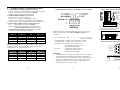
Switches Setting, Terminal Block, DB9
STANDARD
CONFIG SW
DB9 CONFIG
RS-485
SW
WIRING SW
RS-232
RS-232
RS-232
Don't care
RS-485 4 wire
RS-485/422
RS-485/422
4 wire
RS-485 2 wire
RS-485/422
RS-485/422
2 wire
RS-422
RS-485/422
RS-485/422
4 wire
Note:
Terminal block model (RS-C200ST-2, RS-C200ST-4) is not
equipped with the "DB9 CONFIG" switch, the available
connections by the two SW setting are:
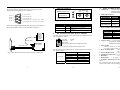
Protocol &
Connection
STANDARD
CONFIG SW
DB9 CONFIG
RS-485
SW
WIRING SW
RS-232
RS-232
NA
Don't care
RS-485 4 wire
RS-485/422
NA
4 wire
RS-485 2 wire
RS-485/422
NA
2 wire
RS-422
RS-485/422
NA
4 wire
4
• Terminal Block for Copper Wires
RS485/422/232 protocol/connection via Terminal Block
T-(-)
T+(+)
R+
RGND
GND
TXD
RXD
1
2
3
4
5
6
7
8
RS232
Protocol &
Connection
• RESISTOR SW
(Terminal Resistor/Pull-up and Pull-Down Res. Setting)
RS485/422
• STANDARD CONFIG (copper protocol) SW
Copper port/cable protocol: RS232 or RS485/422 selection.
RS232 : RS-232 protocol/connection, default.
485/422: RS485/422 protocol/connection.
• RS485 WIRING (RS485 2/4-wire) SW
RS485 wires: 2 or 4-wire selection.
2-wire: 2-wire (Copper) at half-duplex mode.
4-wire: 4-wire (Copper) at full-duplex mode, default.
"RS485/4-wire" is also used for RS422/4-wire connection.
• DB9 CONFIG (DB9 connector model only) SW
232
: RS232/DB9 connection, default.
485/422: RS485/422 via DB9 port and setup with
"STANDARD CONFIG" SW accordingly.
For DB9 model and port connection, the available
connections by the three SW setting are:
T-(-)
T+(+)
R+
RGND
GND
TXD
RXD
RS-485/422 TX- or RS-485(2-wire) TX/RXRS-485/422 TX+ or RS-485(2-wire) TX/RX+
RS-485/422 RX+
RS-485/422 RXGND
GND
RS-232 TXD
RS-232 RXD
Key
Bin
Each bin of Terminal Block is equipped with a key. Push and
hold the key to release Terminal Block when plugging in or
removing the copper wire.
RESISTOR SW is used for RS485/422 protocol/connection,
and it will take effect when STANDARD CONFIG is at
"485/422".
The RESISTOR SW 1, 2, 3, 4: All of them are
at "OFF" as default
RX-TERM ON : Enables 130 Ω terminator on RX
TX-TERM ON : Enables 130 Ω terminator on TX
P-DOWN ON : Enables 1k Ω pull down on
RS422/RS485(4-wire) TX- or
RS485(2-wire)TX/RXP-UP ON
: Enables 1k ohm pull up on
RS422/485(4-wire) TX+ or
RS485(2-wire)TX/RX+
RS485/422 4-Wire Connection
RS485 2-Wire Connection
TX/RXTX/RX+
R-(-)
R+(+)
T+
T-
T-(-)
T+(+)
R+
R-
TX/RXTX/RX+
• DB9 Connector for Copper Wires
RS232 protocol/connection via DB9
5 Signal Ground
Unused 9
4 Unused
Unused 8
3 RS-232 TXD
Unused 7
2 RS-232 RXD
Unused 6
1 Unused
Warning:
⎯ The termination and P-UP, P-DOWN resistors are set up in
accordance with the RS485/422 network configuration.
⎯ Ensure that the copper cable and its voltage polarity match
the device requirement for 4-wire or 2-wire connection.
⎯ Improper termination and network configuration will
render the devices to work poorly.
5
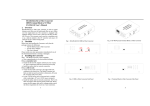
RS-232 Cable Connection via DB9
RXD
TXD
GND
2
3
5
3 TXD
2 RXD
5 GND
6