1
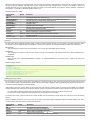
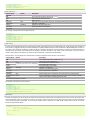
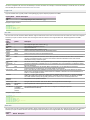
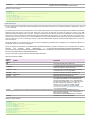
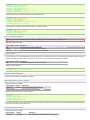
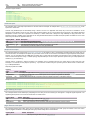
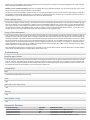
znodeParent
/hbase
columnFamily
–
batchSize
100
coalesceIncrements false
The base path for the znode for the -ROOT- region. Value of
zookeeper.znode.parent in hbase-site.xml
The column family in Hbase to write to.
Number of events to be written per txn.
Should the sink coalesce multiple increments to a cell per
batch. This might give better performance if there are
multiple increments to a limited number of cells.
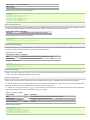
The length of time (in milliseconds) the sink waits for acks
from hbase for all events in a transaction.
timeout
60000
serializer
serializer.*
org.apache.flume.sink.hbase.SimpleAsyncHbaseEventSerializer
–
Properties to be passed to the serializer.
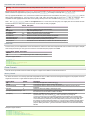
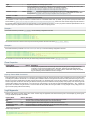
Note that this sink takes the Zookeeper Quorum and parent znode information in the configuration. Zookeeper Quorum and parent node configuration
may be specified in the flume configuration file. Alternatively, these configuration values are taken from the first hbase-site.xml file in the classpath.
If these are not provided in the configuration, then the sink will read this information from the first hbase-site.xml file in the classpath.
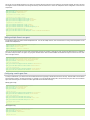
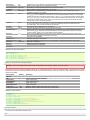
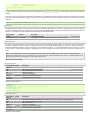
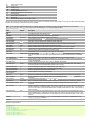
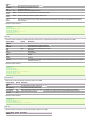
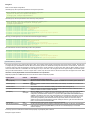
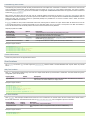
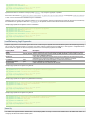
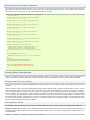
Example for agent named a1:
a1.channels = c1
a1.sinks = k1
a1.sinks.k1.type = asynchbase
a1.sinks.k1.table = foo_table
a1.sinks.k1.columnFamily = bar_cf
a1.sinks.k1.serializer = org.apache.flume.sink.hbase.SimpleAsyncHbaseEventSerializer
a1.sinks.k1.channel = c1
MorphlineSolrSink
This sink extracts data from Flume events, transforms it, and loads it in near-real-time into Apache Solr servers, which in turn serve queries to end
users or search applications.
This sink is well suited for use cases that stream raw data into HDFS (via the HdfsSink) and simultaneously extract, transform and load the same data
into Solr (via MorphlineSolrSink). In particular, this sink can process arbitrary heterogeneous raw data from disparate data sources and turn it into a
data model that is useful to Search applications.
The ETL functionality is customizable using a morphline configuration file that defines a chain of transformation commands that pipe event records from
one command to another.
Morphlines can be seen as an evolution of Unix pipelines where the data model is generalized to work with streams of generic records, including
arbitrary binary payloads. A morphline command is a bit like a Flume Interceptor. Morphlines can be embedded into Hadoop components such as
Flume.
Commands to parse and transform a set of standard data formats such as log files, Avro, CSV, Text, HTML, XML, PDF, Word, Excel, etc. are provided
out of the box, and additional custom commands and parsers for additional data formats can be added as morphline plugins. Any kind of data format
can be indexed and any Solr documents for any kind of Solr schema can be generated, and any custom ETL logic can be registered and executed.
Morphlines manipulate continuous streams of records. The data model can be described as follows: A record is a set of named fields where each field
has an ordered list of one or more values. A value can be any Java Object. That is, a record is essentially a hash table where each hash table entry
contains a String key and a list of Java Objects as values. (The implementation uses Guava’s ArrayListMultimap, which is a ListMultimap). Note that a
field can have multiple values and any two records need not use common field names.
This sink fills the body of the Flume event into the _attachment_body field of the morphline record, as well as copies the headers of the Flume event into
record fields of the same name. The commands can then act on this data.
Routing to a SolrCloud cluster is supported to improve scalability. Indexing load can be spread across a large number of MorphlineSolrSinks for
improved scalability. Indexing load can be replicated across multiple MorphlineSolrSinks for high availability, for example using Flume features such as
Load balancing Sink Processor. MorphlineInterceptor can also help to implement dynamic routing to multiple Solr collections (e.g. for multi-tenancy).
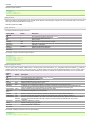
The morphline and solr jars required for your environment must be placed in the lib directory of the Apache Flume installation.
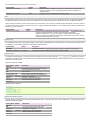
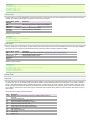
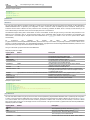
The type is the FQCN: org.apache.flume.sink.solr.morphline.MorphlineSolrSink
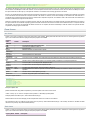
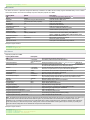
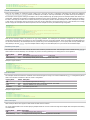
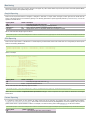
Required properties are in bold.
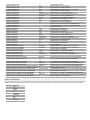
Property Name
channel
type
Default
–
–
Description
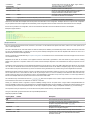
morphlineFile
–
The relative or absolute path on the local file system to the
morphline configuration file. Example: /etc/flume-
morphlineId
null
The component type name, needs to be
org.apache.flume.sink.solr.morphline.MorphlineSolrSink
ng/conf/morphline.conf
batchSize
1000
batchDurationMillis 1000
Optional name used to identify a morphline if there are multiple
morphlines in a morphline config file
The maximum number of events to take per flume transaction.
The maximum duration per flume transaction (ms). The transaction
commits after this duration or when batchSize is exceeded,
whichever comes first.