1
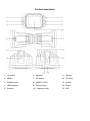
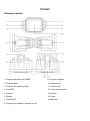
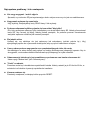
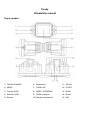
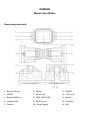
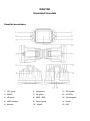
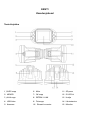
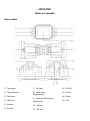
Button and interface function description:
1) UP button
Press this button during recording to zoom in.
Press to choose function higher in MENU mode.
2) MENU button - Short press this button to turn on system settings.
3) DOWN button
Press this button during recording to zoom out.
Press to choose function lower in MENU mode.
4) USB interface
Connect PC for data transfer
Connect external power to charge battery or provide power.
5) Camera - 120° wide-angle Lens
6) Speaker - Video playback, voice monitor, operating sound warning
7) OK button
Confirmation button for video recording and taking photo;
In recording mode, press this mode to start video recording, re-press to stop.
In photo mode, short press to take a photo.
In menu mode means Confirmation.
8) MODE / LOCK
Short press on this button to shift among Photo mode, Recording mode and Playback mode
File Lock function: short press this key to enforce saving the current video when Video recording
9) POWER ON / OFF - Power switch: continuous press for power on/off, shortly press for IR light
on/off.
10) Screen - Display screen
11) SD slot - Slot for memory micro-SD card
12) IR LED light - Night vision light which can be turned on by short press on “POWER” button.
13) Holder mount - Install windscreen holder
14) Reset - Use this to reset camera
15) MIC - Microphone