1
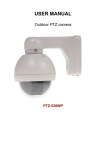
USER MANUAL
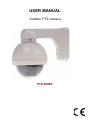
Outdoor PTZ camera
PTZ-660EF
Correct Disposal of This Product (Waste Electrical & Electronic Equipment)
(Applicable in the European Union and other European countries with separate
collection systems)
This marking on the product, accessories or literature indicates that the product
and its electronic accessories (e.g. charger, headset, USB cable) should not be
disposed of with other household waste at the end of their working life. To prevent
possible harm to the environment or human health from uncontrolled waste
disposal, please separate these items from other types of waste and recycle them
responsibly to promote the sustainable reuse of material resources.
Household users should contact either the retailer where they purchased this
product, or their local government office, for details of where and how they can
take these items for environmentally safe recycling.
Business users should contact their supplier and check the terms and conditions
of the purchase contract.
This product and its electronic accessories should not be mixed with other
commercial wastes for disposal.
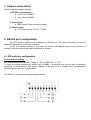
1. Camera connections
Camera has three cables outside:
1) RS-485 communication:
● violet (red): RS485 +
●
gray (black): RS485 -
2) Video signal
● BNC socket: video composite signal
3) Power supply
● 2.1/5.5mm socket: DC12V / 700mA
2. RS-485 port configuration
The PTZ camera functions are controlled by RS-485 port. The port parameters can be set
using DIP-Switches or via RS-485 interface.
To set the switches positions, you have to remove the camera dome cover (unscrew 4
screws), and next remove the plastic protection (4 screws).
2.1 DIP-switches configuration
Device address setting:
The device address can be set in range: 1 – 63 (for PELCO-P: 0 – 63).
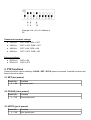
To enter the proper address you should use the DIP1 – 6 switches and set the right combination
according to below picture. The device address is the sum of the numbers from corresponding
switches, which were set to ON position.
The ON/OFF switches and corresponding numbers:
Example: 2+4+16 = 22. Address is
22.
Transmision baudrate settings:
●
1200 b/s
DIP7 = ON, DIP8 = OFF
●
2400 b/s
DIP7 = OFF, DIP8 = OFF
●
4800 b/s
DIP7 = ON, DIP8 = ON
●
9600 b/s
DIP7 = OFF, DIP8 = ON
Protocol settings:
●
PELCO-P
DIP9 = ON
●
PELCO-D
DIP9 = OFF
3. PTZ functions
Camera functions can be called by CLEAR / SET / GOTO preset commands. Available functions are
listed in the below table:
3.1 SET (set preset)
Preset No.:
1 ... 32
Function
Set preset point
3.2 CLEAR (clear preset)
Preset No.:
1 ... 32
Function
Clear preset point
3.3 GOTO (go to preset)
Preset No.:
1 ... 32
Function
Goto preset point
4. Camera menu functions
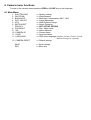
To enter to the camera menu press the OPEN or CLOSE key on the keyboard.
4.1 Main Menu
1. SHUTTER/AGC
2. WHITE BAL
3. BACKLIGHT
4. PICT ADJUST
5. ATR
6. MOTION DET
7. PRIVACY
8. DAY/NIGHT
9. NR
10. CAMERA ID
11. SYNC
12. LANGUAGE
13. CAMERA RESET
SAVE
EXIT
<< Shutter settings
<< White Balance
<< BackLight Compensation (BLC, HLC)
<< Image adjustment
<< Wide Dynamic Range
<< Motion Detection
<< NOT ACTIVE OPTION!
<< Day / Night mode
<< Noise reduction
<< Camera name
<< Synchronization
<< OSD menu language (English, German, Chinese, French,
Russian, Portuguese, Spanish )
<< Default settings
<< Save settings
<< Menu exit
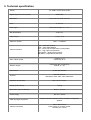
5. Technical specification
Sensor
Digital Signal Processor (DSP)
Resolution
Lens
View angle
Min. illumination
Video output
Electronic shutter
Camera functions
Max. rotation speed
Rotation angles
PTZ control
Protocol
Operation temperature
Weight (with bracket)
1/4" SONY ExView HAD CCD II
SONY Effio
Color: 650 TVL, B/W: 700 TVL
5 - 60 mm
Manufacturer data: 51° - 4.5°
0.001 Lux
1 Vpp / 75 Ω
1/50 s - 1/100000 s
AGC – Auto Gain Control
ATW – Auto White Balance
BLC – Back Light Compensation (configurable)
HLC – High Light Compensation
ATR (WDR) – Wide Dynamic Range
NR (DNR) – Digital Noise Reduction
Vertical: 12 °/s
Horizontal: 36 °/s
Horizontal: 360° (continuous)
Vertical: 0° - 90°
via RS-485 interface
Pelco-D, Pelco-P
Baudrates: 1200, 2400, 4800, 9600 kbit/s
from -10°C to +50°C
1.28 kg
Dimensions (without bracket)
Ø123 x 142 mm
Power supply
DC 12V / 700mA
OSD languages supported
Camera connectors
English, German, Chinese, French, Russian, Portuguese,
Spanish
Video: BNC socket,
Power supply: 2.1/5.5mm socket,
RS-485: pair of wires