1
. . . . . . . . . . . . . . . . . . . . . . . . . . . . . .
7-1
Chapter 7
Troubleshooting
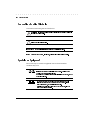
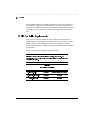
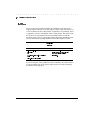
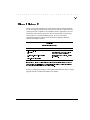
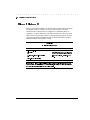
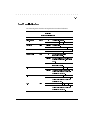
If the DLT Drive fails during POST or operation, use Table 7-1 to determine
the problem and the action to take.
Table 7-1
Troubleshooting Chart
If ...
Then ...
You should ...
Your system does
Your system might not
Configure your system to see the
not recognize the
be configured to see the
ID.
DLT Drive,
SCSI ID.
The SCSI ID might
not be unique.
Change the SCSI ID and
reconfigure the system.
The new
ID is effective at the next power-on.
The parameters for your
Check your SCSI ID adapter
SCSI adapter
installation.
might be incorrect.
The SCSI signal
Make sure the connector on each
cable might be
end of the cable is seated.
loose.
The SCSI bus might not
1.
be correctly terminated.
only device on the bus, make sure
If the DLT Drive is the last or
the terminator is installed on the
drive.
2.
If the DLT Drive is not the last or
only device on the bus, check the
cable connections and make sure
the terminator is installed at the
end of the bus.
The SCSI terminator
Be sure to install a terminator at
might not be at the
each end of the bus.
end of the bus, or more
terminator is usually installed at
than two terminators
the system.
One
might be present.
continued
Compaq DLT Tape Drive User Guide
Writer:
Jim Belew
Project:
Troubleshooting
Comments:
185292.002 final
File Name:J-CH7.DOC Last Saved On:3/13/97 7:39 AM