1
QuadTone RIP User Guide
Curves in their editable form are stored as .qidf files. Although these are
simple text files, it’s best to edit them using the Curve Creator rather than a
text editor. The Curve Creator will ensure the file remains internally
consistent and when you’re ready to print using the Curve you can install it
with the Create Curve button.
So let’s get started. We’re creating a new Curve for a Staples glossy paper,
so it’s a good idea to select an existing profile for a similar paper. You load it
using the File/Open menu and navigate to the appropriate subfolder of the
Profiles folder mentioned above. In this case we’re going to create a curve
for the 2200 printer so the complete path name of file we are using as a
template will be:
C:\ProgramFiles\QuadToneRIP\Profiles\2200-uc\UCpk-MCeramicLuster-cool.qidf
After you’ve loaded your template into the Curve Creator, it’s a good idea to
save it under the name you plan to use for the Curve (different from the
original template, unless you want to change it). In our case we saved the
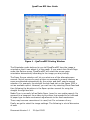
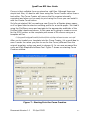
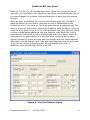
curve as UCpk-StaplesPremGloss-Cool. Figure 7 shows our starting Curve
Creation window.
Figure 7 - Starting Point for Curve Creation
Document Version 1.1
21 April 2005
17