1
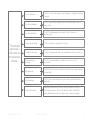
yes Green slow blinking
indicatorlight
“I don’t see any
indicatorlight
when I switch the
device on.”
Press the ON/
OFF-button once to
switch the device on.
This button can be
found under
the rubber cover
piece. See chapter
9 ‘use’ for more
information.
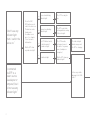
Did the SPT show
any indicator light?
yes
The SPT did not switch
yes on, but showed a 3
seconds red light
no
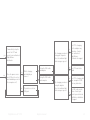
“I connected
the SPT to a
power source
(via adapter or
computer) but I
did not see any
indicatorlight.”
68
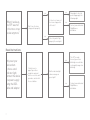
Orange slow blinking
indicatorlight
No indicatorlight
The SPT is ready for
use.
The SPT needs to be
recharged before using
it the next night.
The SPT must be
recharged, connect
the device to a power
source (adapter or
computer)
The indicatorlight
blinks orange and
the SPT is charging
Did the SPT show any
indicatorlight?
Is there any visible
damage to the USBcable?