1
HandyTone-486 User Manual
Grandstream Networks, Inc.
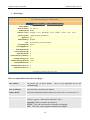
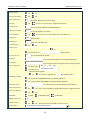
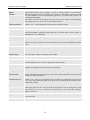
Use # as
Send Key
This parameter allows the user to configure the “#” key to be used as the “Send”(or “Dial”)
key. Once set to “Yes”, pressing this key will immediately trigger the sending of dialed string
collected so far. In this case, this key is essentially equivalent to the “(Re)Dial” key. If set to
“No”, this # key will then be included as part of the dial string to be sent out.
Local SIP port
This parameter defines the local SIP port the HandyTone ATA will listen and transmit. The
default value is 5060.
Local RTP port
This parameter defines the local RTP-RTCP port pair the HandyTone ATA will listen and
transmit. It is the base RTP port for channel 0. When configured, channel 0 will use this
port_value for RTP and the port_value+1 for its RTCP; channel 1 will use port_value+2 for
RTP and port_value+3 for its RTCP. The default value is 5004.
Use Random Port
This parameter, when set to Yes, will force random generation of both the local SIP and RTP
ports. This is usually necessary when multiple HandyTone ATAs are behind the same NAT.
NAT Traversal
This parameter defines whether the HandyTone ATA NAT traversal mechanism will be
activated or not. If activated (by choosing “Yes”) and a STUN server is also specified, then the
HandyTone ATA will behave according to the STUN client specification. Under this mode, the
embedded STUN client inside the HandyTone ATA will attempt to detect if and what type of
firewall/NAT it is behind through communication with the specified STUN server. If the
detected NAT is a Full Cone, Restricted Cone, or a Port-Restricted Cone, the HandyTone ATA
will attempt to use its mapped public IP address and port in all the SIP and SDP messages it
sends out.
If this field is set to “Yes” with no specified STUN server, then the HandyTone ATA will
periodically (every 20 seconds or so) send a blank UDP packet (with no payload data) to the
SIP server to keep the “hole” on the NAT open.
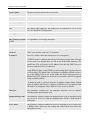
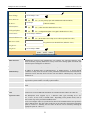
Keep-alive interval
The interval of sending blank UDP packet to keep NAT “pin hole” open, default is 20
Use NAT IP:
NAT IP address used in SIP/SDP message. Default is blank.
Proxy-Require
SIP Extension to notify SIP server that the unit is behind the NAT/Firewall.
Firmware Upgrade:
Via TFTP Server
This is the IP address of the configured TFTP server. If selected and it is non-zero or not blank,
the HandyTone ATA will attempt to retrieve new configuration file or new code image from
the specified TFTP server at boot time. It will make up to 3 attempts before timeout and then it
will start the boot process using the existing code image in the Flash memory. If a TFTP server
is configured and a new code image is retrieved, the new downloaded image will be verified
and then saved into the Flash memory.
Be careful when the TFTP is in progress (the LED will flash in red fast). Do NOT interrupt
the process (especially the power supply) otherwise will cause the device dead. Be patient as
in some network this process will take more than 15 minutes.
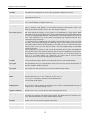
Via HTTP
Server
Automatic
Upgrade
Upgrade The URL for the web server used for firmware upgrade and configuration via HTTP. For
example, http://provisioning.mycompany.com:6688/Grandstream/1.0.6.0
Here “:6688” is the specific TCP port that the HTTP server is listening to, it can be omitted if
using default port 80.
Note: Auto Upgrade has to be set to Yes to enable HTTP upgrade. TFTP and HTTP options
are mutual exclusive.
HTTP Choose Yes to enable HTTP upgrade and provisioning.
In “Check for new firmware every” field, enter the number of days to check the HTTP server
for firmware upgrade or configuration.
Subscribe for MWI:
Default is NO. When set to Yes a SUBSCRIBE for Message Waiting Indication will be sent
periodically.
23