1
Rev.01/2013
USER’S MANUAL
UNIVERSAL AIR CONDITIONER REMOTE CONTROL
COD. 11132199
INTRODUCTION
1.
2.
3.
4.
5.
6.
7.
8.
9.
10.
11.
12.
13.
2
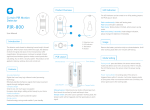
ON/OFF key: press it once to turn the air conditioner on or off
Temperature increase: press it once, temperature increases 1°C
Temperature decrease: press it once, temperature decreases 1°C
Mode switch: press the key, work mode is changed as per the
following sequences: AUTO-COLD-DRY-VENTILATION- HEAT
Air flow speed
Automatic air flow direction: press the key to change air flow
direction between automatic and manual
Manual air flow direction: press the key to change air flow
direction
Press it to confirm selected model code
Auto search code
Code selection +
Code selection Reset function
Press to run the search
3
1
4
5
9
10
12
2
6
7
8
11
13
1. Pull away the upper lead of the remote control in order to release it laterally, insert 2 batteries type AAA according to its
correct polarity on the batteries compartment.
2. Look for the model code from the model code list, if there are more models for the same brand, select the one most
suitable to your conditioner. E.g.: SANYO, try to set up codes from 035 to 039.
3. Press the reset key (12) with a sharp object, preferably a pencil, the code will flash on the display. Press the ‚+’ or ‚–‘ key
until the selected model code will appear. Then press the ‚ENTER’ key (8) to confirm the selection and the code will Stop
flashing. Point the remote control toward the conditioner by pressing the ‘ON/OFF’ key (1) and verify the correct
functioning of the remote control.
If you don’t know the model of the conditioner or if the model is not listed on the code list then proceed as follows:
1. With a pencil press the ‚SET’ key (13), the code will flash on the display. Always keep the remote control pointed toward
the conditioner. Press the AUTO search key (9) and the first code will appear on the display, keep on pressing and release
it (the following codes will appear) until the conditioner will produce a confirmation sound. Press the ‚ENTER’ key (8) to
confirm.
2. Then verify the functions of all the keys, if these do not respond correctly then repeat the auto search procedure once
again.
WARNING
1. Remove the batteries from the remote control if you don’t use it for a long time. If the display looks dim, substitute the
batteries (do not use exhausted batteries together with new ones). When removing the batteries, after a few seconds, the
remote control will loose the code memory so it will be necessary to reset it again.
2. If the remote control does not work properly, remove the batteries for a few minutes, then repeat the procedure.
3. This remote control may not be working with some conditioner models, this is not due to the malfunctioning of the
remote control, but this may be due to some technical settings made on the conditioner by the manufacturers.
3