1
Table of Contents
Chapter 1 Introduction ........................................................................................................ 4
Functions and Features................................................................................................. 4
Packing List ..................................................................................................................... 6
Chapter 2 Hardware Installation........................................................................................ 7
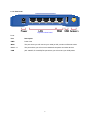
2.1 Panel Layout............................................................................................................. 7
2.2 Procedure for Hardware Installation ........................................................................... 9
Chapter 3 Network Settings and Software Installation ........................................................ 10
3.1 Make Correct Network Settings of Your Computer.................................................. 10
Chapter 4 Configuring WL-1000UR Wireless Broadband Router ...................................... 11
4.1 Start-up and Log in ................................................................................................ 12
4.2 Status ....................................................................................................................... 13
4.3 Wizard...................................................................................................................... 14
4.4 Basic Setting........................................................................................................... 15
4.5 Port Forwarding...................................................................................................... 26
4.6 Firewall Settings..................................................................................................... 30
4.7 Advanced Settings ................................................................................................. 43
4.8 Maintenance ........................................................................................................... 53
Chapter 5 Print Server ...................................................................................................... 58
5.1 Configuring on Windows 95/98 Platforms................................................................ 58
5.2 Configuring on Windows NT Platforms ................................................................... 61
5.3 Configuring on Windows 2000 and XP Platforms .................................................... 62
5.4 Configuring on Unix-like based Platforms ............................................................... 67
5.5 Configuring on Apple PC ...................................................................................... 72
Appendix A TCP/IP Configuration for Windows 95/98...................................................... 73
Appendix B 802.1x Setting............................................................................................... 78
Appendix C WPA-PSK and WPA.................................................................................... 84
Appendix D FAQ and Troubleshooting ............................................................................... 97
Reset to factory Default ............................................................................................... 97
3