1
JUST SPEAK S
2.
JUST SPEAK S
PACKAGE CONTENTS
3.
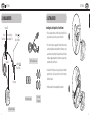
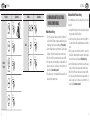
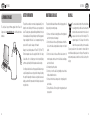
Installing the Just Speak S on Your Helmet
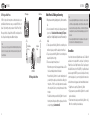
Status LED
Pin-hole
Reset Button
GETTING STARTED
3. GETTING STARTED
English
2. PACKAGE CONTENTS
DC Power Charging &
Firmware Upgrade Port
•
Place the speaker-microphone unit in the helmet along with its’ Velcro
pads, centered to your ear, in the ear pockets of the helmet.
•
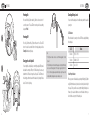
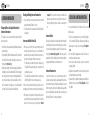
Some helmet models are equipped with chin pads with a removable
cushioning inside that can be unthreaded from the chin strap in order to
ease and improve the positioning of the speakers. Besides, other helmet
models are equipped already with pockets where the speakers can be
placed without the need of the velcro.
•
Locate the boom microphone as closely as possible to your mouth when
wearing the helmet . If possible, try to let the boom of the microphone
behind the chin pads .
•
Hide the wire under the helmet padding after the installation.
(-) Button
(Intercom Button)
Speakers
(+) Button
(Phone Button)
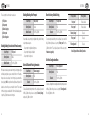
USB Power & Data Cable
Microphone
Microphone Sponges
1
2
Velcro Pads
for Speakers
Just Speak S Headset
4
5