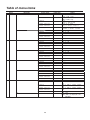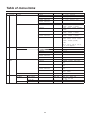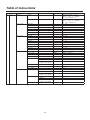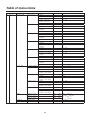
1
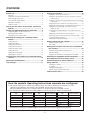
Contents Before use ................................................................. 3 Setting the functions .............................................. 18 Overview ....................................................................................3 Setting the remote camera operations .....................................19 Trademarks and registered trademarks .....................................3 Setting the speed at which to move to the position set by the preset memory .....................................................................21 About copyright and licence .......................................................3 Setting the operations to be performed when a preset operation is executed ...........................................................................21 Concerning the ratings display ...................................................3 Disclaimer of warranty ................................................................3 Returning the remote cameras to their home position .............21 Network security.........................................................................3 Adjusting the panning, tilting, zooming and focusing speed.....21 How to turn the power of the remote cameras on and off ................................................................... 4 Setting and operating the preset memories .......... 6 Setting the movement range of the remote camera (limiter function) ...................................................................22 Registering data in the preset memories ...................................6 Controlling the peripheral devices connected to the remote cameras ...............................................................................24 Executing the preset data ..........................................................7 Adjusting the minimum lens zoom start speed.........................25 Deleting the preset memory data ...............................................7 Exercising external control over the preset memory data ........25 Selecting the settings for a selected remote camera................................................................... 8 Locking the button operations ..................................................26 Setting the gain ..........................................................................8 Setting linkup with the switcher ............................ 27 Setting the pedestal ...................................................................8 Switcher network settings ........................................................27 Adjusting the LCD panel backlight ...........................................26 Setting the white balance ...........................................................9 Link setting ...............................................................................28 Setting the black balance .........................................................12 Setting the shutter speed .........................................................13 Setting the functions when the unit is linked with the switcher ........................................................ 29 Setting the detail ......................................................................13 Setting the image output and image input................................29 Setting the shooting mode .......................................................14 Switcher settings ......................................................................30 Specifying the color bars ..........................................................14 Setting for the information to be displayed on the OSD ...........33 Operating the menu items of the selected remote camera ................................................................ 15 Setting the USER buttons ...................................... 16 Tally settings ........................................................... 17 Checking the equipment alarm information......... 35 Returning the unit to its factory status ................ 36 Control interface for external devices .................. 37 Setup Software ....................................................... 38 Installing the software ..............................................................38 IP settings ................................................................................38 Saving and loading data...........................................................41 Referencing the network environment......................................42 Table of menu items ............................................... 43 How the model’s Operating Instructions manuals are configured The manual of this Remote Camera Controller (hereafter, “the unit”) is divided into two manuals: one is the <Operations and Settings> (this manual in the CD-ROM), and the other is the <Basics>. Before installing the unit, be sure to read the <Basics> to ensure that the unit is installed correctly. For the purposes of this manual, the model numbers of the units are given as listed in the table below. Model number of unit Model number given in manual Model number of unit Model number given in manual Model number of unit Model number given in manual AW-HS50N AW-HS50 AW-E650P AW-E650 AW-PH650N AW-PH650 AW-HE50HN AW-HE50 AW-E750P AW-E750 AW-IF400G AW-IF400 AW-HE50SN AW-HE50 AW-E860N AW-E860 AK-HC1500G AK-HC1500 AW-HE100N AW-HE100 AW-PH360N AW-PH360 AK-HC1800G AK-HC1800 AW-HE870N AW-HE870 AW-PH400P AW-PH400 AW-E350P AW-E350 AW-PH405N AW-PH405 In these instructions, the phrases “pan-tilt head and camera combination” and “camera integrated with a pan-tilt head” are both referred to collectively as “remote camera” except in places where specific equipment is mentioned. 2