1
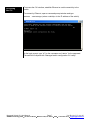
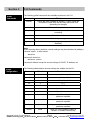
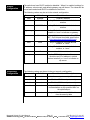
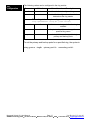
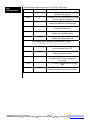
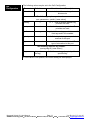
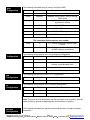
USER MANUAL Industrial Ethernet Managed Switch & Remote Access Modem CLI User Manual For the latest version of this user manual please go to http://www.sixnet.com Contents at a Glance: Section 1 – Command Line Interface(CLI) Introduction to CLI Accessing the CLI Brief description of a CLI interface How to access the CLI interface Global Commands access Configuration alarm Configuration info Configuration network Configuration portsecurity Configuration port Configuration ring Configuration rstp Configuration qos Configuration vlan Configuration igmp Configuration chkpt Configuration tftp Configuration tz Configuration General Configuration Configuration Example Commands usable in any part of the CLI Commands to configure administrative access Commands to configure alarm conditions Commands to view various status information Commands to configure Network Settings Commands to configure MAC-based port security Commands to configure Port settings Commands to configure real-time Ring protocol Commands to configure RSTP settings Commands to configure QoS settings Commands to configure port and tag based VLAN settings Commands to configure IGMP settings Commands to save and restore checkpoints Commands to configure TFTP Commands to set the timezone Commands to set Name and Location of the switch Example of how to configure CLI Service Information Product Support Customer Service Information How to contact product support Section 2 – CLI Commands Section 3 – Service Information Managed Switch CLI User Manual Page 1 6 6 6 7 8 8 9 9 10 10 11 12 13 14 15 16 16 16 16 16 18 19 19 19 Last Revised: 12-Aug-09 SIXNET Technology Park 331 Ushers Road Ballston Lake, NY 12019 USA +1-518-877-5173 [email protected] This manual applies to firmware v4.4.1000 in the following products: ET-5MS-# Managed Ethernet switch with 5 10/100 ports ET-5MS-MDM-# Managed Ethernet switch with 5 10/100 ports and integrated modem ET-9MS-# Managed Ethernet switch with 9 10/100 ports ET-9MG-# Managed Ethernet switch with 6 10/100 and 3 Gigabit ports ET-10MG-# Managed Ethernet switch with 8 10/100 and 2 Gigabit ports ET-16MS-# Managed Ethernet switch with 16 10/100 ports ET-18MG-# Managed Ethernet switch with 16 10/100 and 2 Gigabit ports SL-5MS-# Slim Line Managed Ethernet switch with 5 10/100 ports SL-5MS-MDM-# Managed Ethernet switch with 5 10/100 ports and integrated modem SL-8MS-# Slim Line Managed Ethernet switch with 8 10/100 ports SL-8MG Slim Line Managed Ethernet switch with 8 10/100/1000 ports SL-10MG Managed Ethernet switch with 7 10/100 and 3 Gigabit ports SL-16MS Managed Ethernet switch with 16 10/100 ports SL-18MG Managed Ethernet switch with 16 10/100 and 2 Gigabit ports EF26 Rack Mount Gigabit Managed Ethernet switch with 26 ports EH26 Rack Mount Managed Ethernet switch with 26 10/100 ports EK32 Rack Mount Gigabit Managed Ethernet switch with 32 ports EF32 Rack Mount Managed Ethernet switch with 32 10/100 ports Download the latest firmware from the web site: http://www.sixnet.com Read the firmware release history on the web site: http://www.sixnet.com Get the latest version of this user manual: http://www.sixnet.com Managed Switch CLI User Manual Page 2 Last Revised: 12-Aug-09 SIXNET Technology Park 331 Ushers Road Ballston Lake, NY 12019 USA +1-518-877-5173 [email protected] Sixnet Protected Technology Policy - Sixnet protects your investment in Sixnet systems with long-term planned technology and our unique Protected Technology Policy. We will continue to support the specified capabilities of standard Sixnet products for at least five years (twenty years for Industrial Managed Switches). We plan each product improvement and new feature to be upward compatible with existing designs and installations. Our goals are to make each new software release bring new power to your Sixnet systems and have every existing feature, applications program and data file continue to work. We protect your investment even further with a liberal five-year trade-in policy. Exchange standard products for upgraded versions of the same product to take advantage of new features and performance improvements at any time for five years. A prorated trade-in allowance will be given for your existing equipment. Sixnet protects your long-term productivity with state-of-the-art planned technology and continued support. Sixnet Statement of Limited Warranty - Sixnet, manufacturer of Sixnet products, warrants to Buyer that products, except software, manufactured by Sixnet will be free from defects in material and workmanship. Sixnet's obligation under this warranty will be limited to repairing or replacing, at Sixnet's option, the defective parts within one year of the date of installation, or within 18 months of the date of shipment from the point of manufacture, whichever is sooner. Products may be returned by Buyer only after permission has been obtained from Sixnet. Buyer will prepay all freight charges to return any products to the repair facility designated by Sixnet. This limited warranty does not cover losses or damages which occur in shipment to or from Buyer or due to improper installation, maintenance, misuse, neglect or any cause other than ordinary commercial or industrial applications. In particular, Sixnet makes no warranties whatsoever with respect to implied warranties of merchantability or fitness for any particular purpose. All such warranties are hereby expressly disclaimed. No oral or written information or advice given by Sixnet or Sixnet’s representative shall create a warranty or in any way increase the scope of this warranty. This limited warranty is in lieu of all other warranties whether oral or written, expressed or implied. Sixnet's liability shall not exceed the price of the individual units, which are the basis of the claim. In no event shall Sixnet be liable for any loss of profits, loss of use of facilities or equipment, or other indirect, incidental or consequential damages. INSTALLATION AND HAZARDOUS AREA WARNINGS - These products should not be used to replace proper safety interlocking. No software-based device (or any other solid-state device) should ever be designed to be responsible for the maintenance of consequential equipment or personnel safety. In particular, Sixnet disclaims any responsibility for damages, either direct or consequential, that result from the use of this equipment in any application. All power, input and output (I/O) wiring must be in accordance with Class I, Division 2 wiring methods and in accordance with the authority having jurisdiction. WARNING (EXPLOSION HAZARD) SUBSTITUTION OF COMPONENTS MAY IMPAIR SUITABILITY FOR CLASS 1, DIVISION 2 (ZONE 2). WARNING (EXPLOSION HAZARD) WHEN IN HAZARDOUS LOCATIONS, DISCONNECT POWER BEFORE REPLACING OR WIRING UNITS. WARNING (EXPLOSION HAZARD) DO NOT DISCONNECT EQUIPMENT UNLESS POWER HAS BEEN SWITCHED OFF OR THE AREA IS KNOWN TO BE NONHAZARDOUS. FCC Statement - This equipment has been tested and found to comply with the limits for a Class B digital device, pursuant to Part 15 of the FCC Rules. These limits are designed to provide reasonable protection against harmful interference in a residential installation. This equipment generates, uses and can radiate radio frequency energy and, if not installed and used in accordance with the instructions, may cause harmful interference to radio communications. However, there is no guarantee that interference will not occur in a particular installation. If this equipment does cause harmful interference to radio or television reception, which can be determined by turning the equipment off and on, the user is encouraged to try to correct the interference by one or more of the following measures: Reorient or relocate the receiving antenna; Increase the separation between the equipment and receiver; Connect the equipment into an outlet on a circuit different from that to which the receiver is connected; Consult the dealer or an experienced radio/TV technician for help. Copyright & Trademarks - Copyright 2007 Sixnet, LLC. All Rights Reserved. EtherTRAK is a registered trademark of Sixnet, LLC. Managed Switch CLI User Manual Page 3 Last Revised: 12-Aug-09 SIXNET Technology Park 331 Ushers Road Ballston Lake, NY 12019 USA +1-518-877-5173 [email protected] Software License Agreement 1. OWNERSHIP The managed switch Software is the property of the Licensor, as declared on the main menu of the software, and protected by U.S. Copyright Law, Trademark Law and International Treaty Provisions. No ownership in or title to the Software is transferred to Licensee. Licensee will not remove or obscure the Licensor’s copyright, trademark or proprietary notice from the Software and associated documentation. Licensee agrees to prevent any unauthorized copying of the Software. Except as expressly provided herein, Licensor does not grant any express or implied right to Licensee under Licensor’s patents, copyrights, trademarks or trade secret information. This software runs in coordination with firmware embedded into the Licensor’s hardware products. This firmware is agreed to be part of this Licensed Software. It is further agreed that the designs of the Licensor’s hardware products are the proprietary property of the Licensor. 2. LICENSE The author grants you, the “Licensee” a license to use this software only after you have completed the required registration and if you agree to the terms of this agreement and any restrictions of the registration you have obtained. No ownership in or title to the software is transferred to Licensee. This license is nonexclusive. This license is non-transferable except if in accordance with an OEM agreement with the Licensor. Licensee is authorized to make only those copies of this software that are required to use it in accordance with license granted and those copies required for backup or archival purposes. Licensee agrees to prevent any unauthorized copying of the software or any registration number provided. 3. RESTRICTIONS Except as set forth herein, the Licensee may not copy, sell, transfer, loan, rent, lease, modify, create derivative works or alter the Products, without the express written consent of the Licensor. Licensee may not reverse engineer, decompile or disassemble the products or otherwise attempt to derive source code from the Licensed Software. 4. NO WARRANTY LICENSOR MAKES NO WARRANTIES WHATSOEVER WITH RESPECT TO THE SOFTWARE, INCLUDING BUT NOT LIMITED TO IMPLIED WARRANTIES OF MERCHANTIBILITY OR FITNESS FOR PARTICULAR PURPOSE. ALL SUCH WARRANTIES ARE HEREBY EXPRESSLY DISCLAIMED. NO ORAL OR WRITTEN INFORMATION OR ADVICE GIVEN BY THE LICENSOR OR THE LICENSOR’S REPRESENTATIVE SHALL CREATE A WARRANTY OR IN ANY WAY INCREASE THE SCOPE OF THIS WARRANTY. 5. LIMITATION OF LIABILITY Under no circumstances including negligence shall Licensor be liable for any incidental, special or consequential damages that result from the use or inability to use the Products, even if the Licensor is advised of the possibility of such damages. Licensor shall make a reasonable effort to resolve any problems the Licensee may have in its use of the products. In no event shall Licensor’s total liability to Licensee for any and all damages, losses or causes of action in contract, tort or otherwise exceed the amount paid by Licensee for the Software or Hardware Products that are the basis of the claim. 6. HIGH RISK ACTIVITIES Licensee acknowledges that the Licensed Software is not fault tolerant and is not designed, manufactured, or intended by Licensor for incorporation into products intended for use or resale in on-line control equipment in hazardous, dangerous to life, or potentially life-threatening environments requiring fail-safe performance, such as in the operation of nuclear facilities, aircraft navigation or communication systems, air traffic control, direct life support machines, or weapons systems. Licensor specifically disclaims any express or implied warranty of fitness for High Risk Activities. Licensee specifically represents and warrants that this Software or Derivative Work will not be used for High Risk Activities. 7. INDEMNIFICATION Managed Switch CLI User Manual Page 4 Last Revised: 12-Aug-09 SIXNET Technology Park 331 Ushers Road Ballston Lake, NY 12019 USA +1-518-877-5173 [email protected] Licensee agrees to indemnify, defend and hold harmless the Licensor from any and all liability, penalties, losses, damages, costs, expenses, attorneys’ fees, causes of action or claims caused by or resulting directly or indirectly from Licensee’s use, sale or distribution of the Software which damages either Licensee, the Licensor or any other party or parties without limitation or exception. This indemnification and hold harmless agreement extends to all issues associated with the Software, or this License. 8. INTELLECTUAL PROPERTY INFRINGEMENT Licensee shall not add, or cause to be added, any item or items to any product of Licensor for which Licensee is granted a license under this Agreement, if said added item or items would cause said product of Licensor to infringe or potentially infringe any intellectual property right, including a patent right, of any third party, said item or items including but not limited to application specific software, configuration files, data or document files, application programs, web pages, GPL (General Public License) software, third party applications software, and the like. Licensee agrees that the Licensor does not supply and is not responsible or liable to Licensee under this agreement for any infringement or potential infringement that may result from the addition of application specific software, configuration files, data or documentation files, application programs, web pages, or the like, that are added to the Licensor’s products by or on the behalf of the Licensee. This limitation of liability includes any or all GPL (General Public License) and third party applications software that may be loaded into any product as an accommodation to the Licensee. 9. TERMINATION This Agreement is effective until terminated. This License will terminate immediately without notice by the Licensor if Licensee fails to comply with any provision of this License or any other Agreement that exists between the parties. Upon termination of this Agreement, any and all use, sale or distribution of the software by Licensee must cease immediately and the Licensee must destroy all copies of this software and all associated documentation. If the licensed software is purchased through an intermediary, the Licensor of this software is an intended third party beneficiary of that transaction and is entitled to enforce it in its own name directly against the Licensee. 10. GOVERNING LAW This License shall be governed in all respects by the courts, jurisdiction and laws of the State of New York. Licensee may not export the Software or materials in violation of applicable export laws and regulations. If for any reason a court of competent jurisdiction finds any provision of this License or portion thereof, to be unenforceable, the provision shall be enforced to the maximum extent possible so as to effect the intent of the parties and the remainder of this Certificate shall continue in full force and effect. Note: All information in this document is subject to change without notice. Managed Switch CLI User Manual Page 5 Last Revised: 12-Aug-09 SIXNET Technology Park 331 Ushers Road Ballston Lake, NY 12019 USA +1-518-877-5173 [email protected] Section 1 Introduction to CLI Command Line Interface (CLI) The CLI is constructed with an eye toward automation of CLI-based configuration. The interaction is modeled on that used in many Internet protocols such as Telnet, FTP, and SMTP. After each command is entered and processed, the switch will issue a reply that consists of a numeric status code and a human-readable explanation of the status. See, for example, the SMTP protocol specification in RFC 821- Simple Mail Transfer Protocol (http://www.faqs.org/rfcs/rfc821.html), specifically, “Appendix E - Theory of Reply Codes.” for more details. The general format of commands is: section parameter [value] Where Section is used to group parameters. Parameter will specify the parameter within the section. For example, the network section will have parameters for DHCP, IP address, subnet mask, and default gateway. Value is the new value of the parameter. If value is omitted, the current value is displayed. Please note that new values will not take effect until explicitly committed. Sections and parameter names are case sensitive (e.g., “Network” is not the same as “network”). NOTE: Any commands in section 2 of the CLI guide with the exception of the global commands must be prefaced with the name of the section they are in. For example, to change the IP address of the switch, you would type: network address <newIP> This is because the address command is in the network section of this manual. Managed Switch CLI User Manual Page 6 Last Revised: 12-Aug-09 SIXNET Technology Park 331 Ushers Road Ballston Lake, NY 12019 USA +1-518-877-5173 [email protected] Accessing the CLI To access the CLI interface, establish Ethernet or serial connectivity to the switch. To connect by Ethernet, open a command prompt window and type: telnet <switchip> (where <switchip> is the IP address of the switch) At the login prompt, type “cli” for the username and “admin” for the password. The switch will respond with “Managed switch configuration CLI ready”. Managed Switch CLI User Manual Page 7 Last Revised: 12-Aug-09 SIXNET Technology Park 331 Ushers Road Ballston Lake, NY 12019 USA +1-518-877-5173 [email protected] Section 2 Global Commands CLI Commands The following global commands are available anywhere in the CLI: Command Effect commit Values are inter-validated as needed. If valid, values are committed. Please note that this may take some time depending on changes defaults Restore factory defaults quit CLI is exited. Uncommitted changes are discarded without prompting reset Reset the switch help Print a help message prompt Enable/disable the prompt (usage: “prompt enabled” or “prompt disabled”) Note: When restoring factory defaults, network settings may be maintained by adding a “savenw” option. In other words: defaults restores all values but defaults savenw restores all defaults except the current settings for DHCP, IP address, etc. access Configuration The following administrative access settings are settable via the CLI: Parameter Default Allowable values snmp both none, snmpv2, snmpv3, both terminal both none, telnet, ssh, both web both non, http, https, both cli 1 0, 1 uitimeout 0 0-999 rouser public Any valid user name rwuser private Any valid user name ropass none A password, followed by the same password repeated rwpass None A password, followed by the same password repeated adminpass admin A password, followed by the same password repeated fwload serial “serial” for serial firmware loading or “network” to enable Ethernet only Managed Switch CLI User Manual Page 8 Last Revised: 12-Aug-09 SIXNET Technology Park 331 Ushers Road Ballston Lake, NY 12019 USA +1-518-877-5173 [email protected] alarm Configuration The following values may be configured in the alarm configuration: Parameter Default Allowable values / Description list n/a No value, view all current alarm settings powerloss enabled ‘enabled’ , ‘disabled’ / alarm output will be low if a power input is lost ringfailure disabled enabled’ , ‘disabled’ / alarm output will be low if a power input is lost These settings require a port number, usage: alarm <parameter> <port #> [<new value>] linkloss info Configuration disabled ‘enabled’ , ‘disabled’ / alarm output is triggered when link is down on the specified port The following values may be read from the info command: Parameter Default Allowable values / Description fwversion n/a View the current firmware version cfgversion n/a View the configuration version number macaddr n/a View the MAC address of the switch link n/a ‘all’, port# / show specified port(s) link status These settings require a filter to be specified: info <parameter> <filter type> [<value>] mactable n/a Filter can be ‘id’, ‘port’ , ‘mac’. See below for syntax For the info mactable command, the filter parameters are: id={*|#} Show all/one specific filtering database by ID port={*|#[,#[,...]]} Show all/one/multiple specific port(s) Note: port 33 is the switch CPU mac={*|xx}:{*|xx}:{*|xx}:{*|xx}:{*|xx}:{*|xx} Show only MAC addresses matching the given pattern Managed Switch CLI User Manual Page 9 Last Revised: 12-Aug-09 SIXNET Technology Park 331 Ushers Road Ballston Lake, NY 12019 USA +1-518-877-5173 [email protected] network Configuration The switch can have DHCP enabled or disabled. When it is enabled, settings for IP address, subnet mask, and default gateway may still be set. The values will be stored and used should DHCP be disabled in the future. The following values may be set in the network configuration: portsecurity Configuration Parameter Default Allowable values dhcp disabled enabled, disabled address 10.2.0.1 Any IPv4 address in dotted decimal notation. subnet 255.255.0.0 Any IPv4 address in dotted decimal notation. gateway none Any IPv4 address in dotted decimal notation or “none” to indicate no gateway. hostname Model id Any valid Internet host name. See RFC 952 – DoD Internet host table specification (http://www.faqs.org/rfcs/rfc952.html). dns1 none Any IPv4 address in dotted decimal notation, or “none”. dns2 none Any IPv4 address in dotted decimal notation, or “none”. domain “” A valid Internet domain ntp none Any FQDN (if dns1 or dns2 is set, otherwise any IPv4 address in dotted decimal notation), or “none” to indicate no ntp server. The following values may be set in the port security configuration Parameter Default Allowable values / Description list n/a List all current port security information enable n/a Enables MAC-based port security disable n/a Disables MAC-based port security add n/a Any valid MAC and port number / allow communication my the specified MAC on the specified port remove n/a Any valid MAC / remove a MAC address from the security table Managed Switch CLI User Manual Page 10 Last Revised: 12-Aug-09 SIXNET Technology Park 331 Ushers Road Ballston Lake, NY 12019 USA +1-518-877-5173 [email protected] port Configuration The following values may be set in the port configuration: Parameter Default Allowable values list n/a No value, lists all settings for all ports monitor 1 Any port number These settings require a port number, usage: port <port #> <parameter> [<new value>] name port_# A string admin enabled enabled, disabled negotiation enabled enabled (auto-negotiation), disabled (fixed negotiation) ratelimit enabled enabled, disabled direction none none, egress, both giveip disabled enabled, disabled ipaddr none An IP address Sfp 1000 100,1000 speed (see below) (see below) With auto negotiation, <speed> may be: 10H, 10F, 100H, 100F, 1000F, or FC With fixed negotiation, <speed> maybe: 100H or 100F Valid settings: ‘enabled’ (will automatically set other speeds to ‘disabled’) The syntax for the port speed command is as follows: PORT <PORT #> SPEED … (negotiation enabled) speed 10H enabled speed 10F disabled ... which act like checkboxes on a web form Or, with negotiation disabled speed 10H enabled speed 100F enabled ... which act like radio buttons on a web form speed FC enabled/disabled is available in both modes For combo ports, the SFP speed may be set as follows: port <port#> sfp <speed> Managed Switch CLI User Manual Page 11 Last Revised: 12-Aug-09 SIXNET Technology Park 331 Ushers Road Ballston Lake, NY 12019 USA +1-518-877-5173 [email protected] ring Configuration The following values can be configured in the ring section: Parameter Default Allowable values / Description list n/a View the list of configured rings master auto ‘auto’, ‘this’ / configure how the switch determines the ring master The settings below require a ring number, usage: ring <parameter> <ring #> [<new value>] enable 0 ‘0’, ‘1’ / view or change whether the ring is enabled name n/a Any text value / View or change the specified ring name ports n/a (see below) / View or change this ring’s primary and backup ports To set the primary and backup ports for a specified ring, the syntax is: ring ports <ring#> <primary port #> <secondary port #> Managed Switch CLI User Manual Page 12 Last Revised: 12-Aug-09 SIXNET Technology Park 331 Ushers Road Ballston Lake, NY 12019 USA +1-518-877-5173 [email protected] rstp Configuration The following values may be set in the RSTP configuration: Parameter Default Allowable values / Description protocol none ‘none’ ‘stp’ ‘rstp’ / View or change the spanning tree protocol priority 0 A multiple of 4,096 in the range of 0-61440 / View or change the priority mma 6 An integer in the range 6-40 / View or change the maximum message age hellowtime 1 An integer in the range of 1-10 / View or change the hello time fwddelay 4 An integer in the range 4-30 / View or change the forwarding delay Txlimit 1 An integer in the range of 1-10 / View or change the transmission limit The settings below require a port number, usage: rstp <parameter> <port #>[<new value>] exclude 0 ‘2’, ‘1’, ‘0’ / View or change whether this port is excluded from STP pprio 0 An integer in the range of 0-240 / View or change this port’s priority pcost none ‘auto’ or integer in the range of 0-200,000,000 / View or change this port’s cost type 1 ‘1’, ‘0’ / View or change this port’s edge type ptp Auto ‘ForceTrue’, ‘ForceFalce’, ‘Auto’ / View or change this port’s point-to-point setting Managed Switch CLI User Manual Page 13 Last Revised: 12-Aug-09 SIXNET Technology Park 331 Ushers Road Ballston Lake, NY 12019 USA +1-518-877-5173 [email protected] qos Configuration The following values may be set in the QoS Configuration: Parameter schedule Default strict Allowable values / Description ‘strict’, ‘fair’ / View or change the fairness rule The following require a port number: qos <parameter> <port#> [<new value>] usetag 1 ‘0’, ‘1’ / View or change whether tag priorities are used useip 1 ‘0’, ‘1’ / View or change whether IP priorities are used tag ‘tag’, ‘ip’ / View or change which to use if both tags and IP are enabled 1 0-3 / Default priority to give to packets received on this port normal ‘normal’, ‘add’, ‘remove’, ‘double’ / The type of connection to this port pref priority type The following require a tag number: qos tag<tag #> [<new value>] tag (depends on the tag) 0-3 / View or change the priority of the specified tag If <new value> is not present, the current setting will be displayed Managed Switch CLI User Manual Page 14 Last Revised: 12-Aug-09 SIXNET Technology Park 331 Ushers Road Ballston Lake, NY 12019 USA +1-518-877-5173 [email protected] vlan Configuration The following values may be set in the VLAN Configuration: Parameter Default Allowable values / Description vlist none No value, lists all configured VLANs plist none No value, lists the VLAN settings for each port mode disabled ‘disabled’, ‘port’, ‘standard’, ‘secure’ / View or change VLAN mode coretype none Value in hexadecimal with a 0x prefix / View or set Ethertype for core tags mgmtvlan 1 1-4094 / View or set the management VLAN ID learning shared ‘shared’ , ‘independent’ / Change VLAN learning mode mgmtports all 1-9 / View or set the management VLAN port The commands below require a vlan # from vlist name n/a A string of no more than 33 characters vtype n/a ‘port’, ‘tag’ / View or change the type of this VLAN id n/a An integer between 1 and 4094 / View or change the ID of this VLAN ports n/a Syntax: vlan ports <vlan#> <add/remove> <port#> The commands below require a port # pvid 1 A VLAN # from vlist valid range of 1-4094 force 0 ‘0’, ‘1' add (see below) (see below) remove (see below) (see below) The examples below explain the syntax of the “port”, “add” and “remove” commands: To add a Port Based VLAN: vlan ports <vlan #> add <port #> vlan ports <vlan #> remove <port #> vlan add <name> port <port #> <port #> [...] To add a Tag based VLAN : vlan add <name> tag <vlan ID> <port #> <port #> [...] To remove a VLAN: vlan remove <vlan # or all> Managed Switch CLI User Manual Page 15 Last Revised: 12-Aug-09 SIXNET Technology Park 331 Ushers Road Ballston Lake, NY 12019 USA +1-518-877-5173 [email protected] igmp Configuration The following commands may be used to configure IGMP: Parameter Default Allowable values / Description rlist n/a No value/ Lists router settings for all ports mode disabled disabled, snoop, router / view or change IGMP mode msupp none none, ip, all / view or change the multicast suppression method version 2 1, 2 / IGMP version robustness 2 1-99 / IGMP robustness qinterval 125 60-125 / IGMP query interval qresponse 10 1-30 / IGMP query response interval The commands below require a port number: chkpt Configuration tftp Configuration tz Configuration router 0 0, 1 / identify ports which lead to IGMP routers exclude 0 0, 1 / Exclude a port from the processing of IGMP requests and queries The following values may be set in the checkpoint configuration: Parameter Default Allowable values / Description save n/a None / saves a checkpoint restore n/a net, nonet / net saves current network settings, nonet discards them ftpsave n/a A file name ftprestore n/a A file name The following options can be set in TFTP configuration: Parameter Default Allowable values tftp “” A valid fully-qualified domain name The following values may be set in Timezone configuration: Parameter Default Allowable values list (see below) (see below) value none A time zone from list Note: To view a list of all timezones, use the command “tz list [<prefix>]” with the option to filter by timezones beginning with the characters in <prefix> General Configuration The following commands are general commands which are not part of another subsection: Managed Switch CLI User Manual Page 16 Last Revised: 12-Aug-09 SIXNET Technology Park 331 Ushers Road Ballston Lake, NY 12019 USA +1-518-877-5173 [email protected] Command Default Allowable values / Description location <set location of switch> Any text value / location of the switch contact <set name (and email) of contact for switch> Any text value / contact information of the network or site administrator Managed Switch CLI User Manual Page 17 Last Revised: 12-Aug-09 SIXNET Technology Park 331 Ushers Road Ballston Lake, NY 12019 USA +1-518-877-5173 [email protected] Example Configuration Session In the following example, bold text is sent by the switch and normal text is entered by the user. Upon connection to the serial port of the switch, a login banner and prompt are displayed. Please Note: Logging into this software acknowledges that you have agreed to abide by the software license as stated in the user manual. Switch login: cli Password: <hidden> 210 Managed switch configuration CLI ready. network dhcp 212 Current dhcp setting is 'disabled' network address 192.168.1.1 112 address set to '192.168.1.1' network hostname switch-1 112 hostname set to 'switch-1' rstp protocol rstp 113 protocol set to 'rstp' info link all 219-List of link status Port# Name Link 1 port_1 down 2 port_2 down 3 port_3 100f 4 port_4 down 5 port_5 down 6 port_6 down 7 port_7 down 8 port_8 down 219 List of link status info fwversion 219 Current fwversion setting is '4.4' vlan mode standard 117 mode set to 'standard' vlan mgmtports 217 Current mgmtports setting is 'C 1 2 3 4 5 6 7 8' commit 210 Values committed. quit 210 Managed switch configuration CLI done. After quit, the CLI program will exit and the session will terminate. A login banner and prompt will be presented again. Please note that there may be a delay of up to a minute between the commit command and the CLI’s response. This is normal. Managed Switch CLI User Manual Page 18 Last Revised: 12-Aug-09 SIXNET Technology Park 331 Ushers Road Ballston Lake, NY 12019 USA +1-518-877-5173 [email protected] Section 3 Service Information Service Information We sincerely hope that you never experience a problem with any Sixnet product. If you do need service, call Sixnet at (518) 877-5173 and ask for Applications Engineering. A trained specialist will help you to quickly determine the source of the problem. Many problems are easily resolved with a single phone call. If it is necessary to return a unit to us, an RMA (Return Material Authorization) number will be given to you. Sixnet tracks the flow of returned material with our RMA system to ensure speedy service. You must include this RMA number on the outside of the box so that your return can be processed immediately. The applications engineer you are speaking with will fill out an RMA request for you. If the unit has a serial number, we will not need detailed financial information. Otherwise, be sure to have your original purchase order number and date purchased available. We suggest that you give us a repair purchase order number in case the repair is not covered under our warranty. You will not be billed if the repair is covered under warranty. Please supply us with as many details about the problem as you can. The information you supply will be written on the RMA form and supplied to the repair department before your unit arrives. This helps us to provide you with the best service, in the fastest manner. Normally, repairs are completed in two days. Sometimes difficult problems take a little longer to solve. If you need a quicker turnaround, ship the unit to us by air freight. We give priority service to equipment that arrives by overnight delivery. Many repairs received by mid-morning (typical overnight delivery) can be finished the same day and returned immediately. We apologize for any inconvenience that the need for repair may cause you. We hope that our rapid service meets your needs. If you have any suggestions to help us improve our service, please give us a call. We appreciate your ideas and will respond to them. For Your Convenience: Please fill in the following and keep this manual with your Sixnet system for future reference: P.O. #:__________________ Date Purchased: ___________________ Purchased From:______________________________________________ Product Support To obtain support for Sixnet products: On-line support: http://www.sixnet.com Phone: +1 (518) 877-5173 Fax: +1 (518) 877-8346 Latest product info: http://www.sixnet.com E-mail: :[email protected] Mailing address: Sixnet Technology Park, 331 Ushers Rd, Ballston Lake, NY 12019 Managed Switch CLI User Manual Page 19 Last Revised: 12-Aug-09 SIXNET Technology Park 331 Ushers Road Ballston Lake, NY 12019 USA +1-518-877-5173 [email protected]