1
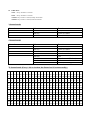
OPERATION INSTRUCTIONS 1) STATIC / BUILT-IN 13 RUNNING EFFECT 2) AUTO RUN 3) SOUND 4) MASTER / SLAVE 5) DMX MODE Built-in programs (P01-P14): STATIC COLOR CL:RGB Flash00-99 DREAM Speed00-99 Flash00-99 METEOR Speed00-99 Flash00-99 FADE Speed00-99 Flash00-99 CHANGE Speed00-99 Flash00-99 FLOW 1 Speed00-99 Flash00-99 FLOW 2 Speed00-99 Flash00-99 FLOW 3 Speed00-99 Flash00-99 FLOW 4 Speed00-99 Flash00-99 FLOW 5 Speed00-99 Flash00-99 FLOW 6 Speed00-99 Flash00-99 FLOW 7 Speed00-99 Flash00-99 FLOW 8 Speed00-99 Flash00-99 FLOW 9 Speed00-99 Flash00-99 Red-Green-Blue-Yellow-Cyan-Purple-White Blackout & Flash speed adjustable. Seven color dreaming Speed & Flash adjustable Seven color flow Speed & Flash adjustable Seven color fade Speed & Flash adjustable Seven color change Speed & Flash adjustable Seven color chase Speed & Flash adjustable Seven color chase Speed & Flash adjustable Seven color chase Speed & Flash adjustable Seven color chase Speed & Flash adjustable Seven color chase Speed & Flash adjustable Seven color chase Speed & Flash adjustable Seven color chase Speed & Flash adjustable Seven color chase Speed & Flash adjustable Seven color chase Speed & Flash adjustable Auto Run mode (14 built-in modes together): FQN01-99 (Frequency adjustable) SLAVE Mode: Link the units and press MODE button of the Slave units to SLAVE mode. Then the slave units will follow running in accordance with the Master unit. Sound Mode: Press MODE button to show: SOUND MODE SENS:00-31 FQN:01-99